Unit 1 · 16 min read
From Stand-alone to Web System: Scope, Architecture and Stack
What the syllabus asks for 7
- What changes in Project II
- The running example: ClinicQ
- Client-server and three-tier architecture
- Choosing the stack
- REST resources and status codes
- From requirements to user stories
- Eight reasons web projects fail, and the cure
In Project I your program ran on one computer for one user. In Project II the same idea must run on a server and be used by many people from their own phones and browsers.
That one change brings new problems: networks, shared data, logins, attacks and deployment.
This unit shows what changes, how to describe the new system with an architecture, and how to choose the stack and the REST resources before writing code.
- The five things that change between a stand-alone project and a web project.
- A numbered problem statement for the running example, ClinicQ, and its scope table.
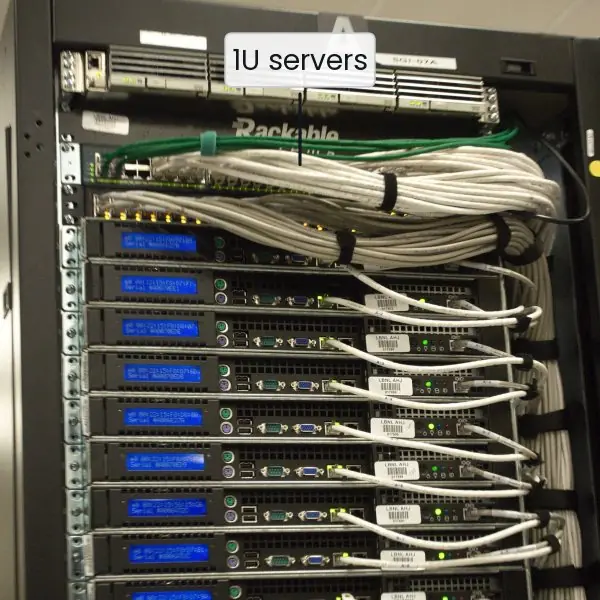
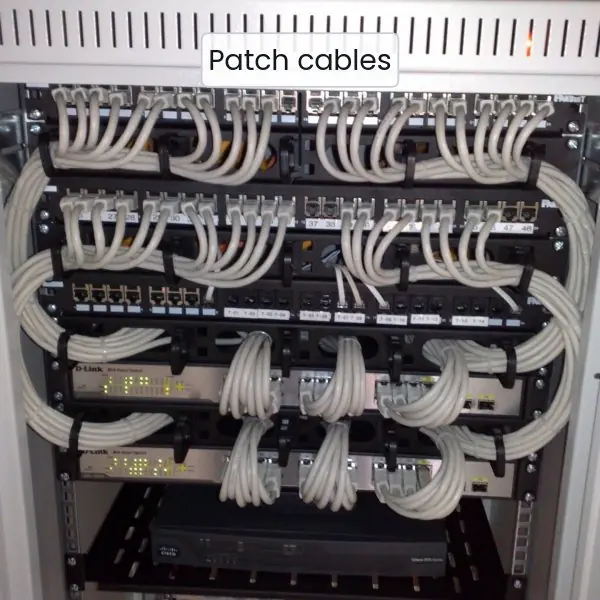
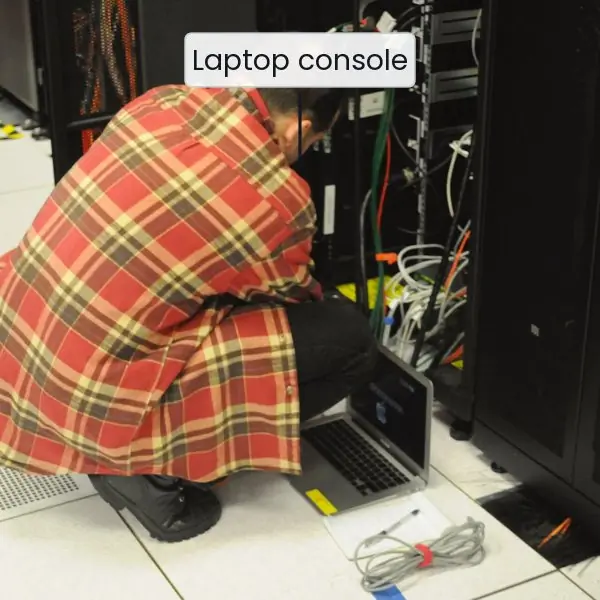
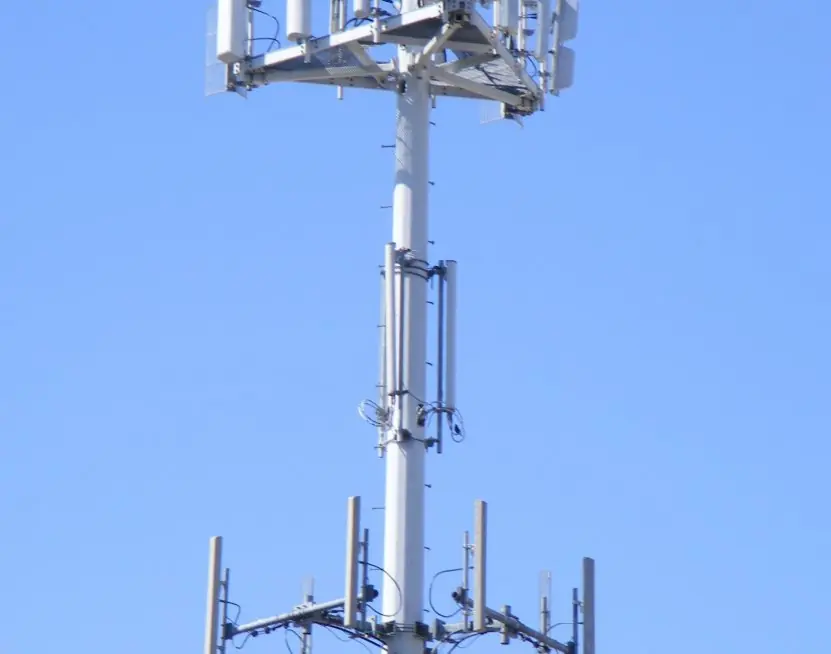
- The client-server and three-tier architecture, with a figure and real server-room photographs.
- A stack comparison table and a REST resource and status-code table you can reuse.
1.1 What changes in Project II
A web system is judged on more than "does it run on my laptop". Five things change.
| Concern | Project I (stand-alone) | Project II (web system) |
|---|---|---|
| Users | one at a time | many at once, so data must not be corrupted |
| Where code runs | one computer | browser (client) and server, linked by HTTP |
| Data | a file or local database | shared database, backups, constraints |
| Trust | the user is the owner | any stranger can send any request |
| Delivery | run from the IDE | deployed on a server with a URL and HTTPS |
Because of these five changes, the report for Project II must also contain an architecture, a security chapter and a deployment section.
Examiners often ask "what happens if two people click at the same moment?" and "what stops a stranger from reading all patient records?". This book prepares those answers.
1.2 The running example: ClinicQ
ClinicQ is invented for this book. A community health post in a Nepali town sees about 150 patients per day. A clerk hands out paper slips as tokens, and the slips are sometimes lost or duplicated.
Problem statement, version 1. "Patients of a 150-patient-per-day health post receive paper token slips.
The average wait is 95 minutes because nobody knows the real queue position, and about 1 token in 12 is duplicated or lost, causing quarrels at the counter. Without change, waiting grows as the catchment population grows."
Objectives (SMART).
| # | Objective | How it is measured at the demo |
|---|---|---|
| O1 | A token is issued in under 1 second | 20 requests, slowest under 1 s |
| O2 | No two tokens share a number on one day | 50 parallel requests, 0 duplicates |
| O3 | Only logged-in staff can change a token status | 10 unauthorised calls all get 401 |
| O4 | A patient can see the queue without logging in | public page lists names as initials only |
| O5 | The system runs on a Rs 0 to 1,000 per month server | deployment bill |
Scope table.
| In scope | Out of scope (future work) |
|---|---|
| patient registration, token issue, status update, public queue page, staff login, daily report | online payment, SMS gateway, video consultation, linking with HMIS or national health ID |
Notice objective O2: it is only a problem in a web system. Two requests that arrive together could both read "last number is 7" and both write 8. Section 2.4 shows how a database constraint prevents that.
1.3 Client-server and three-tier architecture
In the client-server model the client asks and the server answers. In a three-tier architecture the server side is split into two layers, so the whole system has three tiers:
- Presentation tier: HTML, CSS and JavaScript running in the browser, or a mobile app screen.
- Application (logic) tier: the program on the server that checks input, applies rules (such as "one token per number per day") and builds the reply.
- Data tier: the database that stores patients and tokens permanently.

The tiers can run on one computer during development and on three machines in a big deployment. The design is the same, and that is its value: you can replace the database or the screens without rewriting the logic.
1.4 Choosing the stack
A stack is the set of languages, framework and database you use. Choose by what your team already knows and by what the college server can run, not by fashion.
| Stack | Language | Strength | Watch out for |
|---|---|---|---|
| Flask or Django + SQLite/PostgreSQL | Python | short code, Python continues from Project I | Django has many files to learn |
| Express + MySQL | JavaScript | same language in browser and server | callbacks and async errors |
| Laravel or plain PHP + MySQL | PHP | cheap shared hosting in Nepal | old code often mixes SQL and HTML |
| Spring Boot + MySQL | Java | strong typing, matches Advanced Java | heavy for a 12-week project |
| Python standard library only | Python | nothing to install, every line visible | no templates or ORM; used in this book to teach |
This book uses the Python standard library so that the mechanics (a socket, a request line, a JSON body, a SQL statement) are visible. Moving to Flask later changes the syntax, not the ideas.
1.5 REST resources and status codes
REST treats everything as a resource with a URL and uses the HTTP verb to say what to do. Names are nouns in the plural; the verb carries the action. The reply code tells the client what happened.
| Method and URL | Meaning | Success code | Typical error codes |
|---|---|---|---|
POST /api/patients |
register a patient | 201 Created | 400 bad input |
POST /api/tokens |
issue the next token | 201 Created | 404 unknown patient |
GET /api/tokens |
list today's queue | 200 OK | none |
PATCH /api/tokens/{id} |
mark served or cancelled | 200 OK | 401 not logged in, 404, 422 |
POST /api/login |
exchange password for a token | 200 OK | 401 wrong password, 429 too many tries |
Rules that examiners like: GET never changes data; 401 means "who are you?", 403 means "I know you but you may not"; 422 means "well-formed but not acceptable"; never reply 200 with {"error": ...} inside.
1.6 From requirements to user stories
Write each requirement as a story: As a [role] I want [action] so that [benefit]. Rank them with MoSCoW (Must, Should, Could, Won't now).
| Story | Rank |
|---|---|
| As a clerk I want to issue a token so that the queue has a fair order | Must |
| As a nurse I want to mark a token served so that the next patient is called | Must |
| As a patient I want to see the queue so that I know when to arrive | Must |
| As the in-charge I want a daily count so that I can report to the municipality | Should |
| As a patient I want an SMS when I am next | Could |
| As a patient I want to pay online | Won't now |
1.7 Eight reasons web projects fail, and the cure
- Only the "happy path" works. The demo runs once with perfect input and fails when the examiner types a blank name. Write the error replies (400, 404, 422) at the same time as the success reply, as in Section 2.3.
- Passwords stored in plain text. One leaked file exposes every account. Store salted slow hashes (Unit 3) from the first login screen, never "later".
- Everything in one file. HTML, SQL and rules are mixed, so a small change breaks three things. Keep tiers separate: handlers, rules and database access in different functions.
- No design of the data. Tables are changed daily and old rows break. Draw the ER diagram first and add constraints (
UNIQUE,NOT NULL,FOREIGN KEY) so the database refuses bad data. - Works only on the developer's laptop. Paths, ports and passwords are hard-coded. Put settings in environment variables and test a deployment in week 8, not week 12.
- Ignoring two users at once. Duplicate token numbers appear only under load. Use database constraints and transactions, and test with parallel requests (Unit 4).
- Copying a tutorial without understanding it. The viva asks "why this status code?" and the answer is silence. Keep a design note for every decision and be able to defend it.
- No backup and no log. When a bug corrupts data or a stranger logs in, there is no evidence. Back up the database daily and log every login and status change with time and user.

Formula and fact sheet
- Three tiers: presentation, logic, data. HTTPS is terminated at the proxy.
- Status codes: 200 OK, 201 Created, 400 bad input, 401 not authenticated, 403 forbidden, 404 not found, 422 unprocessable, 429 too many requests, 500 server error.
- MoSCoW: Must, Should, Could, Won't now.
- Problem statement = who + what + how big + what if nothing changes.
Chapter summary
- A web project adds many users, a network, shared data, untrusted input and deployment to the concerns of Project I.
- ClinicQ is the running example; its objectives are measurable and its scope table lists what is out.
- The three-tier architecture separates the browser, the logic and the database; every arrow between them is a trust boundary.
- REST uses nouns for URLs, verbs for actions and status codes for the outcome.
- Choose the stack for the team's skills; this book uses the Python standard library to show the mechanics.
Practice
- List the five concerns that change when a stand-alone project becomes a web project.
- Write a four-part problem statement for a ward-office appointment system.
- Name the three tiers of ClinicQ and say what each stores or does.
- Why can the browser not talk to the database directly?
- Give the REST URL and method to cancel token 7.
- Difference between 401 and 403 with an example.
- Why is
POST /api/tokensbetter thanGET /api/newToken? - Rank four user stories of a bus-ticket system with MoSCoW.
- Why does the scope table of ClinicQ place SMS out of scope?
- A clerk issues 150 tokens a day. At 6 seconds each on paper, how many minutes of clerk time per day? At 1 second each in ClinicQ, how many minutes are saved?
Answers and worked solutions
1. Users, where the code runs, data, trust, delivery.
2. Example: "Ward-office clerks give 60 appointments a day by phone. Citizens redial for 30 minutes and 1 call in 6 is lost. Without change, complaints grow."
3. Presentation (browser, shows pages), logic (API, validates and applies rules), data (database, stores tokens).
4. It would bypass validation and login, and the database would be exposed to the internet.
5. PATCH /api/tokens/7 with {"status": "cancelled"}.
6. 401: no or bad login. 403: logged in as a patient but trying a staff action.
7. GET must not change data, and the URL should name a resource.
8. Must: buy ticket, cancel ticket. Should: print ticket. Could: seat map. Won't now: wallet.
9. An SMS gateway costs money and needs an agreement; it does not help the objectives O1 to O5.
10. Paper: 150 × 6 s = 900 s = 15 minutes. ClinicQ: 150 s = 2.5 minutes. Saved: 12.5 minutes.
Model answers: medium (5 marks) and long (10 marks) questions
Q1 (5 marks). Explain the three-tier architecture of a web application with a diagram reference and an example.
Introduction. A three-tier architecture splits a web application into three layers that communicate in one direction, so that each can be changed, secured and scaled on its own.
The tiers.
- Presentation tier. The HTML, CSS and JavaScript in the user's browser or the screens of a mobile app. It collects input and shows results but holds no trusted rules, because the user controls this code.
- Application tier. The server program (Python, PHP, Java or Node). It authenticates the user, validates input, applies business rules such as "one token number per day" and builds the JSON reply.
- Data tier. The database (SQLite, MySQL, PostgreSQL) that stores records permanently and enforces constraints.
Example and figure. In Figure 1.1 a patient opens the ClinicQ page; the browser sends GET /api/tokens over HTTPS to the reverse proxy; the proxy forwards it to the API; the API runs a SELECT on the database and returns the queue as JSON.
Why use it. (i) Security: the browser never reaches the database. (ii) Maintainability: the database can change from SQLite to MariaDB without changing the screens. (iii) Scalability: more application servers can be added behind the proxy.
Conclusion. Separating presentation, logic and data is the standard design of web projects, and it gives the examiner a clear map of the system.
Q2 (5 marks). Describe REST and design the resources and status codes for a token-queue service.
Introduction. REST (Representational State Transfer) is a style for designing web APIs in which every thing is a resource with its own URL and the HTTP method states the action.
The server keeps no memory of the client between requests, so every request carries what the server needs.
Design rules. (i) Use plural nouns in URLs, such as /api/tokens. (ii) Use GET to read, POST to create, PUT or PATCH to change, DELETE to remove. (iii) GET must never change data. (iv) Exchange data as JSON. (v) Reply with the correct status code.
Resources for ClinicQ.
| Request | Meaning | Reply |
|---|---|---|
POST /api/patients |
register | 201, or 400 when the phone is not numeric |
POST /api/tokens |
issue next token | 201, or 404 for an unknown patient |
GET /api/tokens |
show queue | 200 |
PATCH /api/tokens/3 |
mark served | 200, 401 without login, 422 for a bad status |
Conclusion. A clean REST design lets any client (browser, Android app, another college system) use the same API, and the status codes make failures easy to test.
Q3 (10 marks). Explain how a stand-alone student project is turned into a web system. Cover architecture, data, security, testing and deployment, and give an example.
Introduction. A stand-alone program serves one trusted user on one computer. A web system serves many untrusted users over a network, so the same idea needs extra design in five areas.
The example is ClinicQ, a health-post token queue that grows from a paper slip system into a web service.
1. Architecture. The program is split into three tiers: browser, application server and database (Figure 1.1). A reverse proxy such as Nginx accepts HTTPS and forwards to the application.
Each arrow between tiers is a trust boundary, so each side validates what it receives.
2. Data. The database is shared, so integrity moves from the program into the database. UNIQUE(day, no) guarantees that no two tokens of one day share a number even when two requests arrive together; foreign keys stop a token from pointing at a missing patient; CHECK limits status values.
3. Interface. The server publishes a REST API with nouns for URLs, verbs for actions and status codes for outcomes (Section 1.5). Any client can then use it, and each endpoint can be tested without a browser.
4. Security. Anyone on the internet can send any request, so the system needs login, salted password hashes, signed tokens, input validation, parameterised SQL and HTTPS (Unit 3). Roles decide that a patient may only read the queue while staff may change it.
5. Testing and deployment. Unit tests check rules, API tests check status codes, and a load test checks that 50 parallel requests create 50 distinct numbers (Unit 4).
The service is then deployed on a server with a domain name, HTTPS, environment-variable settings, logs and daily backups.
| Area | Stand-alone | Web system |
|---|---|---|
| Users | one | many |
| Integrity | program checks | database constraints and transactions |
| Trust | user is owner | every request is untrusted |
| Release | run in IDE | deploy, monitor, back up |
Conclusion. Turning a program into a web system is mostly about trust, sharing and delivery. A student who can show these five areas, with measured results against the objectives, has met the intent of Project II.