Unit 2 · 14 min read
Planning, Teamwork and Version Control
What the syllabus asks for 6
- Work breakdown and estimates
- Critical path: the tasks that cannot slip
- Task boards, stand-ups and pair programming
- Roles in a student team
- Version control with Git
- Eight practices of a team that finishes
A project with a clear idea can still fail because nobody knows who does what by when. This unit turns the scope of Unit 1 into a schedule, a task board, team roles and a Git repository.
These four tools are cheap, free and what real software teams in Kathmandu use every day.
- A work breakdown structure and time estimates for CampusShelf.
- A critical-path calculation (run as code) and a Gantt chart drawn to scale.
- Kanban and Scrum boards, daily stand-ups and pair programming.
- Git: commits, branches and merges, with real command output.
2.1 Work breakdown and estimates
A work breakdown structure (WBS) splits the project into tasks small enough to finish in one to three weeks. Each task has a duration, an owner and a dependency (what must finish first). For CampusShelf the ten tasks are:
| ID | Task | Weeks | Depends on | Owner |
|---|---|---|---|---|
| A | Proposal and scope | 1 | none | all |
| B | Plan, board and repository | 1 | A | leader |
| C | Requirements | 1 | A | analyst |
| D | Design: DFD, ER, screens | 2 | C | analyst, designer |
| E | Database creation | 1 | D | developer 1 |
| F | Core: issue, return, fine | 2 | E | developer 1 |
| G | Login and reports | 1 | E | developer 2 |
| H | Testing and bug fixing | 1 | F, G | tester |
| I | Report draft | 2 | D | all |
| J | Final report and viva practice | 1 | H, I | all |
Estimating. Students underestimate by about 40 %. Estimate each task as (best + 4 × likely + worst) / 6 (the three-point rule), then add buffer. A task you estimate at 2 weeks (best 1, likely 2, worst 4) becomes (1 + 8 + 4) / 6 = 2.2 weeks.
2.2 Critical path: the tasks that cannot slip
The critical path is the longest chain of dependent tasks; it fixes the shortest possible project length. A delay on it delays the whole project, while a task with slack can slip without harm.
The script finds the earliest start (ES) and finish (EF) with a forward pass and the latest start (LS) with a backward pass.
tasks = {  # id: (weeks, [dependencies])
    "A": (1, []), "B": (1, ["A"]), "C": (1, ["A"]), "D": (2, ["C"]), "E": (1, ["D"]),
    "F": (2, ["E"]), "G": (1, ["E"]), "H": (1, ["F", "G"]), "I": (2, ["D"]), "J": (1, ["H", "I"]),
}
es, ef = {}, {}
for t in tasks:                       # tasks are listed in dependency order
    dur, deps = tasks[t]
    es[t] = max([ef[d] for d in deps], default=0)
    ef[t] = es[t] + dur
end = max(ef.values())
lf = {t: end for t in tasks}
for t in reversed(list(tasks)):
    for d in tasks[t][1]:
        lf[d] = min(lf[d], lf[t] - tasks[t][0])
print("task  ES  EF  slack")
for t in tasks:
    print(f"{t:>4} {es[t]:3d} {ef[t]:3d} {lf[t] - ef[t]:4d}", "  critical" if lf[t] == ef[t] else "")
print("project length:", end, "weeks; calendar plan: 12 weeks; buffer:", 12 - end, "weeks")
task  ES  EF  slack
   A   0   1    0   critical
   B   1   2    7
   C   1   2    0   critical
   D   2   4    0   critical
   E   4   5    0   critical
   F   5   7    0   critical
   G   5   6    1
   H   7   8    0   critical
   I   4   6    2
   J   8   9    0   critical
project length: 9 weeks; calendar plan: 12 weeks; buffer: 3 weeks
The critical tasks (A, C, D, E, F, H, J) have zero slack. The 9-week plan sits inside a 12-week calendar, which leaves a 3-week buffer for exams, festivals and bugs.

2.3 Task boards, stand-ups and pair programming
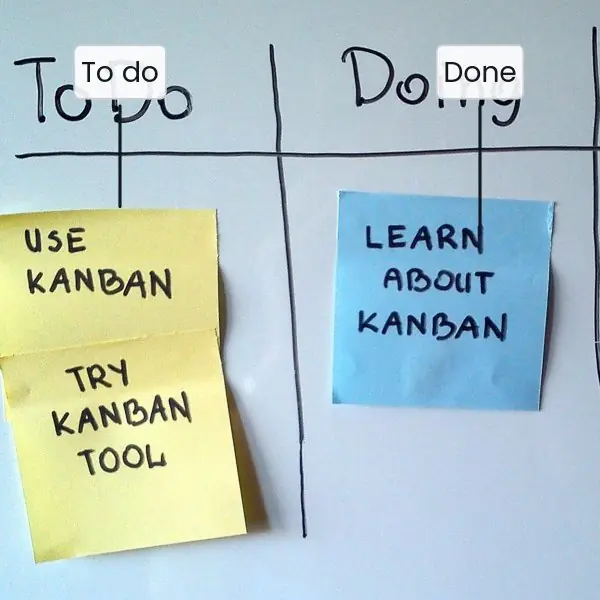
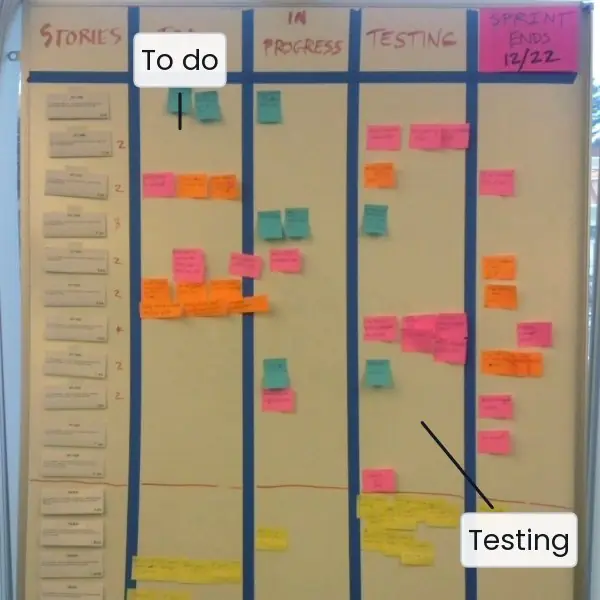
A Gantt chart shows the plan; a board shows today. Each task is a card that moves from To do to Doing to Done. Kanban limits how many cards may be in Doing at once (work-in-progress limit), so the team finishes before starting.
Scrum adds fixed one- or two-week sprints: at the start the team picks the cards for the sprint, and at the end it shows a working demo.
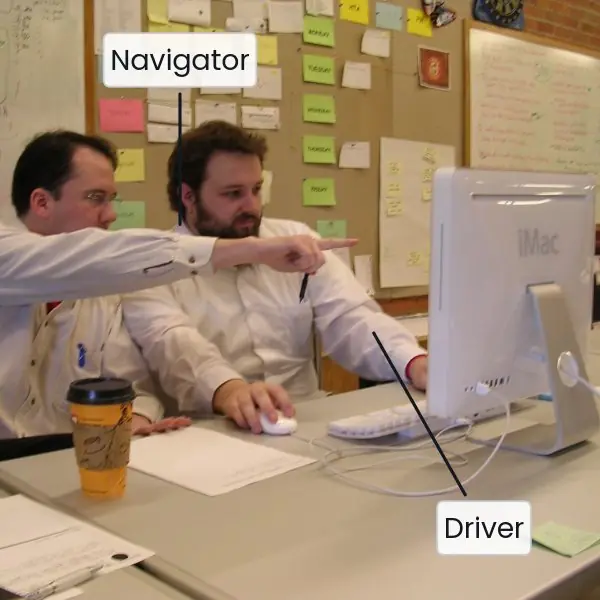
For a student team a 1-week sprint with a 10-minute stand-up (what I did, what I will do, what blocks me) is enough.
2.4 Roles in a student team
| Role | Main duty | Also must be able to |
|---|---|---|
| Team leader | schedule, board, meetings with supervisor | explain the whole project |
| Analyst | requirements, DFD, ER diagram | write the report chapters 1 and 2 |
| Developer(s) | code and database | explain every function they wrote |
| Designer | screens, usability | collect user feedback |
| Tester | test cases, bug log | verify all fixes |
In a team of three or four, one person holds two roles. Every member must be able to answer questions on every module in the viva, so rotate small tasks and review each other's code.
2.5 Version control with Git
Git records every change as a commit, a snapshot with a message.
It gives you three things a USB drive cannot: a full history (undo any mistake), branches (try a feature without breaking the working code) and a merge that combines the work of two people.
A remote copy on GitHub or GitLab doubles as your backup. The workflow is simple: main always holds working code; each feature is built on its own branch and merged back when it passes its tests (Figure 2.2).

The next script runs these commands for real in a scratch folder and prints the history.
import subprocess, tempfile, os
d = tempfile.mkdtemp()
env = dict(os.environ, GIT_AUTHOR_NAME="Asha", GIT_AUTHOR_EMAIL="a@x.np", GIT_COMMITTER_NAME="Asha", GIT_COMMITTER_EMAIL="a@x.np")
def git(*a):
    return subprocess.run(["git", *a], cwd=d, env=env, capture_output=True, text=True).stdout.strip()
def commit(fname, text, msg):
    open(os.path.join(d, fname), "a").write(text + "\n")
    git("add", "."); git("commit", "-q", "-m", msg)
git("init", "-q", "-b", "main")
commit("app.py", "# CampusShelf", "init")
commit("schema.sql", "CREATE TABLE book(id INT);", "schema")
git("switch", "-q", "-c", "feature/fines")
commit("fine.py", "def fine(days): return 2 * max(0, days - 14)", "add fine function")
commit("fine.py", "# tested", "test fine function")
git("switch", "-q", "main")
git("merge", "-q", "--no-ff", "feature/fines", "-m", "merge fines")
print(git("log", "--graph", "--pretty=format:%s"))
print()
print("branches:", git("branch", "--format=%(refname:short)").replace("\n", ", "))
print("files on main:", ", ".join(sorted(f for f in os.listdir(d) if f != ".git")))
*   merge fines
|\
| * test fine function
| * add fine function
|/
* schema
* init

branches: feature/fines, main
files on main: app.py, fine.py, schema.sql
Daily habits. git pull before you start, git add and git commit -m "message" often, git push at the end of the day. Write messages that say what and why ("fine: stop negative days"), not "update". Never commit passwords or the database file.
2.6 Eight practices of a team that finishes
- Meet at a fixed time. A 10-minute stand-up every working day, in person or on a call, keeps everyone aware of blockers. Short and regular beats long and rare. Many Kathmandu teams use a Viber or Messenger group for the same purpose.
- Keep one visible board. Every task is a card with an owner and a due date. The board shows at a glance who is stuck. A physical wall chart or a free Trello board works equally well.
- Define "done". A task is done only when it is coded, tested and merged to
main. Without this rule, "90 % done" lasts for weeks. The tester signs each card. - Review each other's code. A second pair of eyes catches mistakes and spreads knowledge. Every member then understands every module for the viva. Keep reviews polite and specific.
- Commit small and often. Many small commits make bugs easy to locate and undo. A big commit at midnight before the deadline hides problems. Aim for at least one commit per member per working day.
- Share decisions in writing. Record choices such as the database name or the fine rate in a shared notes file. This stops arguments about who agreed to what. It also feeds the report.
- Handle conflict early. If a member is absent or work is poor, speak to the leader in week 2, not week 11. Use the supervisor as a neutral helper. Fair, early conversations save friendships and grades.
- Protect the buffer. Do not spend the 3-week buffer on new features. Use it for fixing bugs, polishing the report and practising the demo. Teams that keep their buffer present calmly.
Formula and fact sheet
- Three-point estimate = (best + 4 × likely + worst) / 6.
- ES = max(EF of dependencies); slack = LF − EF; critical path = zero slack.
- Project 9 weeks + buffer 3 weeks = 12-week calendar.
- Git cycle: pull → edit → add → commit → push; branch per feature;
--no-ffmerge keeps history.
Chapter summary
- A WBS with durations and dependencies gives a schedule; the critical path shows what cannot slip.
- A Gantt chart shows the plan, a Kanban or Scrum board shows today.
- Roles are shared but every member must know every module.
- Git gives history, branches, merges and backup;
mainalways works.
Practice
- What is a work breakdown structure? Break "report writing" into four tasks.
- Compute the three-point estimate for best 2, likely 3, worst 7 weeks.
- In the critical-path script, what is the slack of task I and why?
- Define critical path and slack.
- Differentiate Kanban and Scrum.
- What questions does a daily stand-up answer?
- Why is
mainkept working? Describe the feature-branch workflow. - Write a good and a bad commit message for the same change.
- List the roles of a four-member team and one duty of each.
- Task F is delayed by 1 week. What happens to the project end? What if G is delayed by 1 week?
Answers and worked solutions
1. A tree of tasks small enough to assign. Report: outline chapters, write chapters 1 to 3, write chapters 4 to 6, format and proofread.
2. (2 + 4 × 3 + 7) / 6 = 21 / 6 = 3.5 weeks.
3. I runs weeks 5 to 6 and J needs it by week 8, so the slack is 2 weeks.
4. The longest chain of dependent tasks, which fixes the minimum project length; slack is how long a task can slip without delaying the end.
5. Kanban: continuous flow with a limit on cards in Doing. Scrum: fixed sprints with planning and a demo at each end.
6. What I did, what I will do, what blocks me.
7. Broken code on main stops everyone. Branch, build, test, then merge.
8. Good: "fine: stop negative overdue days". Bad: "update".
9. Leader (schedule), analyst (requirements), developer (code), tester (test cases).
10. F is critical: the end moves from week 9 to week 10 (still inside the buffer). G has 1 week of slack, so a 1-week delay does not move the end.
Model answers: medium (5 marks) and long (10 marks) questions
Q1 (5 marks). Explain the critical path method with an example.
Introduction. The critical path method (CPM) finds the longest chain of dependent tasks in a project. Its length is the shortest time in which the project can finish, and the tasks on it have no spare time.
Steps. (1) List tasks with durations and dependencies. (2) Forward pass: ES = the largest EF of the predecessors, EF = ES + duration. (3) The project length is the largest EF.
(4) Backward pass: LF of a task = the smallest LS of its successors. (5) Slack = LF − EF; tasks with slack 0 are critical.
Example. In CampusShelf the chain Proposal (1) → Requirements (1) → Design (2) → Database (1) → Core modules (2) → Testing (1) → Final report (1) adds to 9 weeks and has zero slack.
Login and reports (G) has 1 week of slack, and the report draft (I) has 2 weeks, because other tasks take longer.
Use. The leader watches critical tasks daily, may add a team member to them, and uses slack tasks to balance workload. A Gantt chart (Figure 2.1) shows the same result visually.
Conclusion. CPM tells the team where a delay hurts and where it does not.
Q2 (5 marks). What is version control? Explain the Git workflow used in a student project.
Definition. Version control records every change to files as numbered snapshots, so that any earlier version can be restored and several people can work together. Git is the most widely used system and is free.
Key ideas. A repository stores the project and its history. A commit is one saved snapshot with a message. A branch is an independent line of work. A merge joins a branch back to another. A remote (GitHub, GitLab) is a shared copy that is also a backup.
Workflow. (1) git pull the latest main. (2) Create feature/fines with git switch -c. (3) Edit, test, git add, git commit several times. (4) Merge into main only when tests pass (git merge --no-ff). (5) git push.
The history printed in Section 2.5 shows two feature commits and the merge commit.
Benefits. Undo, parallel work, traceable history, backup. Rules: small commits, clear messages, no passwords in the repository.
Conclusion. Git removes the "final_v3_new_REAL.zip" problem and shows the supervisor who did what.
Q3 (10 marks). Describe how a student team should plan and manage a 12-week software project.
Introduction. Good management converts a scope into dated tasks, makes progress visible and protects the team from delay. Planning is a tool for communication, not paperwork. This answer follows the CampusShelf plan.
1. Work breakdown. Split the project into tasks of one to three weeks (A to J in Section 2.1) with owners and dependencies. Estimate each with the three-point rule.
2. Schedule and critical path. Compute earliest and latest times (Section 2.2). The critical path A, C, D, E, F, H, J is 9 weeks. Place the plan inside 12 weeks so a 3-week buffer remains for exams, festivals and bugs.
3. Gantt chart. Draw the plan to scale (Figure 2.1), mark critical tasks in red and share it with the supervisor.
4. Task board. Use a Kanban or Scrum board (Plate 2.1). Limit cards in "Doing", define "done" as coded, tested and merged, and run a 10-minute daily stand-up.
5. Roles. Assign leader, analyst, developers, designer and tester; rotate small tasks so everyone can explain every module in the viva.
6. Version control. Use Git with a remote, a branch per feature and a working main (Figure 2.2); commit daily.
7. Communication and risk. Keep a decision log, review with the supervisor fortnightly, and list risks (illness, laptop failure, scope creep) with an action each.
| Tool | Answers the question | Where used |
|---|---|---|
| WBS | what must be done? | Section 2.1 |
| Critical path | what cannot slip? | Section 2.2 |
| Gantt chart | when? | Figure 2.1 |
| Board and stand-up | what is happening today? | Plate 2.1 |
| Git | what changed and who did it? | Figure 2.2 |
Conclusion. Planning with a WBS and critical path, a visible board, Git and a protected buffer lets a team finish on time.