Unit 5 · 17 min read
The Report, the Presentation and the Viva
What the syllabus asks for 8
- The shape of a project report
- Budgeting the writing
- Writing, figures and references
- The ten-minute presentation
- The demo script
- Twelve viva questions, with model answers
- An illustrative marking rubric
- Eight habits of a good viva
Software that nobody can understand earns few marks. The report, the slides and the viva are how the examiners see your work, and they are usually the part students prepare last.
This unit shows the standard report structure, how every earlier unit feeds a chapter, how to build a ten-minute presentation and how to answer viva questions honestly.
- The usual project-report structure and where each earlier deliverable goes.
- A report-writing budget (run as code) and the rules for figures, tables and references.
- A slide plan with a photo plate, a demo script and twelve model viva answers.
- An illustrative marking rubric and the eight habits of a good viva.
5.1 The shape of a project report
TU colleges ask for a bound report in a common pattern. Check your own college's guideline first; its font, margin, page-limit and cover rules override this book.
| Part | Contents | Typical length |
|---|---|---|
| Preliminary pages | title page, certificate, supervisor's recommendation, acknowledgement, abstract, contents, lists of figures, tables and abbreviations | roman numerals |
| Chapter 1 Introduction | background, problem statement, objectives, scope and limitations, report organisation | 3 to 4 pages |
| Chapter 2 Background study | related systems, techniques and tools used, why they were chosen | 3 to 5 pages |
| Chapter 3 System analysis | requirements, feasibility, use cases, DFD | 5 to 7 pages |
| Chapter 4 System design | architecture, ER diagram, schema, screen design | 5 to 7 pages |
| Chapter 5 Implementation and testing | tools, key code, test cases, results, bug log | 6 to 8 pages |
| Chapter 6 Conclusion | what was achieved, limits, future enhancements | 1 to 2 pages |
| References and appendices | cited sources; user manual, extra screens, Gantt chart, sign-off | as needed |
Notice that every chapter is the output of a phase you have already finished (Figure 5.1). That is why the report should be written as you go.

5.2 Budgeting the writing
Students underestimate writing time as badly as coding time. The script spreads a word budget over chapters at a realistic drafting speed of 250 words per hour, including figures and revision.
chapters = {"Preliminary pages": 600, "1 Introduction": 1200, "2 Background": 1000,
            "3 Analysis": 1500, "4 Design": 1500, "5 Implementation and testing": 1800, "6 Conclusion": 500}
RATE, HOURS_PER_DAY = 250, 2
total = sum(chapters.values())
for name, words in chapters.items():
    print(f"{name:30s} {words:5d} words {words / RATE:5.1f} h")
print(f"{'Total':30s} {total:5d} words {total / RATE:5.1f} h = {total / RATE / HOURS_PER_DAY:.1f} days at {HOURS_PER_DAY} h/day")
Preliminary pages                600 words   2.4 h
1 Introduction                  1200 words   4.8 h
2 Background                    1000 words   4.0 h
3 Analysis                      1500 words   6.0 h
4 Design                        1500 words   6.0 h
5 Implementation and testing    1800 words   7.2 h
6 Conclusion                     500 words   2.0 h
Total                           8100 words  32.4 h = 16.2 days at 2 h/day
About 16 working days: spread them over weeks 4 to 11 of the plan, a little after each phase, and the report will be ready before the buffer starts.
5.3 Writing, figures and references
- Plain language. Short sentences, one idea each; define every acronym at first use. Write in the past tense for what you did ("the system was tested with 20 transactions").
- Number everything. "Figure 4.2" and "Table 3.1" with a caption, and refer to them in the text ("as Figure 4.2 shows"). Number by chapter.
- Diagrams must be readable when printed in black and white: labels at least as large as body text, no screenshots of tiny text.
- Code in the body only when it explains something. Put long listings in an appendix; show the key function and the output.
- References. Use one style (IEEE or APA) throughout. Cite books, documentation and papers you really used; list web sources with the date accessed.
- Plagiarism. Copying text or code without credit is academic dishonesty and many colleges run similarity checks. Use your own words, quote briefly with quotation marks and a citation, and credit any library or template code in the report and in code comments.
- Images. Use only your own screenshots and diagrams or images with a free licence, and credit the source.
5.4 The ten-minute presentation
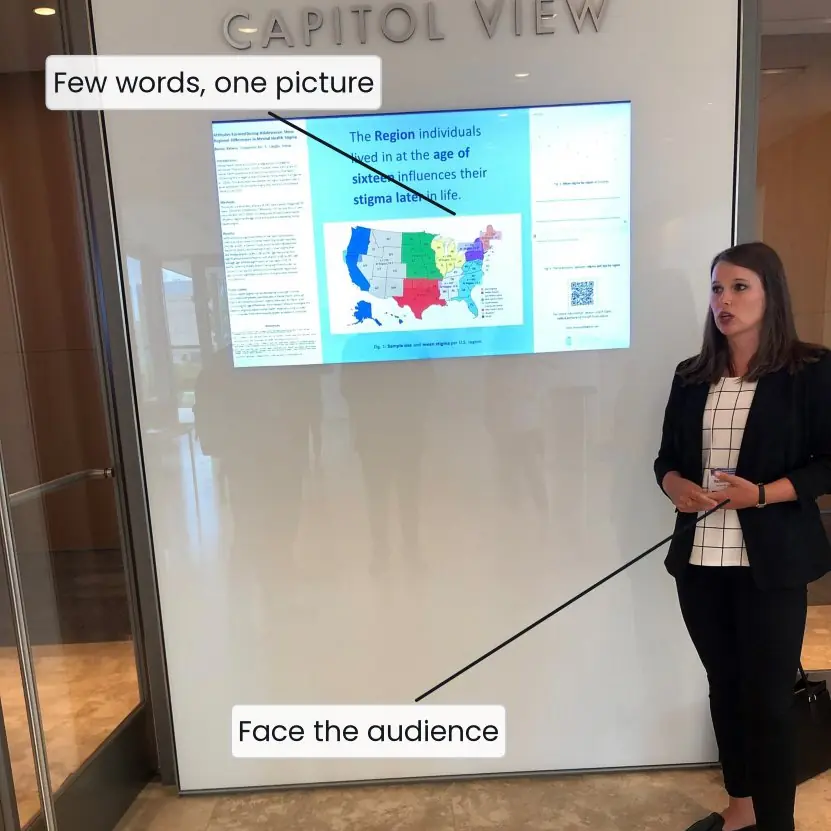
Examiners remember a clear story, not a long slide deck. Use about eight slides (one per minute) and keep two minutes for the demo.
| Slide | Content | Time |
|---|---|---|
| 1 | Title, team, supervisor | 0.5 min |
| 2 | Problem with its numbers (6 minutes, 1 error in 10) | 1 min |
| 3 | Objectives and scope | 1 min |
| 4 | Design in one picture (DFD level 1 or architecture) | 1.5 min |
| 5 | ER diagram or database in one picture | 1 min |
| 6 | Live demo (issue, return, fine, overdue) | 2.5 min |
| 7 | Testing: 8 of 8 tests, one bug story | 1 min |
| 8 | Conclusion and future work | 1.5 min |

5.5 The demo script
A live demo fails when you improvise. Write the steps, rehearse them three times and keep a backup (a short screen recording and a second copy of the database).
- Start from a clean, prepared database with two members and three books already added.
- Show a wrong login, then the right one (F1).
- Issue the last copy of a book; try to issue it again and show the refusal (F3).
- Return a book that is 5 days late and show the fine of Rs 10 (F4).
- Open the overdue report (F5).
- Run the test file and show
OK. - If something breaks, say so calmly, show the backup recording and move on.
5.6 Twelve viva questions, with model answers
| Question | Model answer |
|---|---|
| Why did you choose this project? | Our college library uses a paper register; we measured 6 minutes per issue and 1 error in 10 entries, so the problem is real. |
| What is your contribution? | I designed the ER diagram and wrote the issue and return logic; I can also explain the other modules. |
| Why SQLite and not MySQL? | One librarian and 1,200 members need no separate server; SQLite is a single file, free and enough. MySQL is listed as future work for multiple branches. |
| What is a primary key? A foreign key? | A primary key identifies a row; a foreign key refers to a primary key in another table and stops orphan rows. |
| How is the password stored? | As a salted SHA-256 hash; the plain text never reaches the database. |
| How do you calculate the fine? | Rs 2 × days after the due date, with a minimum of 0; 5 days late gives Rs 10. |
| Show how you tested it. | Eight automated unit tests, one per requirement, plus a system test and an acceptance test with the librarian. |
| What was your hardest bug? | Fine of Rs 2 on the due date itself; a boundary error fixed with a max(0, ...) rule and test 5. |
| What are the limits of your system? | One user at a time, AD dates only, no barcode scanner or online payment; all listed as future work. |
| What would you do with more time? | Add BS dates, SMS reminders and a web version for students. |
| Which part is not your own code? | The sqlite3, hashlib and unittest libraries; everything else we wrote and credited in the report. |
| How is your system better than the register? | Issue time under 30 seconds instead of 6 minutes, no calculation errors, instant overdue list. |
5.7 An illustrative marking rubric
Colleges set their own marks. The table below is a typical pattern for planning only, not an official TU scheme; ask your supervisor for the real distribution.
| Component | Weight | What earns marks |
|---|---|---|
| Proposal and plan | 10 % | clear problem, SMART objectives, Gantt chart |
| Analysis and design | 20 % | testable requirements, diagrams, schema |
| Implementation | 25 % | working core features, clean code, version history |
| Testing | 15 % | test cases tied to requirements, results, bug log |
| Report | 15 % | structure, clarity, figures, references |
| Presentation and viva | 15 % | clear talk, live demo, honest answers |
5.8 Eight habits of a good viva
- Know the problem in numbers. Open with "6 minutes and 1 error in 10". Numbers show that you measured and did not guess. They also set the standard by which your system should be judged.
- Explain from the whole to the part. Start with the architecture picture and go down to a function only if asked. Examiners who see the whole system relax and ask better questions. Avoid starting with code.
- Admit what you do not know. "I did not test with more than 200 members" is better than a made-up answer. Honest limits show maturity. Then say how you would test it.
- Know every module. Even if you wrote only the database, be ready to explain the login and the fine rules. The examiner may ask any member any question. Rehearse swapping modules in the team.
- Rehearse the demo three times. Use the same data and the same order each time, and keep a backup recording. The demo should take no more than three minutes. A smooth demo is worth many slides.
- Speak slowly and look at the examiners. Nervous students rush and read from the slide. Pause after each slide and breathe. A calm voice makes simple work sound solid.
- Credit sources openly. Say which libraries, templates or tutorials helped, and show them in the references. Examiners respect honest credit and punish hidden copying. If asked "is this your code?", answer exactly.
- Listen to the whole question. Wait until the examiner finishes, repeat it in your own words if needed, and answer only what was asked. Short, correct answers are better than long wandering ones. If you did not understand, ask politely.

Formula and fact sheet
- Report chapters: Introduction, Background, Analysis, Design, Implementation and testing, Conclusion, plus references and appendices.
- Drafting budget: words / 250 = hours; 8,100 words ≈ 32 hours ≈ 16 days at 2 hours per day.
- Presentation: about 8 slides for 10 minutes, with 2 to 3 minutes of live demo.
- Always: follow the college's own guideline; credit all sources; keep a backup of the demo.
Chapter summary
- The report mirrors the phases of the project; write each chapter when its phase ends.
- Number figures and tables, use one reference style, and never copy without credit.
- A ten-minute talk has about eight slides and a rehearsed demo with a backup.
- In the viva, speak in numbers, explain from whole to part, admit limits and know every module.
Practice
- List the chapters of a typical TU project report and one item for each.
- Which unit's deliverables belong in Chapter 4? In the appendices?
- Compute the writing hours for a 6,000-word report at 250 words per hour, and the days at 3 hours per day.
- Why must figures be readable in black and white?
- What is plagiarism? Give three ways to avoid it.
- Plan an eight-slide, ten-minute talk for your own project.
- Write a demo script for a project of your choice (six steps).
- Prepare answers to "Why did you choose this technology?" and "What are the limits?"
- Describe three habits that make a viva go well.
- A team of four has 8,100 words to write and each can write 2 hours per day. How many days does it take if the work is shared equally?
Answers and worked solutions
1. Introduction (problem statement), Background (related systems), Analysis (requirements), Design (ER diagram), Implementation and testing (test cases), Conclusion (future work).
2. Chapter 4: ER diagram, schema, wireframes (Unit 3). Appendices: Gantt chart, board photos, sign-off (Unit 2).
3. 6,000 / 250 = 24 hours; 24 / 3 = 8 days.
4. Reports are often printed in black and white; faint colours and tiny labels vanish.
5. Using someone else's work as your own. Avoid it by writing in your own words, quoting with citation and crediting code and images.
6. Title; problem with numbers; objectives; design picture; database picture; demo; testing; conclusion.
7. Prepared data; wrong and right login; issue; return with fine; report; test run; backup recording ready.
8. Reason from the requirements (small, free, enough); name the limits honestly and list them as future work.
9. Know the numbers, explain whole to part, admit what you do not know.
10. Total = 8,100 / 250 = 32.4 hours; four people × 2 h = 8 h per day; 32.4 / 8 = 4.05, about 4 to 5 days (in practice longer, because the work cannot be shared perfectly and must be reviewed).
Model answers: medium (5 marks) and long (10 marks) questions
Q1 (5 marks). Describe the structure of a project report and what each chapter contains.
Introduction. A project report is the permanent record of the work. It must let a reader who has never seen the system understand the problem, the solution and the evidence that it works.
Preliminary pages. Title page, certificate, supervisor's recommendation, acknowledgement, abstract, table of contents and lists of figures, tables and abbreviations.
Chapters. (1) Introduction: background, problem statement, objectives, scope and limitations, organisation of the report. (2) Background study: similar systems and the tools chosen.
(3) System analysis: requirements, feasibility, use cases and DFDs. (4) System design: architecture, ER diagram, schema and screens. (5) Implementation and testing: tools, key code, test cases, results and bug log.
(6) Conclusion: achievements, limits and future enhancements.
End matter. References in one style, and appendices (user manual, Gantt chart, extra screens).
Conclusion. Each chapter comes from one phase of the project (Figure 5.1), so writing it just after that phase keeps the report true. Always follow the college's own format guideline.
Q2 (5 marks). How should a student prepare for the project viva?
Introduction. The viva is a 10 to 15-minute conversation in which the examiners decide whether the work is the student's own and whether it is understood.
Preparation. (1) Know the problem in numbers (6 minutes per issue, 1 error in 10). (2) Know the whole system from the architecture picture down to the table design, and be able to explain every module, not only one's own.
(3) Prepare a ten-minute talk with eight slides and a live demo (Section 5.4). (4) Rehearse the demo three times with fixed data and keep a backup recording.
(5) Prepare answers to the twelve standard questions of Section 5.6, such as why this tool was chosen, how testing was done and what the limits are.
During the viva. Listen to the whole question, answer briefly and honestly, admit gaps and say how they could be closed, and credit all sources.
Conclusion. Students who rehearse and speak honestly about both strengths and limits score well, even with a small project.
Q3 (10 marks). Explain how a Project I team should complete the project from final testing to viva: report, presentation, demo and answers.
Introduction. The last three weeks decide how the work is judged. A team that has planned its buffer (Unit 2) uses them for the report, the talk and rehearsal, not for new features.
1. Freeze the features. Stop adding functions two weeks before the deadline. Fix only bugs, and tag the final version in Git so that the demo and the report describe the same code.
2. Finish the report. Chapters were drafted after each phase. Now check the numbering of figures and tables, unify the reference style, add the abstract, lists and appendices, and proofread.
The writing budget (8,100 words, about 32 hours) fits in the buffer when started early.
3. Check ethics and credit. Rewrite any text that is too close to a source, quote with citations, and credit libraries, templates and images. Run the similarity check if the college offers one.
4. Prepare the talk. Eight slides in ten minutes: title, problem with numbers, objectives, design, database, demo, testing, conclusion (Plate 5.1).
5. Script and rehearse the demo. Use a prepared database, steps tied to requirements F1 to F5, the test run showing OK and a backup recording. Rehearse three times.
6. Prepare the viva. Every member studies every module; the team writes answers to the twelve standard questions and holds a mock viva with the supervisor or a senior student.
7. Collect the paperwork. Supervisor's recommendation, certificate pages, signatures, bound copies and the CD or repository link as required by the college.
8. On the day. Arrive early, test the projector and the laptop, speak slowly, show the demo, admit limits and thank the examiners.
| Week | Task | Output |
|---|---|---|
| 10 | feature freeze, final tests | tagged release, test report |
| 11 | report completion and proofreading | bound report |
| 12 | slides, demo rehearsal, mock viva | talk, backup recording |
Conclusion. Finishing is a skill: freeze, document, rehearse and speak honestly. Project I rewards students who can explain a small system completely over those who show a large one they cannot explain.