Unit 7 · 5 teaching hours · 18 min read
E-Waste, Green Computing and Sustainable Technology
What the syllabus asks for 6
- What is e-waste?
- The life cycle of a device
- Managing e-waste
- Green computing
- Responsibility of the computing professional
- Seeing the ideas: the fires, the sorting line, the aisle, the flows and the footprint
Every phone, laptop and server starts as mined metal and oil, spends a few years consuming electricity and ends as waste that may be reused, recycled, stored in a drawer, burnt in a roadside fire or dumped.
A computing professional shapes all of those stages: what is bought, how long it is used, how efficiently the data centre runs and what happens to the device at the end.
This unit shows the life cycle, the hazards, and the measurements of green computing: PUE for data centres, energy and carbon footprints for equipment, and the surprising arithmetic of extending a device's life.
- E-waste: definition, composition, hazards, life cycle and the Nepali situation.
- The 3Rs, extended producer responsibility, the Basel Convention, data sanitisation.
- Data-centre efficiency: PUE and DCiE, energy and cost calculations.
- Carbon footprint: embodied and operational emissions; the effect of service life.
Emission factors, costs and material flows in the worked examples are assumptions chosen to show the method; use measured or published values for real decisions.
7.1 What is e-waste?
Electronic waste (e-waste) is discarded electrical and electronic equipment: computers, phones, televisions, batteries, chargers, printers, solar-panel inverters, network and medical devices.
Worldwide it is the fastest-growing household waste stream, driven by falling prices, short product cycles and difficulty of repair. It matters for two reasons.
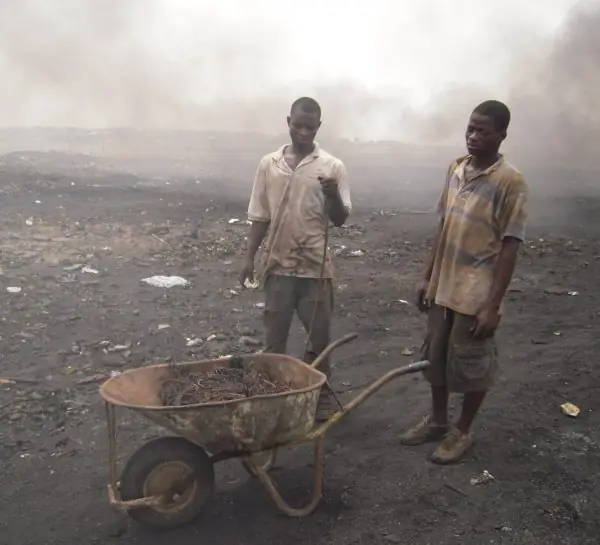
Hazards: devices contain lead (solder, CRT glass), mercury (some lamps and switches), cadmium and other heavy metals (batteries), and brominated flame retardants in plastics; informal burning to recover copper releases dioxins and toxic fumes that harm workers and children.
Resources: the same devices contain copper, aluminium, gold, silver, palladium and rare earths in concentrations higher than many ores, so recycling is also a source of materials (urban mining).
7.2 The life cycle of a device
- Extraction and materials: mining and refining of metals and the production of plastics (energy-intensive, with human-rights risks in some supply chains).
- Manufacture: chips, boards and assembly; this stage causes most of a laptop's or phone's lifetime carbon (its embodied emissions).
- Distribution: shipping and packaging.
- Use: electricity consumption (operational emissions), repairs and upgrades.
- End of life: reuse, refurbishment, recycling, storage, or disposal.
A device's footprint is therefore front-loaded: the largest environmental decision is whether to buy a new one at all. A longer service life, repair and reuse are generally better than recycling, which is better than disposal.
Nepal's situation
Nepal imports almost all of its electronics, including large volumes of second-hand equipment, and has no large-scale formal e-waste recycling plant of the kind found in some countries.
Much of the waste is stored in homes and offices, collected by scrap dealers (kabadi), dismantled informally and partly exported for processing.
The Solid Waste Management Act, 2068 (2011) is the general framework for waste; specific e-waste rules and collection schemes have been proposed and piloted but enforcement is thin.
A typical (illustrative) flow of 1,000 kg of discarded devices:
| Fate of 1,000 kg of discarded devices (illustrative) | kg | Share |
|---|---|---|
| Collected by formal recyclers | 120 | 12% |
| Reused / refurbished | 80 | 8% |
| Sent informally to scrap dealers | 450 | 45% |
| Stored at home or office | 300 | 30% |
| Landfill or burnt | 50 | 5% |
Only 20% reaches formal collection or reuse, while nearly half passes through informal channels with weak protection, and almost a third sits unused in storage.
The policy levers are clear: collection points, deposit or take-back schemes, support for safe informal-sector recycling, and awareness.
7.3 Managing e-waste
- Reduce: buy only what is needed, choose repairable and upgradeable devices with long software support, share equipment, prefer cloud services with efficient shared hardware where appropriate.
- Reuse: donate or refurbish working equipment for schools and community centres; second-hand markets extend life.
- Recycle: use authorised recyclers who separate hazardous parts, recover metals and handle batteries safely.
- Extended producer responsibility (EPR): producers and importers are responsible for taking back and recycling the products they sell, financing collection through a fee.
- Basel Convention: the international treaty controlling transboundary movements of hazardous wastes and their disposal; it aims to stop rich countries dumping hazardous waste on poorer ones. Nepal is a party.
- Right to repair: access to spare parts, manuals and tools.
- Data sanitisation: before reuse or disposal, wipe storage securely (overwrite, cryptographic erase or physical destruction), because deleted files can be recovered and old disks have leaked personal data. Combine with the security chapter of MIS and e-Business.
7.4 Green computing
Green (sustainable) computing is the design, manufacture, use and disposal of computing so as to minimise environmental impact. Practices:
- Energy-efficient hardware (labels such as Energy Star), efficient power supplies, SSDs, low-power processors.
- Power management: sleep modes, screen dimming, switching devices off; typical office PCs consume power when idle.
- Virtualisation and consolidation: run many virtual servers on fewer physical ones; raise utilisation (an idle server draws a large fraction of its peak power).
- Cloud and shared infrastructure: large providers run at better efficiency than a typical small server room, although the total demand still grows.
- Efficient software: avoid busy polling, compress data, cache, use efficient algorithms; the cheapest watt is the one not used.
- Renewable energy and cooling design: hot/cold aisles, free cooling in cool climates, solar power for remote facilities.
- Telecommuting and dematerialisation: replacing travel and paper with digital services, with the caveat of rebound effects (more consumption because it is cheaper).
Power usage effectiveness (PUE)
A data centre's electricity feeds the IT equipment (servers, storage, network) and the overhead (cooling, power conversion, lighting). The Power Usage Effectiveness is
PUE = total facility power ÷ IT equipment power (≥ 1; 1.0 would be perfect),
and its reciprocal is DCiE = IT power ÷ total power (as a percentage).
IT load = 100 kW and total facility load = 150 kW, so PUE = 1.50 and DCiE = 66.7%: one-third of the energy is overhead.
Running continuously (8,760 hours a year): total energy = 150 × 8,760 = 13,14,000 kWh, of which IT 8,76,000 kWh and overhead 4,38,000 kWh.
An efficiency project (better airflow, higher set-point, efficient UPS) brings PUE to 1.3, so the facility draws 100 × 1.3 = 130 kW: annual energy 11,38,800 kWh, a saving of 1,75,200 kWh.
At an assumed Rs 12 per kWh that is Rs 21,02,400 a year.
PUE is useful but incomplete: it ignores how useful the IT work is. A server room at PUE 1.2 full of idle servers wastes more than one at 1.5 whose servers are busy. Pair PUE with utilisation and with work done per kWh.
Carbon footprint
Carbon footprint (in kg CO₂-equivalent) = energy used × emission factor (kg CO₂e per kWh of the supplying grid). The factor depends on how the electricity is generated.
With an illustrative generic grid factor of 0.5 kg/kWh, the server room's 13,14,000 kWh gives 657.0 tonnes of CO₂e a year, and the PUE project saves 87.6 tonnes.
Nepal's electricity is overwhelmingly hydroelectric, so a hydro-dominated factor such as 0.02 kg/kWh would give only 26.3 tonnes: the same equipment is far cleaner on a clean grid, so for Nepali users the embodied emissions and diesel generator back-up dominate more than elsewhere.
State the factor and its source whenever you quote a footprint.
Service life and embodied carbon
Assume a laptop has embodied emissions of 300 kg CO₂e and uses 50 W for 8 hours a day on 250 days a year, which is 100 kWh a year, or 50 kg a year at 0.5 kg/kWh. Spreading the embodied emissions over its service life gives the annual footprint:
| Service life (years) | Embodied per year (kg CO₂e) | Use per year at 0.5 kg/kWh | Annual total |
|---|---|---|---|
| 3 | 100.0 | 50.0 | 150.0 |
| 4 | 75.0 | 50.0 | 125.0 |
| 5 | 60.0 | 50.0 | 110.0 |
| 6 | 50.0 | 50.0 | 100.0 |
Extending the life from 3 to 5 years reduces the annual footprint from 150.0 to 110.0 kg, a cut of 26.7%, with no new technology at all. This is why repair, upgrade and reuse are the most effective actions available to a student or a college lab.
7.5 Responsibility of the computing professional
Choose and specify long-lived, repairable equipment; design software that does not force hardware upgrades; measure energy and publish it; build services with efficiency as a requirement; dispose of equipment responsibly and wipe data; and challenge wasteful practices such as always-on servers without need.
The wider concept is sustainable development: meeting present needs without compromising the future.
The United Nations Sustainable Development Goals include industry and innovation, responsible consumption and production, and climate action, to which these practices contribute.
7.6 Seeing the ideas: the fires, the sorting line, the aisle, the flows and the footprint
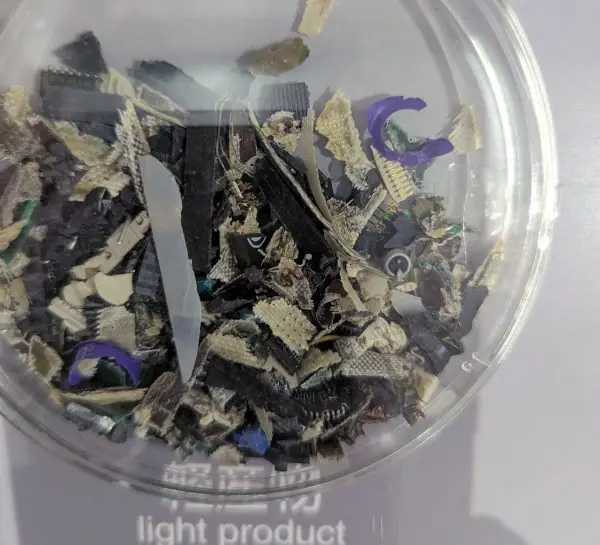
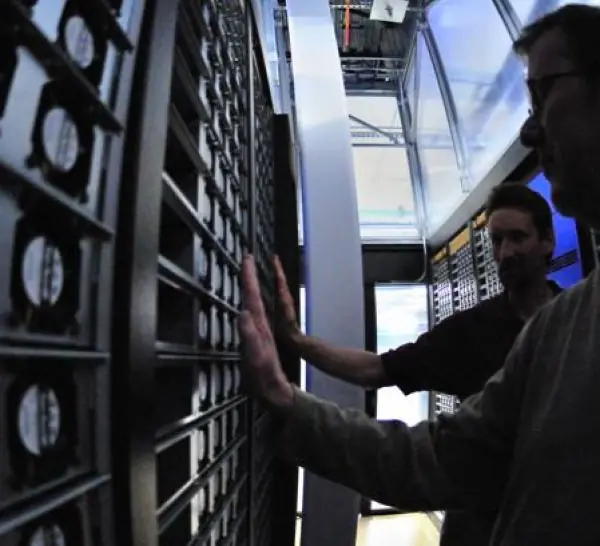
E-waste has two faces. In one, workers burn cable sheathing in the open to sell the copper; in the other, shredded devices are sorted into clean fractions of metal and plastic.
Plate 7.1 shows both, plus a data-centre aisle, where the electricity bill and the carbon of computing are decided every hour of the year.


7.6.1 Eight practices for responsible handling of e-waste and energy
- Buy less and buy repairable. Before a purchase, ask whether the old device can be upgraded with more RAM or an SSD. Choose models with spare parts and long software support. Most of a laptop's carbon is spent when it is made, so not buying is the biggest saving.
- Extend the service life. Keeping a laptop for five years instead of three cuts its annual footprint by 26.7%. A college lab can clean, re-paste and reinstall old machines for first-year classes. Longer life also postpones the cost of disposal.
- Reuse and donate. Working equipment can serve a school in a remote ward or a community centre. Refurbished computers keep their value and give training access to students who have none. Always wipe the data first.
- Sanitise data before disposal. Deleted files can be recovered from old disks. Use secure overwrite, cryptographic erase or physical destruction, and keep a record. Many leaks come from sold or discarded drives, not from hackers.
- Use authorised recyclers. Formal recyclers separate lead, batteries and plastics and recover copper and gold safely. Informal burning gives workers a little cash but releases dioxins and heavy metals. Support take-back and collection points where they exist.
- Switch on power management. An idle office PC still draws power. Sleep modes, screen dimming and switching off at night can cut a lab's energy use by about a quarter. The cheapest watt is the one never used.
- Consolidate with virtualisation. One well-used physical server can run many virtual ones, and an idle server still draws a large part of its peak power. Higher utilisation means fewer machines to buy, cool and later dispose of. Measure utilisation along with PUE.
- Measure carbon with the right factor. Energy in kWh multiplied by the grid factor gives kg CO2e. On Nepal's hydro-dominated grid operational emissions are small, so embodied emissions and diesel backup matter more. State your assumptions whenever you publish a number.
Chapter summary
- E-waste contains hazardous and valuable materials; informal burning harms health; most Nepali e-waste is stored or processed informally.
- A device's footprint is front-loaded (manufacture), so longer life, repair and reuse beat recycling, which beats disposal.
- Manage e-waste by reduce, reuse, recycle, EPR and the Basel framework; sanitise data before disposal.
- PUE = total ÷ IT power (DCiE is its reciprocal); energy = power × hours; carbon = energy × emission factor.
- Extending a laptop's service life from 3 to 5 years cuts its annual footprint by a quarter in the example.
Practice
- Define e-waste and name two hazardous and two valuable components.
- Why is a device's carbon footprint "front-loaded"?
- State the waste hierarchy for devices.
- What does the Basel Convention regulate?
- Compute PUE and DCiE for IT power 80 kW and total power 128 kW.
- For question 5, compute the annual energy (kWh) and the cost at Rs 10 per kWh.
- A device uses 200 kWh a year at 0.5 kg CO₂e/kWh, with 240 kg embodied. Find the annual footprint for a 4-year life and for a 6-year life.
- Why is PUE alone an incomplete measure of data-centre efficiency?
- List four green computing practices for a college computer lab.
- Why should storage be wiped before a computer is donated?
Answers and worked solutions
1. Discarded electrical and electronic equipment. Hazardous: lead, mercury, cadmium, flame retardants. Valuable: copper, gold, silver, palladium.
2. Most emissions come from material extraction and manufacture before the first use; use-phase emissions come later.
3. Reduce, reuse (refurbish), recycle, then dispose.
4. The international movement and disposal of hazardous wastes.
5. PUE = 128/80 = 1.60; DCiE = 80/128 = 62.5%.
6. 128 × 8,760 = 11,21,280 kWh; cost = 11,21,280 × 10 = Rs 1,12,12,800.
7. Use: 200 × 0.5 = 100 kg. 4 years: 240/4 + 100 = 160 kg. 6 years: 240/6 + 100 = 140 kg.
8. It ignores how much useful work the IT equipment does; idle servers at a low PUE still waste energy.
9. Power management, switching off, longer equipment life and repair, virtualisation or shared servers (also donating old machines, efficient software).
10. Deleted files can be recovered; secure wiping prevents leakage of personal and institutional data.
Model answers: medium (5 marks) and long (10 marks) questions
Q1 (5 marks). What is e-waste? Explain its hazards and its value, and describe the situation in Nepal.
Introduction. Electronic waste is discarded electrical and electronic equipment: computers, phones, televisions, batteries, chargers and network devices. It is the fastest-growing household waste stream (section 7.1, Plate 7.1).
- Hazards. Devices contain lead in solder and CRT glass, mercury in some lamps, cadmium in batteries and brominated flame retardants in plastics.
- Informal burning. Burning cable to recover copper releases dioxins and toxic fumes that harm workers and children.
- Value (urban mining). The same devices hold copper, aluminium, gold, silver, palladium and rare earths in richer concentrations than many ores.
- Nepal. Almost all electronics are imported, including much second-hand equipment. There is no large formal recycling plant; scrap dealers (kabadi) dismantle devices informally; the Solid Waste Management Act 2068 is the general law and e-waste rules are thinly enforced.
| Fate of 1,000 kg (illustrative) | kg | Share |
|---|---|---|
| Formal recyclers | 120 | 12% |
| Reused | 80 | 8% |
| Informal scrap dealers | 450 | 45% |
| Stored | 300 | 30% |
| Landfill or burnt | 50 | 5% |
Reading. Only 20% reaches formal collection or reuse; almost half goes through informal channels with weak protection (Figure 7.3).
Conclusion. E-waste is both a hazard and a resource; collection points, take-back schemes and safe informal recycling are the main remedies.
Q2 (5 marks). A server room has IT load 60 kW and total facility load 96 kW. Compute PUE, DCiE and the annual energy. An efficiency project brings PUE to 1.25 with the same IT load. Find the energy and money saved at Rs 12 per kWh and the carbon saved at 0.5 kg/kWh and at 0.02 kg/kWh.
Introduction. PUE = total facility power / IT power; DCiE is its reciprocal (section 7.4, Figure 7.4).
Before. PUE = 96 / 60 = 1.60; DCiE = 60 / 96 = 62.5%. Annual energy = 96 x 8,760 = 8,40,960 kWh, of which IT is 5,25,600 kWh and overhead 3,15,360 kWh.
After. Facility load = 60 x 1.25 = 75 kW; annual energy = 75 x 8,760 = 6,57,000 kWh.
| Item | Calculation | Result |
|---|---|---|
| Energy saved | 8,40,960 - 6,57,000 | 1,83,960 kWh |
| Money saved | 1,83,960 x Rs 12 | Rs 22,07,520 |
| Carbon at 0.5 kg/kWh | 1,83,960 x 0.5 | 91.98 tonnes |
| Carbon at 0.02 kg/kWh | 1,83,960 x 0.02 | 3.68 tonnes |
Comment. The money saving is the same on any grid, but on Nepal's hydro-dominated grid the carbon saving is small, so the business case rests on cost and on embodied emissions.
Conclusion. PUE should be paired with utilisation, because an efficient room full of idle servers still wastes energy.
Q3 (10 marks). Discuss how a computing professional and a college can reduce the environmental impact of computing. Cover the device life cycle, the 3Rs, extended producer responsibility, data sanitisation, green computing practices and carbon calculation.
Introduction. Every device is mined, manufactured, shipped, used and finally discarded. A computing professional shapes each stage by what is bought, how long it is used and how it is retired (sections 7.2 to 7.6, Figure 7.1).
Life cycle and carbon. Manufacture causes most of a laptop's lifetime carbon (embodied emissions); use adds operational emissions.
For a laptop with 300 kg embodied and 50 kg a year of use, a 3-year life gives 150 kg a year and a 5-year life gives 110 kg, a cut of 26.7% (Figure 7.5).
The 3Rs and the hierarchy. Reduce purchases and choose repairable models; reuse by donating to schools; recycle through authorised recyclers; dispose safely only as the last option (Figure 7.2).
Extended producer responsibility and law. Under EPR, producers and importers take back and recycle what they sell, financed by a fee. The Basel Convention controls transboundary movement of hazardous waste; Nepal is a party.
The Solid Waste Management Act 2068 is the general framework, with thin enforcement for e-waste.
Data sanitisation. Before reuse or disposal, wipe storage by overwrite, cryptographic erase or physical destruction, because deleted data can be recovered.
Green computing. Energy-efficient hardware, power management, virtualisation and consolidation, efficient software and good cooling. For data centres, PUE = total / IT power; a fall from 1.50 to 1.30 on a 100 kW IT load saves 1,75,200 kWh a year (Figure 7.4).
| Action | Effect |
|---|---|
| Extend service life | Spreads embodied carbon |
| Reuse and donate | Keeps equipment working |
| Formal recycling | Recovers metals safely |
| Data wiping | Protects privacy |
| Power management | Cuts operational energy |
Conclusion. The most effective actions are the simplest: buy less, repair, reuse, recycle properly, wipe data and measure impact with stated assumptions.