Unit 5 · 8 teaching hours · 51 min read
Programming Concepts and Logics
What the syllabus asks for 16
- Introduction to programming languages; Low level, High level, 4GL
- Compiler, Interpreter and Assembler
- Syntax, Semantic and Runtime errors
- Control Structures: Sequence, Selection and Iteration
- Program Design tools: Algorithm, Flowchart and Pseudocode
- Absolute binary, BCD, ASCII and Unicode
- C: Introduction and features; Structure of C program
- C Preprocessor and Header Files; Character Set; Comments
- Identifiers, Keywords and Tokens; Basic Data Types; Constants and Variables
- Type Specifier; Simple and Compound Statements
- Operators and Expressions: arithmetic, relational, logical, assignment, unary, conditional
- Input/Output Functions
- Selection Control Statement: if, if-else, if-else-if, nested, switch
- Iteration Control Statement: while, do while, for, nested loops
- Array: definition, 1D and 2D, matrix addition and subtraction
- String: definition and string functions strlen, strcat, strcmp, strrev, strcpy, strlwr, strupr
A computer does nothing on its own. Every useful thing it does — adding a column of marks, drawing a chart, sending a message — happens because somebody wrote an ordered list of instructions and the machine carried them out. This unit teaches you to write that list. You will first learn to think the solution out on paper as an algorithm and a flowchart, and only then to write it in C, the language the NEB course uses. Everything in Grade 12 programming is built on this unit, so do not just read the programs — type them, compile them, break them and fix them.
Two kinds of marks live here. The theory marks are definitions and
comparisons: compiler vs interpreter, the three kinds of error, the three control
structures, algorithm vs flowchart vs pseudocode, ASCII vs Unicode. The
programming marks want working C code — a full program with #include,
main(), declarations, the logic, and return 0;. Write the whole program, not
a fragment. A flowchart question always wants the correct shapes: oval for
start/stop, parallelogram for input/output, rectangle for process, diamond for
decision.
5.1 Introduction to programming languages; low level, high level and 4GL
A program is a finite set of instructions, written in a defined order, that tells a computer how to solve a particular problem. A programming language is the set of symbols, words and rules (its syntax) used to write such programs.
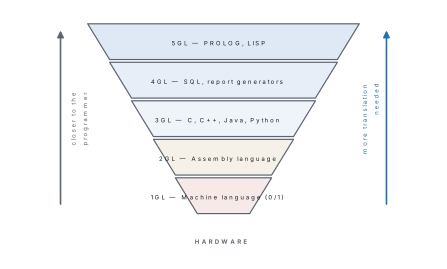
Languages are classified by how close they sit to the machine.
Machine language (1GL) is pure binary — the only language the CPU actually
understands. An instruction such as 10110000 01100001 means "move 97 into
register AL" on an x86 processor. It runs directly, with no translation, and is
therefore the fastest, but it is almost impossible for a human to read, write or
debug, and a program written for one processor will not run on another.
Assembly language (2GL) replaces those bit patterns with short mnemonics
— MOV, ADD, SUB, JMP — and lets you name memory locations. MOV AL, 61h
is the same instruction as above. It still maps one line to one machine
instruction, so it is still machine dependent, but it can be read. An
assembler translates it to machine code. Assembly is used today for device
drivers, embedded microcontrollers and small time-critical routines.
Machine and assembly language together are called low-level languages.
High-level languages (3GL) — C, C++, Java, Python, FORTRAN, COBOL, BASIC —
use ordinary English words and ordinary algebra. One statement such as
area = 3.1416 * r * r; becomes many machine instructions. They are machine
independent: the same source file compiles and runs on a laptop in Butwal and
on a server in Singapore. They need a compiler or interpreter, and the code they
produce is usually a little slower and larger than hand-written assembly.
Fourth-generation languages (4GL) go one step further: you state what you want, not how to get it. SQL is the standard example —
SELECT name, marks FROM students WHERE marks > 80 ORDER BY marks DESC;
says nothing about loops or comparisons, yet a whole search is performed. Other 4GLs include report generators, spreadsheet formulas, MATLAB and Oracle Forms. 4GLs are very fast to write and are used by non-programmers, but they are specialised — you cannot write an operating system in SQL.
| Generation | Name | Written as | Translator | Machine dependent? |
|---|---|---|---|---|
| 1GL | Machine language | 0s and 1s | none | Yes |
| 2GL | Assembly language | mnemonics (MOV, ADD) | assembler | Yes |
| 3GL | High-level language | English-like statements | compiler / interpreter | No |
| 4GL | Very high-level / query | what, not how (SQL) | interpreter / engine | No |
| 5GL | Logic / AI languages | constraints and facts (PROLOG) | inference engine | No |
5.2 Compiler, interpreter and assembler
A CPU can execute only machine code, so every program written in any other language must be translated. The three translators differ in what they translate and how much they translate at a time.
An assembler translates assembly language into machine language.
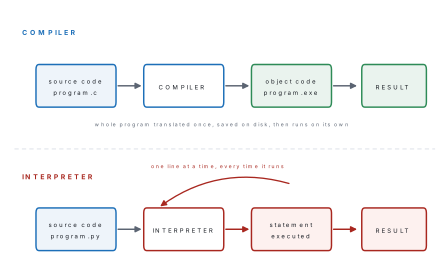
A compiler translates a complete high-level source program into machine code (an object/executable file) in one go, reporting all the errors it finds, and the resulting file is then run on its own.
An interpreter takes the high-level source program and translates and executes it one statement at a time, stopping at the first error.
| Compiler | Interpreter | |
|---|---|---|
| Unit translated | whole program at once | one statement at a time |
| Errors reported | all errors of the whole program together | stops at the first error |
| Output file | produces an object/executable file | produces no separate file |
| Speed of execution | fast (translated once, then just runs) | slow (retranslates every run) |
| Memory needed | more (object code is stored) | less |
| Debugging | harder — errors listed away from the run | easier — you see exactly where it stopped |
| Source needed at run time? | No | Yes |
| Examples | C, C++, Java (to bytecode), Pascal | Python, BASIC, Ruby, JavaScript, PHP |
In real life a C program goes through four steps: preprocessing (handling the
lines that begin with #), compiling (C to assembly/object code),
assembling, and linking (joining your object code to the library code for
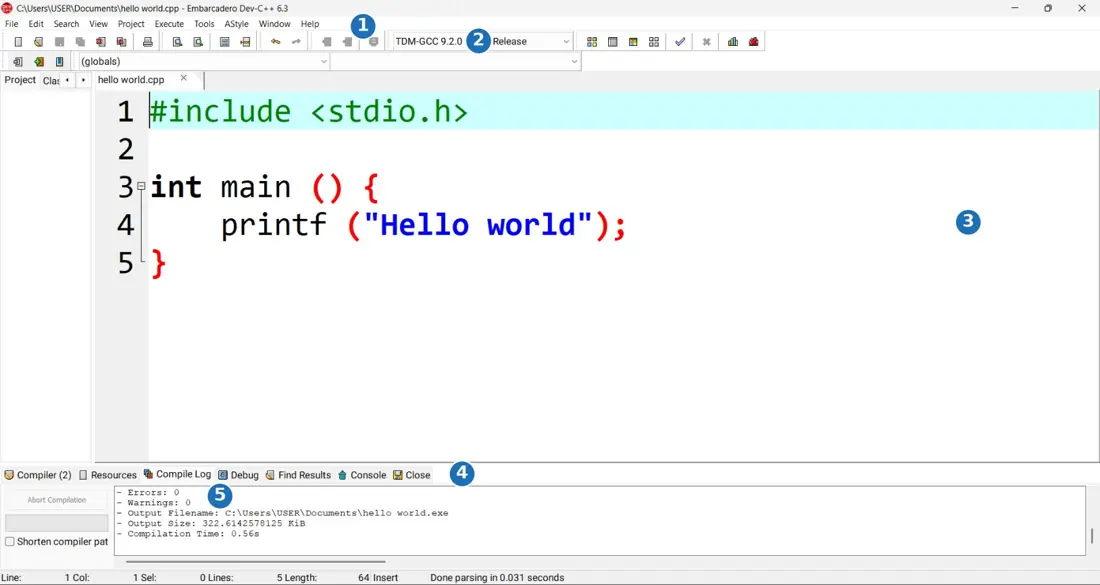
printf and friends) to make the final executable. An Integrated Development
Environment (IDE) such as Dev-C++, Code::Blocks or Turbo C hides all four behind
one "Compile and Run" button.
5.3 Syntax, semantic and runtime errors
An error in a program is called a bug, and removing it is debugging. There are three kinds, and telling them apart is an exam favourite.
A syntax error breaks a grammar rule of the language — a missing semicolon,
an unclosed brace, a misspelt keyword. The compiler catches every one of them and
refuses to produce a program at all. Here is a real one. The semicolon after
b = 3 is missing:
#include <stdio.h>
int main(void)
{
    int a = 5, b = 3
    printf("%d\n", a + b);
    return 0;
}
GCC replies:
e1.c: In function 'main':
e1.c:5:5: error: expected ',' or ';' before 'printf'
    5 |     printf("%d\n", a + b);
      |     ^~~~~~
Notice that the compiler blames line 5, but the mistake is on line 4. A compiler reports where it first noticed trouble, not where you made it: always look at the line above as well.
A semantic error (also called a logical error) is grammatically perfect but says the wrong thing. The program compiles, runs, and quietly prints nonsense. This program converts Celsius to Fahrenheit with the fraction upside down:
f = c * 5 / 9 + 32; /* wrong: should be c * 9 / 5 + 32 */
With c = 37.0 the correct formula prints 37.0 C = 98.6 F, while the wrong one
compiles without a single complaint and prints:
37.0 C = 52.6 F
No tool will find this for you. Only testing with values whose answer you already know will.
A runtime error appears only while the program is running, when it is asked to do something impossible — divide by zero, open a file that does not exist, use an array index that is out of range, or run out of memory. This program is perfectly legal C:
scanf("%d %d", &a, &b);
c = a / b;
With the input 20 4 it prints a / b = 5. With the input 20 0 the program
crashes; on Linux the shell reports:
Floating point exception
A clean compile only proves that your grammar is right. Marks in the board exam are given for a program that produces the right output, so always hand-trace your program with one small test value before you write it out in the answer sheet.
| Syntax error | Semantic (logical) error | Runtime error | |
|---|---|---|---|
| When found | at compile time | never automatically | while running |
| Program produced? | No | Yes | Yes |
| Example | missing ;, prinf for printf |
wrong formula, < for > |
divide by zero, bad array index |
| Who finds it | the compiler | the programmer, by testing | the user, usually |
5.4 Control structures: sequence, selection and iteration
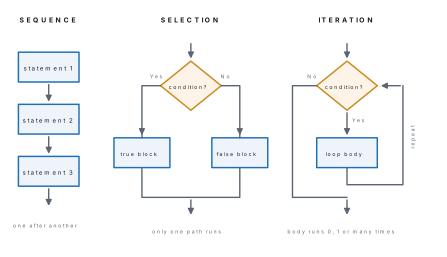
A control structure is a block of code that decides the order in which the statements of a program are executed. The structured programming theorem states that any program, however complicated, can be written using only three of them: sequence, selection and iteration.
- Sequence — statements are carried out one after another, top to bottom, exactly once each.
- Selection (branching) — a condition is tested and one of two or more
paths is taken. In C:
if,if-else,if-else-if,switch. - Iteration (looping/repetition) — a block is repeated while a condition
holds. In C:
while,do-while,for.
5.5 Program design tools: algorithm, flowchart and pseudocode
Before any code is typed, the solution is designed. Three tools are used, and the NEB paper may ask for any of them.
An algorithm is a finite, ordered sequence of clear, unambiguous steps that solves a problem in a finite time. It is written in plain English and numbered.
A flowchart is the pictorial representation of an algorithm, drawn with standard symbols joined by flow lines.
Pseudocode is a half-way language: the structure of a program written with programming keywords (IF, WHILE, ENDIF) but with English inside, and with no attention to the syntax rules of any real language.
Every algorithm must have these five properties: input (zero or more), output (at least one), definiteness (each step unambiguous), finiteness (it must stop) and effectiveness (each step can actually be carried out).
| Symbol | Name | Used for |
|---|---|---|
| Oval (rounded) | Terminal | START and STOP |
| Parallelogram | Input/Output | READ, PRINT |
| Rectangle | Process | calculation, assignment |
| Diamond | Decision | a Yes/No test |
| Circle | Connector | joining parts of a chart on the same page |
| Arrow | Flow line | the direction of flow |
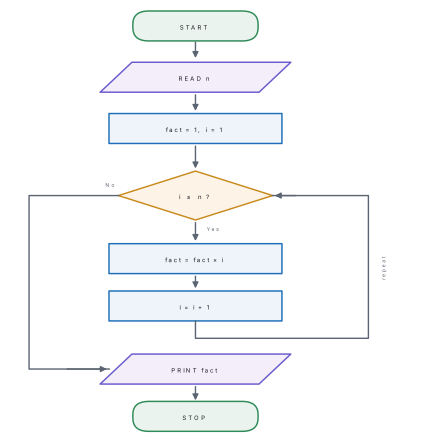
Problem. Design an algorithm, pseudocode and flowchart to read a positive integer and print its factorial, then write the C program.
Solution.
Algorithm
- Start.
- Read the number
n. - Set
fact = 1andi = 1. - If
i > n, go to step 8. - Compute
fact = fact * i. - Compute
i = i + 1. - Go to step 4.
- Print
fact. - Stop.
Pseudocode
BEGIN
    READ n
    SET fact = 1
    FOR i = 1 TO n DO
        fact = fact * i
    ENDFOR
    PRINT fact
END
C program
#include <stdio.h>
int main(void)
{
    int n, i;
    long fact = 1;
    printf("Enter a positive integer: ");
    scanf("%d", &n);
    if (n < 0) { printf("Factorial is not defined for negatives\n"); return 1; }
    for (i = 1; i <= n; i++)
        fact = fact * i;
    printf("%d! = %ld\n", n, fact);
    return 0;
}
Output for the input 7, and again for the input 0:
Enter a positive integer: 7! = 5040
Enter a positive integer: 0! = 1
The loop for n = 0 runs zero times, so fact stays 1 — which is exactly the
mathematical value of 0!.
| Algorithm | Flowchart | Pseudocode | |
|---|---|---|---|
| Form | numbered English steps | diagram of symbols | keyword-and-English text |
| Easy to draw for a big problem? | yes | no — becomes huge | yes |
| Easy for a beginner to follow? | yes | easiest | yes |
| Converts to code | needs thought | needs thought | almost line by line |
| Standard symbols | none | ISO/ANSI symbols | none |
5.6 Absolute binary, BCD, ASCII and Unicode
Numbers and characters must both end up as bit patterns, but they are coded in different ways.
Absolute binary (also called pure or straight binary) is the ordinary positional binary of Unit 2: the whole decimal number is converted as one quantity. So 59 becomes 111011, using six bits.
BCD — Binary Coded Decimal codes each decimal digit separately in four bits. So 59 becomes 0101 1001. BCD wastes space (the six patterns 1010 to 1111 are never used, so about 17% of the codes are thrown away) and arithmetic in BCD is slower, but conversion to and from decimal needs no calculation at all — which is why BCD is used in calculators, digital clocks, electricity meters and seven-segment displays.
Problem. Represent (a) 59 and (b) 274 in absolute binary and in BCD, and comment on the number of bits used.
Solution.
(a) Absolute binary: 59 = 32 + 16 + 8 + 2 + 1 = 111011 — 6 bits. BCD: digit 5 = 0101, digit 9 = 1001, so 0101 1001 — 8 bits.
(b) Absolute binary: 274 = 256 + 16 + 2 = 100010010 — 9 bits. BCD: 2 = 0010, 7 = 0111, 4 = 0100, so 0010 0111 0100 — 12 bits.
BCD always needs 4 bits per decimal digit, so it needs more bits than absolute binary for the same value. The gain is that each digit can be read off, and sent to a display, on its own.
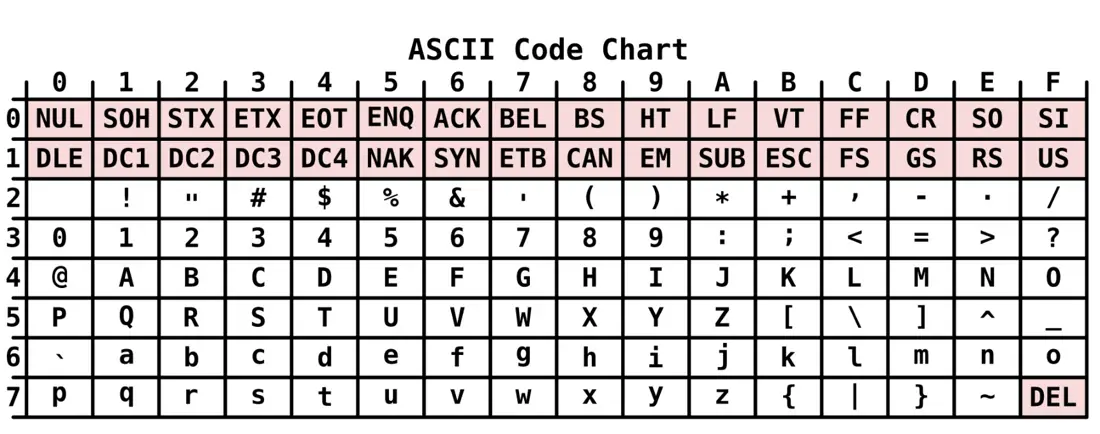
ASCII (American Standard Code for Information Interchange) codes characters. The standard version uses 7 bits, giving 2⁷ = 128 codes, numbered 0 to 127. Extended ASCII uses 8 bits and gives 256. The codes worth memorising are:
| Character(s) | ASCII code (decimal) |
|---|---|
NUL (null) |
0 |
| Space | 32 |
0 to 9 |
48 to 57 |
A to Z |
65 to 90 |
a to z |
97 to 122 |
DEL |
127 |
Because the letters are consecutive and lower case is exactly 32 more than upper case, character arithmetic works. This program prints the codes:
#include <stdio.h>
int main(void)
{
    char ch = 'A';
    printf("'%c' is stored as %d\n", ch, ch);
    printf("'%c' is stored as %d\n", 'a', 'a');
    printf("'%c' is stored as %d\n", '0', '0');
    printf("ch + 32 gives '%c'\n", ch + 32);
    printf("The 26 capitals: ");
    for (ch = 'A'; ch <= 'Z'; ch++) printf("%c", ch);
    printf("\n");
    return 0;
}
'A' is stored as 65
'a' is stored as 97
'0' is stored as 48
ch + 32 gives 'a'
The 26 capitals: ABCDEFGHIJKLMNOPQRSTUVWXYZ
Unicode was created because 256 codes cannot hold the world's writing systems — Devanagari alone needs more than 128. Unicode gives every character of every language one unique number, called a code point, written like U+0915 (क, DEVANAGARI LETTER KA). It has room for 1,114,112 code points, of which about 150,000 are assigned. The first 128 code points of Unicode are exactly ASCII, so every ASCII file is already a valid Unicode (UTF-8) file. This is why you can type नेपाल, 日本 and Nepal in the same document.
| ASCII | Unicode | |
|---|---|---|
| Bits per character | 7 (extended: 8) | 8, 16 or 32, depending on encoding |
| Number of characters | 128 (extended: 256) | over 1.1 million possible |
| Languages covered | English only | practically all languages |
| Compatible with | — | includes ASCII as its first 128 codes |
| Common encodings | — | UTF-8, UTF-16, UTF-32 |
5.7 C: introduction and features; structure of a C program
C was written by Dennis Ritchie at Bell Laboratories, USA, in 1972, to rewrite the UNIX operating system. It grew out of an earlier language called B (Ken Thompson, 1970), which came from BCPL. In 1978 Brian Kernighan and Dennis Ritchie published The C Programming Language, the book that defined "K&R C"; the language was standardised by ANSI in 1989 (ANSI C / C89) and by ISO in 1990.
Its features, in the order examiners usually want them:
- General purpose and structured — programs are built from functions and the three control structures, so large problems break into small ones.
- Middle-level language — it has the readability of a high-level language and low-level facilities (pointers, bitwise operators, direct memory access), which is why operating systems are written in it.
- Portable — the same source compiles on Windows, Linux, macOS and on microcontrollers.
- Rich library — hundreds of ready-made functions in header files.
- Fast and compact, with only 32 keywords to learn.
- Extensible — you add your own functions and your own header files.
- Case sensitive —
sum,SumandSUMare three different names.
A C program has this fixed order:
| Section | Example | Compulsory? |
|---|---|---|
| Documentation (comments) | /* Program to find area */ |
optional |
| Link / preprocessor | #include <stdio.h> |
practically always |
| Definition | #define PI 3.1416 |
optional |
| Global declaration | int count; float area(float); |
optional |
main() function |
int main(void) { ... return 0; } |
compulsory |
| User-defined functions | float area(float r) { ... } |
optional |
/* p01.c - the smallest complete C program with every part labelled */
#include <stdio.h>          /* preprocessor directive: brings in printf   */
#define PI 3.1416           /* symbolic constant                          */

int main(void)              /* execution always begins here               */
{
    float r = 7.0, area;    /* declaration                                */
    area = PI * r * r;      /* statement                                  */
    printf("Namaste, NEBians!\n");
    printf("Area of a circle of radius %.1f cm = %.4f sq cm\n", r, area);
    return 0;               /* 0 tells the OS the program succeeded       */
}
Namaste, NEBians!
Area of a circle of radius 7.0 cm = 153.9384 sq cm
Execution always begins at main(), wherever it appears in the file, and a
program with no main() will compile its pieces but refuse to link. The braces
{ } that open and close main() must match, and every statement inside ends
with a semicolon.
5.8 The C preprocessor and header files; character set; comments
The preprocessor is the first program to touch your source file. It obeys
every line that starts with # — and those lines are not C statements, so they
carry no semicolon.
| Directive | What it does |
|---|---|
#include <stdio.h> |
copies the whole of the header file stdio.h into your file (searches the system directories) |
#include "myfile.h" |
the same, but searches your own folder first |
#define PI 3.1416 |
macro substitution: every later PI is replaced by 3.1416 before compiling |
#define SQ(x) ((x)*(x)) |
a macro with an argument |
#undef PI |
cancels a previous #define |
#ifdef / #endif |
conditional compilation |
A header file (extension .h) holds the declarations of library functions
so the compiler knows how to call them.
| Header | Gives you |
|---|---|
stdio.h |
printf, scanf, getchar, putchar, gets, puts |
conio.h |
clrscr(), getch() — Turbo C only, not standard C |
math.h |
sqrt, pow, abs, sin, cos, log |
string.h |
strlen, strcpy, strcat, strcmp |
stdlib.h |
atoi, rand, malloc, exit |
ctype.h |
toupper, tolower, isalpha, isdigit |
The C character set is everything you are allowed to type in a program:
- Letters —
AtoZandatoz - Digits —
0to9 - Special characters —
, . ; : ? ' " ( ) [ ] { } < > ! | / \ ~ _ $ % & ^ * - + = # - White space — blank, tab, newline, form feed
- Escape sequences —
\nnewline,\ttab,\bbackspace,\\backslash,\"double quote,\0null character
Comments are notes for humans; the compiler deletes them. C has two forms:
/* this is a multi-line comment
   it may run over as many lines as you like */
// this is a single-line comment (C99 onwards)
Comments cannot be nested — a /* inside another /* ... */ does not work.
5.9 Identifiers, keywords and tokens; basic data types; constants and variables
A token is the smallest individual unit of a C program. There are six kinds:
| Token | Examples |
|---|---|
| Keywords | int, if, while, return |
| Identifiers | sum, marks, main, roll_no |
| Constants | 25, 3.1416, 'A', "Nepal" |
| Strings | "Kathmandu" |
| Operators | +, -, *, ==, &&, ++ |
| Special symbols | ; , ( ) { } [ ] # |
Keywords are the 32 reserved words of ANSI C. They are always lower case and can never be used as a name of your own:
auto     break    case     char     const    continue default  do
double   else     enum     extern   float    for      goto     if
int      long     register return   short    signed   sizeof   static
struct   switch   typedef  union    unsigned void     volatile while
An identifier is a name you invent for a variable, function, array or label. The rules — worth five easy marks — are:
- It may contain only letters, digits and the underscore
_. - It must begin with a letter or an underscore, never a digit.
- No blank space and no special character (
marks obtainedandroll-noare both illegal). - It must not be a keyword.
- C is case sensitive:
Totalandtotalare different identifiers.
So sum, _count, marks2, roll_no are valid; 2marks, net pay,
float, pass% are not.
The basic (primary) data types are:
| Type | Typical size | Range (typical) | Format specifier |
|---|---|---|---|
char |
1 byte | −128 to 127 | %c |
int |
4 bytes | −2,147,483,648 to 2,147,483,647 | %d |
short int |
2 bytes | −32,768 to 32,767 | %hd |
long int |
4 or 8 bytes | much larger | %ld |
float |
4 bytes | about 3.4 × 10⁻³⁸ to 3.4 × 10³⁸, 6 digits | %f |
double |
8 bytes | about 1.7 × 10⁻³⁰⁸ to 1.7 × 10³⁰⁸, 15 digits | %lf |
void |
0 | no value at all | — |
Sizes are not fixed by the language — they depend on the compiler and the
machine — which is why C gives you the sizeof operator to ask:
#include <stdio.h>
int main(void)
{
    int    a = 2147483647;
    float  b = 3.14159f;
    double c = 3.141592653589793;
    char   d = 'K';
    printf("int    %d  size %zu bytes\n", a, sizeof(int));
    printf("float  %f  size %zu bytes\n", b, sizeof(float));
    printf("double %.15f  size %zu bytes\n", c, sizeof(double));
    printf("char   %c (ASCII %d)  size %zu byte\n", d, d, sizeof(char));
    printf("short %zu, long %zu, unsigned int %zu\n",
           sizeof(short), sizeof(long), sizeof(unsigned int));
    return 0;
}
On a 64-bit Linux machine with GCC this prints:
int    2147483647  size 4 bytes
float  3.141590  size 4 bytes
double 3.141592653589793  size 8 bytes
char   K (ASCII 75)  size 1 byte
short 2, long 8, unsigned int 4
A constant is a quantity whose value cannot change while the program runs:
25, -7 (integer constants), 3.1416, 2.5e3 (real constants), 'A'
(character constant, in single quotes), "Nepal" (string constant, in double
quotes).
A variable is a named location in memory whose value can change. It must be
declared with a type before it is used: int roll; and it may be
initialised at the same time: int roll = 12;
There are two more ways to make a constant, and the difference is examinable:
#define PI 3.1416      /* preprocessor macro: textual replacement, no memory used */
const float pi = 3.1416f;   /* a real variable that the compiler refuses to change */
5.10 Type specifiers; simple and compound statements
A type specifier is the keyword that states the type of a variable —
char, int, float, double, void — optionally preceded by a modifier
that changes its size or sign: short, long, signed, unsigned.
| Declaration | Meaning |
|---|---|
unsigned int n; |
no negative values, so the positive range doubles (0 to 4,294,967,295) |
signed char c; |
−128 to 127 (the default on most compilers) |
unsigned char c; |
0 to 255 |
long int population; |
a wider integer |
short int age; |
a narrower integer |
A simple statement is a single instruction closed by a semicolon:
sum = a + b;
A compound statement (a block) is a group of statements wrapped in braces and treated as one statement. Anywhere C allows one statement, it allows a block:
if (marks >= 40) {
    printf("Pass\n");
    pass_count = pass_count + 1;
}
Variables declared inside a block are local to it and vanish when the closing brace is reached.
5.11 Operators and expressions
An operator acts on operands; an expression is a combination of operands and operators that reduces to a single value.
| Class | Operators | Note |
|---|---|---|
| Arithmetic | + - * / % |
% (modulus) works on integers only |
| Relational | < > <= >= == != |
result is 1 (true) or 0 (false) |
| Logical | && (and), ! (not), and OR — see below |
combine conditions |
| Assignment | = += -= *= /= %= |
a += b means a = a + b |
| Unary | + - ++ -- ! sizeof & |
one operand only |
| Conditional (ternary) | ? : |
the only three-operand operator |
| Bitwise | & \| ^ ~ << >> |
work bit by bit |
The logical OR operator is typed as two vertical-bar characters, ||.
So (a > b) || (b > 0) reads "a is greater than b, or b is greater
than 0".
Operators are also counted by how many operands they take: unary (one, e.g.
++), binary (two, e.g. +), ternary (three — only ? :).
#include <stdio.h>
int main(void)
{
    int a = 17, b = 5, x, y;
    printf("Arithmetic : %d %d %d %d %d\n", a+b, a-b, a*b, a/b, a%b);
    printf("Real divide: %.2f\n", a / 5.0);
    printf("Relational : %d %d %d %d\n", a>b, a<b, a==b, a!=b);
    printf("Logical    : %d %d %d\n", (a>b)&&(b>0), (a<b)||(b>0), !(a>b));
    y = a; y += b; printf("y += b  -> %d\n", y);
    y -= 2;        printf("y -= 2  -> %d\n", y);
    y *= 3;        printf("y *= 3  -> %d\n", y);
    x = 10;  y = x++;   printf("post: y = x++ gives y = %d, x = %d\n", y, x);
    x = 10;  y = ++x;   printf("pre : y = ++x gives y = %d, x = %d\n", y, x);
    printf("Larger of %d and %d is %d\n", a, b, (a > b) ? a : b);
    printf("Mixed 2+3*4-6/2 = %d\n", 2 + 3 * 4 - 6 / 2);
    return 0;
}
Arithmetic : 22 12 85 3 2
Real divide: 3.40
Relational : 1 0 0 1
Logical    : 1 1 0
y += b  -> 22
y -= 2  -> 20
y *= 3  -> 60
post: y = x++ gives y = 10, x = 11
pre : y = ++x gives y = 11, x = 11
Larger of 17 and 5 is 17
Mixed 2+3*4-6/2 = 11
Three results in that output deserve a second look.
17 / 5 gives 3, not 3.4. When both operands are integers, C does integer
division and throws the fraction away. Write 17 / 5.0 and you get 3.40.
y = x++ gives y = 10 but leaves x = 11. The post-increment x++ uses
the old value first and increases afterwards. The pre-increment ++x
increases first, so y = ++x gives 11.
2 + 3 * 4 - 6 / 2 is 11, not 7. Operators are applied in order of
precedence, and only then left to right:
| Precedence | Operators | Associativity |
|---|---|---|
| highest | ( ) [ ] |
left to right |
! ++ -- sizeof unary - |
right to left | |
* / % |
left to right | |
+ - |
left to right | |
< <= > >= |
left to right | |
== != |
left to right | |
&& |
left to right | |
| logical OR | left to right | |
?: |
right to left | |
| lowest | = += -= *= /= |
right to left |
So 3 * 4 = 12 and 6 / 2 = 3 are done first, leaving 2 + 12 - 3 = 11.
a = 5 stores 5 in a and the expression's value is 5, which C counts as
true. a == 5 compares. Writing if (a = 5) therefore always takes the true
branch and silently destroys a. This single typing mistake costs more marks
than any other in the C paper.
5.12 Input/output functions
C itself has no input or output statements; everything is done by library
functions declared in stdio.h.
| Function | Does | Example |
|---|---|---|
printf() |
formatted output to the screen | printf("Total = %d\n", t); |
scanf() |
formatted input from the keyboard | scanf("%d", &n); |
getchar() |
reads one character | ch = getchar(); |
putchar() |
writes one character | putchar(ch); |
gets() |
reads a whole line into a string | gets(name); |
puts() |
writes a string and a newline | puts(name); |
The format specifier tells the function what kind of data to expect:
| Specifier | Data | Specifier | Data |
|---|---|---|---|
%d |
int (decimal) | %c |
char |
%f |
float | %s |
string |
%lf |
double | %u |
unsigned int |
%ld |
long int | %x |
hexadecimal |
%.2f |
float, 2 decimal places | %5d |
int, right-aligned in 5 columns |
#include <stdio.h>
int main(void)
{
int roll; float marks; char section; char name[20];
printf("Enter roll, marks, section and name: ");
scanf("%d %f %c %s", &roll, &marks, §ion, name);
printf("Roll no : %d\n", roll);
printf("Marks : %.2f\n", marks);
printf("Section : %c\n", section);
printf("Name : %s\n", name);
printf("Grade point (marks/25): %.2f\n", marks / 25.0);
return 0;
}
Typing 17 82.5 B Sushmita gives:
Enter roll, marks, section and name: Roll no   : 17
Marks     : 82.50
Section   : B
Name      : Sushmita
Grade point (marks/25): 3.30
scanf("%d", n); compiles but destroys memory, because scanf must be told
where to put the value. Write scanf("%d", &n);. The one exception is a
string: an array name is already an address, so scanf("%s", name); is
correct without &.
5.13 Selection control statements: if, if-else, if-else-if, nested if, switch
| Form | Shape |
|---|---|
if |
if (condition) statement; |
if-else |
if (condition) statement1; else statement2; |
if-else-if (ladder) |
a chain of tests; the first true one runs and the rest are skipped |
nested if |
an if written inside the body of another if |
switch |
one variable compared against a list of constant case labels |
A grade calculator is the standard if-else-if question:
#include <stdio.h>
int main(void)
{
    float marks;
    printf("Enter marks: ");
    scanf("%f", &marks);
    if (marks >= 90)        printf("Grade A+\n");
    else if (marks >= 80)   printf("Grade A\n");
    else if (marks >= 70)   printf("Grade B+\n");
    else if (marks >= 60)   printf("Grade B\n");
    else if (marks >= 40)   printf("Grade C\n");
    else                    printf("Not graded\n");
    return 0;
}
Enter marks: Grade A          <- input was 83
Enter marks: Not graded       <- input was 35
The ladder works because the tests are checked in order and stop at the first
true one: 83 fails >= 90, passes >= 80, and the remaining tests are never
reached.
switch is used when one variable is compared with several constant values.
It is tidier than a long ladder, but it cannot test a range or a real number.
#include <stdio.h>
int main(void)
{
    int a, b, choice;
    printf("1.Add 2.Subtract 3.Multiply 4.Divide\n");
    printf("Enter two numbers and your choice: ");
    scanf("%d %d %d", &a, &b, &choice);
    switch (choice) {
        case 1: printf("Sum        = %d\n", a + b);        break;
        case 2: printf("Difference = %d\n", a - b);        break;
        case 3: printf("Product    = %d\n", a * b);        break;
        case 4:
            if (b != 0) printf("Quotient   = %.2f\n", (float)a / b);
            else        printf("Division by zero is not allowed\n");
            break;
        default: printf("Invalid choice\n");
    }
    return 0;
}
1.Add 2.Subtract 3.Multiply 4.Divide
Enter two numbers and your choice: Quotient   = 5.00      <- input 45 9 4
1.Add 2.Subtract 3.Multiply 4.Divide
Enter two numbers and your choice: Invalid choice         <- input 45 9 7
Without break, control runs straight on into the next case and every
following one executes too. Check every case has its break, and give the
switch a default for inputs you did not plan for.
if-else-if ladder |
switch |
|
|---|---|---|
| Tests | any condition, including ranges | equality with constants only |
| Data types | any, including float |
int and char only |
| If no case matches | final else |
default |
Needs break? |
no | yes, in every case |
5.14 Iteration control statements: while, do-while, for, nested loops
Every loop needs three things: initialisation of a counter, a test condition, and updating of the counter. The three C loops differ only in where those three sit.
| Loop | Form | Test happens | Minimum runs |
|---|---|---|---|
while |
while (cond) { body } |
before the body | 0 |
do-while |
do { body } while (cond); |
after the body | 1 |
for |
for (init; cond; update) { body } |
before the body | 0 |
while is the entry-controlled loop, do-while the exit-controlled loop.
Note the semicolon after while (cond); in do-while — it is the only place a
loop keyword takes one.
#include <stdio.h>
int main(void)
{
    int i, n = 5, sum = 0;
    printf("for      : ");
    for (i = 1; i <= n; i++) { printf("%d ", i); sum += i; }
    printf("| sum = %d\n", sum);

    i = 1; sum = 0;
    printf("while    : ");
    while (i <= n) { printf("%d ", i); sum += i; i++; }
    printf("| sum = %d\n", sum);

    i = 1; sum = 0;
    printf("do-while : ");
    do { printf("%d ", i); sum += i; i++; } while (i <= n);
    printf("| sum = %d\n", sum);

    i = 100;                                  /* condition is FALSE now */
    while (i < 5)
        printf("this line never prints\n");
    do
        printf("but do-while still prints once, with i = %d\n", i);
    while (i < 5);
    return 0;
}
for      : 1 2 3 4 5 | sum = 15
while    : 1 2 3 4 5 | sum = 15
do-while : 1 2 3 4 5 | sum = 15
but do-while still prints once, with i = 100
The last four lines are the whole difference between while and do-while,
proved by the machine: with i = 100 the while body never ran, but the
do-while body ran once before the condition was even looked at.
A nested loop is a loop inside a loop. For every single turn of the outer loop, the inner loop runs all the way through. This is how patterns and tables are printed:
#include <stdio.h>
int main(void)
{
    int i, j;
    for (i = 1; i <= 5; i++) {          /* outer loop: one row per turn  */
        for (j = 1; j <= i; j++)        /* inner loop: i stars in row i  */
            printf("* ");
        printf("\n");
    }
    printf("\n");
    for (i = 1; i <= 3; i++) {
        for (j = 1; j <= 5; j++)
            printf("%4d", i * j);
        printf("\n");
    }
    return 0;
}
*
* *
* * *
* * * *
* * * * *

   1   2   3   4   5
   2   4   6   8  10
   3   6   9  12  15
Two jump statements are used inside loops: break leaves the loop
immediately, and continue skips the rest of this turn and goes on to the
next one.
for (i = 1; i <= 10; i--) and a while loop whose counter is never updated
both run forever. Before you write a loop in the exam, point at the statement
that changes the counter. If you cannot find it, the loop is infinite.
5.15 Arrays: definition, one-dimensional and two-dimensional, matrix addition and subtraction
An array is a collection of a fixed number of elements of the same data type, stored in consecutive memory locations and referred to by a common name, each element being reached by an index (subscript).
Without arrays, storing the marks of 50 students needs 50 separate variable names. With an array it is one name and a loop.
int marks[5];                       /* declaration: 5 integers           */
int marks[5] = {78, 52, 91, 45, 84};/* declaration with initialisation   */
The index always starts at 0, so a five-element array uses marks[0] to
marks[4]. The total memory used is number of elements × size of one element —
here 5 × 4 = 20 bytes.
#include <stdio.h>
int main(void)
{
    int marks[5] = {78, 52, 91, 45, 84};
    int i, sum = 0, max, min;
    max = min = marks[0];
    for (i = 0; i < 5; i++) {
        printf("marks[%d] = %d\n", i, marks[i]);
        sum += marks[i];
        if (marks[i] > max) max = marks[i];
        if (marks[i] < min) min = marks[i];
    }
    printf("Total   = %d\n", sum);
    printf("Average = %.2f\n", sum / 5.0);
    printf("Highest = %d, Lowest = %d\n", max, min);
    return 0;
}
marks[0] = 78
marks[1] = 52
marks[2] = 91
marks[3] = 45
marks[4] = 84
Total   = 350
Average = 70.00
Highest = 91, Lowest = 45
marks[5] and marks[-1] are outside a five-element array, but C will happily
read or write them and corrupt whatever is next in memory. The loop condition is
i < 5, not i <= 5.
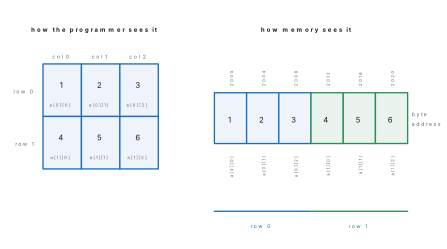
A two-dimensional array is an array of arrays — a table with rows and columns, which is how a matrix is stored.
int a[2][3] = {{1, 2, 3}, {4, 5, 6}}; /* 2 rows, 3 columns */
C stores it in row-major order: the whole of row 0 first, then the whole of row 1, in one unbroken run of memory.
Two matrices can be added or subtracted only if they have the same order, and
the rule is element by element: the element in row i, column j of the answer
is formed from the elements in row i, column j of both matrices. That is a
nested loop, one loop for rows and one for columns.
Problem. Add and subtract the two 2 × 3 matrices by hand, then write the C program that does it.
Solution. Let A have rows (1, 2, 3) and (4, 5, 6), and B have rows (7, 8, 9) and (1, 0, 2).
For the sum, add matching positions: row 0 gives 1+7 = 8, 2+8 = 10, 3+9 = 12; row 1 gives 4+1 = 5, 5+0 = 5, 6+2 = 8.
For the difference, subtract matching positions: row 0 gives 1−7 = −6, 2−8 = −6, 3−9 = −6; row 1 gives 4−1 = 3, 5−0 = 5, 6−2 = 4.
#include <stdio.h>
int main(void)
{
    int a[2][3] = {{1, 2, 3}, {4, 5, 6}};
    int b[2][3] = {{7, 8, 9}, {1, 0, 2}};
    int sum[2][3], diff[2][3], i, j;

    for (i = 0; i < 2; i++)
        for (j = 0; j < 3; j++) {
            sum[i][j]  = a[i][j] + b[i][j];
            diff[i][j] = a[i][j] - b[i][j];
        }

    printf("A + B =\n");
    for (i = 0; i < 2; i++) {
        for (j = 0; j < 3; j++) printf("%4d", sum[i][j]);
        printf("\n");
    }
    printf("A - B =\n");
    for (i = 0; i < 2; i++) {
        for (j = 0; j < 3; j++) printf("%4d", diff[i][j]);
        printf("\n");
    }
    return 0;
}
A + B =
   8  10  12
   5   5   8
A - B =
  -6  -6  -6
   3   5   4
The machine's answer matches the hand calculation exactly.
5.16 Strings: definition and string functions
A string in C is a one-dimensional array of characters terminated by the
null character '\0'. There is no separate string data type. The null
character is what tells every library function where the string ends, so an
array holding n characters must be declared with room for n + 1.
char city[10] = "Pokhara";
reserves 10 bytes and stores P o k h a r a \0, leaving two spare. Note the
difference between 'A' (a single character, 1 byte) and "A" (a string, 2
bytes — the letter and the null).
The functions live in string.h:
| Function | What it does | Example | Result |
|---|---|---|---|
strlen(s) |
returns the length, not counting '\0' |
strlen("Kathmandu") |
9 |
strcpy(s1,s2) |
copies s2 into s1 | strcpy(s3,"Kathmandu") |
s3 becomes Kathmandu |
strcat(s1,s2) |
joins s2 to the end of s1 | strcat(s3," Valley") |
Kathmandu Valley |
strcmp(s1,s2) |
compares; 0 if equal, negative if s1 < s2, positive if s1 > s2 | strcmp("Kathmandu","Valley") |
−11 |
strrev(s) |
reverses the string | strrev("Pokhara") |
arahkoP |
strlwr(s) |
converts to lower case | strlwr("Pokhara") |
pokhara |
strupr(s) |
converts to upper case | strupr("Pokhara") |
POKHARA |
#include <stdio.h>
#include <string.h>
int main(void)
{
    char s1[30] = "Kathmandu";
    char s2[30] = "Valley";
    char s3[30];

    printf("strlen(s1)        = %zu\n", strlen(s1));
    strcpy(s3, s1);
    printf("strcpy(s3, s1)    -> s3 = %s\n", s3);
    strcat(s3, " ");
    strcat(s3, s2);
    printf("strcat            -> s3 = %s\n", s3);
    printf("strcmp(s1, s2)    = %d\n", strcmp(s1, s2));
    printf("strcmp(s1, \"Kathmandu\") = %d\n", strcmp(s1, "Kathmandu"));
    printf("s1[0] = %c, s1[8] = %c\n", s1[0], s1[8]);
    return 0;
}
strlen(s1)        = 9
strcpy(s3, s1)    -> s3 = Kathmandu
strcat            -> s3 = Kathmandu Valley
strcmp(s1, s2)    = -11
strcmp(s1, "Kathmandu") = 0
s1[0] = K, s1[8] = u
Why is strcmp("Kathmandu", "Valley") equal to −11? The function compares
character by character until they differ. The very first pair differs: 'K' is
ASCII 75 and 'V' is ASCII 86, and 75 − 86 = −11. The sign is what matters —
negative means the first string comes earlier in dictionary order.
These three are in the NEB syllabus because they exist in Turbo C and other
Borland compilers, but they are not part of the ANSI C library. Compiling
strrev(s) with GCC gives a real error:
error: implicit declaration of function 'strrev'; did you mean 'strsep'?
Write them yourself. This version compiles and runs anywhere:
#include <stdio.h>
#include <string.h>
#include <ctype.h>

void my_strrev(char s[]) {
    int i, n = strlen(s); char t;
    for (i = 0; i < n / 2; i++) { t = s[i]; s[i] = s[n-1-i]; s[n-1-i] = t; }
}
void my_strupr(char s[]) { int i; for (i = 0; s[i]; i++) s[i] = toupper(s[i]); }
void my_strlwr(char s[]) { int i; for (i = 0; s[i]; i++) s[i] = tolower(s[i]); }

int main(void)
{
    char a[30] = "Pokhara", b[30] = "Pokhara", c[30] = "Pokhara";
    my_strrev(a); printf("strrev(\"Pokhara\")  = %s\n", a);
    my_strupr(b); printf("strupr(\"Pokhara\")  = %s\n", b);
    my_strlwr(c); printf("strlwr(\"Pokhara\")  = %s\n", c);
    return 0;
}
strrev("Pokhara")  = arahkoP
strupr("Pokhara")  = POKHARA
strlwr("Pokhara")  = pokhara
In the board exam, using strrev() is accepted. On a real Linux or modern
Windows compiler, it is not.
Problem. Write a C program that reads a line of text and counts its characters, vowels and consonants.
Solution. Read the whole line (spaces included), walk the array until the null character, fold each letter to lower case by ASCII arithmetic, and test it.
#include <stdio.h>
#include <string.h>
int main(void)
{
    char s[100];
    int i, v = 0, cons = 0;
    printf("Enter a line of text: ");
    scanf("%99[^\n]", s);
    for (i = 0; s[i] != '\0'; i++) {
        char ch = s[i];
        if (ch >= 'A' && ch <= 'Z') ch = ch + 32;
        if (ch >= 'a' && ch <= 'z') {
            if (ch=='a'||ch=='e'||ch=='i'||ch=='o'||ch=='u') v++;
            else cons++;
        }
    }
    printf("Length = %zu, vowels = %d, consonants = %d\n", strlen(s), v, cons);
    return 0;
}
With the input Sagarmatha is in Nepal:
Enter a line of text: Length = 22, vowels = 8, consonants = 11
Check by hand: 22 characters including the three spaces; the vowels are a-a-a-a (Sagarmatha), i (is), i (in), e-a (Nepal) = 8; the remaining 11 letters are consonants. ✓
Chapter summary
- Languages run from 1GL machine code (binary, machine dependent, fastest) up through 2GL assembly (mnemonics, needs an assembler), 3GL high-level (C, Java — machine independent, needs a compiler or interpreter) to 4GL (SQL — you say what, not how).
- A compiler translates the whole program at once and produces an executable; an interpreter translates and runs one statement at a time and produces no file. Compiled code runs faster; interpreted code is easier to debug.
- Syntax errors are caught by the compiler and stop it producing a program; semantic (logical) errors compile fine and give wrong answers; runtime errors such as divide-by-zero appear only while running.
- The three control structures are sequence, selection (
if,if-else,if-else-if,switch) and iteration (while,do-while,for). Every program can be built from these three alone. - Design tools: algorithm (numbered English steps), flowchart (oval = terminal, parallelogram = I/O, rectangle = process, diamond = decision), pseudocode (keywords plus English).
- Absolute binary codes the whole number; BCD codes each decimal digit in
4 bits; ASCII codes characters in 7 bits (128 codes:
A= 65,a= 97,0= 48, space = 32); Unicode gives every character of every language its own code point and contains ASCII as its first 128 codes. - C was written by Dennis Ritchie at Bell Labs in 1972. It is a middle-level,
structured, portable, case-sensitive language with 32 keywords. Every
program has exactly one
main(). - C's six tokens are keywords, identifiers, constants, strings, operators and
special symbols. An identifier starts with a letter or
_, contains only letters, digits and_, and is not a keyword. - Integer division throws the fraction away (
17/5is 3);x++uses the value then increments while++xincrements first;=assigns and==compares. whiletests before the body (may run 0 times);do-whiletests after (runs at least once);forpacks initialisation, test and update into one line.- An array holds a fixed number of same-type elements in consecutive memory, indexed from 0. A 2-D array is stored in row-major order. Matrices of the same order are added or subtracted element by element with a nested loop.
- A string is a character array ending in
'\0', so it needs n + 1 bytes for n characters.strlen,strcpy,strcatandstrcmpare standard;strrev,strlwrandstruprare Turbo C extensions.
Practice questions
Group A — Multiple choice (1 mark each)
- Which of the following is a low-level language? [1]aCbSQLcAssembly languagedPython
- A translator that converts a high-level program into machine code all at once is called [1]aan assemblerba compilercan interpreterda loader
- A missing semicolon in a C program produces [1]aa runtime errorba logical errorca syntax errordno error
- In a flowchart, the diamond symbol represents [1]astart/stopba processcinput/outputda decision
- The ASCII code of the character
Ais [1]a61b65c97d122 - Which one is not a valid C identifier? [1]a
_totalbmarks2c2marksdrollNo - The value of
17 % 5in C is [1]a3b3.4c2d0 - Which loop always executes its body at least once? [1]a
forbwhilecdo-whilednestedfor - If
int a[5];is declared, the last valid element is [1]aa[5]ba[4]ca[0]da[6]
Answers to Group A
1. (c) — machine and assembly languages are the low-level ones.
2. (b) — an interpreter does it one statement at a time.
3. (c) — it breaks a grammar rule, so the compiler refuses to build.
4. (d) — the diamond is always a Yes/No test.
5. (b) — A = 65, so Z = 90 and a = 97.
6. (c) — an identifier may not begin with a digit.
7. (c) — % gives the remainder: 17 = 3 × 5 + 2.
8. (c) — do-while tests the condition after the body.
9. (b) — indexing starts at 0, so five elements are a[0] to a[4].
Group B — Short answer (5 marks each)
- Differentiate between a compiler and an interpreter with any five points. [5]
- Define syntax error, semantic error and runtime error with one example of each. [5]
- Write an algorithm and draw a flowchart to read three numbers and print the largest. [5]
- Write a C program to check whether a given number is prime or not. [5]
- Write a C program to display the first n terms of the Fibonacci series. [5]
- Define an array. Write a C program to read 10 numbers into an array and print their sum and average. [5]
Answers to Group B
1. See the comparison table in §5.2: unit translated (whole program / one statement), errors reported (all together / stops at the first), object file (produced / not produced), execution speed (fast / slow), memory (more / less), examples (C, C++ / Python, BASIC).
2. Syntax error — breaks a grammar rule, found by the compiler, no program is
produced; example: int a = 5 with no semicolon. Semantic (logical) error —
grammatically correct but wrong meaning; example: f = c * 5 / 9 + 32; for a
Celsius-to-Fahrenheit conversion, which prints 52.6 instead of 98.6 for 37 °C.
Runtime error — occurs while running; example: c = a / b; when the user enters
b = 0, which aborts the program with a "Floating point exception".
3. Algorithm: 1. Start. 2. Read a, b, c. 3. If a ≥ b and a ≥ c, print a and
go to 6. 4. If b ≥ a and b ≥ c, print b and go to 6. 5. Print c. 6. Stop.
Flowchart: an oval START, a parallelogram READ a, b, c, a diamond a ≥ b AND
a ≥ c?, its No branch leading to a second diamond b ≥ c?, each branch ending
in a parallelogram PRINT, and all three joining an oval STOP.
The equivalent C program is:
#include <stdio.h>
int main(void)
{
    float a, b, c;
    printf("Enter three numbers: ");
    scanf("%f %f %f", &a, &b, &c);
    if (a >= b && a >= c)      printf("Largest = %.2f\n", a);
    else if (b >= a && b >= c) printf("Largest = %.2f\n", b);
    else                       printf("Largest = %.2f\n", c);
    return 0;
}
With the input 12 47 29 it prints Largest = 47.00.
4.
#include <stdio.h>
int main(void)
{
    int n, i, isPrime = 1;
    printf("Enter a number: ");
    scanf("%d", &n);
    if (n < 2) isPrime = 0;
    for (i = 2; i <= n / 2; i++)
        if (n % i == 0) { isPrime = 0; break; }
    if (isPrime) printf("%d is a prime number\n", n);
    else         printf("%d is not a prime number\n", n);
    return 0;
}
Tested outputs: 29 gives 29 is a prime number; 91 gives 91 is not a prime
number (91 = 7 × 13); 1 gives 1 is not a prime number.
5.
#include <stdio.h>
int main(void)
{
    int n, i, t1 = 0, t2 = 1, next;
    printf("Enter how many terms: ");
    scanf("%d", &n);
    printf("Fibonacci series: ");
    for (i = 1; i <= n; i++) {
        printf("%d ", t1);
        next = t1 + t2;
        t1 = t2;
        t2 = next;
    }
    printf("\n");
    return 0;
}
For n = 10 the tested output is Fibonacci series: 0 1 1 2 3 5 8 13 21 34.
6. An array is a collection of a fixed number of elements of the same data type stored in consecutive memory locations under one name, each reached by an index starting at 0.
#include <stdio.h>
int main(void)
{
    int num[10], i, sum = 0;
    printf("Enter 10 numbers: ");
    for (i = 0; i < 10; i++) scanf("%d", &num[i]);
    for (i = 0; i < 10; i++) sum += num[i];
    printf("Sum = %d, Average = %.2f\n", sum, sum / 10.0);
    return 0;
}
Group C — Long answer (8 marks each)
- (a) Explain the three control structures of structured programming with a
flowchart fragment for each. [4](b) Write a C program using
switchthat reads two numbers and a choice (1 = add, 2 = subtract, 3 = multiply, 4 = divide) and prints the result. [4] - (a) Define an array. Explain the difference between a one-dimensional and a two-dimensional array with a declaration of each. [3](b) Write a C program to read two 3 × 3 matrices and print their sum and their difference. [5]
- (a) What is a string in C? Why does a string of n characters need n + 1 bytes?
[3](b) Explain
strlen,strcpy,strcatandstrcmpwith one example each, and write a C program to check whether a word entered by the user is a palindrome. [5]
Answers to Group C
1. (a) Sequence — statements run top to bottom, each once; drawn as rectangles joined by downward arrows. Selection — a diamond tests a condition and exactly one of the two branches runs before they rejoin. Iteration — a diamond tests a condition, the body runs, and a flow line returns to the diamond; the body may run zero, one or many times. Each structure has one entry and one exit, so they can be stacked and nested. (See Figure 3.)
1. (b) The program is the switch example of §5.13. Tested: the input
45 9 4 prints Quotient = 5.00; the input 45 9 7 prints Invalid choice
from the default label.
2. (a) An array is a fixed-size collection of same-type elements in
consecutive memory under one name, indexed from 0. A one-dimensional array is
a single list and needs one index — int marks[5]; — while a two-dimensional
array is a table of rows and columns and needs two — int a[2][3]; — and is
stored in row-major order (all of row 0, then all of row 1).
2. (b)
#include <stdio.h>
int main(void)
{
    int a[3][3], b[3][3], i, j;
    printf("Enter 9 elements of matrix A: ");
    for (i = 0; i < 3; i++)
        for (j = 0; j < 3; j++) scanf("%d", &a[i][j]);
    printf("Enter 9 elements of matrix B: ");
    for (i = 0; i < 3; i++)
        for (j = 0; j < 3; j++) scanf("%d", &b[i][j]);
    printf("A + B =\n");
    for (i = 0; i < 3; i++) {
        for (j = 0; j < 3; j++) printf("%5d", a[i][j] + b[i][j]);
        printf("\n");
    }
    printf("A - B =\n");
    for (i = 0; i < 3; i++) {
        for (j = 0; j < 3; j++) printf("%5d", a[i][j] - b[i][j]);
        printf("\n");
    }
    return 0;
}
The same nested-loop logic on 2 × 3 matrices was tested in Worked example 5.3 and gave rows (8, 10, 12) and (5, 5, 8) for the sum and (−6, −6, −6) and (3, 5, 4) for the difference.
3. (a) A string is a one-dimensional array of characters terminated by the
null character '\0'. The library functions find the end of a string by looking
for that null, so one extra byte must be reserved for it: char city[10] =
"Pokhara"; stores seven letters plus '\0' and has two bytes spare.
3. (b) strlen("Kathmandu") returns 9 (the null is not counted).
strcpy(s3, s1) copies s1 into s3, so s3 becomes Kathmandu. strcat(s3, s2)
joins s2 onto the end of s3, giving Kathmandu Valley. strcmp(s1, s2) returns
0 when the strings are equal, and here returns −11 because 'K' (65 + 10 = 75)
minus 'V' (86) is −11.
#include <stdio.h>
#include <string.h>
int main(void)
{
    char s[50];
    int i, j, pal = 1;
    printf("Enter a word: ");
    scanf("%49s", s);
    j = strlen(s) - 1;
    for (i = 0; i < j; i++, j--)
        if (s[i] != s[j]) { pal = 0; break; }
    if (pal) printf("\"%s\" is a palindrome\n", s);
    else     printf("\"%s\" is not a palindrome\n", s);
    return 0;
}
Tested outputs: madam gives "madam" is a palindrome; nepal gives
"nepal" is not a palindrome.
Practise more: Computer Science question bank