Unit 6 · 8 teaching hours · 37 min read
Web Technology I
What the syllabus asks for 14
- Web development introduction; Web browsers and search engines
- Overview of internet and web technologies; Content Management System (CMS)
- HTML: objectives, structure, publishing and hosting; Tags vs Attributes
- Basic tags: HTML, HEAD, TITLE, BODY (fore colour, background colour, background image, background sound)
- Heading tags H1-H6 with ALIGN; FONT tag (Size 1-7, BASEFONT, SMALL, BIG, COLOR)
- Paragraph (P); Break Line (BR); Comments
- Formatting Text: B, I, U, Mark, Sup, Sub, EM, BLOCKQUOTE, PREFORMATTED
- Ordered List OL (LI, Type 1/I/A/a, START, VALUE); Unordered List UL (Disc, Circle, Square, DL, DT, DD)
- ADDRESS tag; Creating links; Anchor tag and Hyperlink
- Tables using TH, TR, TD; Forms using textbox, radio, checkbox, textarea, button
- HTML5 elements: audio, embed, source, track, video
- HTML5 Graphics using canvas and svg tags
- Concept of domain name and web hosting
- Cascading Style Sheets: Inline CSS, Embedded CSS, External CSS
Every page you have ever opened — the NEB result page, a school website, a news
site — is a plain text file with tags in it. That is the whole secret of this
unit. HTML is not a programming language and there is nothing to compile: you
type text, you wrap it in tags, you save it with a .html extension, and a
browser turns it into a page. This unit takes you from what the web is to
writing, styling and publishing a page of your own.
The NEB paper asks for tags with their attributes, written correctly. You will be asked to write HTML code for a given output — usually a table, a form or a list — so practise writing tags by hand, not by copying. Learn the difference between a tag and an attribute, between HTML and HTTP, and between the three ways of attaching CSS. Every tag you write in the exam must be spelt correctly and closed correctly.
6.1 Web development, web browsers and search engines
Web development is the work of building and maintaining websites — designing the pages, writing the code, putting the site on a server and keeping it running. It is usually split into front-end work (what the visitor sees: HTML, CSS and JavaScript running in the browser) and back-end work (what happens on the server: PHP, Python, databases).
A web page is a single document. A website is a collection of related web pages kept under one domain name. The first page a visitor lands on is the home page.
A web browser is application software that requests a web page from a web server, interprets the HTML, CSS and JavaScript it receives, and displays the result. Examples: Google Chrome, Mozilla Firefox, Microsoft Edge, Safari, Opera.
The part of a browser that turns HTML into pixels is called the rendering engine — Blink in Chrome and Edge, Gecko in Firefox, WebKit in Safari.
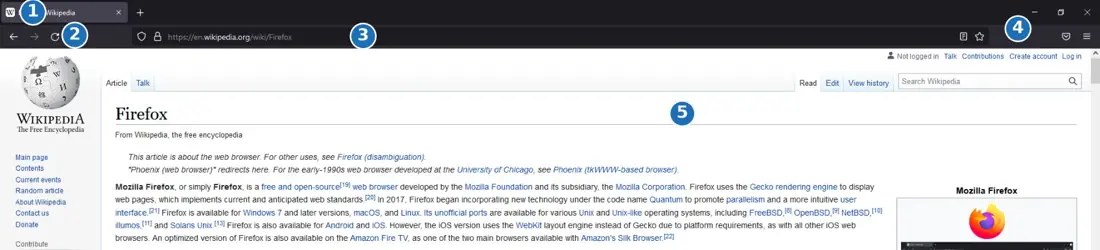
A search engine is a website that maintains an index of other web pages and returns a list of the ones matching a user's query. Examples: Google, Bing, DuckDuckGo, Yahoo.
A search engine works in three stages. A crawler (or spider) follows links from page to page collecting documents; an indexer stores the words of every page it finds in a huge index; and when you type a query the query processor searches that index and ranks the hits so the most relevant come first. So when you search, you are not searching the web — you are searching a copy of it that the search engine made earlier.
A browser and a search engine are not the same thing. The browser is software installed on your device; the search engine is a website you visit using a browser.
6.2 The internet, web technologies and content management systems
The internet is the global network of interconnected computer networks. The World Wide Web (WWW) is just one of the services that runs on it — a collection of linked documents identified by URLs and fetched using HTTP. Email, FTP and video calls are other internet services that are not the Web. Tim Berners-Lee invented the World Wide Web at CERN in 1989.
The internet is the road network; the web is the traffic of documents travelling on it. There are other kinds of traffic on the same roads.
The core technologies you must know by name:
| Technology | Stands for | Does what |
|---|---|---|
| HTML | HyperText Markup Language | gives a page its structure |
| CSS | Cascading Style Sheets | gives a page its presentation |
| JavaScript | — | gives a page its behaviour |
| HTTP / HTTPS | HyperText Transfer Protocol (Secure) | the rules for requesting and sending pages |
| URL | Uniform Resource Locator | the address of a page |
| FTP | File Transfer Protocol | uploading a site to the server |
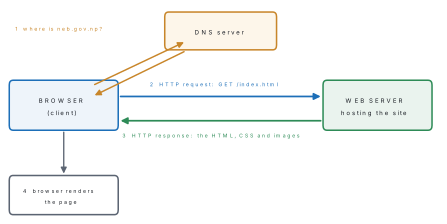
The web works on the client–server model. Your browser is the client; it sends an HTTP request; the web server sends back an HTTP response containing the HTML file and everything the page needs.
A Content Management System is software that lets people create, edit, organise and publish content on a website without writing HTML. The content is stored in a database and poured into ready-made page templates.
Popular examples are WordPress, Joomla and Drupal. A CMS separates three jobs: the content (in the database), the template or theme (the look), and the plugins or extensions (extra features such as a photo gallery or a contact form). That is why a school office clerk can add a notice to the school website without knowing a single tag.
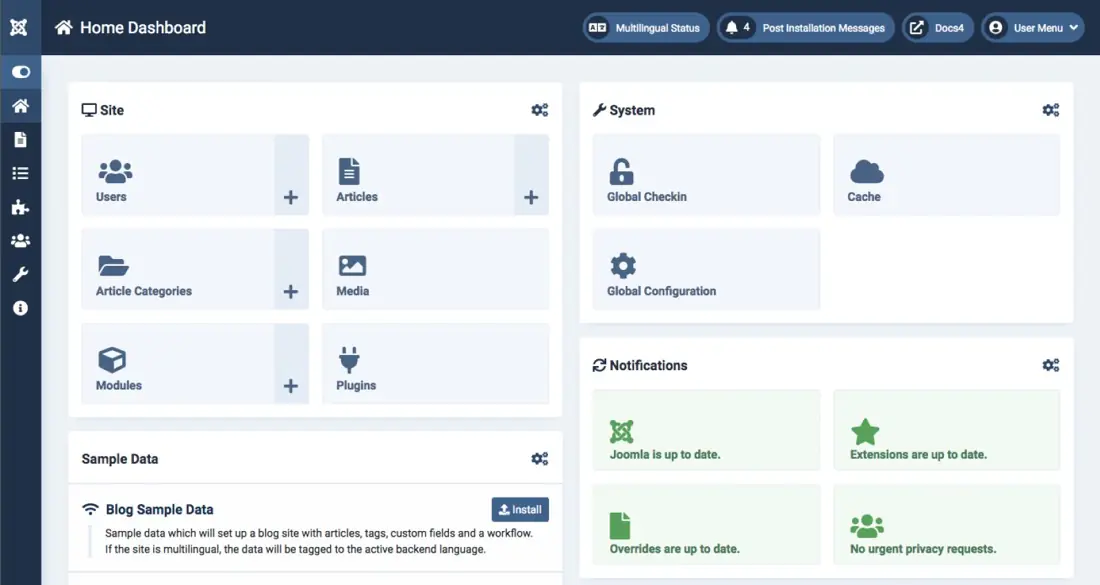
Advantages of a CMS: no coding needed to publish content; several people can work on the same site with different permission levels; the look can be changed by switching the theme without touching the content; updates and backups are built in. Disadvantages: the site is heavier and slower than hand-written HTML; you depend on plugin authors; an unpatched CMS is a common target for attackers.
6.3 HTML: objectives, structure, publishing and hosting
HTML (HyperText Markup Language) is the standard markup language used to create the structure of web pages. HyperText means text that contains links to other text; markup means the content is marked with tags that say what each part of it is. HTML was created by Tim Berners-Lee in 1991; the current version is HTML5 (2014).
HTML is not a programming language — it has no variables, no conditions and no loops. It describes a document; it does not compute anything.
Objectives of HTML — to structure the content of a page (headings, paragraphs, lists, tables); to link documents to one another through hyperlinks; to embed images, audio and video; and to present forms that collect data from the visitor. Being plain text, an HTML file is platform independent: the same file displays on Windows, Linux, Android and iOS.
Every HTML document has the same skeleton.
<!DOCTYPE html>
<html lang="en">
<head>
  <meta charset="utf-8">
  <title>My First Web Page</title>
</head>
<body>
  <h1>Namaste from Nepal</h1>
  <p>This is my first web page.</p>
</body>
</html>
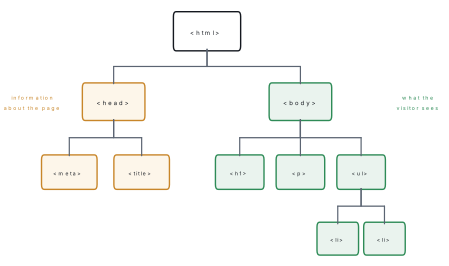
<!DOCTYPE html>tells the browser this is an HTML5 document. It is a declaration, not a tag.<html>is the root element; everything else lives inside it.<head>holds information about the page — title, character set, links to stylesheets. Nothing in the head appears in the page body.<title>sets the text shown on the browser tab and used by search engines. It is compulsory.<body>holds everything the visitor actually sees.
Tags versus attributes. A tag is the keyword in angle brackets that names
an element — <p>, <img>, <table>. Most tags come in pairs: an opening tag
<p> and a closing tag </p>. A few are empty (or void) tags that have no
closing partner, such as <br>, <hr>, <img> and <meta>.
An attribute is extra information written inside the opening tag as
name="value", which modifies the element.
<img src="everest.jpg" alt="Mount Everest" width="300">
Here img is the tag and src, alt and width are three attributes. An
attribute never appears in a closing tag.
| Tag | Attribute | |
|---|---|---|
| Written | in angle brackets | inside the opening tag |
| Job | names the element | modifies the element |
| Form | <p> … </p> |
name="value" |
| Compulsory? | yes, an element is its tag | no, most are optional |
Publishing and hosting. Writing the file is only half the job. To publish it:
- Create the pages in a text editor (Notepad, Notepad++, VS Code) and save with
a
.htmlextension. - Test every page locally by opening it in a browser.
- Buy or register a domain name (§6.13).
- Buy space on a web server — this is web hosting.
- Upload the files to the server using FTP software such as FileZilla, or the hosting control panel (cPanel).
- Test the live site and keep it updated.
If you misspell a tag or forget a closing tag, the browser does not show an error. It silently guesses, and the page comes out wrong somewhere you did not expect. There is no compiler to catch your mistakes, so check your own tags, and close every element you open.
6.4 Basic tags: HTML, HEAD, TITLE and BODY
The four structural tags were shown in §6.3. The <body> tag carries the
attributes that control the look of the whole page.
Attribute of <body> |
Controls | Example |
|---|---|---|
bgcolor |
background colour | bgcolor="#fff8e7" |
text |
foreground (text) colour | text="#003366" |
background |
background image | background="paper.png" |
link vlink alink |
unvisited, visited and active link colours | link="blue" |
A colour is written either as a name (red, navy, orange) or as a
hexadecimal code #RRGGBB, two hex digits each for red, green and blue.
So #FF0000 is pure red, #000000 is black and #FFFFFF is white.
Background sound was set by the <bgsound> tag, which only ever worked in
Internet Explorer:
<body bgcolor="#fff8e7" text="#003366" background="paper.png">
  <bgsound src="music.mid" loop="infinite">
bgcolor, text, background, align, <font>, <basefont> and <bgsound>
are all removed from HTML5. They are in your syllabus and the board may ask
for them, so learn them — but know that a validator rejects them. Running the
code above through the HTML Tidy validator gives, word for word:
Warning: <body> attribute "background" not allowed for HTML5
Warning: <body> attribute "bgcolor" not allowed for HTML5
Warning: <body> attribute "text" not allowed for HTML5
Warning: <h1> attribute "align" not allowed for HTML5
Warning: <basefont> element removed from HTML5
Warning: <font> element removed from HTML5
Warning: <bgsound> is not approved by W3C
The modern replacement for every one of them is CSS (§6.14), and for background
sound it is the HTML5 <audio> element (§6.11).
The HTML5 way to do the same thing is one line of CSS:
body { background-color: #fff8e7; color: #003366;
       background-image: url("paper.png"); }
6.5 Heading tags and the FONT tag
HTML has six levels of heading, <h1> down to <h6>. <h1> is the largest
and most important, <h6> the smallest. Headings are not just big text: search
engines and screen readers use them to work out the structure of the page, so
use one <h1> per page and go down in order.
<h1 align="center">Heading level 1</h1>
<h2 align="left">Heading level 2</h2>
<h3>Heading level 3</h3>
<h4>Heading level 4</h4>
<h5>Heading level 5</h5>
<h6>Heading level 6</h6>
The align attribute takes left (the default), center, right or justify.
In HTML5 it is replaced by style="text-align:center".
The <font> tag used to control the appearance of text and has three
attributes:
| Attribute | Values | Meaning |
|---|---|---|
size |
1 to 7 | 1 is smallest, 3 is the default, 7 is largest |
color |
name or #RRGGBB |
colour of the text |
face |
font name(s) | typeface, e.g. Arial, Helvetica |
<basefont size="4"> set a default size for the rest of the page. A size can
also be given relative to the base: size="+2" means two steps larger.
<basefont size="4">
<font size="5" color="red" face="Arial">Big red Arial text</font>
<p>Normal text, then <small>small text</small> and <big>big text</big>.</p>
<small> renders one step smaller and <big> one step larger than the
surrounding text. <small> survives in HTML5 (it now means fine print, like
a copyright line); <big> was removed — the Tidy validator reports
Warning: <big> element removed from HTML5. The CSS replacement for the whole
<font> tag is:
p { font-family: Arial, sans-serif; font-size: 18px; color: navy; }
6.6 Paragraphs, line breaks and comments
A browser collapses every run of spaces, tabs and newlines in your source into a single space. Pressing Enter in the editor does nothing to the page. You must say where paragraphs and lines end with tags.
<p>…</p>marks a paragraph. Browsers put blank space above and below it.alignworks here too.<br>forces a line break inside a paragraph. It is an empty tag with no closing partner (you may write<br />).<hr>draws a horizontal rule — a dividing line. Also an empty tag.
<p>First line<br>Second line after a break.</p>
<hr>
<p align="justify">A justified paragraph.</p>
A comment is a note for the author that the browser ignores completely:
<!-- This is a comment. The browser does not display it. -->
Comments explain sections of a long page and are also used to temporarily switch off a piece of code while testing. They may run over several lines, but they may not be nested inside one another.
6.7 Formatting text
These tags change how a run of text looks or what it means.
| Tag | Effect | Example source | Shows as |
|---|---|---|---|
<b> |
bold | <b>Bold</b> |
Bold |
<i> |
italic | <i>italic</i> |
italic |
<u> |
underline | <u>Under</u> |
Under, underlined |
<mark> |
highlighted, like a marker pen | <mark>note</mark> |
note on yellow |
<sup> |
superscript, raised and smaller | 5<sup>2</sup> |
5² |
<sub> |
subscript, lowered and smaller | H<sub>2</sub>O |
H₂O |
<em> |
emphasis — italic with meaning | <em>must</em> |
must |
<strong> |
strong importance — bold with meaning | <strong>Stop</strong> |
Stop |
<blockquote> |
a long quotation, indented on both sides | — | indented block |
<pre> |
preformatted — keeps every space and newline, in a monospaced font | — | text as typed |
<b> and <i> are presentational — they say "make it look bold". <strong>
and <em> are semantic — they say "this matters", and a screen reader will
change its tone of voice for them. They look identical on screen.
<pre> is the one tag that switches off the whitespace-collapsing rule, which
makes it the right tag for program code and for tables of figures typed by hand.
<p><b>Bold</b>, <i>italic</i>, <u>underlined</u>,
   <mark>highlighted</mark>, <em>emphasised</em>,
   <strong>strong</strong>.</p>
<p>H<sub>2</sub>O is water and 5<sup>2</sup> is 25.</p>
<blockquote cite="https://www.neb.gov.np">
  A quotation is indented from both sides by the browser.
</blockquote>
<pre>
Roll   Name         Marks
  1    Sushmita       82
  2    Bibek          74
</pre>
6.8 Lists: ordered, unordered and definition
An ordered list numbers its items automatically. <ol> opens it and each
item is an <li>.
| Attribute | On | Values |
|---|---|---|
type |
<ol> |
1 (default), A, a, I, i |
start |
<ol> |
the number the list starts at |
value |
<li> |
forces this item's number, and renumbers the rest from there |
reversed |
<ol> |
counts downwards |
An unordered list <ul> puts a bullet in front of each item instead of a
number. The bullet shape used to be set by type="disc" (the default, a filled
circle), type="circle" (hollow) or type="square". In HTML5 this is
style="list-style-type:square".
<ol type="I" start="3">
  <li>Kathmandu</li>
  <li value="7">Pokhara</li>
  <li>Biratnagar</li>
</ol>
That list displays as III. Kathmandu, then VII. Pokhara — because
value="7" overrides the count — then VIII. Biratnagar, which continues from
7, not from IV.
Lists can be nested: put a whole <ul> inside an <li> of another list.
<ul style="list-style-type:square">
  <li>Input unit</li>
  <li>Processing unit
    <ul style="list-style-type:circle">
      <li>ALU</li>
      <li>CU</li>
    </ul>
  </li>
  <li>Output unit</li>
</ul>
A definition list (also called a description list) pairs terms with their
meanings. It uses three tags: <dl> for the list, <dt> for the term and
<dd> for the definition, which the browser indents.
<dl>
  <dt>HTML</dt>
  <dd>HyperText Markup Language, used to structure a web page.</dd>
  <dt>CSS</dt>
  <dd>Cascading Style Sheets, used to present a web page.</dd>
</dl>
6.9 The ADDRESS tag, links and the anchor tag
<address> marks up contact information for the author or owner of a page.
Browsers show it in italics as a block.
<address>
  NEBians, Sanothimi, Bhaktapur<br>
  Email: <a href="mailto:info@example.com.np">info@example.com.np</a>
</address>
A hyperlink is text or an image that takes you somewhere else when clicked.
It is made with the anchor tag <a>, whose essential attribute is
href (hypertext reference) — the destination.
<a href="https://moecdc.gov.np">Curriculum Development Centre</a>
The text between <a> and </a> is what the visitor sees and clicks.
| Attribute | Meaning |
|---|---|
href |
the URL or file the link points to |
target |
where to open it: _blank (new tab), _self (same tab, default) |
title |
tooltip text shown on hovering |
id |
names a point in the page so links can jump to it |
There are three kinds of link by destination:
- External link — to another website:
href="https://neb.gov.np". - Internal link — to another page of the same site, using a relative path:
href="unit06.html"for a file in the same folder,href="notes/unit07.html"for one in a sub-folder. - Bookmark (same-page) link — to a named point on the page, using
#:href="#summary"jumps to the element whoseidissummary.
An email link uses the mailto: scheme and opens the visitor's mail program.
An image link is made by putting an <img> between the anchor tags.
<p><a href="https://neb.gov.np" target="_blank">Open NEB in a new tab</a></p>
<p><a href="#summary">Jump to the summary on this page</a></p>
<p><a href="index.html"><img src="logo.png" alt="Home" width="80"></a></p>
<h2 id="summary">Summary</h2>
Problem. Write the HTML for a page titled "My Village" with a centred heading, a short paragraph, a bulleted list of three places, and a link to the NEB website that opens in a new tab.
Solution.
<!DOCTYPE html>
<html lang="en">
<head>
  <meta charset="utf-8">
  <title>My Village</title>
</head>
<body bgcolor="#fffdf5" text="#222222">
  <h1 align="center">My Village</h1>
  <p align="justify">My village lies in the hills of Kaski district,
     about two hours' walk from the nearest road head.</p>
  <h2>Places to see</h2>
  <ul type="square">
    <li>The old temple</li>
    <li>The suspension bridge</li>
    <li>The viewpoint above the school</li>
  </ul>
  <hr>
  <address>Written by a Grade 11 student, 2082 BS</address>
  <p><a href="https://neb.gov.np" target="_blank" title="Exam board">
     National Examination Board</a></p>
</body>
</html>
Every element that was opened has been closed, and in the reverse order to the
one in which it was opened. The empty tags <meta>, <hr> and <br> have no
closing partner.
6.10 Tables and forms
A table arranges data in rows and columns. Three tags build it:
<table>…</table>encloses the whole table.<tr>…</tr>is one table row.<th>is a header cell — bold and centred by default.<td>is an ordinary data cell.
Cells go inside rows, and rows go inside the table — never the other way round.
| Attribute | On | Meaning |
|---|---|---|
border |
<table> |
thickness of the border lines |
cellpadding |
<table> |
space between a cell's content and its edge |
cellspacing |
<table> |
space between neighbouring cells |
colspan |
<td> <th> |
how many columns this cell stretches across |
rowspan |
<td> <th> |
how many rows this cell stretches down |
align |
<table> <tr> <td> |
horizontal alignment of the content |
<caption> placed immediately after <table> gives the table a title.
Problem. Write the HTML for a table with the heading row Roll, Name, Computer, two data rows, and a final row where the word "Average" spans the first two columns.
Solution.
<table border="1" cellpadding="5">
  <caption>Marks of Grade 11</caption>
  <tr>
    <th>Roll</th><th>Name</th><th>Computer</th>
  </tr>
  <tr>
    <td>1</td><td>Sushmita</td><td>82</td>
  </tr>
  <tr>
    <td>2</td><td>Bibek</td><td>74</td>
  </tr>
  <tr>
    <td colspan="2">Average</td><td>78</td>
  </tr>
</table>
The last row has only two <td> tags, not three, because the first one
covers two columns. Count the cells in every row: a row whose colspan values do
not add up to the number of columns produces a ragged table.
A form collects data from the visitor and sends it to a program on the
server. <form> encloses the controls and carries two attributes: action
(the server program that will receive the data) and method (get, which
puts the data in the URL, or post, which hides it in the request body — use
post for passwords).
| Control | Written as |
|---|---|
| Text box | <input type="text" name="sname" size="25"> |
| Password box | <input type="password" name="pw"> |
| Radio button (choose one) | <input type="radio" name="gender" value="m"> |
| Check box (choose many) | <input type="checkbox" name="sub" value="cs"> |
| Multi-line text area | <textarea name="addr" rows="3" cols="30"></textarea> |
| Drop-down list | <select name="city"><option>Pokhara</option></select> |
| Submit button | <input type="submit" value="Register"> |
| Reset button | <input type="reset" value="Clear"> |
The rule that catches most students: radio buttons in the same group must share
the same name. That shared name is what makes them mutually exclusive.
Check boxes that share a name are still independent of each other.
Problem. Design a form that collects a name, a gender chosen from two radio buttons, one or more subjects chosen from check boxes, and an address, with Register and Clear buttons.
Solution.
<form action="register.php" method="post">
  <p>Name: <input type="text" name="sname" size="25"></p>
  <p>Gender:
    <input type="radio" name="gender" value="m" id="m"><label for="m">Male</label>
    <input type="radio" name="gender" value="f" id="f"><label for="f">Female</label>
  </p>
  <p>Subjects:
    <input type="checkbox" name="sub" value="cs" id="cs"><label for="cs">Computer</label>
    <input type="checkbox" name="sub" value="ph" id="ph"><label for="ph">Physics</label>
  </p>
  <p>Address:<br>
    <textarea name="addr" rows="3" cols="30"></textarea></p>
  <p>
    <input type="submit" value="Register">
    <input type="reset" value="Clear">
  </p>
</form>
Both radio buttons carry name="gender", so clicking one clears the other. The
<textarea> needs a closing tag even when it is empty, unlike <input>, which
is an empty tag.
6.11 HTML5 media elements: audio, video, source, track and embed
Before HTML5, playing sound or video needed a plug-in such as Flash. HTML5 gave the browser two built-in players.
<audio> plays sound; <video> plays moving pictures. Both take the
attribute controls (show the play/pause bar), and also accept autoplay,
loop, muted and preload. <video> additionally takes width, height
and poster (a still image shown before play starts).
<source> is an empty tag placed inside <audio> or <video>. You give
one <source> per file format; the browser plays the first one it
understands and ignores the rest. This matters because no single format works
everywhere — MP3 and MP4 are the widely supported pair, OGG and WebM the open
alternatives.
<track> adds a timed text file (WebVTT, .vtt) to a video: subtitles,
captions or chapter names. Its kind says which, srclang gives the language
and default selects it automatically.
Any text typed between the opening and closing media tags is fallback content — shown only by a browser too old to support the element.
<audio controls>
  <source src="song.mp3" type="audio/mpeg">
  <source src="song.ogg" type="audio/ogg">
  Your browser does not support the audio element.
</audio>

<video width="480" height="270" controls poster="thumb.jpg">
  <source src="lesson.mp4" type="video/mp4">
  <source src="lesson.webm" type="video/webm">
  <track src="lesson-en.vtt" kind="subtitles" srclang="en" label="English" default>
  Your browser does not support the video element.
</video>
<embed> is the general-purpose container for external content handled by a
plug-in or by the browser itself — a PDF, a map, a video from another site. It
is an empty tag.
<embed src="notes.pdf" type="application/pdf" width="480" height="320">
6.12 HTML5 graphics: canvas and SVG
HTML5 can draw pictures in the page itself, in two completely different ways.
<canvas> is a rectangular drawing surface. The tag alone draws nothing —
it is a blank sheet, and you paint on it with JavaScript. The result is a
grid of pixels (a bitmap), so enlarging it makes it blurry, and once drawn,
the browser no longer knows a rectangle is there.
<canvas id="myCanvas" width="200" height="120"
        style="border:1px solid #888"></canvas>
<script>
  var c = document.getElementById("myCanvas");
  var ctx = c.getContext("2d");
  ctx.fillStyle = "#3b6ea5";
  ctx.fillRect(20, 20, 120, 60);
  ctx.beginPath();
  ctx.arc(160, 50, 25, 0, 2 * Math.PI);
  ctx.stroke();
</script>
getContext("2d") hands back the drawing toolbox; fillRect(x, y, width,
height) paints a solid rectangle; arc(x, y, r, start, end) traces a circle,
and stroke() draws its outline.
SVG (Scalable Vector Graphics) takes the opposite approach. Each shape is its own element in the document tree, written as a tag with attributes, so the browser keeps knowing it is a circle. Being described by coordinates rather than pixels, SVG stays perfectly sharp at any size, and each shape can be styled with CSS or given a click handler.
<svg width="200" height="120">
  <rect x="20" y="20" width="120" height="60" fill="#3b6ea5"></rect>
  <circle cx="160" cy="50" r="25" fill="none" stroke="black"></circle>
  <text x="20" y="105" font-size="14">Drawn with SVG</text>
</svg>
Both blocks above draw the same picture: a filled blue rectangle and an open circle beside it.
| Canvas | SVG | |
|---|---|---|
| Kind of graphic | raster (pixels) | vector (shapes) |
| Drawn by | JavaScript code | HTML-like tags |
| On enlarging | becomes blurry | stays sharp |
| Individual shapes | forgotten after drawing | remain in the document tree |
| Suits | games, charts with thousands of points | logos, icons, maps, diagrams |
6.13 Domain names and web hosting
Every computer on the internet is identified by an IP address, a number such
as 142.250.183.4. Numbers are hard to remember, so we use names.
A domain name is the unique, human-readable address of a website, such as
neb.gov.np. The Domain Name System (DNS) is the internet service that
translates a domain name into the IP address of the server that holds the site.
A domain name is read right to left, from the most general part to the most specific.
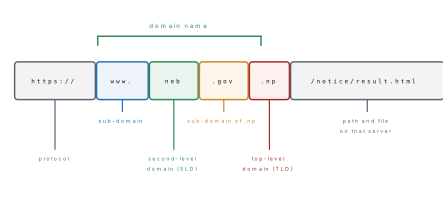
Common top-level domains (TLDs): .com (commercial), .org
(organisation), .net (network), .edu (education), .gov (government),
.info, .biz. Country-code TLDs identify a country: .np for Nepal,
.in for India, .uk for the United Kingdom. Nepal's .np registry is
administered by Mercantile Communication Pvt. Ltd., which takes registrations
at the third level under second-level domains such as .com.np, .org.np,
.net.np, .edu.np (schools, colleges and universities) and .gov.np
(government bodies, overseen by the National Information Technology Centre).
Registration under .np is free of cost, but the applicant must prove
eligibility with citizenship or organisation registration documents.
For most TLDs a domain name is not bought outright — it is registered and rented from a registrar, normally for a year at a time, and must be renewed.
Web hosting is the service of storing a website's files on a web server that is permanently connected to the internet, so that anyone can request them at any time. The company that provides the service is a web host.
| Type of hosting | What you get | Suits |
|---|---|---|
| Shared | one server's resources divided among many sites | small sites, school sites; cheapest |
| VPS (virtual private server) | a guaranteed slice of a server, with root access | growing sites |
| Dedicated | a whole physical server to yourself | large, busy sites; most expensive |
| Cloud | resources spread over many servers, paid by use | sites with changing traffic |
A domain name and hosting are two separate purchases. The domain is the address; the hosting is the land and building. The domain is pointed at the hosting by setting its name servers in the registrar's control panel.
6.14 Cascading Style Sheets: inline, embedded and external
CSS (Cascading Style Sheets) is the language that describes how HTML elements should be presented — colour, size, spacing, position and typeface. HTML holds the structure; CSS holds the look. "Cascading" refers to the rules the browser follows when more than one style applies to the same element.
A CSS rule has two parts: a selector naming the elements it applies to,
and a declaration block in braces holding property: value; pairs.
h1 { color: navy; text-align: center; }
Here h1 is the selector, color and text-align are properties, navy and
center their values. Selectors you must know: the element selector (p),
the class selector (.note, matching class="note", reusable on many
elements) and the id selector (#header, matching id="header", used once
per page).
There are three ways to attach CSS to a page.
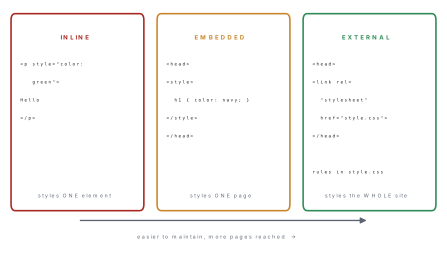
1. Inline CSS — a style attribute on a single tag. It styles that one
element only. Quick, but it mixes presentation into the structure and cannot be
reused, so it is the worst method for a real site.
<p style="color: green">Inline CSS styled only this paragraph.</p>
2. Embedded (internal) CSS — a <style> element inside <head>. Its rules
apply to every matching element on that page.
<head>
  <style>
    body  { background-color: #f4f4f4; font-family: Arial, sans-serif; }
    h1    { color: navy; text-align: center; }
    .note { border-left: 4px solid orange; padding-left: 10px; }
  </style>
</head>
3. External CSS — the rules live in a separate .css file with no HTML tags
in it at all, and every page links to it with a <link> tag in its <head>.
<link rel="stylesheet" href="style.css">
This is the method professionals use: change one line of style.css and a
hundred pages change at once, and the browser caches the file so the site loads
faster.
When two rules apply to the same element, the more specific one wins: inline beats embedded, embedded beats external, and an id selector beats a class selector, which beats an element selector.
Problem. Write a page whose heading is navy and centred (embedded), whose
background is light grey (embedded), that also links to style.css (external),
and which has one green paragraph styled inline.
Solution.
<!DOCTYPE html>
<html lang="en">
<head>
  <meta charset="utf-8">
  <title>Three ways to attach CSS</title>
  <link rel="stylesheet" href="style.css">
  <style>
    body  { background-color: #f4f4f4; font-family: Arial, sans-serif; }
    h1    { color: navy; text-align: center; }
    .note { border-left: 4px solid orange; padding-left: 10px; }
  </style>
</head>
<body>
  <h1>Embedded CSS styled this heading</h1>
  <p class="note">External and embedded rules both reach this paragraph.</p>
  <p style="color: green">Inline CSS styled only this paragraph.</p>
</body>
</html>
The <link> tag is empty — no closing partner — and must sit inside <head>.
If style.css also contained h1 { color: red; }, the heading would still come
out navy, because the embedded rule is more specific than the external one.
Chapter summary
- The internet is the network; the World Wide Web is one service running on it. A browser is software on your device; a search engine is a website that indexes other sites using a crawler, an indexer and a ranking step.
- The web uses the client–server model: DNS turns the name into an IP address, the browser sends an HTTP request, the server sends an HTTP response with the HTML.
- A CMS (WordPress, Joomla, Drupal) stores content in a database and pours it into templates, so people can publish without writing HTML.
- HTML structures a page, CSS presents it, JavaScript gives it behaviour. HTML is a markup language, not a programming language.
- Every document has
<!DOCTYPE html>,<html>,<head>(with the compulsory<title>) and<body>. A tag names an element; an attribute (name="value") sits inside the opening tag and modifies it.<br>,<hr>,<img>,<meta>,<link>and<source>are empty tags. - Headings run
<h1>(largest) to<h6>.<font size="1..7">defaulted to 3.bgcolor,text,background,align,<font>,<basefont>,<big>and<bgsound>are all obsolete in HTML5 — CSS replaces them. - Browsers collapse whitespace, so paragraphs need
<p>and line breaks need<br>.<pre>is the exception that preserves spacing. <ol>numbers items (type,start,value);<ul>bullets them;<dl>with<dt>and<dd>defines terms.- The anchor tag
<a href="...">makes external, internal, bookmark (#id), email (mailto:) and image links;target="_blank"opens a new tab. - Tables are
<table>→<tr>→<th>or<td>, withcolspanandrowspanmerging cells. Forms use<input>withtypeset to text, radio, checkbox, submit or reset, plus<textarea>; radio buttons in one group share aname. - HTML5 media:
<audio>and<video>withcontrols, several<source>files for different formats,<track>for subtitles,<embed>for anything else. - Canvas is a pixel surface painted with JavaScript; SVG is a set of shape tags that stay sharp at any size.
- A domain name is rented through a registrar and resolved by DNS; web hosting is the rented space on a permanently connected server.
- CSS attaches in three ways: inline (one element), embedded (one page) and external (the whole site) — and in a clash, inline beats embedded beats external.
Practice questions
Group A — Multiple choice (1 mark each)
- Which tag holds the information that appears on the browser tab? [1]a
<body>b<head>c<title>d<meta> - Which of the following is an empty tag? [1]a
<p>b<br>c<td>d<textarea> - The default size of the
<font>tag is [1]a1b3c5d7 - Which attribute of the anchor tag gives the destination of a link? [1]a
srcblinkchrefdtarget - To merge two columns into one cell of a table you use [1]a
rowspanbcolspanccellspacingdmerge - Which control lets the user choose only one option from a group? [1]acheck boxbtext areacradio buttondsubmit button
- Which HTML5 tag specifies alternative media files for a video? [1]a
<track>b<embed>c<source>d<media> - Which type of CSS is written inside the
styleattribute of a tag? [1]aexternalbembeddedcinlinedimported .npinneb.gov.npis a [1]asub-domainbcountry-code top-level domaincprotocoldpath
Answers to Group A
1. (c) — <title> sits inside <head> but only its text reaches the tab.
2. (b) — <br> has no closing tag.
3. (b) — sizes run 1 to 7 with 3 as the default.
4. (c) — href stands for hypertext reference.
5. (b) — colspan stretches a cell across columns.
6. (c) — radio buttons sharing one name are mutually exclusive.
7. (c) — the browser plays the first <source> it understands.
8. (c) — inline CSS styles one element only.
9. (b) — .np is Nepal's ccTLD; .gov under it is a sub-domain.
Group B — Short answer (5 marks each)
- Differentiate between a web browser and a search engine with any five points. [5]
- What is a tag? What is an attribute? Explain with an example, and list any four empty tags. [5]
- Write the HTML code for an ordered list of three provinces numbered in capital Roman numerals, each province carrying a square-bulleted sub-list of its cities. [5]
- Write the HTML code to create a table of three rows and three columns with a border, showing the roll number, name and marks of two students. [5]
- What is CSS? Explain the three ways of attaching CSS to a web page with one example of each. [5]
- What is a domain name? What is web hosting? Differentiate between them. [5]
Answers to Group B
1. A browser is application software installed on the user's device; a search engine is a website reached through a browser. A browser fetches and renders one page you name; a search engine returns a ranked list of pages matching a query. A browser uses a rendering engine; a search engine uses a crawler, an indexer and a ranking algorithm. A browser needs no internet connection to open a local file; a search engine always does. Examples: Chrome, Firefox, Edge against Google, Bing, DuckDuckGo.
2. A tag is the keyword in angle brackets that names an HTML element, usually
in a pair such as <p> … </p>. An attribute is extra information written
inside the opening tag as name="value" that modifies the element. In
<img src="everest.jpg" alt="Everest" width="300">, img is the tag and src,
alt and width are attributes. Four empty tags: <br>, <hr>, <img>,
<meta> (also <link>, <input>, <source>).
3.
<ol type="I">
  <li>Bagmati
    <ul type="square">
      <li>Kathmandu</li>
      <li>Bhaktapur</li>
    </ul>
  </li>
  <li>Gandaki
    <ul type="square">
      <li>Pokhara</li>
    </ul>
  </li>
  <li>Koshi
    <ul type="square">
      <li>Biratnagar</li>
    </ul>
  </li>
</ol>
4.
<table border="1" cellpadding="5">
  <tr><th>Roll</th><th>Name</th><th>Marks</th></tr>
  <tr><td>1</td><td>Sushmita</td><td>82</td></tr>
  <tr><td>2</td><td>Bibek</td><td>74</td></tr>
</table>
5. CSS is the language that describes how HTML elements are presented —
colour, size, spacing and typeface. Inline: a style attribute on one tag,
<p style="color:green">Text</p>, styling that element only. Embedded: a
<style> element in the <head>, <style> h1 { color: navy; } </style>,
styling that page. External: rules in a separate .css file linked with
<link rel="stylesheet" href="style.css"> in the <head>, styling every page
that links to it. In a clash, inline beats embedded, which beats external.
6. A domain name is the unique human-readable address of a website, such as
neb.gov.np, resolved to an IP address by DNS; it is rented from a registrar and
renewed periodically. Web hosting is the service of storing the site's files on a
server that is permanently connected to the internet. The domain is the address;
the hosting is the land and building at that address. They are bought separately
and joined by pointing the domain at the host's name servers.
Group C — Long answer (8 marks each)
- (a) Draw and explain the structure of an HTML document, naming every
compulsory element. [3](b) Write the HTML code for a page titled "My School" with a centred
<h1>heading on a light background, one justified paragraph, a definition list of two terms, and a link tocontact.htmlthat opens in a new tab. [5] - (a) What is a form? Name its two main attributes and say what each does. [3](b) Write the HTML code for a student registration form containing a text box for the name, radio buttons for gender, check boxes for optional subjects, a text area for the address, and Submit and Reset buttons. [5]
- (a) Differentiate between
<canvas>and<svg>with any four points. [4](b) Write the HTML5 code to play a video with controls, two alternative source files and an English subtitle track, and explain what each tag does. [4]
Answers to Group C
1. (a) See Figure 3 and §6.3. <!DOCTYPE html> declares HTML5;
<html> is the root; <head> carries information about the page and must
contain <title>; <body> carries everything the visitor sees. <head> and
<body> are siblings and never overlap.
1. (b)
<!DOCTYPE html>
<html lang="en">
<head>
  <meta charset="utf-8">
  <title>My School</title>
</head>
<body bgcolor="#fffdf5">
  <h1 align="center">My School</h1>
  <p align="justify">Our school was established in 2035 BS and today
     teaches over eight hundred students in Grades 1 to 12.</p>
  <dl>
    <dt>NEB</dt>
    <dd>National Examination Board, which conducts the Grade 11 and 12 examinations.</dd>
    <dt>CDC</dt>
    <dd>Curriculum Development Centre, which writes the syllabus.</dd>
  </dl>
  <p><a href="contact.html" target="_blank">Contact us</a></p>
</body>
</html>
2. (a) A form is the part of a page that collects data from the visitor and
sends it to a program on the server. action gives the URL of the server program
that will receive the data. method says how it travels: get appends it to the
URL where it is visible and limited in length, post sends it in the body of the
request, which is what you must use for passwords and for large amounts of data.
2. (b) The code of Worked example 6.3 answers this in full. The two radio
buttons must share name="gender" so that only one can be chosen; the two check
boxes share name="sub" but remain independent; <textarea> requires a closing
tag; type="submit" sends the data to the action URL and type="reset" clears
every control back to its starting value.
3. (a) Canvas is a raster (pixel) surface, SVG is vector (shapes). Canvas is drawn by JavaScript, SVG by tags written in the HTML. Enlarging a canvas drawing makes it blurry, SVG stays sharp at any size. Canvas forgets the shapes once they are painted, so nothing can be clicked or restyled, while every SVG shape stays in the document tree and can be styled with CSS or given an event. Canvas suits games and charts with very many points; SVG suits logos, icons and diagrams.
3. (b)
<video width="480" height="270" controls poster="thumb.jpg">
  <source src="lesson.mp4" type="video/mp4">
  <source src="lesson.webm" type="video/webm">
  <track src="lesson-en.vtt" kind="subtitles" srclang="en" label="English" default>
  Your browser does not support the video element.
</video>
<video> creates the player; controls shows the play/pause bar and poster
gives the still image displayed before playing. Each <source> offers one file
format, and the browser uses the first one it can decode, ignoring the
others. <track> attaches the WebVTT subtitle file, kind="subtitles" says what
kind of text it is, srclang="en" its language and default selects it
automatically. The sentence before </video> is fallback text, shown only by a
browser that does not support the element at all.
Practise more: Computer Science question bank