Unit 8 · 10 teaching hours · 32 min read
Information Security and Cyber Law
What the syllabus asks for 9
- Digital society and computer ethics
- Concept of Information security
- Concept of Cybercrime
- Malicious software and Spam
- Protection from cybercrime
- Intellectual Property Right
- Concept of Digital Signature
- Concept of Cyber Law in Nepal
- ICT Policy in Nepal
A bank in Kathmandu no longer keeps your balance in a ledger; it keeps it as a number in a database. Your result, your citizenship record and your conversations are all files on somebody's disk. That is convenient — and it means a single stolen password can do damage no burglar with a crowbar could. This unit is about the two defences society has built against that: technical ones, which make information hard to steal, and legal ones, which make stealing it punishable.
Ten hours and roughly a fifth of the paper come from here, and almost all of it is definition-and-list work. Fix these in memory: the CIA triad; the difference between a virus, worm and Trojan horse; at least six types of cybercrime; the four kinds of intellectual property; the digital signature process in both directions; and — the part that separates a good script from an average one — the Electronic Transactions Act 2063, with its section numbers and penalties. Nepal-specific questions are asked almost every year and are the easiest marks in the unit for anyone who has actually learnt the table in §8.8.
8.1 Digital society and computer ethics
A digital society is a society in which most everyday activities — learning, banking, shopping, governing, working and socialising — are carried out through digital devices and computer networks rather than on paper or face to face.
Nepal is well into this transition: result publication, passport applications, vehicle tax, electricity bills and wallet payments such as eSewa or Khalti are all routine online transactions now. The benefits are speed, reach and lower cost. The costs are a digital divide between those with connectivity and skills and those without, loss of privacy because every transaction leaves a record, and dependence — when the system is down, nothing can be done manually.
Computer ethics is the set of moral principles that governs the acceptable use of computers and of the information stored in them. It answers the question should I do this? — which is different from can I do this? and different again from is this illegal?
The most widely quoted statement of them is the Ten Commandments of Computer Ethics, published by the Computer Ethics Institute in 1992. Thou shalt not: (1) use a computer to harm other people; (2) interfere with other people's computer work; (3) snoop around in other people's computer files; (4) use a computer to steal; (5) use a computer to bear false witness; (6) copy or use proprietary software for which you have not paid; (7) use other people's computer resources without authorisation or proper compensation; (8) appropriate other people's intellectual output. And thou shalt: (9) think about the social consequences of the program you are writing; (10) always use a computer in ways that ensure consideration and respect for your fellow humans.
Not every unethical act is a crime. Reading a friend's chat over their shoulder is unethical but not punishable; guessing their password and logging in is both. Ethics is the wider circle, law the smaller one inside it.
8.2 Concept of information security
Information security is the protection of information and information systems from unauthorised access, use, disclosure, modification or destruction, so as to preserve its confidentiality, integrity and availability.
Those last three words are the CIA triad, the standard framework for the whole subject.
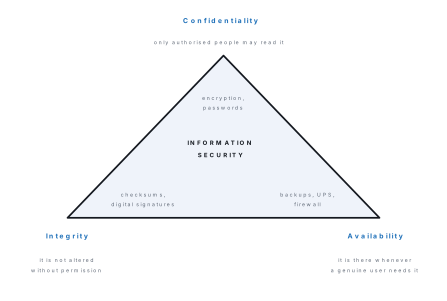
Authentication proves you are who you claim to be, using one or more of three factors: something you know (a password or PIN), something you have (an ATM card, a phone receiving an OTP) and something you are (a fingerprint, an iris, a face). Two of them together is two-factor authentication (2FA), the single most effective thing an ordinary user can switch on. Authorisation is the separate question of what an authenticated user may do — a teacher may read every student's marks, but only the exam officer may change them.
Cryptography protects confidentiality by scrambling the message itself. Readable text is the plaintext, the scrambled form is the ciphertext, scrambling is encryption, reversing it is decryption, and the secret value controlling both is the key. In symmetric encryption one key both locks and unlocks, so the two parties must share it secretly in advance. In asymmetric (public-key) encryption each user holds a mathematically linked pair: whatever one key locks, only the other can unlock. The public key is published, the private key never shared — which is what makes digital signatures possible (§8.7).
Problem. Encrypt the plaintext NEPAL with a Caesar cipher of key 3, then
decrypt the ciphertext FRPSXWHU using the same key.
Solution. A Caesar cipher replaces each letter by the letter k places later in the alphabet, wrapping round from Z to A. With the alphabet numbered A = 0 to Z = 25, encryption is C = (P + 3) \text{ mod } 26.
| Plain | N | E | P | A | L |
|---|---|---|---|---|---|
| Number P | 13 | 4 | 15 | 0 | 11 |
| P + 3 | 16 | 7 | 18 | 3 | 14 |
| Cipher | Q | H | S | D | O |
So NEPAL encrypts to QHSDO.
To decrypt, shift back three: P = (C - 3) \text{ mod } 26. F(5) to C(2), R(17) to
O(14), P(15) to M(12), S(18) to P(15), X(23) to U(20), W(22) to T(19), H(7) to
E(4), U(20) to R(17) — giving COMPUTER.
Note that the key is only 25 useful values wide, so an attacker can simply try them all. Real ciphers such as AES use keys of 128 or 256 bits for this reason.
Availability, finally, is protected by unglamorous things: regular backups kept in a different physical place, an uninterruptible power supply (UPS), redundant disks and a tested plan for restoring service.
8.3 Concept of cybercrime
Cybercrime is any criminal activity in which a computer or a computer network is the tool used to commit the offence, the target of the offence, or the place where evidence of the offence is stored.
The common types asked in the examination are:
- Hacking and cracking — gaining unauthorised access to a system. A hacker in the original sense is an expert programmer; a cracker breaks in with criminal intent, and it is the cracker the law is aimed at.
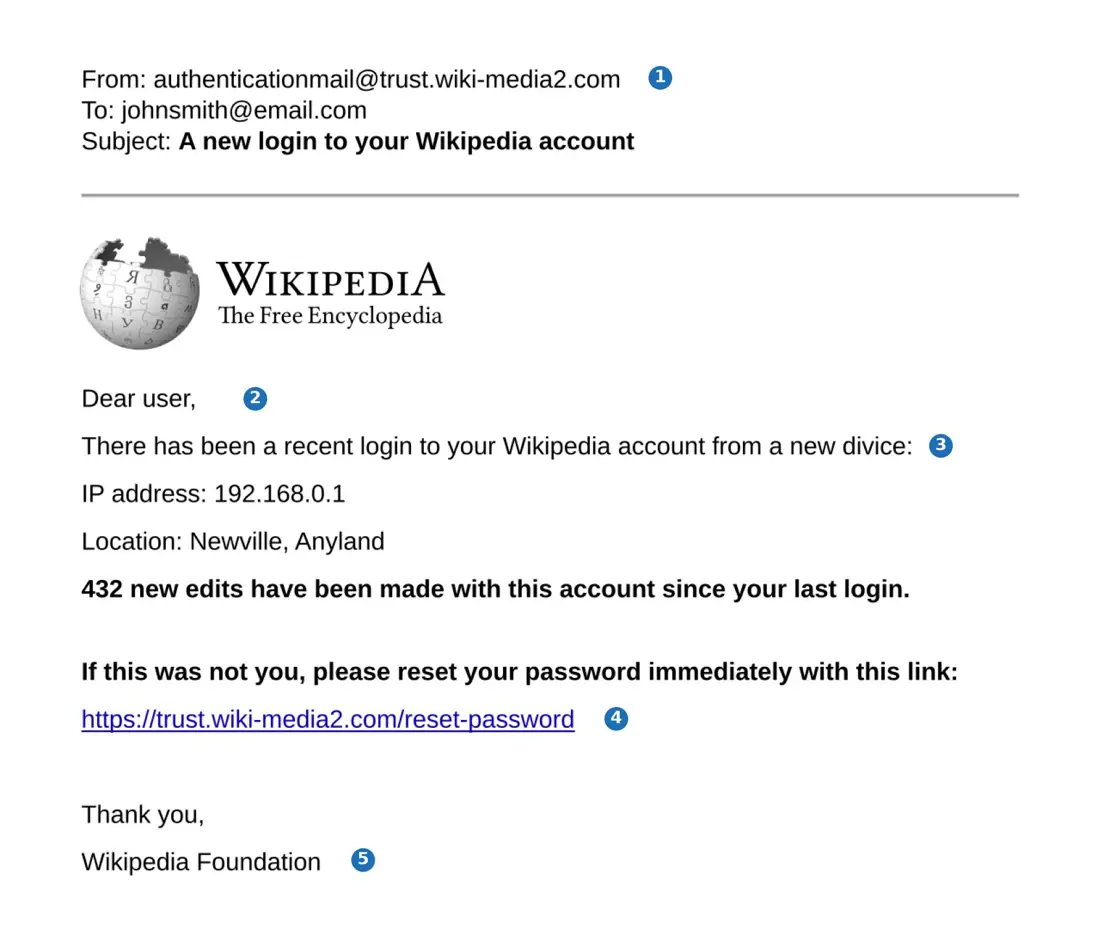
- Phishing — a fake message imitating a trusted organisation, sent to trick the reader into handing over passwords or card numbers.
- Identity theft — using someone else's personal details to impersonate them, usually for financial gain.
- Cyberbullying and cyberstalking — repeated harassment, threats or humiliation through messaging apps or social media.
- Denial-of-service (DoS) attack — flooding a server with bogus requests so that genuine users cannot get through; launched from thousands of hijacked machines at once it is a DDoS.
- Software piracy — copying, distributing or using licensed software without paying for it.
- Salami attack — stealing a trivial amount (a few paisa of rounding) from a very large number of accounts, so no single victim notices.
- Data diddling — altering data just before or just after it is entered into a system, such as changing a meter reading before it is billed.
- Cyber terrorism — attacking a nation's critical systems (power, banking, aviation) to cause fear or disruption.
Phishing deserves a closer look: it is the attack a Grade 11 student is most likely to meet in person, and it works by defeating the human being rather than the encryption.
8.4 Malicious software and spam
Malware is any program written deliberately to damage a computer system, steal data from it, or take control of it without the owner's knowledge or consent.
| Type | How it spreads | What it does |
|---|---|---|
| Virus | attaches itself to a host file or program and travels when that file is copied or run | corrupts or deletes files, slows the machine; cannot spread by itself |
| Worm | copies itself across a network with no host file and no user action | consumes bandwidth and memory, often carrying a further payload |
| Trojan horse | disguises itself as a useful program the user installs willingly | opens a hidden back door for the attacker; does not self-replicate |
| Ransomware | usually arrives as a Trojan or an e-mail attachment | encrypts the victim's files and demands payment for the key |
| Spyware | bundled silently with free downloads | secretly records activity and sends it to the attacker |
| Keylogger | a form of spyware, or a small hardware device | records every keystroke, capturing passwords as they are typed |
| Adware | bundled with free software | forces unwanted advertisements and redirects the browser |
| Rootkit | installed after a break-in | hides the attacker's other programs from the operating system and from antivirus software |
Typical symptoms of infection: a sudden slowdown, files that vanish or will not open, programs that start on their own, unexpected pop-ups, a homepage that keeps changing back, and antivirus software that has been disabled.
Spam is unsolicited bulk electronic mail sent indiscriminately to a very large number of recipients, usually to advertise something, to spread malware or to carry out a phishing attack.
Spam pays because sending a million e-mails costs almost nothing, so even one reply in a hundred thousand is profit. Spammers harvest addresses from public web pages, buy leaked databases and guess common name patterns. The defences are spam filters, which score each message on its sender, wording and reputation; never publishing an address in plain text on a web page; and never replying or clicking unsubscribe in mail you did not sign up for — that merely confirms the address is live.
8.5 Protection from cybercrime
No single measure is enough; security works in layers.
Strong passwords. Long, mixed-character and unique to each account. Length matters far more than cleverness, as the next example shows.
Problem. An attacker can test 1,000,000 guesses per second. How long would an exhaustive search take for (a) a 4-digit PIN, (b) an 8-character password using only lower-case letters, (c) an 8-character password using all 95 printable characters?
Solution. The number of possibilities is (character set size)^(length).
(a) 10^4 = 10{,}000 PINs. At a million guesses per second this is over in 0.01 second — a 4-digit PIN is safe only because a bank locks the card after three wrong tries.
(b) 26^8 = 208{,}827{,}064{,}576. Dividing by 1,000,000 gives 208,827 seconds, which is 208{,}827 \div 3600 = 58 hours — about 2.4 days.
(c) 95^8 = 6{,}634{,}204{,}312{,}890{,}625. Dividing by 1,000,000 gives 6,634,204,312 seconds, and 6{,}634{,}204{,}312 \div (3600 \times 24 \times 365) is about 210 years.
Widening the character set from 26 to 95 multiplied the work by roughly 32,000. Adding a single further character would multiply it by 95 again. This is why advice on passwords always begins with make it longer.
Keep software updated. Most successful break-ins exploit a flaw that was fixed months earlier by a patch the victim never installed.
Antivirus software, kept current, since a scanner recognises only what is in its signature database, and a firewall, which inspects traffic entering and leaving the network and blocks whatever does not match the rules.
Backups — three copies, two kinds of media, one off-site. This is the only defence that actually works against ransomware.
Check that the connection is encrypted before typing anything private. A
padlock and https:// in the address bar mean the traffic between you and the
site is encrypted with TLS, so an eavesdropper sees only ciphertext.
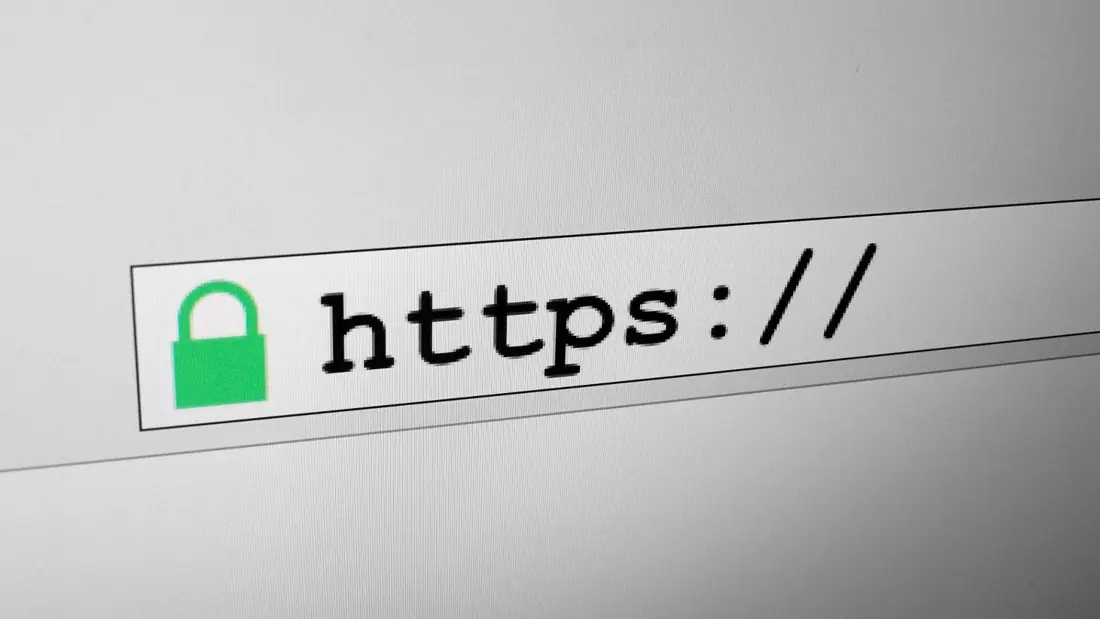
A padlock tells you that nobody can eavesdrop on the connection and that the site really is the one named in the address bar. It says nothing at all about whether that site is trustworthy. Certificates are free and automatic today, so almost every phishing site has a padlock too. Always read the domain name next to the padlock, not just the padlock itself.
Beyond the technical layer: never open attachments from unknown senders, never share an OTP, log out of shared computers, review the permissions an app asks for, and — because prevention sometimes fails — report an offence promptly, since Nepali law sets a short deadline for doing so (§8.8).
8.6 Intellectual Property Right
An intellectual property right is a legal right granted to the creator of an original work of the mind — an invention, a literary or artistic work, a design, a name or a symbol — giving the creator exclusive control over its use for a limited period.
The four kinds you must be able to distinguish are:
- Copyright protects the expression of an idea — software source code, books, music, films, photographs, web pages. It arises automatically the moment the work is created; registration is optional evidence, not a requirement.
- Patent protects a new, useful and non-obvious invention or process, and must be applied for and granted. In exchange for the monopoly the inventor must publish how the invention works.
- Trademark protects a name, logo, slogan or symbol that identifies the source of goods or services, so that customers are not misled.
- Trade secret protects commercially valuable information that the owner keeps confidential, such as a recipe or an algorithm. Protection lasts only as long as the secret is kept.
Software is distributed under a licence stating what the copyright owner permits. Proprietary software is paid for with closed source (Microsoft Windows); freeware costs nothing but is still closed and still copyrighted (Adobe Acrobat Reader); shareware is free for a trial period and must then be paid for; open-source software publishes its source and licenses others to study, modify and redistribute it (Linux, GIMP, Firefox). Open source is not the same as free of charge, and freeware is not open source — a favourite one-mark question.
In Nepal, copyright in literary, artistic and computer works is governed by the Copyright Act, 2059 (2002) and the Copyright Rules, 2061, while patents, designs and trademarks come under the Patent, Design and Trade Mark Act, 2022 (1965). Using pirated software is an infringement of copyright under the first of these and, where it involves altering the program's code, may also attract section 44 of the Electronic Transactions Act.
8.7 Concept of digital signature
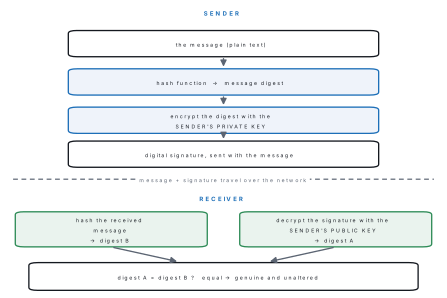
A digital signature is a value attached to an electronic record, produced by encrypting the message digest of that record with the private key of the signer, which any recipient can verify using the signer's public key.
It solves three problems at once. Authentication: only the holder of the private key could have produced it. Integrity: if even one character of the message changes, the digest changes and verification fails. Non-repudiation: the signer cannot later deny having signed, because nobody else has the key.
A hash function (such as SHA-256) is the other ingredient. It reduces a message of any length to a short fixed-length message digest, and it is designed so that it is impossible in practice to work backwards from the digest or to find two different messages with the same digest.
For this to mean anything, the verifier must be sure that the public key really belongs to the person named. That assurance comes from a digital certificate — an electronic document binding a public key to an identity — issued by a trusted certifying authority (CA). Nepal's Electronic Transactions Act devotes its Chapter 4 to this: section 13 empowers the Government of Nepal to appoint a Controller, who licenses and supervises the certifying authorities that issue digital signature certificates in the country.
8.8 Concept of cyber law in Nepal
Cyber law is the body of law that governs the use of computers, the internet and electronic information — covering electronic contracts and records, digital signatures, data protection, intellectual property online, and computer-related offences and their punishment.
Nepal's principal cyber law is the Electronic Transactions Act, 2063 (2008). It was authenticated and published on 22 Mansir 2063 (8 December 2006) as Act number 27 of the year 2063, and is deemed to have commenced from 24 Bhadra 2063. It replaced the Electronic Transactions Ordinance and runs to 12 chapters and 80 sections. Its declared purpose is to make electronic records and digital signatures legally reliable, and to punish those who abuse them.
Scope of the Act. Chapter 2 gives legal recognition to electronic records and digital signatures; Chapter 3 settles when an electronic message counts as dispatched and received; Chapter 4 creates the Controller and the certifying authorities; Chapters 5 and 6 cover digital signature certificates and subscribers' duties. Chapter 7 is the e-government chapter — section 39 lets government documents, licences, applications and payments be issued and made electronically and forbids denying them validity merely for being electronic, section 40 lets government agencies, public entities and banks accept electronic documents and payments, and section 41 lets the Government substitute digital signatures for handwritten ones in government offices. Chapter 8 covers network service providers, Chapter 9 defines the offences, Chapters 10 and 11 create the tribunals and Chapter 12 holds miscellaneous provisions.
Offences and punishments (Chapter 9).
| Section | Offence | Maximum punishment |
|---|---|---|
| 44 | Pirating, destroying or altering computer source code | up to Rs 200,000 fine, or up to 3 years imprisonment, or both |
| 45 | Unauthorised access to computer materials | up to Rs 200,000, or up to 3 years, or both, depending on the gravity of the offence |
| 46 | Damaging, deleting or altering any computer and information system | up to Rs 200,000, or up to 3 years, or both |
| 47 | Publishing illegal material in electronic form | up to Rs 100,000, or up to 5 years, or both |
| 48 | Divulging confidentiality | up to Rs 100,000, or up to 2 years, or both |
| 49 | Informing a false statement to the Controller or a certifying authority | up to Rs 100,000, or up to 2 years, or both |
| 52 | Computer fraud | the benefit obtained is recovered and returned to the victim, plus up to Rs 100,000, or up to 2 years, or both |
| 53 | Abetting a computer-related offence | up to Rs 50,000, or up to 6 months, or both |
| 54 | Acting as an accomplice | one half of the punishment the principal offender is liable to |
| 58 | Any other violation of the Act or its Rules | up to Rs 50,000, or up to 6 months, or both |
Four further rules complete the picture. Section 47(2): a repeat offender under section 47 is punished each time with one and a half times the previous punishment. Section 55: an offence committed outside Nepal is still triable here if the computer, system or network involved is located in Nepal. Section 56 allows the offending equipment to be confiscated, and section 57 fixes liability on a corporate body and on the person who was its chief at the time.
On procedure, section 74 requires the first information report to be filed within 35 days of the information about the offence; section 75 makes the Government of Nepal the plaintiff and requires the police to take the assistance of the Controller or another expert; section 76 allows compensation to be recovered. Cases go to a three-member Information Technology Tribunal constituted under section 60 — one member each from law, information technology and commerce, the law member as chairperson — with appeal to the Information Technology Appellate Tribunal (section 66) within 35 days.
The English translation that circulates online contains real mistranslations. Section 46 appears there as two thousand Rupees where the authoritative Nepali reads दुई लाख — two hundred thousand. Section 48 appears as ten thousand where the Nepali reads एक लाख — one hundred thousand. Section 47(2) appears as one and one half percent where the Nepali डेढी means one and a half times. The table above follows the Nepali text; learn those figures.
Problem. Ramesh watches his class teacher type her password, later logs into the school's result system from a cyber café using her account, and raises his own marks in three subjects. The school discovers this 40 days after being informed of it. Identify the offences and their punishments, and state one procedural difficulty the school now faces.
Solution. Two distinct offences have been committed.
Logging in without authorisation is unauthorised access to computer materials under section 45 — he used a computer to reach data without the authorisation of the person responsible for it. Punishment: up to Rs 200,000, or up to 3 years, or both, depending on gravity.
Changing the marks is a separate offence under section 46, because he knowingly and with mala fide intention altered information held in a computer source, causing wrongful loss to an institution. Punishment: up to Rs 200,000, or up to 3 years, or both. Had he also altered the program code of the result system, section 44 would apply too.
The procedural difficulty: section 74 requires the first information report within 35 days of the information on which the offence was committed. The school waited 40 days and is therefore outside the time limitation. Section 59 does, however, provide that where the same act is also an offence under another prevailing law, a separate case may still be filed under that law.
8.9 ICT policy in Nepal
Nepal's approach to information technology stands on three layers.
The law. The Electronic Transactions Act, 2063 and the Electronic Transaction Rules, 2064 are what make an electronic record, an electronic payment and a digital signature legally equivalent to their paper counterparts. Alongside them sit the Copyright Act, 2059 for works of the mind, the Individual Privacy Act, 2075 (2018) for personal data and the Right to Information Act, 2064 for access to public records.
The policy. The National Information and Communication Technology Policy, 2015 is the standing policy statement. Its thrust is to turn Nepal into an information- and knowledge-based society: universal and affordable broadband, ICT in every school, e-government services delivered online, the domestic IT industry and IT-enabled services grown as an export sector, Nepali-language content and local capacity developed, and attention to cyber security and to the urban–rural digital divide.
The programme. The Digital Nepal Framework is the implementation
programme built on that policy. It groups the work into sectors — digital
foundation (connectivity and digital identity), agriculture, health, education,
energy, tourism, finance and urban infrastructure — and defines concrete
initiatives inside each, so that broad aims become funded projects. On the ground
this shows up as the Government Integrated Data Centre hosting public systems,
the .gov.np domain overseen by the National Information Technology Centre,
online services such as PAN registration and vehicle tax, and retail payment
systems regulated by Nepal Rastra Bank.
What is still weak. The Act dates from 2006 and does not squarely address social-media harm, cloud computing, cross-border data or artificial intelligence; the 35-day limitation under section 74 defeats many complaints; data-protection practice lags behind the Privacy Act; and rural connectivity and digital literacy remain uneven. These are exactly the points an examiner wants in a critically examine question.
Chapter summary
Information security rests on the CIA triad — confidentiality, integrity and availability — and is enforced by authentication (something you know, have or are), authorisation, encryption and backup. Symmetric encryption uses one shared key; asymmetric encryption uses a public/private key pair.
Cybercrime uses the computer as tool, target or place. The main types are hacking and cracking, phishing, identity theft, cyberbullying, denial of service, piracy, salami attacks, data diddling and cyber terrorism. Malware covers viruses (need a host), worms (self-spreading), Trojan horses (disguised), ransomware, spyware, keyloggers, adware and rootkits; spam is unsolicited bulk mail. Protection means long unique passwords, 2FA, patched software, antivirus, a firewall, off-site backups and an eye on the address bar.
Intellectual property comes in four forms — copyright, patent, trademark and trade secret — and software is distributed as proprietary, freeware, shareware or open source. A digital signature is the sender's message digest encrypted with the sender's private key; the receiver decrypts it with the public key and compares it with a fresh digest, which proves authentication, integrity and non-repudiation. Certificates binding keys to identities are issued by certifying authorities licensed by the Controller.
Nepal's cyber law is the Electronic Transactions Act, 2063 (2008) — 12 chapters, 80 sections, Chapter 9 the offences. Learn sections 44, 45, 46, 47 and 48 with their penalties, the 35-day limitation under section 74, and the Information Technology Tribunal under section 60. Above the law sit the National ICT Policy, 2015 and the Digital Nepal Framework.
Practice questions
Group A — Multiple choice (1 mark each)
- Which is not part of the CIA triad? [1]aConfidentialitybIntegritycAuthenticitydAvailability
- Malware that replicates itself across a network without needing a host file is a: [1]avirusbwormcTrojan horsedrootkit
- A fingerprint scanner authenticates using something you: [1]aknowbhavecaredshare
- A digital signature is created by encrypting the message digest with the: [1]asender's public keybsender's private keycreceiver's public keydreceiver's private key
- Software that is free to use but whose source code is not published is: [1]aopen sourcebsharewarecfreewaredproprietary
- Under the Electronic Transactions Act 2063, unauthorised access to computer materials is an offence under section: [1]a44b45c46d47
- The maximum imprisonment for publishing illegal material in electronic form under the Act is: [1]a2 yearsb3 yearsc5 yearsd6 months
- Stealing a very small amount from a very large number of accounts is called a: [1]asalami attackbDoS attackcphishing attackddata diddling
- A first information report under the Electronic Transactions Act must be filed within: [1]a15 daysb35 daysc60 daysd90 days
Answers to Group A
1. (c)
2. (b)
3. (c)
4. (b)
5. (c)
6. (b)
7. (c)
8. (a)
9. (b)
Group B — Short answer (5 marks each)
- Define information security and explain the CIA triad with one example of an attack on each corner. [5]
- Differentiate between a virus, a worm and a Trojan horse. State any two symptoms of a malware infection. [5]
- What is a digital signature? Explain how it is created and how it is verified. [5]
- Define intellectual property right and explain its four types with one example of each. [5]
- Encrypt
SECUREusing a Caesar cipher with key 4, showing your working, and explain why such a cipher is unsafe. [5] - List any five offences defined by the Electronic Transactions Act 2063, giving the section number and the maximum punishment for each. [5]
Answers to Group B
1. Definition as in §8.2. Confidentiality — only authorised people may read the information; attacked by a keylogger capturing a password. Integrity — the information is not altered without permission; attacked by a student changing marks in a result database. Availability — the system is usable whenever a genuine user needs it; attacked by a DDoS flood that keeps real customers off a bank's website.
2. A virus attaches itself to a host file or program and spreads only when that file is copied or executed. A worm is a standalone program that copies itself across a network by itself, needing neither a host nor any user action. A Trojan horse pretends to be a useful program so the user installs it willingly; it does not replicate but opens a back door. Symptoms: sudden slowdown; files disappearing or refusing to open; unexpected pop-ups; the antivirus being disabled; programs starting on their own.
3. Definition as in §8.7. Creation: the sender passes the message through a hash function to get a short message digest, then encrypts that digest with their own private key; the result is the digital signature, which is sent along with the message. Verification: the receiver decrypts the signature with the sender's public key to recover digest A, independently hashes the received message to get digest B, and compares. If A equals B the message is genuine and unaltered; if not, either the message was changed or the signature is forged. This gives authentication, integrity and non-repudiation.
4. Definition as in §8.6. Copyright — the expression of an idea, e.g. source code, a novel or a song; automatic on creation. Patent — a new and non-obvious invention or process, e.g. a new battery chemistry; must be granted. Trademark — a name, logo or slogan identifying a source, e.g. the Nepal Telecom logo. Trade secret — confidential commercial information, e.g. a search engine's ranking algorithm; protected only while kept secret.
5. With key 4, C = (P + 4) \text{ mod } 26. S(18) to W(22), E(4) to I(8), C(2) to
G(6), U(20) to Y(24), R(17) to V(21), E(4) to I(8) — giving WIGYVI. It is
unsafe because the key can only take 25 useful values, so an attacker can simply
try every one of them (a brute-force attack) in a fraction of a second; it also
preserves letter frequencies, so frequency analysis breaks it even without a
brute-force search.
6. Any five from the table in §8.8, for example: s.44 pirating, destroying or altering computer source code — up to Rs 200,000 or 3 years or both; s.45 unauthorised access to computer materials — up to Rs 200,000 or 3 years or both; s.46 damaging a computer and information system — up to Rs 200,000 or 3 years or both; s.47 publishing illegal material in electronic form — up to Rs 100,000 or 5 years or both; s.48 divulging confidentiality — up to Rs 100,000 or 2 years or both; s.52 computer fraud — the benefit is recovered and returned, plus up to Rs 100,000 or 2 years or both.
Group C — Long answer (8 marks each)
- (a) Define cybercrime and explain any six types of cybercrime with one sentence each. [6](b) State any four measures an ordinary user can take to protect themselves from cybercrime. [2]
- (a) Introduce the Electronic Transactions Act 2063, stating its year of publication, its structure and its scope. [3](b) Explain any four offences it defines, with section numbers and penalties. [4](c) Name the body that hears cases under the Act and state within how many days an appeal must be filed. [1]
Answers to Group C
1. (a) Definition as in §8.3. Hacking and cracking — gaining unauthorised access to a system, the cracker doing so with criminal intent. Phishing — sending a forged message imitating a trusted organisation to trick the reader into revealing passwords or card details. Identity theft — using another person's personal details to impersonate them, usually for financial gain. Cyberbullying and cyberstalking — repeated online harassment, threats or humiliation of an individual. Denial-of-service attack — flooding a server with bogus requests so that genuine users cannot reach it. Software piracy — copying, distributing or using licensed software without paying for it. (Salami attack, data diddling and cyber terrorism are equally acceptable.)
1. (b) Any four of: use long, unique passwords and enable two-factor
authentication; keep the operating system, browser and antivirus updated; never
open attachments or click links in unexpected messages, and never share an OTP;
check for https and read the domain name before entering anything private; keep
regular off-site backups; use a firewall and log out of shared computers.
2. (a) The Electronic Transactions Act, 2063 (2008) is Nepal's principal cyber law. It was authenticated and published on 22 Mansir 2063 (8 December 2006) as Act number 27 of 2063 and is deemed to have commenced from 24 Bhadra 2063. It has 12 chapters and 80 sections. Its scope covers legal recognition of electronic records and digital signatures; dispatch and receipt of electronic messages; the Controller and certifying authorities; digital signature certificates and subscribers' duties; government use of electronic records and digital signatures; the liability of network service providers; computer-related offences; and the Information Technology Tribunal and Appellate Tribunal.
2. (b) Any four, for example: s.44 pirating, destroying or altering computer source code — fine up to Rs 200,000, or imprisonment up to 3 years, or both. s.45 unauthorised access to computer materials — up to Rs 200,000, or up to 3 years, or both, depending on gravity. s.46 destroying, damaging, deleting or altering information in a computer source — up to Rs 200,000, or up to 3 years, or both. s.47 publishing illegal material in electronic form — up to Rs 100,000, or up to 5 years, or both, with a repeat offence punished at one and a half times the previous punishment under s.47(2). s.48 divulging confidentiality — up to Rs 100,000, or up to 2 years, or both.
2. (c) The three-member Information Technology Tribunal constituted under section 60, consisting of one member each from law, information technology and commerce, with the law member as chairperson. An appeal against its order or decision must be filed with the Information Technology Appellate Tribunal within 35 days.
Practise more: Computer Science question bank