Unit 4 · 8 teaching hours · 31 min read
Database Management System
What the syllabus asks for 7
- Data, database and DBMS
- Architecture and data independence
- Data models
- The relational model
- Entity–relationship modelling
- Normalisation (introduction)
- SQL: structured query language
Banks, hospitals, schools and online shops are all, at heart, collections of organised data. A database management system (DBMS) stores that data once, protects it, and lets many people query and update it at the same time.
This unit gives a complete first course in the ideas; the Semester III subject Database Management System develops them fully.
- Why files were replaced by databases; DBMS advantages and users.
- The three-level architecture and data independence.
- Data models, and the relational model: tables, keys, integrity.
- Entity–relationship (ER) modelling, and a first look at normalisation.
- SQL: creating tables, inserting, querying, joining, grouping, with worked outputs.
4.1 Data, database and DBMS
- Data hierarchy: bit → byte → field → record → file → database.
- A database is an organised, shared collection of related data. A DBMS is the software that creates, stores, protects and queries it (MySQL, PostgreSQL, Oracle, SQL Server, SQLite). A database system = data + DBMS + hardware + users.
Problems of the file-processing approach: data redundancy (the same student's address in three files) leading to inconsistency; data isolation in different formats; no concurrent access control; weak security; programs depend on file layout.
| Advantage of a DBMS | How |
|---|---|
| Controlled redundancy | one copy, referenced elsewhere |
| Consistency and integrity | constraints enforced centrally |
| Data sharing | many users and applications at once |
| Security | per-user permissions |
| Backup and recovery | logs and restore |
| Data independence | change storage without changing programs |
| Concurrency control | transactions keep simultaneous updates correct |
Disadvantages: cost, complexity, a single point of failure unless replicated.
4.1.1 Applications of DBMS
- Banking and finance. Banks keep accounts, balances and transactions in a DBMS so that every deposit and withdrawal is recorded exactly once. ConnectIPS, Fonepay and ATM networks read and update these tables within seconds. Transaction control (ACID) makes sure money is never lost half-way between two accounts.
- Education. A university stores student profiles, enrolment, attendance and results in a database. Tribhuvan University's EMIS and college admission portals let staff search thousands of records quickly. Different views let a teacher see marks while an accountant sees fees.
- Government services. The National ID, citizenship, vehicle registration and tax records of Nepal are held in databases. The Nagarik App and the Inland Revenue Department portal fetch data from them for citizens. Central storage avoids repeated forms and duplicated records.
- Healthcare. Hospitals store patient history, prescriptions, test reports and bed use. DHIS2, used by Nepal's Ministry of Health, collects district health data in one database. Doctors can see earlier reports, which improves treatment and avoids repeated tests.
- Airlines and travel. Reservation systems keep flights, seats and passengers in a shared database. Two agents must never sell the same seat, so concurrency control locks the record. Buddha Air and Yeti Airlines booking sites depend on this.
- Retail and e-commerce. Shops keep products, stock, customers and bills in tables. Daraz and local supermarkets use them to find an item, update stock after a sale and print invoices. Reports of best-selling goods help the owner reorder in time.
- Telecommunications. Ncell and Nepal Telecom store subscriber details, call records and recharge history. Billing, SIM registration and balance checks are queries on these tables. Millions of simple updates per day need a fast, reliable DBMS.
- Social media and web applications. Websites store users, posts, messages and likes in databases, often a mix of relational (MySQL, PostgreSQL) and NoSQL (MongoDB, Redis) systems. Every page you open runs several queries. Indexes keep the answers quick even with huge data.
People: the database administrator (DBA) designs storage, grants access and backs up; designers model the data; application programmers write programs; end users query or use forms (casual, naive and sophisticated users).

4.1.2 Eight advantages of a DBMS
The table above names the benefits in one line each. In an examination answer each of the eight points below should be written with its meaning and an example.
- Controlled redundancy. In a file system the same student address may be stored in the library, accounts and exam files. A DBMS keeps one copy and links to it from other tables. This saves disk space and removes the risk of copies that disagree.
- Consistency and integrity. Rules such as "marks lie between 0 and 100" or "every student belongs to an existing programme" are stored in the database itself. The DBMS refuses data that breaks a rule, whichever program tries to enter it. A college result system therefore cannot hold a mark of 150.
- Data sharing. Many users and applications use the same data at the same time. The accounts section, the exam section and the principal see one up-to-date record of a student. Nepal's EMIS and the National ID system depend on this shared view.
- Security. The DBA gives each user only the permissions needed. A clerk may read fee records but not change marks, while a teacher may enter marks for one course. Passwords, roles and audit logs show who did what.
- Backup and recovery. The DBMS keeps logs of every change, so after a power failure it can restore the last correct state. Banks run backups every night and can replay the log to the exact minute. A file system usually offers only a copy of the files.
- Data independence. Programs do not depend on how data is physically stored. Adding an index or a new column does not force every program to be rewritten. This reduces maintenance cost over the years.
- Concurrency control. When two clerks update the same account at once, locks and transactions keep the result correct. Without them, two airline agents could sell the same seat. The DBMS handles this so that programmers need not.
- Faster development and standard access. SQL, report writers and form builders let a new application be built in days rather than months. The same language works on MySQL, PostgreSQL, Oracle and SQL Server. Data standards also make exchange between organisations easier.
4.1.3 Seven disadvantages of a DBMS
- High cost. Commercial systems such as Oracle have expensive licences, and a good server, storage and backup system add more. Small organisations may find the cost too high. Open-source systems such as PostgreSQL reduce, but do not remove, this cost.
- Complexity. Design, normalisation, indexing and tuning need real skill. A badly designed database is slow and hard to change. Teams must invest time in modelling before coding.
- Need for trained staff. A DBA, designers and programmers are required, and they are scarce in many Nepali districts. Their salaries add to running costs. Training for ordinary users is also needed.
- Overhead for small tasks. For a simple list of 50 names, a spreadsheet is faster to set up than a full DBMS. The DBMS uses memory, processor time and disk space even for tiny jobs. It pays off only when data is large or shared.
- Single point of failure. If the central database server stops, every application that depends on it stops. Hospitals and banks therefore replicate the data on a second server. This again increases cost.
- Conversion cost. Moving old paper registers or spreadsheets into a database needs careful cleaning and re-entry. Errors in the old data must be corrected during the move. Municipalities digitising records have found this to be the longest step.
- Large damage if security fails. Because data is concentrated in one place, a successful attack exposes everything. Leaks of customer records have happened in many countries. Strong passwords, encryption, patching and access logs are essential.

4.2 Architecture and data independence
The three-level (ANSI/SPARC) architecture separates:
| Level | Describes | Who sees it |
|---|---|---|
| External (view) | the part of the data each user group needs | end users |
| Conceptual (logical) | the whole database: entities, attributes, relations, constraints | DBA, designers |
| Internal (physical) | files, indexes, how bytes lie on disk | system |
- Logical data independence: change the conceptual schema (add a column) without rewriting external views/programs.
- Physical data independence: change storage (add an index, move to SSD) without changing the conceptual schema.
The schema is the design (rarely changes); the instance is the data at a moment (changes constantly). DDL (data definition language) defines schema; DML (data manipulation) queries and updates; DCL controls permissions; TCL controls transactions.

4.3 Data models
A data model is a way of describing data and its structure.
- Hierarchical: tree, one parent per record (IBM IMS).
- Network: graph, many parents allowed (CODASYL).
- Relational: data as tables (relations); dominant since the 1980s (Codd, 1970).
- Object-oriented / document / key-value / graph (NoSQL): MongoDB, Redis, Neo4j for flexible or huge-scale data.
4.4 The relational model
A relation is a table. A row is a tuple (record), a column is an attribute (field); the set of allowed values of an attribute is its domain. Degree = number of attributes; cardinality = number of tuples.
Keys
| Key | Meaning |
|---|---|
| Super key | any set of attributes that uniquely identifies a tuple |
| Candidate key | a minimal super key |
| Primary key | the candidate key chosen to identify tuples; never NULL |
| Alternate key | a candidate key not chosen |
| Composite key | a key made of more than one attribute |
| Foreign key | attribute(s) that refer to the primary key of another (or the same) table |
Integrity rules.
Entity integrity a primary key is never NULL.
Referential integrity every foreign-key value must match an existing primary-key value (or be NULL).
Domain integrity values must fit the attribute's type and constraints.
Example, students and their programmes:
| Student: SID (PK) | Name | ProgID (FK) |
|---|---|---|
| 1 | Sita | 10 |
| 2 | Ram | 10 |
| 3 | Hari | 20 |
| Programme: ProgID (PK) | PName |
|---|---|
| 10 | BCA |
| 20 | BBS |
ProgID in Student is a foreign key to Programme; inserting a student with ProgID 30 breaks referential integrity and is rejected.
4.5 Entity–relationship modelling
The ER model designs the database before tables are made.
- Entity: a thing about which we store data (Student, Course); weak entity has no key of its own and depends on another (a Dependent of an Employee).
- Attribute: a property: simple/composite, single/multi-valued, stored/derived (Age from DOB). Key attribute is underlined.
- Relationship: an association between entities (Student enrols in Course). Cardinality: 1:1, 1:N, M:N.
ER symbols: rectangle = entity (double = weak), ellipse = attribute, diamond = relationship, lines join them.

Converting ER to tables: each entity → a table with its key; a 1:N relationship → put the key of the "one" side as a foreign key on the "many" side; an M:N relationship → a new table holding both keys (plus any relationship attribute).
Student (SID, Name) and Course (CID, Title) are M:N (a student takes many courses; a course has many students).
The relational design is: Student(SID, Name), Course(CID, Title), Enrol(SID, CID, Grade) with primary key (SID, CID), where SID and CID are also foreign keys.
4.6 Normalisation (introduction)
Normalisation removes redundancy and update anomalies by splitting tables.
An un-normalised table Order(OID, Cust, CustPhone, Item) repeats the phone number on every order line, so changing it means many updates (update anomaly), deleting the last order loses the customer (deletion anomaly), and a customer cannot be added without an order (insertion anomaly).
- 1NF: every field holds a single atomic value; no repeating groups.
- 2NF: 1NF and no non-key attribute depends on only part of a composite key.
- 3NF: 2NF and no non-key attribute depends on another non-key attribute (no transitive dependency).
Fix: Customer(Cust, CustPhone) and Order(OID, Cust, Item); the phone number is now stored once.

4.7 SQL: structured query language
SQL is the standard language of relational databases.
CREATE TABLE programme (
    prog_id  INT PRIMARY KEY,
    pname    VARCHAR(30) NOT NULL
);
CREATE TABLE student (
    sid      INT PRIMARY KEY,
    name     VARCHAR(40) NOT NULL,
    marks    INT CHECK (marks BETWEEN 0 AND 100),
    prog_id  INT REFERENCES programme(prog_id)
);
INSERT INTO programme VALUES (10, 'BCA'), (20, 'BBS');
INSERT INTO student VALUES (1, 'Sita', 82, 10), (2, 'Ram', 67, 10),
                           (3, 'Hari', 74, 20), (4, 'Gita', 91, 10);
Queries on this data:
SELECT name, marks FROM student WHERE marks >= 75 ORDER BY marks DESC;
Gita|91
Sita|82
SELECT p.pname, COUNT(*) AS n, AVG(s.marks) AS avg_marks
FROM student s JOIN programme p ON s.prog_id = p.prog_id
GROUP BY p.pname;
BBS|1|74.0
BCA|3|80.0
UPDATE student SET marks = marks + 5 WHERE sid = 2;
DELETE FROM student WHERE marks < 70;
The second statement removes nobody here: Ram becomes 72, and everyone else is already ≥ 74.
| Clause | Role |
|---|---|
SELECT |
columns (or expressions, aggregates) to return |
FROM |
tables; JOIN … ON combines tables by matching keys |
WHERE |
filters rows before grouping |
GROUP BY |
one output row per group |
HAVING |
filters groups after aggregation |
ORDER BY |
sort (ASC default, DESC) |
Aggregates: COUNT, SUM, AVG, MIN, MAX. LIKE 'S%' matches names starting with S; IN (10, 20); IS NULL; DISTINCT. ALTER TABLE changes a table, DROP TABLE removes it, GRANT/REVOKE manage permission, COMMIT/ROLLBACK end a transaction.
Transactions and ACID. A transaction (e.g. transfer Rs 500 from A to B) is a unit of work that is Atomic (all or nothing), Consistent (rules hold before and after), Isolated (concurrent transactions do not see each other's half-done work), Durable (once committed, it survives a crash).
4.7.1 Eight things SQL can do
- Define structure (DDL).
CREATE TABLE,ALTER TABLEandDROP TABLEbuild and change the design. A college can add aphonecolumn without losing data. The same commands work on most database systems. - Change data (DML).
INSERT,UPDATEandDELETEadd, correct and remove rows. A teacher's mark entry is anINSERT, and a correction after rechecking is anUPDATE. TheWHEREclause limits the change to chosen rows. - Ask questions (SELECT).
SELECTwithWHEREandORDER BYreturns exactly the rows wanted, sorted as needed. "Students with marks of at least 75, highest first" is one line. The user says what is needed, not how to find it. - Summarise.
COUNT,SUM,AVG,MINandMAXwithGROUP BYandHAVINGproduce totals and averages per group. A municipality can count households per ward in one query.HAVINGfilters groups, whileWHEREfilters rows. - Join tables.
JOIN ... ONcombines rows from several tables through a key. The student table and the programme table are linked byprog_idto show the programme name beside each student. Because data is normalised, joins put it back together. - Enforce rules (constraints).
PRIMARY KEY,NOT NULL,UNIQUE,CHECKandFOREIGN KEYkeep data valid. ACHECK (marks BETWEEN 0 AND 100)rejects a bad value at entry. Constraints protect integrity for every program that uses the table. - Control access (DCL).
GRANTandREVOKEgive or take away permissions for users and roles. The accounts clerk maySELECTfee data, but only the examination head mayUPDATEmarks. This is how a DBMS keeps data secure. - Group work safely (transactions and views).
COMMITandROLLBACKmake several changes succeed or fail together, and aVIEWstores a query as a virtual table. A fund transfer is committed only when both the debit and the credit are done. Views let a user see only the columns allowed.



Formula and fact sheet
- Data hierarchy: bit → byte → field → record → file → database.
- Three levels: external, conceptual, internal; logical and physical data independence.
- Key hierarchy: super ⊃ candidate ⊃ primary; foreign key links tables.
- Cardinality of a relation = rows; degree = columns.
- M:N needs a third (junction) table; 1:N puts the FK on the many side.
- 1NF atomic; 2NF no partial dependency; 3NF no transitive dependency.
- SQL: WHERE before GROUP BY, HAVING after; ACID for transactions.
Chapter summary
- A DBMS replaces scattered files with one controlled, shared and secure store.
- The three-level architecture gives data independence.
- Relational databases organise data into tables linked by keys, with integrity rules the DBMS enforces.
- ER modelling designs the database; normalisation removes redundancy and anomalies.
- SQL creates, queries and updates; transactions obey ACID.
Practice
A. Short questions
- Define database and DBMS. List five advantages of a DBMS.
- What are the problems of the file-based system?
- Differentiate schema and instance.
- Differentiate primary key, candidate key and foreign key.
- State entity integrity and referential integrity.
- What is data independence? Name its two types.
- What are the DDL and DML? Give two commands of each.
- What does ACID stand for?
B. Problems (use the student and programme tables of §4.7)
- Write SQL to display names of students of BCA who scored above 70.
- Write SQL to show the highest mark in each programme.
- Design tables for a library where one member borrows many books and one book is borrowed by many members over time.
- Normalise to 3NF:
Marks(SID, SName, CID, CTitle, Score)with key (SID, CID).
C. Long questions
- Explain the three-level architecture of a DBMS.
- Explain entity, attribute, relationship and cardinality with an ER example.
- Explain the advantages and disadvantages of a DBMS and compare it with the file-processing system.
- What is normalisation? Explain 1NF, 2NF and 3NF with an example.
- What is a transaction? Explain the ACID properties with an example (5 marks).
Answers and worked solutions
1. A database is an organised shared collection of related data; a DBMS is the software that manages it. Advantages: controlled redundancy, consistency, sharing, security, backup/recovery, data independence.
2. Redundancy and inconsistency, data isolation, no concurrency control, poor security, program-data dependence.
3. Schema is the design of the database; instance is the data stored at a moment.
4. Primary key: chosen unique, non-null identifier. Candidate key: any minimal unique attribute set (primary is one of them). Foreign key: refers to a primary key in another table.
5. Entity integrity: primary key cannot be NULL. Referential integrity: a foreign key must match an existing primary key or be NULL.
6. Ability to change one level without affecting the next higher level. Logical and physical.
7. DDL: CREATE, ALTER, DROP. DML: SELECT, INSERT, UPDATE, DELETE.
8. Atomicity, Consistency, Isolation, Durability.
9. SELECT s.name FROM student s JOIN programme p ON s.prog_id = p.prog_id WHERE p.pname = 'BCA' AND s.marks > 70; gives Sita and Gita (Ram has 67).
10. SELECT p.pname, MAX(s.marks) FROM student s JOIN programme p ON s.prog_id = p.prog_id GROUP BY p.pname; gives BBS 74, BCA 91.
11. Member(MemberID, Name), Book(BookID, Title), Borrow(MemberID, BookID, IssueDate, ReturnDate) with primary key (MemberID, BookID, IssueDate).
12. SName depends only on SID and CTitle only on CID (partial dependencies). Split into Student(SID, SName), Course(CID, CTitle), Marks(SID, CID, Score).
13. External, conceptual, internal levels with the table of §4.2 and the two independences.
14. Use the definitions in §4.5 and draw Student–Enrol–Course as an M:N example.
15. Advantages: controlled redundancy, integrity, sharing, security, recovery, independence, concurrency control, fast development. Disadvantages: cost, complexity, skilled staff, overhead, single point of failure, conversion, large breach. Full model answer below.
16. Normalisation splits tables to remove anomalies: 1NF atomic values, 2NF no partial dependency, 3NF no transitive dependency. Worked on Marks in Figure 4.4; model answer below.
17. Atomicity, Consistency, Isolation, Durability; a Rs 500 transfer is committed or rolled back as a whole (Plate 4.2). Model answer in the 5-mark section.
Model answers: medium (5 marks) and long (10 marks) questions
Medium questions (5 marks)
Q2. What are the problems of the file-based system and how does a DBMS solve them? (5 marks)
In a file-processing system each application keeps its own files (Figure 4.1). A college may store a student's address in the admission file, the exam file and the library file.
- Redundancy and inconsistency: the same data is repeated, so a changed address may be updated in one file only.
- Data isolation: files have different formats, so combining them needs new programs.
- No concurrent access control: two clerks changing one record can overwrite each other.
- Weak security: access cannot be limited to selected fields or users.
- Program-data dependence: if the file layout changes, every program must be rewritten.
A DBMS solves these by keeping one shared database: controlled redundancy, constraints for integrity, locking for concurrency, per-user permissions, logs for recovery, and data independence through the three-level architecture.
| Problem | File system | DBMS |
|---|---|---|
| Duplicate data | common | controlled |
| Security | file-level | user and column level |
| Concurrent update | unsafe | transactions and locks |
| Backup | manual copy | log-based recovery |
Example. A bank cannot let two ATMs withdraw the same balance twice; a DBMS lock prevents this.
Q12. Normalise Marks(SID, SName, CID, CTitle, Score) to 3NF. (5 marks)
Given. Primary key (SID, CID). Functional dependencies: SID → SName; CID → CTitle; (SID, CID) → Score.
- 1NF: every field is atomic and there are no repeating groups, so the table is already in 1NF. It suffers anomalies: SName repeats for every course (update anomaly), and a new course cannot be added until a student takes it (insertion anomaly).
- 2NF: remove partial dependencies on part of the key. SName depends only on SID and CTitle only on CID, so split into Student(SID, SName), Course(CID, CTitle) and Marks(SID, CID, Score).
- 3NF: check for transitive dependencies between non-key attributes. None remain, because Score depends on the whole key, SName on SID alone and CTitle on CID alone. The design is in 3NF.
| Table | Key | Non-key attributes |
|---|---|---|
| Student | SID | SName |
| Course | CID | CTitle |
| Marks | (SID, CID) | Score |
Result. A student's name and a course title are stored once, and joining the three tables on SID and CID rebuilds the original data without loss.
Q4. Differentiate primary key, candidate key and foreign key. (5 marks)
A key is an attribute or set of attributes that identifies rows. A super key is any set that is unique; a candidate key is a minimal super key.
- Candidate key: a minimal attribute set that identifies each row uniquely. In Student(RollNo, Email, Name), both RollNo and Email are candidates.
- Primary key: the candidate chosen to identify rows. It must be unique and not null (entity integrity). RollNo is chosen.
- Alternate key: a candidate that is not chosen, such as Email.
- Foreign key: an attribute in one table that refers to the primary key of another table. It may repeat and (if optional) may be null (referential integrity).
| Key | Unique? | Null allowed? | Count per table |
|---|---|---|---|
| Primary | yes | no | one |
| Candidate | yes | no (if chosen) | one or more |
| Foreign | no | yes | zero or more |
Example. In Enrol(RollNo, CourseID, Grade), (RollNo, CourseID) is the composite primary key and each part is also a foreign key to Student and Course.
Q17. What is a transaction? Explain the ACID properties with an example. (5 marks)
A transaction is a group of database operations that must be treated as one unit of work: either all of it happens or none of it does.
Transferring Rs 500 from account A to account B is one transaction made of two updates, a debit of A and a credit of B. Plate 4.2 shows this run in a real database.
- Atomicity: all steps are done or none is. If the system crashes after the debit but before the credit, the DBMS rolls the debit back (case 3 of Plate 4.2: A = 1,000 and B = 500 again).
- Consistency: a transaction takes the database from one valid state to another. A rule such as
balance >= 0is never broken; a transfer of Rs 1,500 from an account holding Rs 1,000 is refused and rolled back (case 2). - Isolation: transactions that run at the same time do not see each other's half-finished work. Two clerks updating the same balance are made to wait for each other by locks.
- Durability: after
COMMITthe change survives power failure, because it is written to the log on disk.
| Property | Question it answers | Mechanism |
|---|---|---|
| Atomicity | all or nothing? | rollback, log |
| Consistency | rules still true? | constraints |
| Isolation | do users interfere? | locks, versions |
| Durability | is it permanent? | write-ahead log, backup |
Commands. BEGIN starts the transaction, COMMIT makes it permanent and ROLLBACK cancels it. In the run of Plate 4.2 the total of the two accounts stays Rs 1,500 in all three cases, which is exactly what ACID promises.
Long questions (10 marks)
Q13. Explain the three-level architecture of a DBMS. (10 marks)
Introduction. The ANSI/SPARC three-level architecture separates what users see from how data is stored, so that each level can change without breaking the others (Figure 4.2). Its main aim is data independence.
- External level (view level): describes the part of the database each user group needs. A teacher view shows marks, an accounts view shows fees. There can be many external schemas.
- Conceptual level (logical level): describes the whole database for the organisation: entities, attributes, relationships and constraints. There is only one conceptual schema, and the DBA works here.
- Internal level (physical level): describes how data is stored: files, blocks, indexes, compression and access paths on HDD or SSD.
- External/conceptual mapping: translates a user view into the conceptual tables. It makes logical data independence possible.
- Conceptual/internal mapping: translates tables into storage structures. It makes physical data independence possible.
- Logical data independence: the conceptual schema can change (add the column
Email) without rewriting external views or programs that do not use it. - Physical data independence: storage can change (add an index, move to SSD) without changing the conceptual schema.
- Schema and instance: the schema is the design at each level; the instance is the data stored at one moment.
| Level | Describes | Users | Changes when |
|---|---|---|---|
| External | user views | end users | user needs change |
| Conceptual | whole database | DBA, designers | business rules change |
| Internal | storage details | DBMS, system | hardware or tuning changes |
Example. A college adds a Phone column (conceptual change). The library view and its programs still run, which shows logical independence.
Conclusion. The three levels give security (users see only their view), flexibility and easier maintenance. Data independence is the main advantage over file systems.
Q14. Explain entity, attribute, relationship and cardinality with an ER example. (10 marks)
Introduction. The entity-relationship (ER) model is a high-level design method that draws the data before any table is created. It uses rectangles for entities, ellipses for attributes and diamonds for relationships (Figure 4.3).
- Entity: a real-world thing about which data is stored, such as Student, Course or Teacher. A weak entity has no key of its own and depends on a strong entity (a Dependent of an Employee).
- Attribute: a property of an entity. Types: simple (Name), composite (Address = ward + municipality), single-valued (RollNo), multi-valued (Phone), derived (Age from DOB) and key (RollNo, underlined).
- Relationship: an association between entities, for example Student enrols in Course.
- Cardinality: how many instances take part. 1:1 (one citizen, one citizenship number), 1:N (one department, many students) and M:N (many students, many courses).
- Participation: total if every instance must take part (every student belongs to a department), partial otherwise.
- Mapping to tables: each entity becomes a table; the key of the one side becomes a foreign key on the many side for 1:N; M:N needs a new table.
College example. Entities: Student(RollNo, Name, Phone), Course(CourseID, Title), Teacher(TID, TName), Department(DeptID). Relationships: enrols (M:N), teaches (1:N), has (1:N).
| Entity or relationship | Table produced |
|---|---|
| Student | Student(RollNo, Name, DeptID) |
| Course | Course(CourseID, Title, TID) |
| Enrols (M:N) | Enrol(RollNo, CourseID, Grade) |
| Department | Department(DeptID, DName) |
Conclusion. ER modelling finds the entities and links early, avoids redundancy and gives a design that converts directly into relational tables.
Q15. Explain the advantages and disadvantages of a DBMS and compare it with the file-processing system. (10 marks)
Introduction. A database management system (DBMS) is software that creates, stores, protects and queries a shared collection of related data. Before DBMS, every application kept its own files, which caused repeated data and many errors.
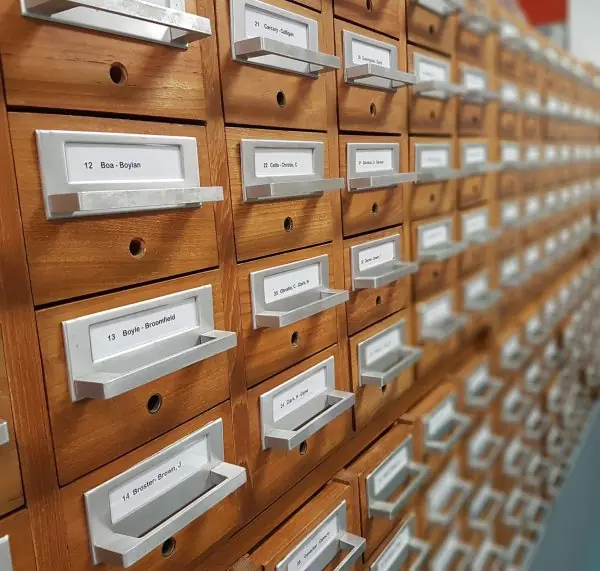
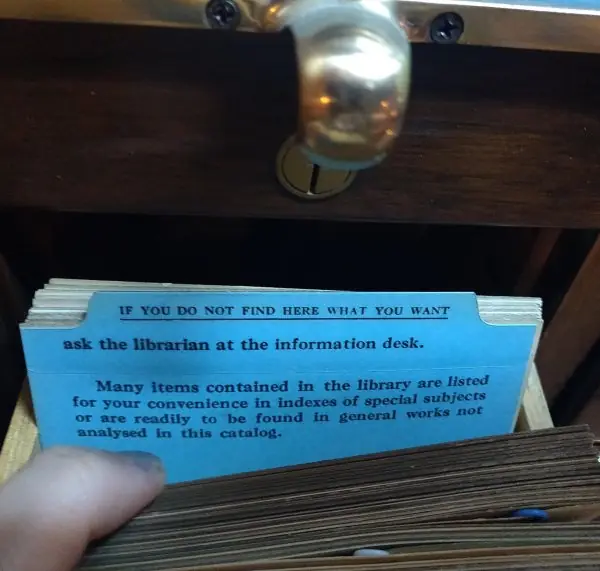
Banks, hospitals, Tribhuvan University and the National ID system now depend on databases (Plate 4.1 shows the old filing idea and the index idea behind it).
Problems of the file-processing system. The same student address is stored in several files (redundancy), so a change in one file leaves the others wrong (inconsistency).
Data sits in different formats (isolation), programs depend on the file layout, two users cannot safely update together, and security is weak.
Advantages of a DBMS
- Controlled redundancy: one copy of each fact, referenced from other tables.
- Consistency and integrity: rules such as marks from 0 to 100 are enforced centrally.
- Data sharing: many users and applications use the same current data.
- Security: per-user permissions through
GRANTandREVOKE. - Backup and recovery: logs restore the database after a failure.
- Data independence: storage can change without changing programs.
- Concurrency control: locks and transactions keep simultaneous updates correct.
- Fast development: SQL, forms and reports shorten the time to build an application.
Disadvantages of a DBMS
- High cost of software, hardware and backup.
- Design and tuning are complex.
- Skilled staff such as a DBA are needed.
- Overhead is too heavy for very small jobs.
- The server is a single point of failure unless it is replicated.
- Converting old records is slow and costly.
- A security breach exposes all the data at once.
| Basis | File-processing system | DBMS |
|---|---|---|
| Redundancy | high | controlled |
| Consistency | often lost | enforced by constraints |
| Sharing | difficult | easy |
| Security | weak, file level | per user and per table |
| Concurrent access | unsafe | transactions and locks |
| Data independence | none | logical and physical |
| Cost | low | higher |
Example. In a college, the fees office, library and examination section each keep student data. After moving to one database, a change of a student's phone number is made once and every section sees it.
Figure 4.5 shows that an index makes one lookup among 100,000 rows need at most 17 comparisons instead of tens of thousands.
Conclusion. A DBMS gives accurate, shared and secure data at the price of cost and complexity. For any organisation with large or shared data, the advantages clearly outweigh the disadvantages.
Q16. What is normalisation? Explain 1NF, 2NF and 3NF with an example. (10 marks)
Introduction. Normalisation is the process of organising the tables of a relational database to remove redundancy and the update, insertion and deletion anomalies it causes.
It works by splitting a large table into smaller tables joined by keys, guided by functional dependencies.
Example table. Marks(SID, SName, CID, CTitle, Score) with composite key (SID, CID), holding 7 rows for 4 students and 3 courses (Figure 4.4). The course title is repeated 7 times and the student name 7 times.
Anomalies.
Update renaming course 101 means changing 3 rows; missing one leaves two titles.
Insertion a new course cannot be stored until a student takes it.
Deletion deleting the only student of a course also deletes the course title.
Normal forms
- First normal form (1NF): every field holds one atomic value and there are no repeating groups. A cell such as "Database, Networks" must be split into separate rows.
Marksis already in 1NF. - Second normal form (2NF): the table is in 1NF and no non-key attribute depends on only part of a composite key. SName depends on SID alone and CTitle on CID alone, so these partial dependencies are removed:
Student(SID, SName),Course(CID, CTitle),Result(SID, CID, Score). - Third normal form (3NF): the table is in 2NF and no non-key attribute depends on another non-key attribute (no transitive dependency). If
Studentalso heldDeptIDandDeptName, DeptName would depend on DeptID and must move to aDepartmenttable. The three tables above are already in 3NF.
| Normal form | Condition | Removes |
|---|---|---|
| 1NF | atomic values, no repeating groups | multi-valued cells |
| 2NF | 1NF and no partial dependency | repetition caused by part of a key |
| 3NF | 2NF and no transitive dependency | non-key depends on non-key |
Result. In the run of Figure 4.4 the renaming of course 101 now changes 1 row instead of 3, and joining the three tables returns exactly the original 7 rows, so no information is lost (a lossless join).
Conclusion. Normalisation gives tables in which each fact is stored once, which saves space and prevents inconsistency. Too much splitting can slow queries because of extra joins, so designers sometimes keep a little redundancy on purpose (denormalisation) for speed.