Unit 8 · 5 teaching hours · 25 min read
Regular Expressions, Databases and Testing
What the syllabus asks for 5
- Regular expressions
- SQLite from Python
- Unit testing with unittest
- Virtual environments and pip
- Seeing the ideas: patterns, records, checks and isolation
Three tools turn a Python script into a dependable program: regular expressions to find structure in text, SQLite to store data in a real database without installing a server, and unit tests to check that the code still works after every change.
- Regular expressions with the
remodule. - Working with SQLite from Python: create, insert, query, update, parameters, transactions.
- Unit testing with
unittest; virtual environments andpipin brief.
8.1 Regular expressions
A regular expression (regex) is a pattern describing a set of strings. The re module searches, matches and replaces with them. Always write patterns as raw strings r"…" so that backslashes reach the regex engine.
| Pattern | Meaning |
|---|---|
. |
any character except newline |
\d \w \s |
digit; letter, digit or underscore; whitespace (capitals negate) |
^ $ |
start, end of string |
* + ? {m,n} |
0 or more; 1 or more; 0 or 1; between m and n repeats |
[abc] [a-z] [^0-9] |
character class; range; negated class |
( ) \| |
group; alternation |
\b |
word boundary |
import re
text = "Call 9841234567 or 01-4412345; mail ram@tu.edu.np, sita.k@bca.com.np by 2026-11-02."
print(re.findall(r"\b98\d{8}\b", text))
print(re.findall(r"[\w.]+@[\w.]+\w", text))
m = re.search(r"(\d{4})-(\d{2})-(\d{2})", text)
print(m.group(0), m.groups(), m.span())
print(re.sub(r"\d", "#", "Roll 42, Ph 98"), re.split(r"[,;]\s*", "a, b;c,d"))
print(bool(re.fullmatch(r"[A-Z]{3}\d{3}", "BCA254")), bool(re.fullmatch(r"[A-Z]{3}\d{3}", "bca254")))
['9841234567']
['ram@tu.edu.np', 'sita.k@bca.com.np']
2026-11-02 ('2026', '11', '02') (72, 82)
Roll ##, Ph ## ['a', 'b', 'c', 'd']
True False
findall returns all matches; search finds the first anywhere; match anchors at the start; fullmatch needs the whole string to match; sub replaces; split splits; compile pre-builds a pattern.
Named groups (?P<year>\d{4}) make results self-documenting. Patterns are greedy by default (.* takes as much as possible); add ? (.*?) for the shortest match.
import re
log = '203.0.113.5 - [02/Nov/2026:10:15:32] "GET /result.php?id=14 HTTP/1.1" 200 512'
pat = re.compile(r'(?P<ip>[\d.]+) - \[(?P<when>[^\]]+)\] "(?P<method>\w+) (?P<path>\S+)[^"]*" (?P<status>\d{3})')
m = pat.match(log)
print(m.groupdict())
print(re.findall(r"<b>(.*?)</b>", "<b>one</b> and <b>two</b>"), re.findall(r"<b>(.*)</b>", "<b>one</b> and <b>two</b>"))
{'ip': '203.0.113.5', 'when': '02/Nov/2026:10:15:32', 'method': 'GET', 'path': '/result.php?id=14', 'status': '200'}
['one', 'two'] ['one</b> and <b>two']
Regexes are powerful but easy to misuse. For well-formed formats such as HTML or JSON, use a real parser. Validate e-mail addresses loosely and confirm by sending a message.
8.2 SQLite from Python
SQLite is a complete SQL database stored in a single file, included with Python as the sqlite3 module. The SQL itself is the subject of Semester III's DBMS book. Here is the Python side.
import sqlite3
con = sqlite3.connect(":memory:")          # use a filename for a persistent database
cur = con.cursor()
cur.execute("""CREATE TABLE student (
                 roll INTEGER PRIMARY KEY,
                 name TEXT NOT NULL,
                 dept TEXT,
                 marks REAL CHECK (marks BETWEEN 0 AND 100))""")
rows = [(1, "Ram", "BCA", 78.5), (2, "Sita", "BCA", 91.0), (3, "Hari", "BIT", 64.0), (4, "Gita", "BIT", 85.5)]
cur.executemany("INSERT INTO student VALUES (?, ?, ?, ?)", rows)
con.commit()
for row in cur.execute("SELECT name, marks FROM student WHERE marks > ? ORDER BY marks DESC", (70,)):
    print(row)
print(cur.execute("SELECT dept, COUNT(*), AVG(marks) FROM student GROUP BY dept").fetchall())
('Sita', 91.0)
('Gita', 85.5)
('Ram', 78.5)
[('BCA', 2, 84.75), ('BIT', 2, 74.75)]
Always pass values as parameters (?), never by pasting them into the SQL text with f-strings: parameters make SQL injection impossible (Web Technology II shows the attack).
import sqlite3
con = sqlite3.connect(":memory:")
con.row_factory = sqlite3.Row
con.execute("CREATE TABLE acct (id INTEGER PRIMARY KEY, owner TEXT, bal REAL CHECK (bal >= 0))")
con.executemany("INSERT INTO acct (owner, bal) VALUES (?, ?)", [("Ram", 500), ("Sita", 300)])
con.commit()

def transfer(src, dst, amount):
    try:
        with con:                                  # one transaction: commit or roll back
            con.execute("UPDATE acct SET bal = bal - ? WHERE id = ?", (amount, src))
            con.execute("UPDATE acct SET bal = bal + ? WHERE id = ?", (amount, dst))
        return "ok"
    except sqlite3.IntegrityError as e:
        return f"rolled back: {e}"

print(transfer(1, 2, 200), [tuple(r) for r in con.execute("SELECT owner, bal FROM acct")])
print(transfer(1, 2, 900), [tuple(r) for r in con.execute("SELECT owner, bal FROM acct")])
ok [('Ram', 300.0), ('Sita', 500.0)]
rolled back: CHECK constraint failed: bal >= 0 [('Ram', 300.0), ('Sita', 500.0)]
The second transfer would make Ram's balance negative; the CHECK constraint raises IntegrityError, and the with con: block rolls back the whole transaction, so no money is lost or created: the ACID properties from DBMS in action.
Other drivers (MySQL Connector, psycopg2) follow the same pattern (Python's DB-API): connect, cursor, execute, fetch, commit.
8.3 Unit testing with unittest
A unit test checks one small piece of behaviour automatically. Tests protect against regressions when you change code (Software Engineering, Unit 6).
import io, unittest

def grade(m):
    if not 0 <= m <= 100:
        raise ValueError("marks out of range")
    return "A" if m >= 80 else "B" if m >= 60 else "C" if m >= 40 else "F"

class GradeTests(unittest.TestCase):
    def test_bands(self):
        self.assertEqual([grade(m) for m in (85, 65, 45, 10)], ["A", "B", "C", "F"])
    def test_boundaries(self):
        self.assertEqual((grade(80), grade(79), grade(40), grade(39)), ("A", "B", "C", "F"))
    def test_invalid(self):
        with self.assertRaises(ValueError):
            grade(101)
    def test_deliberate_failure(self):
        self.assertEqual(grade(60), "A")        # wrong on purpose

suite = unittest.defaultTestLoader.loadTestsFromTestCase(GradeTests)
result = unittest.TextTestRunner(stream=io.StringIO(), verbosity=0).run(suite)
print("ran", result.testsRun, "failures", len(result.failures), "errors", len(result.errors))
print([ln for ln in result.failures[0][1].splitlines() if ln.startswith("AssertionError")][0])
ran 4 failures 1 errors 0
AssertionError: 'B' != 'A'
A test class extends unittest.TestCase; methods starting with test are run, each with its own fresh self; assertEqual, assertTrue, assertRaises, assertAlmostEqual check results. Run a file's tests with python -m unittest.
The deliberate failure shows how a failing test reports the expected and actual values. pytest is a popular third-party runner with shorter syntax (plain assert).
Good tests are small, independent, fast and cover boundaries (as in the BVA technique).
8.4 Virtual environments and pip
Different projects need different library versions. A virtual environment is an isolated folder of packages:
python -m venv venv                  # create
source venv/bin/activate             # Linux/macOS    (Windows: venv\Scripts\activate)
pip install requests pandas          # install into the environment
pip freeze > requirements.txt        # record exact versions
pip install -r requirements.txt      # recreate elsewhere
deactivate
Commit requirements.txt (not the venv folder) to version control, so that a teammate can rebuild the same environment.
8.5 Seeing the ideas: patterns, records, checks and isolation
The four tools of this unit each have an old, physical ancestor.
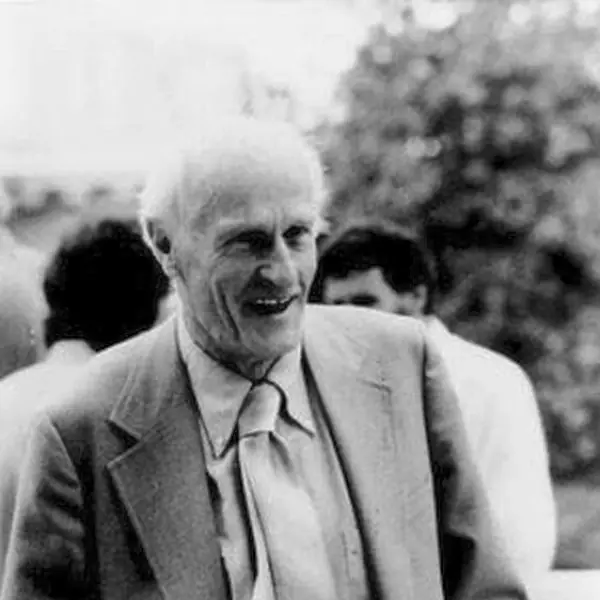
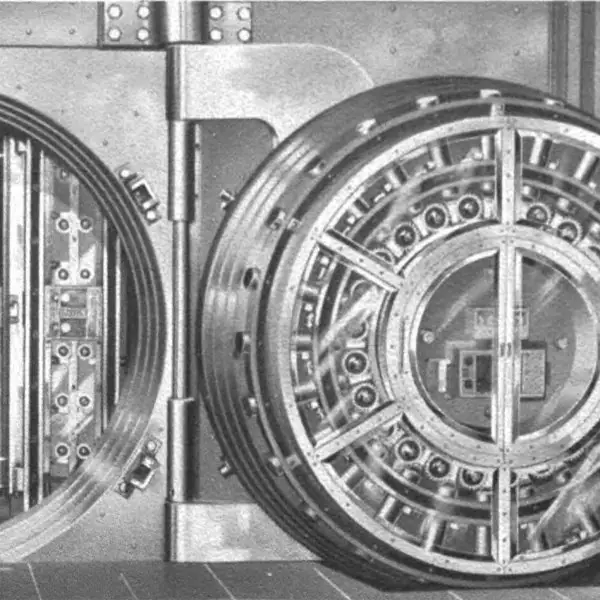
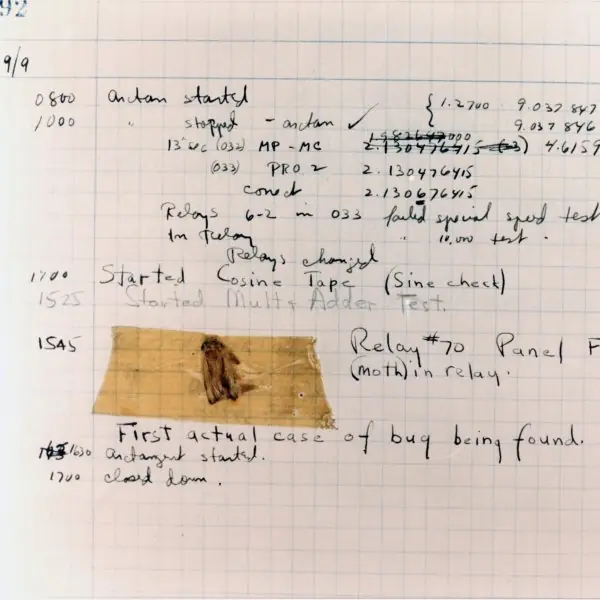
Stephen Kleene invented the notation behind regular expressions in 1951; a bank vault is the oldest picture of a protected, numbered store of records (a database); a crash test checks a design under controlled stress before real people depend on it (a unit test); and the 1947 logbook page that records the "first actual case of bug being found" shows why testing matters.
The figures then trace a regex token by token, show greedy against lazy matching, follow SQLite transactions and an injection attack with real results, and picture a test run and a virtual environment.





8.5.1 Eight practices for dependable Python programs
- Validate input with a precise pattern. A mobile number, a PAN or a roll number has a fixed shape that a regex can check in one line, as in Fig. 8.1. A form for a Nepali college can reject
98412before it reaches the database. Keep the pattern simple and add^and$so that extra characters are not accepted. - Prefer a parser when the format is nested. Regular expressions are excellent for flat text such as log lines, codes and phone numbers. For HTML, JSON or XML they break easily, so use
html.parser,jsonorxml. Using the right tool avoids bugs that only appear with unusual input. - Always pass values as parameters. A
?placeholder sends the value as data, so a name such asx' OR '1'='1cannot change the query (Fig. 8.4). This protects the student, fee and payment records of a college system. Never build SQL with f-strings or string joining. - Group related changes in one transaction. Paying a fee has two steps: reduce the wallet and record the payment. With
with con:both steps happen or neither does (Fig. 8.3), which is what a wallet such as Fonepay must guarantee. Without it, a failure between the steps leaves money lost or counted twice. - Let the database enforce the rules. A
CHECK (marks BETWEEN 0 AND 100), aNOT NULLor aPRIMARY KEYstops bad data at the door, whichever program writes it. This is stronger than checking only in Python. The rules are written once and every program obeys them. - Write a test for every function that has a rule. A function that turns marks into a grade has bands and boundaries, and a few tests check them in a second (Fig. 8.5). When someone changes the code later, a failing test shows the damage at once. Software teams run all tests before every release for this reason.
- Test the boundaries and the errors. Most mistakes sit at the edges: 79 and 80, 39 and 40, 100 and 101. Test the lowest and highest valid values and one value just outside, and test that bad input raises the expected exception with
assertRaises. These three or four tests catch more than a dozen tests of ordinary values. - Isolate each project and record its packages. Create a virtual environment for every project, install into it, and save the exact versions with
pip freeze > requirements.txt(Fig. 8.6). A classmate can then rebuild the same environment on a lab computer. This avoids the common problem that the program works on one machine and fails on another.
Formula and fact sheet
- Regex:
.,\d,\w,\s,* + ? {m,n},[...],( ),|,^ $; raw strings; greedy vs lazy*?. re.findall,search,match,fullmatch,sub,split,compile.sqlite3.connect,cursor.execute(sql, params),executemany,commit;with con:is a transaction. Parameters, not f-strings.unittest.TestCase,assertEqual,assertRaises;python -m unittest.python -m venv,pip install,pip freeze.
Chapter summary
- Regular expressions find and transform text patterns; raw strings and named groups keep them readable.
sqlite3gives a zero-setup SQL database; parameterised queries stop injection andwith con:gives atomic transactions.- Unit tests make change safe; virtual environments keep projects reproducible.
Practice
- Write a regex that matches Nepali mobile numbers (ten digits starting with 98 or 97) and test it.
- Extract all years (four digits) from a sentence.
- Explain greedy and non-greedy matching with an example.
- Create an SQLite table, insert three rows and print those above the average.
- Why must queries use
?placeholders? - Write two unit tests for a function
is_even. - What is the purpose of a virtual environment?
Answers and worked solutions
1.
import re
pat = re.compile(r"^9[78]\d{8}$")
print([bool(pat.match(n)) for n in ("9841234567", "9751234567", "9641234567", "98412345")])
[True, True, False, False]
2.
import re
print(re.findall(r"\b\d{4}\b", "TU began in 1959; BCA in 2074 BS and 2017 AD."))
['1959', '2074', '2017']
3. Greedy .* takes the longest possible match; .*? the shortest (Section 8.1 shows <b>(.*)</b> returning one long match and <b>(.*?)</b> returning two).
4.
import sqlite3
con = sqlite3.connect(":memory:")
con.execute("CREATE TABLE t (name TEXT, marks REAL)")
con.executemany("INSERT INTO t VALUES (?, ?)", [("a", 50), ("b", 80), ("c", 90)])
print(con.execute("SELECT name FROM t WHERE marks > (SELECT AVG(marks) FROM t)").fetchall())
[('b',), ('c',)]
5. Placeholders send the values separately from the SQL text, so input like '; DROP TABLE t; -- is treated as data, not as SQL, which prevents SQL injection; they also handle quoting and types.
6.
import io, unittest
def is_even(n):
    return n % 2 == 0
class T(unittest.TestCase):
    def test_even(self): self.assertTrue(is_even(10))
    def test_odd(self): self.assertFalse(is_even(7))
r = unittest.TextTestRunner(stream=io.StringIO()).run(unittest.defaultTestLoader.loadTestsFromTestCase(T))
print(r.testsRun, r.wasSuccessful())
2 True
7. It isolates a project's packages and versions from the system and from other projects, so that dependency conflicts are avoided and the environment can be recreated from requirements.txt.
Model answers (5 and 10 marks)
Q1. What is a regular expression? Explain the common metacharacters and the functions of the re module with a program. (5 marks)
Introduction. A regular expression (regex) is a short pattern that describes a set of strings, such as "ten digits starting with 98 or 97".
Instead of writing a long chain of if tests on characters, the programmer writes one pattern and lets the re module search, check or change text with it.
Regexes are used to validate form fields, to pull values out of log files and to clean text before analysis.
Main points.
- Metacharacters.
.matches any character except a newline;\d,\wand\smatch a digit, a word character and a space;[abc]or[a-z]match one character of a set;^and$anchor the start and the end. - Quantifiers.
*means zero or more,+one or more,?zero or one, and{m,n}between m and n. They are greedy by default and become lazy when followed by?(Fig. 8.2). - Groups.
( )groups part of a pattern and captures it;(?P<name>...)gives the group a name;|means "or". - Functions.
re.searchfinds a match anywhere,re.matchonly at the start,re.fullmatchneeds the whole string to match,re.findallreturns all matches,re.subreplaces andre.splitsplits.re.compileprepares a pattern for repeated use. - Raw strings. Write patterns as
r"..."so that Python does not treat\das an escape sequence.
import re
pat = re.compile(r"^9[78]\d{8}$")
print([bool(pat.match(n)) for n in ("9841234567", "9751234567", "9641234567", "98412345")])
text = "Roll 44, Roll 58 and Roll 102 passed in 2026."
print(re.findall(r"\d+", text))
print(re.sub(r"Roll (\d+)", r"#\1", text))
m = re.search(r"(?P<day>\d{2})/(?P<month>\w{3})/(?P<year>\d{4})", "Held on 02/Nov/2026.")
print(m.group("day"), m.group("month"), m.group("year"))
[True, True, False, False]
['44', '58', '102', '2026']
#44, #58 and #102 passed in 2026.
02 Nov 2026
Example. A college form can reject a mobile number with pat.fullmatch(number) before it is saved, and a script can pull every roll number out of a notice with re.findall(r"\d+", notice).
Conclusion. Regular expressions describe text patterns compactly; learn the metacharacters, quantifiers and groups, use raw strings and anchors, and use a real parser for nested formats such as HTML.
Q2. Explain how Python works with an SQLite database. Show create, insert, select and update, and explain why parameters must be used. (5 marks)
Introduction. SQLite is a complete SQL database kept in a single file (or in memory) and included with Python as the sqlite3 module, so no server has to be installed. It is used inside mobile apps, browsers and small web sites.
The Python program connects, sends SQL through a cursor, and reads the results as tuples.
Main points.
- Connect.
sqlite3.connect("college.db")opens or creates the file;":memory:"makes a temporary database for tests. - Create and constrain.
CREATE TABLEdefines columns and rules such asPRIMARY KEY,NOT NULLandCHECK, which the database enforces for every program. - Insert, select, update.
executeruns one statement andexecutemanyruns one statement for many rows;fetchone,fetchallor aforloop read the rows;commit()makes the changes permanent. - Parameters. Values are given as
?placeholders and a tuple. The database receives them as data, so text typed by a user can never become part of the SQL command, which stops SQL injection (Fig. 8.4). - Close.
con.close()releases the file.
import sqlite3
con = sqlite3.connect(":memory:")
con.execute("CREATE TABLE student (roll INTEGER PRIMARY KEY, name TEXT NOT NULL, marks REAL CHECK (marks BETWEEN 0 AND 100))")
con.executemany("INSERT INTO student VALUES (?, ?, ?)", [(1, "Ram", 78.5), (2, "Sita", 91.0), (3, "Hari", 64.0)])
con.execute("UPDATE student SET marks = marks + ? WHERE roll = ?", (5, 3))
con.commit()
print(con.execute("SELECT name, marks FROM student WHERE marks > ? ORDER BY marks DESC", (70,)).fetchall())
print(con.execute("SELECT AVG(marks) FROM student").fetchone()[0])
try:
    con.execute("INSERT INTO student VALUES (4, 'Gita', 150)")
except sqlite3.IntegrityError as e:
    print("rejected:", e)
[('Sita', 91.0), ('Ram', 78.5)]
79.5
rejected: CHECK constraint failed: marks BETWEEN 0 AND 100
Example. A fee office can store payments in fees.db, list those above a given amount with a parameterised SELECT, and be sure that a mistyped marks value of 150 is refused by the table itself.
Conclusion. sqlite3 gives a zero-setup SQL database; use ? parameters for every value, commit after changes, and let constraints protect the data.
Q3. What is unit testing? Explain the unittest module with a program, and explain why boundary tests and test-driven development are useful. (10 marks)
Introduction. A unit test is a small automatic program that checks one piece of behaviour, usually one function, by running it with chosen inputs and comparing the result with the expected value.
Manual checking is slow and is forgotten; automatic tests can be run after every change in a second.
The 1947 logbook of Plate 8.1(d) shows that finding bugs is as old as computing, and unit tests are how modern teams find them early and cheaply.
The unittest module. A test class inherits from unittest.TestCase. Every method whose name starts with test is a test; the runner calls each one on a fresh instance (Fig. 8.5).
Inside a test the programmer uses assertions such as assertEqual(a, b), assertTrue(x), assertAlmostEqual for decimals and assertRaises(Error) to check that bad input raises the right exception. setUp runs before every test to prepare data, and tearDown runs after it to clean up.
A test passes if no assertion fails; a failure is a wrong result, and an error is an unexpected exception. Tests are run from a terminal with python -m unittest.
import io, unittest

def fee(days_late):
    if days_late < 0:
        raise ValueError("negative days")
    return 0 if days_late <= 7 else 50 + 10 * (days_late - 7)

class FeeTests(unittest.TestCase):
    def test_no_fine_within_a_week(self):
        self.assertEqual((fee(0), fee(7)), (0, 0))
    def test_boundary_just_after(self):
        self.assertEqual(fee(8), 60)
    def test_growth(self):
        self.assertEqual(fee(10), 80)
    def test_invalid(self):
        with self.assertRaises(ValueError):
            fee(-1)

suite = unittest.defaultTestLoader.loadTestsFromTestCase(FeeTests)
result = unittest.TextTestRunner(stream=io.StringIO(), verbosity=0).run(suite)
print("ran", result.testsRun, "failures", len(result.failures), "errors", len(result.errors))
ran 4 failures 0 errors 0
Points to remember.
- Automatic and repeatable: the same tests run the same way every time.
- Boundary tests: most bugs sit at the edge (7 and 8 days, 79 and 80 marks), so test the last valid value and the first invalid one.
- Error tests: check that
assertRaisescatches bad input. - Independence: each test must not depend on another, which is why each gets a fresh
self. - Regression safety: after a change, a failing test points to what broke.
- Test-driven development (TDD): write a failing test first, write just enough code to pass it, then tidy the code; the tests become the specification.
| Level | What is tested | Tool |
|---|---|---|
| Unit test | one function or class | unittest |
| Integration test | several parts together | unittest with real files or a database |
| System / acceptance test | the whole program by a user | manual or automated scripts |
Conclusion. Unit tests with unittest give fast, repeatable checks of small pieces of code; with boundary cases and TDD they find bugs early and make later changes safe.
Q4. Explain transactions in SQLite and their importance. Describe SQL injection and how it is prevented, with a program. (10 marks)
Introduction. A transaction is a group of database operations that must be treated as one unit: either all of them take effect or none does.
This all-or-nothing property is called atomicity, and it is the first letter of the ACID rules (atomicity, consistency, isolation, durability) that make a database trustworthy.
A wallet or bank transfer, for example a Fonepay payment, has at least two steps, a debit and a credit, and a failure between them must never leave money lost.
How transactions work in sqlite3. Changes made through a connection stay uncommitted until commit() is called, and rollback() discards them.
The simplest safe style is the with con: block: if the block ends normally it commits, and if an exception occurs it rolls back.
Constraints such as CHECK (bal >= 0) raise sqlite3.IntegrityError when a step would break a rule, which triggers the rollback (Fig. 8.3). This keeps the data consistent, and durable once committed because the file is written to disk.
import sqlite3
con = sqlite3.connect(":memory:")
con.execute("CREATE TABLE acct (id INTEGER PRIMARY KEY, owner TEXT, bal REAL CHECK (bal >= 0))")
con.executemany("INSERT INTO acct (owner, bal) VALUES (?, ?)", [("Ram", 500), ("Sita", 300)])
con.commit()
def show():
    return [(o, int(b)) for o, b in con.execute("SELECT owner, bal FROM acct ORDER BY id")]
try:
    with con:
        con.execute("UPDATE acct SET bal = bal - 100 WHERE id = 1")
        con.execute("UPDATE acct SET bal = bal - 900 WHERE id = 1")
except sqlite3.IntegrityError as e:
    print("rolled back:", e)
print(show())
evil = "x' OR '1'='1"
bad = con.execute(f"SELECT owner FROM acct WHERE owner = '{evil}'").fetchall()
good = con.execute("SELECT owner FROM acct WHERE owner = ?", (evil,)).fetchall()
print(len(bad), len(good))
rolled back: CHECK constraint failed: bal >= 0
[('Ram', 500), ('Sita', 300)]
2 0
SQL injection. If a program builds SQL by pasting user text into a string, the user can type SQL instead of data.
The text x' OR '1'='1 turns the condition into one that is true for every row, so the query returns the whole table (Fig. 8.4). Worse input can read other tables or delete data.
Prevention: always use ? placeholders so that values travel as data; validate input with a pattern; give the database user only the rights it needs; never show raw database errors to the user.
| Aspect | f-string SQL | ? parameters |
|---|---|---|
| User text becomes | part of the command | only a value |
| Injection possible | yes | no |
Quoting of ' |
manual and error-prone | automatic |
| Reuse of the prepared statement | no | yes (executemany) |
Conclusion. Use transactions (with con:) so related changes are atomic, let constraints guard the rules, and pass every value as a parameter so that input can never become code.
Q5. What is a virtual environment? Explain how venv and pip are used and why requirements.txt is kept. (5 marks)
Introduction. Different projects often need different versions of the same library.
If all projects share the single set of packages of the system Python, installing one version for project A can break project B. A virtual environment is an isolated folder that holds its own Python interpreter link and its own packages, so each project has the versions it needs and nothing else (Fig. 8.6).
Main points.
- Create:
python -m venv venvmakes the foldervenv. - Activate:
source venv/bin/activateon Linux or macOS,venv\Scripts\activateon Windows; the prompt shows the environment name. - Install:
pip install requests pandasdownloads packages from PyPI into the environment only. - Record:
pip freeze > requirements.txtwrites the exact versions installed. - Rebuild: a teammate runs
pip install -r requirements.txtin a new environment and gets the same versions. - Leave:
deactivatereturns to the system Python.
python -m venv venv
source venv/bin/activate
pip install requests pandas
pip freeze > requirements.txt
pip install -r requirements.txt
deactivate
Example. A group project of five students stores requirements.txt in the shared repository. Each student creates a venv on their own computer and installs from the file, so the program behaves the same on every machine.
The venv folder itself is not committed because it is large and specific to one computer.
Conclusion. venv isolates a project, pip installs into it, and requirements.txt makes the setup reproducible for teammates and for deployment.