Unit 1 · 18 min read
Internet and the World Wide Web
What the syllabus asks for 7
- Internet versus Web
- Addresses: IP, domain, DNS
- URL anatomy
- HTTP
- Web server, browser, search engine and hosting
- Other Internet protocols and services
- Seeing the Web: machines, messages and addresses
The Internet is the global network of networks; the World Wide Web is one service that runs on it: linked documents fetched over HTTP. This unit explains how a page travels from a server to your browser.
- Internet, WWW, client–server model; history and Web 1.0 to 3.0.
- IP addresses, domain names and DNS; the anatomy of a URL.
- HTTP requests, responses, methods, status codes, headers, cookies.
- Web servers, browsers, hosting and related protocols (FTP, SMTP, POP3, IMAP).
1.1 Internet versus Web
| Internet | World Wide Web | |
|---|---|---|
| What | the physical and logical network infrastructure (cables, routers, TCP/IP) | a service of linked hypertext documents and resources |
| Born | ARPANET 1969; TCP/IP adopted 1983 | proposed by Tim Berners-Lee at CERN, 1989; first site 1991 |
| Others on the Internet | email, FTP, VoIP, online games, SSH |
The Web has had phases: Web 1.0 (static read-only pages), Web 2.0 (user-generated content, social media, dynamic apps with AJAX), Web 3.0 / semantic web (machine-readable meaning, decentralised data; the term is used loosely).
Client–server model. A client (browser) sends a request; a server (a program, not just a machine) listens and responds. Three-tier web apps split into presentation (browser), application logic (server code) and data (database).
An intranet is a private network using the same technology; an extranet shares part of it with partners.
1.2 Addresses: IP, domain, DNS
- IP address identifies a host: IPv4 has 32 bits written as four decimal bytes (
192.168.1.10, about 4.3 billion addresses), IPv6 has 128 bits (2001:db8::1). Private ranges (10.x.x.x,172.16–31.x.x,192.168.x.x) are not routable on the Internet; routers use NAT. - Domain name is the human-readable name:
www.example.com.npreads right to left: country code TLDnp, second levelcom, domainexample, hostwww. - DNS (Domain Name System) is the distributed phone book that translates names into IP addresses: browser cache → operating system → recursive resolver (ISP) → root server → TLD server → the domain's authoritative server. Results are cached for a time set by the TTL. Record types:
A(IPv4),AAAA(IPv6),CNAME(alias),MX(mail),NS(name server),TXT. - Port numbers pick the service on a host: HTTP 80, HTTPS 443, FTP 21, SMTP 25, SSH 22, DNS 53.
1.3 URL anatomy
https://www.example.com:8080/courses/web/index.html?lang=en&page=2#unit3
\___/   \_____________/ \__/\____________________/ \___________/ \____/
scheme       host       port         path               query    fragment
The scheme names the protocol; host locates the server; path names the resource; query string carries name=value pairs separated by &; the fragment is used only by the browser to scroll to an element. A URL is a kind of URI.
Absolute URLs include the scheme and host; relative ones (../img/a.png) are resolved against the current page.
1.4 HTTP
HTTP (Hypertext Transfer Protocol) is a text-based, stateless request–response protocol over TCP; HTTPS wraps it in TLS encryption. Each request is independent; the server remembers nothing unless cookies or sessions are used.
GET /courses/web/index.html HTTP/1.1          <- request line: method, path, version
Host: www.example.com                          <- headers
Accept: text/html
User-Agent: Mozilla/5.0

HTTP/1.1 200 OK                                <- status line
Content-Type: text/html; charset=UTF-8
Content-Length: 1256

<!DOCTYPE html> ...                            <- body
| Method | Use | Safe/idempotent |
|---|---|---|
GET |
read a resource; parameters in the URL | yes |
POST |
send data to create/process; data in the body | no |
PUT / PATCH |
replace / partially update | PUT idempotent |
DELETE |
remove | idempotent |
HEAD |
headers only | yes |
| Status class | Meaning | Examples |
|---|---|---|
| 1xx | informational | 101 Switching Protocols |
| 2xx | success | 200 OK, 201 Created, 204 No Content |
| 3xx | redirection | 301 Moved Permanently, 302 Found, 304 Not Modified |
| 4xx | client error | 400 Bad Request, 401 Unauthorized, 403 Forbidden, 404 Not Found |
| 5xx | server error | 500 Internal Server Error, 503 Service Unavailable |
Cookies are small name–value pairs the server sets with Set-Cookie and the browser returns with every later request; they implement sessions (login state), preferences and tracking. Flags: HttpOnly (not readable by JavaScript), Secure (HTTPS only), SameSite, Max-Age.
GET versus POST: GET data is visible in the URL, bookmarkable, cached, length-limited; POST is for forms that change data or carry secrets such as passwords (still needs HTTPS to be private).
1.5 Web server, browser, search engine and hosting
- A web server (Apache, Nginx, IIS, Node.js) receives HTTP requests and returns static files or output of dynamic programs (PHP, Node, Python, Java).
- A browser (Chrome, Firefox, Safari, Edge) requests resources, parses HTML into the DOM, applies CSS, runs JavaScript and renders. Engines: Blink, Gecko, WebKit.
- A search engine has a crawler (follows links), an index (word → pages) and a ranking algorithm (relevance, links such as PageRank, quality).
- Hosting: shared, VPS, dedicated, cloud, or static hosting. To publish: register a domain, point its DNS
A/CNAMErecord to the host, upload files (FTP/SFTP or Git), enable HTTPS (certificate). - Web design strategies: know the audience, plan the structure (site map), keep navigation consistent, design for mobile first, load fast, be accessible.
1.6 Other Internet protocols and services
| Protocol | Port | Purpose |
|---|---|---|
| FTP / SFTP | 21 / 22 | transfer files |
| SMTP | 25, 587 | send mail between servers |
| POP3 | 110 | download mail and (usually) delete from the server |
| IMAP | 143 | read mail kept on the server, synchronised across devices |
| Telnet / SSH | 23 / 22 | remote terminal (Telnet unencrypted; use SSH) |
| DHCP | 67/68 | automatically give hosts IP addresses |
Email path: your client → your SMTP server → recipient's SMTP server (found by MX record) → recipient's mailbox → read by POP3 or IMAP.
1.7 Seeing the Web: machines, messages and addresses
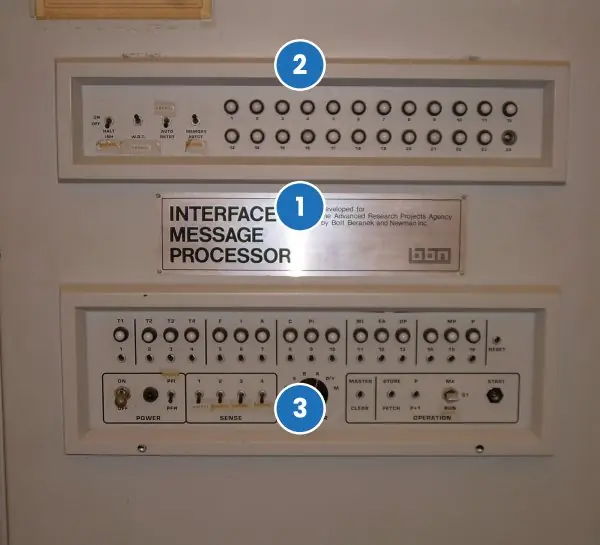
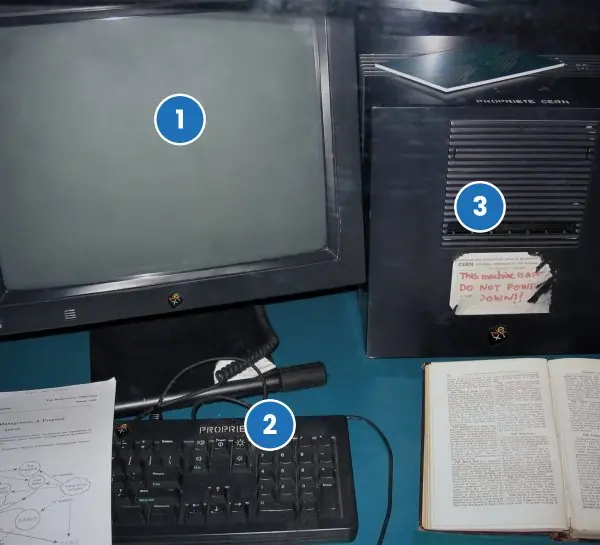
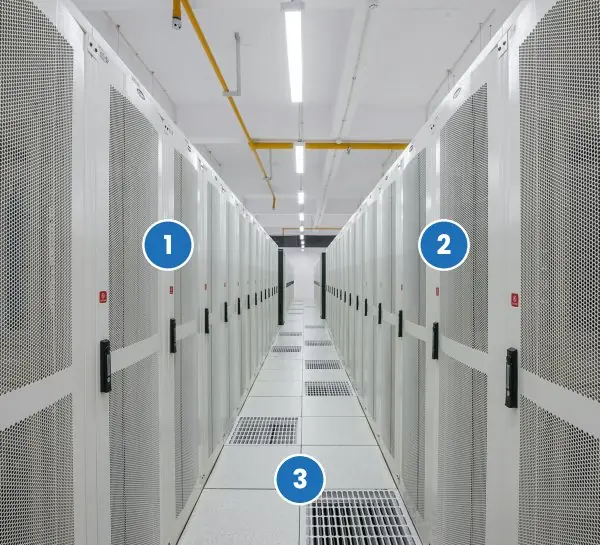
The Web feels weightless, but every page you open is a physical machine answering a text message. The plate below shows three real machines from three eras of the network.
The figures that follow draw the invisible parts: the time a page request spends waiting, the parts of a URL, the DNS hierarchy, the two HTTP messages and the arithmetic of an IP address.


1.7.1 Eight applications of the Web in Nepal
- Digital payments. Apps such as eSewa, Khalti, Fonepay and ConnectIPS use HTTPS requests to move money between bank accounts. The browser or app sends a POST message over TLS, and the bank server answers with a status code and a receipt. A student paying an exam form fee from a mobile phone is using exactly the request-response cycle of this unit.
- Government services. The Nagarik App, the Department of Transport Management and the passport portal let citizens apply, pay and track documents online. Each service is a set of web pages and APIs behind a domain name. A citizen in Humla can renew a licence form without travelling to Kathmandu, saving days of walking and bus fare.
- Education and results. Tribhuvan University and the Education Board publish results, notices and admission forms on websites. Thousands of students open the same page within minutes of a result, so the servers need load balancing and caching. Learners also attend classes on video platforms that use the same HTTP and DNS foundations.
- E-commerce. Daraz, Sastodeal and local clothing shops sell through websites that show a catalogue, take an order and hand over to a courier. The shopping cart is kept with cookies or sessions, because HTTP itself is stateless. A buyer in Pokhara sees the same cart on the phone and the laptop after logging in.
- News and media. Online newspapers such as Kantipur and Setopati publish stories that are fetched as HTML, images and video. Search engines find these pages by following links, which is why good titles and headings matter. During an election, the same site may serve many times its normal traffic.
- Banking and finance. Mobile banking, the NEPSE trading system and insurance portals expose account information through secure websites. Login uses a password and often a one-time code, and the session is tracked by a secure cookie. A share investor can view the market and place an order without going to a broker office.
- Tourism and travel. Hotels in Thamel and trekking agencies in Pokhara take bookings through websites and travel portals. Maps, photos and reviews are loaded over the Web, and a payment gateway completes the booking. Visitors from abroad often judge a business by how fast and clear its site is, so web design directly earns income.
- Communication and remote work. Email, web mail, video meetings and shared documents run in the browser. Nepali freelancers sell design, coding and writing to clients overseas through web platforms, and receive payment through banks and remittance channels. This work needs only a laptop, an Internet link and good knowledge of web technology.
Formula and fact sheet
- IPv4 = 32 bits (2³² ≈ 4.29 × 10⁹); IPv6 = 128 bits.
- URL = scheme://host:port/path?query#fragment.
- HTTP is stateless; cookies add state. 2xx ok, 3xx redirect, 4xx client error, 5xx server error.
- Ports: HTTP 80, HTTPS 443, FTP 21, SSH 22, SMTP 25, DNS 53, POP3 110, IMAP 143.
- DNS: name → IP; A, AAAA, CNAME, MX, NS.
Chapter summary
- The Web is a service on the Internet built from URLs, HTTP and HTML; clients request and servers respond.
- DNS turns names into IP addresses; HTTP is stateless and uses methods and status codes; cookies carry sessions.
- Browsers render; servers serve static or dynamic content; mail uses SMTP, POP3 and IMAP.
Practice
- Differentiate the Internet and the World Wide Web.
- Identify the parts of
https://shop.example.com.np:8443/items/list.php?cat=5&sort=price#top. - Explain how DNS resolves
www.example.com. - State the difference between GET and POST; when would you use each?
- What do status codes 200, 301, 403, 404 and 500 mean?
- Why is HTTP called stateless and how do cookies address this?
- Compare POP3 and IMAP.
- List the steps needed to publish a website on its own domain.
Answers and worked solutions
1. The Internet is the global network infrastructure; the Web is a service of linked documents (HTTP/HTML) running on it; email and FTP are other services.
2. Scheme https; host shop.example.com.np; port 8443; path /items/list.php; query cat=5&sort=price; fragment top.
3. Check the browser/OS cache; ask the recursive resolver; it asks a root server, then the .com TLD server, then the domain's authoritative server, which returns the IP; the answer is cached for its TTL.
4. GET reads and puts parameters in the URL (searches, bookmarks); POST sends data in the body (login, registration, uploads).
5. 200 success; 301 permanent redirect; 403 forbidden (authenticated but not allowed); 404 not found; 500 server error.
6. Each request is independent and carries no memory of earlier ones. A cookie set by the server is sent back on each request, letting the server recognise the session.
7. POP3 downloads mail to one device, usually removing it from the server; IMAP leaves mail on the server and synchronises folders across devices.
8. Choose hosting; register a domain; set the DNS A/CNAME record to the host; upload files; install an HTTPS certificate; test.
Model answers: medium (5 marks) and long (10 marks) questions
Q1 (5 marks). Differentiate between the Internet and the World Wide Web. Mention one other service of the Internet.
Introduction. The two words are often used as if they meant the same thing, but one is the road and the other is a vehicle that runs on it (section 1.1).
- Nature. The Internet is the worldwide network of networks made of cables, routers, satellites and the TCP/IP rules. The Web is a service, a huge collection of linked documents and resources identified by URLs and moved by HTTP.
- Origin. The Internet grew from ARPANET, which joined its first computers in 1969 (Plate 1.1a shows the IMP router used then), and adopted TCP/IP in 1983. Tim Berners-Lee proposed the Web at CERN in 1989 and ran the first site on a NeXT computer (Plate 1.1b) in 1991.
- Needs. The Web needs a browser, a web server, HTTP and HTML. The Internet needs only a protocol stack and a physical link, so it carries the Web, email, FTP, VoIP and games together.
- Example. Opening kantipurdaily.com uses the Web. Sending a message from an SMTP mail client or logging in remotely with SSH uses the Internet but not the Web.
| Point | Internet | World Wide Web |
|---|---|---|
| What it is | Global network infrastructure | Service of linked hypertext pages |
| Main protocols | TCP/IP, DNS, BGP | HTTP/HTTPS, HTML, URL |
| Started | 1969 (ARPANET) | 1989-1991 (CERN) |
| Other services | Email, FTP, SSH, VoIP | Is itself one service |
Conclusion. The Web is only one service on the Internet; every Web page travels over the Internet, but not everything on the Internet is a Web page.
Q2 (5 marks). Explain how a domain name such as www.example.com.np is converted to an IP address.
Introduction. People remember names, but routers need numbers, so the Domain Name System (DNS) acts as the Internet's phone book (section 1.2, Figure 1.3).
- Local check. The browser first looks in its own cache and in the operating system's hosts file. If the name was visited recently, the address is returned at once and no network traffic is needed.
- Recursive resolver. If not found, the computer asks the resolver of its Internet provider, such as Worldlink or Nepal Telecom. The resolver does all the remaining work on behalf of the user, which is why it is called recursive.
- Hierarchy. The resolver asks a root server, which names the server for the .np top-level domain; that server names the com.np registry; the registry names the authoritative server for example.com.np. Each reply is a referral, not the final answer.
- Final answer. The authoritative server returns an A record (IPv4) or AAAA record (IPv6) with a TTL. The resolver passes the address to the browser and keeps a copy until the TTL expires.
- Connection. Only then does the browser open a TCP connection to that address on port 443 or 80.
Conclusion. DNS is a distributed, cached hierarchy; caching makes most lookups answer in one step instead of five, which is why DNS failures make "the Internet" appear to be down.
Q3 (10 marks). Describe the HTTP request-response cycle. Explain the parts of the messages, the common methods and status codes, and how cookies add state to HTTP.
Introduction. HTTP (HyperText Transfer Protocol) is the application-layer protocol of the Web.
It follows the client-server model: the browser sends a request, the server sends back one response, and the connection may then be reused or closed.
HTTPS is the same protocol carried inside TLS so that the messages are encrypted (section 1.4, Figures 1.1 and 1.4).
- Preparation. The browser resolves the host name by DNS, opens a TCP connection to port 80 or 443 and, for HTTPS, completes the TLS handshake. In Figure 1.1 these three steps cost 120 ms of the 220 ms in the example, which is why persistent connections matter.
- Request message. It has a request line (method, path, version), headers such as Host, Accept, User-Agent and Cookie, a blank line and an optional body. The Host header lets one server hold many websites.
- Methods. GET reads a resource and puts parameters in the URL; POST sends data in the body for login and uploads; PUT replaces a resource; DELETE removes it; HEAD fetches only headers. GET and HEAD are safe because they should not change data.
- Server processing. The web server maps the path to a file or to a program (PHP, Node, Java), which may query a database and builds the answer.
- Response message. It has a status line, headers (Content-Type, Content-Length, Set-Cookie, Cache-Control), a blank line and the body, usually HTML, JSON or an image.
- Status codes. 1xx informational; 2xx success (200 OK, 201 Created); 3xx redirection (301 moved permanently, 304 not modified); 4xx client error (400, 401, 403, 404); 5xx server error (500, 503).
- Statelessness and cookies. Each request is independent, so the server forgets the visitor. After login the server sends Set-Cookie: sid=9F3A, the browser stores it and sends Cookie: sid=9F3A with every later request, which lets the server find the session. Flags such as HttpOnly, Secure and SameSite protect the cookie from theft.
- Rendering. The browser reads the HTML, requests the CSS, JavaScript and images it names, and paints the page.
| Class | Meaning | Example |
|---|---|---|
| 2xx | Success | 200 OK |
| 3xx | Redirect | 301 Moved Permanently |
| 4xx | Client error | 404 Not Found |
| 5xx | Server error | 500 Internal Server Error |
Conclusion. HTTP is a simple, text-based, stateless request-response protocol. Methods say what to do, status codes say what happened, and cookies add the memory that logins and shopping carts need.