Unit 2 · 17 min read
HTML and Graphics
What the syllabus asks for 8
- Document structure
- Text, links, images, lists
- Tables
- Forms
- Semantic HTML5 layout
- Multimedia and frames
- Graphics: images, image maps, canvas and SVG
- Seeing HTML: browsers, trees and boxes
HTML (HyperText Markup Language) describes the structure and meaning of a web page with elements made of tags. HTML5 is the current standard; CSS (Unit 4) handles appearance and JavaScript (Unit 3) behaviour.
- Document structure, text, links, images, lists, tables.
- Forms with every input type, and semantic HTML5 layout elements.
- Audio, video and frames, plus graphics with image maps,
<canvas>and SVG.
2.1 Document structure
<!DOCTYPE html>
<html lang="en">
<head>
  <meta charset="UTF-8">
  <meta name="viewport" content="width=device-width, initial-scale=1">
  <title>My first page</title>
  <link rel="stylesheet" href="style.css">
</head>
<body>
  <h1>Welcome</h1>
  <p>Hello, <strong>world</strong>!</p>
  <script src="app.js"></script>
</body>
</html>
An element is <tag attribute="value">content</tag>; void elements (<br>, <img>, <hr>, <input>, <meta>, <link>) have no end tag.
Tags nest properly; names are case-insensitive but written lowercase. Global attributes: id (unique), class, style, title, lang, hidden, data-*. Comments: <!-- … -->.
Entities: < > & " ©. The <head> holds metadata (not displayed); <body> holds visible content.
2.2 Text, links, images, lists
| Element | Purpose |
|---|---|
<h1>–<h6> |
headings (one h1 per page; do not skip levels) |
<p>, <br>, <hr> |
paragraph, line break, thematic break |
<strong>, <em>, <mark>, <code>, <pre>, <blockquote>, <sub>, <sup> |
meaning-carrying inline and block text (prefer these to <b>, <i>) |
<a href="url"> |
hyperlink; target="_blank" opens a new tab (add rel="noopener"); href="#id" jumps within the page; mailto: and tel: links |
<img src alt width height> |
image; alt text is essential for accessibility and when the image fails to load |
<ul>/<ol>/<li> |
unordered (bullets) and ordered (numbers) lists; <dl><dt><dd> description lists |
<h2>Course links</h2>
<p>Read the <a href="unit3.html">JavaScript unit</a> or
   <a href="https://developer.mozilla.org" target="_blank" rel="noopener">MDN</a>.</p>
<img src="logo.png" alt="NEBians logo" width="120" height="120">
<ol>
  <li>HTML</li>
  <li>CSS
    <ul><li>Selectors</li><li>Box model</li></ul>
  </li>
</ol>
2.3 Tables
<table border="1">
  <caption>Marks sheet</caption>
  <thead><tr><th>Name</th><th>DBMS</th><th>DSA</th></tr></thead>
  <tbody>
    <tr><td>Sita</td><td>85</td><td>72</td></tr>
    <tr><td>Ram</td><td colspan="2">absent</td></tr>
  </tbody>
  <tfoot><tr><td colspan="3">Pass marks: 40</td></tr></tfoot>
</table>
<tr> row, <th> header cell, <td> data cell; colspan and rowspan merge cells; <thead>, <tbody>, <tfoot> group rows. Use tables for data, not for page layout (use CSS, Unit 4).
2.4 Forms
A form sends user input to a server: <form action="/register" method="post">. action is the URL that receives the data; method is get or post; enctype="multipart/form-data" is required for file upload.
Each control needs a name (the key sent) and a <label for="id">.
<form action="/register" method="post">
  <label for="nm">Name</label>
  <input type="text" id="nm" name="name" required minlength="2" placeholder="Full name">

  <label for="em">Email</label>
  <input type="email" id="em" name="email" required>

  <label for="pw">Password</label>
  <input type="password" id="pw" name="password" minlength="8" required>

  <label for="dob">Date of birth</label>
  <input type="date" id="dob" name="dob">

  Gender:
  <input type="radio" name="gender" value="f" id="gf"><label for="gf">Female</label>
  <input type="radio" name="gender" value="m" id="gm"><label for="gm">Male</label>

  <input type="checkbox" name="agree" value="yes" id="ag"><label for="ag">I agree</label>

  <label for="sem">Semester</label>
  <select id="sem" name="semester">
    <option value="">--choose--</option>
    <option value="3" selected>Third</option>
    <option value="4">Fourth</option>
  </select>

  <label for="msg">Message</label>
  <textarea id="msg" name="message" rows="3" cols="30"></textarea>

  <input type="hidden" name="source" value="signup">
  <button type="submit">Register</button>
  <button type="reset">Clear</button>
</form>
Input type |
Control |
|---|---|
text, password, email, url, tel, search |
one-line text with built-in checks for email/url |
number, range |
numeric box / slider with min, max, step |
date, time, datetime-local, month, week, color |
pickers |
radio |
one choice from a group sharing the same name |
checkbox |
on/off; several may be chosen |
file |
upload |
hidden |
value sent but not shown |
submit, reset, button, image |
buttons |
HTML5 validation attributes: required, pattern="regex", min/max, minlength/maxlength, readonly, disabled, autofocus, placeholder. <fieldset>/<legend> group controls; <datalist> offers suggestions.
Client-side validation helps users but can be bypassed, so the server must validate again.
2.5 Semantic HTML5 layout
<body>
<header><h1>College portal</h1><nav><a href="/">Home</a> <a href="/results">Results</a></nav></header>
<main>
<article><h2>Exam notice</h2><p>…</p></article>
<aside>Related links</aside>
</main>
<footer>© 2082 NEBians</footer>
</body>
<header>, <nav>, <main>, <section>, <article>, <aside>, <footer>, <figure>/<figcaption>, <time> tell browsers, search engines and screen readers what each part is, unlike anonymous <div> and <span>.
2.6 Multimedia and frames
<video controls width="320" poster="cover.jpg">
  <source src="lesson.mp4" type="video/mp4">
  <source src="lesson.webm" type="video/webm">
  Your browser does not support video.
</video>
<audio controls src="song.mp3"></audio>
<iframe src="https://www.openstreetmap.org/export/embed.html" width="400" height="250" title="Map"></iframe>
<video> and <audio> replaced Flash plug-ins; supply several formats and a fallback message. <iframe> embeds another page (maps, videos); beware of security and use sandbox. The old <frameset> is obsolete.
2.7 Graphics: images, image maps, canvas and SVG
- Raster images (JPEG for photos, PNG for transparency and sharp edges, GIF for simple animation, WebP/AVIF for smaller files) are grids of pixels and blur when enlarged. Vector graphics (SVG) are shapes defined by math and scale without loss. Use
srcsetand<picture>to serve sizes suited to the screen. - Image map: clickable regions on one image.
<img src="campus.png" alt="Campus map" usemap="#campus" width="400" height="200">
<map name="campus">
  <area shape="rect" coords="0,0,200,100" href="library.html" alt="Library">
  <area shape="circle" coords="300,100,50" href="lab.html" alt="Computer lab">
  <area shape="poly" coords="200,150,350,150,275,200" href="canteen.html" alt="Canteen">
</map>
- SVG is XML-based vector graphics embedded directly in HTML and styled with CSS:
<svg width="220" height="120" viewBox="0 0 220 120" xmlns="http://www.w3.org/2000/svg">
  <rect x="10" y="10" width="100" height="60" fill="#1F4E8C" rx="8"/>
  <circle cx="160" cy="40" r="30" fill="orange" stroke="black" stroke-width="2"/>
  <line x1="10" y1="100" x2="210" y2="100" stroke="green" stroke-width="3"/>
  <text x="10" y="116" font-size="12">SVG shapes</text>
</svg>
- Canvas is a pixel drawing surface painted by JavaScript (good for games and charts):
<canvas id="c" width="200" height="100"></canvas>
<script>
  const ctx = document.getElementById("c").getContext("2d");
  ctx.fillStyle = "tomato";  ctx.fillRect(10, 10, 80, 50);
  ctx.beginPath(); ctx.arc(140, 40, 30, 0, 2 * Math.PI); ctx.stroke();
</script>
| SVG | Canvas | |
|---|---|---|
| Model | retained: each shape is a DOM element | immediate: pixels, no objects remain |
| Scaling | perfect | blurs unless redrawn |
| Events | per shape | you compute hits |
| Best for | logos, icons, diagrams | games, many moving objects |
2.8 Seeing HTML: browsers, trees and boxes
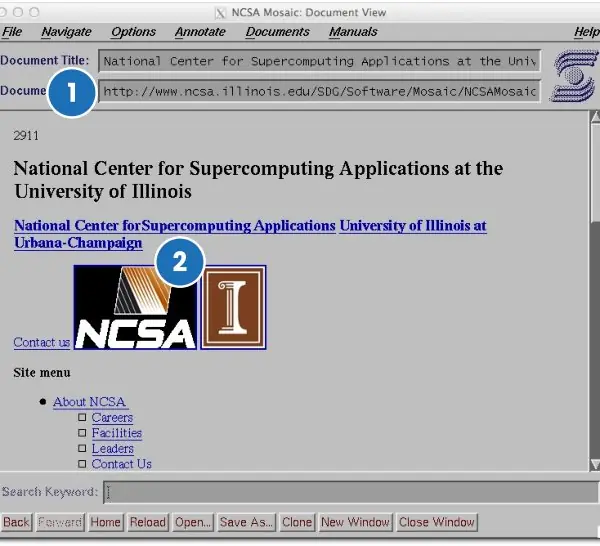
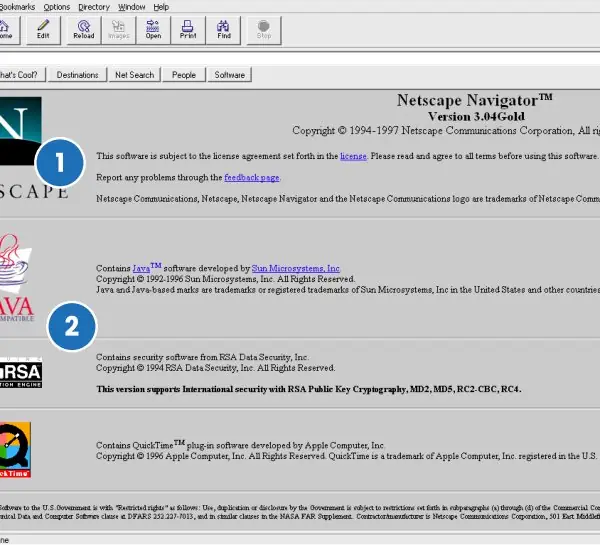
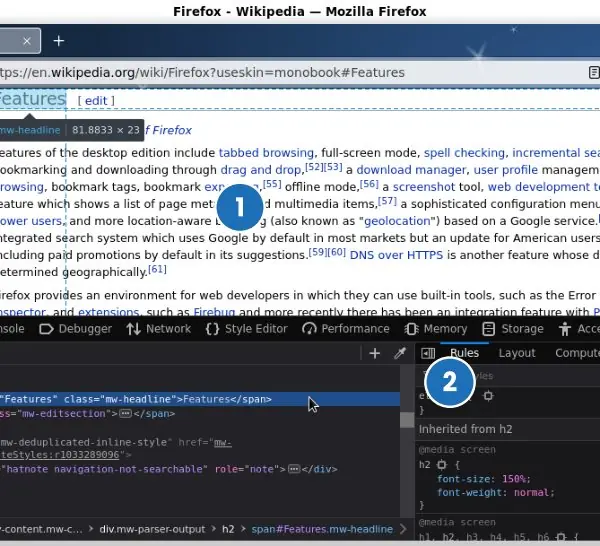
HTML is easiest to understand when you see what a browser does with it. The plate below shows the first mainstream graphical browser, a 1990s commercial browser and a modern developer-tools panel.
The figures then draw the document tree, the semantic page layout, a table with merged cells, the form controls and the canvas coordinate system.


2.8.1 Eight rules for writing good HTML
- Always declare the document type and language. Start with the doctype line and put lang="en" or lang="ne" on the html element. The doctype keeps the browser out of old quirks mode, and the language helps screen readers pronounce the words. A Nepali news page that sets lang="ne" is read aloud correctly by assistive tools.
- Use semantic elements first. Choose header, nav, main, article, section, aside and footer before reaching for a plain div. These names tell browsers, search engines and screen readers what each part means. A search engine can then show the main article of a Tribhuvan University notice and skip the menu.
- Close and nest elements correctly. Each opening tag needs its closing tag, and inner elements must close before outer ones. A missing end tag silently changes the document tree and breaks the layout. Validating a page with the W3C checker finds these slips before a user does.
- Give every image alt text. The alt attribute describes the picture for people who cannot see it and appears when the file fails to load. Decorative pictures get an empty alt so they are skipped. A product photo on a Daraz-style shop needs a useful description so that a blind customer knows what is sold.
- Use tables for data, not for layout. A table should hold rows and columns of related facts, with th cells and a caption. Layout tables confuse screen readers and cannot adapt to a phone screen. A results table with scope attributes on the headings is read correctly cell by cell.
- Label every form control. Connect each input to its label with for and id, and choose the right type: email, tel, number, date. The right type shows a better keyboard on a phone and lets the browser check the value. A bank sign-up form that labels its fields correctly reduces mistakes and support calls.
- Write meaningful links. Link text such as "Download the 2081 syllabus (PDF)" is clearer than "click here". Add rel="noopener" when opening a new tab to another site, and mark file links with their type. People who move through links with the keyboard hear only the link text, so it must make sense alone.
- Keep content, style and behaviour separate. Put the meaning in HTML, the look in CSS files and the behaviour in script files. This keeps pages small, lets the browser cache the shared files and makes later changes easy. A college site with one shared stylesheet can change its colours on all 200 pages with one edit.
Formula and fact sheet
- Skeleton:
<!DOCTYPE html>,html,head(meta, title, link),body. - Void elements: br, hr, img, input, meta, link.
- Forms:
action,method,name,label for; radio buttons share aname; validation attributes. - Semantic tags: header, nav, main, section, article, aside, footer.
- Raster: JPEG/PNG/GIF/WebP; vector: SVG; programmatic: canvas.
Chapter summary
- HTML structures content with nested elements; the head describes the page and the body shows it.
- Text, links, images, lists and tables carry content; forms collect input with typed, validated controls.
- Semantic elements give meaning; video, audio and iframe embed media; SVG and canvas draw graphics.
Practice
- Write the minimal valid HTML5 page with title "Results".
- Write HTML for a table with a header row, two data rows and a cell spanning two columns.
- Create a registration form with name, email, gender (radio), hobbies (checkboxes), country (select) and a submit button.
- Differentiate
<b>and<strong>,divandsection. - What is the purpose of
alt,label for, andname? - Differentiate SVG and canvas; raster and vector.
- Make an image map with two clickable regions.
- Why must forms be validated on the server as well?
Answers and worked solutions
1. <!DOCTYPE html><html lang="en"><head><meta charset="UTF-8"><title>Results</title></head><body><h1>Results</h1></body></html>
2. See 2.3: <tr><th>…</th></tr>, then two <tr> rows of <td>, one cell with colspan="2".
3. See the form in 2.4; hobbies use type="checkbox" with the same name="hobby", country uses <select> with <option>s.
4. <b> only bolds; <strong> says the text is important (screen readers can emphasise). div is a meaningless block; section is a thematic grouping of content, normally with a heading.
5. alt: text alternative for images (accessibility and fallback). label for: ties a label to an input by id, enlarging the click target and helping screen readers. name: the key under which the value is sent to the server.
6. See the tables in 2.7: raster = pixel grid, vector = mathematical shapes; SVG retains objects, canvas paints pixels.
7. <img usemap="#m"><map name="m"><area shape="rect" coords="0,0,100,50" href="a.html" alt="A"><area shape="circle" coords="150,50,30" href="b.html" alt="B"></map>
8. Client-side checks run in the user's browser and can be disabled or bypassed (the form can be sent with any tool), so the server must treat all input as untrusted.
Model answers: medium (5 marks) and long (10 marks) questions
Q1 (5 marks). What are semantic elements in HTML5? Write the structure of a simple page using at least six of them.
Introduction. A semantic element describes the meaning of its content through its name, unlike div and span which describe nothing (section 2.5, Figure 2.2).
- header holds the introduction of a page or section, such as the logo and title.
- nav marks a block of main navigation links, so screen readers can jump to it.
- main holds the unique content of the page; there is only one visible main per page.
- article is a self-contained piece, such as a news story, that would make sense on its own; section groups related content under a heading.
- aside holds side content such as related links; footer holds copyright and contact details.
- Benefits. Better accessibility, better search-engine understanding, and simpler, more readable code.
<body>
<header><h1>Kathmandu College</h1></header>
<nav><a href="/">Home</a> <a href="/notice">Notices</a></nav>
<main>
<article><h2>Admission open</h2><p>Forms close on Friday.</p></article>
<aside><a href="/fees">Fee structure</a></aside>
</main>
<footer>© 2082 Kathmandu College</footer>
</body>
Conclusion. Semantic tags give the same visual result as divs but add machine-readable meaning, so they should be preferred.
Q2 (5 marks). Write HTML code for a timetable table in which the heading Time covers two columns and the cell Break covers two rows. Explain colspan and rowspan.
Introduction. A table is built row by row with tr, and th and td cells; cells can be merged using two attributes (section 2.3, Figure 2.3).
- colspan makes one cell extend over several columns to its right; the covered columns must not be repeated in that row.
- rowspan makes one cell extend downwards over several rows; the covered position must be left out of the next rows.
- Structure. Use thead for headings and tbody for data, and a caption for the title.
- Check. A row's cells plus the cells carried down by earlier rowspans must equal the number of columns, or the browser misaligns the table.
<table border="1">
  <caption>Weekly timetable</caption>
  <tr><th>Day</th><th colspan="2">Time</th></tr>
  <tr><td>Sunday</td><td>10:00 HTML</td><td rowspan="2">Break</td></tr>
  <tr><td>Monday</td><td>10:00 CSS</td></tr>
  <tr><td>Tuesday</td><td>10:00 JS</td><td>11:00 Lab</td></tr>
</table>
Conclusion. colspan merges across, rowspan merges downwards; counting cells per row prevents the usual mistakes.
Q3 (10 marks). Explain HTML forms. Describe the form element, its attributes, the common input controls, and the difference between GET and POST. Write a complete registration form.
Introduction. A form collects data from a visitor and sends it to a server program as name-value pairs. Login, admission, exam-form and payment pages all rely on forms, so they are among the most important parts of HTML (section 2.4, Figure 2.4).
- The form element. It wraps all controls. Its action attribute gives the URL that receives the data, method gives GET or POST, and enctype must be multipart/form-data when files are uploaded.
- Text-like inputs. input has types text, password, email, tel, number, url and search. The type changes the keyboard on a phone and the built-in check.
- Choice controls. Radio buttons with the same name allow one choice; checkboxes allow several; select with option gives a drop-down list; datalist gives suggestions.
- Other controls. textarea for several lines, input type=file for uploads, input type=date, button type=submit and reset, and hidden for values the user does not edit.
- Labels and grouping. label connects text to a control through for and id, and makes the click area bigger; fieldset and legend group related controls.
- Validation attributes. required, minlength, maxlength, min, max and pattern let the browser check values before sending, but a server must repeat every check because the browser can be bypassed.
- GET and POST. GET adds the data to the URL (for searching, bookmarks, small data) and is visible and limited in length. POST places the data in the message body (for logins, uploads, changes) and is not shown in the address bar, though it is not secure without HTTPS.
- Name attribute. Only controls with a name are sent; the name is the key used by the server.
<form action="/register" method="post">
  <label for="n">Name</label>
  <input id="n" name="name" type="text" required>
  <label for="e">Email</label>
  <input id="e" name="email" type="email" required>
  <label for="p">Password</label>
  <input id="p" name="pw" type="password" minlength="8" required>
  <fieldset><legend>Level</legend>
    <label><input type="radio" name="level" value="plus2"> +2</label>
    <label><input type="radio" name="level" value="bachelor"> Bachelor</label>
  </fieldset>
  <select name="district"><option>Kathmandu</option><option>Pokhara</option></select>
  <textarea name="msg" rows="3"></textarea>
  <button type="submit">Register</button>
</form>
| Point | GET | POST |
|---|---|---|
| Data location | URL query string | Message body |
| Visible in address bar | Yes | No |
| Length limit | About 2,000 characters in practice | Very large |
| Bookmark / repeat safely | Yes | No (may change data) |
| Typical use | Search, filters | Login, upload, payment |
Conclusion. A form is a form element plus labelled controls, each with a name. Correct types and validation improve the user experience, GET suits reading and POST suits changing data, and the server must always validate again.