Question bank · 66 min read
Computer Science: Unit-wise Subjective Question Bank
The Computer Science written paper is 2 hours and 50 marks. Nine of those marks are the multiple-choice items of Group A, which the previous chapter drilled. The remaining 41 marks — more than four-fifths of the paper — are written answers: five short questions of 5 marks each in Group B, and two long questions of 8 marks each in Group C.
This chapter is the bank for those 41 marks. It is organised unit by unit, and
every question carries a full model answer written the way you should actually
write it in the hall — not a hint, not an outline, but the finished answer with
its definition, its body, its diagram and its example in place. Every C program
printed here was compiled with gcc and run, and the output you see below each
listing is the output the program really produced.
15.1 What the examiner is actually paying for
Before the questions, the arithmetic of the marking. A 5-mark Group B answer is almost never marked as one lump. It is marked as roughly five separable things, and the NEB paper often says so out loud: question 11 of the 2080 paper is printed as (1+4), and question 13 as (1+4). The 8-mark Group C questions are split even more explicitly — (2+6) and (3+5) both appear in 2080.
So the unit of currency is not the paragraph. It is the scoring point: a definition, a labelled diagram, a named example, one row of a comparison table, one correctly written line of code. An answer that says the right thing five times in five identifiable places collects five marks. An answer that says one right thing beautifully for a page collects one or two.
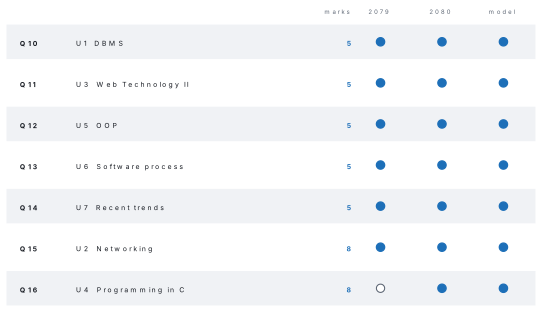
The figure records the single most useful structural fact in this chapter. In all three papers that could be verified, each Group B and Group C slot drew from the same syllabus unit: Q10 from DBMS, Q11 from Web Technology II, Q12 from OOP, Q13 from the software process, Q14 from recent trends, Q15 (8 marks) from networking and Q16 (8 marks) from C programming. Three papers is a small sample and the board is not bound by it, but it tells you where your revision time earns most: the two 8-mark slots have only ever come from networking and C programming, so a candidate weak in C programming is starting the paper 8 marks down.
Take the real 2080 question 13: "Explain the importance of the system testing of the system development life cycle (SDLC). (1+4)" The bracket is the marking scheme. The 1 buys a definition of system testing. The 4 buys four separate reasons it matters. So the answer is written as one sentence and then four numbered reasons — and the candidate who writes four numbered reasons and stops has finished, while the candidate writing flowing prose about how testing is very important has spent three minutes to earn one mark.
Write the definition. Then count out loud on your fingers as you write the points, and stop at the number in the bracket plus one for safety.
Three habits that pay in every answer
Underline the technical term the first time you use it — examiners scan for keywords, and an underlined normalization, encapsulation or full duplex is found in a second. Draw the diagram even when the question does not ask for one: a labelled block diagram in a networking answer is a scoring point the prose cannot replace. Number your points. A numbered list is the easiest thing in the world to mark, and the easiest to award full credit to.
Group C questions are compound. The 2080 Q16 reads "Write the advantage of pointer. Write a C-program to enter the radius of a football and find the area of football by using user defined function. (3+5)" — and most candidates write only the program. The three marks for advantages of pointers are sitting there, they take ninety seconds, and they are thrown away every year. Read the whole question and answer every clause in it.
15.2 Unit 1: Database Management System
Twelve teaching hours, and in every verified paper exactly one 5-mark slot (Q10). The slot has twice been offered as a choice — relational model or SQL DDL in 2080, centralized vs distributed or normalization in 2079 — so both halves of each pair are worth knowing.
Group B — Short answer (5 marks each)
- Explain the relational data model with an example. (NEB 2080) [5]
Model answer 1
The relational data model, proposed by E. F. Codd in 1970, organises all data into two-dimensional tables called relations. Its features are:
- Each relation is a table of rows (tuples/records) and columns (attributes/fields); the number of columns is its degree and the number of rows its cardinality.
- Every row is uniquely identified by a primary key, so no two rows are identical.
- Relationships between tables are expressed not by pointers but by values — a foreign key in one table holds a primary-key value of another.
- The order of rows and of columns carries no meaning, and every cell holds a single atomic value.
- Data is retrieved with a declarative language, SQL, rather than by navigating links.
Example. A school keeps two relations:
| student | class | |||||
|---|---|---|---|---|---|---|
| regno | name | class_id | class_id | class_name | ||
| 101 | Sita Rai | C1 | C1 | Twelve A | ||
| 102 | Ramesh Karki | C2 | C2 | Twelve B |
regno is the primary key of student, class_id is the primary key of
class and a foreign key in student. To find Sita's class the DBMS matches
the value C1 in both tables. MySQL, Oracle and MS SQL Server are all
relational DBMSs, which is why the relational model is the dominant model in
use today.
- Write SQL DDL commands to create the database
schooland the table from the schemastudent_info(regno integer, name char(25), class integer, gender char(1), address char(25)), then add aphonecolumn and finally remove the table. (NEB 2080) [5]
Model answer 2
DDL (Data Definition Language) commands define and change the structure of
a database: CREATE, ALTER, DROP, TRUNCATE and RENAME.
CREATE DATABASE school;
USE school;

CREATE TABLE student_info (
    regno    INTEGER      PRIMARY KEY,
    name     CHAR(25)     NOT NULL,
    class    INTEGER,
    gender   CHAR(1),
    address  CHAR(25)
);

ALTER TABLE student_info ADD phone CHAR(10);

DROP TABLE student_info;
CREATE TABLE builds the empty structure with each column's name, data type and
width; PRIMARY KEY on regno stops duplicate registration numbers and
NOT NULL stops a nameless record. ALTER TABLE … ADD inserts a new column
into an existing table without disturbing the rows already stored. DROP TABLE
deletes the structure and all its data, which is why it is a DDL command
while DELETE — which removes rows but keeps the table — is DML.
- Differentiate between a centralized and a distributed database system. (NEB 2079) [5]
Model answer 3
| Centralized database | Distributed database | |
|---|---|---|
| Location of data | Stored on one single computer at one site | Stored on several computers at different sites, connected by a network |
| Access | All users reach the one machine over the network | A user normally reaches the nearest copy or fragment |
| Cost | Cheaper to set up and administer | Expensive hardware, software and skilled administration |
| Reliability | One machine fails and the whole database is unavailable | Failure of one site leaves the other sites working |
| Speed | Slows down as the number of users grows; one bottleneck | Load is shared, so response is faster for local queries |
| Consistency | Easy — there is only one copy | Difficult — replicas must be synchronised |
| Example | A single school's library database on the librarian's server | A bank's account database replicated across branch servers |
In short: a centralized system trades reliability and speed for simplicity and low cost, while a distributed system buys reliability, local speed and growth room at the price of complexity and the hard problem of keeping replicas consistent.
- What are the purposes of normalization? Give an example of second normal form. (NEB 2079) [5]
Model answer 4
Normalization is the step-by-step process of breaking a large table into smaller, well-structured tables so that the design is free of redundancy and anomalies. Its purposes are:
- To remove redundant (repeated) data, so the same fact is not stored many times and storage is not wasted.
- To eliminate insertion, deletion and update anomalies.
- To make sure every non-key attribute depends on the whole primary key and nothing but the key.
- To make the database easier to extend and maintain as requirements change.
- To keep the data consistent, because a fact stored once cannot disagree with itself.
Example of 2NF. A table is in 2NF when it is in 1NF and no non-key attribute depends on only part of a composite primary key. Consider:
result(regno, subject_code, subject_name, marks) with the composite key
(regno, subject_code). Here marks depends on both parts of the key, but
subject_name depends on subject_code alone — a partial dependency — so
the subject name is repeated on every row for that subject. Splitting it gives
result(regno, subject_code, marks)subject(subject_code, subject_name)
Both tables are now in 2NF, and a subject's name is stored exactly once.
- Explain 2NF and 3NF with examples. (NEB model question) [5]
Model answer 5
Second normal form (2NF). A relation is in 2NF if (i) it is in 1NF — every cell atomic, no repeating groups — and (ii) every non-key attribute is fully functionally dependent on the whole primary key, i.e. there is no partial dependency.
Example. order_item(order_no, item_code, item_name, qty) has the composite
key (order_no, item_code). item_name depends on item_code only, so the
table is not in 2NF. Decompose into order_item(order_no, item_code, qty) and
item(item_code, item_name).
Third normal form (3NF). A relation is in 3NF if (i) it is in 2NF and (ii) no non-key attribute depends on another non-key attribute — there is no transitive dependency.
Example. student(regno, name, class_id, class_teacher) has the single key
regno. class_teacher depends on class_id, and class_id depends on
regno, so class_teacher depends on the key only transitively and the teacher's
name repeats for every student of that class. Decompose into
student(regno, name, class_id) and class(class_id, class_teacher).
So 2NF kills partial dependency on a composite key and 3NF kills transitive dependency through another non-key field.
- Demonstrate the basic DML statements with an example. (NEB model question) [5]
Model answer 6
DML (Data Manipulation Language) commands work on the data inside an
existing table, not on its structure. The four basic ones are INSERT,
SELECT, UPDATE and DELETE.
INSERT INTO student_info (regno, name, class, gender, address)
       VALUES (101, 'Sita Rai', 12, 'F', 'Butwal');

SELECT regno, name, address FROM student_info
       WHERE class = 12 ORDER BY name;

UPDATE student_info SET address = 'Pokhara'
       WHERE regno = 101;

DELETE FROM student_info WHERE regno = 101;
INSERTadds a new row; the value list must match the column list in order and in type.SELECTretrieves rows;WHEREfilters them andORDER BYsorts the result.UPDATEchanges values in rows that satisfy theWHEREclause — omit theWHEREand every row in the table is changed.DELETEremoves whole rows but leaves the table structure in place, unlike the DDL commandDROP.
Because DML changes only data, its effects can be undone with ROLLBACK in a
transaction, while DDL commands are auto-committed.
- Define primary key, candidate key and alternate key with one example of each. [5]
Model answer 7
Consider the table citizen(citizenship_no, nid_no, voter_id, name, address).
- A candidate key is any attribute, or minimal set of attributes, that can
uniquely identify every record in a table. Here
citizenship_no,nid_noandvoter_idare all candidate keys. - A primary key is the one candidate key the designer actually chooses to
identify records. It can never be NULL and can never repeat. Here we might
choose
citizenship_noas the primary key. - An alternate key (secondary key) is a candidate key that was not
chosen as the primary key.
nid_noandvoter_idare the alternate keys. - A foreign key, for contrast, is an attribute in one table whose values must already exist as primary-key values in another table; it enforces referential integrity.
- A composite key is a primary key made of two or more attributes together,
such as (
regno,subject_code) in a marks table.
So: every primary key is a candidate key, every alternate key is a candidate key that lost the election, and only the primary key is used by the DBMS to order and index the table by default.
- What is database security? Explain any four measures used to secure a database. [5]
Model answer 8
Database security means protecting a database against accidental loss and against deliberate misuse — unauthorised reading, changing or destroying of data. It has three goals, usually abbreviated CIA: confidentiality, integrity and availability.
Four measures:
- Authentication — every user must prove identity with a username and password (or biometrics, or two-factor codes) before the DBMS accepts a connection at all.
- Authorisation / privileges — the DBA grants each user only the rights
that user needs, using
GRANTandREVOKE. A clerk may holdSELECTandINSERTon one table while only the DBA holdsDROP. - Encryption — sensitive columns and the backup files are stored in ciphertext, so a stolen disk or an intercepted network packet is useless without the key.
- Backup and recovery — regular full and incremental backups kept off-site, with a transaction log, so that after a crash, a fire or a ransomware attack the database can be restored to a consistent state.
A fifth practical measure is the audit trail, a log of who read or changed what and when, which deters insider misuse because it makes it traceable.
- Compare the hierarchical and network database models. [5]
Model answer 9
| Hierarchical model | Network model | |
|---|---|---|
| Structure | An inverted tree; data in records linked as parent–child | A graph; records linked as owner–member sets |
| Relationship supported | One-to-many only | One-to-many and many-to-many |
| Parents per child | Exactly one | A child may have several parents |
| Navigation | From the single root downwards only | From any entry point along any link |
| Redundancy | Higher — a record needed under two parents must be duplicated | Lower, because a record can be shared by two owners |
| Complexity | Simple to understand, rigid to change | More flexible, harder to design and program |
| Example system | IBM IMS | CODASYL DBTG, IDMS |
Both are navigational models: the programmer must follow physical links to reach data, so a change in structure breaks existing programs. That is precisely the weakness the relational model removed by linking tables through values instead of links, and it is why both of these models have been displaced in general use.
- What is a DBMS? State any four advantages of using a DBMS over a traditional file system. [5]
Model answer 10
A DBMS (Database Management System) is software that lets users create, store, retrieve, update and control a database while hiding the physical details of storage — for example MySQL, Oracle, MS Access and PostgreSQL. It sits between the user's application and the stored data and is the only route to it.
Advantages over keeping data in ordinary files:
- Controlled redundancy. In a file system each department keeps its own copy of a student's address; a DBMS stores it once, so it cannot be updated in one place and left stale in another.
- Data consistency and integrity. The DBMS enforces constraints — data
types,
NOT NULL, primary and foreign keys — so invalid data is refused at entry rather than discovered later. - Security. Access is granted per user and per table, and every access can be logged, which a folder of files cannot do.
- Data sharing with concurrency control. Many users can work on the same database at once, and the DBMS's locking and transactions stop two simultaneous updates from corrupting each other.
- Backup, recovery and easy querying. Automatic backup and log-based recovery are built in, and any question can be answered with a short SQL query instead of a new program.
Group C — Long answer (8 marks each)
- (a) What is a database model? [2](b) Explain the hierarchical, network and relational models with a diagram of each, and state which one dominates modern practice and why. [6]
Model answer — Group C 1
(a) A database model is the logical plan that describes how data is structured, how the items are related to one another, and what operations and constraints may be applied to them. It is the design blueprint of the database, independent of the physical files on the disk. The three classical models are the hierarchical, the network and the relational model.
(b) 1. Hierarchical model. Records are arranged as an inverted tree. There is one root, every other record has exactly one parent, and a parent may have many children — so only one-to-many relationships can be expressed.
            School
           /      \
      Class 11    Class 12
       /    \       /    \
   Sita  Ramesh  Anita  Bikash
Advantage: simple and fast for naturally hierarchical data. Drawback: a many-to-many case (a student taking many subjects, a subject taken by many students) forces the same record to be duplicated under several parents.
2. Network model. Records are arranged as a graph of owner–member sets. A member record may have more than one owner, so many-to-many relationships are represented directly.
   Sita ─────┐        ┌───── Physics
             ├── takes ┤
   Ramesh ───┘        └───── Computer
Advantage: less redundancy and more flexible than the hierarchy. Drawback: the structure of pointers is complex, and a program must still navigate the links physically.
3. Relational model. All data is held in tables of rows and columns. Each table has a primary key; relationships are made by putting one table's primary key into another table as a foreign key, i.e. by matching values, not by following pointers.
student(regno, name, class_id)      class(class_id, class_name)
        101   Sita    C1     ─────► C1        Twelve A
        102   Ramesh  C2     ─────► C2        Twelve B
Which dominates and why. The relational model. Because it links tables by value, the physical storage can be reorganised without rewriting any program — data independence. It has a simple mathematical basis, one standard declarative query language (SQL) in which any question can be asked without writing navigation code, and normalization gives a systematic method for producing a clean design. MySQL, Oracle, MS SQL Server and PostgreSQL are all relational, which is why nearly every business system built today uses this model.
- (a) Define normalization and state why it is needed. [2](b) The table below stores examination records. Normalize it up to third normal form, showing the table at each stage and naming the dependency you removed. [6]
| regno | name | class_id | class_teacher | subject_code | subject_name | marks |
|---|---|---|---|---|---|---|
| 101 | Sita Rai | C1 | Mr. Thapa | CS | Computer | 78 |
| 101 | Sita Rai | C1 | Mr. Thapa | PH | Physics | 65 |
| 102 | Ramesh Karki | C2 | Mrs. Shah | CS | Computer | 81 |
Model answer — Group C 2
(a) Normalization is the process of decomposing a relation into two or more smaller relations, step by step against a series of normal forms, so that the design contains no redundant data and no update anomalies while losing none of the original information. It is needed because an un-normalized table repeats the same fact on many rows, which wastes space and lets the copies disagree; it also suffers the three anomalies: an insertion anomaly (a new subject cannot be recorded until some student takes it), a deletion anomaly (deleting Ramesh's only row loses the fact that Mrs. Shah teaches C2), and an update anomaly (changing a subject's name means finding and editing every row that mentions it).
(b) Step 1 — first normal form (1NF). Every cell already holds one atomic
value and there is no repeating group, so the table is in 1NF. Its primary
key must be the composite (regno, subject_code), because a student appears
once per subject.
Step 2 — second normal form (2NF): remove partial dependencies. With the composite key in place:
marksdepends on bothregnoandsubject_code— full dependency, correct.name,class_idandclass_teacherdepend onregnoalone.subject_namedepends onsubject_codealone.
Both of the last two are partial dependencies, so the table is not in 2NF. Split it into three:
STUDENT(regno, name, class_id, class_teacher)
SUBJECT(subject_code, subject_name)
RESULT(regno, subject_code, marks)
All three relations are now in 2NF.
Step 3 — third normal form (3NF): remove transitive dependencies. Look at
STUDENT. The key is regno; class_id depends on regno, and
class_teacher depends on class_id. So class_teacher depends on the key
only transitively — regno → class_id → class_teacher — and the teacher's
name still repeats once for every student in that class. Split STUDENT:
STUDENT(regno, name, class_id)
CLASS(class_id, class_teacher)
SUBJECT(subject_code, subject_name)
RESULT(regno, subject_code, marks)
Every non-key attribute in all four relations now depends on the whole primary key and on nothing but the key, so the design is in 3NF. Each fact — a student's name, a class's teacher, a subject's name, a mark — is stored exactly once, and the three anomalies are gone. The original table can always be rebuilt by joining the four relations on their shared keys, so the decomposition is lossless.
- (a) What is SQL, and how do DDL and DML differ? [3](b) A table
employee(emp_id, name, post, salary, dept)is to be built. Write SQL statements to create it, insert two records, raise by 10% the salary of everyone in theAccountdepartment, list all employees earning more than Rs 30000 in descending order of salary, and finally delete the record ofemp_id5. [5]
Model answer — Group C 3
(a) SQL (Structured Query Language) is the standard non-procedural language for defining, manipulating and controlling a relational database. The user states what is wanted and the DBMS decides how to get it. Its commands fall into families, of which two matter most:
| DDL — Data Definition Language | DML — Data Manipulation Language | |
|---|---|---|
| Acts on | The structure (schema) of the database | The data stored in the tables |
| Commands | CREATE, ALTER, DROP, TRUNCATE, RENAME |
INSERT, SELECT, UPDATE, DELETE |
| Effect | Changes the definition of objects | Changes or reads rows only |
| Commit | Auto-committed; cannot be rolled back | Can be rolled back inside a transaction |
The third family, DCL (Data Control Language), holds GRANT and REVOKE
and manages privileges.
(b)
CREATE TABLE employee (
    emp_id  INTEGER      PRIMARY KEY,
    name    VARCHAR(30)  NOT NULL,
    post    VARCHAR(20),
    salary  DECIMAL(10,2),
    dept    VARCHAR(20)
);

INSERT INTO employee VALUES (1, 'Sita Rai',    'Officer',   42000, 'Account');
INSERT INTO employee VALUES (2, 'Ramesh Karki','Assistant', 26000, 'Sales');

UPDATE employee
   SET salary = salary * 1.10
 WHERE dept = 'Account';

SELECT emp_id, name, post, salary
  FROM employee
 WHERE salary > 30000
 ORDER BY salary DESC;

DELETE FROM employee WHERE emp_id = 5;
Notes the examiner looks for: PRIMARY KEY on emp_id; a numeric type with two
decimal places for money; the WHERE clause on the UPDATE, without which
every employee gets the raise; salary * 1.10 rather than a hard-coded figure;
DESC written explicitly, since ORDER BY is ascending by default; and
DELETE FROM — not DROP — because only the row is to go, not the table.
The DBMS slot is the most predictable five marks on the paper, and it is almost
always one of four things: the relational model, normalization, SQL, or a
comparison (centralized/distributed, DDL/DML, keys). Two specific things gain
marks cheaply. First, always write an example table with real values — even
three rows. Normalization answers with no table earn about half credit, because
the examiner cannot see that you found the dependency. Second, when you
normalize, name the dependency you are removing ("partial dependency of
subject_name on subject_code") rather than just presenting the split tables;
the naming is what shows understanding.
The commonest error is confusing DELETE with DROP and TRUNCATE. Fix it
once: DELETE removes chosen rows (DML, rollback-able), TRUNCATE removes all
rows but keeps the structure (DDL), DROP removes the structure and the data
(DDL). This has appeared as a one-mark MCQ and inside 5-mark answers.
15.3 Unit 2: Data Communication and Networking
Fifteen teaching hours — the largest unit in the course — and in every verified paper it supplied an 8-mark Group C question: topologies plus guided and unguided media in 2080, star versus ring plus cable choice in 2079, Class C addressing in a LAN in the model question. Treat this unit as worth 8 marks on the day and prepare accordingly.
Group B — Short answer (5 marks each)
- What is a communication system? Explain the five elements of data communication with a block diagram. [5]
Model answer 1
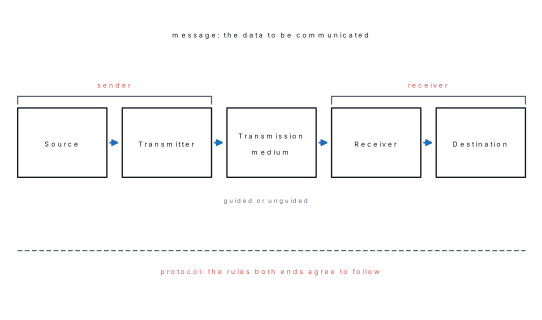
A communication system is an arrangement of hardware, software and a medium that carries information from a sender to a receiver in an understandable form. When the information carried is digital data between two computing devices it is called data communication.
Its five elements are:
- Message — the data or information to be communicated: text, numbers, pictures, audio or video.
- Sender (source) — the device that originates and transmits the message, for example a computer, a telephone or a sensor.
- Receiver (destination) — the device that accepts the message, for example another computer or a printer.
- Transmission medium — the physical path along which the message travels; guided media such as twisted pair, coaxial cable and optical fibre, or unguided media such as radio, microwave and infrared.
- Protocol — the agreed set of rules governing the exchange: how the data is formatted, how fast it is sent, how errors are detected and how the two ends are synchronised. Without a shared protocol a connection carries signals but no meaning, exactly as two people speaking different languages on a good telephone line communicate nothing.
The block diagram above shows the path: source → transmitter → transmission medium → receiver → destination, with the transmitter converting the data into a signal the medium can carry and the receiver converting it back.
- Explain simplex, half-duplex and full-duplex transmission modes with one example of each. [5]
Model answer 2
The transmission mode describes the direction in which data can flow between two linked devices.
- Simplex. Data travels in one direction only; one device is always the sender and the other always the receiver. The whole bandwidth of the channel is used for that one direction. Examples: keyboard to CPU, CPU to monitor, radio and television broadcast.
- Half duplex. Data can travel in both directions but only one at a time; the two ends take turns and the whole channel is given to whichever is currently sending. Examples: a walkie-talkie, a CB radio, and an old Ethernet hub network.
- Full duplex. Data travels in both directions at the same time, either because the link has two separate paths or because the bandwidth is divided between the two directions. Examples: a telephone conversation, a mobile phone call, and a modern switched Ethernet connection.
| Simplex | Half duplex | Full duplex | |
|---|---|---|---|
| Direction | One way | Both ways, alternately | Both ways, at once |
| Bandwidth use | Whole channel one way | Whole channel, by turns | Shared or doubled |
| Performance | Lowest | Moderate | Highest |
| Example | Keyboard to CPU | Walkie-talkie | Telephone |
- Differentiate between LAN and WAN on any five points. [5]
Model answer 3
| LAN (Local Area Network) | WAN (Wide Area Network) | |
|---|---|---|
| Area covered | A room, a building or a campus; up to about 1 km | A city, a country or the whole world |
| Ownership | Owned and administered privately by one organisation | Usually built from links leased from telecom operators |
| Transmission speed | High — 100 Mbps to 10 Gbps | Comparatively low, and shared among many users |
| Error rate | Very low, because cables are short and controlled | Higher, because the signal travels far through many devices |
| Cost of setup | Low; cables, a switch and NICs | Very high; leased lines, routers, satellite or fibre backbone |
| Media used | Twisted pair, coaxial, fibre | Fibre backbone, microwave, satellite, leased telephone lines |
| Example | The computer laboratory of a school | The Internet; a bank's network linking all its branches |
A MAN (Metropolitan Area Network) lies between the two, covering a city — the network joining several campuses of one university, for instance.
- Explain any five transmission impairments. [5]
Model answer 4
A transmission impairment is any effect that makes the signal arriving at the receiver different from the signal that was sent, so that the received data may be wrong.
- Noise — unwanted random electrical energy added to the signal by the medium and the electronics: thermal noise, impulse noise from switching equipment, induced noise from motors and fluorescent lamps. It reduces the signal-to-noise ratio and causes bit errors.
- Distortion — a change in the shape of the signal, because a composite signal's different frequency components travel at different speeds and arrive out of step with one another.
- Attenuation — the loss of signal strength as the signal travels, because the medium converts some of its energy to heat. It is why repeaters and amplifiers are needed on long links.
- Crosstalk — the signal on one wire inducing an unwanted signal on a neighbouring wire, heard on a telephone line as another conversation in the background. Twisting the pair reduces it.
- Echo — part of the transmitted signal reflected back to the sender from an impedance mismatch at a join or at the far end, so the sender hears its own signal delayed.
- Jitter — variation in the arrival time of successive packets. It does not matter for a file transfer but destroys a voice or video call, which needs a steady stream.
- Differentiate between client-server and peer-to-peer network architecture. [5]
Model answer 5
| Client-server | Peer-to-peer | |
|---|---|---|
| Roles | Dedicated server provides services; clients request them | Every computer is both client and server |
| Control | Centralised — one administrator, one user database | Decentralised; each user controls their own machine |
| Security | Strong, applied centrally at the server | Weak; depends on each user's own settings |
| Backup | Central and easy, data is in one place | Each machine must be backed up separately |
| Cost | High — a server machine, server OS and an administrator | Low; ordinary computers and an ordinary OS |
| Scalability | Scales well to hundreds of users | Practical only up to about 10 machines |
| Failure | Server fails and the whole service stops | One machine failing affects only its own shares |
| Example | A school's web and file server; email; a bank's system | Two or three office PCs sharing a printer and folders; BitTorrent |
A client-server design suits an organisation that needs central control and security; peer-to-peer suits a small workgroup that needs to share a printer and a few folders with no budget for a server.
- Define IP address, subnet mask, default gateway and MAC address. [5]
Model answer 6
- IP address — a logical, software-assigned numeric address identifying a
host on a network. IPv4 uses 32 bits written as four decimal octets,
192.168.1.10; IPv6 uses 128 bits written in hexadecimal. It can be changed and is reassigned when the device moves to another network. - Subnet mask — a 32-bit pattern that tells a host which part of its IP
address is the network part and which the host part. In
192.168.1.10with mask255.255.255.0, the first three octets192.168.1are the network and.10is the host. It is how a host decides whether a destination is local (send directly) or remote (send to the gateway). - Default gateway — the IP address of the router interface on the local
network through which traffic for any other network must pass. Typically
192.168.1.1. Without it a host can talk only inside its own subnet. - MAC address — the physical 48-bit hardware address burned into the
NIC by its manufacturer, written as six hexadecimal pairs such as
00:1A:2B:3C:4D:5E. The first three bytes identify the manufacturer. It is globally unique, cannot normally be changed, and is used for delivery within a single LAN segment.
The difference in one line: the MAC address says which device, the IP address says where on the internetwork it is, and the pair is resolved by ARP.
- Explain the function of NIC, modem, switch and router. [5]
Model answer 7
- NIC (Network Interface Card) — the adapter, now usually built into the motherboard, that physically connects a computer to the network. It holds the MAC address, converts parallel data from the bus into a serial signal for the cable and back, and handles the media access rules. It works at the physical and data link layers.
- Modem (modulator–demodulator) — converts the computer's digital data into an analogue signal for a telephone or cable line (modulation) and converts the incoming analogue signal back into digital data (demodulation). It is what lets a digital computer use a line built for analogue voice.
- Switch — a multi-port data link layer device that joins the computers of a LAN. It reads the destination MAC address of each frame and forwards the frame only to the port where that device is attached, so each port gets its own collision-free bandwidth. It is the central device of a star topology and replaced the hub, which broadcast every frame to every port.
- Router — a network layer device that joins two or more different networks. It reads the destination IP address, consults its routing table, chooses the best path and forwards the packet towards it. A router is what lets a LAN reach the Internet, and it does not forward broadcasts, so it also separates broadcast domains.
In short: a NIC attaches one host, a switch joins hosts within one network, and a router joins networks to one another.
- Differentiate between Internet, intranet and extranet. [5]
Model answer 8
| Internet | Intranet | Extranet | |
|---|---|---|---|
| Definition | The global public network of interconnected networks | A private network inside one organisation, using Internet technology | An intranet extended to selected outside partners |
| Users | Anyone in the world | Only the organisation's own members | Members plus authorised suppliers, dealers or customers |
| Access | Public, unrestricted | Restricted by login inside the organisation | Restricted, usually over a VPN with credentials |
| Size | Unlimited, billions of hosts | Limited to the organisation | Larger than the intranet, smaller than the Internet |
| Security | Least secure; exposed to everyone | Most secure; behind the organisation's firewall | Intermediate; a controlled opening in the firewall |
| Content | General and public | Internal notices, records, staff portals | Shared catalogues, orders, joint project files |
| Example | Google, Facebook, Wikipedia | A college's internal result and attendance portal | A bank letting a partner insurance firm see policy data |
All three use the same TCP/IP protocols and web browsers — the difference is not technology but who is allowed in.
- What is a network topology? Explain bus and mesh topology with a diagram and state one advantage and one disadvantage of each. [5]
Model answer 9
A network topology is the physical or logical arrangement in which the computers and other devices of a network are connected together — the shape of the network.
Bus topology. Every device is attached by a drop line to one common backbone cable, which is closed at both ends by a terminator that absorbs the signal to stop reflection.
   ┤═══╤═══════╤═══════╤═══════╤═══├      ═ backbone,  ┤├ terminator
       │       │       │       │
      PC1     PC2     PC3     PC4
Advantage: it uses the least cable of any topology and is cheap and simple to install for a few machines. Disadvantage: a single break in the backbone brings down the entire network, and because all devices share one cable, collisions rise sharply and performance collapses as machines are added.
Mesh topology. Every device has a dedicated point-to-point link to every other device, so n devices need n(n−1)/2 cables and n−1 ports each.
      PC1 ───── PC2
       │ ╲     ╱ │
       │   ╲ ╱   │
       │   ╱ ╲   │
      PC4 ───── PC3
Advantage: it is the most reliable topology — traffic has several alternative paths, so one broken link does not disconnect anybody, and there is no contention because every link is private. Disadvantage: the cost of cable and ports grows as the square of the number of devices, so it is used only for backbones and critical links, never for an office LAN.
- Write short notes on the OSI reference model, naming all seven layers and the main function of each. [5]
Model answer 10
The OSI (Open Systems Interconnection) reference model was published by ISO in 1984 as a seven-layer framework describing how data should move between two hosts. Each layer offers a service to the layer above and uses the service of the layer below, so that a change inside one layer does not disturb the others.
| Layer | Name | Main function | Example |
|---|---|---|---|
| 7 | Application | Provides the interface to the user's program | HTTP, FTP, SMTP |
| 6 | Presentation | Translation, encryption, compression of data | SSL, JPEG, ASCII |
| 5 | Session | Opens, manages and closes a dialogue between hosts | NetBIOS, RPC |
| 4 | Transport | End-to-end delivery, segmentation, flow and error control | TCP, UDP |
| 3 | Network | Logical addressing and routing between networks | IP, router |
| 2 | Data link | Framing, physical addressing (MAC), error detection | Ethernet, switch |
| 1 | Physical | Transmits raw bits as electrical, optical or radio signals | Cable, NIC, hub |
At the sender the data passes down the layers, each adding its own header — encapsulation — and at the receiver it passes up, each layer stripping its own header. A useful mnemonic from layer 7 down is All People Seem To Need Data Processing.
Group C — Long answer (8 marks each)
- (a) What is network topology? [2](b) Differentiate between guided (wired) and unguided (wireless) transmission media with examples. (NEB 2080) [6]
Model answer — Group C 1
(a) A network topology is the arrangement — the geometric layout — in which the nodes and the links of a computer network are connected to one another. Physical topology means the actual layout of the cables and devices; logical topology means the path the data actually follows between nodes. The common physical topologies are bus, star, ring, mesh, tree and hybrid. The topology chosen fixes the amount of cable needed, the cost, the difficulty of fault finding, and how badly one failure hurts the rest of the network.
(b) A transmission medium is the physical path between transmitter and receiver. It is either guided, where the signal is confined inside a solid conductor or fibre, or unguided, where the signal is broadcast through air or space.
| Guided (wired) media | Unguided (wireless) media | |
|---|---|---|
| Path of the signal | Confined within a physical conductor | Radiated freely through air, vacuum or water |
| Also called | Bounded media | Unbounded media |
| Direction | Point-to-point along the cable | Broadcast in all directions, or beamed |
| Bandwidth | Very high, especially optical fibre (Gbps to Tbps) | Lower and shared among all users of the band |
| Security | High — tapping needs physical access to the cable | Low — anyone in range can receive the signal |
| Interference | Little; shielding and twisting reduce it further | High; weather, walls, other transmitters, distance |
| Installation | Laborious — trenches, ducts, conduits | Easy; no cable to lay, reaches difficult terrain |
| Mobility | None; the device is tethered | Full mobility |
| Cost | Cable and labour rise with distance | Equipment cost is fixed; distance is nearly free |
Examples of guided media. Twisted-pair cable — pairs of insulated copper wires twisted together to cancel crosstalk; UTP Cat 5e/Cat 6 is the standard LAN cable, cheap and easy to terminate with an RJ-45, good to 100 m. Coaxial cable — a central copper core inside an insulator, a braided shield and a jacket; better shielded and higher bandwidth than twisted pair, used for cable television and older Ethernet. Optical fibre — a hair-thin glass core carrying light by total internal reflection; enormous bandwidth, immune to electrical interference, no crosstalk, spans kilometres without a repeater, but costly and hard to splice. It is the medium of undersea and national backbones.
Examples of unguided media. Radio waves (3 kHz–1 GHz) — omnidirectional, pass through walls, used for Wi-Fi, FM radio and cordless phones. Microwaves (1–300 GHz) — line-of-sight and highly directional, used for terrestrial towers, mobile phone links and satellite communication. Infrared (300 GHz–400 THz) — very short range and blocked by walls, used for remote controls and some device-to-device links; its inability to pass through a wall makes it secure within a room.
Conclusion. Guided media are chosen when high bandwidth, security and reliability matter and the devices do not move — a laboratory LAN, a campus backbone. Unguided media are chosen where cabling is impossible or where the user must be mobile — a hilltop relay, a building already built, a phone in a pocket. Most real networks are hybrids: a fibre backbone and a switched copper LAN ending in Wi-Fi access points.
- Compare star and ring topology with their advantages and disadvantages. Which data communication cable is more appropriate to design a local area network? Describe. (NEB 2079) [8]
Model answer — Group C 2
Star topology. Every device is connected by its own dedicated cable to one central device, a switch or hub. No device connects directly to any other; all traffic passes through the centre.
Ring topology. Devices are connected one to the next in a closed loop. Each device has exactly two neighbours, and data travels around the ring from node to node, usually in one direction, each node regenerating the signal and passing it on until it reaches the addressed node.
| Star | Ring | |
|---|---|---|
| Layout | All nodes to one central switch | Nodes joined in a closed loop |
| Cable needed | One cable per node, all to the centre | One cable between each pair of neighbours; less total |
| Data path | Node → switch → node | Node to node around the loop |
| Effect of one node failing | Only that node is lost | The whole ring stops, unless it is a dual ring |
| Effect of one cable break | Only that node is lost | The whole ring stops |
| Fault finding | Easy — faults are isolated to one cable | Hard — the whole ring is dead, so every link is suspect |
| Adding a node | Plug into a free port; nobody is disturbed | The ring must be broken, so the network goes down |
| Collisions | None with a switch; each port is its own segment | None; access is controlled by token passing |
| Performance under load | Excellent; limited by the switch | Degrades as nodes are added, since every frame is relayed |
| Central point of failure | Yes — the switch | No single central device |
| Cost | Higher: a switch plus more cable | Lower cable cost, but specialised NICs |
Advantages of star: easy to install, extend and troubleshoot; one failure is contained; full-duplex switched bandwidth per port; the standard for modern Ethernet. Disadvantage: if the central switch dies the whole LAN dies, and the cable run from every corner of the building to one point costs money.
Advantages of ring: no collisions because a token controls access, equal access for every node, and less cable than a star. Disadvantages: a single break kills the network, adding or removing a node requires downtime, and every frame must be relayed by intervening nodes, which adds delay.
Which cable is appropriate for a LAN? Unshielded twisted-pair (UTP) copper cable, category 5e or category 6, terminated with RJ-45 connectors. The reasons:
- Sufficient speed. Cat 5e carries 1 Gbps and Cat 6 carries 1 Gbps comfortably (10 Gbps over short runs) — far more than a school or office LAN needs.
- Adequate distance. 100 m per segment covers any floor of a building, and a switch in each wiring closet extends it.
- Low cost. It is the cheapest network cable per metre, and the connectors and crimping tools cost very little.
- Easy installation and repair. It is thin and flexible, runs easily in conduit, and a damaged patch cord is replaced in a minute by a technician with a crimper — unlike fibre, which needs fusion splicing.
- Universal support. Every NIC, switch, printer and IP camera has an RJ-45 port, so no converters are needed.
Optical fibre is better in bandwidth, distance and immunity to interference, and it is the right choice for the backbone link between buildings or floors, especially where there is electrical noise or a lightning risk; but it is too expensive and too awkward to terminate for every desk. Coaxial cable is obsolete for LANs. So the practical design is fibre for the backbone, Cat 6 UTP for the horizontal runs to each desk, in a star topology centred on switches — which is exactly how structured cabling is specified today.
- How do you implement a Class C IP address in a local area network? Describe with an example of an office of 50 computers. (NEB model question) [8]
Model answer — Group C 3
Class C addresses. IPv4 addresses are 32 bits, written as four decimal
octets. In class C the first three octets are the network part and the
last octet is the host part, so the default subnet mask is
255.255.255.0 (written /24). The first octet of a class C address lies
between 192 and 223, and the block reserved for private use — usable inside
any LAN without permission from an authority — is 192.168.0.0 to
192.168.255.255.
Each class C network therefore holds 2⁸ = 256 addresses, of which 254 are usable for hosts, because two are reserved:
- the network address, all host bits 0, e.g.
192.168.10.0— names the network itself; - the broadcast address, all host bits 1, e.g.
192.168.10.255— reaches every host on that network at once.
Implementation for a 50-computer office.
Step 1 — choose the network. 50 hosts fit easily inside one class C network, so
take the private block 192.168.10.0/24 with mask 255.255.255.0.
Step 2 — plan the address ranges rather than assigning at random:
| Purpose | Addresses |
|---|---|
| Network address (reserved) | 192.168.10.0 |
| Default gateway (router LAN port) | 192.168.10.1 |
| Servers, switches, printers (static) | 192.168.10.2 – 192.168.10.20 |
| Workstations (DHCP pool) | 192.168.10.51 – 192.168.10.150 |
| Spare for growth | 192.168.10.151 – 192.168.10.254 |
| Broadcast address (reserved) | 192.168.10.255 |
Step 3 — configure the router. Give the router's LAN interface
192.168.10.1 with mask 255.255.255.0. Its WAN interface takes the public
address given by the ISP, and NAT on the router translates the private
addresses to that one public address so all 50 machines can reach the Internet.
Step 4 — configure the hosts. Servers and printers get static addresses so
that their addresses never change; workstations get addresses automatically from
the DHCP service on the router, which avoids the duplicate-address mistakes
that manual assignment always produces in a 50-machine office. Each host is
configured with: IP address, subnet mask 255.255.255.0, default gateway
192.168.10.1, and a DNS server.
Step 5 — wire it. A star topology: Cat 6 UTP from every desk to switches in the wiring closet, the switches uplinked to the router.
Step 6 — test. ipconfig (or ifconfig) to confirm the settings,
ping 192.168.10.1 to confirm the gateway is reachable, ping a neighbour to
confirm local delivery, and ping 8.8.8.8 then ping google.com to separate an
Internet problem from a DNS problem.
How the mask does its work. When 192.168.10.60 sends to
192.168.10.75, it ANDs both addresses with the mask, gets 192.168.10.0 for
both, concludes the destination is local, finds its MAC address by ARP and
delivers the frame through the switch directly. When it sends to 8.8.8.8 the
AND gives a different network, so it hands the packet to the default gateway
instead. That single comparison is the whole purpose of the subnet mask.
If the office were to grow beyond 254 hosts, either a second class C network
joined by the router, or a class B private block such as 172.16.0.0/16, would
be used — but for 50 computers a single class C network with room to triple is
the correct and simplest design.
This is the unit that decides grades, because it has supplied an 8-mark question in every paper verified for this book. Three things earn marks here that candidates routinely leave out.
Draw the diagram. A topology answer without a sketch loses marks even when the prose is right. The sketches need thirty seconds — four boxes and some lines — and they are worth 1–2 marks each.
Use the comparison-table format. Guided vs unguided, star vs ring, LAN vs WAN, client-server vs peer-to-peer: a table with a named criterion on each row is faster to write than prose and impossible to misread. Aim for six or seven rows for 6 marks, and make sure each row names its criterion in the left column.
Answer the "which would you use" clause. Both the 2079 and the model question end with a practical judgement — which cable, how would you implement. Marks here go for a recommendation plus reasons, so commit to an answer (Cat 6 UTP; a single private class C network) and justify it with speed, distance, cost and ease of maintenance. A candidate who lists cable types without choosing one has not answered the question that was asked.
15.4 Unit 3: Web Technology II
Twelve teaching hours, one 5-mark slot (Q11) in every verified paper, and that slot has always been a choice between two code-writing questions: database connectivity or a JavaScript program in 2080, a JavaScript program or PHP data-fetching in 2079, a JavaScript function or external CSS in the model question. This is the unit where you must be able to write code, not describe it. Every JavaScript listing below was run and produced the output shown.
Group B — Short answer (5 marks each)
- Differentiate between client-side and server-side scripting. [5]
Model answer 1
| Client-side scripting | Server-side scripting | |
|---|---|---|
| Where it runs | In the visitor's browser | On the web server, before the page is sent |
| Purpose | Interactivity, validation, animation of the page | Processing data, database access, generating the page |
| Visibility of code | Visible to anyone through View Source | Never visible; only its output reaches the browser |
| Database access | Cannot reach the database directly | Designed to reach the database |
| Server load | None; the browser does the work | Loads the server with every request |
| Response speed | Instant, no round trip needed | Slower; a request must travel to the server and back |
| Dependence | Depends on the browser and can be switched off | Independent of the browser |
| Languages | JavaScript, VBScript, jQuery | PHP, ASP.NET, JSP, Python, Node.js |
The two are complements, not rivals. Validation is written twice on purpose: in JavaScript so the user is told immediately what is wrong without a round trip, and again in PHP because a client-side check can be bypassed by disabling JavaScript and therefore can never be trusted for security.
- Write a JavaScript program to calculate the factorial of a given number. (NEB 2080, NEB 2079) [5]
Model answer 2
<html>
<head><title>Factorial</title></head>
<body>
<script type="text/javascript">
    var n, i, fact = 1;
    n = parseInt(prompt("Enter a positive number:"));

    if (isNaN(n) || n < 0) {
        document.write("Please enter a valid positive number.");
    } else {
        for (i = 1; i <= n; i++) {
            fact = fact * i;
        }
        document.write("The factorial of " + n + " is " + fact);
    }
</script>
</body>
</html>
Verified output (the same loop run outside the browser):
factorial(5)  = 120
factorial(7)  = 5040
factorial(0)  = 1
Four points the examiner checks: fact is initialised to 1, not 0, or every
answer is zero; parseInt converts the string returned by prompt into a
number; the loop runs from 1 to n inclusive (i <= n); and the result is
displayed with document.write or alert. The zero case is correct
automatically, because the loop body never executes and fact stays 1.
- Write a function to add any two numbers in JavaScript. (NEB model question) [5]
Model answer 3
<html>
<head>
<title>Sum of two numbers</title>
<script type="text/javascript">
    function add(a, b) {
        return a + b;
    }

    function showSum() {
        var x = parseFloat(document.getElementById("num1").value);
        var y = parseFloat(document.getElementById("num2").value);
        document.getElementById("result").innerHTML =
            "Sum = " + add(x, y);
    }
</script>
</head>
<body>
    <input type="text" id="num1" placeholder="First number">
    <input type="text" id="num2" placeholder="Second number">
    <button onclick="showSum()">Add</button>
    <p id="result"></p>
</body>
</html>
Verified output: add(15, 27) = 42
A function in JavaScript is a named block of statements that runs only when
called. It is declared with the function keyword, a name, a parenthesised list
of parameters and a body in braces; return sends a value back to the
caller. The crucial line is parseFloat: without it, value is a string, so
"15" + "27" would give the string "1527" instead of 42. This is the single
most common error in this answer.
- Define the syntax for database connectivity. Write a server-side scripting
code to insert data into the table
student(first_name, last_name, mark,
   email)
, where the server islocalhost, the user isroot, the password is blank and the database isstudentDB. (NEB 2080) [1+4]
Model answer 4
Syntax for database connectivity in PHP:
connection = mysqli_connect(servername, username, password, databasename);
The function returns a connection resource if it succeeds and false if it
fails, so the return value is always tested before it is used.
<?php
    // 1. connect
    $con = mysqli_connect("localhost", "root", "", "studentDB");

    // 2. check the connection
    if (!$con) {
        die("Connection failed: " . mysqli_connect_error());
    }

    // 3. build the query
    $sql = "INSERT INTO student (first_name, last_name, mark, email)
            VALUES ('Sita', 'Rai', 78, 'sita@gmail.com')";

    // 4. execute and report
    if (mysqli_query($con, $sql)) {
        echo "New record inserted successfully.";
    } else {
        echo "Error: " . mysqli_error($con);
    }

    // 5. close
    mysqli_close($con);
?>
The five stages — connect, check, prepare the query, execute, close — are the
marking scheme of this question. Note that the password argument is an empty
string "" and not omitted, that the string values inside the SQL are in
single quotes while the numeric mark is not, and that mysqli_close releases the
connection.
- How do you fetch data from a database in PHP and display it in a table? Describe with code. (NEB 2079) [5]
Model answer 5
Fetching data has four steps: connect to the database, run a SELECT
query, loop through the result set one row at a time, and display each
row.
<?php
    $con = mysqli_connect("localhost", "root", "", "studentDB");
    if (!$con) { die("Connection failed: " . mysqli_connect_error()); }

    $sql = "SELECT first_name, last_name, mark, email FROM student";
    $result = mysqli_query($con, $sql);

    if (mysqli_num_rows($result) > 0) {
        echo "<table border='1'>";
        echo "<tr><th>First name</th><th>Last name</th>
                  <th>Mark</th><th>Email</th></tr>";

        while ($row = mysqli_fetch_assoc($result)) {
            echo "<tr>";
            echo "<td>" . $row['first_name'] . "</td>";
            echo "<td>" . $row['last_name']  . "</td>";
            echo "<td>" . $row['mark']       . "</td>";
            echo "<td>" . $row['email']      . "</td>";
            echo "</tr>";
        }
        echo "</table>";
    } else {
        echo "No records found.";
    }
    mysqli_close($con);
?>
The mechanism to explain in words: mysqli_query returns a result set, which
is a pointer into the rows the server has selected. mysqli_fetch_assoc reads
one row and returns it as an associative array whose keys are the column
names, then advances the pointer; when there are no rows left it returns false,
which ends the while loop. That is why a single while prints the whole table
without knowing in advance how many rows there are. mysqli_fetch_array and
mysqli_fetch_row do the same thing returning a numerically indexed array.
- Demonstrate how external CSS is implemented in a web page. (NEB model question) [5]
Model answer 6
External CSS keeps all style rules in a separate .css file, which every
HTML page of the site links to. There are three ways to apply CSS — inline (in
the tag's style attribute), internal (in a <style> block in the head) and
external — and external is preferred for a real site.
Step 1 — the style file, saved as style.css:
body {
    font-family: Arial, sans-serif;
    background-color: #f4f4f4;
    margin: 20px;
}
h1 {
    color: #003366;
    text-align: center;
}
p.note {
    color: green;
    font-size: 14px;
}
Step 2 — link it from the head of every HTML page:
<html>
<head>
    <title>External CSS demo</title>
    <link rel="stylesheet" type="text/css" href="style.css">
</head>
<body>
    <h1>NEB Grade 12 Computer Science</h1>
    <p class="note">This paragraph is styled by the external file.</p>
</body>
</html>
The <link> tag must be inside <head>; rel="stylesheet" states the
relationship, type="text/css" the language and href the path to the file.
Advantages: one edit to style.css restyles the entire site; the HTML stays
clean and shorter; the browser caches the style file so it is downloaded once
for the whole site, which makes pages load faster; and the designer and the
content writer can work on separate files.
- What is form validation? Write JavaScript code to check that a name field is
not empty and that an email field contains an
@sign. [5]
Model answer 7
Form validation is the process of checking the data a user has typed into a form before it is accepted — that required fields are filled, that numbers are numbers, that an email address has a plausible shape, that two password entries match. It is done in JavaScript on the client so that the user is told immediately, and repeated on the server because client-side checks can be switched off.
<html>
<head>
<script type="text/javascript">
function validateForm() {
    var name  = document.forms["reg"]["uname"].value;
    var email = document.forms["reg"]["uemail"].value;

    if (name == "" || name == null) {
        alert("Name must not be empty.");
        return false;
    }
    if (email.indexOf("@") == -1 || email.indexOf(".") == -1) {
        alert("Please enter a valid email address.");
        return false;
    }
    return true;
}
</script>
</head>
<body>
<form name="reg" action="save.php" method="post"
      onsubmit="return validateForm()">
    Name:  <input type="text" name="uname"><br>
    Email: <input type="text" name="uemail"><br>
    <input type="submit" value="Register">
</form>
</body>
</html>
The mechanism: onsubmit="return validateForm()" means the browser submits the
form only if the function returns true. Returning false cancels the
submission and leaves the user's typing in place. indexOf returns −1 when the
character is not found, which is how the email test works.
- What is jQuery? State its advantages and write the basic syntax with two examples. [5]
Model answer 8
jQuery is a small, free, cross-browser JavaScript library whose slogan is write less, do more. It does not replace JavaScript; it wraps common tasks — selecting elements, changing them, handling events, animating them and making AJAX calls — into very short calls.
Basic syntax:
$(selector).action();
The dollar sign is the shortcut for the jQuery function itself; the selector finds the HTML elements, using the same notation as CSS; the action is what to do to them.
<script src="https://code.jquery.com/jquery-3.6.0.min.js"></script>
<script>
$(document).ready(function() {
    $("#btnHide").click(function() {
        $("p").hide();                 // hide every paragraph
    });
    $(".title").css("color", "blue");  // recolour class="title"
});
</script>
Advantages: it is far shorter than plain JavaScript for the same work; it
hides the differences between browsers, so one line works everywhere; it has
simple built-in effects (hide(), show(), fadeIn(), slideUp()); it
simplifies AJAX; it is a single small file loaded from a CDN; and its CSS-style
selectors are already familiar. $(document).ready() is essential — it delays
the code until the whole page has loaded, so the elements it refers to exist.
- Explain the data types, variables and operators of JavaScript. [5]
Model answer 9
Variables. A variable is a named container for a value. It is declared with
var (or the newer let and const) and JavaScript is loosely typed: the
same variable may hold a number now and a string later, and the type is decided
by the value, not by the declaration. Names may contain letters, digits, _ and
$, may not begin with a digit, and are case-sensitive.
Data types fall into two groups:
Primitive: Number (one type for both 12 and 3.75), String
("Nepal" or 'Nepal'), Boolean (true/false), Undefined (declared
but never assigned) and Null (deliberately empty).
Composite: Object, Array (var m = [65, 72, 80];) and Function.
Operators:
| Category | Operators | Example |
|---|---|---|
| Arithmetic | + − * / % ++ -- |
7 % 3 gives 1 |
| Assignment | = += −= *= /= |
x += 5 |
| Comparison | == != === !== > < >= <= |
5 == "5" is true |
| Logical | && || ! |
(a > 0 && b > 0) |
| String | + concatenation |
"Nep" + "al" gives "Nepal" |
| Conditional | ? : |
(m >= 40) ? "Pass" : "Fail" |
The distinction worth a mark: == compares values after type conversion, so
5 == "5" is true, while === compares value and type, so 5 === "5" is
false. Using === avoids a whole family of bugs.
- What is event handling in JavaScript? Explain any four events with their handlers. [5]
Model answer 10
An event is something that happens on a web page — a click, a key press, a
page finishing loading — and event handling is the technique of running a
JavaScript function in response to it. This makes the page interactive and is why
JavaScript is called an event-driven language. A handler is attached either
as an HTML attribute, onclick="doIt()", or in script with
element.addEventListener("click", doIt).
| Event | Fires when | Typical use |
|---|---|---|
onclick |
The user clicks an element | Submit, calculate, open a menu |
onload |
The page or an image has finished loading | Start a slideshow, set defaults |
onsubmit |
A form is being submitted | Run validation; return false to cancel |
onmouseover / onmouseout |
The pointer enters / leaves an element | Highlight, show a tooltip |
onchange |
The value of an input or select has changed | Recalculate a total |
onkeyup |
A key is released in a field | Live search, live character count |
<button onclick="alert('Stay Safe')">Click me</button>

<img src="logo.png" onmouseover="this.style.opacity=0.5"
                    onmouseout="this.style.opacity=1">

<body onload="document.forms['reg']['uname'].focus()">
The keyword this inside a handler refers to the element that raised the event,
which is why this.style.opacity works without naming the image.
Group C — Long answer (8 marks each)
- (a) Differentiate between client-side and server-side scripting with two
examples of each. [3](b) Write a PHP script that connects to a MySQL database
collegeDB, inserts one record intostudent(regno, name, marks)and then displays all records in an HTML table. [5]
Model answer — Group C 1
(a) Client-side scripting is program code that is downloaded with the page and executed by the browser on the user's own machine. Its source is visible through View Source, it cannot touch the database, it puts no load on the server, and it responds instantly because nothing has to travel over the network. Examples: JavaScript, jQuery, VBScript.
Server-side scripting is code that is executed on the web server before the page is sent. The browser receives only the resulting HTML and never sees the code, so it can safely hold database passwords and business rules; it can read and write the database and files; but every action costs a round trip to the server. Examples: PHP, ASP.NET, JSP, Node.js.
| Client-side | Server-side | |
|---|---|---|
| Executed by | Browser | Web server |
| Code visible to user | Yes | No |
| Database access | No | Yes |
| Round trip needed | No | Yes |
| Examples | JavaScript, jQuery | PHP, ASP.NET, JSP |
(b)
<?php
    // ---------- 1. connect ----------
    $con = mysqli_connect("localhost", "root", "", "collegeDB");
    if (!$con) {
        die("Connection failed: " . mysqli_connect_error());
    }

    // ---------- 2. insert one record ----------
    $sql = "INSERT INTO student (regno, name, marks)
            VALUES (101, 'Sita Rai', 78)";
    if (mysqli_query($con, $sql)) {
        echo "<p>Record inserted.</p>";
    } else {
        echo "<p>Insert error: " . mysqli_error($con) . "</p>";
    }

    // ---------- 3. read every record ----------
    $result = mysqli_query($con, "SELECT * FROM student ORDER BY regno");

    if (mysqli_num_rows($result) > 0) {
        echo "<table border='1' cellpadding='5'>";
        echo "<tr><th>Reg. no</th><th>Name</th><th>Marks</th></tr>";
        while ($row = mysqli_fetch_assoc($result)) {
            echo "<tr><td>" . $row['regno'] . "</td>";
            echo     "<td>" . $row['name']  . "</td>";
            echo     "<td>" . $row['marks'] . "</td></tr>";
        }
        echo "</table>";
    } else {
        echo "<p>No records in the table.</p>";
    }

    // ---------- 4. close ----------
    mysqli_close($con);
?>
The structure to point out in the answer: connect once and test the connection;
send the INSERT and check its return value; send the SELECT, which returns a
result set; walk the result set with mysqli_fetch_assoc in a while loop,
which returns false when the rows run out; and close the connection at the end.
In production the values inserted would come from a form through prepared
statements rather than being written into the SQL string, which is how SQL
injection is prevented.
- (a) What is form validation, and why is it done on both the client and the server? [3](b) Design an HTML registration form with name, email, age and password fields, and write JavaScript to validate that no field is empty, that the age is between 15 and 60, and that the password is at least six characters long. [5]
Model answer — Group C 2
(a) Form validation is the checking of data entered in a web form against a set of rules before the data is accepted or stored — that required fields are not blank, that a number really is a number and lies in a sensible range, that an email address has the right shape, that a password is long enough. Its purposes are to keep the database clean, to give the user immediate and specific help, and to block malicious input.
It is done twice, on purpose. Client-side validation in JavaScript is done for the user's convenience and speed: the error is shown the instant the field loses focus, with no round trip to the server, and the typed data is not lost. Server-side validation in PHP is done for security and integrity: a client-side check runs on hardware the user controls, so it can be bypassed by disabling JavaScript, by editing the page, or by sending a request straight to the server with a tool. Therefore client-side validation is a courtesy and server-side validation is the real defence — and the server must repeat every check, however thoroughly the browser has already done it.
(b)
<html>
<head>
<title>Registration</title>
<script type="text/javascript">
function validateForm() {
    var f = document.forms["reg"];
    var name = f["uname"].value;
    var mail = f["umail"].value;
    var age  = f["uage"].value;
    var pass = f["upass"].value;

    if (name == "" || mail == "" || age == "" || pass == "") {
        alert("All fields are compulsory.");
        return false;
    }
    if (mail.indexOf("@") == -1 || mail.indexOf(".") == -1) {
        alert("Enter a valid email address.");
        return false;
    }
    if (isNaN(age)) {
        alert("Age must be a number.");
        return false;
    }
    if (parseInt(age) < 15 || parseInt(age) > 60) {
        alert("Age must be between 15 and 60.");
        return false;
    }
    if (pass.length < 6) {
        alert("Password must be at least 6 characters long.");
        return false;
    }
    return true;
}
</script>
</head>
<body>
<h2>Student registration</h2>
<form name="reg" action="register.php" method="post"
      onsubmit="return validateForm()">
    Name:     <input type="text"     name="uname"><br><br>
    Email:    <input type="text"     name="umail"><br><br>
    Age:      <input type="text"     name="uage"><br><br>
    Password: <input type="password" name="upass"><br><br>
    <input type="submit" value="Register">
    <input type="reset"  value="Clear">
</form>
</body>
</html>
Three details the examiner looks for. onsubmit="return validateForm()" — the
return is essential, because without it a false result is thrown away and the
form submits anyway. Every failing test returns immediately, so exactly one
message is shown at a time. isNaN is tested before the range comparison,
because comparing a non-numeric string with < gives a misleading result. And
method="post" is used rather than get so the password does not appear in the
URL.
- (a) Name and explain the control structures available in JavaScript. [3](b) Write JavaScript code to print the multiplication table of a number entered by the user, and to find the sum of the digits of a number. [5]
Model answer — Group C 3
(a) A control structure determines the order in which statements are executed. JavaScript has three families.
Sequence — statements run one after another, top to bottom, which is the default.
Selection (branching) — a choice is made on a condition:
if (condition) { … }runs a block only when the condition is true;if … elsechooses between two blocks;if … else if … elsechooses among many;switch (expression) { case … break; default: }compares one expression against several constant cases, and needsbreakin each case or execution falls through to the next;- the conditional operator
condition ? a : bas a one-line form.
Iteration (looping) — a block is repeated:
for (init; condition; update)when the number of repetitions is known;while (condition)when it is not — the test comes before the body, so the body may run zero times;do { … } while (condition)— the test comes after, so the body always runs at least once;for…inover the properties of an object andfor…ofover the items of an array.
break leaves a loop immediately; continue skips to the next iteration.
(b) Multiplication table:
<script type="text/javascript">
    var n = parseInt(prompt("Enter a number for its table:"));
    var i;
    document.write("<h3>Multiplication table of " + n + "</h3>");
    for (i = 1; i <= 10; i++) {
        document.write(n + " x " + i + " = " + (n * i) + "<br>");
    }
</script>
Verified output for n = 7, the products the loop produces:
7, 14, 21, 28, 35, 42, 49, 56, 63, 70
Sum of the digits:
<script type="text/javascript">
    var num = parseInt(prompt("Enter a number:"));
    var sum = 0, digit, temp = num;

    while (temp > 0) {
        digit = temp % 10;            // last digit
        sum   = sum + digit;
        temp  = Math.floor(temp / 10);   // drop the last digit
    }
    document.write("Sum of the digits of " + num + " is " + sum);
</script>
Verified output: for 4567 the sum is 22 (4+5+6+7), and the same loop
written to build the number backwards gives reverse(4567) = 7654.
The two points that decide this answer: (n * i) is wrapped in brackets, because
without them + concatenates strings and the page prints 7 x 3 = 73; and
Math.floor is required in the digit loop, since JavaScript division produces a
fraction, so plain temp / 10 would never reach 0 and the loop would never end.
document.write(n + " x " + i + " = " + n * i); looks correct and is a favourite
mistake. JavaScript evaluates * before +, so n * i is computed first and
this particular line does work — but
document.write(n + " x " + i + " = " + n + i);
prints 7 x 3 = 73, because by the time the interpreter reaches + n the
left-hand side is already a string, and + between a string and a number
concatenates instead of adding. The same trap appears with input: prompt
always returns a string, so prompt("a") + prompt("b") with 15 and 27 gives
"1527", not 42.
The fix is a habit, not a rule to memorise: convert every input with
parseInt or parseFloat at the moment you read it, and bracket every
arithmetic expression you embed in a string. Two seconds of typing protects
two marks.
This slot is a code-writing slot, and it has offered a choice every year. If the choice is between JavaScript and PHP, take the one you can finish — a complete, correct, short program beats an ambitious half-written one, because marks here are for a working listing.
What earns full credit in a code answer: the surrounding tags
(<html>, <script type="text/javascript">) so the examiner can see you know
where script goes; sensible variable names; correct initialisation (fact = 1,
sum = 0); the input converted with parseInt; the output actually displayed
with document.write or alert; and indentation. In a PHP answer, the
connection test with die() and the closing mysqli_close are each worth having.
What loses credit: pseudocode instead of real syntax, missing semicolons in quantity, forgetting the quotes around a string in an SQL statement, and leaving the answer without any output statement — a program that computes the right value and prints nothing scores like a program that does nothing.