Unit 1 · 12 teaching hours · 32 min read
Database Management System (DBMS)
What the syllabus asks for 8
- Introduction to data, database, database system, DBMS
- Field, Record, Objects, Primary Key, Alternate key, Candidate key
- Advantages of using DBMS
- DDL and DML
- Database Models: Network Model, Hierarchical Model, Relational database model
- Concept of Normalization: 1NF, 2NF, 3NF
- Centralized vs Distributed Database
- Database Security
Every school office, bank branch and online shop in Nepal runs on a database. This unit is about how data is organised so that thousands of facts can be stored once, kept correct, and pulled out again in any combination somebody asks for. You will learn the vocabulary (field, record, key), the language that talks to a database (SQL), the three classical database models, and the repair technique called normalisation. Work through every query and every normalisation step with a pen — this unit is examined by making you do things, not describe them.
Unit 1 supplies roughly 12 of the 50 written marks. The long (8-mark) question is almost always one of two things: normalise the given table up to 3NF, or write SQL statements for the given table. The short questions come from keys, advantages of DBMS, DDL vs DML, database models and centralised vs distributed. Learn to write SQL, not to recognise it.
1.1 Introduction to data, database, database system and DBMS
Data are raw, unprocessed facts — Anisha Shrestha, 78, 2007-04-12.
They mean nothing on their own. Information is data that has been processed
into a form that helps somebody decide something: "Anisha scored 78 in Computer
Science, the second highest in her class." Processing is what turns one into the
other.
A database is an organised, integrated collection of logically related data stored so that it can be shared by many users and many applications.
A Database Management System (DBMS) is the system software that lets you define, create, store, retrieve, update and control a database — for example MySQL/MariaDB, Oracle, PostgreSQL, Microsoft SQL Server, MS Access, SQLite and MongoDB.
A database system is the whole working arrangement: hardware + DBMS software + the database itself + users + the procedures they follow.
The five components of a database system are worth listing because they are a standard short-answer question:
| Component | What it means |
|---|---|
| Hardware | Servers, disks, terminals, network links that physically hold and move the data |
| Software | The DBMS, the operating system, and the application programs that use the database |
| Data | The stored operational data plus the metadata (data about data — table names, column types, constraints), kept in the data dictionary |
| Users | End users, application programmers, and the Database Administrator (DBA) who designs the schema and controls access |
| Procedures | The documented rules for using and maintaining the system: backup, recovery, access policy |
Three-level architecture and data independence
The ANSI/SPARC architecture separates a database into three levels of abstraction. This separation is the reason a database can be reorganised on disk without rewriting the programs that use it.
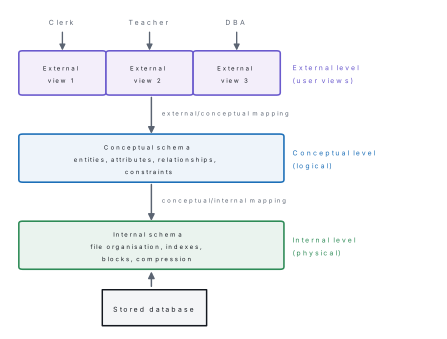
- Logical data independence — you may add a new table or a new column to the conceptual schema without changing existing external views or programs.
- Physical data independence — you may add an index or move the file to a new disk without changing the conceptual schema.
DBMS versus the traditional file system
| Point | File-processing system | DBMS |
|---|---|---|
| Redundancy | Same data repeated in many files | Data stored once, shared |
| Inconsistency | Updating one copy leaves others stale | One copy, so one truth |
| Data access | A new program for every new question | Any question answered by a query |
| Data independence | Program depends on file layout | Program independent of storage |
| Integrity | Rules coded inside each program | Constraints declared once in the schema |
| Concurrency | Two users can corrupt the same record | Locking and transactions prevent it |
| Security | File-level only | Per-table, per-column privileges |
| Backup/recovery | Manual | Built-in log-based recovery |
| Cost | Cheap, simple | Higher cost, needs a DBA |
1.2 Field, record, objects, primary key, alternate key, candidate key
Data in a relational database is stored in a table (formally a relation). A field is one column of the table — one named property, with one data type. A record is one row — all the field values describing a single real-world thing. Formally a field is an attribute and a record is a tuple.
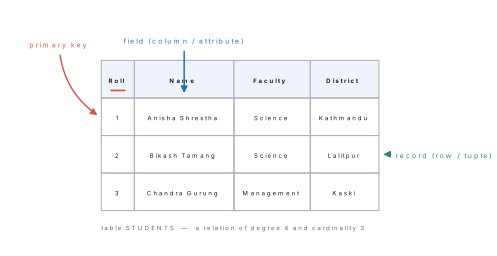
Objects. Everything the DBMS stores and names is a database object: tables, views, indexes, sequences, stored procedures, triggers, and in desktop systems like MS Access also queries, forms, reports and macros. A view is a virtual table — a stored query that behaves like a table but holds no data of its own.
Keys
- Super key — any set of attributes that uniquely identifies a row.
- Candidate key — a minimal super key: remove any attribute and it stops being unique. A table may have several candidate keys.
- Primary key — the one candidate key the designer chooses to identify rows. It can never be NULL and never be duplicated.
- Alternate key — the candidate keys that were not chosen as primary.
- Composite key — a key made of two or more attributes together.
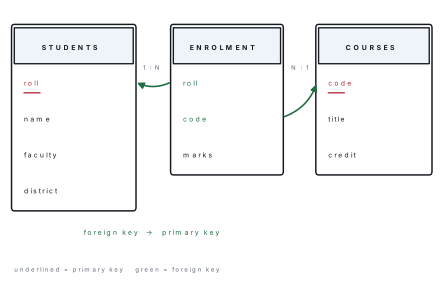
- Foreign key — an attribute in one table whose values must already exist as a primary key in another table. It is what links tables.
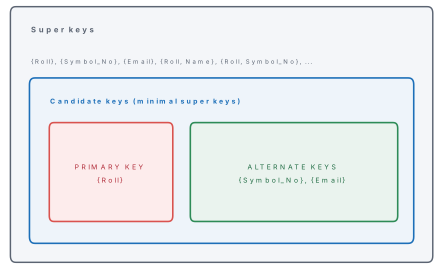
Problem. A table STUDENT(Roll, Symbol_No, Email, Name, Faculty) is such that
no two students share a roll number, a symbol number or an email address, but two
students may share a name and many share a faculty. List the candidate keys, a
possible primary key, the alternate keys, and two super keys that are not
candidate keys.
Solution.
- Candidate keys.
{Roll},{Symbol_No},{Email}— each alone is unique and cannot be reduced further, so each is minimal. - Primary key.
{Roll}— the school already prints it on every form, it is short, numeric and never changes. (Email would be a poor choice: students change email addresses.) - Alternate keys.
{Symbol_No}and{Email}. - Super keys that are not candidate keys.
{Roll, Name}and{Email, Faculty}— both unique, but not minimal, because the extra attribute can be dropped and uniqueness survives.
{Name} is not a key at all, and {Faculty} is not a key: many rows share a value.
Being the leftmost column, or being called ID, does not make a column a primary
key. What makes it one is a declared constraint that the values are unique and
not NULL. Equally, a composite primary key such as (Roll, Code) is one key
made of two columns — not two primary keys. A table can have at most one primary key.
1.3 Advantages of using DBMS
- Controlled redundancy. A fact is stored once. A student's district lives in
STUDENTSonly, not repeated in every mark-sheet row. - Consistency. Because there is one copy, there cannot be two different answers to the same question.
- Data sharing. Many users and many programs use the same data at the same time, each seeing the part they are allowed to see.
- Data integrity. Constraints (
PRIMARY KEY,FOREIGN KEY,NOT NULL,CHECK,UNIQUE) are declared once in the schema and the DBMS enforces them on everybody. - Security. Privileges are granted per user, per table, even per column.
- Data independence. Storage can be reorganised without touching programs.
- Backup and recovery. The DBMS keeps a log and can roll a damaged database forward or back to a consistent state.
- Concurrency control. Locking and transactions stop two simultaneous updates from corrupting each other.
- Fast, flexible enquiry. Any new question is a new query, not a new program.
- Enforcement of standards. Naming, formats and documentation are centralised under the DBA.
Disadvantages (worth one mark if asked): higher software and hardware cost, complexity, the need for trained staff, and a single point of failure — if the server dies, every application stops.
1.4 DDL and DML
SQL (Structured Query Language) is the standard language of relational databases. Its statements are grouped into sub-languages:
| Sub-language | Purpose | Statements |
|---|---|---|
| DDL — Data Definition Language | Defines and changes the structure (the schema) | CREATE, ALTER, DROP, TRUNCATE, RENAME |
| DML — Data Manipulation Language | Works on the data inside the structure | SELECT, INSERT, UPDATE, DELETE |
| DCL — Data Control Language | Controls who may do what | GRANT, REVOKE |
| TCL — Transaction Control Language | Makes a group of changes all-or-nothing | COMMIT, ROLLBACK, SAVEPOINT |
Some books count
SELECTseparately as DQL (Data Query Language). Either answer is accepted, but say which convention you are using.
1.4.1 The sample database used in this chapter
Every query below was executed on this database. Learn these three tables — the worked examples, the normalisation exercise and the practice questions all use them.
CREATE TABLE students (
    roll     INTEGER PRIMARY KEY,
    name     VARCHAR(40) NOT NULL,
    faculty  VARCHAR(20) NOT NULL,
    district VARCHAR(20),
    dob      DATE
);

CREATE TABLE courses (
    code   CHAR(5) PRIMARY KEY,
    title  VARCHAR(30) NOT NULL,
    credit INTEGER
);

CREATE TABLE enrolment (
    roll  INTEGER,
    code  CHAR(5),
    marks INTEGER,
    PRIMARY KEY (roll, code),
    FOREIGN KEY (roll) REFERENCES students(roll),
    FOREIGN KEY (code) REFERENCES courses(code)
);
students
| roll | name | faculty | district | dob |
|---|---|---|---|---|
| 1 | Anisha Shrestha | Science | Kathmandu | 2007-04-12 |
| 2 | Bikash Tamang | Science | Lalitpur | 2006-11-03 |
| 3 | Chandra Gurung | Management | Kaski | 2007-01-22 |
| 4 | Deepa Yadav | Science | Dhanusha | 2007-07-30 |
| 5 | Eliza Rai | Management | Morang | 2006-09-15 |
courses
| code | title | credit |
|---|---|---|
| CS401 | Computer Science | 4 |
| MA402 | Mathematics | 5 |
| EN403 | English | 3 |
| PH404 | Physics | 4 |
| NE405 | Nepali | 3 |
enrolment
| roll | code | marks |
|---|---|---|
| 1 | CS401 | 78 |
| 1 | MA402 | 65 |
| 1 | PH404 | 71 |
| 2 | CS401 | 52 |
| 2 | MA402 | 48 |
| 3 | CS401 | 85 |
| 3 | EN403 | 66 |
| 4 | CS401 | 91 |
| 4 | MA402 | 74 |
| 4 | PH404 | 59 |
| 5 | EN403 | 45 |
1.4.2 DDL in action — ALTER
ALTER TABLE students ADD COLUMN phone CHAR(10);
The structure afterwards (DESCRIBE students; in MySQL, PRAGMA table_info in SQLite):
| column | type | not null | primary key |
|---|---|---|---|
| roll | INTEGER | no | yes |
| name | VARCHAR(40) | yes | no |
| faculty | VARCHAR(20) | yes | no |
| district | VARCHAR(20) | no | no |
| dob | DATE | no | no |
| phone | CHAR(10) | no | no |
Other DDL you must be able to write:
DROP TABLE enrolment;                       -- removes structure AND data
TRUNCATE TABLE enrolment;                   -- removes all rows, keeps structure
ALTER TABLE students DROP COLUMN phone;     -- removes one column
CREATE VIEW science_marks AS
    SELECT s.name, c.title, e.marks
    FROM students s JOIN enrolment e ON s.roll = e.roll
                    JOIN courses  c ON c.code = e.code
    WHERE s.faculty = 'Science';
1.4.3 DML — retrieving data with SELECT
The general form is
SELECT column_list FROM table [WHERE condition]
[GROUP BY columns] [HAVING group_condition] [ORDER BY columns [ASC|DESC]];
Problem. Using the tables of §1.4.1, write SQL to (a) list the roll, name and district of Science students in alphabetical order, (b) list students from Kathmandu or Kaski, (c) list the faculties present, without repetition, and (d) list the rolls that scored 70 or more in CS401, highest first.
Solution.
(a)
SELECT roll, name, district FROM students
WHERE faculty = 'Science' ORDER BY name;
| roll | name | district |
|---|---|---|
| 1 | Anisha Shrestha | Kathmandu |
| 2 | Bikash Tamang | Lalitpur |
| 4 | Deepa Yadav | Dhanusha |
(b)
SELECT name, district FROM students
WHERE district IN ('Kathmandu', 'Kaski');
| name | district |
|---|---|
| Anisha Shrestha | Kathmandu |
| Chandra Gurung | Kaski |
(c)
SELECT DISTINCT faculty FROM students;
| faculty |
|---|
| Science |
| Management |
(d)
SELECT roll, marks FROM enrolment
WHERE code = 'CS401' AND marks >= 70 ORDER BY marks DESC;
| roll | marks |
|---|---|
| 4 | 91 |
| 3 | 85 |
| 1 | 78 |
Aggregate functions collapse many rows into one value: COUNT, SUM, AVG,
MAX, MIN.
SELECT COUNT(*) AS total_students FROM students;
| total_students |
|---|
| 5 |
SELECT MAX(marks) AS highest, MIN(marks) AS lowest,
       ROUND(AVG(marks), 2) AS average FROM enrolment;
| highest | lowest | average |
|---|---|---|
| 91 | 45 | 66.73 |
1.4.4 DML — INSERT, UPDATE, DELETE
INSERT INTO students (roll, name, faculty, district, dob)
VALUES (6, 'Firoj Ansari', 'Science', 'Parsa', '2007-02-18');
SELECT roll, name, faculty, district FROM students WHERE faculty = 'Science';
| roll | name | faculty | district |
|---|---|---|---|
| 1 | Anisha Shrestha | Science | Kathmandu |
| 2 | Bikash Tamang | Science | Lalitpur |
| 4 | Deepa Yadav | Science | Dhanusha |
| 6 | Firoj Ansari | Science | Parsa |
UPDATE enrolment SET marks = marks + 5 WHERE code = 'EN403';
2 rows affected. Checking:
SELECT roll, code, marks FROM enrolment WHERE code = 'EN403';
| roll | code | marks |
|---|---|---|
| 3 | EN403 | 71 |
| 5 | EN403 | 50 |
DELETE FROM enrolment WHERE marks < 50;
1 row affected — Bikash's Mathematics 48 is gone, leaving 10 rows.
DELETE FROM enrolment; deletes every row, and
UPDATE enrolment SET marks = 0; zeroes every mark. The WHERE clause is
not optional in practice. Also do not confuse DELETE (DML, removes rows, can be
rolled back) with DROP (DDL, removes the whole table) or TRUNCATE (DDL,
removes all rows fast and cannot normally be rolled back).
1.4.5 Joining tables
A join combines rows of two or more tables using a matching condition — almost always foreign key = primary key.
Problem. (a) Print each Science student's name with the title of every course they take and the marks. (b) For each course print the number of students and the average marks, best average first. (c) Print the name, subject count and total marks of every student taking three or more subjects.
Solution.
(a) Three tables must be joined, students → enrolment → courses:
SELECT s.name, c.title, e.marks
FROM students s
JOIN enrolment e ON s.roll = e.roll
JOIN courses   c ON c.code = e.code
WHERE s.faculty = 'Science'
ORDER BY s.name, c.title;
| name | title | marks |
|---|---|---|
| Anisha Shrestha | Computer Science | 78 |
| Anisha Shrestha | Mathematics | 65 |
| Anisha Shrestha | Physics | 71 |
| Bikash Tamang | Computer Science | 52 |
| Bikash Tamang | Mathematics | 48 |
| Deepa Yadav | Computer Science | 91 |
| Deepa Yadav | Mathematics | 74 |
| Deepa Yadav | Physics | 59 |
(b)
SELECT c.title, COUNT(e.roll) AS students, ROUND(AVG(e.marks),1) AS avg_marks
FROM courses c JOIN enrolment e ON c.code = e.code
GROUP BY c.title
ORDER BY avg_marks DESC;
| title | students | avg_marks |
|---|---|---|
| Computer Science | 4 | 76.5 |
| Physics | 2 | 65.0 |
| Mathematics | 3 | 62.3 |
| English | 2 | 55.5 |
Nepali does not appear: an inner join drops courses with no enrolment. To keep them, use a LEFT JOIN:
SELECT c.code, c.title, COUNT(e.roll) AS enrolled
FROM courses c LEFT JOIN enrolment e ON c.code = e.code
GROUP BY c.code, c.title ORDER BY c.code;
| code | title | enrolled |
|---|---|---|
| CS401 | Computer Science | 4 |
| EN403 | English | 2 |
| MA402 | Mathematics | 3 |
| NE405 | Nepali | 0 |
| PH404 | Physics | 2 |
(c) A condition on a group goes in HAVING, not WHERE:
SELECT s.name, COUNT(*) AS subjects, SUM(e.marks) AS total
FROM students s JOIN enrolment e ON s.roll = e.roll
GROUP BY s.roll, s.name
HAVING COUNT(*) >= 3
ORDER BY total DESC;
| name | subjects | total |
|---|---|---|
| Deepa Yadav | 3 | 224 |
| Anisha Shrestha | 3 | 214 |
WHERE filters rows before grouping; HAVING filters groups after
grouping. WHERE marks >= 40 is legal, WHERE AVG(marks) >= 60 is not —
that must be HAVING AVG(marks) >= 60.
1.4.6 The DBMS enforces your constraints
Running these on MariaDB with InnoDB tables:
INSERT INTO enrolment VALUES (99, 'CS401', 60);
ERROR 1452 (23000): Cannot add or update a child row: a foreign key
constraint fails (`school`.`enrolment`, CONSTRAINT `enrolment_ibfk_1`
FOREIGN KEY (`roll`) REFERENCES `students` (`roll`))
DELETE FROM courses WHERE code = 'CS401';
ERROR 1451 (23000): Cannot delete or update a parent row: a foreign key
constraint fails (`school`.`enrolment`, CONSTRAINT `enrolment_ibfk_2`
FOREIGN KEY (`code`) REFERENCES `courses` (`code`))
There is no student 99, so the enrolment is refused; and CS401 cannot be deleted while enrolments point at it. That refusal is referential integrity — the DBMS protecting the data from the program.
1.5 Database models: network, hierarchical and relational
A database model is the way the model organises data and the relationships between data.
1.5.1 Hierarchical model
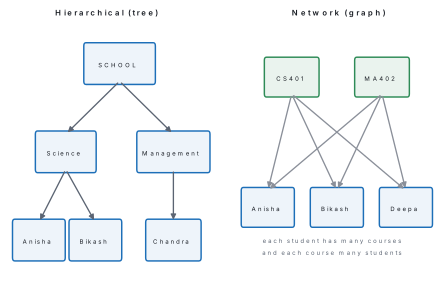
Data is arranged as an upside-down tree. Every record (called a segment) has exactly one parent; the topmost record is the root. Relationships are therefore one-to-many only, and navigation is by following pointers from parent to child. IBM's IMS (1966) is the classic example; the Windows registry and XML documents keep the same shape.
1.5.2 Network model
The network model (CODASYL, 1971) relaxes the one-parent rule: a record may have many parents, so the structure is a graph rather than a tree. Each relationship is called a set, with an owner record and member records. It can express many-to-many directly, which the hierarchical model cannot.
1.5.3 Relational model
Proposed by E. F. Codd in 1970, the relational model stores everything in tables, and expresses relationships not by pointers but by matching values — a foreign key equal to a primary key (see the figure in §1.4.1). It needs no navigation path: you state what you want in SQL and the DBMS works out how to get it. Almost every DBMS in use today is relational.
| Everyday word | Relational term |
|---|---|
| table | relation |
| row | tuple |
| column | attribute |
| number of columns | degree |
| number of rows | cardinality |
| set of allowed values of a column | domain |
| Feature | Hierarchical | Network | Relational |
|---|---|---|---|
| Structure | Tree | Graph | Tables |
| Parents per child | Exactly one | Many | Not applicable |
| Relationship shown by | Parent–child pointer | Owner–member set | Matching key values |
| Supports M:N directly | No | Yes | Yes, via a link table |
| Query language | Procedural navigation | Procedural navigation | Declarative (SQL) |
| Redundancy | High | Medium | Low (after normalisation) |
| Example | IBM IMS | CODASYL DBTG, IDMS | MySQL, Oracle, MS Access |
1.5.4 The E-R model
Before drawing tables, designers draw an Entity–Relationship (E-R) diagram. An entity is a thing we store data about; an attribute is a property of it; a relationship is an association between entities.
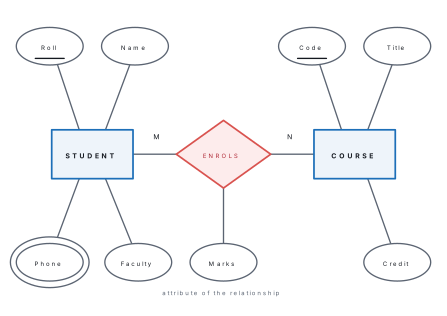
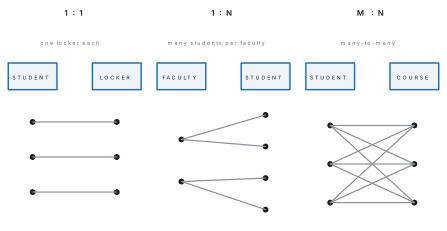
Cardinality records how many instances of one entity may relate to instances of the other.
1.6 Concept of normalisation: 1NF, 2NF, 3NF
Normalisation is the step-by-step decomposition of a badly designed table into smaller tables so that redundancy and the resulting insert, update and delete anomalies are removed, while no information is lost — the original table can always be recovered by joining the new ones.
Start with a real badly designed table. A school keeps its whole result record in one file:
UNF — unnormalised form
| roll | name | faculty | faculty_head | courses |
|---|---|---|---|---|
| 1 | Anisha Shrestha | Science | R. Sharma | CS401 Computer Science 78, MA402 Mathematics 65 |
| 3 | Chandra Gurung | Management | S. Karki | CS401 Computer Science 85, EN403 English 66 |
| 4 | Deepa Yadav | Science | R. Sharma | CS401 Computer Science 91, MA402 Mathematics 74 |
The courses cell holds several values — a repeating group. You cannot ask
"who scored above 80 in CS401?" without splitting text, so this is not even a
relation.
Step 1 — First Normal Form (1NF)
A relation is in 1NF if every cell holds a single atomic value — no repeating groups, no multivalued attributes — and every row is unique.
Split the repeating group into separate rows, one row per (student, course):
1NF: RESULT(roll, name, faculty, faculty_head, code, title, marks)
| roll | name | faculty | faculty_head | code | title | marks |
|---|---|---|---|---|---|---|
| 1 | Anisha Shrestha | Science | R. Sharma | CS401 | Computer Science | 78 |
| 1 | Anisha Shrestha | Science | R. Sharma | MA402 | Mathematics | 65 |
| 3 | Chandra Gurung | Management | S. Karki | CS401 | Computer Science | 85 |
| 3 | Chandra Gurung | Management | S. Karki | EN403 | English | 66 |
| 4 | Deepa Yadav | Science | R. Sharma | CS401 | Computer Science | 91 |
| 4 | Deepa Yadav | Science | R. Sharma | MA402 | Mathematics | 74 |
Neither roll nor code alone identifies a row, but together they do, so the
primary key is the composite key (roll, code).
Now name the functional dependencies. Writing X → Y ("X determines Y") means that for each value of X there is exactly one value of Y:
| # | Functional dependency | Type |
|---|---|---|
| FD1 | (roll, code) → marks | full dependency on the whole key |
| FD2 | roll → name, faculty | partial — depends on part of the key |
| FD3 | code → title | partial — depends on part of the key |
| FD4 | faculty → faculty_head | transitive, via a non-key attribute |
The table is in 1NF but it is horrible. Anisha Shrestha and R. Sharma are
stored twice; if Anisha's name is corrected in one row only, the table
contradicts itself (update anomaly); a new course with nobody enrolled cannot
be recorded at all, because part of the primary key would be missing (insert
anomaly); and deleting Chandra's only English row destroys the fact that EN403
is called English (delete anomaly).
Step 2 — Second Normal Form (2NF)
A relation is in 2NF if it is in 1NF and every non-key attribute is fully functionally dependent on the whole primary key — that is, there are no partial dependencies. (A table in 1NF whose primary key is a single attribute is automatically in 2NF.)
FD2 and FD3 are partial, so remove each into its own table, taking its determinant as the new primary key:
STUDENT(roll, name, faculty, faculty_head) — from FD2
| roll | name | faculty | faculty_head |
|---|---|---|---|
| 1 | Anisha Shrestha | Science | R. Sharma |
| 3 | Chandra Gurung | Management | S. Karki |
| 4 | Deepa Yadav | Science | R. Sharma |
COURSE(code, title) — from FD3
| code | title |
|---|---|
| CS401 | Computer Science |
| MA402 | Mathematics |
| EN403 | English |
ENROLMENT(roll, code, marks) — what is left, from FD1
| roll | code | marks |
|---|---|---|
| 1 | CS401 | 78 |
| 1 | MA402 | 65 |
| 3 | CS401 | 85 |
| 3 | EN403 | 66 |
| 4 | CS401 | 91 |
| 4 | MA402 | 74 |
roll and code in ENROLMENT are now foreign keys. All three tables are in 2NF.
Step 3 — Third Normal Form (3NF)
A relation is in 3NF if it is in 2NF and no non-key attribute depends on another non-key attribute — there are no transitive dependencies (X → Y → Z where Y is not a key).
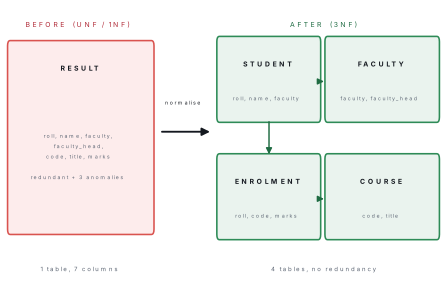
COURSE and ENROLMENT are already in 3NF. STUDENT is not: FD4 gives
roll → faculty → faculty_head, so faculty_head depends on roll only
through faculty. R. Sharma is still repeated once per Science student, and
if the Science department changes head you must update several rows. Split off
the transitive part:
STUDENT(roll, name, faculty)
| roll | name | faculty |
|---|---|---|
| 1 | Anisha Shrestha | Science |
| 3 | Chandra Gurung | Management |
| 4 | Deepa Yadav | Science |
FACULTY(faculty, faculty_head)
| faculty | faculty_head |
|---|---|
| Science | R. Sharma |
| Management | S. Karki |
faculty in STUDENT is now a foreign key to FACULTY. The final design is four
tables — STUDENT, FACULTY, COURSE, ENROLMENT — all in 3NF.
Problem. Show that joining the four 3NF tables reproduces the 1NF table exactly, i.e. nothing was lost.
Solution. Join on each foreign key:
SELECT s.roll, s.name, s.faculty, f.faculty_head, e.code, c.title, e.marks
FROM student   s JOIN faculty   f ON s.faculty = f.faculty
                 JOIN enrolment e ON e.roll    = s.roll
                 JOIN course    c ON c.code    = e.code
ORDER BY s.roll, e.code;
| roll | name | faculty | faculty_head | code | title | marks |
|---|---|---|---|---|---|---|
| 1 | Anisha Shrestha | Science | R. Sharma | CS401 | Computer Science | 78 |
| 1 | Anisha Shrestha | Science | R. Sharma | MA402 | Mathematics | 65 |
| 3 | Chandra Gurung | Management | S. Karki | CS401 | Computer Science | 85 |
| 3 | Chandra Gurung | Management | S. Karki | EN403 | English | 66 |
| 4 | Deepa Yadav | Science | R. Sharma | CS401 | Computer Science | 91 |
| 4 | Deepa Yadav | Science | R. Sharma | MA402 | Mathematics | 74 |
These are the same six rows, with the same values, as the 1NF table. The decomposition is therefore lossless, and the three anomalies are gone: a new course can be inserted into COURSE with nobody enrolled, a name is corrected in exactly one place, and deleting an enrolment no longer destroys a course title.
| Normal form | Condition to satisfy | What it removes |
|---|---|---|
| 1NF | All values atomic; no repeating groups | Repeating groups, multivalued cells |
| 2NF | 1NF + no partial dependency on part of a composite key | Redundancy caused by part-key dependence |
| 3NF | 2NF + no transitive dependency between non-key attributes | Redundancy caused by non-key → non-key |
| BCNF (beyond syllabus) | 3NF + every determinant is a candidate key | Remaining key anomalies |
2NF only becomes an issue when the primary key is composite. If the key is a single column, jump straight to checking transitive dependencies for 3NF, and say so: "the key is a single attribute, so the relation is already in 2NF." Also, always keep the foreign keys when you split a table — a decomposition that cannot be re-joined has lost information and earns no marks.
1.7 Centralised versus distributed database
In a centralised database the whole database is stored and managed at one site; users elsewhere reach it over the network. In a distributed database the data is split (fragmented) or copied (replicated) across several sites, each with its own DBMS, but the collection behaves as one logical database.
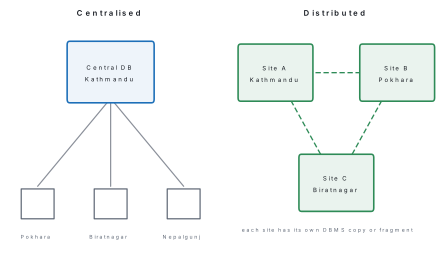
| Point | Centralised | Distributed |
|---|---|---|
| Location of data | One site | Several sites |
| Control | Single DBA, easy to control | Needs co-ordination between sites |
| Cost and complexity | Lower | Higher (network, replication software) |
| Access speed for remote users | Slower — every request crosses the network | Faster — local data answered locally |
| Reliability | Single point of failure | Other sites keep working if one fails |
| Consistency | Easy — one copy | Hard — replicas must be kept in step |
| Expansion | Limited by one machine | Add another site |
| Example | A school's MS Access file on the office PC | Nepal Telecom or a bank with branch servers |
1.8 Database security
Database security is the protection of a database against accidental or deliberate loss of confidentiality (nobody unauthorised reads it), integrity (nobody unauthorised changes it) and availability (authorised users can reach it when needed).
The threats are unauthorised access, theft of data, malicious or accidental modification, SQL injection, physical damage (fire, theft, load-shedding, earthquake) and hardware or software failure.
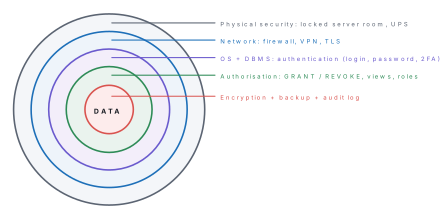
The measures a DBMS provides, in the order examiners list them:
- Authentication — proving who you are: user name and password, and now commonly two-factor authentication.
- Authorisation (access control) — deciding what that user may do, with DCL:
CREATE USER 'teacher'@'localhost' IDENTIFIED BY 'Pass$123';
GRANT SELECT ON school.students TO 'teacher'@'localhost';
GRANT SELECT, UPDATE (marks) ON school.enrolment TO 'teacher'@'localhost';
SHOW GRANTS FOR 'teacher'@'localhost';
GRANT USAGE ON *.* TO `teacher`@`localhost` IDENTIFIED BY PASSWORD '*EC95AF1F...'
GRANT SELECT ON `school`.`students` TO `teacher`@`localhost`
GRANT SELECT, UPDATE (`marks`) ON `school`.`enrolment` TO `teacher`@`localhost`
The teacher can read students and change only the marks column of enrolment — column-level privilege. Withdrawing it again:
REVOKE UPDATE (marks) ON school.enrolment FROM 'teacher'@'localhost';
GRANT SELECT ON `school`.`students` TO `teacher`@`localhost`
GRANT SELECT ON `school`.`enrolment` TO `teacher`@`localhost`
- Views — grant access to a view instead of the table, so a user sees only
the rows and columns the view exposes (
science_marksin §1.4.2 hides Management students entirely). - Encryption — store and transmit data as cipher text, so a stolen disk or a sniffed packet is useless.
- Backup and recovery — regular full and incremental backups kept off-site, plus the DBMS transaction log so committed work can be replayed after a crash.
- Transactions — group related changes so they are all-or-nothing:
START TRANSACTION;
UPDATE enrolment SET marks = 0 WHERE code = 'CS401';
SELECT marks FROM enrolment WHERE code = 'CS401';   -- 0, 0, 0, 0
ROLLBACK;
SELECT marks FROM enrolment WHERE code = 'CS401';   -- 78, 52, 85, 91
The ROLLBACK undoes the mistaken update completely; COMMIT would have made it
permanent.
- Integrity constraints —
PRIMARY KEY,FOREIGN KEY,NOT NULL,CHECKkeep bad data out in the first place (see §1.4.6). - Audit trail — a log of who did what and when, so misuse can be traced.
- Physical security — a locked server room, UPS or inverter against load-shedding, and fire protection.
Writing ... WHERE name = '" + input + "' allows SQL injection: a visitor who
types ' OR '1'='1 turns your query into one that matches every row. Always use
parameterised (prepared) statements, and give the web application's database user
the smallest set of privileges it needs.
Chapter summary
- Data are raw facts; information is processed data. A database is shared, integrated data; a DBMS is the software managing it; a database system is hardware + software + data + users + procedures.
- The three-level architecture (external / conceptual / internal) plus its two mappings gives logical and physical data independence.
- Field = column = attribute; record = row = tuple. Degree = number of columns, cardinality = number of rows.
- Super key ⊃ candidate key; one candidate key becomes the primary key (unique, never NULL), the others are alternate keys; a foreign key matches a primary key in another table and gives referential integrity.
- DDL (
CREATE,ALTER,DROP,TRUNCATE) defines structure; DML (SELECT,INSERT,UPDATE,DELETE) manipulates data; DCL (GRANT,REVOKE) controls access; TCL (COMMIT,ROLLBACK) controls transactions. WHEREfilters rows before grouping,HAVINGfilters groups after; an inner join drops unmatched rows, aLEFT JOINkeeps them.- Models: hierarchical = tree, one parent per child; network = graph, many parents; relational = tables linked by matching key values (Codd, 1970).
- Normalisation: 1NF atomic values; 2NF 1NF + no partial dependency on part of a composite key; 3NF 2NF + no transitive dependency. A correct decomposition is lossless — the original table rejoins exactly.
- Centralised = one site, simple but a single point of failure; distributed = many co-operating sites, reliable and fast locally but complex.
- Security is layered: authentication, authorisation, views, encryption, backup, transactions, constraints, audit trail, physical protection.
Practice questions
Group A — Multiple choice (1 mark each)
- Which of the following is not a DDL statement? [1]aCREATEbALTERcUPDATEdDROP
- A candidate key that has not been chosen as the primary key is called a [1]asuper keybalternate keycforeign keydcomposite key
- A relation is in 2NF if it is in 1NF and has no [1]arepeating groupbtransitive dependencycpartial dependencydforeign key
- The number of attributes in a relation is its [1]acardinalitybdegreecdomaindtuple count
- In the hierarchical database model, every child record has [1]ano parentbexactly one parentcat most two parentsdmany parents
- Which clause filters groups produced by GROUP BY? [1]aWHEREbORDER BYcHAVINGdDISTINCT
Answers to Group A
1. (c) — UPDATE changes data, not structure, so it is DML.
2. (b) — by definition the unchosen candidate keys are the alternate keys.
3. (c) — partial dependency is removed at 2NF; transitive dependency at 3NF.
4. (b) — degree counts attributes; cardinality counts tuples.
5. (b) — one parent only; that is why it is a tree.
6. (c) — WHERE filters rows before grouping, HAVING filters groups after.
Group B — Short answer (5 marks each)
- Define data, database and DBMS. State any four advantages of using a DBMS over a traditional file-processing system. [5]
- Differentiate between DDL and DML with two example statements of each.
Where do
GRANTandROLLBACKfit? [5] - Define candidate key, primary key, alternate key and foreign key. For
EMPLOYEE(Emp_ID, Citizenship_No, PAN_No, Name, Dept_ID), in which no two employees share the first three attributes, list the candidate keys and identify a primary key, the alternate keys and the foreign key. [5] - Using the tables
students,coursesandenrolmentof §1.4.1, write SQL statements to(a) insert a new course NE405 with 3 credits,(b) raise every Physics mark by 2,(c) delete all students of Morang district,(d) list the name and marks of every student who took Computer Science, and(e) show each district with the number of students from it. [5] - Distinguish between centralised and distributed databases on any five points. [5]
Answers to Group B
2. DDL defines structure — CREATE TABLE students (...), ALTER TABLE students ADD COLUMN phone CHAR(10). DML manipulates the data inside it — INSERT INTO students VALUES (...), UPDATE enrolment SET marks = marks + 5 WHERE code = 'EN403'. DDL changes are auto-committed and act on the schema; DML acts on rows and can be rolled back. GRANT is DCL (access control) and ROLLBACK is TCL (transaction control).
3. Candidate keys: {Emp_ID}, {Citizenship_No}, {PAN_No} — each is unique and minimal. Primary key: {Emp_ID} (short, issued by the organisation, never changes). Alternate keys: {Citizenship_No} and {PAN_No}. Foreign key: Dept_ID, referencing the primary key of a DEPARTMENT table. {Name} is not a key because two employees may share a name.
4.
(a) INSERT INTO courses (code, title, credit) VALUES ('NE405', 'Nepali', 3);
(b) UPDATE enrolment SET marks = marks + 2 WHERE code = 'PH404';
(c) DELETE FROM students WHERE district = 'Morang';
(d) SELECT s.name, e.marks FROM students s JOIN enrolment e ON s.roll = e.roll WHERE e.code = 'CS401';
(e) SELECT district, COUNT(*) AS n FROM students GROUP BY district;
Note for (c): with the foreign key in place the DBMS will refuse while Eliza Rai
still has enrolments, so her enrolment rows must be deleted first (or the
constraint defined with ON DELETE CASCADE).
Group C — Long answer (8 marks each)
- The following table stores the library records of a school. [8]
| Member_ID | Member_Name | Branch | Branch_Incharge | Book_ID | Book_Title | Issue_Date |
|---|---|---|---|---|---|---|
| M01 | Anisha | Science | Sharma | B11 | Physics Class 12 | 2082-03-10 |
| M01 | Anisha | Science | Sharma | B24 | C Programming | 2082-03-18 |
| M02 | Chandra | Management | Karki | B11 | Physics Class 12 | 2082-04-02 |
(a) Why is this table not in 2NF? Name its primary key and list all functional dependencies. (b) Normalise it up to 3NF, showing the tables at each stage with their keys. (c) Name the three anomalies your final design removes.
- (a) Explain the hierarchical, network and relational database models, with a diagram of each. [5](b) What is database security? Describe any three measures a DBMS uses to provide it. [3]
Answer outline to Group C question 1
(a) Primary key = (Member_ID, Book_ID) — a member may borrow many books and
a book may be issued to many members over time.
FDs: (Member_ID, Book_ID) → Issue_Date [full]; Member_ID → Member_Name, Branch
[partial]; Book_ID → Book_Title [partial]; Branch → Branch_Incharge [transitive].
It is not in 2NF because Member_Name, Branch and Book_Title depend on only
part of the composite key.
(b) 1NF: already atomic — all cells hold single values, key (Member_ID, Book_ID).
2NF — remove the two partial dependencies: MEMBER(Member_ID, Member_Name, Branch, Branch_Incharge); BOOK(Book_ID, Book_Title); ISSUE(Member_ID, Book_ID, Issue_Date) with both columns as foreign keys.
3NF — MEMBER still has Member_ID → Branch → Branch_Incharge, so split: MEMBER(Member_ID, Member_Name, Branch) with Branch a foreign key, and BRANCH(Branch, Branch_Incharge). Final design: MEMBER, BRANCH, BOOK, ISSUE.
(c) Insert anomaly — a new book, or a new branch with no members, can now be recorded. Update anomaly — the branch in-charge's name is stored once, so it cannot become inconsistent. Delete anomaly — returning the last copy of a book no longer erases its title. The decomposition is lossless: joining MEMBER, BRANCH, BOOK and ISSUE on the foreign keys reproduces the original three rows.
Practise more: Computer Science question bank