Unit 4 · 12 teaching hours · 26 min read
Programming in C
What the syllabus asks for 14
- Review of C programming concepts
- Functions: library and user defined functions and advantages
- Function definition, prototype, call and return statements
- Accessing a Function by passing values
- Storage classes: automatic and external
- Recursion: factorial and Fibonacci problems
- Structure: definition, declaration, initialization and size
- Accessing members of structure; Array of structure
- Union: definition, declaration; Difference between union and structure
- Pointers: definition; Address (&) and indirection (*) operator
- Pointer Expression and Assignment; Call by value and call by reference
- Working with Files: Concept of Data File; Sequential and Random File
- File manipulation functions: putw, getw, putc, getc, fscanf, fprintf
- Opening, Reading, Writing and Appending data file
In Grade 11 you learned to write a single main() that read some values, looped
over them and printed an answer. That is enough for twenty lines of code and
hopeless for two hundred. This unit adds the four tools that let a C program
grow: functions (break the work into named pieces), structures and
unions (group related data under one name), pointers (work with memory
addresses directly), and files (keep the data after the program ends).
Almost every paper contains one program from this unit — a function, a recursion
(factorial or Fibonacci), an array of structures, or a file that is written and
read back. Learn the difference between call by value and call by reference,
between structure and union, and the sequence fopen → read/write →
fclose. Write the #include, the prototype and the return 0; — they carry
marks.
Every program in this chapter was compiled and run before publication, and the output printed beneath each one is the output the machine actually produced.
4.1 Review of C programming concepts
C was written by Dennis Ritchie at Bell Laboratories in 1972. It is a structured, mid-level, compiled language: close enough to the hardware to write an operating system, structured enough to be readable.
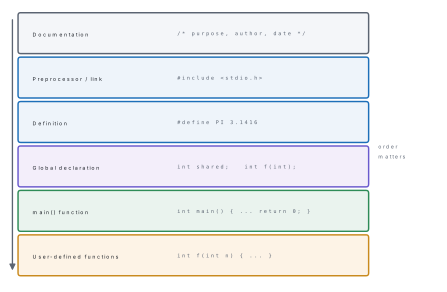
#include <stdio.h>
int main() {
    int roll = 12;
    float percent = 78.5f;
    char grade = 'A';
    char name[20] = "Anisha";
    printf("Roll    = %d\n", roll);
    printf("Percent = %.2f\n", percent);
    printf("Grade   = %c\n", grade);
    printf("Name    = %s\n", name);
    printf("sizes: int=%d float=%d char=%d double=%d\n",
           (int)sizeof(int), (int)sizeof(float), (int)sizeof(char), (int)sizeof(double));
    int a = 17, b = 5;
    printf("%d %d %d %d %d\n", a+b, a-b, a*b, a/b, a%b);
    return 0;
}
Output:
Roll    = 12
Percent = 78.50
Grade   = A
Name    = Anisha
sizes: int=4 float=4 char=1 double=8
22 12 85 3 2
Note 17 / 5 gives 3, not 3.4: dividing one integer by another throws away
the fraction. Write 17 / 5.0 if you want 3.4.
| Item | Examples |
|---|---|
| Data types | int, float, double, char, void; modifiers short, long, signed, unsigned |
| Format specifiers | %d int, %f float, %c char, %s string, %ld long, %p pointer |
| Operators | + - * / %, = += -=, == != < >, && || !, ++ --, ?:, & * |
| Decisions | if, if-else, if-else-if, nested if, switch-case |
| Loops | for, while, do-while; break and continue |
| Arrays | int marks[5] = {78, 52, 85, 91, 45}; — index starts at 0 |
int marks[5] = {78, 52, 85, 91, 45};
int i, sum = 0, max = marks[0];
for (i = 0; i < 5; i++) {
    sum += marks[i];
    if (marks[i] > max) max = marks[i];
}
printf("sum = %d, average = %.2f, highest = %d\n", sum, sum / 5.0, max);
Output:
sum = 351, average = 70.20, highest = 91
4.2 Functions: library and user-defined; advantages
A function is a self-contained, named block of code that performs one task,
may accept arguments and may return one value. A C program is nothing
but a collection of functions, of which main() is the one the system calls
first.

| Library function | User-defined function | |
|---|---|---|
| Written by | The compiler's authors | The programmer |
| Where it lives | In a header and the standard library | In the programmer's own source file |
| Needs | #include <stdio.h> etc. |
A definition, and usually a prototype |
| Body | Not visible; already compiled | Visible and editable |
| Examples | printf, scanf, sqrt, strlen, getc |
factorial, area, swap |
Advantages of using functions
- Reusability — write once, call as many times as needed.
- Modularity — a large problem is broken into small, independent tasks.
- Readability —
factorial(n)says what it does; twelve lines of loop do not. - Easier testing and debugging — each function can be checked on its own.
- Shorter program — no repeated blocks of code.
- Teamwork — different people can write different functions at the same time.
- Easier maintenance — a change is made in one place only.
4.3 Function definition, prototype, call and return
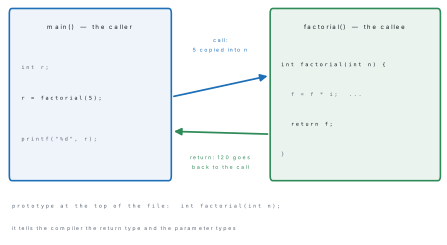
Three things must agree: the prototype (declaration), the definition (the body) and the call.
#include <stdio.h>
#include <math.h>

/* function prototypes (declarations) */
int  factorial(int n);
float area(float l, float b);
void greet(void);

int main() {
    greet();
    printf("factorial(5) = %d\n", factorial(5));
    printf("area(8, 5)   = %.2f\n", area(8, 5));
    printf("sqrt(144)    = %.2f   pow(2,10) = %.0f\n", sqrt(144.0), pow(2, 10));
    return 0;
}

/* function definitions */
void greet(void) { printf("Namaste from a user-defined function!\n"); }

int factorial(int n) {
    int i, f = 1;
    for (i = 1; i <= n; i++) f = f * i;
    return f;                       /* return sends the value back */
}

float area(float l, float b) { return l * b; }
Output:
Namaste from a user-defined function!
factorial(5) = 120
area(8, 5)   = 40.00
sqrt(144)    = 12.00   pow(2,10) = 1024
- Prototype:
int factorial(int n);— return type, name, parameter types, a semicolon. Placed beforemain()so the compiler knows the function exists. - Definition: the same header without the semicolon, followed by the body in braces.
- Call:
factorial(5)— the value 5 is the argument; inside the functionnis the parameter. - return: sends one value back and ends the function immediately. A
voidfunction returns nothing and may use a barereturn;or none at all.
4.4 Accessing a function by passing values
When a function is called by passing values (call by value), the arguments are copied into the parameters. The function works on the copies, so the originals in the caller are untouched. This is C's default for everything except arrays.
float area(float l, float b) { return l * b; }
...
printf("area(8, 5)   = %.2f\n", area(8, 5));   /* prints 40.00 */
Problem. Write a C program with a function larger() that takes two
integers and returns the greater, and call it from main().
Solution.
#include <stdio.h>
int larger(int a, int b);            /* prototype */

int main() {
    int x = 47, y = 92;
    printf("larger of %d and %d is %d\n", x, y, larger(x, y));
    return 0;
}

int larger(int a, int b) {           /* definition */
    if (a > b) return a;
    return b;
}
Compiled and run, this printed
larger of 47 and 92 is 92
The three marks go to the prototype, the if with two returns, and the call
used directly inside printf.
4.5 Storage classes: automatic and external
A storage class decides four things about a variable: where it is stored, its default initial value, its scope (where it can be seen) and its lifetime (how long it survives).

| Storage class | Keyword | Stored in | Default value | Scope | Lifetime |
|---|---|---|---|---|---|
| Automatic | auto (the default) |
Stack | Garbage | Inside its own block | Until the block ends |
| External / global | extern |
Data segment | 0 | The whole program, all files | Whole program |
| Static | static |
Data segment | 0 | Its own block (or file) | Whole program |
| Register | register |
CPU register if possible | Garbage | Inside its own block | Until the block ends |
#include <stdio.h>

int counter_auto(void) {
    auto int c = 0;      /* created fresh on every call */
    c++;
    return c;
}
int counter_static(void) {
    static int c = 0;    /* keeps its value between calls */
    c++;
    return c;
}

extern int shared;       /* declared here, defined below */

void show(void) { printf("inside show(), shared = %d\n", shared); }

int shared = 100;        /* external (global) variable */

int main() {
    printf("auto  : %d %d %d\n", counter_auto(), counter_auto(), counter_auto());
    printf("static: %d %d %d\n", counter_static(), counter_static(), counter_static());
    shared = shared + 5;
    show();
    return 0;
}
Output:
auto  : 1 1 1
static: 1 2 3
inside show(), shared = 105
That output is the whole lesson: the automatic variable is born again on every
call and always returns 1, while the static variable survives between calls and
counts 1, 2, 3. The external variable shared is visible inside show()
without being passed to it.
auto int c; without = 0 does not contain zero — it contains whatever
happened to be at that stack address. Only extern and static variables are
automatically initialised to 0. Forgetting this produces a program that gives a
different wrong answer every time it runs.
4.6 Recursion: factorial and Fibonacci
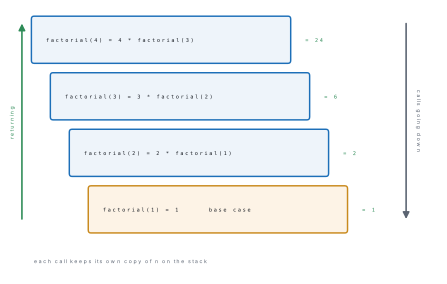
Recursion is a function calling itself, directly or indirectly. Every recursive function needs a base case that stops the recursion and a recursive case that moves towards it. Without a base case the calls never stop and the program dies with a stack overflow.
#include <stdio.h>

long factorial(int n) {
    if (n == 0 || n == 1) return 1;      /* base case  */
    return n * factorial(n - 1);         /* recursive case */
}

int fibonacci(int n) {
    if (n == 0) return 0;
    if (n == 1) return 1;
    return fibonacci(n - 1) + fibonacci(n - 2);
}

int main() {
    int i;
    printf("factorial: ");
    for (i = 0; i <= 8; i++) printf("%ld ", factorial(i));
    printf("\n5! = %ld,  7! = %ld\n", factorial(5), factorial(7));

    printf("Fibonacci series: ");
    for (i = 0; i < 10; i++) printf("%d ", fibonacci(i));
    printf("\n");
    return 0;
}
Output:
factorial: 1 1 2 6 24 120 720 5040 40320
5! = 120,  7! = 5040
Fibonacci series: 0 1 1 2 3 5 8 13 21 34
| Point | Recursion | Iteration (loop) |
|---|---|---|
| Ends when | The base case is reached | The loop condition becomes false |
| Memory | A stack frame per call — heavy | One set of variables — light |
| Speed | Slower (call overhead) | Faster |
| Code length | Shorter and closer to the definition | Longer but plainer |
| Danger | Stack overflow if the base case is missing | Infinite loop |
4.7 Structure: definition, declaration, initialization and size
A structure is a user-defined data type that groups several variables — possibly of different types — under one name. Each variable in it is called a member or field.
struct student {              /* definition: a new type, no memory yet */
    int   roll;
    char  name[20];
    char  faculty[12];
    float marks;
};

struct student s1 = {1, "Anisha", "Science", 78.5};   /* declaration + init */
struct student s2;                                    /* declaration only   */
The definition creates a template and occupies no memory; memory is used
only when a variable of that type is declared. The size of a structure is the
sum of the sizes of its members, possibly rounded up by the compiler for
alignment — in the run below, 4 + 20 + 12 + 4 = 40 bytes.
4.8 Accessing members of a structure; array of structures
Members are reached with the dot operator, s1.roll. Strings cannot be
assigned with =; use strcpy. An array of structures holds many records of
the same kind — exactly what a class list, an inventory or a result sheet is.
#include <stdio.h>
#include <string.h>

struct student {
    int   roll;
    char  name[20];
    char  faculty[12];
    float marks;
};

int main() {
    struct student s1 = {1, "Anisha", "Science", 78.5};
    struct student s2;
    struct student cls[3] = {
        {1, "Anisha",  "Science",    78.5},
        {2, "Bikash",  "Science",    52.0},
        {3, "Chandra", "Management", 85.0}
    };
    int i;
    float total = 0;

    s2.roll = 4;
    strcpy(s2.name, "Deepa");           /* strings need strcpy */
    strcpy(s2.faculty, "Science");
    s2.marks = 91.0;

    printf("%d %s %s %.1f\n", s1.roll, s1.name, s1.faculty, s1.marks);
    printf("%d %s %s %.1f\n", s2.roll, s2.name, s2.faculty, s2.marks);

    printf("--- array of structure ---\n");
    for (i = 0; i < 3; i++) {
        printf("%-3d %-8s %-11s %.1f\n",
               cls[i].roll, cls[i].name, cls[i].faculty, cls[i].marks);
        total += cls[i].marks;
    }
    printf("average = %.2f\n", total / 3);
    printf("sizeof(struct student) = %d bytes\n", (int)sizeof(struct student));
    return 0;
}
Output:
1 Anisha Science 78.5
4 Deepa Science 91.0
--- array of structure ---
1   Anisha   Science     78.5
2   Bikash   Science     52.0
3   Chandra  Management  85.0
average = 71.83
sizeof(struct student) = 40 bytes
4.9 Union: definition and declaration; union versus structure
A union looks like a structure but all its members share the same piece of memory. Its size is the size of its largest member, and only one member holds a valid value at any moment.

union value {
    int   i;
    float f;
    char  s[8];
};
...
union value v;
printf("sizeof(union value)    = %d bytes\n", (int)sizeof(union value));
v.i = 65;      printf("union after v.i = 65   : v.i = %d\n", v.i);
v.f = 3.14f;   printf("union after v.f = 3.14 : v.f = %.2f, v.i = %d (corrupted)\n",
                      v.f, v.i);
Output:
sizeof(union value)    = 8 bytes
union after v.i = 65   : v.i = 65
union after v.f = 3.14 : v.f = 3.14, v.i = 1078523331 (corrupted)
| Point | Structure | Union |
|---|---|---|
| Keyword | struct |
union |
| Memory | Separate memory for every member | One shared memory for all members |
| Size | Sum of all members (here 40 bytes) | Size of the largest member (here 8 bytes) |
| Members usable at once | All | Only one |
| Changing one member | Does not affect the others | Overwrites all the others |
| Initialisation | All members may be initialised | Only the first member may be initialised |
| Use | Records with several fields at once | Saving memory when only one field is needed at a time |
After v.f = 3.14, reading v.i gave 1078523331 — the bit pattern of the
float read as an integer. A union does not convert; it reinterprets the same
bytes. Read back only the member you wrote last.
4.10 Pointers: definition; the address (&) and indirection (*) operators
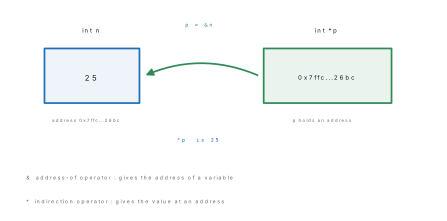
A pointer is a variable that stores the memory address of another
variable. int *p; declares p as a pointer to an int; p = &n; makes it point
at n; *p is the value stored at that address.
4.11 Pointer expression and assignment; call by value and call by reference

#include <stdio.h>

void swapByValue(int a, int b)      { int t = a; a = b; b = t; }
void swapByReference(int *a, int *b){ int t = *a; *a = *b; *b = t; }

int main() {
    int n = 25;
    int *p;             /* p is a pointer to int */
    p = &n;             /* & gives the address    */

    printf("n        = %d\n", n);
    printf("&n       = %p\n", (void *)&n);
    printf("p        = %p\n", (void *)p);
    printf("*p       = %d   (indirection: the value at that address)\n", *p);
    printf("sizeof(p)= %d bytes\n", (int)sizeof(p));

    *p = *p + 5;        /* pointer expression: changes n itself */
    printf("after *p = *p + 5,  n = %d\n", n);

    int x = 10, y = 20;
    swapByValue(x, y);
    printf("call by value    : x = %d, y = %d  (unchanged)\n", x, y);
    swapByReference(&x, &y);
    printf("call by reference: x = %d, y = %d  (swapped)\n", x, y);

    int arr[5] = {10, 20, 30, 40, 50};
    int *q = arr;                       /* an array name is the address of arr[0] */
    printf("arr[2] = %d,  *(q+2) = %d\n", arr[2], *(q + 2));
    return 0;
}
Output:
n        = 25
&n       = 0x7ffc003c26bc
p        = 0x7ffc003c26bc
*p       = 25   (indirection: the value at that address)
sizeof(p)= 8 bytes
after *p = *p + 5,  n = 30
call by value    : x = 10, y = 20  (unchanged)
call by reference: x = 20, y = 10  (swapped)
arr[2] = 30,  *(q+2) = 30
(The two addresses will differ on your machine; what matters is that &n and
p print the same address.)
| Point | Call by value | Call by reference |
|---|---|---|
| What is passed | A copy of the value | The address of the variable |
| Parameter declared as | int a |
int *a |
| Call written as | swap(x, y) |
swap(&x, &y) |
| Effect on the original | None | The original is changed |
| Memory | Extra copy of each argument | Only an address (8 bytes) |
| Returning several results | Not possible — return sends one value |
Possible — change several variables through pointers |
4.12 Working with files: the concept of a data file; sequential and random files
A variable lives in RAM and dies when the program ends. A data file is a named collection of bytes stored on disk, so the data survives, can be far larger than memory, and can be shared between programs.
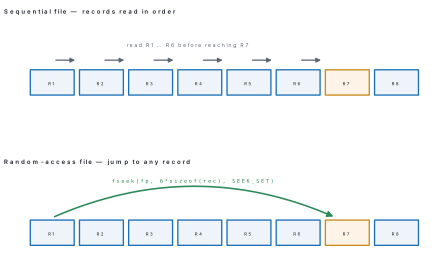
| Point | Sequential file | Random (direct) access file |
|---|---|---|
| Order of access | From the beginning, record by record | Any record directly |
| Speed for one record | Slow if it is far in | Fast — one jump |
| Functions | fscanf, fprintf, getc, putc |
fseek, ftell, rewind, fread, fwrite |
| Record size | May vary | Usually fixed, so the position can be calculated |
| Typical use | Log files, text reports, payroll runs | Databases, indexed records, updating one record |
File opening modes used with fopen(name, mode):
| Mode | Meaning | If the file does not exist | If it exists |
|---|---|---|---|
"r" |
Read only | Returns NULL |
Opens it |
"w" |
Write only | Creates it | Erases the old contents |
"a" |
Append | Creates it | Adds at the end |
"r+" |
Read and write | Returns NULL |
Opens it, keeps contents |
"w+" |
Read and write | Creates it | Erases the old contents |
"a+" |
Read and append | Creates it | Adds at the end |
"rb" "wb" |
The same in binary | Used with putw, getw, fread, fwrite |
4.13 File manipulation functions: putw, getw, putc, getc, fscanf, fprintf
| Function | Purpose | Example |
|---|---|---|
fopen() |
Opens a file and returns a FILE * |
fp = fopen("a.txt", "w"); |
fclose() |
Closes it and flushes the buffer | fclose(fp); |
putc() / fputc() |
Writes one character | putc('A', fp); |
getc() / fgetc() |
Reads one character, returns EOF at the end |
ch = getc(fp); |
putw() |
Writes one integer in binary | putw(55, fp); |
getw() |
Reads one integer in binary | n = getw(fp); |
fprintf() |
Formatted write — printf to a file |
fprintf(fp, "%d %s", r, nm); |
fscanf() |
Formatted read — scanf from a file |
fscanf(fp, "%d %s", &r, nm); |
fseek() |
Moves the file pointer | fseek(fp, 8, SEEK_SET); |
ftell() |
Reports the current position | pos = ftell(fp); |
rewind() |
Goes back to the beginning | rewind(fp); |
4.14 Opening, reading, writing and appending a data file

The program below writes a text file, reads it back with fscanf, appends a
record, dumps the whole file with getc, then repeats the exercise in binary
with putw/getw and finally jumps straight to the third integer with fseek.
#include <stdio.h>

int main() {
    FILE *fp;
    char ch;
    int  n, i;
    char name[20];
    float marks;

    /* ---- 1. WRITE a text file with fprintf ---- */
    fp = fopen("student.txt", "w");
    if (fp == NULL) { printf("Cannot open file\n"); return 1; }
    fprintf(fp, "%d %s %.1f\n", 1, "Anisha",  78.5);
    fprintf(fp, "%d %s %.1f\n", 2, "Bikash",  52.0);
    fprintf(fp, "%d %s %.1f\n", 3, "Chandra", 85.0);
    fclose(fp);
    printf("written student.txt\n");

    /* ---- 2. READ it back with fscanf ---- */
    fp = fopen("student.txt", "r");
    printf("--- reading with fscanf ---\n");
    while (fscanf(fp, "%d %s %f", &n, name, &marks) != EOF)
        printf("roll %d  %-8s %.1f\n", n, name, marks);
    fclose(fp);

    /* ---- 3. APPEND ---- */
    fp = fopen("student.txt", "a");
    fprintf(fp, "%d %s %.1f\n", 4, "Deepa", 91.0);
    fclose(fp);

    /* ---- 4. READ character by character with getc ---- */
    fp = fopen("student.txt", "r");
    printf("--- reading with getc after appending ---\n");
    while ((ch = getc(fp)) != EOF) putchar(ch);
    fclose(fp);

    /* ---- 5. putw and getw: integers in a binary file ---- */
    fp = fopen("marks.dat", "wb");
    for (i = 1; i <= 5; i++) putw(i * 11, fp);
    fclose(fp);
    fp = fopen("marks.dat", "rb");
    printf("--- integers read back with getw ---\n");
    for (i = 1; i <= 5; i++) printf("%d ", getw(fp));
    printf("\n");

    /* ---- 6. RANDOM access with fseek and ftell ---- */
    fseek(fp, 2 * sizeof(int), SEEK_SET);   /* jump straight to the 3rd integer */
    printf("3rd integer directly = %d, position now = %ld\n", getw(fp), ftell(fp));
    fclose(fp);
    return 0;
}
Output:
written student.txt
--- reading with fscanf ---
roll 1  Anisha   78.5
roll 2  Bikash   52.0
roll 3  Chandra  85.0
--- reading with getc after appending ---
1 Anisha 78.5
2 Bikash 52.0
3 Chandra 85.0
4 Deepa 91.0
--- integers read back with getw ---
11 22 33 44 55
3rd integer directly = 33, position now = 12
Problem. Explain the last line of the output: why does
fseek(fp, 2 * sizeof(int), SEEK_SET) reach the third integer, and why does
ftell then report 12?
Solution. putw wrote the five integers 11, 22, 33, 44, 55 in binary, each
occupying sizeof(int) = 4 bytes, so the file is 20 bytes long:
| Byte offset | 0–3 | 4–7 | 8–11 | 12–15 | 16–19 |
|---|---|---|---|---|---|
| Value | 11 | 22 | 33 | 44 | 55 |
SEEK_SET measures from the start of the file, and 2 \times 4 = 8, so the
file pointer is placed at byte 8 — the first byte of the third integer. getw
then reads 4 bytes (33) and leaves the pointer at 8 + 4 = 12, which is what
ftell reports. This calculation, offset = (record number) × (record size),
is the whole idea of random access.
Problem. Write a C program that stores three student records in a file and reads them back.
Solution. Use fprintf/fscanf for a text file, as in section 4.14, or
fwrite/fread for a binary file:
#include <stdio.h>
struct student { int roll; char name[20]; float marks; };

int main() {
    FILE *fp;
    struct student s[3] = {{1,"Anisha",78.5},{2,"Bikash",52.0},{3,"Chandra",85.0}};
    struct student t;
    int i;

    fp = fopen("stud.dat", "wb");
    if (fp == NULL) { printf("Cannot open file\n"); return 1; }
    fwrite(s, sizeof(struct student), 3, fp);      /* write all 3 at once */
    fclose(fp);

    fp = fopen("stud.dat", "rb");
    for (i = 0; i < 3; i++) {
        fread(&t, sizeof(struct student), 1, fp);
        printf("%d %-8s %.1f\n", t.roll, t.name, t.marks);
    }
    fclose(fp);
    return 0;
}
Compiled and run, this printed
1 Anisha   78.5
2 Bikash   52.0
3 Chandra  85.0
Marks are given for the "wb"/"rb" modes, the NULL check, sizeof(struct
student) as the record size, and closing the file after each phase.
Chapter summary
- A C program is a set of functions;
main()is the one that runs first. A function needs a prototype, a definition and a call, andreturnsends back exactly one value. - Library functions come from headers (
stdio.h,math.h,string.h); user-defined functions are written by the programmer. Functions give reusability, modularity, readability and easier debugging. - Storage classes:
auto(stack, garbage, block scope, dies with the block),extern(data segment, 0, whole program),static(data segment, 0, block scope but whole-program lifetime),register(in a CPU register). - Recursion needs a base case.
factorial(5) = 120; the Fibonacci series is 0 1 1 2 3 5 8 13 21 34. Recursion is shorter but uses a stack frame per call. - A structure groups members of different types, each with its own memory;
its size is the sum of the members. A union overlays its members in one
block the size of the largest, so only the member written last is valid.
Members are reached with
.; an array of structures stores many records. - A pointer stores an address.
&gives the address,*gives the value at an address. Call by value passes copies and cannot change the original; call by reference passes addresses and can. - A data file stores data permanently. Sequential access reads records in
order; random access jumps with
fseek. The pattern is alwaysFILE *fp;→fopen→ checkNULL→fprintf/fscanf/getc/putw→fclose. Mode"w"erases an existing file; use"a"to append.
Practice questions
Group A — Multiple choice (1 mark each)
- Which storage class keeps its value between function calls? [1]aautobregistercstaticdnone
- What does
&mean when written before a variable name? [1]athe value ofbthe address ofclogical ANDda pointer declaration - The size of a union is the size of [1]aall members addedbits largest membercits first memberd8 bytes always
- Which file mode erases the contents of an existing file? [1]a
"r"b"a"c"w"d"r+" - A recursive function without a base case will [1]areturn 0bnot compilecoverflow the stackdrun once
getw()reads [1]aone characterbone word of textcone integerdone line- In call by value, changes made to the parameters inside a function [1]achange the argumentsbdo not change the argumentsccause an errordchange only globals
Answers to Group A
1. (c) — static has block scope but whole-program lifetime.
2. (b) — & is the address-of operator; * is indirection.
3. (b) — all members share the same memory.
4. (c) — "w" truncates; use "a" to keep the old data.
5. (c) — the calls never stop and the stack runs out.
6. (c) — getw/putw work on integers in binary files.
7. (b) — the function works on copies.
Group B — Short answer (5 marks each)
- What is a function? Differentiate between library and user-defined functions and list any four advantages of using functions. [5]
- Explain the automatic and external storage classes with their scope, default value and lifetime, and illustrate the difference with a short program. [5]
- What is recursion? Write a C program to find the factorial of a number using recursion and dry-run it for n = 4. [5]
- Differentiate between a structure and a union on any five points, with a declaration of each. [5]
- Define a pointer. Explain the
&and*operators and write a program that swaps two numbers using call by reference. [5] - What is a data file? Differentiate between sequential and random access
files, and name the file modes
"r","w"and"a". [5]
Answer to Group B question 3 — dry run for n = 4
factorial(4) calls factorial(3), which calls factorial(2), which calls
factorial(1). factorial(1) hits the base case and returns 1. Then
2 \times 1 = 2 is returned, then 3 \times 2 = 6, then 4 \times 6 = 24. So
factorial(4) is 24, which matches the printed series
1 1 2 6 24 120 720 5040 40320 in section 4.6.
Group C — Long answer (8 marks each)
-
(a) What is a structure? Write a C program that reads the roll number, name and marks of 3 students into an array of structures and prints them along with the average marks. [5](b) Differentiate between a structure and a union with an example showing the size of each. [3]
-
(a) Explain call by value and call by reference with a program that attempts to swap two numbers by each method, and state what is printed in each case. [5](b) Write a C program to create a data file
student.txt, write three records into it and read them back. [3]
Answer outline to Group C question 2
Part (a): the program in section 4.11 is the complete answer. swapByValue(x, y)
prints x = 10, y = 20 because it swapped its own copies; swapByReference(&x,
&y) prints x = 20, y = 10 because *a and *b are the originals themselves.
Marks are for the two function definitions, the & in the second call, the
int * parameters, and stating both outputs.
Part (b): fp = fopen("student.txt","w"), a NULL check, three fprintfs,
fclose, then reopen with "r" and loop
while (fscanf(fp, "%d %s %f", &n, name, &marks) != EOF) — printed in full in
section 4.14.
Practise more: Computer Science question bank