Unit 3 · 12 teaching hours · 30 min read
Web Technology II
What the syllabus asks for 16
- Introduction; Server side and Client Side Scripting
- Introduction of internet technology
- Adding JavaScript to HTML page; JavaScript fundamentals
- JavaScript Data types; Variables and operators
- Functions and control structures: if-else, if-else-if, switch-case, for, while, do while
- Object based programming with JavaScript and Event handling
- Image, event and form objects
- Form validation; JQuery
- Server Side Scripting using PHP; Hardware and Software Requirements
- Object oriented programming with server side scripting
- Basic PHP syntax; PHP data types; Basic Programming in PHP
- Operators: arithmetic, logical, comparison, operator precedence
- Variables Manipulation
- Database Connectivity; Connecting server side script to database
- Making SQL queries; Fetching data sets; getting data about data
- Creating SQL database with server side scripting; Displaying queries in tables
Grade 11 taught you HTML and CSS — how to lay a page out. A page built only from HTML and CSS is static: it looks the same to everyone and cannot react. This unit makes pages dynamic. JavaScript runs inside the visitor's browser and reacts to what they do; PHP runs on the web server and talks to a database. Put the two together and you have the whole modern web: a form the browser checks instantly, submitted to a server that stores it in MySQL and prints the result back as a table.
Expect a comparison of client-side and server-side scripting, a small JavaScript program using a loop or a function, form validation, and — most often of all — a PHP script that connects to MySQL, runs a query and displays the rows. Learn the five connection steps by heart: connect, select database, query, fetch, close.
All the programs printed in this chapter were run before publication: JavaScript with Node.js v24, PHP with the PHP 8.4 command-line interpreter, and the database examples against a live MariaDB (MySQL) server. The output shown under each program is the output the machine actually produced.
3.1 Introduction; server-side and client-side scripting
A scripting language is a programming language whose statements are interpreted line by line at run time rather than compiled into an executable beforehand. In web development a script is embedded in — or linked from — an HTML page to make it dynamic.
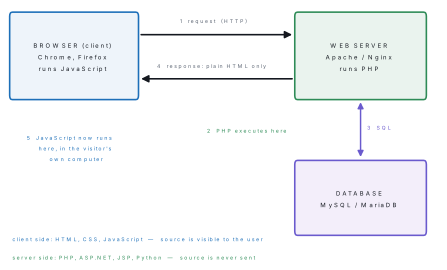
| Point | Client-side scripting | Server-side scripting |
|---|---|---|
| Where it runs | In the visitor's browser | On the web server |
| Languages | JavaScript, VBScript | PHP, ASP.NET, JSP, Python, Node.js |
| Source code | Downloaded with the page — anyone can view it | Never leaves the server; the browser sees only its output |
| Server load | None — work is done by the client | Every request costs server time |
| Speed of response | Instant, no network round trip | Needs a round trip to the server |
| Database access | Not possible directly | Yes — this is its main purpose |
| Security | Weak; the user can change or disable it | Strong; the user cannot see or alter the code |
| Needs | A browser with scripting enabled | A web server with the interpreter installed |
| Typical job | Validating a form, image rollover, calculator, animation | Login, storing data, generating pages from a database |
3.2 Introduction to internet technology
The web works on the client-server model over TCP/IP. When you type an address the following happens.
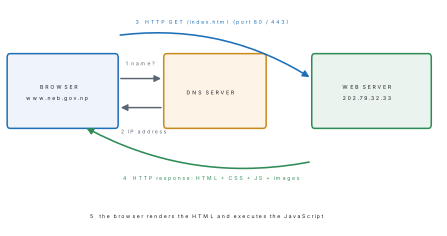
- URL (Uniform Resource Locator) — the address of a resource:
https://www.neb.gov.np/notices/result.php?year=2082, made of the protocol (https), the domain name, the path and an optional query string. - DNS (Domain Name System) — the directory that translates a domain name into an IP address.
- HTTP / HTTPS — the request-response protocol of the web; HTTPS is HTTP carried inside TLS encryption and uses port 443. Browsers now mark plain HTTP pages as "Not secure", so every real site should use HTTPS.
- Web server — software (Apache, Nginx, IIS) that listens for requests and returns files or the output of a server-side script.
- Web browser — software that sends requests and renders the HTML it gets back; its rendering engine draws the page and its JavaScript engine (V8 in Chrome, SpiderMonkey in Firefox) runs the scripts.
- Web hosting — renting space on a web server; a domain name must be
registered separately (
.npdomains are managed by Mercantile in Nepal).
3.3 Adding JavaScript to an HTML page; JavaScript fundamentals
JavaScript was created by Brendan Eich at Netscape in 1995. It is a lightweight, interpreted, case-sensitive, object-based language that runs inside the browser. Despite the name it has no relationship with Java. Its standardised form is called ECMAScript.
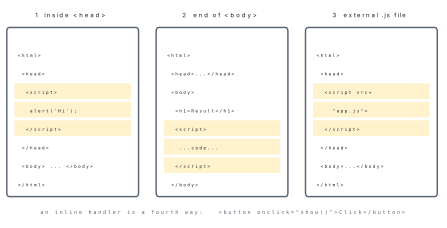
<!DOCTYPE html>
<html>
<head>
  <title>My first script</title>
  <script>
    function greet() {
      document.getElementById("out").innerHTML = "Namaste, Nepal!";
    }
  </script>
</head>
<body>
  <h2 id="out">Click the button</h2>
  <button onclick="greet()">Greet</button>

  <!-- an external file is linked like this -->
  <script src="app.js"></script>
</body>
</html>
Three ways to produce output while learning: document.write("...") writes into
the page, alert("...") pops up a dialog box, and console.log("...") prints to
the browser's developer console. A statement ends with a semicolon, // starts a
single-line comment and /* ... */ a multi-line one.
3.4 JavaScript data types; variables and operators
JavaScript is loosely typed: you do not declare the type of a variable, and
the same variable may hold a number now and a string later. Variables are
declared with var (older, function-scoped) or let and const (modern,
block-scoped). A name may contain letters, digits, _ and $, must not start
with a digit, and is case sensitive — Total and total are different.
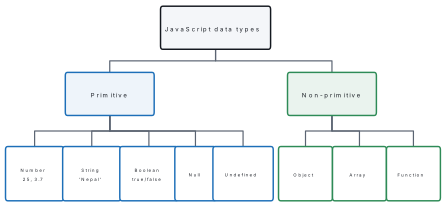
// --- data types
var a = 25;              // number
var b = "Nepal";         // string
var c = true;            // boolean
var d = null;            // null
var e;                   // undefined
var arr = [10, 20, 30];  // object (array)
console.log(typeof a, typeof b, typeof c, typeof d, typeof e, typeof arr);

// --- operators
var x = 17, y = 5;
console.log(x + y, x - y, x * y, x / y, x % y);
console.log(x > y, x == "17", x === "17", x != y);
console.log("Ram" + " " + "Bahadur");
var n = 7;
console.log(n++, n, ++n);
Output:
number string boolean object undefined object
22 12 85 3.4 2
true true false true
Ram Bahadur
7 8 9
| Group | Operators | Note |
|---|---|---|
| Arithmetic | + - * / % ** ++ -- |
+ also joins strings |
| Assignment | = += -= *= /= %= |
|
| Comparison | == === != !== > < >= <= |
== compares value only, === compares value and type |
| Logical | && \|\| ! |
|
| Conditional | condition ? a : b |
the ternary operator |
| String | + |
"Ram" + " " + "Bahadur" |
17 == "17" is true because JavaScript converts the string to a number
first, but 17 === "17" is false because the types differ. The output above
proves it. Always use === unless you really want the conversion — this single
point is a favourite one-mark question.
3.5 Functions and control structures
A function is a named block of statements that runs only when it is called.
It may take parameters and may return a value. Functions avoid repetition,
make code readable and can be reused.
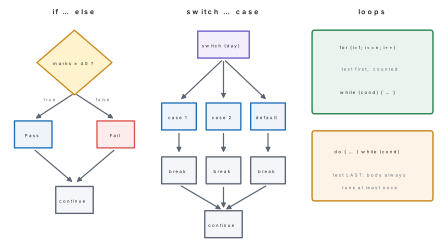
// if - else if - else
var marks = 72;
if (marks >= 80)      { console.log("Distinction"); }
else if (marks >= 60) { console.log("First division"); }
else if (marks >= 45) { console.log("Second division"); }
else                  { console.log("Fail"); }

// switch-case
var day = 3, name;
switch (day) {
  case 1: name = "Sunday";  break;
  case 2: name = "Monday";  break;
  case 3: name = "Tuesday"; break;
  default: name = "Unknown";
}
console.log("Day " + day + " is " + name);

// for
var sum = 0;
for (var i = 1; i <= 10; i++) { sum += i; }
console.log("Sum 1..10 =", sum);

// while
var f = 1, k = 1;
while (k <= 5) { f = f * k; k++; }
console.log("5! =", f);

// do..while
var j = 1;
var out = "";
do { out += j + " "; j += 2; } while (j <= 9);
console.log("Odd numbers:", out.trim());

// function with parameters and a return value
function area(l, b) { return l * b; }
console.log("Area of 8 x 5 =", area(8, 5));

function grade(m) {
  if (m >= 40) return "Pass";
  return "Fail";
}
console.log(grade(38), grade(41));
Output:
First division
Day 3 is Tuesday
Sum 1..10 = 55
5! = 120
Odd numbers: 1 3 5 7 9
Area of 8 x 5 = 40
Fail Pass
Problem. Write JavaScript that prints the multiplication table of a number
held in a variable n, from 1 to 10.
Solution.
var n = 7;
for (var i = 1; i <= 10; i++) {
  document.write(n + " x " + i + " = " + (n * i) + "<br>");
}
The same logic run in Node with console.log produced
7 x 1 = 7
7 x 2 = 14
7 x 3 = 21
...
7 x 10 = 70
Note the brackets around (n * i). Without them JavaScript would evaluate the
+ left to right on strings and print 7 x 1 = 71 — the classic mistake.
3.6 Object-based programming with JavaScript and event handling
JavaScript is object-based, not fully object-oriented: it has objects and
constructors, but classical class-based inheritance was only added later
(ES6). An object is a collection of properties (data) and methods
(functions).
// constructor function
function Student(name, faculty, marks) {
  this.name = name;
  this.faculty = faculty;
  this.marks = marks;
  this.result = function () {
    return this.marks >= 40 ? "Pass" : "Fail";
  };
}
var s1 = new Student("Anisha Shrestha", "Science", 78);
var s2 = new Student("Eliza Rai", "Management", 35);
console.log(s1.name + " (" + s1.faculty + ") -> " + s1.result());
console.log(s2.name + " (" + s2.faculty + ") -> " + s2.result());

// object literal
var school = { name: "Everest HSS", city: "Kathmandu", students: 480 };
console.log(school.name + ", " + school.city + ", " + school.students + " students");

// built-in objects: String, Math, Array
var t = "  Kathmandu, Nepal  ";
console.log("[" + t.trim().toUpperCase() + "] length=" + t.trim().length);
console.log(Math.max(12, 45, 7), Math.min(12, 45, 7), Math.sqrt(144), Math.round(7.6));
var marks = [45, 72, 88, 61];
console.log(marks.length, marks.join(" - "), marks.sort(function(p,q){return q-p;}));
Output:
Anisha Shrestha (Science) -> Pass
Eliza Rai (Management) -> Fail
Everest HSS, Kathmandu, 480 students
[KATHMANDU, NEPAL] length=16
45 7 12 8
4 45 - 72 - 88 - 61 [ 88, 72, 61, 45 ]
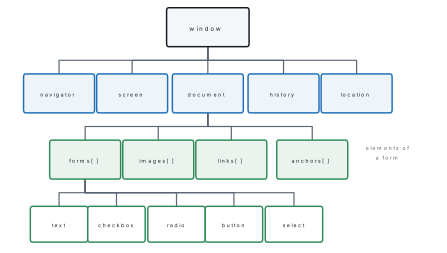
An event is something that happens in the page — the user clicks, types,
moves the mouse, or the page finishes loading. An event handler is the
JavaScript function that is run in response, attached with an on... attribute
or with addEventListener.
| Event | Fires when | Typical use |
|---|---|---|
onclick |
An element is clicked | Buttons |
ondblclick |
Double-clicked | Open an item |
onmouseover / onmouseout |
Pointer enters / leaves | Image rollover, tooltip |
onload / onunload |
Page finishes loading / is left | Initialise, warn before leaving |
onfocus / onblur |
A field gains / loses focus | Highlight a field, check it |
onchange |
A field's value changes and it loses focus | Recalculate a total |
onsubmit |
A form is submitted | Validation — return false cancels the submit |
onkeypress / onkeyup |
A key is used | Live search, character counter |
3.7 Image, event and form objects
Every <img> on the page is an element of document.images[] and has a src
property that can be changed at run time — that is all an image rollover is.
<img id="pic" src="flag.png" width="120"
     onmouseover="this.src='flag_big.png'"
     onmouseout="this.src='flag.png'">
The form object is reached as document.forms[0] or by name, and each field
inside it is an element with a value, a name and a type.
<form name="reg" onsubmit="return validate()">
  Name:  <input type="text" name="uname"><br>
  Email: <input type="text" name="email"><br>
  Faculty:
  <select name="fac">
    <option>Science</option>
    <option>Management</option>
  </select><br>
  <input type="checkbox" name="agree"> I agree<br>
  <input type="submit" value="Register">
</form>

<script>
  // reading the fields
  var f = document.forms["reg"];
  var n = f.uname.value;          // or document.getElementById("...").value
  var e = f.email.value;
  var c = f.agree.checked;        // true / false
</script>
document.getElementById("id") returns one element,
document.getElementsByName("n") and document.getElementsByTagName("p")
return collections, and document.querySelector("#id .cls") accepts any CSS
selector. Change what is shown with .innerHTML, change a field with .value,
and change appearance with .style.color.
3.8 Form validation; jQuery
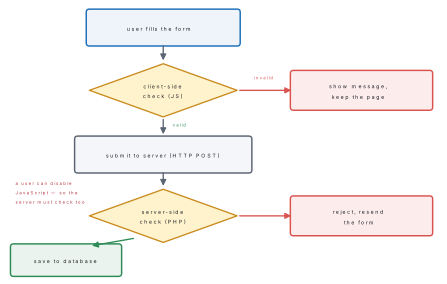
Form validation is checking that what the user typed is complete and sensible before it is sent to the server. Done in JavaScript it is instant and saves a round trip.
<form name="reg" onsubmit="return validate()">
  Name:  <input type="text" name="uname"><br>
  Email: <input type="text" name="email"><br>
  Age:   <input type="text" name="age"><br>
  <input type="submit" value="Register">
</form>

<script>
function validate() {
  var f = document.forms["reg"];
  if (f.uname.value === "") {
    alert("Name must not be empty");
    f.uname.focus();
    return false;                 // false cancels the submission
  }
  if (f.email.value.indexOf("@") === -1 || f.email.value.indexOf(".") === -1) {
    alert("Enter a valid e-mail address");
    return false;
  }
  var age = f.age.value;
  if (isNaN(age) || age < 16 || age > 25) {
    alert("Age must be a number between 16 and 25");
    return false;
  }
  return true;                    // true lets the form go to the server
}
</script>
The same checking function was run outside the browser with four sets of test data:
validate("", "a@b.com", 18)                  -> Name must not be empty
validate("Anisha", "anisha.gmail.com", 18)   -> Enter a valid e-mail address
validate("Anisha", "anisha@gmail.com", 30)   -> Age must be a number between 16 and 25
validate("Anisha", "anisha@gmail.com", 18)   -> Form accepted
jQuery is a JavaScript library (John Resig, 2006) whose motto is "write
less, do more". It wraps the DOM in a single function named $, smooths over
differences between browsers, and makes selection, events, effects and AJAX very
short.
<script src="https://code.jquery.com/jquery-3.7.1.min.js"></script>
<script>
  $(document).ready(function () {
    $("#btn").click(function () {
      $("#msg").html("Namaste!").css("color", "green");
      $("#box").fadeOut(500);
    });
  });
</script>
| Task | Plain JavaScript | jQuery |
|---|---|---|
| Select by id | document.getElementById("msg") |
$("#msg") |
| Select by class | document.getElementsByClassName("c") |
$(".c") |
| Change content | el.innerHTML = "hi" |
$("#msg").html("hi") |
| Handle a click | el.onclick = fn |
$("#btn").click(fn) |
| Hide with animation | several lines | $("#box").fadeOut(500) |
3.9 Server-side scripting using PHP; hardware and software requirements
PHP (PHP: Hypertext Preprocessor) was written by Rasmus Lerdorf in 1994. It is a free, open-source, server-side scripting language embedded in HTML. The server runs the PHP and sends only the resulting HTML to the browser, so the source is never exposed. The examples here were run on PHP 8.4.
To run PHP you need a web server stack:
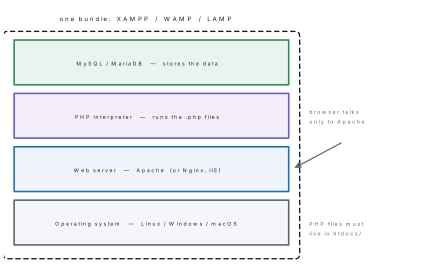
- Software — an operating system; a web server (Apache); the PHP interpreter; a database server (MySQL/MariaDB); a text editor (VS Code, Notepad++) and a browser. XAMPP (cross-platform), WAMP (Windows) and LAMP (Linux) bundle the middle four into one installer.
- Hardware — very modest for learning: any computer with about 2 GB of free RAM, 1 GB of disk and a network interface. A production server needs more RAM, fast disks and a permanent internet connection with a static IP.
- To run a page, save it as
.phpinside the server's document root (htdocsin XAMPP), start Apache and MySQL from the control panel, and openhttp://localhost/myfile.php. Opening the file by double-clicking will not work — the PHP would never be executed.
3.10 Object-oriented programming with server-side scripting
Unlike JavaScript, PHP supports full object-oriented programming: classes,
objects, constructors, public/private/protected visibility, inheritance
with extends, and parent:: to reach the base class.
<?php
class Student {
    public $name, $faculty, $marks;

    public function __construct($name, $faculty, $marks) {
        $this->name    = $name;
        $this->faculty = $faculty;
        $this->marks   = $marks;
    }
    public function result() {
        return $this->marks >= 40 ? "Pass" : "Fail";
    }
    public function show() {
        echo $this->name, " (", $this->faculty, ") : ", $this->marks,
             " -> ", $this->result(), "\n";
    }
}

class ScienceStudent extends Student {       // inheritance
    public $lab;
    public function __construct($name, $marks, $lab) {
        parent::__construct($name, "Science", $marks);
        $this->lab = $lab;
    }
    public function show() {                  // overriding
        parent::show();
        echo "   practical: ", $this->lab, "\n";
    }
}

$s1 = new Student("Chandra Gurung", "Management", 85);
$s1->show();
$s2 = new ScienceStudent("Deepa Yadav", 91, 24);
$s2->show();
Output:
Chandra Gurung (Management) : 85 -> Pass
Deepa Yadav (Science) : 91 -> Pass
   practical: 24
Note the three pieces of syntax that are examined: $this-> inside the class,
new ClassName(...) to create an object, and -> (not a dot) to reach a member.
3.11 Basic PHP syntax; PHP data types; basic programming in PHP
A PHP block begins with <?php and ends with ?>; outside those tags
everything is sent to the browser unchanged. Every statement ends with a
semicolon. Variable names begin with $, are case sensitive, and need no
type declaration — but keywords such as IF and Echo are not case
sensitive.
<?php
$roll    = 12;                 // integer
$percent = 78.5;               // float (double)
$name    = "Anisha Shrestha";  // string
$passed  = true;               // boolean
$marks   = array(78, 65, 71);  // array
$nothing = NULL;               // null
echo gettype($roll), " ", gettype($percent), " ", gettype($name), " ",
     gettype($passed), " ", gettype($marks), " ", gettype($nothing), "\n";
Output:
integer double string boolean array NULL
PHP has eight data types: four scalar (integer, float, string, boolean), two compound (array, object) and two special (NULL, resource).
<?php
$marks = 72;
if ($marks >= 80)      echo "Distinction\n";
elseif ($marks >= 60)  echo "First division\n";
elseif ($marks >= 45)  echo "Second division\n";
else                   echo "Fail\n";

for ($i = 1; $i <= 5; $i++) echo $i * $i, " ";
echo "\n";

$n = 1; $fact = 1;
while ($n <= 6) { $fact *= $n; $n++; }
echo "6! = $fact\n";

$subjects = array("Computer" => 78, "Maths" => 65, "Physics" => 71);
foreach ($subjects as $sub => $m) { echo "$sub = $m\n"; }
echo "Total = ", array_sum($subjects), ", Average = ",
     round(array_sum($subjects) / count($subjects), 2), "\n";

function grade($m) {
    if ($m >= 80) return "A";
    if ($m >= 60) return "B";
    if ($m >= 40) return "C";
    return "F";
}
echo grade(91), grade(72), grade(45), grade(20), "\n";
Output:
First division
1 4 9 16 25
6! = 720
Computer = 78
Maths = 65
Physics = 71
Total = 214, Average = 71.33
ABCF
foreach is PHP's own loop for walking an array, and an associative array
("Computer" => 78) is a key-value store — the two features most worth
remembering for the exam.
3.12 Operators: arithmetic, logical, comparison, precedence
<?php
$x = 17; $y = 5;
echo $x + $y, " ", $x - $y, " ", $x * $y, " ", $x / $y, " ", $x % $y, " ", $x ** 2, "\n";
var_dump($x > $y, $x == "17", $x === "17", $x <=> $y);
echo ($x > 10 && $y < 10) ? "both true\n" : "not both\n";
$c = 10; $c += 5; $c *= 2; echo "c = $c\n";
echo 2 + 3 * 4, " ", (2 + 3) * 4, "\n";
Output:
22 12 85 3.4 2 289
bool(true)
bool(true)
bool(false)
int(1)
both true
c = 30
14 20
| Group | Operators |
|---|---|
| Arithmetic | + - * / % ** |
| Assignment | = += -= *= /= %= .= |
| Comparison | == === != !== <> > < >= <= <=> |
| Logical | && \|\| ! and or xor |
| String | . (concatenation) and .= |
| Increment | ++ -- (prefix and postfix) |
| Conditional | ? : and ?? (null coalescing) |
Operator precedence decides the order of evaluation when there are no
brackets. From high to low: () → ++ -- ! → ** → * / % → + - . →
< <= > >= → == === != !== → && → || → ?: → = += -=. The output above
shows it: 2 + 3 * 4 is 14, not 20, because * binds tighter than +.
When in doubt, use brackets.
In JavaScript "5" + 3 gives the string "53". In PHP, "5" + 3 gives the
number 8, and you must write "5" . 3 to get the string "53". Mixing the
two languages' habits is the commonest error in this unit.
3.13 Variable manipulation
<?php
$a = "Kathmandu";
$b = 'Nepal';
echo "Hello $a, $b\n";              // double quotes interpolate variables
echo $a . ", " . $b . "\n";         // the dot joins strings
echo strlen($a), " ", strtoupper($a), " ", substr($a, 0, 4), " ",
     str_replace("Kath", "KTM", $a), "\n";
echo trim("  padded  "), "|", ucfirst("nepal"), "|", strrev("abc"), "\n";
Output:
Hello Kathmandu, Nepal
Kathmandu, Nepal
9 KATHMANDU Kath KTMmandu
padded|Nepal|cba
Note the difference between quotes: "Hello $a" substitutes the variable,
'Hello $a' prints the dollar sign literally.
Data from a form arrives in the superglobal arrays $_POST (method="post")
and $_GET (method="get"); $_SESSION and $_COOKIE remember a user between
pages, and $_SERVER holds information about the request.
<?php
$name  = trim($_POST["name"]);
$marks = (int) $_POST["marks"];          // type casting
if (empty($name))                     { echo "Name is required\n"; }
elseif (!is_numeric($_POST["marks"])) { echo "Marks must be a number\n"; }
else { echo "Welcome $name, your marks are $marks\n"; }
echo date("Y-m-d"), " ", strtoupper($name), " ", $marks + 2, "\n";
Run with $_POST = array("name" => " Anisha ", "marks" => "78") this printed
Welcome Anisha, your marks are 78
2026-09-26 ANISHA 80
Useful functions: strlen, strtolower, strtoupper, substr, strpos,
str_replace, trim, explode, implode, count, array_sum, sort,
isset, empty, unset, is_numeric, intval, date, round, rand.
3.14 Database connectivity; connecting a server-side script to a database
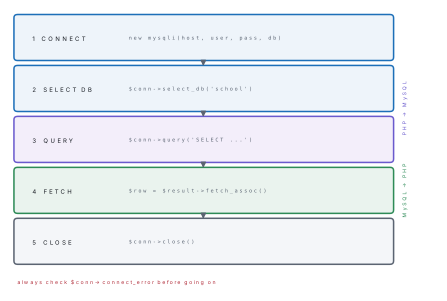
PHP talks to MySQL through the MySQLi extension (procedural or object-oriented) or through PDO. Whichever you use, the sequence is always the same five steps.
3.15 Making SQL queries; fetching data sets; getting data about data
The script below was run against a live MySQL/MariaDB server. It creates the database and table, inserts rows, runs a query, fetches the result set, and then asks the result set about itself.
<?php
// 1. CONNECT
$conn = new mysqli("localhost", "root", "");
if ($conn->connect_error) { die("Connection failed: " . $conn->connect_error); }
echo "Connected successfully\n";

// 2. CREATE DATABASE AND TABLE
$conn->query("DROP DATABASE IF EXISTS school");
if ($conn->query("CREATE DATABASE school") === TRUE) {
    echo "Database 'school' created\n";
}
$conn->select_db("school");
$sql = "CREATE TABLE students (
          roll    INT PRIMARY KEY,
          name    VARCHAR(40) NOT NULL,
          faculty VARCHAR(20) NOT NULL,
          marks   INT
        )";
if ($conn->query($sql) === TRUE) { echo "Table 'students' created\n"; }

// 3. INSERT
$conn->query("INSERT INTO students VALUES
    (1,'Anisha Shrestha','Science',78),
    (2,'Bikash Tamang','Science',52),
    (3,'Chandra Gurung','Management',85),
    (4,'Deepa Yadav','Science',91),
    (5,'Eliza Rai','Management',45)");
echo $conn->affected_rows, " records inserted\n";

// 4. SELECT AND FETCH THE DATA SET
$result = $conn->query("SELECT roll, name, faculty, marks FROM students
                        WHERE faculty='Science' ORDER BY marks DESC");
echo "Rows returned: ", $result->num_rows, "\n";
echo "Columns      : ", $result->field_count, "\n";
while ($row = $result->fetch_assoc()) {
    echo $row["roll"], "  ", $row["name"], "  ", $row["faculty"], "  ", $row["marks"], "\n";
}

// 5. DATA ABOUT DATA (metadata)
$result->data_seek(0);
foreach ($result->fetch_fields() as $f) {
    echo "field: ", $f->name, "  type: ", $f->type, "  length: ", $f->length, "\n";
}

// AGGREGATES
$r2 = $conn->query("SELECT faculty, COUNT(*) AS n, ROUND(AVG(marks),1) AS avg_marks
                    FROM students GROUP BY faculty");
while ($row = $r2->fetch_assoc()) {
    echo $row["faculty"], " : ", $row["n"], " students, average ", $row["avg_marks"], "\n";
}

$conn->close();
echo "Connection closed\n";
Output:
Connected successfully
Database 'school' created
Table 'students' created
5 records inserted
Rows returned: 3
Columns      : 4
4  Deepa Yadav  Science  91
1  Anisha Shrestha  Science  78
2  Bikash Tamang  Science  52
field: roll  type: 3  length: 11
field: name  type: 253  length: 160
field: faculty  type: 253  length: 80
field: marks  type: 3  length: 11
Management : 2 students, average 65.0
Science : 3 students, average 73.7
Connection closed
Problem. A query returns the row (1, 'Anisha Shrestha', 'Science', 78).
How would you read the student's name with each of the fetch functions?
Solution.
| Function | What it returns | Reading the name |
|---|---|---|
fetch_assoc() |
Associative array keyed by column name | $row["name"] |
fetch_row() |
Numeric array, column order | $row[1] |
fetch_array() |
Both kinds of key | $row["name"] or $row[1] |
fetch_object() |
An object | $row->name |
All four return NULL/false when there are no more rows, which is why
while ($row = $result->fetch_assoc()) is the standard loop.
$result->num_rows gives the row count before looping, and
$conn->affected_rows gives the number of rows changed by an INSERT, UPDATE or
DELETE.
"SELECT * FROM users WHERE name='" . $_POST["u"] . "'" can be broken by a user
who types ' OR '1'='1. That is SQL injection. Use a prepared statement:
$stmt = $conn->prepare("SELECT name, marks FROM students WHERE marks > ?");
$limit = 70;
$stmt->bind_param("i", $limit);
$stmt->execute();
$res = $stmt->get_result();
while ($row = $res->fetch_assoc()) { echo $row["name"], " ", $row["marks"], "\n"; }
$stmt->close();
which really printed
Anisha Shrestha 78
Chandra Gurung 85
Deepa Yadav 91
3.16 Creating an SQL database with server-side scripting; displaying queries in tables
Section 3.15 already created the database from PHP with
CREATE DATABASE and CREATE TABLE. The remaining job — and the commonest
practical question in the board exam — is to print a result set as an HTML
table.
<?php
$conn = new mysqli("localhost", "root", "", "school");
if ($conn->connect_error) { die("Connection failed: " . $conn->connect_error); }

$result = $conn->query("SELECT roll, name, faculty, marks FROM students ORDER BY roll");

echo "<table border='1'>\n";
echo "<tr><th>Roll</th><th>Name</th><th>Faculty</th><th>Marks</th></tr>\n";
while ($row = $result->fetch_assoc()) {
    echo "<tr><td>" . $row["roll"] . "</td>" .
         "<td>" . $row["name"] . "</td>" .
         "<td>" . $row["faculty"] . "</td>" .
         "<td>" . $row["marks"] . "</td></tr>\n";
}
echo "</table>\n";
$conn->close();
The HTML this actually generated:
<table border='1'>
<tr><th>Roll</th><th>Name</th><th>Faculty</th><th>Marks</th></tr>
<tr><td>1</td><td>Anisha Shrestha</td><td>Science</td><td>78</td></tr>
<tr><td>2</td><td>Bikash Tamang</td><td>Science</td><td>52</td></tr>
<tr><td>3</td><td>Chandra Gurung</td><td>Management</td><td>85</td></tr>
<tr><td>4</td><td>Deepa Yadav</td><td>Science</td><td>91</td></tr>
<tr><td>5</td><td>Eliza Rai</td><td>Management</td><td>45</td></tr>
</table>
which the browser draws as:
| Roll | Name | Faculty | Marks |
|---|---|---|---|
| 1 | Anisha Shrestha | Science | 78 |
| 2 | Bikash Tamang | Science | 52 |
| 3 | Chandra Gurung | Management | 85 |
| 4 | Deepa Yadav | Science | 91 |
| 5 | Eliza Rai | Management | 45 |
Problem. Write a PHP page that takes a student's name, faculty and marks
from a form and stores them in the students table, then lists every stored
row.
Solution.
<!DOCTYPE html>
<html><body>
<form method="post" action="">
  Roll:    <input type="text" name="roll"><br>
  Name:    <input type="text" name="name"><br>
  Faculty: <input type="text" name="faculty"><br>
  Marks:   <input type="text" name="marks"><br>
  <input type="submit" name="save" value="Save">
</form>

<?php
$conn = new mysqli("localhost", "root", "", "school");
if ($conn->connect_error) { die("Connection failed: " . $conn->connect_error); }

if (isset($_POST["save"])) {                       // only after the form is sent
    $stmt = $conn->prepare(
        "INSERT INTO students (roll, name, faculty, marks) VALUES (?, ?, ?, ?)");
    $stmt->bind_param("issi", $_POST["roll"], $_POST["name"],
                              $_POST["faculty"], $_POST["marks"]);
    if ($stmt->execute()) { echo "<p>Record saved.</p>"; }
    else                  { echo "<p>Error: " . $conn->error . "</p>"; }
    $stmt->close();
}

$res = $conn->query("SELECT * FROM students ORDER BY roll");
echo "<table border='1'><tr><th>Roll</th><th>Name</th>"
   . "<th>Faculty</th><th>Marks</th></tr>";
while ($r = $res->fetch_assoc()) {
    echo "<tr><td>{$r['roll']}</td><td>{$r['name']}</td>"
       . "<td>{$r['faculty']}</td><td>{$r['marks']}</td></tr>";
}
echo "</table>";
$conn->close();
?>
</body></html>
The three points that earn the marks: isset($_POST["save"]) so the insert runs
only after submission, a prepared statement rather than string pasting, and
the while loop that turns each fetched row into a <tr>.
Chapter summary
- Client-side scripts (JavaScript) run in the browser — fast, visible to the user, cannot touch a database. Server-side scripts (PHP) run on the web server — hidden, slower by one round trip, and the only way to reach a database.
- JavaScript is interpreted, case sensitive, loosely typed and object-based. It
is added to a page inside
<script>in the head or body, or linked from an external.jsfile. - Data types: number, string, boolean, null, undefined (primitive) and object,
array, function (non-primitive).
==compares values only;===compares value and type. - Control structures:
if / else if / else,switch-case,for,while,do-while.do-whilealways executes its body at least once. - Everything in the browser hangs off
window:document, thenforms[],images[],links[], then the individual fields. Events (onclick,onsubmit,onmouseover,onload) connect user actions to functions. - Form validation with
onsubmit="return validate()"— returningfalsecancels the submission. Validate again on the server, because the user can disable JavaScript. - jQuery shortens DOM work to
$(selector).action(). - PHP:
<?php ... ?>, variables begin with$, eight data types,.joins strings,foreachwalks arrays,$_POSTand$_GETcarry form data. It supports full OOP withclass,__construct,$this->andextends. - Database connectivity in five steps: connect (
new mysqli(...)), select database, query, fetch (fetch_assoc,fetch_row,fetch_array,fetch_object), close. Use prepared statements to defeat SQL injection, and awhileloop to print each row as a table row.
Practice questions
Group A — Multiple choice (1 mark each)
- Which of the following is a server-side scripting language? [1]aJavaScriptbHTMLcPHPdCSS
- What does
typeof []return in JavaScript? [1]aarraybobjectclistdundefined - Which loop is guaranteed to run its body at least once? [1]aforbwhilecdo-whiledforeach
- Which event is used to validate a form before it is sent? [1]aonloadbonsubmitconchangedonmouseover
- Every PHP variable name must begin with [1]a
#b@c$d& - Which PHP function returns a row of a result set as an associative array? [1]a
fetch_row()bfetch_assoc()cnum_rows()dquery() - In PHP,
"5" + 3evaluates to [1]a"53"b8can errord"8"
Answers to Group A
1. (c) — JavaScript is client-side, HTML and CSS are not scripting languages.
2. (b) — arrays are a kind of object in JavaScript.
3. (c) — do-while tests after the body.
4. (b) — onsubmit="return validate()"; returning false cancels it.
5. (c) — the dollar sign.
6. (b) — fetch_assoc() keys the array by column name.
7. (b) — PHP's + is arithmetic only; use . to join strings.
Group B — Short answer (5 marks each)
- Differentiate between client-side and server-side scripting on any five points, with two examples of each. [5]
- Write a JavaScript program to find the sum and average of the first n natural numbers using a loop, and explain how a function returns a value. [5]
- What is an event? Explain any five JavaScript event handlers with the situation in which each fires. [5]
- What is form validation? Write JavaScript that rejects an empty name field
and an e-mail address with no
@sign. [5] - List the data types of PHP and write a PHP program that prints the
multiplication table of a number using a
forloop. [5] - Write the five steps needed to connect a PHP script to a MySQL database, with the statement used at each step. [5]
Answer to Group B question 2
function sumAndAverage(n) {
  var sum = 0;
  for (var i = 1; i <= n; i++) { sum += i; }
  return sum;                      // return sends a value back to the caller
}
var n = 10;
var s = sumAndAverage(n);
console.log("Sum = " + s + ", Average = " + (s / n));
For n = 10 this prints Sum = 55, Average = 5.5. A function returns a value
with the return statement; execution of the function stops there and the value
replaces the function call in the expression that called it.
Group C — Long answer (8 marks each)
-
(a) Write a PHP program that connects to a MySQL database named
school, retrieves all records from the tablestudents(roll, name, faculty, marks)and displays them in an HTML table. [5](b) Explain the purpose ofmysqli_connect,query,fetch_assocandclose, and say why a prepared statement is safer than pasting user input into a query. [3] -
(a) What is JavaScript? Explain its data types and any four operators with examples. [4](b) Write a complete HTML page with a form having name, e-mail and age fields, and a JavaScript function that validates all three before the form is submitted. [4]
Answer outline to Group C question 1
The five marks in part (a) go to: new mysqli("localhost","root","","school")
with a connect_error check; the SELECT passed to $conn->query(); the
while ($row = $result->fetch_assoc()) loop; echoing <tr><td> around each
field; and $conn->close(). The full program is printed in section 3.16 above.
In part (b): mysqli_connect opens the link to the server, query sends SQL
and returns a result object, fetch_assoc pulls one row at a time into an
associative array, and close releases the connection. A prepared statement
sends the SQL and the data separately, so a value such as ' OR '1'='1 is
treated as text and can never change the meaning of the query — that is what
stops SQL injection.
Practise more: Computer Science question bank