Unit 10 · 2 teaching hours · 25 min read
Case Study: DOS, Windows, UNIX and Linux
What the syllabus asks for 6
- MS-DOS
- Windows
- UNIX
- Linux
- Comparison
- Seeing the ideas: four systems side by side
Everything in Units 1 to 9 can be seen at work in real systems.
This unit takes four of them, MS-DOS, Windows, UNIX and Linux, and asks the same questions of each: how is it structured, how does it manage processes, memory and files, and what did its design teach us?
The Linux commands shown ran on a real Linux 6.1 machine.
- MS-DOS: single-tasking, no protection; why it was simple and why it was replaced.
- Windows (NT family): hybrid kernel, processes and threads, NTFS, registry.
- UNIX: design philosophy, process creation, file-system view of everything.
- Linux: kernel structure, process states and the
/procfile system, file hierarchy, licensing.
10.1 MS-DOS
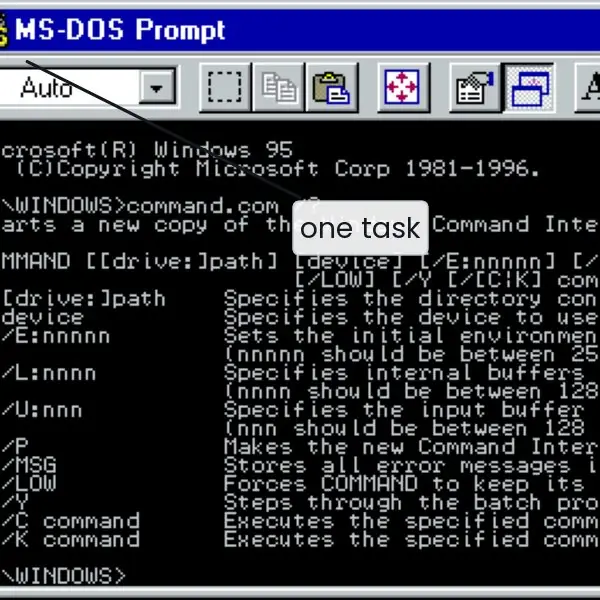
Microsoft Disk Operating System (1981, for the IBM PC) is a single-user, single-tasking, 16-bit operating system with a command-line interface.
| Aspect | MS-DOS design |
|---|---|
| Structure | simple layered structure with no kernel protection: programs can access hardware and overwrite the OS directly |
| Components | IO.SYS (hardware drivers), MSDOS.SYS (kernel, file management), COMMAND.COM (shell), CONFIG.SYS and AUTOEXEC.BAT (start-up files) |
| Processes | one program at a time; TSRs (terminate-and-stay-resident) programs give a crude form of background work |
| Memory | real mode: 1 MB address space, of which 640 KB is conventional memory; extra memory via EMS/XMS managers |
| File system | FAT12/FAT16: 8.3 file names, a file allocation table chaining clusters; no permissions |
| Interface | commands such as DIR, COPY, DEL, FORMAT, CHKDSK; batch files (.BAT); DOS services by software interrupt INT 21h |
Strengths: tiny, fast, very easy to understand and write for. Weaknesses: no multitasking, no memory protection (a crash takes down the machine), no real security, a 640 KB barrier.
Windows 3.x/9x ran on top of DOS; the Windows NT line removed this dependence. Today the cmd.exe prompt keeps DOS-style commands, but the system underneath is NT.
10.2 Windows
Modern Windows (NT 3.1 in 1993, then 2000, XP, 7, 10, 11, and the Server editions) is a 32/64-bit, preemptive, multitasking, multiuser system with a hybrid kernel.
Structure
- User mode: environment subsystems (Win32), services, and applications; user-mode drivers.
- Kernel mode: the executive (object manager, process manager, virtual memory manager, I/O manager, security reference monitor), the kernel (scheduling, interrupts) and the hardware abstraction layer (HAL) that hides hardware differences. Drivers and many services run in kernel mode, which is the reason for the label hybrid rather than pure microkernel (Unit 2).
Processes, threads and scheduling
A Windows process owns an address space and resources; the thread is the unit of scheduling.
Windows uses priority-based, preemptive scheduling with 32 priority levels (1 to 15 variable for normal threads, 16 to 31 real-time; 0 is reserved for the system's zero-page thread) and a round-robin quantum within a level.
The kernel temporarily boosts the priority of a thread that has finished waiting for I/O or is in the foreground window, to improve responsiveness.
Objects such as mutexes, semaphores and events (the synchronization of Unit 3) are all kernel objects handled through handles.
Memory and files
Virtual memory by demand paging with a per-process virtual address space of 4 GB (2 GB for the process by default on 32-bit Windows) or far larger on 64-bit, a page file on disk and a working-set policy per process.
The file system is NTFS: a master file table (MFT) of records with attributes (small files live inside their MFT record), journaling for crash recovery, per-file ACLs, compression and encryption (EFS, BitLocker).
Drives are named C:, D:; paths use \. System configuration lives in the registry, a hierarchical database of keys and values. Windows also offers virtualization (Hyper-V) and the Windows Subsystem for Linux.
10.3 UNIX
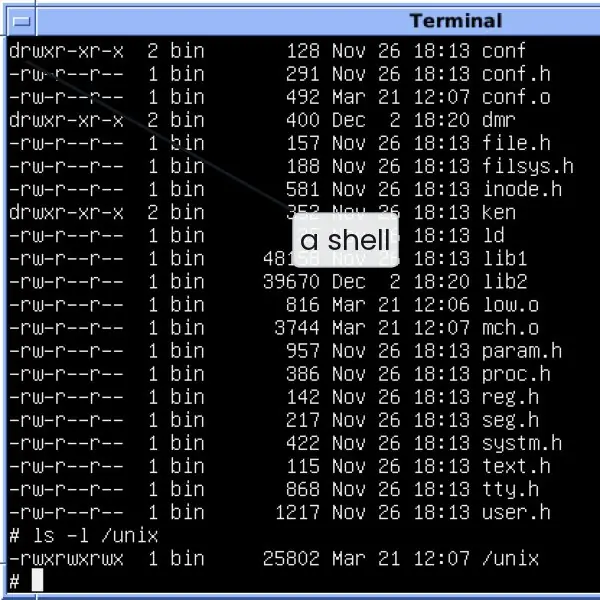
UNIX began at Bell Labs in 1969 (Ken Thompson, Dennis Ritchie) and was rewritten in C by 1973, which made it portable, a first for an OS. Its descendants include BSD, Solaris, AIX, macOS and, in spirit, Linux.
Design philosophy
- Everything is a file: disks, terminals, printers and even processes are read and written through the same
open,read,write,closecalls. - Small tools that do one job well, combined with pipes:
cat log | grep error | sort | uniq -c. - Text is the universal interface; configuration files are plain text.
- Multiuser and multitasking from the start; a single hierarchical file system.
Structure
A monolithic kernel (Unit 2) with a thin hardware layer below and the system-call interface above; shell, utilities and libraries run in user mode.
The kernel contains the process manager and scheduler, memory manager (swapping, later demand paging), file system with inodes (Unit 7) and device drivers (character and block).
Processes
All processes are created by fork; exec loads a new program. The first process, init (PID 1), is the ancestor of all others and adopts orphans; a child that exits before its parent calls wait is a zombie.
Scheduling is a multilevel feedback queue with priorities that decay with CPU usage, so that interactive jobs stay responsive. The shell loop of Unit 2 (read, fork, exec, wait) is the template.
10.4 Linux
Linux was started in 1991 by Linus Torvalds, a Finnish student, as a free UNIX-like kernel, and combined with the GNU tools of the Free Software Foundation to form a complete system.
It is released under the GNU General Public License (GPL): anyone may run, study, modify and redistribute it, provided derivative work stays free.
A distribution (Ubuntu, Debian, Fedora, Red Hat) packages the kernel with tools, a package manager and a desktop.
Kernel
Linux is a monolithic kernel with loadable modules (Unit 2): modules for drivers and file systems can be loaded and unloaded at run time (lsmod, modprobe).
It is preemptive, multiuser, multitasking, supports multiple processors (SMP), demand-paged virtual memory, many file systems (ext4, XFS, Btrfs, FAT, NTFS) and a full network stack.
Linux runs on everything from Android phones to all of the world's top supercomputers.
Processes and threads
Linux treats processes and threads uniformly as tasks created by the clone system call; flags decide what is shared (address space, files). Threads of one process therefore get separate task IDs but one thread-group ID.
Scheduling since kernel 2.6.23 is the Completely Fair Scheduler (CFS), which tracks each task's virtual runtime and always runs the task that has received the least, held in a red-black tree: a practical form of the fair-share ideas of Unit 3.
(Newer kernels use EEVDF with the same goal.)
Process states appear in the State field of every process in the /proc pseudo-file system, which exposes kernel data structures as files: R (running or runnable), S (sleeping, interruptible wait), D (uninterruptible disk wait), T (stopped), Z (zombie).
Real output on the test machine, for the grep process that was reading its own status:
$ grep -E "^(Name|State|Pid|PPid|Threads)" /proc/self/status
Name:   grep
State:  R (running)
Pid:    8181
PPid:   8160
Threads:    1
$ uname -sr
Linux 6.1.158+
$ ulimit -n; ulimit -s
1024
8192
This is the PCB of Unit 3 made visible: name, state, process ID, parent ID, thread count. The ulimit values are per-process limits: 1,024 open file descriptors and an 8,192 KB stack.
File-system hierarchy
Linux has one tree starting at /; disks are mounted into it. The Filesystem Hierarchy Standard places things in standard directories:
$ ls / | head -n 12
bin
boot
code
dev
etc
home
lib
lib64
lost+found
media
mnt
opt
| Directory | Contents |
|---|---|
/bin, /sbin, /usr |
commands and programs |
/etc |
system configuration (text files) |
/home |
users' personal directories |
/dev |
device files (/dev/sda disk, /dev/null) |
/proc, /sys |
kernel and process information as files |
/boot |
kernel image and boot loader files |
/tmp, /var |
temporary files; logs and spool areas |
/mnt, /media |
mount points for disks and USB drives |
(The entry code above is specific to the test machine; the others are standard.) Permissions, links and umask behave as shown in Unit 7. Security: users, groups, sudo, SELinux or AppArmor mandatory access control, and a package system that signs software.
10.5 Comparison
| Feature | MS-DOS | Windows (NT) | UNIX | Linux |
|---|---|---|---|---|
| Users | single | multi | multi | multi |
| Tasking | single-task | preemptive multitask | preemptive multitask | preemptive multitask |
| Kernel | simple, no protection | hybrid | monolithic | monolithic + modules |
| Native file system | FAT | NTFS | UFS / ZFS and others | ext4 and others |
| Interface | command line | GUI first, PowerShell | shell, X11 GUIs | shell, many desktops |
| Licence | proprietary | proprietary | mixed (BSD open, others proprietary) | GPL, open source |
| Path separator | \ |
\ |
/ |
/ |
| Typical use | legacy PCs, embedded | desktops, servers | servers, workstations | servers, cloud, Android, supercomputers |
10.6 Seeing the ideas: four systems side by side
The four systems of this unit are best understood by looking at what each one shows the user, and then at how each is built inside.
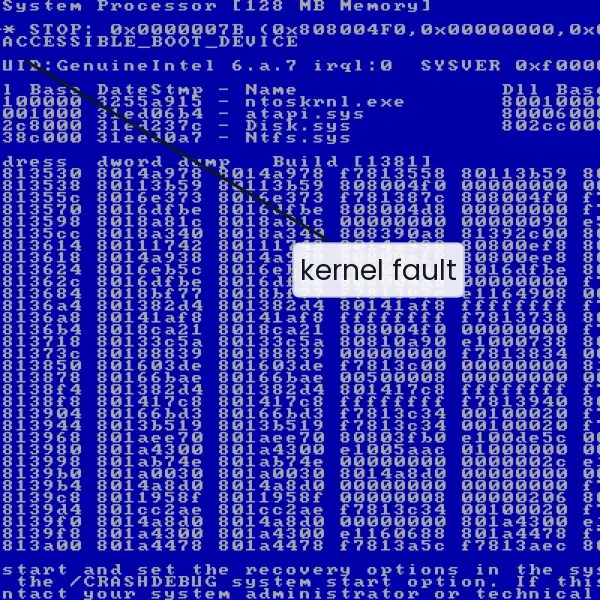
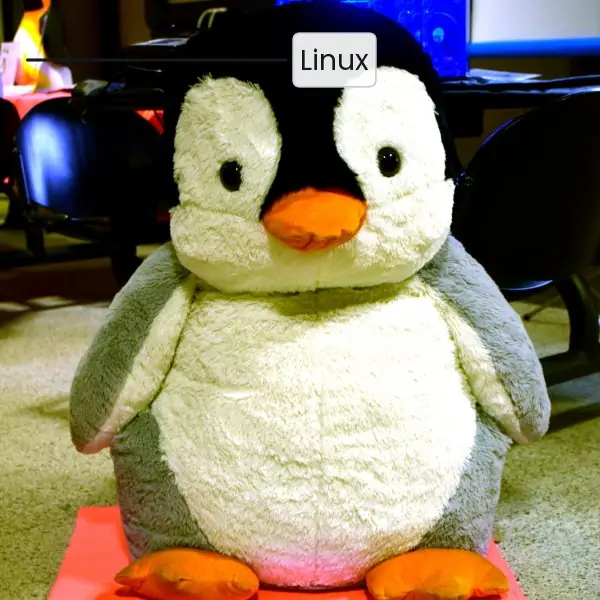
The plate begins with real screens and a mascot: a DOS prompt, the Windows NT stop screen that appears when the kernel gives up, a UNIX V5 shell and the Linux penguin.
The figures map the DOS memory, the layers of Windows NT, the fork, exec and wait life of a UNIX process (with a real run that captured a zombie), the layers of Linux, and a timeline that shows how the four systems overlap in history.


10.6.1 Eight reasons why Linux is widely used
- No licence fee. Linux and most of its software are free of charge, so a college or a small company can run many servers without paying for each copy. This matters in Nepal, where budgets for software are small. The money saved can be spent on hardware or training instead.
- Open source code. Anyone can read, check and change the source under the GPL. A university can study how a scheduler or file system works, which is why Linux is the standard teaching system for operating systems. Security researchers can also find and fix errors in public.
- Stability and uptime. A Linux server often runs for months without a restart, because a fault in one user program does not bring the kernel down. System updates usually do not need a reboot of the whole machine. This is why many web hosts and data centres choose it.
- Strong security model. Linux has users, groups, permission bits,
sudoand optional SELinux or AppArmor controls. Programs run with the least rights they need, so a damaged program cannot easily change the system files. Software is installed from signed repositories instead of random websites. - Runs on almost any hardware. The same kernel runs on a Raspberry Pi, an old college PC, a phone, a cloud server and a supercomputer. Old computers in a school lab can be given a light desktop and used again. Android, the most common phone system, is built on the Linux kernel.
- Modular and customisable. Loadable modules let a driver or file system be added without rebuilding the kernel, and distributions such as Ubuntu or Debian choose their own tools and desktop. An organisation can build a small system for one task, such as a router or a kiosk. The user is not forced to accept one design.
- Powerful command line and automation. Small tools joined by pipes, such as
sort | uniq -c, and shell scripts let a system administrator repeat a job on many machines. A backup of a college server can be scheduled with a few lines. This saves time and avoids mistakes of manual work. - Large community support. Thousands of volunteers and companies write the code, test it and answer questions in forums and mailing lists. A student who meets an error message usually finds an answer online within minutes. The cost of this support is mostly the time to read and learn, and the weakness is that no single company is responsible for every problem.
Formula and fact sheet
- DOS: single-user, single-task, FAT, real mode, 640 KB, no protection.
- Windows NT: hybrid kernel, HAL, 32 priority levels, NTFS, registry.
- UNIX: written in C, everything is a file, pipes,
fork/exec, inodes. - Linux: GPL, monolithic kernel with modules, tasks via
clone, CFS scheduler,/proc.
Chapter summary
- MS-DOS shows what a minimal OS looks like and why protection and multitasking were needed.
- Windows NT adds a layered hybrid design, preemptive priority scheduling, NTFS and a security model with ACLs.
- UNIX contributed portability, a unified file abstraction and small cooperating tools.
- Linux combines the UNIX design with open-source development, loadable modules and a fair scheduler.
Practice
- List four limitations of MS-DOS.
- What is the role of the HAL in Windows? Why is the Windows kernel called hybrid?
- Describe how Windows schedules threads.
- Explain "everything is a file" with three examples.
- How does UNIX create a new process? What are init and a zombie?
- What is a loadable kernel module and what is its advantage?
- What is the GPL? How does a Linux distribution differ from the Linux kernel?
- Name five directories of the Linux hierarchy and their purpose.
- Compare DOS, Windows and Linux on multitasking, security and file system.
- What does the
Stateline in/proc/<pid>/statustell you? Which letter means a zombie?
Answers and worked solutions
1. Single-tasking; no memory protection; 640 KB conventional memory limit; no multi-user security or permissions; 8.3 filenames; command-line only.
2. The HAL hides hardware differences (interrupt controllers, buses) from the kernel, so one kernel runs on many machines. It is hybrid because it has a microkernel-like structure of separate components, but many (drivers, graphics, file system) run in kernel mode for speed.
3. Preemptive, priority-based scheduling over 32 levels; threads of equal priority share the CPU in round-robin quanta; priorities of waiting or foreground threads are temporarily boosted.
4. A disk partition appears as /dev/sda1; the terminal as /dev/tty; a process's information as /proc/<pid>/status. All are accessed with open, read, write.
5. fork copies the calling process; the child normally calls exec to load a new program. init (PID 1) is the root of the process tree and adopts orphans. A zombie is a finished process whose exit status has not yet been collected by its parent.
6. A piece of kernel code (such as a driver) loaded into or removed from the running kernel without rebooting. It keeps the kernel small, and allows hardware support to be added on demand.
7. The GNU General Public License lets anyone use, modify and distribute the software, requiring that derivative works remain under the same licence. The kernel alone is not a usable system; a distribution adds the GNU tools, libraries, package manager, installer and desktop.
8. /bin (essential commands), /etc (configuration), /home (user files), /dev (devices), /proc (process and kernel information), /var (logs, spool).
9. DOS: single task, no security, FAT. Windows NT: preemptive multitasking, ACL-based security, NTFS. Linux: preemptive multitasking, permission bits plus ACLs and SELinux, ext4 and others.
10. It shows the process's scheduling state: R running/runnable, S sleeping, D uninterruptible sleep, T stopped, Z zombie.
Model answers (5 and 10 marks)
Q1. Describe MS-DOS: its structure, memory organisation and limitations. (5 marks)
MS-DOS (Microsoft Disk Operating System, 1981, for the IBM PC) is a single-user, single-tasking, 16-bit system with a command-line interface. It is a simple layered design with no kernel protection.
Structure. IO.SYS holds the hardware drivers, MSDOS.SYS is the kernel that manages files and programs, and COMMAND.COM is the shell that reads commands such as DIR, COPY and FORMAT. CONFIG.SYS and AUTOEXEC.BAT set up the machine at start-up.
Programs request services with the software interrupt INT 21h.
Memory (Fig. 10.1). DOS runs in real mode. The 8086 has 20 address lines, so the address space is 2^{20} = 1 MB, and the top 384 KB is reserved for video memory and ROM. That leaves 640 KB of conventional memory for DOS and the program.
Extra memory is reached with managers such as HIMEM.SYS (XMS) or EMS.
Files. The file system is FAT12/FAT16 with 8.3 file names; a file allocation table chains the clusters, and there are no permissions.
Limitations.
- Only one program runs at a time; TSR programs are a crude workaround.
- There is no memory protection, so one faulty program can crash the machine or overwrite DOS.
- There is no user security.
- The 640 KB barrier limits large programs.
DOS is still useful for teaching what a minimal operating system needs. Its limits are the reasons for protection, multitasking and virtual memory.
Q2. Explain the UNIX design philosophy: "everything is a file" and pipes. (5 marks)
UNIX began at Bell Labs in 1969 (Ken Thompson and Dennis Ritchie) and was rewritten in C by 1973, so it became the first portable operating system. Its design rests on a few ideas.
Everything is a file. Disks, terminals, printers and even process information are reached with the same calls: open, read, write and close.
For example, a disk partition is /dev/sda1, the terminal is /dev/tty, and the state of a process is the file /proc/<pid>/status. A programmer learns one interface, and a program written for files can also work on devices.
Small tools, joined by pipes. Each tool does one job well, and the | operator connects the output of one program to the input of the next. A real run on the test machine:
$ printf 'b\na\nc\na\nb\nb\n' | sort | uniq -c | sort -rn
      3 b
      2 a
      1 c
sort groups equal lines, uniq -c counts them, and sort -rn puts the biggest count first.
Text as the common format. Configuration files and tool output are plain text, so they can be read, searched and edited with the same tools.
Multiuser and multitasking. Many users and processes share one file tree; new processes are made by fork and exec (Fig. 10.3).
These ideas are the reason UNIX, and Linux after it, are still used on servers and phones.
Q3. Explain the architecture of Windows NT. How does it manage processes, memory and files? (10 marks)
Introduction. Windows NT (first released as NT 3.1 in 1993) is the base of Windows 2000, XP, 7, 10, 11 and the server editions.
It is a 32/64-bit, preemptive, multitasking, multiuser system with a hybrid kernel, which means it has a layered, microkernel-like structure but runs most services in kernel mode for speed.
Architecture (Fig. 10.2). The system has two modes.
- User mode: applications, the Win32 subsystem, services (print spooler, updates) and the security logon process. They have limited rights and cannot touch hardware.
- Kernel mode: the executive with the object manager, process manager, virtual memory manager, I/O manager and security reference monitor; the kernel that schedules threads and handles interrupts; the device drivers; and the hardware abstraction layer (HAL), which hides hardware differences so one kernel runs on many machines.
A system call goes through ntdll.dll to switch from user to kernel mode.
Six points of management.
- Processes and threads: a process owns an address space and resources; the thread is the unit of scheduling.
- Scheduling: priority-based and preemptive with 32 levels (1 to 15 normal, 16 to 31 real-time) and round-robin quanta within one level. A thread that has just finished I/O gets a temporary boost.
- Virtual memory: demand paging, a per-process virtual address space, a page file on disk and a working-set policy for each process.
- File system: NTFS keeps a master file table, journals changes for crash recovery, and gives every file an access-control list (ACL).
- Security: logon, access tokens and ACLs checked by the security reference monitor.
- Registry: a central database of configuration settings.
| Feature | MS-DOS | Windows NT |
|---|---|---|
| Kernel | none, no protection | hybrid with protected kernel mode |
| Multitasking | none | preemptive, 32 priorities |
| Memory | 640 KB real mode | virtual memory, paging |
| File system | FAT | NTFS, journaled, ACLs |
| Users | one | many, with security |
Weakness. Because drivers run in kernel mode, a faulty driver can crash the whole machine and show a stop screen (Plate 10.1b).
Conclusion. Windows NT adds protection, preemptive scheduling, virtual memory and a security model to the simple ideas of DOS. The price of the hybrid design is that a bad driver can stop the system, while its gain is speed and a rich set of services.
Q4. Explain Linux: its history and licence, kernel structure, process management and file-system hierarchy. (10 marks)
Introduction. Linux was started in 1991 by Linus Torvalds, a Finnish student, as a free UNIX-like kernel. Combined with the GNU tools it forms a complete system.
It is released under the GNU General Public License (GPL), which lets anyone use, change and share it as long as derived work stays under the same licence.
A distribution (Ubuntu, Debian, Fedora) adds the installer, package manager, libraries and desktop to the kernel.
Kernel structure (Fig. 10.4). Linux has a monolithic kernel with loadable modules.
The scheduler, memory manager, virtual file system, network stack and drivers share one address space for speed, while drivers and file systems can be loaded or removed at run time with modprobe, without rebooting.
The kernel is preemptive, multiuser, multitasking and supports several processors.
Process management.
- Processes and threads are both tasks, created by the
clonesystem call; flags decide what is shared. Threads of one process get separate task IDs but one thread-group ID. - The scheduler is the Completely Fair Scheduler (CFS), which tries to give each runnable task a fair share of CPU time.
- Every process has a state, shown in
/proc/<pid>/status: R running, S sleeping, D uninterruptible wait, T stopped, Z zombie. - A real run (Fig. 10.3) showed a finished child in state Z until the parent called
wait. Orphans are adopted byinit(PID 1).
File-system hierarchy. There is one tree from /, and disks are mounted into it.
The standard places are /bin and /usr (programs), /etc (configuration), /home (users), /dev (devices), /proc and /sys (kernel data as files), /boot (kernel image), /var and /tmp (logs and temporary files) and /mnt (mount points).
The default file system is ext4, with permission bits and optional ACLs.
| Point | Windows NT | Linux |
|---|---|---|
| Source | closed | open (GPL) |
| Kernel | hybrid | monolithic with modules |
| Paths | C:\Users |
/home |
| File system | NTFS | ext4 and others |
| Cost | licence fee | free |
Conclusion. Linux joins the UNIX design with open-source development. Its modules keep the kernel flexible, its scheduler is fair and its everything-is-a-file view makes the system easy to inspect.
Q5. Compare MS-DOS, Windows, UNIX and Linux. (5 marks)
The four systems differ most in tasking, protection and openness. DOS is the oldest and simplest, while Windows NT, UNIX and Linux are modern, protected, multitasking systems.
| Feature | MS-DOS | Windows (NT) | UNIX | Linux |
|---|---|---|---|---|
| Year | 1981 | 1993 | 1969 | 1991 |
| Users | single | multi | multi | multi |
| Tasking | single-task | preemptive | preemptive | preemptive |
| Kernel | simple, no protection | hybrid | monolithic | monolithic + modules |
| File system | FAT | NTFS | UFS and others | ext4 and others |
| Interface | command line | GUI, PowerShell | shell, X11 | shell, many desktops |
| Licence | proprietary | proprietary | mixed | GPL |
Explanation. DOS runs one program at a time and has no protection, so it was replaced for general use. Windows NT adds a protected kernel, 32-level priority scheduling, NTFS and ACLs.
UNIX introduced portability through C, everything is a file, and pipes. Linux copies the UNIX interface in new code, adds loadable modules, and is free under the GPL.
For servers and the cloud, Linux is the usual choice; for desktops and office software, Windows is the most common.
A student choosing a system should ask three questions: how many users and tasks it must support, how much protection it needs, and whether the source code must be open.
DOS fails the first two, which explains why it survives only in teaching and in a few old embedded machines.