Unit 7 · 2 teaching hours · 24 min read
File System Interface Management
What the syllabus asks for 6
- File concept
- Directories
- Access methods
- File-system layout and allocation (what the interface hides)
- Protection
- Seeing the ideas: tapes, card indexes and directory trees
Disks store blocks of bits; people store files in folders. The file system is the part of the OS that turns blocks into named, protected, persistent data.
This unit covers the interface: what a file is, how files are named and organised in directories, how programs access them, and how access is controlled.
- File concept: naming, structure, types, attributes, operations, descriptors.
- Directory structures and path names.
- Sequential and direct access; protection with access-control lists and matrices.
- Real output of the Unix commands that show these ideas at work.
7.1 File concept
A file is a named collection of related information stored on secondary storage; to the user it is the smallest unit of logical storage. The OS maps files onto physical devices.
Naming
Names let a file survive the process that created it. Rules differ: MS-DOS allowed 8.3 names; modern systems allow 255 characters. UNIX is case-sensitive (Notes.txt ≠ notes.txt); Windows is case-insensitive but case-preserving.
Many systems use an extension (.c, .pdf); Windows uses it to choose the program, UNIX treats it as a convention only.
Structure
| Structure | Description | Example |
|---|---|---|
| Unstructured byte sequence | the OS sees only bytes; programs impose meaning | UNIX, Windows (most general, flexible) |
| Record sequence | fixed-length records read or written as a unit | old mainframes, punched-card systems |
| Tree of records | records with keys, found by key | mainframe ISAM / database-style files |
Types
- Regular files: user data, either ASCII text or binary.
- Directories: system files that keep the structure of the file system.
- Character special files: model serial I/O devices (terminals, printers).
- Block special files: model disks.
- Executables have an internal layout (header, text, data, relocation, symbol table) that the loader understands.
Attributes (metadata)
Name, type, location on disk, size, protection (permissions), owner, creation / last-access / last-modification times, flags (hidden, read-only, archive), and the link count. These are kept in the directory entry or an inode.
Operations and file descriptors
The basic operations are create, delete, open, close, read, write, append, seek, get attributes, set attributes and rename. open searches the directory once and stores the file's attributes in a per-process open-file table, returning a small integer, the file descriptor (handle).
Later read and write calls name the descriptor, so no searching is repeated. By UNIX convention descriptors 0, 1 and 2 are standard input, output and error.
The OS also keeps a system-wide open-file table with a count of how many processes have each file open.
7.2 Directories
A directory is a file that maps names to files. Organisations:
| Scheme | Description | Problems |
|---|---|---|
| Single-level | one directory for all files | name collisions; no grouping |
| Two-level | a directory per user | users cannot share easily, no sub-grouping |
| Hierarchical (tree) | directories contain files and sub-directories, arbitrary depth | the standard design |
| Acyclic graph | hierarchical plus links: one file reachable by several names | deletion and dangling links |
| General graph | cycles allowed | needs garbage collection or cycle checks |
Path names
An absolute path starts at the root (/home/user/docs/notes.txt, or C:\Users\Sita\notes.txt). A relative path starts at the working directory (docs/notes.txt; .. is the parent, . is the current directory).
Directory operations: create, delete, opendir, readdir, rename, link, unlink.
Links
A hard link is another directory entry for the same inode: both names are equally "real", and the data is deleted only when the link count reaches zero.
A symbolic (soft) link is a small file containing a path; it breaks if the target is removed. Real output of the Unix commands follows (inode numbers and the user name will differ on your machine):
$ ls -l docs/notes.txt hard.txt soft.txt
-rw-r----- 2 user user 10  docs/notes.txt
-rw-r----- 2 user user 10  hard.txt
lrwxrwxrwx 1 user user 14  soft.txt -> docs/notes.txt
$ stat -c "%i %h %A %s %n" docs/notes.txt hard.txt soft.txt
1070623 2 -rw-r----- 10 docs/notes.txt
1070623 2 -rw-r----- 10 hard.txt
1070624 1 lrwxrwxrwx 14 soft.txt
$ rm docs/notes.txt; cat hard.txt; cat soft.txt
BCA sem 4
cat: soft.txt: No such file or directory
notes.txt and hard.txt share inode 1070623 and link count 2; the soft link has its own inode, count 1 and a size of 14 (the length of the string docs/notes.txt). After rm, the data survives through the hard link, but the symbolic link dangles.
7.3 Access methods
| Method | How | Fits |
|---|---|---|
| Sequential | read or write records in order; a file pointer advances; rewind resets |
tapes, compilers, logs, text processing |
| Direct (random) | jump to any block by number: read n, write n, or seek then read |
databases, indexes, virtual memory |
| Indexed | an index of keys points into the file | large records databases |
Sequential access can be simulated on direct-access files, but not the other way round efficiently. lseek(fd, offset, whence) positions the pointer for direct access.
7.4 File-system layout and allocation (what the interface hides)
A UNIX-style inode stores attributes and the block pointers: 12 direct pointers, then a single, double and triple indirect pointer. With 4 KB blocks and 4-byte pointers an indirect block holds 1,024 pointers.
| Pointers | Reach |
|---|---|
| 12 direct | 12 × 4 KB = 48 KB |
| single indirect | 1,024 × 4 KB = 4 MB |
| double indirect | 1,024² × 4 KB = 4 GB |
| triple indirect | 1,024³ × 4 KB = 4 TB |
Maximum file size ≈ 4.004 TiB. A 10,000-byte file needs 3 blocks (wasting 2,288 bytes in the last), and a 100 MB file (25,600 blocks) needs the double-indirect level.
Other allocation methods: contiguous (fast, but external fragmentation), linked (no fragmentation, slow random access; FAT keeps the chain in a table: a 32 GB FAT32 volume with 4 KB clusters needs 8,388,608 entries = 32 MB of table), and indexed (inode style).
7.5 Protection
Protection controls who may do what with a file. Types of access: read, write, execute, append, delete, list.
UNIX permissions
Each file has an owner, a group and nine permission bits: read/write/execute for user, group, others. rw-r----- is octal 640: owner read/write, group read, others nothing. The umask removes bits from the defaults for new files (666) and directories (777):
$ chmod 600 docs/notes.txt; stat -c "%a %A" docs/notes.txt
600 -rw-------
$ (umask 022; touch a.txt; mkdir d); stat -c "%a %n" a.txt d
644 a.txt
755 d
$ (umask 077; touch b.txt); stat -c "%a %n" b.txt
600 b.txt
umask 022 turns file default 666 into 644 and directory default 777 into 755; umask 077 leaves the owner alone: 600. (Bitwise: 666 AND NOT 022 = 644.)
Access-control matrix and access-control list
Conceptually, protection is a matrix with a row per domain (user or process) and a column per object (file, device):
| Domain \ Object | notes.txt | printer | grades.db |
|---|---|---|---|
| Ram (student) | read | — | |
| Sita (teacher) | read, write | read, write | |
| Admin | read, write | print, manage | read, write, delete |
Storing the whole matrix is wasteful, as it is mostly empty, so systems store it by column or by row:
- Access-control list (ACL): for each object, a list of ⟨domain, rights⟩. Easy to see who can access a file and to revoke it. Windows NTFS and Linux POSIX ACLs (
setfacl) work this way. It costs a list search per access. - Capability list: for each domain, a list of ⟨object, rights⟩ tokens it holds. Natural for passing rights between processes; revocation is harder.
UNIX permissions are a compact ACL with exactly three entries. Beyond file permissions, protection includes user authentication (Unit 8), encryption and the principle of least privilege: give a process only the rights it needs.
File grades.db has the ACL: Sita = rw, Admin = rwd, Ram = none. Ram runs cat grades.db. The kernel finds no entry granting read to Ram, so open fails with Permission denied.
When Sita later gets promoted to admin, only the ACL of each file needs editing; a capability system would have to find and recall every issued token.
7.6 Seeing the ideas: tapes, card indexes and directory trees
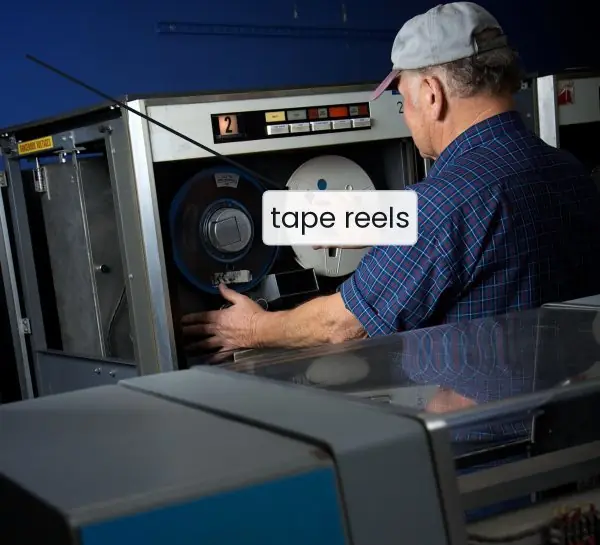
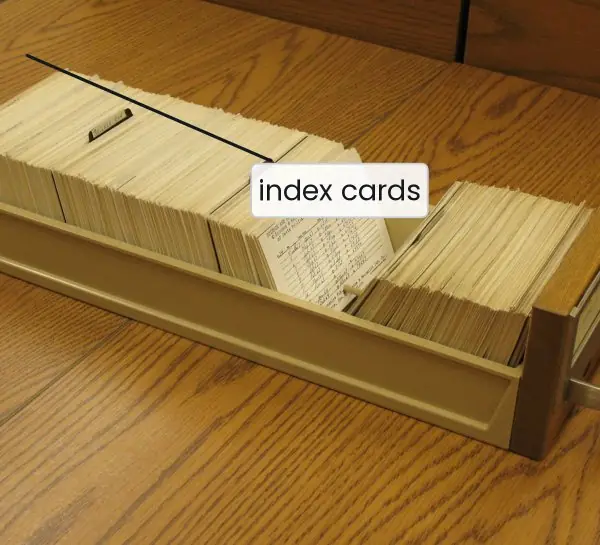
A file system is an old idea. Before disks, programs read tapes from the first record to the last; libraries found a book by flipping through an index of cards before walking to the shelf.
The plate shows both machines, and a small tree that is the modern directory.
The figures that follow trace one open file through the kernel tables, compare four directory designs, show how far an inode can reach, and work out permission bits and the umask in binary.


7.6.1 Eight advantages of a hierarchical file system with permissions
- Persistent, named storage. A file keeps its data after the program that wrote it has ended and after the power is switched off. Names let people find it again without remembering disk addresses. A student can save a lab report on Friday and open
labs/os/report.txtagain on Monday. - Organisation by folders. Directories can contain directories, so related files stay together at any depth. A college server can keep
/home/bca4/ram/os-lab/apart from/home/bca4/sita/os-lab/. Without a tree, thousands of files would sit in one long list and be almost impossible to search. - Same name, different places. The same file name can be used in many directories because the full path is what must be unique. Every student can have a file called
main.c, and a Tribhuvan University exam office can keep oneresults.csvper semester. The OS never confuses them, since each path starts at the root and ends at one file. - One interface for everything. Programs use the same open, read, write and close calls for a disk file, a USB drive, a terminal or a pipe. A program written to read a ConnectIPS statement saved as a text file can read from the keyboard with no change. This keeps programs small and lets the OS support new devices easily.
- Protection of private data. Each file carries an owner, a group and permission bits, and the kernel checks them on every
open. A teacher can makegrades.dbreadable only by herself, while the class notes are readable by everyone. A cyber-cafe user cannot read the previous customer's files if the permissions are set correctly. - Controlled sharing. Groups and ACLs allow just the right people to share a file. A project group of four BCA students can have write access to one folder, while the rest of the college can only read it. Sharing is done by changing a few permission bits instead of copying the files again and again.
- Space saving with links. A hard link or symbolic link gives one file a second name without a second copy of the data. A large video lecture can appear in two course folders and still use the disk space once. Deleting one name leaves the data safe as long as another hard link remains.
- Fast access through metadata and caching. The inode holds the attributes and the block pointers, so a small file is reached with a few disk reads. Recently used directory entries and blocks stay in memory in the buffer cache. Opening the same Nagarik App report a second time is therefore much faster than the first time.
Formula and fact sheet
- Inode reach: 12 direct + P + P² + P³ blocks, with P = block size ÷ pointer size.
- Permissions: r = 4, w = 2, x = 1; 640 = rw-r-----. New-file mode = 666 AND NOT umask; new-directory mode = 777 AND NOT umask.
- Hard link: same inode, link count + 1. Symbolic link: separate file holding a path.
- ACL = column of the access matrix (per object); capability list = row (per domain).
Chapter summary
- A file is a named, persistent collection of bytes with attributes; a file descriptor is the handle returned by
open. - Directories are organised as trees (or graphs with links); paths are absolute or relative.
- Access is sequential or direct. Inodes, linked and contiguous allocation are the implementations behind the interface.
- Protection uses permission bits, ACLs and capabilities, ideally with least privilege.
Practice
- Define a file. List five file attributes and five file operations.
- What is a file descriptor and why does
openexist as a separate call? - Compare single-level, two-level and tree-structured directories.
- Differentiate absolute and relative path names with an example.
- Explain hard and soft links; what happens to each if the original is deleted?
- Compare sequential and direct access with a use for each.
- A file has mode 754. Describe the rights of the owner, group and others.
- With umask 027, what mode does a new file (default 666) get?
- Distinguish an ACL from a capability list. Which makes revocation easier?
- With 8 KB blocks and 4-byte pointers, what is the largest file reachable with 10 direct pointers plus one single-indirect block?
Answers and worked solutions
1. A file is a named collection of related data on secondary storage. Attributes: name, type, size, owner, protection, timestamps, location. Operations: create, open, read, write, seek, close, delete, rename.
2. A descriptor is a small integer index into the process's open-file table. open searches the directory and checks permissions once; later calls use the descriptor, so the directory is not searched on every read and write.
3. Single-level: all files in one directory, name clashes. Two-level: separate directory per user, avoids clashes but no sub-grouping and awkward sharing. Tree: arbitrary nesting, grouping, relative paths, the modern design.
4. Absolute: from the root (/home/user/docs/a.txt). Relative: from the working directory (docs/a.txt, or ../x.txt for a file in the parent).
5. A hard link is another name for the same inode; deleting one name leaves the data reachable via the other (count decrements). A symbolic link stores a path; deleting the target leaves a dangling link that fails to open.
6. Sequential: process in order, e.g. reading a log or compiling source. Direct: jump to any block, e.g. a database record lookup.
7. 754 = rwx r-x r--: the owner can read, write and execute; the group can read and execute; others can only read.
8. 666 AND NOT 027: the mask removes group write (020) and all of others (007), giving 640.
9. ACL: a list per object of who may access it. Capability list: per domain, the objects it may access. Revocation is easier with ACLs: edit the object's list. Capabilities are held by processes, so they must be tracked down.
10. Pointers per block = 8 KB / 4 B = 2,048. Blocks reachable = 10 + 2,048 = 2,058; size = 2,058 × 8 KB = 16,464 KB ≈ 16.08 MB.
Model answers (5 and 10 marks)
Q1. Compare single-level, two-level and tree-structured directories. (5 marks)
A directory maps file names to files, and the design decides how names are shared and grouped (Figure 7.2).
- Single-level. One directory holds every file of every user. It is simple and fast to search, but all names must be unique, so two students cannot both create
a.c. With hundreds of files the list becomes unmanageable. - Two-level. A master directory contains one user directory per user. Names may repeat across users, and the OS can search only the current user's area. However, a user cannot group files into sub-folders, and sharing a file with another user needs special rules such as a path through the master directory.
- Tree-structured. Directories can contain files and other directories to any depth. Every file has a unique absolute path (
/home/sita/os/notes.txt) and a relative path from the working directory. Users can group projects, share sub-trees and set permissions per directory. This is the design of UNIX, Linux and Windows.
| Point | Single-level | Two-level | Tree |
|---|---|---|---|
| Grouping | none | by user only | any depth |
| Name clash | frequent | only inside one user | only inside one directory |
| Sharing | easy but unsafe | awkward | by path and permissions |
| Search | slow when large | faster | fast, follows a path |
An acyclic graph adds links to the tree so that one file has two names. The tree is the best balance of simplicity and power, so it is the standard choice.
Q2. What are file attributes and file operations? Explain the role of the file descriptor. (5 marks)
Attributes are the metadata the OS keeps about a file, in its directory entry or inode: name, type, location on disk, size, owner, protection (permission bits), timestamps (creation, last access, last modification), flags such as hidden or read-only, and the link count.
They let the OS find the data, check access and report information in ls -l.
Operations are the system calls on a file: create, delete, open, close, read, write, append, seek (reposition the pointer), get and set attributes, and rename. Each operation is a call into the kernel, so the kernel can check permissions every time.
File descriptor. Searching the directory and checking permissions for every read would be slow.
So open does the work once: it finds the inode, checks the permissions, creates an entry in the open-file table holding the current offset and access mode, and returns a small integer, the file descriptor (Figure 7.1).
Later read(fd, ...) and write(fd, ...) use that integer as an index into the process's table. Descriptors 0, 1 and 2 are standard input, output and error. close releases the entry.
For example, two processes that open the same file get separate entries and offsets but share one inode, so one can read from byte 100 while the other reads from byte 0.
Q3. Explain the file allocation methods. How does a UNIX inode locate the blocks of a file? (10 marks)
Introduction. A disk is a set of fixed-size blocks, and the file system must decide which blocks hold each file and how to find them again. The choice affects speed, wasted space and the largest possible file.
1. Contiguous allocation. A file occupies consecutive blocks, so the directory stores only the start block and the length.
Sequential and direct access are both fast (one seek), but free space breaks into holes (external fragmentation) and a file that grows may have to be moved. It is used on CD-ROMs and other read-only media.
2. Linked allocation. Each block holds a pointer to the next block. There is no external fragmentation and files grow easily. Direct access is slow, because reaching block k needs k reads, and one lost pointer breaks the chain.
With 4 KB blocks and a 4-byte pointer only 4,092 bytes per block hold data, so 1 MiB needs 257 blocks instead of 256. The FAT keeps all the pointers in one table in memory to repair the slow access.
3. Indexed allocation. One index block lists the block numbers of the file, so direct access is fast and there is no external fragmentation. The cost is the index block itself, which is wasted for tiny files.
4. The UNIX inode. The inode combines these ideas (Figure 7.3). With 4 KB blocks and 4-byte pointers an index block holds 1,024 pointers.
| Pointers | Reach |
|---|---|
| 12 direct | 12 × 4 KB = 48 KB |
| 1 single indirect | 1,024 × 4 KB = 4 MB |
| 1 double indirect | 1,024² × 4 KB = 4 GB |
| 1 triple indirect | 1,024³ × 4 KB = 4 TB |
The maximum size is about 4.0039 TiB. A 10,000-byte file needs 3 blocks (2,288 bytes unused in the last) and stays in the direct pointers.
A 100 MB file needs 25,600 blocks: 12 direct, 1,024 through the single-indirect block and the remaining 24,564 through the double-indirect block, which uses 1 + 24 index blocks, so the file costs 26 index blocks in all.
| Method | Fragmentation | Direct access | Growth |
|---|---|---|---|
| Contiguous | external | fast | hard |
| Linked | none (small internal) | slow | easy |
| Indexed / inode | none | fast | easy |
Conclusion. Small files, which are the most common, are reached through the direct pointers with almost no overhead, and huge files remain possible through indirect blocks. That is why inode-based systems such as ext4 dominate.
Q4. Explain file protection in an operating system with UNIX permissions, umask, access-control lists and capability lists. (10 marks)
Introduction. Protection decides who may do what to a file. The OS must enforce it in the kernel, because a user program cannot be trusted to check itself. The types of access are read, write, execute, append, delete and list.
1. UNIX permission bits. Each file has an owner, a group and nine bits: read (4), write (2) and execute (1) for the user, the group and others (Figure 7.4). The mode rw-r----- is octal 640.
The owner may read and write, the group may read and others have no access. The mode 754 is rwxr-xr--: the owner has all rights, the group may read and execute, and others may read.
2. Directory permissions. On a directory, read lists the names, write creates or deletes entries, and execute allows passing through the directory to reach a file. A file inside a directory without execute permission cannot be opened.
3. The umask. A new file starts from 666 and a new directory from 777; the umask removes bits. With umask 027 a file gets 666 AND NOT 027 = 640 and a directory gets 777 AND NOT 027 = 750.
A real run gave 640 -rw-r----- for the file and 750 drwxr-x--- for the directory. Umask 022 gives 644 and 755; umask 077 gives 600 and 700.
4. Access matrix. Conceptually protection is a matrix with a row per domain (user or process) and a column per object (file or device). Storing the full matrix wastes space, because most cells are empty.
5. Access-control list (ACL). The matrix is stored by column: each object keeps a list of ⟨domain, rights⟩. It is easy to see who can use a file and to revoke access by editing one list. NTFS and POSIX ACLs (setfacl) work this way.
6. Capability list. The matrix is stored by row: each domain holds tokens for the objects it may use. It is natural for passing rights between processes, but revocation is hard because the tokens are scattered.
7. Least privilege and authentication. A process should receive only the rights it needs, and the user must be authenticated first, for example by a password.
| Feature | UNIX bits | ACL | Capability list |
|---|---|---|---|
| Stored with | the inode (3 entries) | the object | the domain |
| Granularity | owner, group, others | any user or group | any object |
| Revocation | change the mode | edit the list | difficult |
Conclusion. UNIX bits are a compact ACL with three entries and cover most needs; ACLs add finer control where required, and the umask ensures that new files start safe.
Together with least privilege they keep a shared system, such as a college lab server, from leaking private data.
Q5. Differentiate between a hard link and a symbolic link with an example. (5 marks)
A hard link is a second directory entry that points to the same inode. Both names are equally real, and the inode keeps a link count. The data is deleted only when the count reaches zero. A hard link cannot cross file systems and normally cannot point to a directory.
A symbolic (soft) link is a separate small file that stores a path. It has its own inode and its size equals the length of that path. It may point to a directory or to another file system, but it becomes a dangling link if the target is removed.
A real run on Linux:
$ echo "BCA sem 4" > a.txt; ln a.txt b.txt; ln -s a.txt c.txt
$ ls -li a.txt b.txt c.txt
1610836 -rw-r--r-- 2 user user 10 a.txt
1610836 -rw-r--r-- 2 user user 10 b.txt
1610837 lrwxrwxrwx 1 user user  5 c.txt -> a.txt
$ rm a.txt; cat b.txt; cat c.txt
BCA sem 4
cat: c.txt: No such file or directory
a.txt and b.txt share inode 1610836 and link count 2. The soft link has a different inode and a size of 5, the length of the string a.txt. After rm a.txt the count falls to 1, so b.txt still reads the data, while c.txt dangles.
| Point | Hard link | Symbolic link |
|---|---|---|
| Inode | same as target | its own |
| After target removed | still works | dangles |
| Across file systems | no | yes |
| Directories | normally not | yes |