Unit 1 · 8 teaching hours · 26 min read
Server-Side Scripting and PHP Fundamentals
What the syllabus asks for 7
- Client-side versus server-side scripting
- Variables, constants and types
- Control structures
- Arrays
- Functions
- Including files and running from the command line
- Seeing the ideas: from request to running PHP
In Web Technology I your pages came to life in the browser with JavaScript. But the browser cannot read the college's student database, check a password safely or send an e-mail: that work happens on a server.
This unit introduces server-side scripting and the language that powers most of the web's server side, PHP: its syntax, types, control structures, arrays and functions.
- How a dynamic page is produced: request, server-side script, response.
- PHP syntax, variables, types, operators, control structures, arrays,
foreach, functions, andinclude. - Running PHP from the command line, so you can test every example.
Every PHP program in this book was run with PHP 8.2 from the command line; the output shown is real. A web server runs the same code and sends its output to the browser. Programs begin with the opening tag <?php.
1.1 Client-side versus server-side scripting
| Client-side (JavaScript) | Server-side (PHP) | |
|---|---|---|
| Runs on | the user's browser | the web server |
| Source visible to the user | yes | no, only the output is sent |
| Can access | the page, the browser | files, databases, e-mail, other servers |
| Typical tasks | validation hints, animation, AJAX calls | login, saving data, reports, payments |
| Trust | none: the user can change it | the server is trusted, but must never trust the input |
How a dynamic page is produced. (1) The browser sends an HTTP request for result.php. (2) The web server (Apache, Nginx) sees the .php extension and passes the file to the PHP interpreter.
(3) PHP runs the code, perhaps querying MySQL, and produces HTML. (4) The server sends that HTML back as the response. The browser never sees the PHP code.
The classic LAMP stack is Linux + Apache + MySQL + PHP (on Windows, XAMPP or WAMP bundles them). For development PHP also has a built-in server: php -S localhost:8000.
Features of PHP. Free and open source, runs on all major platforms and servers, simple C-like syntax, loosely typed (with optional strict types), embedded in HTML, a huge function library, easy database connectivity (MySQL, PostgreSQL, SQLite), and the engine behind WordPress, Joomla, Laravel and Wikipedia's MediaWiki.
<?php
echo "Hello from PHP ", PHP_VERSION_ID >= 80000 ? "8+" : "7", "\n";
print("Namaste\n");
?>
<p>Today is a plain HTML line, outside the PHP tags.</p>
<?= "short echo tag: " . 6 * 7 ?>
Hello from PHP 8+
Namaste
<p>Today is a plain HTML line, outside the PHP tags.</p>
short echo tag: 42
Anything outside <?php … ?> is sent unchanged, so PHP can be mixed into HTML templates. Statements end with ;. Comments: // line, # line, /* block */.
1.2 Variables, constants and types
Variables begin with $, are case-sensitive, and need no declaration. PHP is loosely typed: the type belongs to the value and may change. Constants are defined with const NAME = value; or define().
<?php
$name = "Sita"; $age = 20; $gpa = 3.75; $enrolled = true; $nothing = null;
const COLLEGE = "Patan";
var_dump($name, $age, $gpa, $enrolled, $nothing);
echo gettype($age), " ", gettype("5" + 5), " ", "5" + "5.5", " ", "3" . 4, "\n";
echo "Hello $name, you are {$age} years old at " . COLLEGE . "\n";
echo 'Single quotes do not expand $name', "\n";
echo intdiv(17, 5), " ", 17 % 5, " ", 2 ** 10, " ", 7 / 2, " ", (int) "42abc", "\n";
string(4) "Sita"
int(20)
float(3.75)
bool(true)
NULL
integer integer 10.5 34
Hello Sita, you are 20 years old at Patan
Single quotes do not expand $name
3 2 1024 3.5 42
Types: int, float, string, bool, array, object, null, callable. Double-quoted strings expand variables and escapes (\n); single-quoted do not. . concatenates (PHP uses + only for numbers).
Type juggling: "5" + 5 is 10 and "5" + "5.5" is 10.5. PHP 8 throws a TypeError for non-numeric strings in arithmetic, and compares more sensibly than PHP 7 did, but you should still use ===.
Comparison: == versus ===
== compares after type conversion; === also demands the same type. Prefer === and !==.
<?php
var_dump(0 == "a", "1" == "01", "10" == "1e1", 100 == "1e2", null == false);
var_dump(0 === "a", "1" === "01", null === false, 1 <=> 2, "b" <=> "a");
var_dump(null ?? "default", isset($undefined), empty("0"), empty([]));
$score = 55;
echo $score >= 40 ? "pass" : "fail", " ", $score <=> 50, "\n";
bool(false)
bool(true)
bool(true)
bool(true)
bool(true)
bool(false)
bool(false)
bool(false)
int(-1)
int(1)
string(7) "default"
bool(false)
bool(true)
bool(true)
pass 1
The null coalescing operator ?? supplies a default when a value is unset or null; <=> (spaceship) returns −1, 0 or 1; empty() treats "0", 0, "", [], null, false as empty.
Operators
Arithmetic + - * / % ** (and intdiv), assignment = += -= .= ??=, comparison == === != !== < > <= >= <=>, logical && || ! and or xor, increment ++ --, string ., ternary ?:, null-coalescing ??, array + (union).
Precedence is like C; && binds tighter than ||; use parentheses.
1.3 Control structures
<?php
$marks = 67;
if ($marks >= 80) { $g = "Distinction"; }
elseif ($marks >= 60) { $g = "First"; }
else { $g = "Other"; }
echo "$marks => $g\n";

switch (date("N", strtotime("2026-11-02"))) {      // 1 = Monday
    case 6: echo "Saturday: holiday\n"; break;
    case 1: case 2: echo "weekday near the start\n"; break;
    default: echo "other day\n";
}
echo match (true) { $marks >= 80 => "A", $marks >= 60 => "B", default => "C" }, "\n";

for ($i = 1; $i <= 5; $i++) { echo $i * $i, " "; }
$n = 5; $f = 1;
while ($n > 1) { $f *= $n--; }
do { echo "[do-while runs once: $f]"; } while (false);
echo "\n";
for ($i = 0; $i < 10; $i++) {
    if ($i % 2) continue;
    if ($i > 6) break;
    echo $i, ",";
}
echo "\n";
67 => First
weekday near the start
B
1 4 9 16 25 [do-while runs once: 120]
0,2,4,6,
switch uses loose comparison and needs break; the PHP 8 match expression uses strict comparison, returns a value and has no fall-through. Loops: for, while, do … while, foreach (below); break and continue work as in C.
1.4 Arrays
PHP's array is an ordered map: it serves as list, dictionary, stack and queue. Keys are integers or strings.
<?php
$days = ["Sun", "Mon", "Tue"];                 // indexed
$days[] = "Wed";
$student = ["name" => "Ram", "age" => 19, "marks" => [78, 85]];   // associative
$student["dept"] = "BCA";
echo count($days), " ", $days[1], " ", $student["marks"][1], " ", implode(",", array_keys($student)), "\n";
foreach ($days as $i => $d) { echo "$i=$d "; }
echo "\n";
foreach ($student as $key => $value) {
    echo $key, ": ", is_array($value) ? implode("/", $value) : $value, "\n";
}
print_r(array_slice($days, 1, 2));
var_dump(in_array("Tue", $days), array_search("Wed", $days), isset($student["phone"]));
4 Mon 85 name,age,marks,dept
0=Sun 1=Mon 2=Tue 3=Wed
name: Ram
age: 19
marks: 78/85
dept: BCA
Array
(
    [0] => Mon
    [1] => Tue
)
bool(true)
int(3)
bool(false)
| Function | Purpose |
|---|---|
count, array_keys, array_values, array_merge |
inspect and combine |
array_push/[], array_pop, array_shift, array_unshift |
stack and queue |
in_array, array_search, array_key_exists |
search |
sort, rsort, asort, ksort, usort |
sorting (by value, key, custom) |
array_map, array_filter, array_reduce, array_sum |
functional style |
array_slice, array_splice, array_unique, array_column |
slicing and shaping |
<?php
$marks = ["Ram" => 78, "Sita" => 92, "Hari" => 64, "Gita" => 85];
arsort($marks);
print_r($marks);
$passed = array_filter($marks, fn($m) => $m >= 70);
echo implode(", ", array_keys($passed)), " | avg ", round(array_sum($marks) / count($marks), 2), "\n";
$sq = array_map(fn($x) => $x ** 2, [1, 2, 3, 4]);
echo implode(" ", $sq), " | ", array_reduce($sq, fn($c, $x) => $c + $x, 0), "\n";
$rows = [["n" => "Ram", "m" => 78], ["n" => "Sita", "m" => 92]];
usort($rows, fn($a, $b) => $b["m"] <=> $a["m"]);
echo implode(",", array_column($rows, "n")), "\n";
Array
(
    [Sita] => 92
    [Gita] => 85
    [Ram] => 78
    [Hari] => 64
)
Sita, Gita, Ram | avg 79.75
1 4 9 16 | 30
Sita,Ram
1.5 Functions
<?php
declare(strict_types=1);

function area(float $w, float $h = 1.0): float { return $w * $h; }
function swap(int &$a, int &$b): void { [$a, $b] = [$b, $a]; }
function total(int ...$nums): int { return array_sum($nums); }
function greet(string $name, string $greeting = "Hello"): string { return "$greeting, $name!"; }

echo area(3, 4), " ", area(5), " ", total(1, 2, 3, 4), " ", greet(greeting: "Namaste", name: "Sita"), "\n";
$x = 1; $y = 2; swap($x, $y); echo "$x $y\n";
$counter = function () { static $n = 0; return ++$n; };
echo $counter(), $counter(), $counter(), "\n";
try { echo area("abc"); } catch (TypeError $e) { echo "TypeError caught\n"; }
12 5 10 Namaste, Sita!
2 1
123
TypeError caught
Type declarations (int, float, string, bool, array, ?int nullable, int|string union) and return types make code self-documenting; with strict_types=1 PHP refuses silent conversions.
Parameters can have defaults, be passed by reference (&), be variadic (...$nums) and be named at the call (PHP 8).
Scope: variables inside a function are local; use global $x or, better, parameters. static variables keep their value between calls. Arrow functions fn($x) => … capture outer variables automatically.
Useful string and math functions
<?php
$s = "  Kathmandu Valley  ";
echo strlen(trim($s)), "|", strtoupper(trim($s)), "|", ucwords("bca fourth semester"), "|", str_replace("Valley", "City", trim($s)), "\n";
echo substr("Pokhara", 0, 4), " ", strpos("Pokhara", "k"), " ", str_contains("Pokhara", "kha") ? "yes" : "no", " ", strrev("abc"), " ", str_pad("7", 3, "0", STR_PAD_LEFT), "\n";
print_r(explode(",", "a,b,c")); echo sprintf("%05.1f|%-6s|%3d|%x", 3.14159, "ab", 42, 255), " ", number_format(1234567.891, 2), "\n";
echo max(3, 9, 4), " ", round(2.567, 1), " ", floor(-1.5), " ", abs(-8), " ", sqrt(144), " ", pi() > 3 ? "pi" : "", "\n";
16|KATHMANDU VALLEY|Bca Fourth Semester|Kathmandu City
Pokh 2 yes cba 007
Array
(
    [0] => a
    [1] => b
    [2] => c
)
003.1|ab    | 42|ff 1,234,567.89
9 2.6 -2 8 12 pi
1.6 Including files and running from the command line
include 'header.php' inserts another file (a warning if it is missing, and it returns false); require stops with a fatal error if missing; the _once variants avoid loading twice. Use them for shared headers, footers and configuration.
<?php
file_put_contents("config.php", '<?php return ["site" => "BCA Portal", "year" => 2026];');
file_put_contents("lib.php", '<?php function banner(string $t): string { return "== $t =="; }');
$config = require "config.php";
require_once "lib.php";
require_once "lib.php";
echo banner($config["site"]), " ", $config["year"], "\n";
$r = @include "missing.php";
var_dump($r);
echo basename(__FILE__), " line ", __LINE__, "\n";
== BCA Portal == 2026
bool(false)
p.php line 10
Run a script with php script.php; pass arguments through $argv. The built-in web server is started with php -S localhost:8000.
1.7 Seeing the ideas: from request to running PHP
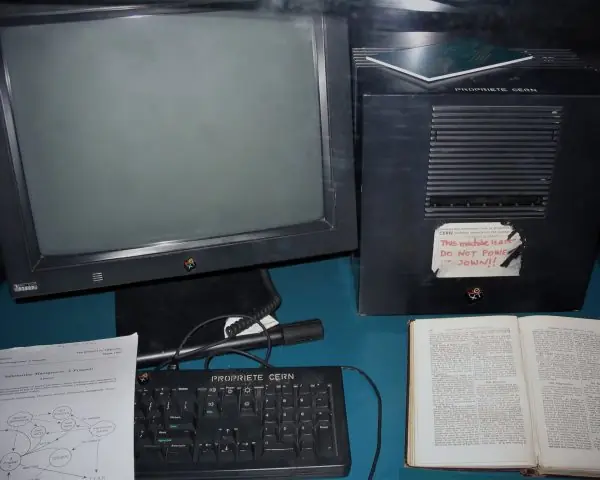
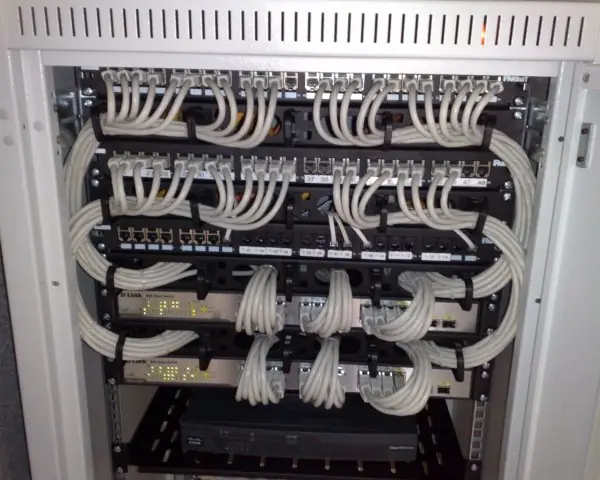
PHP is a language for servers, and servers are real machines in real racks. The photographs show the person who started PHP, the machine that served the first web page ever, and the cabling of a modern server room.
The figures then follow one request through the server and show the PHP rules that cause most beginner mistakes, with results taken from real runs of PHP 8.2.35.



1.7.1 Eight reasons PHP is widely used for web development
- It is free and open source. Anyone can download and use PHP at no cost, and the source code is open for inspection. A small college in Pokhara can run its notice board and result portal without paying a licence fee. Free software also means a student can practise at home on a laptop.
- It runs on almost every server. PHP works on Linux, Windows and macOS, and with Apache, Nginx and the built-in development server. Cheap shared hosting from Nepali companies usually supports it by default. This makes it easy to move a site from one host to another.
- It is embedded in HTML. A page can mix plain HTML with small pieces of PHP between
<?phpand?>, or the short tag<?=. A designer can keep the layout and let PHP fill in the changing parts, such as a student's name. This makes the first dynamic page very quick to build. - The syntax is easy to learn. PHP looks like C and JavaScript, so a student who knows one of them reads it at once. Variables start with
$and need no type declaration. A working form handler can be written in a few lines (Section 1.1). - It connects to databases easily. The
mysqliandPDOextensions talk to MySQL, PostgreSQL and SQLite with a few function calls. A result system that reads marks from a table is a normal first project. Unit 4 builds exactly this kind of connection. - It has a huge function library. Strings, arrays, dates, files, images, JSON and e-mail are all covered by built-in functions such as
str_contains,array_mapandjson_encode. A programmer rarely writes basic tools from scratch. This saves time on projects like a fee receipt in the Nepali date format. - It has a large community and many ready-made systems. WordPress, Joomla, Drupal and Laravel are written in PHP, and many Nepali news sites and organisation sites use them. Questions on forums usually have answers already. A student who learns PHP can therefore also customise these systems (Unit 8).
- It is fast enough and improves steadily. PHP 8 added a just-in-time compiler, named arguments,
matchand stronger types, so modern code is both quicker and safer. Because every request starts a fresh script, a crash in one request does not bring down the others. This suits busy sites such as an admission-form portal.
Formula and fact sheet
- Server-side code runs on the server; the browser receives only its output.
$var,const,===vs==,??,<=>; double quotes expand, single quotes do not;.concatenates.if/elseif/else,switch,match,for,while,foreach ($a as $k => $v).- Arrays are ordered maps;
[]appends;count,sort,array_map,array_filter. function f(int $x = 1): int;&by reference;...variadic;declare(strict_types=1).include,require,require_once.
Chapter summary
- PHP runs on the server, generates HTML dynamically and can reach files and databases; the browser never sees the source.
- The language is loosely typed, with strict mode and type declarations available; use
===. - Arrays are the universal data structure; functions can take defaults, references, variadics and named arguments.
- Files are shared with
include/require; the command line and the built-in server make testing easy.
Practice
- Differentiate client-side and server-side scripting, and explain the steps in producing a dynamic page.
- What is the difference between
==and===? Predictvar_dump("10" == "1e1", "10" === "1e1"). - Write a PHP script that prints the multiplication table of 7.
- Create an associative array of five students' marks and print the names with marks above the average.
- Write a function with a default parameter and one that takes its argument by reference.
- Differentiate
includeandrequire. - Explain the output of
echo "5" + "5", "5" . "5";.
Answers and worked solutions
1. See Section 1.1: client-side code runs in the browser and is visible; server-side code runs on the server and only its output is sent. Steps: request → web server → PHP interpreter runs script (and database) → HTML response.
2. == converts types before comparing, === requires equal types and values. "10" == "1e1" is true (both numeric strings, 10 = 10.0); "10" === "1e1" is false.
3.
<?php
for ($i = 1; $i <= 10; $i++) { echo "7 x $i = ", 7 * $i, "\n"; }
7 x 1 = 7
7 x 2 = 14
7 x 3 = 21
7 x 4 = 28
7 x 5 = 35
7 x 6 = 42
7 x 7 = 49
7 x 8 = 56
7 x 9 = 63
7 x 10 = 70
4.
<?php
$m = ["Ram" => 78, "Sita" => 92, "Hari" => 64, "Gita" => 85, "Bikash" => 55];
$avg = array_sum($m) / count($m);
foreach ($m as $n => $v) { if ($v > $avg) echo "$n ($v)\n"; }
echo "average $avg\n";
Ram (78)
Sita (92)
Gita (85)
average 74.8
5.
<?php
function power(int $b, int $e = 2): int { return $b ** $e; }
function addTax(float &$price): void { $price *= 1.13; }
$p = 100.0; addTax($p);
echo power(5), " ", power(2, 8), " ", $p, "\n";
25 256 113
6. include raises a warning and continues if the file is missing; require raises a fatal error and stops. Use require for essential files.
7. "5" + "5" adds numerically to 10; "5" . "5" concatenates to 55; echo with a comma prints both: 1055.
Model answers (5 and 10 marks)
Q1. What is server-side scripting? Explain how a dynamic page is produced in PHP, and describe the features, advantages and limitations of PHP. (10 marks)
Introduction. Server-side scripting means that the program which builds a web page runs on the web server, not in the visitor's browser. The visitor receives only the finished HTML, never the program.
PHP (originally Personal Home Page, now PHP: Hypertext Preprocessor) is the most widely used server-side language, and it powers WordPress, Joomla and Laravel.
How a dynamic page is produced (Fig. 1.1).
- The browser sends an HTTP request such as
GET /result.php?roll=7. - The web server (Apache or Nginx) sees the
.phpextension and passes the file to the PHP interpreter. - PHP runs the code and, if needed, queries a database such as MySQL.
- The database returns the rows.
- PHP produces HTML and the server returns it with the status
200 OK. The PHP source stays on the server.
Features of PHP.
- Free, open source and cross-platform.
- C-like syntax; loosely typed, with optional
declare(strict_types=1). - Embedded in HTML with
<?php ... ?>. - Built-in support for forms, sessions, cookies, files and e-mail.
- Database drivers for MySQL, PostgreSQL and SQLite (
mysqli,PDO). - Object-oriented features since PHP 5, and a rich function library.
Comparison with client-side scripting.
| Point | Client-side (JavaScript) | Server-side (PHP) |
|---|---|---|
| Runs on | the visitor's browser | the web server |
| Source visible to the user | yes | no, only the output |
| Can reach database and files | no (only through requests) | yes |
| Typical task | validation hints, animation | login, saving data, reports |
Advantages. Low cost, easy hosting, quick development, a very large community and many ready-made systems, so a Nepali college can build a result portal quickly.
Limitations. Loose typing allows surprising comparisons ("10" == "1e1" is true), the function names are not always consistent, and careless code is open to SQL injection and cross-site scripting. Large projects need a framework and discipline to stay maintainable.
Conclusion. PHP is a practical choice for database-driven sites because it runs on the server, is easy to learn and has strong tool support. Its weaknesses are controlled by using ===, strict types, prepared statements and a framework.
Q2. Differentiate between == and === in PHP. Explain type juggling with examples. (5 marks)
PHP is a loosely typed language: when two values of different types meet in an operator, PHP converts one of them so that the operation can proceed. This automatic conversion is called type juggling.
==(loose equality) converts the types first and then compares the values. It returnstruewhen the converted values are equal.===(strict equality) returnstrueonly if both the type and the value are the same. No conversion is done.- Numeric strings are compared as numbers by
==:"10" == "1e1"is true because both mean the number 10, and100 == "1e2"is true. - Empty values are treated as false:
null == false,[] == falseand"0" == falseare all true. - PHP 8 changed one rule:
"abc" == 0is now false (it was true in PHP 7), because a non-numeric string is no longer converted to 0.
Fig. 1.2 shows these pairs with their real results. The program below prints them.
<?php
var_dump("10" == "1e1", "10" === "1e1");
var_dump(null == false, null === false);
var_dump("abc" == 0, 0 == "a");
echo "5" + "5", " and ", "5" . "5", "\n";
bool(true)
bool(false)
bool(true)
bool(false)
bool(false)
bool(false)
10 and 55
The last line shows juggling at work: + makes numbers (10) and . makes text (55). Rule: use === and !== for comparisons, and cast the input explicitly, for example (int) $_GET['roll'], so that no accidental conversion decides the result of a program.
Q3. What is an array in PHP? Explain indexed, associative and multidimensional arrays with a program. (5 marks)
An array in PHP is an ordered map: it stores many values, each reached by a key, and the order in which the elements were added is kept (Fig. 1.3). One structure serves as a list, a dictionary, a stack or a table.
- Indexed array. The keys are integers starting at 0, as in
$marks = [78, 92, 64]. A new element added with$marks[] = 85takes the next integer key. - Associative array. The keys are strings chosen by the programmer, as in
["Ram" => 78, "Sita" => 92]. It is used for records and for configuration settings. - Multidimensional array. An array whose elements are arrays; for example, a list of students each having a name and marks. It is the usual shape of a database result.
- Useful functions.
count,array_sum,sort,ksort,array_keys,in_array,array_mapandarray_filter. - Looping.
foreach ($a as $key => $value)visits every element in order and is safer than aforloop with an index.
<?php
$class = [
    ["name" => "Ram",  "marks" => [78, 64]],
    ["name" => "Sita", "marks" => [92, 88]],
    ["name" => "Hari", "marks" => [55, 61]],
];
foreach ($class as $i => $s) {
    $avg = array_sum($s["marks"]) / count($s["marks"]);
    echo "$i: {$s['name']} average $avg\n";
}
$names = array_column($class, "name");
echo implode(", ", $names), " | total students ", count($class), "\n";
0: Ram average 71
1: Sita average 90
2: Hari average 58
Ram, Sita, Hari | total students 3
The output shows the three kinds together: the outer array is indexed, each student is associative and the marks are a nested indexed array. array_column pulls one field out of every record, a common step before showing a table on a web page.
Q4. Explain functions in PHP: default arguments, passing by value and by reference, variadic functions and return types. Write a program. (10 marks)
Introduction. A function is a named block of code that can be called many times with different arguments. It removes repetition and keeps a program readable.
PHP has thousands of built-in functions, such as strlen and date, and the programmer can write more with the keyword function.
Declaring and calling. The form is function name(type $param = default): returnType { ... }. Parameter types and the return type are optional, but a modern program should use them.
With declare(strict_types=1); at the top of the file PHP refuses to convert, for example, a string into an int parameter, and throws a TypeError instead.
Parts of a function.
- Default arguments.
function power(int $b, int $e = 2)can be called aspower(5), which gives 25, or aspower(2, 8), which gives 256. Parameters with defaults come last. - Pass by value (default). The function receives a copy, so changes inside do not affect the caller's variable (Fig. 1.4, left).
- Pass by reference. Writing
&$pmakes the parameter an alias of the caller's variable, so the function can change it (Fig. 1.4, right). - Variadic functions.
function total(int ...$n)collects any number of arguments into an array. - Named arguments (PHP 8).
power(e: 3, b: 2)passes values by name, in any order. - Return types.
: int,: string,: void,?int(an int or null) document what the function gives back. - Scope. A variable made inside a function is local; a global variable must be passed in as an argument or imported with
global, and the first way is better.
<?php
declare(strict_types=1);
function power(int $b, int $e = 2): int { return $b ** $e; }
function addTax(float &$price): void { $price *= 1.13; }
function total(int ...$n): int { return array_sum($n); }
function bump(int $n): int { return ++$n; }

$p = 100.0;
addTax($p);
$n = 5;
echo power(5), " ", power(2, 8), " ", power(e: 3, b: 2), "\n";
echo "price ", $p, " | bump ", bump($n), " but n is ", $n, "\n";
echo "total ", total(4, 8, 15, 16, 23, 42), "\n";
try { echo power("5"); } catch (TypeError $e) { echo "TypeError caught\n"; }
25 256 8
price 113 | bump 6 but n is 5
total 108
TypeError caught
Comparison of the two ways of passing arguments.
| Point | By value | By reference |
|---|---|---|
| Syntax | function f($x) |
function f(&$x) |
| What is passed | a copy | the variable itself |
| Caller's variable | unchanged | may be changed |
| Typical use | most functions | functions that must return several results |
Conclusion. Functions make code reusable and testable.
Good PHP functions use type declarations, defaults and return types, pass by value unless a change is intended, and are called with strict_types on so that mistakes appear at once as errors and not as wrong results on a result sheet.