Unit 3 · 8 teaching hours · 22 min read
User Interface - Layouts, RecyclerView and Fragments
What the syllabus asks for 6
- Views and layouts
- Handling events and input
- RecyclerView
- Fragments
- Jetpack Compose in outline
- Seeing the interface: tools, trees, lists and panes
A screen full of text and buttons is easy; a screen showing a ten-thousand-row transaction history that scrolls smoothly on a low-end phone is where UI programming gets interesting.
This unit covers how Android describes interfaces (the View system and XML layouts, with Jetpack Compose as the modern declarative alternative), how resources give you Nepali strings and density-specific assets for free, and how RecyclerView keeps a huge list fast by creating only the rows that are visible.
It then explains Fragments, and verifies the efficiency numbers and the DiffUtil list-update computation with code.
- Views, ViewGroups and the common layouts; resources and localisation (Nepali).
- RecyclerView: adapter, ViewHolder, recycling arithmetic, and a diff computation as DiffUtil does.
- Fragments, their lifecycle and navigation; event handling; Jetpack Compose in outline.
3.1 Views and layouts
Everything on screen is a View (a rectangle that draws itself and handles input): TextView, EditText, Button, ImageView, CheckBox.
A ViewGroup is a view that contains and positions other views; the view hierarchy is a tree with a ViewGroup at the root.
The system performs measure (how big does each view want to be), layout (where does it go) and draw passes on the tree; deep hierarchies make these passes slow.
| Layout | Positions children | Use |
|---|---|---|
| LinearLayout | In a single row or column, with weights | Simple stacks, forms |
| ConstraintLayout | By constraints to siblings, parent and guidelines | Flat, responsive screens (the default) |
| FrameLayout | Stacked, one on top of another | A fragment container, overlays |
| RelativeLayout | Relative to siblings (older) | Legacy |
| GridLayout / Grid in RecyclerView | In rows and columns | Galleries |
| CoordinatorLayout / ScrollView | Scrolling and behaviours | Collapsing toolbars, long forms |
Not executed (needs the Android SDK): a ConstraintLayout fragment of a login screen.
<androidx.constraintlayout.widget.ConstraintLayout
    xmlns:android="http://schemas.android.com/apk/res/android"
    xmlns:app="http://schemas.android.com/apk/res-auto"
    android:layout_width="match_parent" android:layout_height="match_parent"
    android:padding="16dp">
    <EditText android:id="@+id/phone" android:layout_width="0dp"
        android:layout_height="wrap_content" android:hint="@string/phone_hint"
        android:inputType="phone"
        app:layout_constraintTop_toTopOf="parent"
        app:layout_constraintStart_toStartOf="parent"
        app:layout_constraintEnd_toEndOf="parent" />
    <Button android:id="@+id/send" android:layout_width="wrap_content"
        android:layout_height="48dp" android:text="@string/send_otp"
        app:layout_constraintTop_toBottomOf="@id/phone"
        app:layout_constraintEnd_toEndOf="parent" />
</androidx.constraintlayout.widget.ConstraintLayout>
match_parent fills the parent, wrap_content fits the content, and 0dp in ConstraintLayout means "as the constraints dictate".
The layout is inflated into view objects, and code reaches them through View Binding (binding.send.setOnClickListener { ... }) instead of findViewById.
Resources and localisation
Everything that is not code goes in res/, and the system picks the right alternative using qualifiers in the folder name: values-ne/strings.xml (Nepali), values-night/ (dark mode), layout-sw600dp/ (tablets), drawable-xxhdpi/, layout-land/.
Never hard-code visible text: use @string/send_otp and provide values/strings.xml (English) and values-ne/strings.xml (Nepali) so that a phone set to Nepali shows Nepali without code changes.
Use plurals and format arguments rather than concatenation, and support right-to-left only if needed. Colours and sizes go in values/colors.xml and dimens.xml; themes and styles (Material Design components) give a consistent look.
Check that the font renders Devanagari conjuncts correctly, and that text with sp units scales with the user's setting.
3.2 Handling events and input
Views report events through listeners: setOnClickListener, addTextChangedListener, touch and gesture detectors.
Heavy work in a click handler freezes the screen, because all UI code runs on the single main (UI) thread, and if the main thread is blocked for about five seconds the system shows an "Application Not Responding" dialog.
Network and disk calls therefore run on background threads (Unit 5), and results are posted back to the main thread.
Validate input (inputType, regex, length), show errors in TextInputLayout, hide the keyboard when done, and give feedback quickly with a progress indicator, a Snackbar or a Toast for brief messages.
3.3 RecyclerView
A list of 10,000 items cannot have 10,000 views in memory.
RecyclerView creates only enough ViewHolder objects to fill the screen plus a small margin, and as a row scrolls off the top its holder is recycled: rebound to the data of a row about to appear at the bottom. Its parts:
- Adapter: supplies the data and creates holders (
onCreateViewHolder), binds data to a holder (onBindViewHolder) and reports the item count. - ViewHolder: caches references to the row's views, avoiding repeated lookups.
- LayoutManager: positions rows (
LinearLayoutManager,GridLayoutManager,StaggeredGridLayoutManager). - ItemAnimator and DiffUtil: animate changes and compute them efficiently.
Not executed (needs the Android SDK): a minimal adapter.
class NoteAdapter(private var items: List<Note>) :
    RecyclerView.Adapter<NoteAdapter.VH>() {
    class VH(val row: RowNoteBinding) : RecyclerView.ViewHolder(row.root)
    override fun onCreateViewHolder(parent: ViewGroup, viewType: Int): VH =
        VH(RowNoteBinding.inflate(LayoutInflater.from(parent.context), parent, false))
    override fun onBindViewHolder(holder: VH, position: Int) {
        holder.row.title.text = items[position].title
    }
    override fun getItemCount() = items.size
}
How much does recycling save?
The phone of Unit 1 is 914.29 dp tall; with rows of 72 dp, about 13 rows are at least partly visible; RecyclerView keeps roughly the visible rows plus a couple of spare ones (15 holders) instead of 10,000.
A naive list of 10,000 inflated views would be 667 times as many view objects, and inflating them would take seconds; recycling makes the cost depend on the screen size, not the list size.
Each row should be cheap to bind: no network calls, no big bitmaps decoded on the main thread, flat layouts.
Updating a list with DiffUtil
When data changes (a new list from the database), calling notifyDataSetChanged() redraws everything and loses animations. DiffUtil compares the old and new lists and dispatches the minimum inserts, removals and moves.
It uses Myers' diff algorithm, whose edit script has length (n + m − 2·LCS) for lists of sizes n and m with a longest common subsequence of length LCS.
The program computes that edit script for IDs of a note list and checks its size against the LCS formula:
def lcs_table(a, b):
    t = [[0] * (len(b) + 1) for _ in range(len(a) + 1)]
    for i in range(len(a) - 1, -1, -1):
        for j in range(len(b) - 1, -1, -1):
            if a[i] == b[j]:
                t[i][j] = 1 + t[i + 1][j + 1]
            else:
                t[i][j] = max(t[i + 1][j], t[i][j + 1])
    return t

def diff(a, b):
    t = lcs_table(a, b)
    i = j = 0
    ops = []
    while i < len(a) or j < len(b):
        if i < len(a) and j < len(b) and a[i] == b[j]:
            i += 1
            j += 1
        elif j < len(b) and (i == len(a) or t[i][j + 1] >= t[i + 1][j]):
            ops.append("insert " + b[j] + " at " + str(j))
            j += 1
        else:
            ops.append("remove " + a[i])
            i += 1
    return ops

old = ["n1", "n2", "n3", "n4", "n5"]
new = ["n1", "n3", "n6", "n4", "n5", "n7"]
ops = diff(old, new)
print(ops)
print(len(ops), "operations; formula n + m - 2*LCS =", len(old) + len(new) - 2 * lcs_table(old, new)[0][0])
['remove n2', 'insert n6 at 2', 'insert n7 at 5']
3 operations; formula n + m - 2*LCS = 3
The list update becomes "remove n2, insert n6, insert n7" with three notifications instead of redrawing eleven rows.
In real code you subclass DiffUtil.ItemCallback (areItemsTheSame compares IDs, areContentsTheSame compares fields) and use ListAdapter, which runs the diff on a background thread.
3.4 Fragments
A Fragment is a reusable portion of UI with its own lifecycle, hosted by an Activity. They let one activity show several panes (a list and a detail on a tablet) and let screens be swapped without a new activity.
Its lifecycle extends the activity's: onAttach, onCreate, onCreateView (inflate the layout), onViewCreated, onStart, onResume, onPause, onStop, onDestroyView (the view is destroyed but the fragment may live on in the back stack), onDestroy, onDetach.
The key trap: after onDestroyView, any reference to the views must be dropped (set the binding to null) or memory leaks. A fragment's view has its own viewLifecycleOwner, and flows must be collected in it.
Communication: share a ViewModel scoped to the activity or use the Fragment Result API; avoid calling the activity directly.
Navigation. The Navigation component defines a graph of destinations (nav_graph.xml), a NavHostFragment that shows the current one, and navController.navigate(R.id.action_list_to_detail, bundle); Safe Args generates type-safe arguments.
Bottom navigation bars, drawers and tabs use the same mechanism. The system's Back button pops the fragment back stack.
3.5 Jetpack Compose in outline
Jetpack Compose is the modern declarative UI toolkit: you write functions that describe the UI for the current state, and the framework re-runs them when the state changes (recomposition). Not executed (needs the Android SDK):
@Composable
fun Counter() {
    var count by remember { mutableStateOf(0) }
    Column(Modifier.padding(16.dp)) {
        Text("Clicks: $count")
        Button(onClick = { count++ }) { Text("Add") }
    }
}
There are no XML layouts, no adapters (a LazyColumn does the recycling) and no findViewById; state is hoisted into a ViewModel and flows down while events flow up (unidirectional data flow).
New apps use Compose; the View system remains everywhere in existing code, so both must be understood. The same ideas (state, lists, navigation) appear in SwiftUI and Flutter.
3.6 Seeing the interface: tools, trees, lists and panes
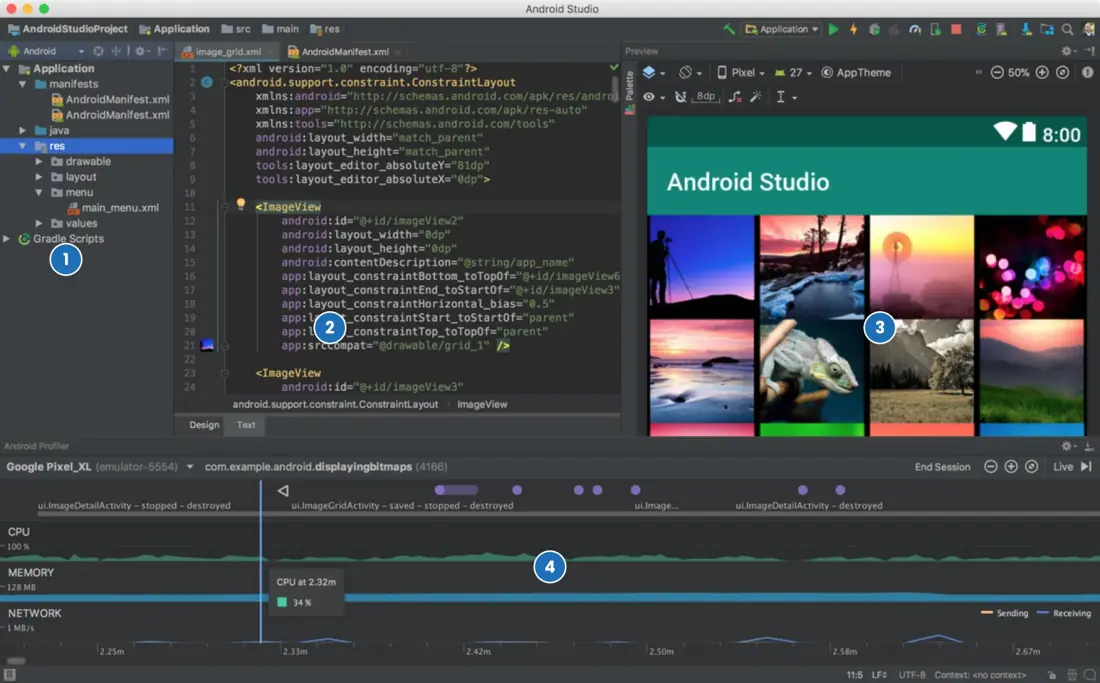
A screen is a tree of views, a list is a pool of recycled rows, and a tablet is the same app with a second pane. Each idea is clearer when drawn. The first plate is a real screenshot of Android Studio, the tool in which every layout in this unit is built.





3.6.1 Eight rules for screens that work on every phone
- Size in dp and text in sp. A 48 dp button is about 9 mm on every screen, and 16 sp text grows when the user raises the font size in settings. Fixed pixel sizes break on dense screens. This is vital for a Nepali newspaper or exam-result app, because many readers enlarge the text.
- Prefer a flat ConstraintLayout. One ConstraintLayout can replace three or four nested LinearLayouts. The system measures a shallow tree faster, so the screen opens quickly on a 2 GB phone. Deeply nested layouts are a common reason for slow screens in budget devices.
- Never hard-code text. All visible text goes in strings.xml, with a values-ne/strings.xml for Nepali. The system chooses the language the user has set. A Nagarik App-style service for citizens needs both languages from the first release, not as an afterthought.
- Keep the main thread free. Every click handler and layout pass runs on the single UI thread, and more than about five seconds of blocking produces the "App not responding" dialog. Move file, database and network work to background threads or coroutines. A loan calculator that downloads an interest table inside a click handler freezes the screen.
- Use RecyclerView or LazyColumn for lists. They create only about fifteen rows for a screen even when the list holds ten thousand, as in Figure 3.3. This saves memory and keeps scrolling smooth. A list of ward offices, bus routes or students never needs an inflated view for every entry.
- Update lists with DiffUtil. Calling notifyDataSetChanged redraws every row and loses the animation. DiffUtil works out the three changes of Figure 3.4 and notifies only those. A chat or price list that refreshes every few seconds stays steady.
- Plan for width classes. Make the layout adapt at 600 dp and use fragments so that a list and a detail can be shown side by side (Plate 3.2). Foldables and tablets are growing in the market and a school may give students tablets. One code base, two layouts, and no change to the logic.
- Make targets reachable and readable. Keep tap targets at 48 dp or more, give images content descriptions for TalkBack, and keep colour contrast high for sunlight. A farmer using a market-price app outdoors needs large, high-contrast text. These checks cost almost nothing at design time.

Chapter summary
- UIs are trees of Views in ViewGroups; ConstraintLayout gives flat, responsive screens; resource qualifiers supply Nepali text, dark mode, tablets and density-specific assets.
- All UI work runs on the main thread; blocking it risks an ANR, so I/O goes to background threads.
- RecyclerView recycles a handful of ViewHolders (15 here instead of 10,000); DiffUtil computes the minimal list updates (n + m − 2·LCS operations).
- Fragments are lifecycle-aware UI pieces; drop view references in onDestroyView; Navigation manages destinations.
- Compose describes UI as functions of state.
Practice
- Differentiate View and ViewGroup and name three layout managers.
- Why use dp and sp and
@stringreferences instead of fixed pixels and literal text? - Where would you put Nepali strings and how does the system choose them?
- What is an ANR and how do you avoid it?
- How does RecyclerView save memory?
- How many operations does DiffUtil need to turn [a, b, c, d] into [a, c, d, e]?
- Why is
notifyDataSetChanged()inefficient? - Name the Fragment callback where the layout is inflated and the one where you must release the binding.
- What is a ViewModel shared between two fragments used for?
- State the main difference between the View system and Compose.
Answers and worked solutions
1. A View draws itself and handles input; a ViewGroup contains and positions views. Layouts: LinearLayout, ConstraintLayout, FrameLayout.
2. dp keeps physical size the same across densities and sp respects the user's font setting; @string allows translation and reuse.
3. In res/values-ne/strings.xml; the system selects it when the device language is Nepali, falling back to values/.
4. "Application Not Responding" appears when the main thread is blocked for about five seconds; avoid it by running network, database and heavy computation off the main thread.
5. It keeps only visible rows plus a few spares as ViewHolders and rebinds them to new data as rows scroll.
6. LCS = [a, c, d] = 3; operations = 4 + 4 − 2·3 = 2 (remove b, insert e).
7. It redraws and rebinds every item and cancels animations even if only one item changed.
8. onCreateView (inflate); onDestroyView (null the binding).
9. Sharing data and events (for example the selected item) between the fragments.
10. The View system describes UI in XML and mutates view objects; Compose declares UI as functions of state and re-runs them when state changes.
Model answers: medium (5 marks) and long (10 marks) questions
Q1 (5 marks). Explain how RecyclerView displays a long list efficiently. For a 914.29 dp screen with 72 dp rows, how many holders are needed?
Introduction. A list of 10,000 rows cannot have 10,000 views in memory, so RecyclerView recycles a small pool of views (section 3.3, Figure 3.3).
- Adapter. It supplies the data, creates holders in
onCreateViewHolder, binds data inonBindViewHolderand reportsgetItemCount. - ViewHolder. It keeps references to the views of one row, so
findViewByIdis not repeated. - LayoutManager. It positions the rows (Linear, Grid or Staggered) and decides when a row has left the screen.
- Recycling. When a row scrolls off the top, its holder goes to a pool and is rebound to the data of the row that is about to appear at the bottom. No new view is inflated.
- Arithmetic. Rows visible = 914.29 ÷ 72 = 12.70, so 13 rows are at least partly visible; with 2 spare holders the pool is 15. A naive list would hold 10,000 views, which is 10,000 ÷ 15 = 667 times as many.
Example. A list of every ward office in Nepal can be scrolled smoothly even on a phone with 2 GB of RAM.
Conclusion. RecyclerView keeps memory and start-up time independent of the list length, and DiffUtil adds minimal updates on top.
Q2 (5 marks). Compare LinearLayout and ConstraintLayout. In the login screen of Figure 3.2, find the width of the EditText.
Introduction. A layout is a ViewGroup that measures and positions its children (section 3.1).
- LinearLayout. Places children in one row or column, optionally sharing space by weights. It is simple and good for forms, but complex screens need nesting.
- ConstraintLayout. Places each child by constraints to the parent, siblings or guidelines, so a complex screen stays flat. It is the default in Android Studio and works well with the layout editor (Plate 3.1).
- Cost. Every nested level adds a measure and layout pass for each frame; a flat tree is cheaper.
- Calculation. The screen is 1080 px at density 2.625, which is 411.43 dp. With padding 16 dp on both sides the EditText (width 0 dp, constrained to both edges) is 411.43 − 2 × 16 = 379.43 dp, which is 379.43 × 2.625 = 996 px.
| Point | LinearLayout | ConstraintLayout |
|---|---|---|
| Placement | Row or column | Constraints |
| Nesting | Often deep | Usually flat |
| Best for | Simple stacks | Responsive screens |
Conclusion. Use LinearLayout for simple stacks and ConstraintLayout for everything else; the EditText is 379.43 dp (996 px) wide.
Q3 (10 marks). What is a Fragment? Explain its lifecycle and how fragments and the Navigation component are used to build phone and tablet layouts.
Introduction. A Fragment is a reusable portion of user interface with its own lifecycle, hosted by an Activity (section 3.4). It lets one activity show several panes and lets screens be swapped without starting a new activity.
- Reuse. The same list fragment is used on a phone and on a tablet.
- Own lifecycle. It has onAttach, onCreate, onCreateView (inflate the layout), onViewCreated, onStart, onResume, and the reverse onPause, onStop, onDestroyView, onDestroy and onDetach.
- View lifecycle. The view can be destroyed while the fragment object lives (for example on the back stack), so references to views must be cleared in onDestroyView.
- Fragment manager. The activity's FragmentManager adds, replaces and removes fragments in transactions, which can be placed on the back stack.
- Navigation component. A navigation graph (
nav_graph.xml) lists destinations and actions; a NavHostFragment shows the current one, andnavController.navigate(R.id.action_list_to_detail, bundle)moves between them. Safe Args generates type-safe arguments. - Phone layout. Under 600 dp the list and detail are separate destinations and Back returns to the list (Plate 3.2b).
- Tablet layout. In
layout-sw600dp/the two fragments are shown together: 360 dp for the list and 1280 − 360 = 920 dp for the detail (Plate 3.2c). - Shared data. Fragments of one screen share a ViewModel scoped to the activity, so selecting an item in the list updates the detail.
| Point | Activity | Fragment |
|---|---|---|
| Declared in | Manifest | Code or XML inside an activity |
| Lifecycle | 7 callbacks | Longer, plus view lifecycle |
| Reuse | One screen | Many hosts |
| Typical role | Entry point, container | A pane or screen |
Conclusion. Fragments plus Navigation give one code base for all screen sizes, with a single activity hosting many screens, which is the recommended structure for modern apps.
Q4 (10 marks). Compare the View-based (XML) UI toolkit with Jetpack Compose.
Introduction. The View system describes a screen in XML and changes it by calling methods on objects, whereas Jetpack Compose is declarative: you write functions that describe the UI for the current state (section 3.5, Figure 3.5).
- Definition of UI. XML layouts are inflated into View objects; Compose uses Kotlin functions marked
@Composable. - Updating. In the View system the code finds a view and calls
setText; in Compose the state changes and the function runs again (recomposition). - Lists. RecyclerView needs an adapter, holders and DiffUtil; a
LazyColumndoes the recycling with a few lines. - State. Compose encourages unidirectional data flow: state flows down from the ViewModel and events flow up.
- Code volume. A counter screen needs an XML file and a Kotlin class in the View system but about ten lines in Compose.
- Theming and reuse. Compose composables are ordinary functions that accept parameters, so components are reused without custom views.
- Interoperability. Both can live in one app: ComposeView embeds Compose in XML and AndroidView embeds a view in Compose.
- Maturity. The View system exists in almost all older code and libraries, so both must be understood.
| Point | View system (XML) | Jetpack Compose |
|---|---|---|
| Style | Imperative | Declarative |
| UI files | XML + Kotlin | Kotlin only |
| Lists | RecyclerView + adapter | LazyColumn |
| Update | Call setters | Change state |
| Preview | Layout editor | @Preview functions |
Conclusion. New apps should use Compose for less code and fewer state bugs, while existing apps keep XML where it works and migrate screen by screen.