Unit 7 · 6 teaching hours · 23 min read
Cross-Platform Development, Testing and Publishing
What the syllabus asks for 7
- Cross-platform frameworks
- Testing and quality
- Packaging: APK, AAB and shrinking
- Signing
- Versioning and release
- A development checklist
- Seeing the release: frameworks, tests, packages and keys
An app that works on the developer's phone is only the start.
It must run on hundreds of device models, be tested, shrunk, signed with a key that proves who built it, versioned so updates install in the right order and published to a store.
A team with one developer may also have to reach iPhone users too. This unit compares cross-platform frameworks, describes testing and quality practice, and explains packaging (APK and AAB), signing, versioning and store release.
The signing explanation is accompanied by a simplified chunked-digest program, executed, that shows why changing a single byte of the package invalidates its signature.
- Cross-platform options: Flutter, React Native, Kotlin Multiplatform, PWAs; when to choose each.
- Testing pyramid, tools and release quality (crash reporting, staged rollout).
- Build outputs: APK, AAB, R8 shrinking; APK signing with a digest demonstration; versionCode arithmetic.
- Publishing: Play Console, store listing, policies; distribution and monetisation in Nepal.
7.1 Cross-platform frameworks
| Framework | Language | How the UI is drawn | Notes |
|---|---|---|---|
| Flutter (Google) | Dart | Its own rendering engine draws every pixel | Consistent look, fast, large community; custom widgets rather than native ones |
| React Native (Meta) | JavaScript/TypeScript | A bridge to real native widgets | Reuses web skills; native modules needed for some features |
| Kotlin Multiplatform (JetBrains) | Kotlin | Share logic; build UI natively or with Compose Multiplatform | Gradual adoption, native look |
| Xamarin / .NET MAUI | C# | Native widgets through .NET | Good for .NET teams |
| Ionic / Capacitor / Cordova | Web (HTML, CSS, JS) | A web view inside a native shell | Quickest for web teams, weakest performance |
| PWA | Web | Browser | No store, limited device access |
Choosing. One developer, standard screens and a deadline: Flutter or React Native. An app that needs deep platform features (a custom camera pipeline, a new OS feature on launch day) or maximum performance: native.
Business logic shared between an existing Android and iOS app: Kotlin Multiplatform. A content service with little device access: a PWA.
The costs of cross-platform are a larger app size, a dependence on the framework's roadmap, and the need to learn some native code for plugins.
Hiring and maintenance are often the deciding factors: choose what the team can maintain for years.
Not executed (needs the Flutter SDK): the Flutter counter, the equivalent of the Compose example in Unit 3.
class Counter extends StatefulWidget {
  const Counter({super.key});
  @override
  State<Counter> createState() => _CounterState();
}
class _CounterState extends State<Counter> {
  int count = 0;
  @override
  Widget build(BuildContext context) => Column(children: [
        Text('Clicks: $count'),
        ElevatedButton(onPressed: () => setState(() => count++), child: const Text('Add')),
      ]);
}
7.2 Testing and quality
The testing pyramid recommends many fast tests at the bottom and few slow ones at the top:
| Level | Runs on | Tests | Tools |
|---|---|---|---|
| Unit tests | Local JVM (seconds) | Logic: ViewModels, repositories, parsers, calculators (like the EMI program of Unit 4) | JUnit, Mockito/MockK, Truth, coroutine test utilities |
| Integration tests | JVM or device | Room with a real database, repository with a fake server | Room testing, MockWebServer |
| UI / instrumented tests | Device or emulator | Screens and flows | Espresso, Compose test rules, UI Automator |
| Manual and exploratory | Real devices | Look and feel, odd devices | Test on a low-end phone, slow network, small screen, Nepali locale, large fonts |
Also: static analysis (Lint, detekt, ktlint), performance profiling (Android Studio Profiler: CPU, memory, network, energy), StrictMode (flags accidental disk and network on the main thread) and LeakCanary (finds memory leaks).
Test the awkward cases: rotation in the middle of a request, process death, permission denial, airplane mode, a server returning an error.
After release, crash reporting (Firebase Crashlytics) and analytics tell you what broke on devices you do not own; staged rollout (release to 5%, then 20%, then 100%) limits the damage of a bad release.
Accessibility checks (TalkBack, contrast, 48 dp targets) are part of quality.
7.3 Packaging: APK, AAB and shrinking
The Gradle build produces either an APK (Android Package, a zip containing DEX code, resources, native libraries and the manifest, installable directly) or an AAB (Android App Bundle), the format Google Play requires for new apps: Play uses the bundle to generate split APKs tuned to each device (its screen density, CPU architecture and language), so users download less.
To reduce size: R8 shrinks (removes unused code), optimises and obfuscates (renames classes) according to ProGuard rules; resource shrinking removes unused resources; use vector drawables and WebP; avoid large libraries for small features.
Download size matters to prepaid-data users: under about 20 MB is a common target for the Nepali market, and an app that offers a lite variant for low-end devices gains users.
7.4 Signing
Every APK must be digitally signed before it can be installed.
The developer holds a private key in a keystore; the signature proves that the package comes from the key's owner and has not been modified, and Android refuses to install an update signed by a different key than the installed version (so nobody else can update your app).
Rules: keep the keystore and passwords safe and backed up (losing the key means you can never update the app under the same identity, unless you enrolled in Play App Signing, where Google holds the app-signing key and you hold only an upload key); never commit the keystore or its passwords to a repository.
APK Signature Scheme v2 and later signs the whole file: the APK content is split into 1 MiB chunks; each chunk is hashed (SHA-256 of a 0xA5 byte, the chunk length and the chunk), and a top-level digest is the hash of a 0x5A byte, the number of chunks and all chunk digests; the signature covers that top-level digest.
Verification recomputes it, so changing any byte changes a chunk digest and then the top-level digest, and the signature check fails.
The program below follows this structure on synthetic data (a simplification: the real format also treats the signing block and the zip central directory specially):
import hashlib, struct
CHUNK = 1024 * 1024
data = bytes((i * 7) % 251 for i in range(2500000))

def root_digest(blob):
    digests = []
    for off in range(0, len(blob), CHUNK):
        chunk = blob[off:off + CHUNK]
        digests.append(hashlib.sha256(b"\xa5" + struct.pack("<I", len(chunk)) + chunk).digest())
    return hashlib.sha256(b"\x5a" + struct.pack("<I", len(digests)) + b"".join(digests)).hexdigest(), len(digests)

root, n = root_digest(data)
print(len(data), "bytes ->", n, "chunks")
print("root digest:", root[:32])
tampered = bytearray(data)
tampered[1500000] ^= 1
print("tampered root differs:", root_digest(bytes(tampered))[0] != root)
2500000 bytes -> 3 chunks
root digest: 395837017c7c09ab60d2b9d8d5ab05e1
tampered root differs: True
The three chunks are 1,048,576 + 1,048,576 + 402,848 bytes. Flipping one bit at offset 1,500,000 (inside the second chunk) changes that chunk's digest and so the root, and the verification fails.
7.5 Versioning and release
Two version numbers matter: versionName (shown to users, for example "2.3.7") and versionCode (an integer that must increase with every release; the store and installer use it to decide what is an update).
A common scheme derives the code from the semantic version: versionCode = major × 10,000 + minor × 100 + patch, so 2.3.7 becomes 2 × 10,000 + 3 × 100 + 7 = 20307, and 2.10.0 becomes 21000, which sorts after 2.9.9 (20909) as it should.
Release steps: update the version, run tests, build the release AAB, sign, upload to the Google Play Console (internal testing track, then closed, open, and production), complete the store listing (title, short and full description in English and Nepali, screenshots, icon, feature graphic, privacy policy URL, content rating, a Data safety form describing what you collect), and use a staged rollout.
Play enforces policies (permissions justification, user data, ads, deceptive behaviour) and target API deadlines; apps that miss them lose visibility.
Alternatives for distribution include direct APK download from a website (users must enable installing from unknown sources, which is a security risk), third-party stores and the Apple App Store (for which an Apple developer account, a Mac and Xcode are needed).
Monetisation. Paid download, in-app purchases and subscriptions (Google Play Billing; developers outside supported payout countries may need workarounds, so check current rules), advertising (AdMob) and sponsorship.
In Nepal, local payment integrations (wallet and bank QR SDKs) are common for in-app payments for physical goods and services (which Play's billing rules allow); always respect store policy about digital goods.
7.6 A development checklist
- Define minSdk from your audience, declare only the permissions you use.
- Use ViewModel + repository + Room + coroutines; keep the UI declarative or thin.
- Support Nepali and large fonts; use dp/sp; test on small, slow phones.
- Treat the network as unreliable: timeouts, retries with backoff, offline cache.
- Protect secrets and personal data; encrypt, minimise, explain.
- Automate: unit tests in CI, lint, signed release builds from a CI secret store.
- Monitor: crash reports, ANR rate, staged rollout, user feedback.
7.7 Seeing the release: frameworks, tests, packages and keys
Shipping an app is a chain of decisions and artefacts: which framework, how much testing, which package format, which key signs it and which version number it carries.
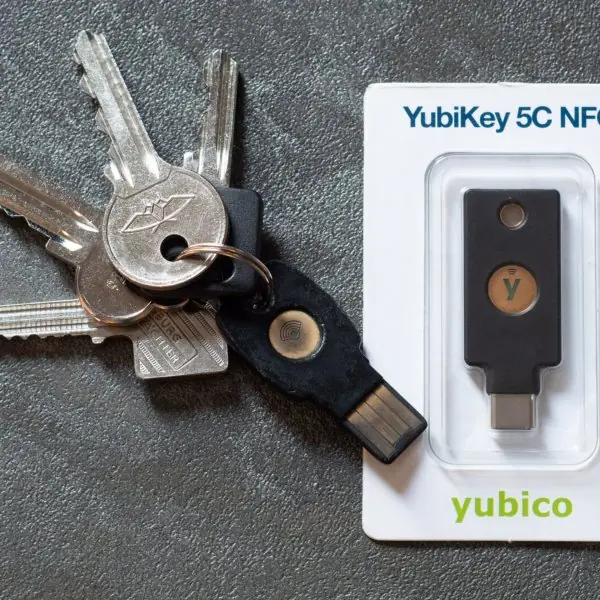
The plate shows three physical or visible parts of that chain: a hardware key, a phone making a payment, and the line of Android versions the app must keep working on.
The figures then draw each artefact with the numbers used in this unit.




7.7.1 Eight things to check before publishing an app
- Pick the framework with the team in mind. A one-person team with standard screens can use Flutter or React Native, and a bank with a custom camera pipeline may need native code. The wrong choice costs months. Write down the reasons, as the diagram in Figure 7.1 shows the trade between sharing and native feel.
- Run the whole test pyramid. Most of the tests should be fast unit tests of the logic, such as the EMI calculator of Unit 4, with a few UI tests on top (Figure 7.2). Add manual runs on a cheap phone with a slow network. An app tested only on a new flagship phone often fails for the many users on 2 GB devices.
- Shrink the download. Use R8, resource shrinking, WebP and vector drawables, and upload an AAB so that Play builds split APKs (Figure 7.3). A user on a prepaid data pack decides in seconds whether a 60 MB download is worth it. An app under about 20 MB is far more likely to be installed.
- Protect the signing key. The private key proves that an update comes from you, and losing it means you can never update the app under the same identity. Keep a backup in a safe place, use Play App Signing and protect the Google account with a hardware key (Plate 7.1a). Never commit a keystore or its password to a public repository.
- Increase versionCode every time. The installer treats a lower or equal code as a downgrade and refuses it. A formula such as major × 10,000 + minor × 100 + patch sorts correctly (Figure 7.5). Keep versionName readable for users, for example 2.3.7.
- Complete the store listing honestly. Give a title and descriptions in English and Nepali, real screenshots, a privacy-policy URL, a content rating and an accurate Data safety form. Play compares the form with what the app really does. A mismatch can lead to rejection or removal.
- Release in stages and watch. Start with internal and closed testers, then roll out to 1 per cent, 10 per cent and more of the users while crash and ANR rates are watched (Figure 7.6). If a bug appears, halting at 1 per cent harms few people. A school app released to every user at once and broken on one phone model teaches this lesson quickly.
- Follow the payment and policy rules. Digital goods inside the app must use Play Billing, while physical goods and services may use local wallets and QR payments such as Fonepay (Plate 7.1b). Keep the target API level current, justify every permission and respect advertising rules. Apps that miss the deadlines lose visibility in the store.
Chapter summary
- Cross-platform frameworks (Flutter, React Native, Kotlin Multiplatform, PWAs) trade one code base against size, fidelity and plugin dependence; choose by team skills and requirements.
- Test mostly with fast JVM unit tests, some integration tests and few UI tests; test on low-end devices, slow networks and Nepali locale.
- Release as a shrunk (R8) AAB; Play generates device-specific APKs; keep download size low.
- Signing proves authorship and integrity; v2 signs chunk digests of the whole file (tampering flips the root digest); protect the key.
- versionCode must increase (major × 10,000 + minor × 100 + patch); publish through staged tracks with a complete listing.
Practice
- Compare Flutter and React Native in three points.
- When would you choose native development over cross-platform?
- Describe the testing pyramid and one tool per level.
- What is the difference between APK and AAB?
- What does R8 do?
- Why must you protect the signing key and what is Play App Signing?
- In the signing digest scheme, how many 1 MiB chunks does a 5,000,000-byte file have, and what is the size of the last one?
- Compute versionCode for version 3.14.2 using the scheme of this unit.
- Why is a staged rollout useful?
- List four items needed for a Play Store listing.
Answers and worked solutions
1. Flutter: Dart, draws its own widgets, consistent UI. React Native: JavaScript, native widgets through a bridge, reuses web skills, depends on native modules. Both give one code base for Android and iOS.
2. For deep platform features, maximum performance, a new OS feature on day one, or a platform-specific look.
3. Unit tests on the JVM (JUnit), integration tests (Room testing, MockWebServer), UI tests on a device (Espresso), with many at the bottom and few at the top.
4. An APK is an installable package; an AAB is a publishing format from which Play builds optimised split APKs for each device.
5. It shrinks (removes unused code), optimises and obfuscates the code.
6. Updates must be signed by the same key; losing it blocks updates. Play App Signing lets Google hold the app-signing key so a lost upload key can be reset.
7. 5,000,000 / 1,048,576 = 4.77, so 5 chunks; the last has 5,000,000 − 4 × 1,048,576 = 805,696 bytes.
8. 3 × 10,000 + 14 × 100 + 2 = 31402.
9. A bad release reaches only a small share of users first, so problems found by crash reports can be fixed before most users are affected.
10. Title, descriptions (English and Nepali), screenshots, icon, privacy-policy URL, content rating, Data safety form.
Model answers: medium (5 marks) and long (10 marks) questions
Q1 (5 marks). Compare Flutter, React Native and native development and say when each is the better choice.
Introduction. Cross-platform frameworks trade one code base against size, fidelity and plugin dependence (section 7.1, Figure 7.1).
- Flutter. One Dart code base; its own engine draws every pixel, so the look is the same on Android and iOS and animation is smooth. The cost is custom widgets and a larger app.
- React Native. One JavaScript or TypeScript code base driving real native widgets through a bridge, so it reuses web skills; features without a ready module need native code.
- Native. Kotlin or Swift with the platform SDK: best performance, immediate access to new features, and the platform look, but two code bases.
- Kotlin Multiplatform. Shares the logic only and keeps the native UI, which allows gradual adoption.
| Point | Flutter | React Native | Native |
|---|---|---|---|
| Language | Dart | JavaScript | Kotlin / Swift |
| UI | Own engine | Native widgets | Native |
| Code bases | 1 | 1 | 2 |
| Best for | Fast, consistent UI | Web teams | Deep platform features |
Conclusion. One developer with standard screens and a deadline should choose Flutter or React Native; an app needing maximum performance or day-one OS features should be native.
Q2 (5 marks). Explain the testing pyramid and name the tools used at each level.
Introduction. The pyramid recommends many fast tests at the bottom and few slow ones at the top (section 7.2, Figure 7.2).
- Unit tests (about 70 per cent). Run on the local JVM in seconds and test logic such as ViewModels, repositories, parsers and the EMI calculator. Tools: JUnit, MockK or Mockito, Truth and coroutine test utilities.
- Integration tests (about 20 per cent). Test components together, for example Room with a real database or a repository with a fake server. Tools: Room testing support and MockWebServer.
- UI tests (about 10 per cent). Run on an emulator or device and drive screens and flows. Tools: Espresso, Compose test rules and UI Automator.
- Manual testing. Real devices, a low-end phone, a slow network, a small screen, the Nepali locale and large fonts.
- Supporting tools. Lint and detekt for static analysis, the Profiler for CPU, memory, network and energy, StrictMode for main-thread I/O and LeakCanary for leaks.
Conclusion. A pyramid keeps feedback fast and the suite cheap, while a few UI and manual tests confirm that the whole app works on real devices.
Q3 (5 marks). Using versionCode = major × 10,000 + minor × 100 + patch, compute the codes for 1.12.5, 2.3.7, 2.9.9, 2.10.0 and 3.4.12, and explain why the formula is used.
Introduction. Two numbers identify a release: versionName (shown to users) and versionCode (an integer that must increase, section 7.5, Figure 7.5).
- 1.12.5: 1 × 10,000 + 12 × 100 + 5 = 11205.
- 2.3.7: 2 × 10,000 + 3 × 100 + 7 = 20307.
- 2.9.9: 20,000 + 900 + 9 = 20909.
- 2.10.0: 20,000 + 1,000 + 0 = 21000, greater than 20909 as it should be.
- 3.4.12: 30,000 + 400 + 12 = 30412.
- Why. The store and the installer decide what is an update from the integer; a lower or equal code is a downgrade and is refused. Text comparison would put "2.10.0" before "2.9.9". The formula assumes minor and patch stay below 100.
Conclusion. The codes 11205 < 20307 < 20909 < 21000 < 30412 increase with the versions, so each release counts as an update.
Q4 (10 marks). Explain why Android apps are signed. Describe APK Signature Scheme v2 and show with the test file of section 7.4 how tampering is detected.
Introduction. Every APK must be digitally signed before it can be installed; the signature proves who published the package and that it has not been modified (section 7.4, Figure 7.4).
- Private key. The developer holds a private key in a keystore (ideally protected by hardware, Plate 7.1a); the public certificate travels inside the APK.
- Update rule. Android installs an update only if it is signed with the same key as the installed app, so another publisher cannot replace the app.
- Scheme v2. The whole file is signed, not each entry, and the signature block sits just before the central directory.
- Chunking. The APK is cut into 1 MiB (1,048,576-byte) chunks. The 2,500,000-byte test file gives 3 chunks of 1,048,576, 1,048,576 and 402,848 bytes.
- Digests. Each chunk is hashed with SHA-256 over a 0xA5 byte, the chunk length and the chunk. A top-level digest is the SHA-256 of a 0x5A byte, the number of chunks and the concatenated chunk digests; its value for the test file begins 395837017c7c09ab.
- Signature. The root digest is signed with the private key, and the installer verifies it with the certificate.
- Tampering. Flipping one bit at offset 1,500,000, which lies in chunk 2, changes digest 2 and therefore the root digest; the program prints
tampered root differs: Trueand the installer refuses the package. - Parallel and fast. Chunks can be hashed in parallel, so verification is faster than checking every entry of the older v1 jar signing.
| Point | v1 (jar signing) | v2 and later |
|---|---|---|
| Covers | Each file entry | Whole APK |
| Speed | Slower | Faster, parallel |
| Extra bytes inserted | May go unnoticed | Detected |
| Hash unit | File | 1 MiB chunk |
Conclusion. Signing gives identity and integrity; v2 protects every byte of the file, and the developer must guard the key because losing it means losing the ability to update.
Q5 (10 marks). Describe the steps for preparing and publishing an Android app on Google Play, including packaging, testing tracks and the store listing.
Introduction. Publishing is a pipeline from source code to a signed bundle in front of users (sections 7.3 to 7.6, Figure 7.6).
- Prepare. Fix minSdk from the audience, declare only the needed permissions, and keep targetSdk current because Play enforces deadlines.
- Version. Raise versionName and versionCode (for example 2.3.7 becomes 20307).
- Test. Run unit and integration tests in CI, then UI tests and manual runs on a low-end phone, a slow network and the Nepali locale.
- Shrink. Enable R8 and resource shrinking, use vector drawables and WebP; aim for a small download.
- Build and sign. Build a release AAB and sign it; use Play App Signing and a protected key.
- Upload and tracks. Upload to the Play Console, publish first to the internal track, then closed, open and production.
- Listing. Provide a title and descriptions in English and Nepali, screenshots, icon, feature graphic, privacy-policy URL, content rating and the Data safety form.
- Roll out and monitor. Release in stages (for example 1, 10, 50 and 100 per cent), watch crash and ANR rates and halt if they rise.
Monetisation. Paid download, in-app purchases and subscriptions through Play Billing, advertising (AdMob) and sponsorship; physical goods and services may use local wallets or QR payments, but digital goods must respect store policy.
| Step | Purpose |
|---|---|
| Version + tests | Safe, ordered updates |
| R8 + AAB | Small downloads |
| Sign | Identity and integrity |
| Tracks | Gradual exposure |
| Listing + Data safety | Compliance and trust |
Conclusion. A disciplined pipeline of testing, shrinking, signing and staged rollout gets an app to users safely and keeps it updatable.