Unit 2 · 10 teaching hours · 55 min read
Database Management System
What the syllabus asks for 7
- Introduction to database; data, information, database and DBMS; advantages of a DBMS
- Data types in MySQL: numeric, string and date/time types
- Table: field, record, and table design
- Keys: primary key, foreign key, composite and candidate keys; types of relationship (one-to-one, one-to-many, many-to-many)
- Introduction to MySQL: features, installing MySQL 8 and working in MySQL Workbench
- Data Definition Language (DDL): CREATE, ALTER, DROP and TRUNCATE
- Data Manipulation Language (DML): INSERT, SELECT with WHERE, ORDER BY and LIKE, UPDATE and DELETE
A librarian who finds one book among thousands in seconds, a school office that prints every student's marksheet in an afternoon, and a bank that knows your balance the moment you pay with Fonepay all rely on the same idea: data kept in an organised, searchable form. This unit explains what a database is, how a Database Management System (DBMS) looks after it, and how to build and use one in MySQL with SQL commands. Every query in this chapter was run on MySQL 8.4, and the table printed under it is exactly what MySQL returned.
The CDC grid gives this unit 8 marks: two MCQs (2 marks), one short question (2 marks) and one long question (4 marks). MCQs test a key, a data type or which SQL command does what. The short question is usually a definition with an advantage (DBMS, primary key) or two differences (data and information, DDL and DML). The long question asks you to define and explain with examples (database, DBMS, fields and records) or to write SQL for a given table — CREATE, INSERT, SELECT with WHERE, ORDER BY or LIKE, UPDATE and DELETE. In SQL answers every keyword, comma, quote and semicolon is a key element, so write each query in full.
2.1 Introduction to database: data, information, database and DBMS
Databases work quietly behind almost everything you do online.
| Area | What the database stores |
|---|---|
| Social media | user profiles, posts, comments, likes |
| Online shopping (Daraz, SastoDeal) | products, prices, orders, reviews |
| Banking and wallets (eSewa, Khalti) | accounts, transactions, balances |
| Hospitals | patient records, test reports, appointments |
| Schools | students, attendance, marks, fees |
Data and information
Data are raw facts and figures — numbers, words, dates, images — that have no clear meaning on their own. Information is data that has been organised or processed so that it is meaningful and useful for understanding something or making a decision.
The marks 80, 85 and 90 are data. "Binay's average in the three terminal exams is 85, so he improved by 10 marks" is information: the data has been processed (averaged and compared) and now means something.
| Aspect | Data | Information |
|---|---|---|
| Definition | raw, unprocessed facts and figures | processed, organised data with meaning |
| Form | numbers, text, symbols, images | tables, reports, summaries, charts |
| Meaning | no clear meaning on its own | meaningful and useful for decisions |
| Stage | input to processing | output of processing |
| Example | 2082, 95, Binay | "Binay scored 95 in 2082 BS and was among the toppers." |
Database
A database is an organised collection of related data stored so that it can be easily accessed, managed and updated. In a relational database the data is kept in tables of rows and columns.
Before computers, records were kept on paper: registers, files in cabinets and card catalogues. This traditional file system works for a few hundred records, but searching, sorting, copying and keeping it correct all depend on human effort.
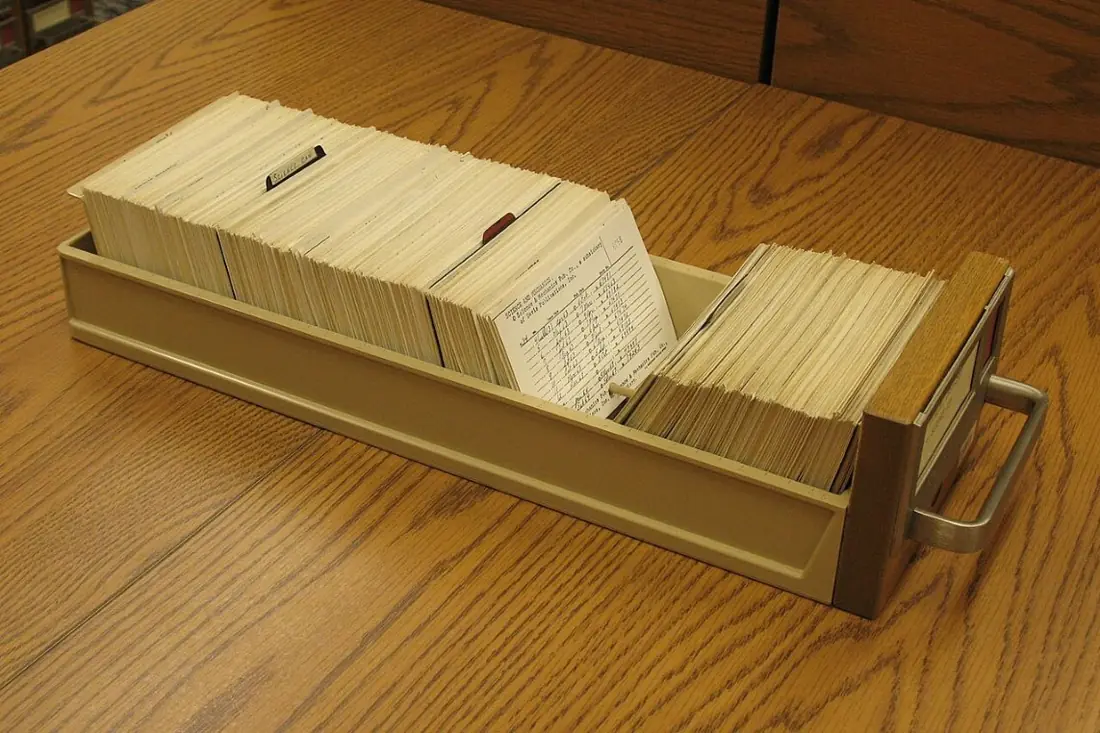
| Traditional (manual) file system | Computerised database |
|---|---|
| records on paper in registers and cabinets | records stored digitally in tables |
| slow to search, sort and update | searching and sorting take seconds |
| the same data copied in many files (redundancy) | data stored once and shared |
| copies easily disagree (inconsistency) | rules keep the data consistent |
| hard to protect; one fire destroys it | passwords, permissions and backups |
| one person can use a file at a time | many users at the same time |
In groups, collect the name, age and favourite subject of five classmates and arrange the data as a small table. Then discuss: if the school had 1,000 students, what would be hard about the paper version, and how would a DBMS make searching ("all students who like Computer"), sorting and updating easier?
Database Management System (DBMS)
A Database Management System (DBMS) is software used to create, store, retrieve, update and delete data in a database in an organised way, while keeping the data correct (integrity), safe (security) and available to many users. It works as the intermediary between the users and the database.
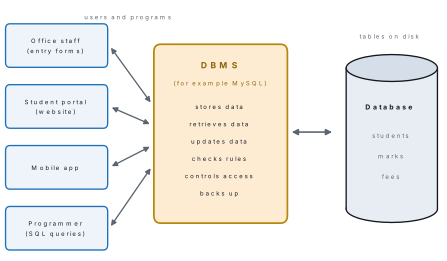
Examples of DBMS software: MySQL (open source, used by most websites), Oracle Database (commercial, large enterprises), Microsoft SQL Server, PostgreSQL (open source, advanced features), SQLite (tiny, built into phones and apps) and MongoDB (a NoSQL system for unstructured data).
Recent trends. Cloud databases run on the Internet and grow with your needs (Google Cloud SQL, Amazon RDS). NoSQL databases such as MongoDB and Cassandra store data that does not fit neat tables. In-memory databases such as Redis and SAP HANA keep data in RAM for very fast answers. Distributed databases spread data over many servers so that one failure does not stop the service.
Features of a DBMS. Data storage in tables; quick data retrieval with simple commands; data manipulation (add, change, delete); data integrity (rules such as "marks must be 0 to 100"); control of redundancy (each fact stored once); security (who may see or change what); and backup and recovery.
| Advantages of a DBMS | Disadvantages (challenges) |
|---|---|
| fast storage, searching and retrieval | needs trained people to set up and manage |
| reduces repetition of data (redundancy) | software, hardware and training cost money |
| keeps data consistent and accurate | a badly managed system is a security risk |
| many users can work at the same time | large systems need regular maintenance |
| security through passwords and permissions | very large data can make it slow without tuning |
| backup and recovery after accidents | a failure of the server stops every user |
A spreadsheet such as Excel is fine for one person's small list, but it cannot stop two rows having the same roll number, does not link tables safely, slows down with hundreds of thousands of rows, and is awkward for many users at once. A DBMS does all of these.
A Relational Database Management System (RDBMS) is a DBMS that stores data in tables (relations) of rows and columns and links the tables through common fields called keys. MySQL, Oracle, PostgreSQL and Microsoft SQL Server are RDBMSs.
2.2 Data types in MySQL: numeric, string and date/time types
The data type of a column decides what kind of value it may hold (whole number, decimal, text, date), how much space each value takes, and which operations make sense on it.
Choosing the right type keeps wrong data out and saves space: a date column rejects "hello", and arithmetic works on numbers but not on names.
Numeric types
| Type | Holds | Range or note |
|---|---|---|
| TINYINT | very small whole numbers | −128 to 127 |
| SMALLINT | small whole numbers | −32,768 to 32,767 |
| INT | whole numbers | −2,147,483,648 to 2,147,483,647 |
| BIGINT | very large whole numbers | about ±9.2 × 10¹⁸ |
| DECIMAL(p, s) | exact numbers with decimals | p digits in total, s after the point; use for money and marks |
| FLOAT, DOUBLE | approximate numbers with decimals | very large or tiny values, small rounding errors |
String (character) types
| Type | Holds | Note |
|---|---|---|
| CHAR(n) | fixed-length text, up to 255 characters | always uses the space of n characters; good for codes such as gender 'M'/'F' |
| VARCHAR(n) | variable-length text, up to n characters | uses only as much space as the text; best for names and addresses |
| TEXT | long text, up to 65,535 bytes | paragraphs, comments, descriptions |
Date and time types (written in quotes, in this exact order)
| Type | Format | Example |
|---|---|---|
| DATE | 'YYYY-MM-DD' | '2010-03-12' |
| TIME | 'hh:mm:ss' | '14:30:00' |
| DATETIME | 'YYYY-MM-DD hh:mm:ss' | '2025-07-17 10:15:00' |
| TIMESTAMP | like DATETIME, stored in UTC; can fill itself in automatically | used to record when a row was created or changed |
BOOLEAN stores TRUE or FALSE. In MySQL it is really TINYINT(1): TRUE is stored as 1 and FALSE as 0.
Problem. A table has phone_int INT, phone_txt VARCHAR(10),
code_char CHAR(5), price_dec DECIMAL(8,2) and joined DATE. Predict, then
check in MySQL, what happens to each value: (a) the mobile number 9800000001 in
phone_int; (b) 1234.567 in price_dec; (c) 'ABCDEFG' in code_char;
(d) '2007 ' in joined.
Solution. (a) The largest INT is 2,147,483,647, so a ten-digit Nepali mobile number does not fit:
ERROR 1264 (22003): Out of range value for column 'phone_int' at row 1
Phone numbers are labels, not quantities, so they belong in VARCHAR(10) (or
CHAR(10)), which also keeps a leading zero such as 01-5550000.
(b) DECIMAL(8,2) keeps two decimal places, so MySQL stores 1234.57 and gives a warning ("Data truncated").
(c) Seven characters do not fit in five:
ERROR 1406 (22001): Data too long for column 'code_char' at row 1
(d) A DATE must be a full 'YYYY-MM-DD':
ERROR 1292 (22007): Incorrect date value: '2007 ' for column 'joined' at row 1
MySQL's DATE follows the Gregorian (AD) calendar. A Bikram Sambat date such as '2081-03-32' (Asar 32) is rejected because no AD month has 32 days, and worse, '2082-04-15' is accepted — as 15 April 2082 AD, which makes every age or day-of-week calculation wrong. Store AD dates in DATE columns; if you must keep the BS date, store it in a separate CHAR(10) column. (The textbook's example "DATE: 2047-07-06" is a BS date, so treat it as a format example only.)
2.3 Table: field, record and table design
A table is the basic structure of a relational database: data about one kind of thing (students, books, products) arranged in rows and columns. A field (column) holds one kind of fact for every row, such as Name or Date of Birth, and has a fixed data type. A record (row) holds all the facts about one item — one student, one book — so a record is one complete entry.
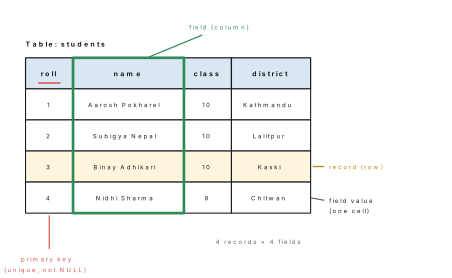
Key points about tables, fields and records:
- A table holds one kind of entity; its columns are fields and its rows are records. The table is the primary building block of a database.
- Every field has a name (such as
dob) and a data type (such as DATE); every value in that field must fit the type. - Each record describes one entity completely and is usually identified by a unique ID, the primary key.
- Tables can be linked to other tables through keys (section 2.4).
Designing a table
A well-designed table answers questions correctly for years. Follow these steps:
- Decide the entity the table is about (students, books, sales).
- List the fields, one fact per field: separate
name,classanddistrictrather than one long "details" field. - Choose a data type and size for each field.
- Choose the primary key, a field whose value is different for every record (roll number, book number).
- Add constraints such as NOT NULL for fields that must always be filled.
- Do not store what can be calculated. Store the date of birth, not the age (the age changes every year); store marks, not the total.
Problem. Design a table books for the school library to store the book
number, title, author, price, number of copies and the date each book was
bought. Give each field a suitable data type and choose the primary key.
Solution.
| Field | Data type | Reason |
|---|---|---|
| book_no | INT (primary key) | a unique number for every book |
| title | VARCHAR(100), NOT NULL | titles vary in length; every book has one |
| author | VARCHAR(60) | names vary in length |
| price | DECIMAL(7,2) | money needs exact decimals, e.g. 545.50 |
| copies | SMALLINT | a small whole number |
| bought_on | DATE | an AD date such as '2025-04-20' |
CREATE TABLE books (
    book_no   INT PRIMARY KEY,
    title     VARCHAR(100) NOT NULL,
    author    VARCHAR(60),
    price     DECIMAL(7, 2),
    copies    SMALLINT,
    bought_on DATE
);
2.4 Keys and relationships
In a database, keys are fields (or groups of fields) that identify records uniquely and link tables together.
- A primary key is the field (or combination of fields) that uniquely identifies each record of a table. Its values must be unique and never NULL, and a table has only one primary key.
- A candidate key is any field or set of fields that could serve as the primary key because it is unique and never empty. One candidate is chosen as the primary key; the others are called alternate keys.
- A composite key is a key made of two or more fields together, used when no single field is unique on its own.
- A foreign key is a field in one table that refers to the primary key of another table. It creates the link between the tables and makes sure the link is valid (referential integrity); it is the "linking pin" between tables.
In a students table, roll and a unique symbol_no (SEE symbol number) are
both candidate keys. If roll is chosen as the primary key, symbol_no
becomes an alternate key. name is not a candidate key, because two students
can share a name. A super key is any set of fields that is unique, even if
it contains extra fields (such as roll + name); every candidate key is a
minimal super key.
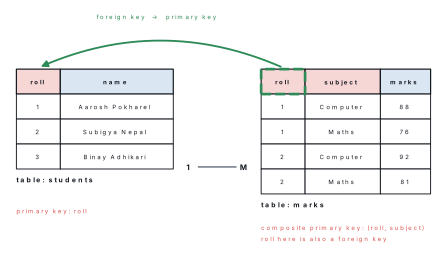
| Primary key | Foreign key |
|---|---|
| identifies each record of its own table | refers to the primary key of another table |
| must be unique | may repeat (one student has many marks) |
| can never be NULL | may be NULL unless forbidden |
| only one per table | a table may have several |
example: roll in students |
example: roll in marks |
In the textbook's example, two different books both have BookID B_01. If
BookID is the key of the Library table, that is impossible — the DBMS would
reject the second row. Each book needs its own BookID (B_01, B_02, …); it is
the StudentID (the foreign key) that may repeat, because one student can
borrow many books.
Problem. A table results has the fields symbol_no (unique for every
student), roll, class, name and gpa, where a roll number is unique only
within one class. (a) List the candidate keys. (b) Choose a primary key and name
the alternate key. (c) Which key is composite?
Solution. (a) symbol_no on its own is unique; roll alone is not (Class 9
and Class 10 both have roll 1), but the pair (class, roll) is. So the
candidate keys are symbol_no and (class, roll).
(b) A single short field is simpler: choose symbol_no as the primary key;
then (class, roll) is the alternate key.
(c) (class, roll) is composite, because it is made of two fields.
Types of relationship
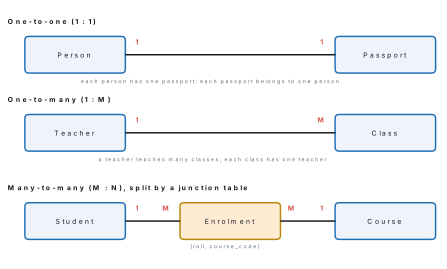
A relationship is a logical link between two tables through a common field (a key). It lets data stored in separate tables be used together without repeating it.
| Relationship | Meaning | Example | How it is stored |
|---|---|---|---|
| One-to-one (1 : 1) | one record on each side links to exactly one on the other | a person and a passport; a student and a library card | the primary key of one table is a unique foreign key in the other |
| One-to-many (1 : M) | one record links to many, but each of those links back to only one | a teacher and the classes taught; a customer and orders; a student and marks | the foreign key goes in the "many" table |
| Many-to-many (M : N) | many on each side link to many on the other | students and courses; books and authors | a third junction table holds the pairs of keys |
One-to-many is by far the most common relationship. A one-to-one link is used to split rarely-used or private details (medical records) into a separate table.
2.5 Introduction to MySQL
MySQL is a free, open-source relational DBMS that uses SQL (Structured Query Language) to define, store and query data. It was first released in 1995 by the Swedish company MySQL AB, which was bought by Sun Microsystems in 2008; Oracle Corporation took it over with Sun in 2010 and maintains it today. Most websites, school and office systems and many mobile apps keep their data in MySQL because it is fast, reliable and free.
Features of MySQL
- Open source and free (Community Edition), and runs on Windows, Linux and macOS.
- Simple language: SQL commands read almost like English.
- Data definition, retrieval and manipulation: create tables, query them and change their data.
- Multi-user: many users and programs can work at the same time.
- Security: user accounts, passwords and permissions.
- Fast and scalable: from a school lab to websites with millions of users.
- Works with modern applications: PHP, Python, Java and web frameworks.
Installing MySQL 8 on Windows
The textbook's steps use MySQL Installer, a Windows tool that existed only for MySQL 8.0. MySQL 8.0 reached its end of life in April 2026; the series to install now is MySQL 8.4 LTS (long-term support, maintained until 2032), which installs from an ordinary MSI file and is set up with MySQL Configurator. Workbench is downloaded separately.
- Open dev.mysql.com/downloads/mysql, choose version 8.4 LTS and operating system Microsoft Windows, and download the Windows (x86, 64-bit), MSI Installer. Click "No thanks, just start my download".
- Run the downloaded
.msifile and choose the Typical setup. At the end keep Run MySQL Configurator ticked and click Finish. - In MySQL Configurator, keep the data folder, then on Type and Networking choose Development Computer and leave the port as 3306.
- On Accounts and Roles type a strong root password twice and remember it: you will need it every time you log in as root.
- On Windows Service keep "Configure MySQL Server as a Windows Service" (service name MySQL84) and "Start the MySQL Server at System Startup".
- Accept the defaults for file permissions and sample databases, then on Apply Configuration click Execute. When every step shows a green tick, click Finish.
- Download MySQL Workbench from dev.mysql.com/downloads/workbench, install it, and open it.
Open MySQL 8.4 Command Line Client from the Start menu (or a Command Prompt
in C:\Program Files\MySQL\MySQL Server 8.4\bin) and type
mysql --version — two hyphens and no spaces (the textbook's mysql - - version
is a printing slip). Then log in with mysql -u root -p, type your password,
and you should see the mysql> prompt. Leave with exit;, quit; or
Ctrl + D.
Working in MySQL Workbench
MySQL Workbench is the graphical tool for writing SQL and seeing the results. On its home screen, double-click the tile Local instance MySQL84, type the root password, and the SQL editor opens.
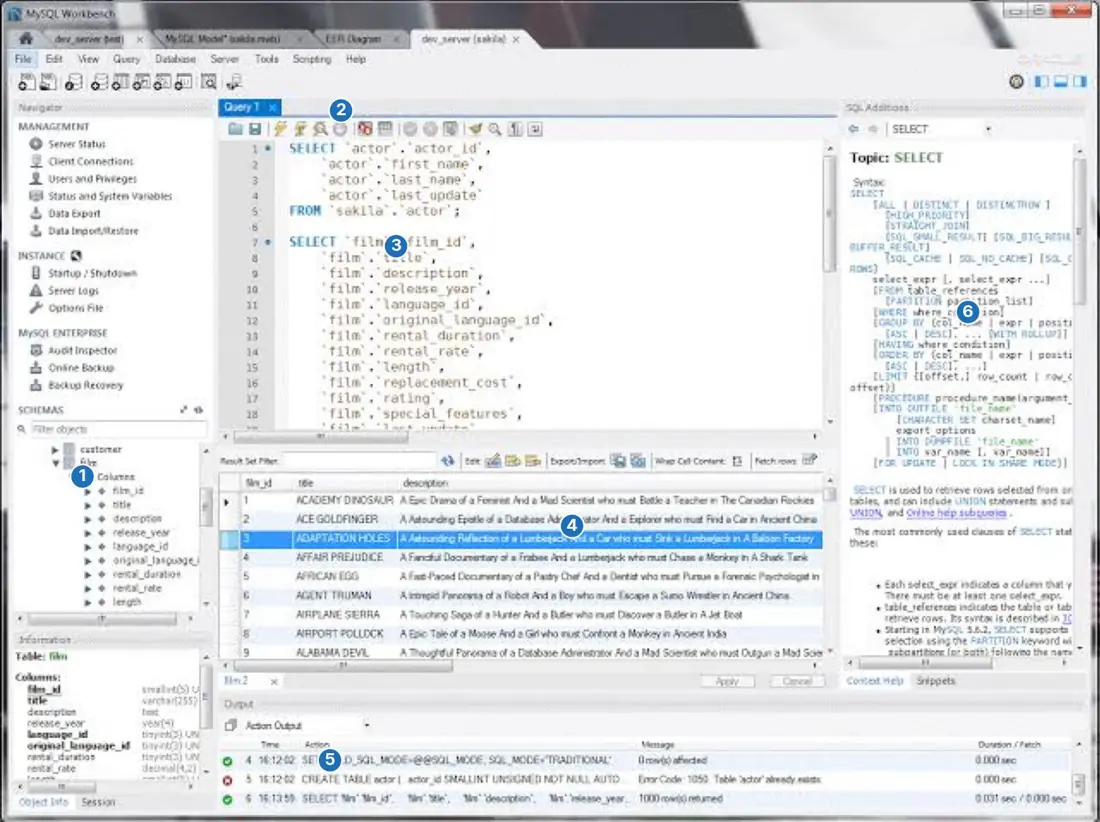
Workbench starts in safe-update mode, which refuses an UPDATE or DELETE
whose WHERE clause does not use a key column. For example
UPDATE students SET class = 10; stops with
ERROR 1175 (HY000): You are using safe update mode and you tried to update a table without a WHERE that uses a KEY column.
This protects you from changing every row by accident. Add a WHERE that uses the
primary key (WHERE roll = 5), or, when you really mean every row, untick
Edit → Preferences → SQL Editor → Safe Updates and reconnect.
SQL and queries
SQL (Structured Query Language), pronounced "S-Q-L" or "sequel", is the standard language for working with relational databases. It was developed at IBM in the 1970s. A query is one request written in SQL — to create a table, retrieve, insert, update or delete data.
| Sub-language | Purpose | Commands |
|---|---|---|
| DDL — Data Definition Language | define and change the structure | CREATE, ALTER, DROP, TRUNCATE, RENAME |
| DML — Data Manipulation Language | work with the data inside tables | INSERT, SELECT, UPDATE, DELETE |
| DCL — Data Control Language | control permissions | GRANT, REVOKE |
| TCL — Transaction Control Language | make a group of changes permanent or undo them | COMMIT, ROLLBACK, START TRANSACTION |
SQL keywords are not case-sensitive (select works like SELECT), but writing
keywords in capitals makes queries easier to read. Every statement ends with a
semicolon, and text and date values go in single quotes.
Constraints
A constraint is a rule attached to a column or table that the DBMS enforces on every INSERT and UPDATE, so that only valid, consistent data enters the table.
| Constraint | Rule it enforces | Example |
|---|---|---|
| PRIMARY KEY | values unique and never NULL | roll INT PRIMARY KEY |
| FOREIGN KEY | value must exist in the referenced table | FOREIGN KEY (roll) REFERENCES students(roll) |
| NOT NULL | the column must always have a value | name VARCHAR(40) NOT NULL |
| UNIQUE | no two rows may have the same value (NULL allowed) | phone VARCHAR(10) UNIQUE |
| CHECK | the value must satisfy a condition (enforced from MySQL 8.0.16) | CHECK (marks BETWEEN 0 AND 100) |
| DEFAULT | value used when none is given | district VARCHAR(30) DEFAULT 'Kathmandu' |
Constraints keep data accurate, stop duplicate or impossible entries, enforce the links between tables and record the organisation's rules inside the database itself.
2.6 Data Definition Language (DDL): CREATE, ALTER, DROP and TRUNCATE
DDL statements build and change the structure of the database: databases, tables, columns and constraints. They do not work on individual rows. In MySQL every DDL statement is committed at once — it cannot be undone with ROLLBACK — so think before you run DROP or TRUNCATE.
CREATE
CREATE DATABASE school;
USE school;
CREATE TABLE students (
    roll     INT PRIMARY KEY,
    name     VARCHAR(40) NOT NULL,
    gender   CHAR(1),
    class    INT NOT NULL,
    district VARCHAR(20) DEFAULT 'Kathmandu',
    dob      DATE,
    CONSTRAINT chk_gender CHECK (gender IN ('M', 'F'))
);
DESCRIBE students;
USE selects the database that the following statements work on, and
DESCRIBE (or DESC) shows the structure MySQL actually created:
| Field | Type | Null | Key | Default | Extra |
|---|---|---|---|---|---|
| roll | int | NO | PRI | NULL | |
| name | varchar(40) | NO | NULL | ||
| gender | char(1) | YES | NULL | ||
| class | int | NO | NULL | ||
| district | varchar(20) | YES | Kathmandu | ||
| dob | date | YES | NULL |
SHOW DATABASES; lists the databases and SHOW TABLES; lists the tables of
the current database.
ALTER
ALTER TABLE changes the structure of an existing table. All of these were run, in this order, on the table above:
| Task | Statement |
|---|---|
| add a column | ALTER TABLE students ADD email VARCHAR(50); |
| change a column's type or size | ALTER TABLE students MODIFY COLUMN district VARCHAR(30); |
| rename a column and give its type | ALTER TABLE students CHANGE dob date_of_birth DATE; |
| rename a column only (MySQL 8) | ALTER TABLE students RENAME COLUMN date_of_birth TO dob; |
| delete a column | ALTER TABLE students DROP COLUMN email; |
| set a default value | ALTER TABLE students ALTER district SET DEFAULT 'Kathmandu'; |
| remove a named constraint | ALTER TABLE students DROP CONSTRAINT chk_gender; |
| add a constraint | ALTER TABLE students ADD CONSTRAINT chk_gender CHECK (gender IN ('M', 'F')); |
| rename the table | ALTER TABLE students RENAME TO pupils; or RENAME TABLE students TO pupils; |
After ALTER TABLE students MODIFY COLUMN district VARCHAR(30); MySQL's
DESCRIBE showed the default of district had changed from 'Kathmandu' to
NULL: MODIFY rebuilds the column from exactly what you write, so anything
you leave out (NOT NULL, DEFAULT) is lost. Repeat it:
MODIFY COLUMN district VARCHAR(30) DEFAULT 'Kathmandu'; — or put it back with
ALTER … SET DEFAULT as in the table above.
DROP and TRUNCATE
CREATE TABLE notice (id INT, title VARCHAR(30));
INSERT INTO notice VALUES (1, 'Holiday'), (2, 'Exam routine');
TRUNCATE TABLE notice;
SELECT * FROM notice;
The SELECT now returns Empty set, but DESCRIBE notice; still shows both
columns: TRUNCATE removed all the rows and kept the structure.
DROP TABLE notice;
Now SHOW TABLES; no longer lists notice: DROP removed the table and its
data for ever. DROP DATABASE school; would remove the whole database.
| DELETE | TRUNCATE | DROP | |
|---|---|---|---|
| Type | DML | DDL | DDL |
| Removes | chosen rows (with WHERE) or all rows | all rows | the whole table: rows and structure |
| Structure kept? | yes | yes | no |
| WHERE allowed? | yes | no | no |
| Can be rolled back? | yes, inside a transaction | no | no |
| Speed on big tables | slower (row by row) | very fast | very fast |
2.7 Data Manipulation Language (DML): INSERT, SELECT, UPDATE and DELETE
DML statements work on the data inside tables without changing their
structure. All the examples below use the students table built in §2.6 (with
district widened to VARCHAR(30)) and follow one another in order, so each
result is exactly what MySQL returned at that point.
INSERT — adding records
INSERT INTO table_name (column1, column2, ...) VALUES (value1, value2, ...);
INSERT INTO table_name VALUES (value1, value2, ...);   -- a value for every column, in order
INSERT INTO students (roll, name, gender, class, district, dob)
VALUES (1, 'Aarosh Pokharel', 'M', 10, 'Kathmandu', '2010-03-12');

INSERT INTO students (roll, name, gender, class, district, dob) VALUES
(2, 'Subigya Nepal', 'F', 10, 'Lalitpur', '2010-07-25'),
(3, 'Binay Adhikari', 'M', 10, 'Kaski', '2009-11-02'),
(4, 'Nidhi Sharma', 'F', 9, 'Chitwan', '2011-01-19'),
(5, 'Sampada Bhattarai', 'F', 10, 'Kathmandu', '2010-05-30'),
(6, 'Aman Yadav', 'M', 9, 'Dhanusha', '2011-09-14'),
(7, 'Rajesh Tamang', 'M', 10, 'Makwanpur', NULL),
(8, 'Anjali Gurung', 'F', 9, 'Kaski', '2011-02-21'),
(9, 'Iman Shrestha', 'M', 9, 'Bhaktapur', '2011-08-03');

INSERT INTO students VALUES (10, 'Muna Rai', 'F', 10, 'Morang', '2010-04-27');
INSERT INTO students (roll, name, class) VALUES (11, 'Dikshya Pokhrel', 10);
SELECT * FROM students;
| roll | name | gender | class | district | dob |
|---|---|---|---|---|---|
| 1 | Aarosh Pokharel | M | 10 | Kathmandu | 2010-03-12 |
| 2 | Subigya Nepal | F | 10 | Lalitpur | 2010-07-25 |
| 3 | Binay Adhikari | M | 10 | Kaski | 2009-11-02 |
| 4 | Nidhi Sharma | F | 9 | Chitwan | 2011-01-19 |
| 5 | Sampada Bhattarai | F | 10 | Kathmandu | 2010-05-30 |
| 6 | Aman Yadav | M | 9 | Dhanusha | 2011-09-14 |
| 7 | Rajesh Tamang | M | 10 | Makwanpur | NULL |
| 8 | Anjali Gurung | F | 9 | Kaski | 2011-02-21 |
| 9 | Iman Shrestha | M | 9 | Bhaktapur | 2011-08-03 |
| 10 | Muna Rai | F | 10 | Morang | 2010-04-27 |
| 11 | Dikshya Pokhrel | NULL | 10 | Kathmandu | NULL |
The second INSERT added eight rows in one statement. Dikshya's row shows the
constraints at work: district received its DEFAULT 'Kathmandu', and the
columns with no value and no default became NULL ("no value").
Problem. Predict the result of each statement on the table above.
(a) INSERT INTO students (roll, name, class) VALUES (3, 'Kiran Thapa', 9);
(b) INSERT INTO students (roll, name) VALUES (12, 'Kiran Thapa');
(c) INSERT INTO students (roll, name, gender, class) VALUES (12, 'Kiran Thapa', 'X', 9);
Solution. Each one breaks a constraint, so MySQL rejects the whole row:
(a) ERROR 1062 (23000): Duplicate entry '3' for key 'students.PRIMARY'
(b) ERROR 1364 (HY000): Field 'class' doesn't have a default value
(c) ERROR 3819 (HY000): Check constraint 'chk_gender' is violated.
(a) roll 3 already exists, and a primary key must be unique. (b) class is NOT
NULL and has no default. (c) the CHECK allows only 'M' or 'F'.
SELECT — retrieving data
SELECT column1, column2 FROM table_name
WHERE condition
ORDER BY column [ASC | DESC];
SELECT * returns every column; the answer comes back as a temporary table
called the result set. Dikshya's practice row is removed first with
DELETE FROM students WHERE roll = 11;, leaving ten students.
The WHERE clause keeps only the rows for which its condition is true. It can
use the comparison operators =, <> (not equal), >, <, >=, <=, the
logical operators AND, OR, NOT, and the special forms BETWEEN … AND …,
IN (…) and IS NULL.
Problem. Write queries to list (a) the name and date of birth of Class 10 students, (b) the roll and name of girls in Class 10, (c) students from Kaski or Chitwan, (d) students born in 2010, (e) students from the three districts of Kathmandu Valley, (f) students whose date of birth is missing.
Solution.
(a)
SELECT name, dob FROM students WHERE class = 10;
| name | dob |
|---|---|
| Aarosh Pokharel | 2010-03-12 |
| Subigya Nepal | 2010-07-25 |
| Binay Adhikari | 2009-11-02 |
| Sampada Bhattarai | 2010-05-30 |
| Rajesh Tamang | NULL |
| Muna Rai | 2010-04-27 |
(b)
SELECT roll, name FROM students WHERE gender = 'F' AND class = 10;
| roll | name |
|---|---|
| 2 | Subigya Nepal |
| 5 | Sampada Bhattarai |
| 10 | Muna Rai |
(c)
SELECT name, district FROM students WHERE district = 'Kaski' OR district = 'Chitwan';
| name | district |
|---|---|
| Binay Adhikari | Kaski |
| Nidhi Sharma | Chitwan |
| Anjali Gurung | Kaski |
(d)
SELECT name, dob FROM students WHERE dob BETWEEN '2010-01-01' AND '2010-12-31';
| name | dob |
|---|---|
| Aarosh Pokharel | 2010-03-12 |
| Subigya Nepal | 2010-07-25 |
| Sampada Bhattarai | 2010-05-30 |
| Muna Rai | 2010-04-27 |
(e)
SELECT name, district FROM students WHERE district IN ('Kathmandu', 'Lalitpur', 'Bhaktapur');
| name | district |
|---|---|
| Aarosh Pokharel | Kathmandu |
| Subigya Nepal | Lalitpur |
| Sampada Bhattarai | Kathmandu |
| Iman Shrestha | Bhaktapur |
(f)
SELECT name FROM students WHERE dob IS NULL;
| name |
|---|
| Rajesh Tamang |
WHERE dob = NULL returns no rows at all, because NULL means "unknown" and an
unknown value is never equal to anything, not even another NULL. Always write
IS NULL or IS NOT NULL.
ORDER BY, DISTINCT and LIMIT
ORDER BY sorts the result set: ASC (ascending, the default) or DESC (descending). With two columns, the second decides the order only among rows that tie on the first. DISTINCT removes repeated rows from the result, and LIMIT n keeps only the first n rows.
Problem. (a) List names and dates of birth in alphabetical order. (b) List students by class, highest class first, and within a class by age, oldest first. (c) Show the three oldest students. (d) List each district once.
Solution.
(a)
SELECT name, dob FROM students ORDER BY name;
| name | dob |
|---|---|
| Aarosh Pokharel | 2010-03-12 |
| Aman Yadav | 2011-09-14 |
| Anjali Gurung | 2011-02-21 |
| Binay Adhikari | 2009-11-02 |
| Iman Shrestha | 2011-08-03 |
| Muna Rai | 2010-04-27 |
| Nidhi Sharma | 2011-01-19 |
| Rajesh Tamang | NULL |
| Sampada Bhattarai | 2010-05-30 |
| Subigya Nepal | 2010-07-25 |
(b) The oldest student has the earliest date, so dates go in ascending order:
SELECT name, class, dob FROM students ORDER BY class DESC, dob ASC;
| name | class | dob |
|---|---|---|
| Rajesh Tamang | 10 | NULL |
| Binay Adhikari | 10 | 2009-11-02 |
| Aarosh Pokharel | 10 | 2010-03-12 |
| Muna Rai | 10 | 2010-04-27 |
| Sampada Bhattarai | 10 | 2010-05-30 |
| Subigya Nepal | 10 | 2010-07-25 |
| Nidhi Sharma | 9 | 2011-01-19 |
| Anjali Gurung | 9 | 2011-02-21 |
| Iman Shrestha | 9 | 2011-08-03 |
| Aman Yadav | 9 | 2011-09-14 |
MySQL places NULL before every value in ascending order, so Rajesh comes first in Class 10.
(c)
SELECT name, dob FROM students WHERE dob IS NOT NULL ORDER BY dob LIMIT 3;
| name | dob |
|---|---|
| Binay Adhikari | 2009-11-02 |
| Aarosh Pokharel | 2010-03-12 |
| Muna Rai | 2010-04-27 |
(d)
SELECT DISTINCT district FROM students;
| district |
|---|
| Kathmandu |
| Lalitpur |
| Kaski |
| Chitwan |
| Dhanusha |
| Makwanpur |
| Bhaktapur |
| Morang |
LIKE — searching for patterns
LIKE compares text with a pattern that contains wildcard characters: % stands for any number of characters (including none) and _ (underscore) stands for exactly one character. The pattern must match the whole value. With MySQL's default settings LIKE ignores the difference between capital and small letters.
| Pattern | Matches | Example values |
|---|---|---|
'A%' |
starts with A | Aarosh, Aman, Anil |
'%rai' |
ends with rai | Muna Rai, Sampada Bhattarai |
'%sh%' |
contains sh anywhere | Aarosh, Rajesh, Shrestha |
'_a%' |
second letter is a | Sampada, Rajesh |
'_man' |
exactly four letters ending in man | Aman, Iman |
Problem. Write queries on students to find (a) names beginning with A,
(b) names ending in "rai", (c) names containing "sh", (d) names whose second
letter is "a", and (e) students whose first name is a four-letter name ending in
"man".
Solution.
(a)
SELECT name, class FROM students WHERE name LIKE 'A%';
| name | class |
|---|---|
| Aarosh Pokharel | 10 |
| Aman Yadav | 9 |
| Anjali Gurung | 9 |
(b)
SELECT name FROM students WHERE name LIKE '%rai';
| name |
|---|
| Sampada Bhattarai |
| Muna Rai |
(c)
SELECT name FROM students WHERE name LIKE '%sh%';
| name |
|---|
| Aarosh Pokharel |
| Nidhi Sharma |
| Rajesh Tamang |
| Iman Shrestha |
(d)
SELECT name FROM students WHERE name LIKE '_a%';
| name |
|---|
| Aarosh Pokharel |
| Sampada Bhattarai |
| Rajesh Tamang |
(e) WHERE name LIKE '_man' returns an empty set here, because the stored
values are full names such as "Aman Yadav", and the pattern must match the
whole value. Add a space and % for the surname:
SELECT name FROM students WHERE name LIKE '_man %';
| name |
|---|
| Aman Yadav |
| Iman Shrestha |
The textbook's pattern '_man' does work on a column that stores single first
names: on a table holding Aman, Iman, Suman, Rajesh, Ramesh and Ganesh, '_man'
returned Aman and Iman, '%man' returned Aman, Iman and Suman, and '%esh'
returned Rajesh, Ramesh and Ganesh.
UPDATE — changing existing data
UPDATE table_name SET column1 = value1, column2 = value2 WHERE condition;
Problem. (a) Iman Shrestha (roll 9) has moved to Lalitpur; record it. (b) Promote every Class 9 student to Class 10.
Solution.
(a)
UPDATE students SET district = 'Lalitpur' WHERE roll = 9;
MySQL replies Query OK, 1 row affected — Rows matched: 1 Changed: 1.
| roll | name | district |
|---|---|---|
| 9 | Iman Shrestha | Lalitpur |
(b) A column can be used in its own new value:
UPDATE students SET class = class + 1 WHERE class = 9;
Query OK, 4 rows affected — Nidhi, Aman, Anjali and Iman are now in Class 10.
(For the examples that follow they were moved back with
UPDATE students SET class = class - 1 WHERE roll IN (4, 6, 8, 9);.)
UPDATE students SET class = 10; puts every student in Class 10, and
DELETE FROM students; empties the table. Write the WHERE clause first, and
test it with a SELECT that uses the same condition before you run the UPDATE or
DELETE.
DELETE — removing records
DELETE FROM table_name WHERE condition;
DELETE FROM students WHERE roll = 11; removed Dikshya's row (1 row affected),
DELETE FROM students WHERE name LIKE '%esh'; would remove every student whose
name ends in "esh", and DELETE FROM students; would remove all rows while
keeping the table's structure.
MySQL normally runs with autocommit switched on (SELECT @@autocommit;
returns 1): each INSERT, UPDATE or DELETE is saved permanently the moment it
runs. To be able to undo, start a transaction first:
START TRANSACTION;
DELETE FROM students WHERE class = 9;      -- Query OK, 4 rows affected
SELECT COUNT(*) FROM students;             -- 6
ROLLBACK;
SELECT COUNT(*) FROM students;             -- 10 again
ROLLBACK undid the delete; COMMIT would have made it permanent.
- Activity 5(a) inserts the date
'2007 '; MySQL rejects it with error 1292 because a DATE must be 'YYYY-MM-DD', and the explanation then calls it 1990. - Activity 5(b) says column names are "not specified", but
(ID, Name)is a column list; and because Activity 3 madeClassNOT NULL, this insert actually fails with error 1364. - Activity 4(c) selects
FROM record; the table isstudents. - Activity 6(c) uses a column called
rank. RANK is a reserved word in MySQL 8, soUPDATE record SET rank = rank + 1 …stops with a syntax error (1064). Rename the column, or write it in backquotes:`rank`. - Activity 7(b)
DELETE FROM students WHERE ID > 5;deletes rows whose ID is greater than 5, not "rank". - The textbook says DML changes "are not saved permanently unless a COMMIT command is used". In MySQL autocommit is on by default, so they are saved at once; only inside START TRANSACTION do you need COMMIT.
Reports
A report in MySQL is the organised presentation of data drawn from one or more tables by a query: a class list, a result summary, a sales total. MySQL itself prints reports as plain result tables; for designed, printable or graphical reports the data is passed to tools such as Power BI, Tableau or Looker Studio. Reports help people understand data, plan and decide.
| Type of report | What it shows | SQL used |
|---|---|---|
| Detail report | the individual records | SELECT … ORDER BY |
| Filtered report | only records meeting a condition | WHERE |
| Summary (aggregate) report | totals, averages, counts | COUNT, SUM, AVG, MAX, MIN |
| Grouped report | one summary line per group (class, district, subject) | GROUP BY |
The aggregate functions turn many rows into one value: COUNT(*) counts
rows, SUM() adds, AVG() averages, MAX() and MIN() find the largest and
smallest. GROUP BY makes one line per group, and HAVING filters groups.
To report marks, a second table holds each student's marks, with a composite
primary key and a foreign key to students:
CREATE TABLE marks (
    roll    INT,
    subject VARCHAR(20),
    marks   INT CHECK (marks BETWEEN 0 AND 100),
    PRIMARY KEY (roll, subject),
    FOREIGN KEY (roll) REFERENCES students(roll)
);
INSERT INTO marks VALUES
(1, 'Computer', 88), (1, 'Maths', 76), (2, 'Computer', 92), (2, 'Maths', 81),
(3, 'Computer', 67), (3, 'Maths', 58), (5, 'Computer', 95), (5, 'Maths', 89),
(7, 'Computer', 54), (7, 'Maths', 47), (10, 'Computer', 79), (10, 'Maths', 85);
The keys now protect the data. INSERT INTO marks VALUES (15, 'Computer', 70);
fails with error 1452 ("a foreign key constraint fails") because there is no
student 15; DELETE FROM students WHERE roll = 1; fails with error 1451
because marks still refer to roll 1; and INSERT INTO marks VALUES (4,
'Computer', 105); fails the CHECK (error 3819).
Problem. Produce (a) the number of students in each class, (b) for each subject the number of entries and the highest, lowest and average marks, (c) each student's total in descending order, and (d) the districts with more than one student.
Solution.
(a)
SELECT class, COUNT(*) AS students FROM students GROUP BY class;
| class | students |
|---|---|
| 10 | 6 |
| 9 | 4 |
(b)
SELECT subject, COUNT(*) AS entries, MAX(marks) AS highest, MIN(marks) AS lowest,
       ROUND(AVG(marks), 1) AS average
FROM marks GROUP BY subject;
| subject | entries | highest | lowest | average |
|---|---|---|---|---|
| Computer | 6 | 95 | 54 | 79.2 |
| Maths | 6 | 89 | 47 | 72.7 |
Check: Computer total = 88 + 92 + 67 + 95 + 54 + 79 = 475, and 475 ÷ 6 = 79.17.
(c)
SELECT roll, SUM(marks) AS total FROM marks GROUP BY roll ORDER BY total DESC;
| roll | total |
|---|---|
| 5 | 184 |
| 2 | 173 |
| 1 | 164 |
| 10 | 164 |
| 3 | 125 |
| 7 | 101 |
(d)
SELECT district, COUNT(*) AS students FROM students
GROUP BY district HAVING COUNT(*) > 1;
| district | students |
|---|---|
| Kathmandu | 2 |
| Lalitpur | 2 |
| Kaski | 2 |
Lalitpur has two students because Iman moved there in Worked example 2.8.
A report can also combine tables; this one joins the two on roll to print
names with totals:
SELECT s.name, SUM(m.marks) AS total, ROUND(AVG(m.marks), 1) AS average
FROM students s JOIN marks m ON s.roll = m.roll
GROUP BY s.roll, s.name ORDER BY total DESC;
| name | total | average |
|---|---|---|
| Sampada Bhattarai | 184 | 92.0 |
| Subigya Nepal | 173 | 86.5 |
| Aarosh Pokharel | 164 | 82.0 |
| Muna Rai | 164 | 82.0 |
| Binay Adhikari | 125 | 62.5 |
| Rajesh Tamang | 101 | 50.5 |
Reports in MySQL are valued for their organised presentation, filtering of only the rows needed, summarisation with aggregate functions, combination of several tables, timely access to current data and easy export to spreadsheets and reporting tools.
The textbook's case study asks you to design the database of a farming app that helps Nepali farmers manage crops, tools, sales and farm activities (the Ministry of Agriculture and Livestock Development's site, doanepal.gov.np, has real crop data). Write the report under the headings Introduction, Problem statement, Objective, SQL integration, Expected outcomes and Conclusion. A starting design with five entities, tested on MySQL 8.4:
CREATE DATABASE krishikranti;
USE krishikranti;
CREATE TABLE farmers (
    farmer_id   INT PRIMARY KEY,
    name        VARCHAR(50) NOT NULL,
    phone       VARCHAR(10) UNIQUE,
    district    VARCHAR(30) NOT NULL,
    land_ropani DECIMAL(6, 2) CHECK (land_ropani > 0)
);
CREATE TABLE crops (
    crop_id   INT PRIMARY KEY,
    crop_name VARCHAR(30) NOT NULL UNIQUE,
    season    VARCHAR(10) CHECK (season IN ('Summer', 'Winter', 'Spring'))
);
CREATE TABLE tools (
    tool_id        INT PRIMARY KEY,
    farmer_id      INT NOT NULL,
    tool_name      VARCHAR(30) NOT NULL,
    tool_condition VARCHAR(10) DEFAULT 'Good',
    FOREIGN KEY (farmer_id) REFERENCES farmers(farmer_id)
);
CREATE TABLE sales (
    sale_id     INT PRIMARY KEY,
    farmer_id   INT NOT NULL,
    crop_id     INT NOT NULL,
    sale_date   DATE NOT NULL,
    quantity_kg DECIMAL(8, 2) CHECK (quantity_kg > 0),
    rate_per_kg DECIMAL(8, 2) CHECK (rate_per_kg > 0),
    FOREIGN KEY (farmer_id) REFERENCES farmers(farmer_id),
    FOREIGN KEY (crop_id) REFERENCES crops(crop_id)
);
CREATE TABLE farm_activities (
    activity_id   INT PRIMARY KEY,
    farmer_id     INT NOT NULL,
    crop_id       INT NOT NULL,
    activity      VARCHAR(30) NOT NULL,
    activity_date DATE NOT NULL,
    FOREIGN KEY (farmer_id) REFERENCES farmers(farmer_id),
    FOREIGN KEY (crop_id) REFERENCES crops(crop_id)
);
Every table uses the constraints the project asks for (NOT NULL, UNIQUE,
DEFAULT, CHECK) and foreign keys link sales, tools and activities to farmers and
crops (one farmer — many sales). With two sample farmers, the query
SELECT sale_id, quantity_kg * rate_per_kg AS amount_rs FROM sales; returned
57750.0000 for 1,500 kg of paddy at Rs 38.50 per kg. Now insert at least 25
records in each table, as the project requires, and write five report queries of
your own.
Textbook exercises: model answers
1. Multiple choice — answers
a. (iii) — word processing is not a DBMS function.
b. (iii) — the primary key identifies each record uniquely.
c. (iii) — a foreign key establishes and enforces the link between tables.
d. (ii) — one teacher, many classes; each class has one teacher.
e. (iii) — INSERT adds new rows.
f. (ii) — UPDATE changes existing data.
g. (iii) — WHERE states the condition for the rows to be retrieved.
h. (ii) — LIKE searches for patterns using % and _.
i. (iv) — DATE stores only a date, YYYY-MM-DD.
j. (iv) — VARCHAR holds text of variable length, such as names and addresses.
k. (ii) — CHAR is fixed-length, VARCHAR is variable-length up to n.
2. Short questions — model answers
a. Data are raw, unprocessed facts and figures with no clear meaning on their own, e.g. 45, 67, 89. Information is data processed into a meaningful form, e.g. "the class average is 67".
b. A primary key is the field (or fields) whose value uniquely identifies
each record of a table. It must be unique and cannot be NULL, and a table has
only one, e.g. roll in a students table.
c. A foreign key is a field in one table that refers to the primary key of
another table, linking the two and allowing only values that exist there, e.g.
roll in the marks table refers to roll in students.
d. A field (column) holds one kind of fact for every record, e.g. Name. A row (record) holds all the facts about one entity, e.g. one student's roll, name, class and date of birth.
e. A database is an organised collection of related data, e.g. a school's tables of students and marks. A DBMS is the software that creates and manages that database, e.g. MySQL. The database is the data; the DBMS is the program that stores, retrieves and protects it.
f. An RDBMS is a DBMS that stores data in tables of rows and columns and links tables through keys (primary and foreign keys). Examples: MySQL, Oracle, PostgreSQL, Microsoft SQL Server.
g. A DBMS stops duplicate and invalid data with keys and constraints, links related tables, handles very large amounts of data quickly, lets many users work at the same time, controls who can see or change data, and provides backup and recovery — none of which a simple spreadsheet does well.
h. The primary key gives every record a unique identity so that it can be found, updated or deleted without confusion. The foreign key links a record to a record in another table and makes sure the link points to a record that exists (referential integrity).
i. In a one-to-many relationship one record in the first table is linked to many records in the second, but each of those is linked to only one record in the first. Example: one customer places many orders on Daraz, but each order belongs to one customer.
j. DDL (CREATE, ALTER, DROP, TRUNCATE) defines and changes the structure of the database — tables, columns, constraints. DML (INSERT, SELECT, UPDATE, DELETE) works on the data stored inside the tables.
k. WHERE filters the rows of a SELECT: only rows that satisfy its condition
appear in the result, e.g. SELECT name FROM students WHERE class = 10; lists
only Class 10 students.
l. SQL constraints are rules on columns — PRIMARY KEY, FOREIGN KEY, NOT NULL, UNIQUE, CHECK and DEFAULT — that the DBMS checks on every insert and update. They keep data integrity by refusing duplicates, missing values, impossible values and links to records that do not exist.
m. A composite key is a key made of two or more fields that together
identify a record uniquely. It is needed when no single field is unique, e.g. in
a marks table neither roll nor subject is unique, but (roll, subject)
is.
3. Long questions — model answers
a. DBMS and its advantages. A DBMS is software that creates, stores, retrieves, updates and deletes data in a database while keeping it consistent, secure and available to many users, e.g. MySQL or Oracle. Advantages: (1) fast storage, searching and retrieval; (2) reduced redundancy — each fact stored once; (3) consistency and integrity through keys and constraints; (4) security through accounts and permissions; (5) many users at the same time; (6) backup and recovery after mistakes or failures.
b. Importance and features of the primary key. Without a primary key two records could look identical, and a DBMS could not tell which one to update, delete or link to; the primary key gives each record a unique identity and is the field that foreign keys refer to. Features: it uniquely identifies each record; it cannot contain duplicate values; it cannot be NULL; a table has only one primary key; it may be a single field or a composite of several fields.
c. DDL and DML.
| DDL | DML |
|---|---|
| Data Definition Language | Data Manipulation Language |
| defines and changes the structure | works on the data inside tables |
| CREATE, ALTER, DROP, TRUNCATE, RENAME | INSERT, SELECT, UPDATE, DELETE |
| affects whole tables and columns | affects rows (records) |
| committed at once; cannot be rolled back | can be rolled back inside a transaction |
e.g. CREATE TABLE students (...) |
e.g. INSERT INTO students VALUES (...) |
d. Table and query.
| Table | Query |
|---|---|
| a stored structure of rows and columns that holds the data | a request written in SQL to work with that data |
| permanent; stays in the database | runs when executed; its result set is temporary |
| created with CREATE TABLE | written with SELECT, INSERT, UPDATE, DELETE |
| holds all the records of one entity | can pick, filter, sort, combine and summarise records from many tables |
e.g. students |
e.g. SELECT name FROM students WHERE class = 10; |
e. Relationships. A relationship is a logical link between two tables based
on a common field (a key), so that related data stored separately can be used
together without repetition. (1) One-to-one: one record on each side, e.g. a
person and a passport. (2) One-to-many: one record linked to many, each of
which links back to only one, e.g. a teacher and the classes taught. (3)
Many-to-many: many records on each side, e.g. students and courses; it is
stored through a junction table such as enrolment(roll, course_code).
f. Query and its importance. A query is a request to the database, written in SQL, to retrieve, insert, update or delete data. Importance: it retrieves exactly the data needed from large tables; filters rows with conditions; sorts and summarises data for reports; adds, changes and removes records without searching by hand; and combines data from several tables.
g. Report in MySQL and its purpose. A report is the organised presentation of data retrieved from one or more tables by SQL queries, e.g. a class list or a result summary. MySQL produces it as a result table; tools such as Power BI or Tableau turn it into a printed or graphical report. Its purpose is to help people understand and analyse data and make plans and decisions — summary, detail, grouped, filtered and aggregate reports serve different needs.
h. Report and its features. A report presents selected, organised data from a database in readable form. Features: organised presentation; filtering of only the rows needed; summarisation with SUM, AVG, COUNT, MAX and MIN; grouping by class, district or subject; combination of data from several tables; timely access to current data; easy export to spreadsheets and reporting tools.
4. SQL tasks — tested answers
Each statement was run in this order on MySQL 8.4.
a.
CREATE DATABASE CompanyData;
USE CompanyData;
b.
CREATE TABLE Employees (
    EmployeeID INT PRIMARY KEY,
    FirstName  VARCHAR(50),
    LastName   VARCHAR(50),
    Salary     DECIMAL(10, 2)
);
c.
ALTER TABLE Employees ADD Email VARCHAR(100);
d.
ALTER TABLE Employees ALTER Salary SET DEFAULT 25000;
DESCRIBE now shows the default 25000.00 for Salary. (Equivalent:
ALTER TABLE Employees MODIFY Salary DECIMAL(10, 2) DEFAULT 25000;.)
e.
RENAME TABLE Employees TO StaffMembers;
f. Name the columns: the table now has five columns (Email was added in c),
so INSERT INTO StaffMembers VALUES (101, 'Sampada', 'Bhattrai', 30000.50);
fails with ERROR 1136 (21S01): Column count doesn't match value count at row 1.
INSERT INTO StaffMembers (EmployeeID, FirstName, LastName, Salary)
VALUES (101, 'Sampada', 'Bhattrai', 30000.50);
g.
SELECT * FROM StaffMembers;
With three more employees added for testing, the result was:
| EmployeeID | FirstName | LastName | Salary | |
|---|---|---|---|---|
| 101 | Sampada | Bhattrai | 30000.50 | NULL |
| 102 | Binay | Adhikari | 45000.00 | NULL |
| 103 | Nidhi | Sharma | 38000.00 | NULL |
| 104 | Aman | Yadav | 25000.00 | NULL |
Aman's salary was not given, so the DEFAULT of 25000 was used.
h. After task (e) the table is called StaffMembers, so
SELECT FirstName, Salary FROM Employees; gives
ERROR 1146 (42S02): Table 'CompanyData.Employees' doesn't exist. Write:
SELECT FirstName, Salary FROM StaffMembers;
i.
UPDATE StaffMembers SET Salary = Salary * 1.10;
4 rows affected; Sampada's salary became 33000.55 (30000.50 × 1.10). In
Workbench's safe-update mode add a key condition such as
WHERE EmployeeID > 0.
j.
DELETE FROM StaffMembers WHERE EmployeeID = 103;
k.
TRUNCATE TABLE StaffMembers;
The table is now empty but DESCRIBE still shows its five columns.
(DELETE FROM StaffMembers; also works, more slowly.)
Chapter summary
- Data are raw facts; information is processed, meaningful data. A database is an organised collection of related data; a DBMS (MySQL, Oracle) is the software that manages it; an RDBMS keeps data in linked tables.
- DBMS advantages: fast retrieval, less redundancy, consistency, security, multi-user access, backup. Disadvantages: cost, expertise, maintenance.
- Data types: INT, SMALLINT, BIGINT, DECIMAL(p,s) (exact), FLOAT (approximate); CHAR(n) (fixed), VARCHAR(n) (variable), TEXT; DATE 'YYYY-MM-DD', TIME, DATETIME, TIMESTAMP; BOOLEAN = TINYINT(1).
- A table has fields (columns) and records (rows). Keys: primary (unique, not NULL, one per table), candidate, alternate, composite (two or more fields), foreign (refers to another table's primary key).
- Relationships: 1 : 1, 1 : M (most common), M : N (via a junction table).
- Constraints: PRIMARY KEY, FOREIGN KEY, NOT NULL, UNIQUE, CHECK, DEFAULT.
- DDL: CREATE, ALTER (ADD, MODIFY, CHANGE, RENAME COLUMN, DROP COLUMN), DROP, TRUNCATE, RENAME — committed at once.
- DML: INSERT, SELECT (WHERE, ORDER BY ASC/DESC, LIKE with % and _), UPDATE … SET … WHERE, DELETE … WHERE. Never forget WHERE.
- Reports use COUNT, SUM, AVG, MAX, MIN with GROUP BY. Install MySQL 8.4 LTS with MySQL Configurator; write SQL in Workbench.
Practice questions
Group A — Multiple choice (1 mark each)
- Which of these is information rather than data? [1]a45, 67, 89bRam, Sita, Haric"The class average is 67"d2082-01-15
- The best data type for a ten-digit mobile number is [1]aINTbSMALLINTcVARCHAR(10)dDATE
- A field that uniquely identifies each record and can never be NULL is a [1]aforeign keybprimary keycalternate keydUNIQUE column
- In a table
marks(roll, subject, marks), the key (roll, subject) is a [1]aforeign keybcomposite keycalternate keydsuper table - A student can join many clubs and each club has many students. This relationship is [1]aone-to-onebone-to-manycmany-to-manydmany-to-one
- Which command removes all the rows of a table but keeps its structure? [1]aDROP TABLEbTRUNCATE TABLEcALTER TABLEdCREATE TABLE
- Which clause arranges the result set in order? [1]aWHEREbORDER BYcLIKEdDISTINCT
SELECT name FROM students WHERE name LIKE '_a%';lists names whose [1]afirst letter is absecond letter is aclast letter is adonly letter is a- Which of these is a DML command? [1]aCREATEbALTERcUPDATEdDROP
- The default port number of the MySQL server is [1]a80b443c3306d8080
- Which constraint stops a mark of 105 from being stored? [1]aUNIQUEbDEFAULTcCHECKdNOT NULL
- Which statement shows the structure (columns and types) of a table? [1]aSHOW studentsbDESCRIBE studentscSELECT * FROM studentsdUSE students
Answers to Group A
1. (c) — it is processed data with meaning; the others are raw facts.
2. (c) — ten digits overflow INT, and a phone number is a label, not a quantity.
3. (b) — unique and not NULL is the primary-key rule.
4. (b) — two fields together form a composite key.
5. (c) — many on both sides; it needs a junction table.
6. (b) — TRUNCATE empties the table; DROP removes it completely.
7. (b) — ORDER BY sorts, ASC or DESC.
8. (b) — _ is exactly one character, so the a is in second place.
9. (c) — UPDATE changes data; the others change structure.
10. (c) — MySQL listens on port 3306 by default.
11. (c) — e.g. CHECK (marks BETWEEN 0 AND 100).
12. (b) — DESCRIBE (or DESC) lists the fields, types, keys and defaults.
Group B — Short answer (2 marks each)
- Define DBMS and write any two of its advantages. [2]
- Differentiate between CHAR and VARCHAR with an example of each. [2]
- What is a foreign key? Explain with an example. [2]
- Write two differences between DELETE and TRUNCATE. [2]
- Write an SQL statement to create a table
teacherswith fields tid (integer, primary key), tname (up to 40 characters, required), subject (up to 20 characters) and salary (decimal with 2 places). [2] - Using the
studentstable of this chapter, write a query to show the name and district of Class 10 students in alphabetical order of name, and write its result. [2] - What does
UPDATE marks SET marks = marks + 5 WHERE subject = 'Maths' AND marks < 50;do? How many rows does it change in themarkstable of this chapter? [2] - What is a candidate key? Give an example. [2]
Answers to Group B
1. A DBMS is software that creates, stores, retrieves, updates and manages data in a database, e.g. MySQL. Advantages (any two): less redundancy, data consistency and integrity, security, multi-user access, backup and recovery, fast retrieval.
2. CHAR(n) is fixed-length: it always uses the space of n characters, e.g.
gender CHAR(1) storing 'M'. VARCHAR(n) is variable-length up to n characters
and uses only the space the text needs, e.g. name VARCHAR(40) storing
'Muna Rai'.
3. A foreign key is a field in one table that refers to the primary key of
another table and links them. Example: roll in marks refers to roll in
students, so a mark can be entered only for a roll number that exists in
students.
4. DELETE is DML, can remove selected rows with WHERE and can be rolled back in a transaction; TRUNCATE is DDL, always removes all rows, takes no WHERE, is faster and cannot be rolled back.
5.
CREATE TABLE teachers (
    tid     INT PRIMARY KEY,
    tname   VARCHAR(40) NOT NULL,
    subject VARCHAR(20),
    salary  DECIMAL(9, 2)
);
6.
SELECT name, district FROM students WHERE class = 10 ORDER BY name;
| name | district |
|---|---|
| Aarosh Pokharel | Kathmandu |
| Binay Adhikari | Kaski |
| Muna Rai | Morang |
| Rajesh Tamang | Makwanpur |
| Sampada Bhattarai | Kathmandu |
| Subigya Nepal | Lalitpur |
7. It adds 5 to every Maths mark below 50 (a grace mark). Only Rajesh's Maths mark (47) is below 50, so MySQL reports 1 row affected and the mark becomes 52.
8. A candidate key is any field or set of fields that could serve as the
primary key because it is unique and never NULL. Example: in a students table
both roll and symbol_no are candidate keys; one is chosen as the primary key
and the other becomes the alternate key.
Group C — Long answer (4 marks each)
- Define database and DBMS. Explain any three features of a DBMS. [1+3]
- A shop keeps a table
products(pid, pname, category, price, qty). Write SQL to(a) create the table with pid as primary key and price greater than 0,(b) insert the record (6, 'Speaker', 'Audio', 1500, 10),(c) show the name and price of products costing more than Rs 500, the most expensive first, and(d) delete the products that are out of stock. [4] - What is a key in a database? Explain primary key, foreign key and composite key with examples. [1+3]
- Explain the three types of relationship with an example and a diagram of each. [4]
Answers to Group C
1. A database is an organised collection of related data; a DBMS is the software that creates and manages it (1). Any three features (1 each): data stored in tables of rows and columns; quick retrieval with queries; data manipulation (insert, update, delete); integrity rules such as constraints; control of redundancy; security through accounts and permissions; backup and recovery.
2.
CREATE TABLE products (
    pid      INT PRIMARY KEY,
    pname    VARCHAR(40) NOT NULL,
    category VARCHAR(20),
    price    DECIMAL(8, 2) CHECK (price > 0),
    qty      INT DEFAULT 0
);
INSERT INTO products (pid, pname, category, price, qty)
VALUES (6, 'Speaker', 'Audio', 1500.00, 10);
SELECT pname, price FROM products WHERE price > 500 ORDER BY price DESC;
DELETE FROM products WHERE qty = 0;
Tested with five more products (a mouse at Rs 450 and a headphone at Rs 1,850 were out of stock), the SELECT listed Webcam 2500.00, Headphone 1850.00, Speaker 1500.00, Keyboard 1200.00, Pen drive 32 GB 650.00 — the Rs 450 mouse is left out — and the DELETE reported 2 rows affected.
3. A key is a field or set of fields used to identify records uniquely and
to link tables (1). Primary key: uniquely identifies each record, unique and
not NULL, one per table — roll in students. Foreign key: a field that
refers to the primary key of another table — roll in marks refers to
students(roll). Composite key: two or more fields that together identify a
record — (roll, subject) in marks.
4. One-to-one: each record on one side matches exactly one on the other, e.g. Person — Passport (draw two boxes joined by a line marked 1 and 1). One-to-many: one record matches many, each of which matches only one, e.g. Teacher — Class (marked 1 and M); the foreign key goes in the Class table. Many-to-many: many on each side, e.g. Student — Course; it is drawn and stored as Student 1 — M Enrolment M — 1 Course, with the junction table Enrolment holding (roll, course_code). (See the figure in §2.4.)
Practise more: Computer Science question bank