Unit 3 · 10 teaching hours · 42 min read
Multimedia
What the syllabus asks for 6
- Introduction to multimedia, its elements and applications
- Text: fonts, typography and text file formats
- Graphics: raster and vector images, pixels and resolution, graphics file formats, and editing images in Pixlr and Canva
- Audio: digital sound, audio file formats, and recording and editing audio in Audacity
- Video: frames, frame rate and resolution, video file formats, and editing and exporting video in CapCut
- Concept of animation: 2D and 3D animation, frame-by-frame and keyframe animation, and where animation is used
A science lesson on your phone may show an animated experiment, play a teacher's voice, pop up a quiz and end with a short video — text, pictures, sound, video and animation working together. That combination is multimedia. This unit explains each element: how text is styled, how pictures are stored as pixels or as shapes, how sound and video become numbers in a file, and how animation creates movement. It also shows how to edit images in Pixlr and Canva, sound in Audacity and video in CapCut, the free tools the course uses.
The CDC grid gives this unit 8 marks: two MCQs (2 marks), one short question (2 marks) and one long question (4 marks). MCQs test full forms and "which format for which job" (PNG for lossless web images, WAV for recording your voice, MP4 for video). The short question is usually two differences — raster and vector, 2D and 3D animation, lossy and lossless — or a definition with an example. The long question asks for the components of multimedia with their uses, or a scenario such as choosing formats and tools for a school project. Know every full form, and give one example with every point.
3.1 Introduction to multimedia, its elements and applications
Multimedia is the combined use of more than one form of media — text, graphics, audio, video and animation — to present information. Multi means many and media means forms of communication. The tools and techniques used to create multimedia content such as films, games, websites and learning apps are called multimedia technology.
Apps you already know are multimedia: Duolingo mixes text, voice, sound effects and animation to teach languages; TikTok combines video, filters, text and music; YouTube joins video, sound, thumbnails and live chat; and Google Earth layers satellite images, text labels and 3D maps. In Nepal, OLE Nepal's E-Paath lessons and the government's Sikai Chautari portal use multimedia for school subjects.
| Element | What it is | Example in a learning app |
|---|---|---|
| Text | letters, numbers and symbols | lesson notes, quiz questions |
| Graphics | still pictures: photos, drawings, charts, icons | a labelled diagram of the heart |
| Audio | sound: speech, music, effects | the teacher's voice explaining |
| Video | moving pictures recorded with sound | a recorded experiment |
| Animation | drawn or computer-made pictures that move | an animated water cycle |
Multimedia may be linear, playing from start to end like a film, or interactive, where the user clicks, chooses and answers, as in a game or a learning app.
Applications of multimedia
- Education — e-books, online courses, simulations and quizzes make lessons interactive and easier to understand.
- Entertainment — films, music, video games and virtual reality.
- Business and advertising — advertisements, product videos and presentations capture customers' attention.
- Communication — video calls, video conferencing and social media.
- Content creation — short videos, graphics and podcasts for social media.
- Other fields — medical imaging and surgery training, virtual tours for tourism, maps and navigation, news and journalism.
| Advantages of multimedia | Disadvantages of multimedia |
|---|---|
| holds attention and makes learning interesting | creating good content takes time and skill |
| explains hard ideas with pictures, sound and motion | cameras, computers and software can be costly |
| suits learners who learn by seeing, hearing or doing | large files need storage and fast Internet |
| allows interaction and immediate feedback | too many effects can distract from the message |
| one presentation can reach a huge audience | may not work on old devices or for people without access |
3.2 Text: fonts, typography and text file formats
Text is the characters you see on the screen — letters, digits and symbols, also called alphanumeric characters. It carries most of the exact information in a multimedia product: titles, labels, instructions and explanations. Text is typed in editors such as Notepad and WordPad and word processors such as Microsoft Word and Google Docs.
Fonts
A typeface is a design of letters, such as Arial; a font is one version of it — a particular size, weight and style, such as Arial Bold 14 point. Font size is measured in points (1 point = 1/72 inch).
| Font family | Look | Examples | Best for |
|---|---|---|---|
| Serif | small strokes (serifs) at the ends of letters | Times New Roman, Georgia | printed books and long reading |
| Sans-serif | plain letters without serifs | Arial, Calibri, Noto Sans | screens, slides, signs |
| Monospace | every letter the same width | Courier New, Consolas | program code |
| Script and decorative | handwriting or artistic shapes | Brush Script | titles and cards only |
Nepali text should be typed in a Unicode font such as Kalimati, Mangal or Noto Sans Devanagari. Older non-Unicode fonts such as Preeti store English letters and only draw them as Devanagari, so Preeti text turns into nonsense on any computer or phone that does not have the font.
Typography
Typography is the art of arranging text so that it is easy to read and pleasant to look at. Its main tools are the choice of font, size and style (bold, italic, underline), colour and contrast with the background, alignment (left, centre, right, justified), line spacing (leading), kerning (the gap between two letters) and hierarchy — making headings larger than body text so the reader sees the structure at a glance.
Use no more than two fonts; a sans-serif font for anything read on a screen; dark text on a light background or the reverse, never red on green; at least 24 point for slide text; and bold, not underline, for emphasis.
Text file formats
| Format | Full form | Stores | Notes |
|---|---|---|---|
| TXT | Text | plain characters only — no fonts, sizes or colours | opens in any editor; smallest; used for notes and program code |
| RTF | Rich Text Format | text with formatting: fonts, size, colour, bold, alignment, spacing | readable by almost every word processor (Microsoft, 1987) |
| DOCX | (Word) Document, XML format | text, formatting, tables, images, comments | Microsoft Word's own format since Word 2007; actually a zipped bundle of XML files |
| Portable Document Format | text, fonts, images and layout fixed for printing | looks the same on every device; used to share final documents |
A DOCX file differs from a TXT file in that it keeps the formatting, pictures and tables, needs a word processor to open properly and is larger; a TXT file keeps only the characters.
Problem. Plain text in the common UTF-8 code uses 1 byte for each English character and 3 bytes for each Devanagari character. How many bytes does a TXT file need for (a) "Namaste Nepal" and (b) "नमस्ते नेपाल"? (The Devanagari phrase is made of 11 Unicode characters plus one space.)
Solution. (a) "Namaste Nepal" has 13 characters including the space, so
13 bytes. (b) 11 Devanagari characters × 3 bytes + 1 space × 1 byte =
33 + 1 = 34 bytes. Python confirms both: len("नमस्ते नेपाल".encode("utf-8"))
returns 34.
3.3 Graphics: raster and vector, pixels and resolution, formats, and editing
Graphics are the visual elements of multimedia: photographs, drawings, charts, logos, icons and shapes. They are made and edited in programs such as Pixlr, Canva, GIMP and Adobe Photoshop (for photos) and Inkscape and Adobe Illustrator (for drawings and logos). A computer stores a picture in one of two completely different ways.
Raster graphics, pixels and resolution
A raster (or bitmap) image is a grid of tiny squares called pixels. A pixel (short for picture element) is the smallest unit of an image shown on a screen; each pixel holds one colour, usually as three numbers for its red, green and blue (RGB) light, each from 0 to 255.
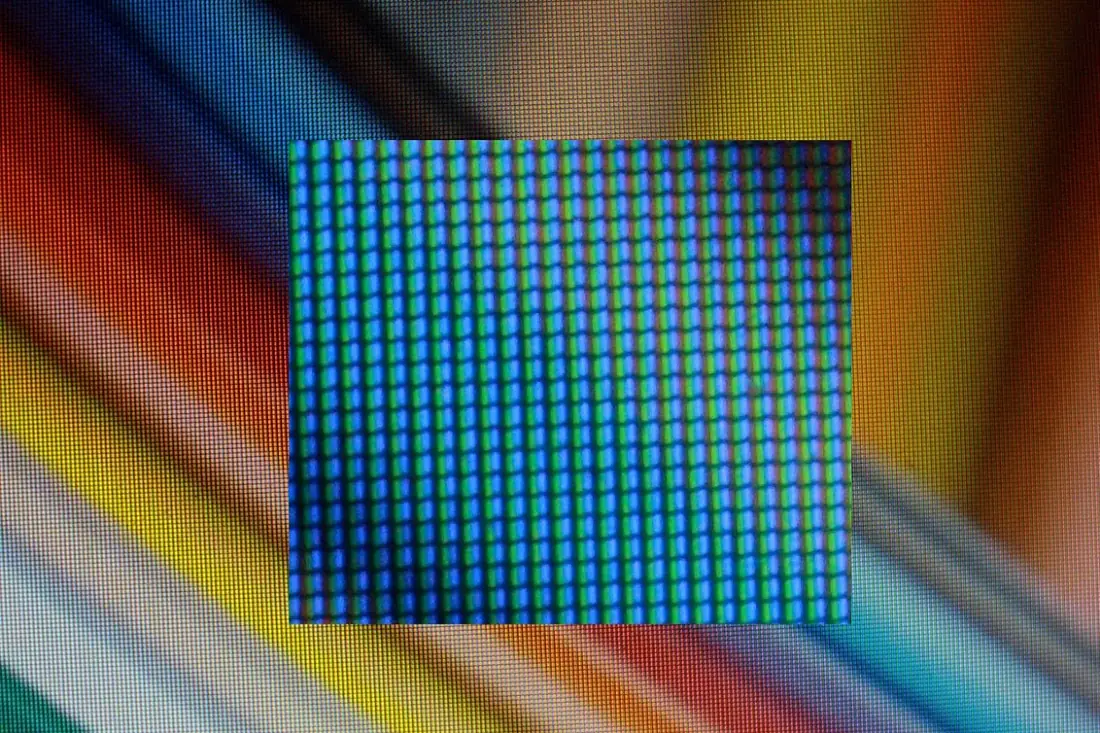
The resolution of a raster image is its number of pixels, written as width × height, for example 1920 × 1080. More pixels show more detail but make a larger file. For printing, resolution is also given as pixels per inch (ppi) or dots per inch (dpi): about 300 ppi gives a sharp photo print. The colour depth is the number of bits per pixel: 24-bit colour (8 bits each for red, green and blue) gives about 16.7 million colours. When a raster image is enlarged, the pixels become visible as blocks — pixelation.
Vector graphics
A vector image stores a picture as shapes described by mathematics: points (anchors), straight lines, curves (Bézier curves), and their fill and outline colours. The computer redraws the shapes at whatever size is needed, so a vector image stays sharp at any size.

| Raster (bitmap) graphics | Vector graphics |
|---|---|
| made of a grid of pixels | made of mathematically described points, lines and curves |
| blurs or pixelates when enlarged | stays sharp at any size |
| file size grows with the number of pixels | file size grows with the number of shapes; usually small |
| best for photographs and realistic images | best for logos, icons, diagrams, fonts, maps |
| edited pixel by pixel (Pixlr, Photoshop, GIMP) | edited shape by shape (Inkscape, Illustrator) |
| formats: JPG, PNG, GIF, BMP, WebP | formats: SVG, AI, EPS (and PDF) |
Graphics file formats
Most image formats compress the pixel data to make files smaller. Lossless compression rebuilds every pixel exactly; lossy compression throws away detail the eye is unlikely to notice, giving much smaller files.
| Format | Full form | Type | Key features | Typical use |
|---|---|---|---|---|
| JPG / JPEG | Joint Photographic Experts Group | raster, lossy | small files for photographs; quality setting; no transparency | camera photos, web photos |
| PNG | Portable Network Graphics | raster, lossless | supports transparency; sharp edges and text stay crisp | logos on websites, screenshots, diagrams |
| GIF | Graphics Interchange Format | raster, lossless but only 256 colours | simple animation; on/off transparency | short animations, stickers |
| WebP | (Web Picture) | raster, lossy or lossless | smaller than JPG and PNG; transparency and animation | modern websites |
| BMP | Bitmap | raster, uncompressed | very large files | old Windows programs |
| SVG | Scalable Vector Graphics | vector | sharp at any size; text-based | icons, logos, maps on websites |
| Portable Document Format | document (raster and vector) | fixed layout, prints identically | sharing and printing documents and posters |
The textbook says GIF is "the only image format that supports animation". WebP and APNG (animated PNG) also store animations, usually in better quality and smaller files than GIF; GIF is simply the oldest and most widely supported.

Problem. (a) How many pixels are in a 1920 × 1080 image, and how many bytes does it need uncompressed at 24-bit colour? (b) A 3000 × 2000 photo is printed at 300 ppi. How large is the print? (c) Simplify the ratio 1920 : 1080.
Solution. (a) 1920 × 1080 = 2,073,600 pixels. 24 bits = 3 bytes per pixel, so 2,073,600 × 3 = 6,220,800 bytes, about 6.2 MB. (b) Width = 3000 ÷ 300 = 10 inches (25.4 cm); height = 2000 ÷ 300 = 6.67 inches (16.9 cm). (c) The highest common factor of 1920 and 1080 is 120; 1920 ÷ 120 = 16 and 1080 ÷ 120 = 9, so the aspect ratio is 16 : 9.
Problem. Choose a format for each and give the reason: (a) the school logo with a transparent background for the website; (b) the same logo for a 6-metre banner; (c) photos from the school sports day for the Facebook page; (d) a small looping "Thank you" animation; (e) the final exam routine for parents.
Solution. (a) PNG — lossless with transparency. (b) SVG (or another vector format) — vector graphics stay sharp when enlarged to banner size. (c) JPG — photographs compress well and load quickly. (d) GIF (or animated WebP) — supports simple animation. (e) PDF — the layout looks the same on every phone and printer and is not easily edited.
Editing images in Pixlr
Pixlr is a free online image editor at pixlr.com, with an app for phones. The quick editor the textbook calls Pixlr X is now named Pixlr Express, and the advanced one Pixlr Editor. Its workspace has four areas: the canvas (where the image is shown and edited), the tools panel (left), the layers panel (right) and the navigation tools for zoom, pan and rotate.
| Task | Steps in Pixlr |
|---|---|
| New project | Open pixlr.com → Pixlr Express → Create new → choose a preset or type a name and size (e.g. 1920 × 1080) → Create |
| Add text | Text tool (T) → Add new text → type → change font, size, colour, alignment and spacing in the left panel; drag the handles to resize, the round dot to rotate |
| Add a shape | Arrange (or Elements) → Shape → choose square, circle and so on → set fill, outline and shadow |
| Work with layers | Layers panel → + to add a layer → the ⋯ menu to rename, hide, lock or change opacity and blend mode → drag to reorder |
| Insert a photo | Element / Add media → choose the file → Open |
| Cut out an object | Cutout tool → choose shape, softness or the Draw and Lasso cutout → drag over the object → Keep or Remove to refine |
| Export | Save → choose the name, format (JPG, PNG, WEBP or PXZ) and quality → Save as |
PXZ is Pixlr's own layered format: save in PXZ to keep layers for later editing, and export a PNG or JPG for sharing. A higher quality setting gives a sharper image and a bigger file.
Designing in Canva
Canva (canva.com, with a phone app) is a free online design tool built around templates. Choose the kind of design (poster, presentation, Instagram post, certificate), pick a template, then replace its text and pictures by dragging Elements (shapes, icons, stickers, photos) on to the page. Uploads brings in your own images, Text adds headings, and Share → Download exports the design as PNG, JPG, PDF or, for animated designs, MP4. Pixlr is better for editing a photograph itself; Canva is faster for laying out a poster, card or presentation from ready-made parts.
Open a photo in Pixlr (or Photoshop). Put the background, the photo and a title on separate layers; select one area and change only it; add a shape, text and one filter; then export the result as PNG and as JPG at quality 70. Compare the two file sizes and the sharpness of the text, and present your image to the class.
3.4 Audio: digital sound, audio file formats, and recording and editing
Audio is the sound in multimedia: speech, music, instruments and sound effects. Sound is a vibration that travels through air as a pressure wave. A microphone turns the wave into a changing electrical voltage (an analogue signal), and the computer's sound card turns that into numbers.
From sound wave to digital audio
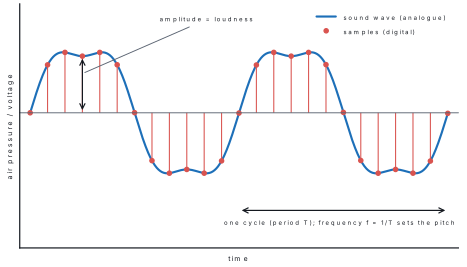
An audio waveform is the graph of a sound against time. Its amplitude (height) shows the loudness; the time taken by one complete wave is its period, and the number of waves each second is the frequency, which we hear as pitch (high or low).
The textbook says the width of the waveform graph shows the "wavelength". On a graph drawn against time, the width of one wave is its period; wavelength is a distance in metres. What matters for sound is the frequency (frequency = 1 ÷ period), which sets the pitch.
To store sound, the computer measures the wave at regular instants — sampling — and stores each measurement as a number:
- the sampling rate is the number of samples per second; music CDs use 44,100 Hz (44.1 kHz) and video uses 48 kHz;
- the bit depth is the number of bits per sample; 16-bit audio has 65,536 possible levels;
- the number of channels: 1 for mono, 2 for stereo.
The size of uncompressed audio follows directly:
Problem. Find the size of one minute of CD-quality stereo audio (44.1 kHz, 16-bit, 2 channels) stored as WAV, and of the same minute as a 128 kbps MP3. How many times smaller is the MP3?
Solution. WAV: 44,100 × 16 × 2 × 60 = 84,672,000 bits; ÷ 8 = 10,584,000 bytes ≈ 10.6 MB. MP3: 128,000 bits per second × 60 s = 7,680,000 bits; ÷ 8 = 960,000 bytes = 0.96 MB. Ratio = 10,584,000 ÷ 960,000 ≈ 11 times smaller. This is why songs are shared as MP3 or AAC but recorded and edited as WAV.
Audio file formats
| Format | Full form | Compression | Features and use |
|---|---|---|---|
| WAV | Waveform Audio File Format | none (uncompressed) | exact copy of the recording; very large; used for recording and editing |
| MP3 | MPEG-1 Audio Layer III | lossy | small files, plays everywhere; made portable music players and streaming possible |
| AAC | Advanced Audio Coding | lossy | better quality than MP3 at the same bit rate; used by YouTube, iPhones and Android |
| M4A | MPEG-4 Audio | lossy (usually AAC) | AAC sound in an MP4 container |
| FLAC | Free Lossless Audio Codec | lossless | about half the size of WAV with no loss |
| OGG | Ogg Vorbis | lossy | free, open format used in games |
The bit rate (kbps) of a compressed file sets its quality and size: 128 kbps is fine for speech and casual listening; 192–320 kbps sounds close to the original.
Recording and editing audio in Audacity
Audacity is a free, open-source audio editor for Windows, macOS and Linux (audacityteam.org). Its window has a menu bar, a toolbar with the transport buttons, a timeline across the top, one track for each recording showing its waveform, and level meters.
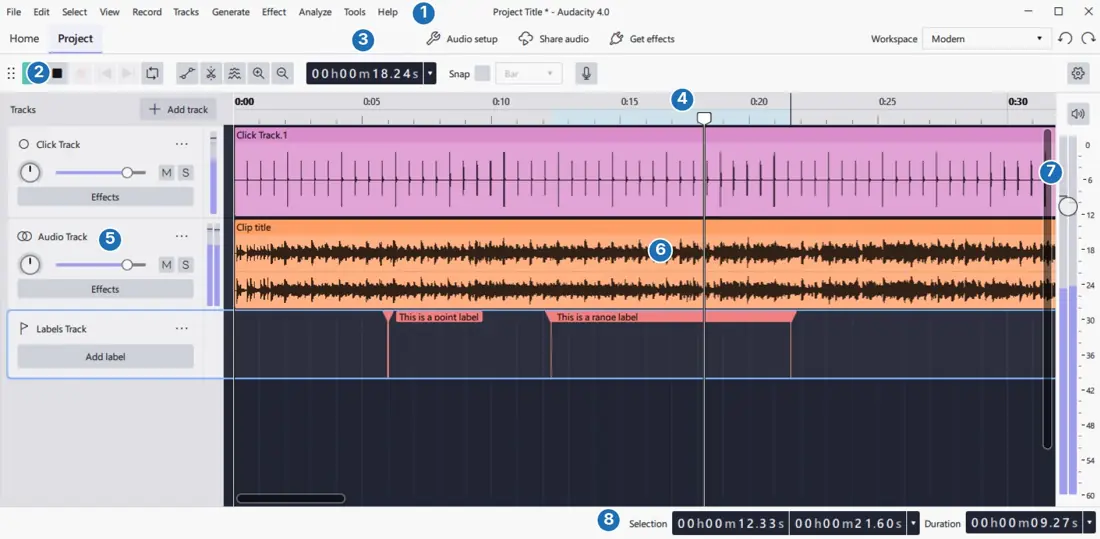
| Task | Steps in Audacity |
|---|---|
| Record | plug in a microphone and choose it in Audio Setup; press the red Record button (or R), speak, and press Stop (or Space) |
| Import a file | File → Import → Audio, or drag the file into the window |
| Cut out a part | drag across the unwanted part of the waveform to select it, then Edit → Delete (or press Delete) |
| Apply an effect | select a part and open the Effect menu, where effects are grouped: Fading → Fade In / Fade Out, Volume and Compression → Amplify / Normalize, Noise Removal and Repair → Noise Reduction, Delay and Reverb → Echo; preview, then apply |
| Listen | press Play (Space); the play head moves along the timeline |
| Export | File → Export Audio, give a name, choose MP3 or WAV, the quality (bit rate) and channels, then Export |
The textbook uses AudioMass (audiomass.co), a free editor that runs in the browser. It works the same way: its menu bar, waveform display and control panel offer Record (press R and choose the microphone), File → Load from Computer, select-and-scissors to cut, an Effects menu (normalize, fade in, fade out, reverse, pitch shift, and reverb with time, decay and wet settings), and File → Export/Download as MP3 or WAV with a chosen bit rate.
Record a 30-second introduction of yourself in Audacity or AudioMass. Remove a cough or a long pause, add a short fade in and fade out, use Normalize so the volume is even, and export it once as WAV and once as 128 kbps MP3. Compare the two file sizes with the formula above, then play both to the class.
3.5 Video: frames, frame rate and resolution, formats, and editing
Video is a series of still pictures called frames, shown one after another so quickly that the eye sees continuous motion, usually together with a sound track. The number of frames shown each second is the frame rate, measured in frames per second (fps).
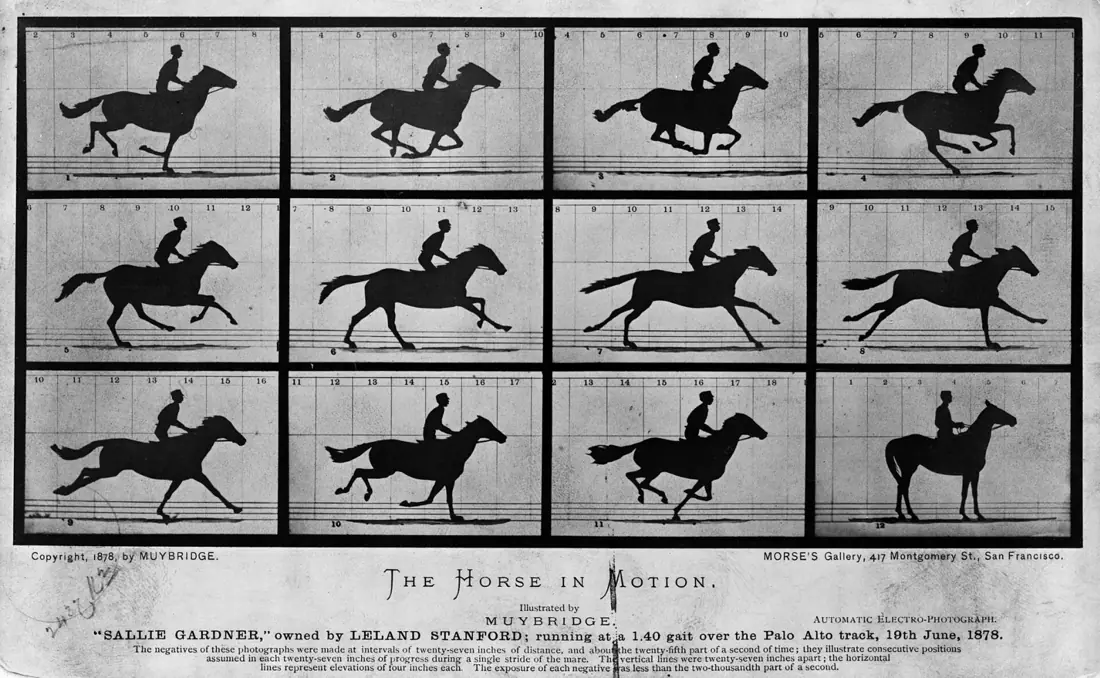
A higher frame rate gives smoother motion and a larger file:
| Frame rate | Where it is used |
|---|---|
| 24 fps | cinema films |
| 25 fps | television in Nepal, India and Europe (the PAL standard) |
| 30 fps | television in the USA (NTSC), most online video and phones |
| 50–60 fps | sports, video games, slow-motion and smooth phone video |
Resolution is the number of pixels in each frame, width × height. The aspect ratio is the ratio of width to height: 16 : 9 for TV and YouTube, 9 : 16 for vertical TikTok and Reels, 4 : 3 for old TVs.
| Name | Resolution | Pixels per frame | Common use |
|---|---|---|---|
| SD (Standard Definition) | 720 × 480 (720 × 576 in PAL countries) | 345,600 | old TVs, DVDs |
| HD | 1280 × 720 | 921,600 | online video on slow connections |
| FHD (Full HD) | 1920 × 1080 | 2,073,600 | TVs, laptops, YouTube, phone cameras |
| 4K UHD | 3840 × 2160 | 8,294,400 | large TVs, films, high-end phones |

Problem. (a) How many bytes does one uncompressed Full HD frame need at 24-bit colour, and how many per second at 30 fps? (b) The same video is saved as an MP4 at 8 Mbps. How big is a 10-minute video? (c) How many frames does a 90-minute film at 24 fps contain?
Solution. (a) 1920 × 1080 × 3 bytes = 6,220,800 bytes per frame; × 30 = 186,624,000 bytes, about 187 MB every second (11.2 GB a minute). (b) 8,000,000 bits × 600 s = 4,800,000,000 bits; ÷ 8 = 600,000,000 bytes = 600 MB. Compression (by a codec such as H.264) makes the video about 300 times smaller. (c) 24 × 90 × 60 = 129,600 frames.
Video file formats
A video file is a container that holds the compressed video, the audio and extra data such as subtitles. The way the pictures are compressed is the codec (H.264, H.265, AV1).
| Format | Full form | Features and use |
|---|---|---|
| MP4 | MPEG-4 Part 14 | the most widely used; good compression with H.264 or H.265 video and AAC audio; plays on phones, YouTube, Netflix |
| MOV | QuickTime Movie | Apple's format, compressed or uncompressed; used on iPhones and Macs and in editing |
| AVI | Audio Video Interleave | Microsoft's older format (1992); large files; compressed or uncompressed |
| MKV | Matroska Video | free open container; many audio and subtitle tracks |
| WebM | Web Media | open format for the web, used by YouTube in browsers |
Editing and exporting video in CapCut
CapCut is a free video editor from ByteDance, used online at capcut.com, on Windows and Mac, and as a phone app (some effects are paid). Clipchamp, built into Windows 11, and the open-source Shotcut and Kdenlive are free alternatives that work the same way: every editor has a media area, a preview, a timeline and an export button.
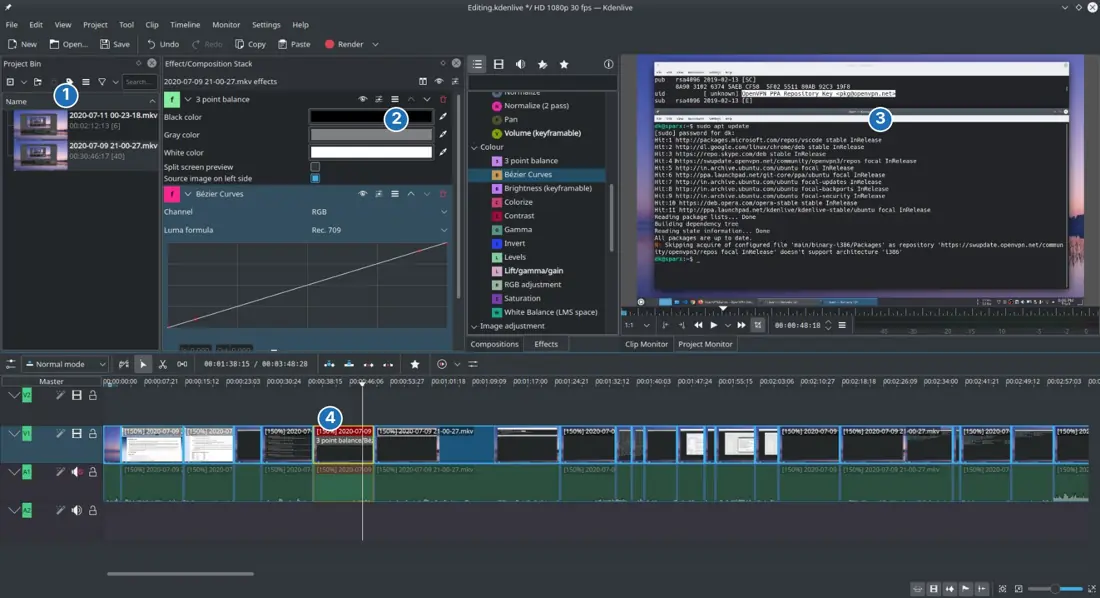
| Task | Steps in CapCut |
|---|---|
| New project | capcut.com → Create new video → choose the aspect ratio (16 : 9 for YouTube, 9 : 16 for TikTok) → click "Untitled project" to rename it |
| Import | Media → Upload → From this device → select the files → Open; they appear in the media area |
| Arrange | click a clip, or drag it, on to the timeline; drag clips to change their order; use the zoom slider to see detail |
| Play | press Space or the play button; the play head (cursor) moves along the timeline |
| Trim | drag the start or end handle of a clip to shorten it |
| Split and delete | move the play head to the cut point → Split → select the unwanted piece → Delete |
| Transition | hover between two clips → Add transition → choose one → drag its edges to change its length |
| Effects and filters | Effects panel → place the play head → click an effect → double-click it on the timeline to adjust |
| Text | Text → Add heading → type → set font and colour in Properties → drag the text clip's edges to set how long it shows |
| Export | Export → Download → choose the resolution (e.g. 1080p), frame rate (e.g. 30 fps) and quality → Export; the file is an MP4 |
Watch the same clip in SD, HD and FHD and fill in the table.
| Resolution | Dimensions | Picture quality | File size | Common use |
|---|---|---|---|---|
| SD | 720 × 480 | soft; detail and small text blur on a big screen | smallest | old TVs, very slow mobile data |
| HD | 1280 × 720 | clear on a phone | about 2.7 × SD (more pixels) | online video, phones |
| FHD | 1920 × 1080 | sharp, fine detail | about 6 × SD (more pixels) | TVs, laptops, YouTube, games |
Reflection. FHD shows the most detail because it has the most pixels. Upload a school project at 1080p (FHD) so it is sharp, and let viewers choose a lower quality. On limited mobile data, HD or even SD saves data. Films and modern games use FHD or higher because large screens make every pixel visible.
Import three or four clips into CapCut or Clipchamp, arrange and trim them, add a transition between each pair, a title and one filter, then export the video as a 1080p MP4 and present it.
3.6 Concept of animation
Animation is the illusion of movement created by showing a series of slightly different drawings or computer images quickly one after another. In multimedia it usually means computer animation, made with software.
Animation is used for cartoons, films, advertisements, video games, websites and learning materials. 2D and 3D describe how the pictures are made; frame-by-frame and keyframe describe how the movement is made.
2D animation is flat: its pictures have only width and height. Each frame is drawn, or characters are built from flat parts that move. Cartoons, explainer videos, animated stickers and many advertisements are 2D. Free 2D tools include Pencil2D, OpenToonz and Krita; Adobe Animate is a common paid one.
3D animation has width, height and depth, so objects have volume and can be seen from any angle with light and shadow. A character is first modelled (built as a 3D mesh), then rigged (given a skeleton of joints), textured, animated by moving the rig, and finally rendered into frames. Pixar's Toy Story (1995) was the first feature film made entirely with computer animation. Blender is a free 3D tool; Maya and 3ds Max are professional ones.
| 2D animation | 3D animation |
|---|---|
| two dimensions: width and height | three dimensions: width, height and depth |
| flat look | depth, perspective, light and shadow |
| drawn frame by frame or built from flat parts | modelled, rigged, textured, animated, rendered |
| quicker and cheaper to make | needs more skill, time and computing power |
| cartoons, stickers, explainer videos | animated films, games, architecture walkthroughs |
| Pencil2D, OpenToonz, Adobe Animate | Blender, Maya, 3ds Max |
Frame-by-frame animation: the animator draws every frame separately. It gives full control and a hand-made look, but it is slow: one second of film at 24 fps needs 24 drawings. Keyframe animation: the animator sets only the important positions — the keyframes, such as the start and the end of a movement — and the software calculates the frames in between, called in-betweens or tweens (the process is tweening). Almost all computer animation today is keyframed.

Problem. A ball rolls across the screen in 2 seconds at 24 fps. How many frames are there? How many must the animator make by hand (a) frame by frame and (b) with keyframes at the start and the end?
Solution. Frames = 24 × 2 = 48. (a) Frame by frame: all 48 drawings. (b) Keyframes: 2 positions; the software produces the other 48 − 2 = 46 in-betweens.
Where animation is used: films and cartoons; video games; advertisements and logos that move; education (an animated heart pumping, the water cycle, E-Paath lessons); websites and apps (loading icons, stickers, emojis); science, medicine and engineering simulations; architecture walkthroughs; and weather maps on television.
Animation and psychology. Animators use what attracts people's attention: bright colours and movement catch the eye, which is why cartoons for children are colourful and busy; expressive faces help viewers feel for a character; and well-timed, smooth movement makes an animation pleasant and easy to follow.
Watch a multimedia presentation or website chosen by your teacher. List every example of text, graphics, audio, video and animation you can find, then discuss in class how each one helps the message.
Textbook exercises: model answers
1. Full forms. (i) RTF — Rich Text Format. (ii) PNG — Portable Network Graphics. (iii) GIF — Graphics Interchange Format. (iv) JPG — Joint Photographic (Experts) Group. (v) SVG — Scalable Vector Graphics. (vi) PDF — Portable Document Format. (vii) MP3 — MPEG-1 Audio Layer III (MPEG Audio Layer 3). (viii) AAC — Advanced Audio Coding. (ix) MP4 — MPEG-4 Part 14. (x) AVI — Audio Video Interleave.
2. Multiple choice — answers
i. (b) — multi means many: many types of media.
ii. (a) — cost and access to hardware and software is a drawback; the others are benefits.
iii. (b) — TXT stores only the characters.
iv. (c) — the characters on screen are text.
v. (b) — vector graphics are built from Bézier curves and scale without loss.
vi. (b) — a PDF can hold raster and vector graphics and is used to share documents.
vii. (c) — amplitude (height) is loudness.
viii. (c) — MP3 is the common compressed format for sharing.
ix. (c) — resolution is the number of pixels, width × height.
x. (b) — MP4 compresses video efficiently.
xi. (a) — width, height and depth.
xii. (d) — 2D animation is usually drawn frame by frame.
3. Short notes — model answers
a. Components of multimedia. Multimedia has five components: text (written information), graphics (still images such as photos, drawings and charts), audio (speech, music, effects), video (recorded moving pictures with sound) and animation (drawn or computer-made pictures that move). Together they make information interesting and easy to understand.
b. Rich Text Format. RTF is a text file format created by Microsoft (1987) that stores text together with its formatting — fonts, sizes, colours, bold and italic, alignment, indentation and line spacing. Almost every word processor can open it, so it is used to exchange formatted documents.
c. Audio waveform. A waveform is the graph of a sound against time. Its height (amplitude) shows loudness and the number of waves per second (frequency) shows pitch. To store it, the computer samples the wave thousands of times a second (44,100 for CD sound) and saves each value as a number.
d. Video resolution and frame rate. Resolution is the number of pixels in each frame, written width × height — SD 720 × 480, HD 1280 × 720, FHD 1920 × 1080; more pixels give a sharper picture and a bigger file. Frame rate is the number of frames shown each second (fps) — 24, 25, 30, 50 or 60; a higher rate gives smoother motion.
e. Raster and vector graphics. Raster graphics are grids of pixels, best for photographs, and they pixelate when enlarged (JPG, PNG, GIF). Vector graphics are shapes described mathematically, best for logos and icons, and stay sharp at any size (SVG, AI, EPS).
f. 2D and 3D animation. 2D animation is flat, with width and height only, and is usually drawn frame by frame (cartoons). 3D animation has width, height and depth; models are built, rigged and moved, then rendered (Toy Story, games).
4. Questions — model answers
a. Text, graphics, audio, video and animation.
b. A raster graphic is an image made of a grid of pixels, each with its own colour; its quality depends on the number of pixels (resolution).
c. JPG (JPEG), PNG and GIF (also BMP and WebP).
d. Raster images are made of pixels and lose quality when enlarged; vector images are made of mathematical shapes and stay sharp at any size. Raster suits photos, vector suits logos and diagrams, and vector files are usually smaller.
e. In education multimedia makes lessons interactive and easier to understand through pictures, sound, video and simulations, and lets students learn at their own pace. In business it attracts customers through advertisements and product videos, explains products clearly, and helps companies communicate through presentations and video meetings.
f. A TXT file stores only plain characters, opens in any editor and is very small. A DOCX file stores text with fonts, colours, tables, images and page layout, needs a word processor, and is larger.
g. For a greeting card: text for the message and names, graphics for a photo, border and decorations, and, for a digital card, a little animation (falling flowers, a glowing diya) and audio (a short tune) to make it lively and personal.
h. PNG — it is lossless and supports a transparent background, so the logo sits cleanly on any colour. (SVG is even better on websites because it stays sharp at every size.)
i. Vector — a billboard is enlarged many times, and a vector design is redrawn sharply at any size, while a raster image would pixelate unless it had an enormous number of pixels.
j. Similarities: both combine several media, are interactive and are used for learning. Differences: YouTube centres on video with sound, text titles and thumbnails, and is used to watch and share content; Google Earth centres on satellite images and 3D maps with text labels, and is used to explore places. YouTube is mostly linear viewing; Google Earth is exploration the user controls.
k. A learning-app screen could have: a text title and short notes (exact information), a labelled graphic (shows structure at a glance), an audio button to hear the explanation (helps reading and pronunciation), a short video of a real experiment, an animation of the process (makes motion and change clear), and a quiz with instant feedback (interaction). Sketch them as boxes on one screen: title at the top, image and video in the middle, audio and quiz buttons at the bottom.
l. Video combines moving pictures, sound and text, so it shows processes and emotions that text or audio alone cannot, holds attention and is easy to understand for people of every reading level — which is why most Internet traffic today is video. But video files are large, need more data and better devices, take longer to produce and are hard to skim or search; text is quicker to scan and audio can be heard while doing something else. The best choice depends on the message, the audience and their connection.
Presentation. Make 8–10 slides on the importance and uses of multimedia in education, entertainment, business and communication, each with one picture and few words. Chart. For graphics (Pixlr, Canva, GIMP, Inkscape), audio (Audacity, AudioMass) and video (CapCut, Clipchamp, Kdenlive) software, list the logo, maker, free or paid, uses and file extensions (.png, .jpg, .svg, .pxz; .wav, .mp3; .mp4, .mov). Project. Plan the message, audience and a storyboard first; for the graphic project make three posters and export PNG or JPG; for the video project export an MP4; then explain the tools, techniques and message to the class.
Chapter summary
- Multimedia combines text, graphics, audio, video and animation; it may be linear or interactive and is used in education, entertainment, business, communication and content creation.
- Text: serif, sans-serif and monospace fonts, size in points; typography arranges text for readability. Formats: TXT (plain), RTF (formatted), DOCX (Word), PDF (fixed layout). Use Unicode fonts for Nepali.
- Raster images are grids of pixels (JPG, PNG, GIF, BMP, WebP) and pixelate when enlarged; vector images are mathematical shapes (SVG, AI, EPS) and stay sharp. Raw size = width × height × bytes per pixel.
- Lossless compression keeps every detail (PNG, FLAC); lossy throws some away for small files (JPG, MP3, MP4).
- Audio: amplitude = loudness, frequency = pitch; sampled at, e.g., 44,100 Hz with 16 bits. Size = rate × bits × channels × seconds. WAV is uncompressed; MP3 and AAC are compressed.
- Video = frames shown at a frame rate (24, 25, 30, 60 fps) with a resolution (SD 720 × 480, HD 1280 × 720, FHD 1920 × 1080). Formats: MP4, MOV, AVI, MKV.
- Tools: Pixlr (photo editing, layers, cutout; JPG/PNG/WEBP/PXZ), Canva (templates), Audacity/AudioMass (record, cut, effects, export), CapCut (timeline, trim, split, transitions, text, export MP4).
- Animation: 2D (width, height) and 3D (with depth: model, rig, animate, render); frame-by-frame draws every frame, keyframe animation draws key poses and the software makes the tweens.
Practice questions
Group A — Multiple choice (1 mark each)
- Which one is NOT an element of multimedia? [1]atextbanimationccompilerdaudio
- The smallest unit of a raster image is a [1]abitbpixelcvectordframe
- Which format is lossless and supports a transparent background? [1]aJPGbPNGcBMPdMP3
- A school logo that must stay sharp on a large banner should be made as a [1]araster imagebvector imagecGIFdJPEG
- Which audio format is uncompressed? [1]aMP3bAACcWAVdM4A
- In an audio waveform, the height of the wave shows [1]apitchbloudnesscdurationdfile size
- The number of frames shown in one second is called [1]aresolutionbbit ratecframe ratedaspect ratio
- A resolution of 1920 × 1080 is called [1]aSDbHDcFull HDd4K
- Which video format was developed by Apple? [1]aAVIbMOVcMKVdWAV
- In keyframe animation, the frames between two keyframes are [1]adrawn one by onebcalculated by the software as tweenscdeleteddstored as audio
- A 3D animation has [1]awidth onlybwidth and heightcwidth, height and depthdlength and breadth
- Which program is used to record and edit sound? [1]aCanvabAudacitycPixlrdMySQL
Answers to Group A
1. (c) — a compiler translates programs; it is not a medium.
2. (b) — a pixel is one picture element.
3. (b) — PNG is lossless with transparency; JPG has no transparency.
4. (b) — vectors are redrawn sharply at any size.
5. (c) — WAV stores the samples without compression.
6. (b) — amplitude is loudness; frequency is pitch.
7. (c) — frames per second.
8. (c) — Full HD is 1920 × 1080; HD is 1280 × 720.
9. (b) — MOV is the QuickTime format.
10. (b) — the software interpolates the in-betweens.
11. (c) — depth is the third dimension.
12. (b) — Audacity is a free audio editor.
Group B — Short answer (2 marks each)
- Write two differences between raster and vector graphics. [2]
- What is a pixel? What does a resolution of 1280 × 720 mean? [2]
- Calculate the size of a 30-second stereo WAV recording at 44.1 kHz and 16 bits. [2]
- Differentiate between lossy and lossless compression, naming one format of each. [2]
- What is frame rate? Why are sports often broadcast at 50 or 60 fps? [2]
- Write two differences between 2D and 3D animation. [2]
- What is keyframe animation? How does it differ from frame-by-frame animation? [2]
- Suggest a file format, with a reason, for(a) a song to share on WhatsApp and(b) a scanned certificate to email. [2]
Answers to Group B
1. Raster graphics are made of pixels and lose quality when enlarged; vector graphics are mathematical shapes and stay sharp at any size. Raster suits photographs (JPG, PNG); vector suits logos and diagrams (SVG).
2. A pixel (picture element) is the smallest dot of an image, holding one colour. 1280 × 720 means the image is 1280 pixels wide and 720 pixels high — 921,600 pixels in all (HD).
3. 44,100 × 16 × 2 × 30 = 42,336,000 bits; ÷ 8 = 5,292,000 bytes ≈ 5.3 MB.
4. Lossless compression makes a file smaller without losing any detail, so the original can be rebuilt exactly (PNG, FLAC). Lossy compression throws away detail that is hard to notice, giving much smaller files (JPG, MP3, MP4).
5. Frame rate is the number of frames shown each second (fps). Sports are full of fast movement; 50 or 60 frames per second show each movement in more steps, so the ball and players look smooth instead of jerky.
6. 2D animation has width and height only and looks flat; 3D animation adds depth, perspective, light and shadow. 2D is drawn or built from flat parts; 3D is modelled, rigged and rendered, and needs more time and computing power.
7. In keyframe animation the animator sets only the key positions (start, end, important poses) and the software calculates the frames in between (tweening). In frame-by-frame animation every frame is drawn by hand, which gives full control but takes far longer.
8. (a) MP3 (or AAC) — small file that plays on every phone. (b) PDF — keeps the layout, prints identically and is not easily changed (a JPG is also acceptable for a photo of it).
Group C — Long answer (4 marks each)
- What is multimedia? Explain its five elements with an example of each. [1+3]
- Explain the steps to record your voice in Audacity, remove a cough from the recording, add a fade-out at the end and export it as an MP3 file. [4]
- A 2-minute Full HD video is recorded at 30 fps. Find(a) the number of frames,(b) the uncompressed size of one frame at 24-bit colour,(c) the file size if it is compressed at 8 Mbps, and(d) state why videos are compressed. [4]
- What is animation? Differentiate between frame-by-frame and keyframe animation, and write four uses of animation. [1+1+2]
Answers to Group C
1. Multimedia is the combined use of text, graphics, audio, video and animation to present information (1). Text — written words, e.g. lesson notes; graphics — still pictures, e.g. a diagram of the heart; audio — sound, e.g. a teacher's recorded voice; video — recorded moving pictures, e.g. an experiment; animation — moving drawn or computer images, e.g. an animated water cycle (3).
2. (1) Connect a microphone, choose it in Audio Setup, press the red Record button, speak, and press Stop. (2) Play the recording, drag across the cough on the waveform to select it, and press Delete. (3) Select the last few seconds and choose Effect → Fading → Fade Out. (4) Choose File → Export Audio, give a file name, select MP3, choose the quality (e.g. 128 kbps) and click Export.
3. (a) 2 × 60 × 30 = 3,600 frames. (b) 1920 × 1080 × 3 = 6,220,800 bytes (about 6.2 MB). (c) 8,000,000 × 120 = 960,000,000 bits; ÷ 8 = 120,000,000 bytes = 120 MB. (d) Uncompressed, the video would need 6.2 MB × 3,600 ≈ 22.4 GB; compression makes it small enough to store, upload and stream.
4. Animation is the illusion of movement made by showing slightly different pictures quickly one after another (1). Frame-by-frame animation draws every frame by hand; keyframe animation sets only key poses and the software calculates the in-between frames (1). Uses (any four, 2): cartoons and films, video games, advertisements, education and simulations, website and app effects, weather maps.
Practise more: Computer Science question bank