Unit 5 · 14 teaching hours · 45 min read
AI and Contemporary Technologies
What the syllabus asks for 10
- Artificial Intelligence and Machine Learning: meaning, types and applications
- Learning techniques: supervised, unsupervised and reinforcement learning
- AI in robotics: sensing, deciding and acting; simulating simple robotic tasks
- Generative AI: how large language models and image generators work, prompting and limitations
- Application of integrated AI tools in study and work
- Ethics in AI: bias, privacy and security
- Internet of Things (IoT) and its applications
- Virtual reality, augmented reality and extended reality (XR)
- Cloud computing: service models (IaaS, PaaS, SaaS) and applications
- e-Commerce, e-Governance and e-Education in Nepal
Your phone unlocks when it sees your face, YouTube guesses the next video you will enjoy, and a chatbot can write a poem in Nepali in seconds. These are artificial intelligence (AI) at work. This unit explains how machines learn from data, how robots sense and act, how generative AI writes text and makes pictures, and the ethical questions these tools raise. It then covers the other technologies changing daily life in Nepal: the Internet of Things, virtual and augmented reality, cloud computing, and online shopping, government services and learning.
The CDC grid gives this unit 11 marks: one MCQ (1 mark), three short questions (3 × 2 = 6 marks) and one long question (4 marks) — so most of the marks are written answers. Typical short questions: define supervised and unsupervised learning, two ethical problems of an AI system, two IoT applications for a given problem, two differences between Internet-based services. Typical long questions: four guidelines for using AI responsibly, applications of AI or ML, cloud service models, or the merits and limitations of e-commerce, e-governance or e-education. Most questions are scenarios; answer with points that apply to the situation given, one mark per point.
5.1 Artificial Intelligence and Machine Learning: meaning, types and applications
Artificial intelligence (AI) is the branch of computer science that builds machines able to do tasks that normally need human intelligence: learning, reasoning, solving problems, understanding language, recognising images and making decisions. Machine learning (ML) is the part of AI in which a computer learns from data and improves with experience, instead of being given step-by-step rules for every case.
The term "artificial intelligence" was coined by John McCarthy for a workshop at Dartmouth College in 1956, and Arthur Samuel named "machine learning" in 1959. Older programs followed only the rules a programmer wrote. To teach a computer to tell a cat from a dog with rules you would need endless instructions about ears and whiskers; with machine learning you show it thousands of labelled photos and it works out the difference itself. Deep learning is machine learning that uses large networks of simple units (neural networks), and generative AI is deep learning that creates new content.

| Artificial intelligence | Machine learning |
|---|---|
| the broad field of making machines think and act intelligently | a subset of AI that makes machines learn from data |
| uses reasoning, rules, search, language processing and learning | uses data, patterns and predictions |
| may follow fixed rules or learn | always learns from examples |
| examples: hotel service robots, chatbots, smart assistants | examples: spam filters, YouTube recommendations, fraud alerts |
Types of AI
| By capability | Meaning | Exists? |
|---|---|---|
| Narrow (weak) AI | very good at one task — translation, face unlock, chess, chat | yes: every AI in use today |
| General (strong) AI | could learn any intellectual task a human can | not yet; a research goal |
| Super AI | would be more intelligent than humans in every field | only an idea |
AI can also be grouped by how it works: reactive machines respond to the present only (IBM's Deep Blue, which beat world chess champion Garry Kasparov in 1997); limited-memory AI uses recent data and experience (self-driving cars, chatbots — almost all modern AI); theory-of-mind and self-aware AI, which would understand feelings or itself, do not exist.
Applications of AI and ML
| Area | What AI does | Example |
|---|---|---|
| Gaming | plans moves and plays against humans | chess and football games, computer opponents |
| Natural language processing (NLP) | understands and produces human language | Google Translate between Nepali and English, Siri, Alexa |
| Automated grading | checks and scores answers instantly | Google Forms quizzes, Grammarly, Quillionz |
| Personalised learning | adapts lessons to each learner | Duolingo |
| Expert systems | gives advice using stored expert knowledge | helping doctors diagnose diseases |
| Computer vision | recognises faces and objects in images | face lock, number-plate reading |
| Handwriting recognition | turns handwriting into editable text | scanning notes with a phone |
| Intelligent robots | sense, decide and act | factory, hospital and space robots |
Machine learning in particular powers email spam detection, speech recognition (voice typing), image recognition, self-driving cars, chatbots and virtual assistants, fraud detection in banks and wallets (an unusual payment from a new phone is flagged), social-media feeds that show what you are likely to watch, monitoring of the dark web for crime, and cybersecurity systems that spot attacks such as phishing.
Problem. Classify each: (a) a calculator adding 245 + 378; (b) Daraz showing "customers also bought"; (c) a chess program that searches millions of moves with fixed rules; (d) a phone camera recognising a face it has learnt.
Solution. (a) Neither — it follows fixed arithmetic rules and shows no intelligence. (b) ML — it learns buying patterns from millions of orders. (c) AI but not ML — it reasons and plans, but with rules written by people. (d) ML (deep learning) — it learnt the face from examples.
In groups, list five recent AI tools for mobile and desktop with the developer, key features and an application, and present them. For example:
| AI tool | Developer | Key features | Application |
|---|---|---|---|
| ChatGPT | OpenAI | conversation, writing, coding help, image input | explaining a topic, drafting |
| Gemini | chat, built into Gmail and Docs | summarising, writing help | |
| Microsoft Copilot | Microsoft | chat; works inside Word, Excel, PowerPoint | drafting and data analysis |
| Google Translate | text, voice and camera translation, including Nepali | understanding signs and notices | |
| Grammarly | Grammarly Inc. | grammar, spelling and tone suggestions | correcting essays and emails |
5.2 Learning techniques: supervised, unsupervised and reinforcement learning
A machine learns by finding patterns in data. How it is taught gives three main learning techniques.
- Supervised learning: the machine is trained on labelled data — every example comes with the correct answer (the label) — and learns to predict the label of new examples. It is like learning with a teacher who gives the answers.
- Unsupervised learning: the machine gets unlabelled data and must find patterns or groups by itself (clustering). It is like exploring materials with no teacher.
- Reinforcement learning: an agent learns by trial and error: it acts in an environment, receives a reward for good actions and a penalty for bad ones, and gradually learns the actions that earn the most reward.
The textbook says there are "two types of learning techniques: supervised and unsupervised". The syllabus — and the subject itself — also includes reinforcement learning, which is how game-playing programs such as AlphaGo and many robots learn. (Semi-supervised learning, which mixes a few labelled examples with many unlabelled ones, is a fourth, less common type.)
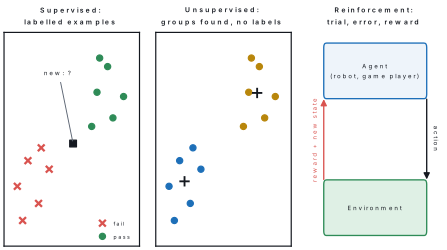
| Point | Supervised | Unsupervised | Reinforcement |
|---|---|---|---|
| Data | labelled (with answers) | unlabelled | no fixed data; experience from actions |
| Goal | predict the label of new data | find groups or patterns | find the actions that earn most reward |
| Feedback | the correct answer for every example | none | reward or penalty after actions |
| Like learning… | with a teacher who gives answers | alone, by exploring | by practice, from success and failure |
| Examples | spam or not spam; pass or fail; cat or dog | grouping customers by shopping habits | a robot learning to walk; a game-playing AI; self-driving practice in simulation |
Problem. Eight students' daily study hours and attendance are labelled "pass" or "fail". Predict the result of three new students by looking at the three most similar labelled students (the k-nearest-neighbour method).
Solution.
# Supervised learning: learn "pass" or "fail" from labelled examples
training = [
    # (hours of study per day, attendance %, label)
    (1.0, 60, "fail"), (1.5, 72, "fail"), (2.0, 65, "fail"), (2.5, 80, "pass"),
    (3.0, 85, "pass"), (3.5, 70, "pass"), (4.0, 90, "pass"), (0.5, 85, "fail"),
]

def distance(a, b):
    # attendance is divided by 10 so that both features count about equally
    return ((a[0] - b[0]) ** 2 + ((a[1] - b[1]) / 10) ** 2) ** 0.5

def predict(hours, attendance, k=3):
    nearest = sorted(training, key=lambda row: distance((hours, attendance), row))[:k]
    labels = [row[2] for row in nearest]
    return max(set(labels), key=labels.count)

for student in [(2.8, 78), (1.2, 68), (3.8, 60)]:
    print(student, "->", predict(*student))
(2.8, 78) -> pass
(1.2, 68) -> fail
(3.8, 60) -> pass
The program was never told a rule such as "study 2.5 hours to pass"; it predicts from the labelled examples alone. For (3.8, 60) the three nearest students are pass, fail and pass, so the majority answer is pass.
Problem. Name the learning technique: (a) Gmail learns spam from millions of emails marked "spam" or "not spam"; (b) a shop groups its customers by buying habits without any categories given; (c) a computer learns to play a game by winning and losing thousands of times; (d) Teachable Machine learns cats and dogs from photos you label.
Solution. (a) Supervised — labelled examples. (b) Unsupervised — it discovers the groups. (c) Reinforcement — rewards for winning. (d) Supervised — every photo is labelled cat or dog.
Open teachablemachine.withgoogle.com → Get Started → Image Project. Name Class 1 "Cat" and Class 2 "Dog", upload five photos to each, and click Train Model. In Preview test new photos and note the confidence bars. Then test a photo of a rabbit: the model must still answer "cat" or "dog", because it knows only the labels it was taught — a limit of supervised learning worth discussing in class.
5.3 AI in robotics: sensing, deciding and acting
A robot is a programmable machine that senses its surroundings, decides what to do and acts on the world, often without human help. Robotics is the field of designing, building, programming and operating robots. AI in robotics means using AI — computer vision, speech, learning and planning — so that robots can understand their surroundings and decide for themselves rather than repeat one fixed movement.
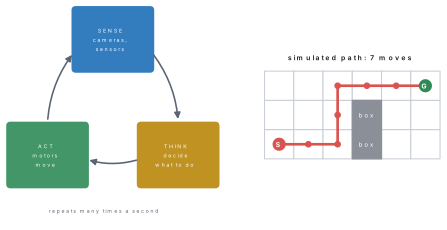
Every robot repeats a sense–think–act cycle many times a second:
- Sense — sensors collect information: cameras, microphones, distance (ultrasonic or infrared) sensors, touch, temperature and light sensors.
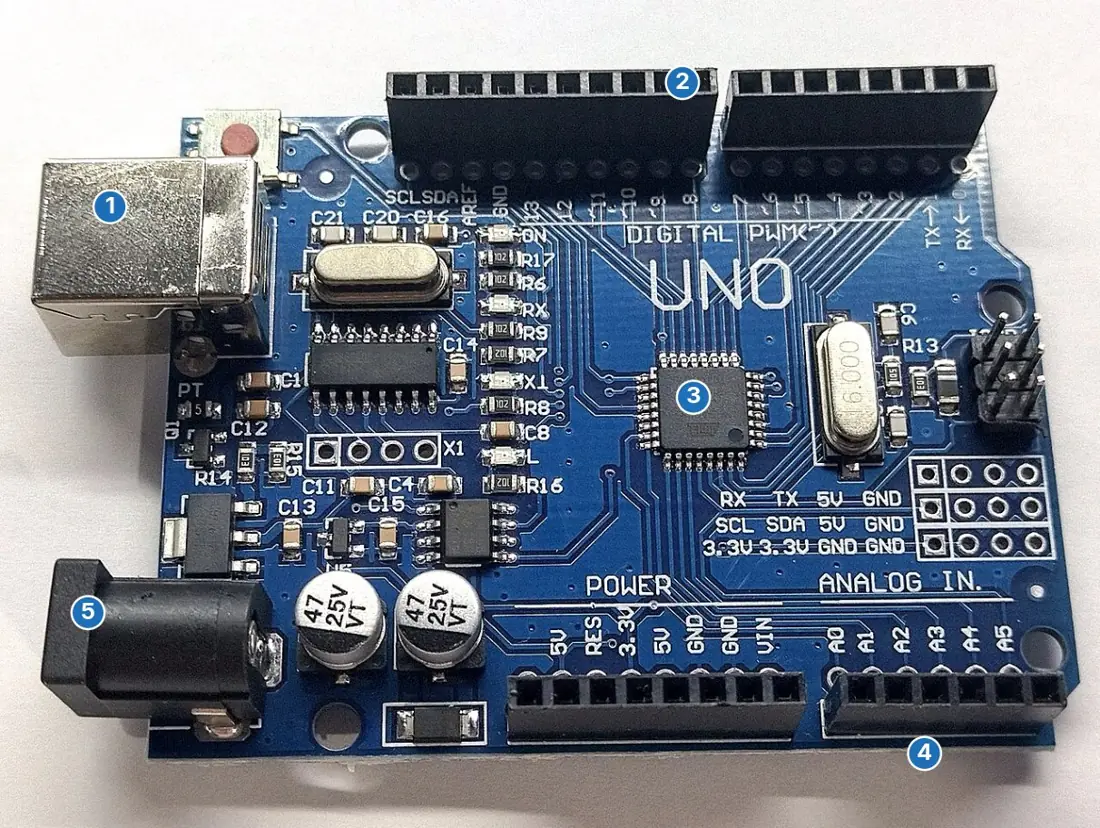
- Think (decide) — the controller (a computer or a microcontroller such as an Arduino) processes the readings and chooses an action, using programmed rules or AI.
- Act — actuators (motors, wheels, arms, grippers, speakers) carry the action out, which changes what the sensors read next.
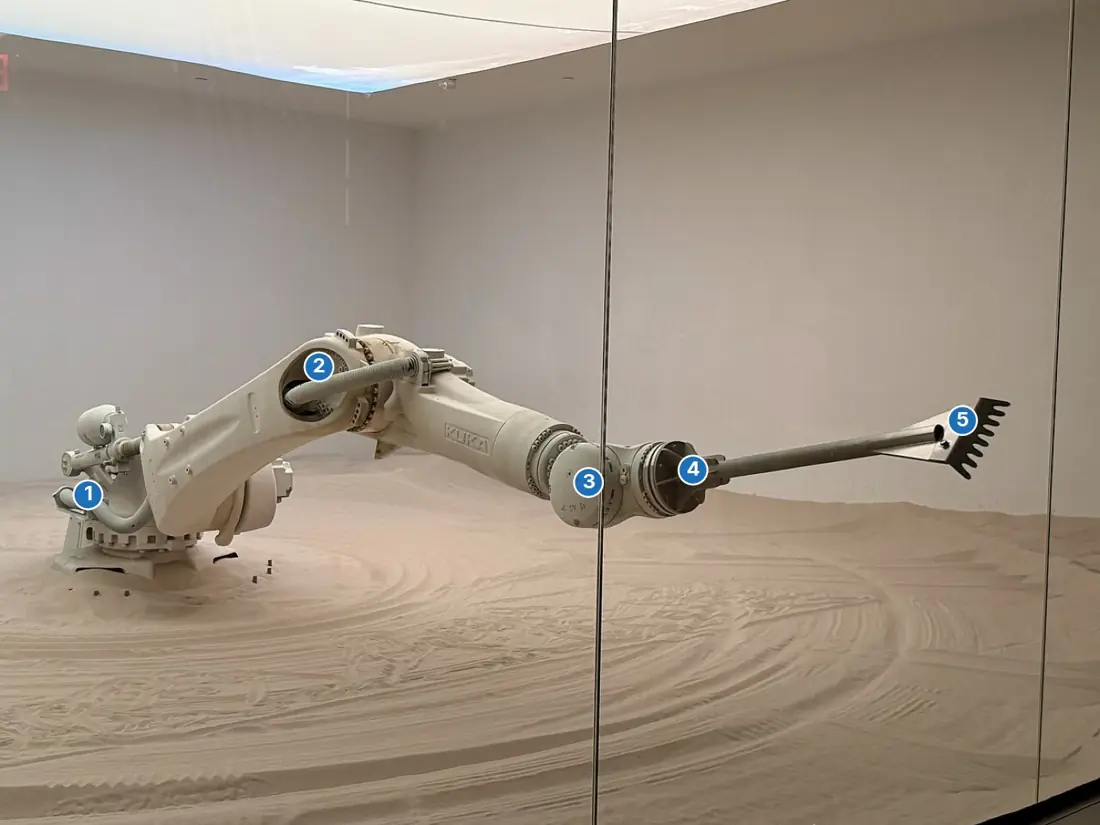
Robots are used for jobs that are dangerous, difficult or boring for people: bomb disposal, fire fighting, exploring the ocean floor and other planets (NASA's Mars rovers), work in nuclear or chemical plants, welding and painting in car factories, warehouse picking, robotic surgery (such as the da Vinci system), fruit picking and spraying on farms, and cleaning homes (robot vacuum cleaners). They make work faster, safer and more accurate.
Simulating simple robotic tasks
Before a real robot is built, its program is tested in a simulator, where a mistake costs nothing.
At scratch.mit.edu, create a project, delete the cat, and choose a robot sprite and a backdrop. Build: when green flag clicked → say "Starting patrol" for 2 seconds → repeat 4 { move 100 steps → turn ↻ 90 degrees → say "Corner reached" for 1 second }. Click the green flag: the robot walks round a square and speaks at each corner. (Activity 1.4 does the same in an online robot simulator such as RoboBlocky: four "drive forward" and four "turn 90°" blocks make a perfect square.)
Problem. A robot starts at square (0, 0) of a grid and must reach the goal (5, 2). Boxes block squares (3, 0) and (3, 1). Each turn it senses the square to its east: if it is clear and the robot has not reached the goal's column, it moves east; otherwise it moves north. Simulate it.
Solution.
# A robot on a grid: sense, think, act until it reaches the goal
obstacles = [(3, 0), (3, 1)]       # squares blocked by boxes
goal = (5, 2)
x, y = 0, 0
step = 0
while (x, y) != goal:
    step += 1
    ahead = (x + 1, y)                       # SENSE: look one square east
    if x < goal[0] and ahead not in obstacles:
        x = x + 1                            # THINK: path clear, so ACT: move east
        action = "east"
    else:
        y = y + 1                            # blocked (or column reached): move north
        action = "north"
    print("Step", step, ": moved", action, "to", (x, y))
print("Goal reached in", step, "steps")
Step 1 : moved east to (1, 0)
Step 2 : moved east to (2, 0)
Step 3 : moved north to (2, 1)
Step 4 : moved north to (2, 2)
Step 5 : moved east to (3, 2)
Step 6 : moved east to (4, 2)
Step 7 : moved east to (5, 2)
Goal reached in 7 steps
Each pass of the loop is one sense–think–act cycle; the path is drawn in the figure above.
5.4 Generative AI: how it works, prompting and limitations
Generative AI is AI that creates new content — text, images, music, video or computer code — in response to an instruction called a prompt. It learns from huge amounts of existing data and then produces original output, so the same prompt can give a different answer each time.
How large language models work
A large language model (LLM), such as the one behind ChatGPT, is a very large neural network trained on an enormous amount of text: books, websites, articles and code. Text is broken into small pieces called tokens (words or parts of words). During training the model is shown billions of sentences with the next token hidden and adjusts itself to predict the next token correctly; it is then fine-tuned with human feedback to be helpful and safe. When you type a prompt, it writes the answer one token at a time: it gives every possible next token a probability, picks one, adds it to the text and repeats. Most modern LLMs use the transformer design, published by Google researchers in 2017.
An image generator such as DALL·E or Stable Diffusion is usually a diffusion model. It learns from millions of pictures paired with their captions. To make a picture it starts from random noise and removes the noise step by step, each step guided by the words of your prompt, until an image appears.

Popular generative AI tools
| Tool | Made by | Head of the company (2026) | Mainly for |
|---|---|---|---|
| ChatGPT | OpenAI (launched November 2022) | Sam Altman | conversation, writing, coding; reads files and images |
| Gemini | Google DeepMind, Google (Alphabet) | Sundar Pichai | chat; built into Gmail, Docs and Android |
| Microsoft Copilot | Microsoft, using OpenAI's models | Satya Nadella | chat; built into Windows, Word, Excel, PowerPoint |
| GitHub Copilot | GitHub, a Microsoft company | (Microsoft) | suggesting code while you program |
| Claude | Anthropic | Dario Amodei | writing, analysis and coding |
| DeepSeek | DeepSeek (China) | Liang Wenfeng | chat and coding |
| DALL·E, Midjourney, Stable Diffusion, Adobe Firefly | OpenAI, Midjourney, Stability AI, Adobe | — | making images from text |
The textbook's table says Copilot was "developed by OpenAI + GitHub". There are really two: Microsoft Copilot, Microsoft's assistant in Windows and Microsoft 365, and GitHub Copilot, a coding assistant made by GitHub (owned by Microsoft). Both are built on OpenAI's GPT models, which is where OpenAI comes in.
Prompting
A prompt is the instruction given to a generative AI. The answer is only as good as the prompt, so a good prompt states the task, gives context (who it is for, what you already know), sets the format and length, adds limits (language, level, what to avoid), and is refined if the first answer is not right.
Problem. Improve the prompt "Tell me about IoT."
Solution. A weak prompt gives a long, general answer. A better one: "Explain the Internet of Things to a Class 10 student in Nepal in about 150 words. Give two examples from agriculture and one from homes, and end with two practice questions." It names the audience, length, examples and format, so the answer fits the need. If the answer uses hard words, follow up with "Use simpler English."
Limitations of generative AI
- Hallucination — it can state false facts, invent sources or give wrong calculations in confident language, because it predicts likely words rather than checking facts.
- Out-of-date knowledge — it knows only what was in its training data unless it is connected to the Internet.
- Bias — it can repeat unfair stereotypes present in its training data.
- Privacy — anything you type may be stored; never enter passwords, phone numbers or private documents.
- Copyright and honesty — submitting AI-written work as your own is cheating, and generated images may copy others' styles.
- Misuse — fake photos, voices and videos (deepfakes) are used for scams and false news.
Use a free image generator (Microsoft Designer's image creator, Canva's AI image tool or Craiyon). Try "a robot teacher in a classroom in Nepal, cartoon style", then change one word at a time and compare the pictures. Display your favourite with a one-line caption, and note one thing the generator got wrong.
5.5 Application of integrated AI tools in study and work
AI is now built into the everyday tools of school and office work, so you use it without opening a separate chatbot.
| Tool | Integrated AI features | How they help |
|---|---|---|
| Google Docs | Smart Compose (suggests the rest of a sentence), spelling and grammar suggestions, voice typing, translation of the whole document, summaries and "Help me write" (Gemini) | faster, cleaner writing; dictating in Nepali or English |
| Gmail | Smart Compose and Smart Reply, spam filtering, grammar suggestions, email summaries | quicker replies, a cleaner inbox |
| Microsoft 365 | Copilot in Word (drafting and rewriting), Excel (formulas, charts, data analysis), PowerPoint (Designer layouts, slides from a document), Teams (meeting transcripts and recaps) | reports, data analysis and presentations in less time |
| Phones | voice assistants, live translation, camera text recognition (Google Lens) | reading notices, translating, accessibility |
(Gmail's "schedule send", listed in the textbook, is a useful timing feature rather than AI.)
In study, these tools can explain a hard concept in simpler words, make practice questions from your notes, check grammar, translate between Nepali and English, turn speech into text, and summarise a long chapter. In work, they draft letters and reports, analyse sales data, prepare presentations, record meeting notes and answer customers through chatbots.
Privacy — never enter personal details of yourself or others. Accuracy — check every fact and figure against your textbook or a trusted source. Fairness — watch for biased or one-sided answers. Honesty — use AI to learn and to check your work, not to do it; say when you have used it, and write the final answer in your own words.
5.6 Ethics in AI: bias, privacy and security
Ethics is the set of moral principles that tells us what is right and wrong, fair and unfair. AI decides who sees which advertisement, which loan is approved and which face matches a criminal record, so it must be fair, safe, private, transparent and accountable. In August 2025 Nepal's cabinet approved a National Artificial Intelligence Policy, 2082 to promote AI skills and ethical, transparent use of AI.
Bias. An AI system is biased when it treats people unfairly because of gender, caste, ethnicity, language, age or region. AI learns from past data, so it copies the unfairness in that data: a hiring AI trained mostly on men's CVs may reject women; a face-recognition system trained mostly on light-skinned faces makes more mistakes with darker skin; a speech system trained on one accent may fail for speakers from other regions. Fixes: train on diverse and representative data, test the results for different groups, and keep a human able to check and overrule decisions.
Privacy. AI collects and analyses huge amounts of personal data — photos, location, messages, health and shopping records. Misused or leaked, it can lead to identity theft, spying, blackmail or unfair treatment. Data should be collected only with consent, only as much as is needed, stored securely and deleted when no longer needed. Nepal's Individual Privacy Act, 2075 protects personal information.
Security. AI systems can be attacked: hackers may steal their data, change their training data so that they learn wrong behaviour (data poisoning), or fool them with specially altered inputs — stickers on a road sign that make a self-driving car misread "Stop". AI is also used by criminals for deepfake scams and convincing phishing messages. Protection: encryption, strong passwords and access control, regular testing, and human oversight of important decisions.
Problem. A bank uses an AI system to approve loans automatically from applicants' data. Explain two ethical problems and one safeguard for each.
Solution. (1) Bias: if past loan data favoured men or applicants from cities, the AI will repeat that unfairness — the bank should test approval rates for different groups and train on balanced data. (2) Privacy and transparency: the system uses sensitive financial data and cannot easily explain its decisions — the bank should collect only necessary data with consent, protect it, explain the reasons for a refusal, and let a human officer review rejected applications.
5.7 Internet of Things (IoT) and its applications
The Internet of Things (IoT) is the network of everyday physical objects — appliances, vehicles, machines, sensors, wearables — fitted with sensors, software and network connections, so that they collect data, exchange it over the Internet and act on it, often without human intervention.
An IoT system has sensors (measuring temperature, moisture, motion, light, location), a small computer or microcontroller that reads them, a connection (Wi-Fi, Bluetooth, mobile data), a cloud server that stores and analyses the data, an app where people see it, and actuators that act — switch on a pump, lock a door, turn off a light. A smoke detector that alerts the fire brigade and the owner's phone by itself is a simple IoT system.
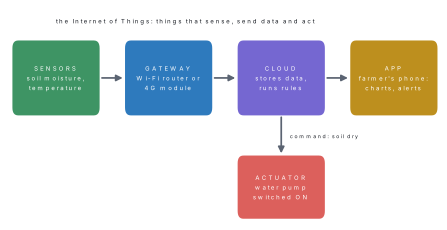
| Application | What IoT does | Example |
|---|---|---|
| Smart home | lights, fans, plugs, cameras and locks controlled from a phone; automatic switching | a smart bulb that turns on at sunset |
| Smart city | traffic lights that adjust to traffic, smart street lights, parking sensors, full-bin alerts, air-quality monitors | less congestion and energy waste |
| Smart agriculture | soil-moisture sensors control irrigation; greenhouse temperature monitoring; livestock trackers | water given only when the crop needs it |
| Smart healthcare | wearables measure heartbeat and steps; remote monitoring of patients | an elderly patient's readings sent to the doctor |
| Smart transportation | GPS tracking of buses and taxis, ride-hailing apps, smart toll and fuel cards | seeing exactly where the bus is |
| Smart education | RFID or fingerprint attendance, smart boards, connected labs | attendance recorded automatically |
| Communication and industry | machines report faults before breaking down; stock tracked with RFID | maintenance done in time |
IoT saves time, energy and money and gives accurate, real-time information. Its challenges are security (badly protected devices are easy to hack), privacy (devices collect personal data), dependence on the Internet and electricity, cost, and electronic waste.
5.8 Virtual reality, augmented reality and extended reality (XR)
Virtual reality (VR) is a completely computer-generated 3D environment that feels real; a headset covers the eyes and the view changes as the head moves. Augmented reality (AR) adds digital images or information on top of the real world, seen through a phone camera or special glasses. Mixed reality (MR) goes further, letting digital objects interact with real ones. Extended reality (XR) is the umbrella term for all of them.
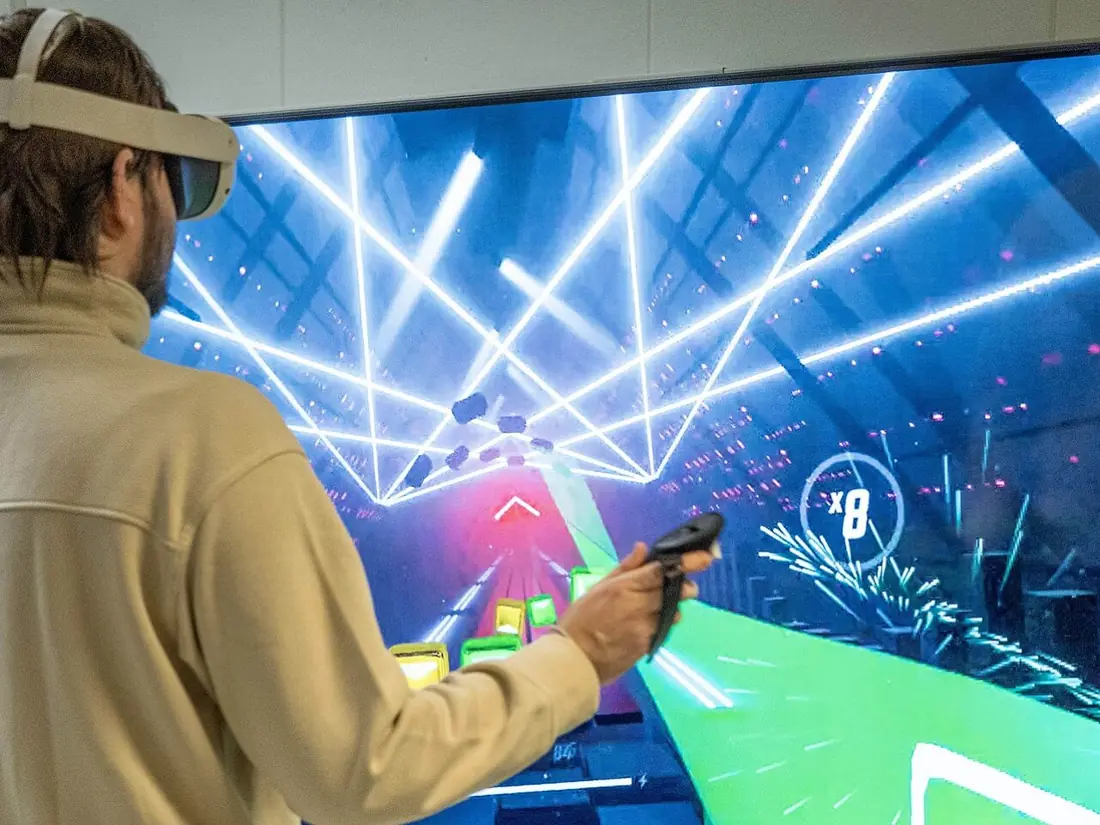
| Point | Virtual reality (VR) | Augmented reality (AR) | Mixed reality (MR) |
|---|---|---|---|
| What you see | only a computer-made world | the real world with digital additions | real world and digital objects that interact |
| Device | VR headset (e.g. Meta Quest) | smartphone, tablet, AR glasses | MR headset (e.g. Microsoft HoloLens) |
| Contact with the real world | cut off | kept | kept |
| Examples | VR games, virtual tours, flight simulators | Pokémon GO, Google Lens translating a sign, camera filters, seeing furniture in your room before buying | engineers handling a 3D model on a real table |
Applications of VR and XR: education (virtual field trips, 3D models of the heart or the solar system), training (pilots, drivers, surgeons and soldiers practise safely), health (therapy and rehearsing operations), business (virtual showrooms and property tours), entertainment (games, concerts, films), military and defence, tourism and hospitality (previewing hotels and heritage sites), and aeronautics (flight simulators and aircraft design).
5.9 Cloud computing: service models and applications
Cloud computing is the delivery of computing services — servers, storage, databases, software, networking and analytics — over the Internet, on demand, paying only for what is used, instead of buying and maintaining your own hardware and software. The provider runs the equipment in large data centres.

The largest providers are Amazon Web Services (AWS), Microsoft Azure, Google Cloud, IBM Cloud and Oracle Cloud. Everyday cloud apps include Google Drive, OneDrive, Dropbox, iCloud, Gmail, Google Docs and Microsoft 365.
Features of cloud computing: on-demand self-service; access from anywhere on any device; scalability (resources grow or shrink as needed); resource pooling (many customers share the provider's machines); pay-as-you-go pricing; and maintenance, updates and backups done by the provider.
| Benefits | Limitations |
|---|---|
| no costly servers to buy; pay only for use | needs a reliable Internet connection |
| files available anywhere, any time, on any device | data is held by another company: privacy concerns |
| easy teamwork on shared documents | provider outages stop the service |
| automatic backup and updates | monthly costs add up; hard to move to another provider |
| scales instantly for big events (SEE results day) | less control over how the system is run |
Service models: IaaS, PaaS and SaaS
| Model | What the provider gives | Who uses it | Examples |
|---|---|---|---|
| IaaS — Infrastructure as a Service | virtual servers, storage and networks; you install and manage the operating system and software | IT teams and system administrators | Amazon EC2 and S3, Microsoft Azure Virtual Machines, Google Compute Engine |
| PaaS — Platform as a Service | a ready platform (operating system, runtime, database, tools) to develop, test and run your own applications | software developers | Google App Engine, Azure App Service, Heroku, Firebase |
| SaaS — Software as a Service | complete applications used through a browser or app; nothing to install or maintain | everyone | Gmail, Google Docs, Microsoft 365, Zoom, Canva, Google Drive, OneDrive |
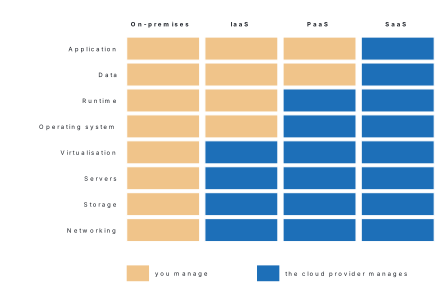
The textbook gives "Google Drive, OneDrive for storing your documents" as examples of IaaS. They are finished applications used through a browser or app, so they are SaaS. IaaS means renting raw infrastructure — a virtual server or block of storage that your own IT staff set up and manage, such as Amazon EC2.
Clouds are also described by who can use them: a public cloud is shared by any paying customer (AWS, Google Cloud); a private cloud serves one organisation; a hybrid cloud combines the two.
Problem. Name the model: (a) a school writes its routine in Google Docs; (b) a company rents ten virtual servers from AWS and installs its own software; (c) a student hosts her Python web app on Google App Engine; (d) a teacher designs posters in Canva.
Solution. (a) SaaS. (b) IaaS. (c) PaaS. (d) SaaS.
Find out how Google Drive or OneDrive keeps your files: where the data centres are, how files are copied to several places for safety, how sharing links and permissions work, and how syncing keeps your phone and laptop copies the same. Prepare a five-slide presentation for your class.
5.10 e-Commerce, e-Governance and e-Education in Nepal
ICT and the Internet now let people shop, use government services and study without leaving home or standing in long queues.
e-Commerce
e-Commerce (electronic commerce) is the buying and selling of goods and services, and the payment for them, over the Internet.
In Nepal Daraz and SastoDeal sell goods online, HamroBazar lets people sell to each other, and Foodmandu and Pathao deliver food; digital wallets and payment systems such as eSewa, Khalti, Fonepay QR and connectIPS let buyers pay from their phones. The types are B2C (business to consumer, e.g. Daraz), C2C (consumer to consumer, e.g. HamroBazar) and B2B (business to business, e.g. a shop ordering stock from a wholesaler online). Parliament passed the E-Commerce Act, 2081 in 2025, which requires online businesses to register with the government.
| Merits of e-commerce | Limitations |
|---|---|
| shop from home, 24 hours a day | the product delivered may differ from the picture |
| saves time and travel | online scams and fraud |
| wide choice, including international products | less face-to-face contact |
| easy price comparison and doorstep delivery | dependence on technology and the Internet |
| digital payment without cash | delivery can be late; returns can be slow |
e-Governance
e-Governance is the use of digital technology and the Internet by the government to provide services and information to citizens, businesses and its own offices efficiently and transparently.
| Type | Between | Nepali example |
|---|---|---|
| G2C — Government to Citizen | government and people | Nagarik App (linked citizenship, PAN, licence and voter details), online passport application, online SEE and NEB results |
| G2B — Government to Business | government and companies | online company registration, tax filing on the Inland Revenue Department's portal, e-bidding for government contracts |
| G2G — Government to Government | between offices | shared data between ministries and local governments |
| G2E — Government to Employee | government and its staff | online salary and pension records |
Nepal's Digital Nepal Framework (2019) set out plans to deliver more services online, and citizens can file complaints through the Hello Sarkar service.
| Merits of e-governance | Limitations |
|---|---|
| transparency: citizens can track applications | digital divide: not everyone has a device or Internet |
| accountability of officials | system crashes or slow servers interrupt services |
| faster service with less paperwork | lack of digital literacy |
| equal access from every district | cyber attacks and data leaks |
| less bribery, since fewer in-person visits are needed | some services still need a visit to an office |
e-Education
e-Education (e-learning) is the use of digital technology and the Internet for teaching and learning, so that lessons, videos, assignments and exams can be reached from computers, tablets or phones at any time and place.
Examples in Nepal include the government's Sikai Chautari portal (learning.cehrd.gov.np) with lessons and textbooks for Grades 1–10, OLE Nepal's E-Paath lessons and E-Pustakalaya library, and online classes in Google Classroom, Zoom and Google Meet, which schools and colleges used widely during the COVID-19 lockdowns.
| Merits of e-education | Limitations |
|---|---|
| learn at your own pace, anytime and anywhere | little face-to-face contact with teachers and friends |
| a huge variety of materials, often free | needs devices, electricity and Internet |
| lessons can be replayed | technical problems interrupt learning |
| often cheaper than travelling to classes | quality varies; self-discipline is needed |
| flexible for working students and remote areas | practical subjects are harder to teach online |
Make a chart of six emerging technologies — for example generative AI, 5G, IoT, cloud computing, blockchain and XR — with each one's key features and how it is changing the IT industry and jobs in Nepal. Present it to your class.
Textbook exercises: model answers
i. (c) — AI imitates intelligence; it does not put a human brain into a machine.
ii. (d) — self-driving cars, Siri and Alexa all use AI.
iii. (d) — manual typewriting involves no AI.
iv. (a) supervised — trained data come with correct answers. (Options a and b are both printed "Supervised".)
v. (c) — unsupervised learning has no labels.
vi. (d) — Gemini is Google's chatbot.
vii. (a) — Copilot (GitHub Copilot) is designed to help programmers write code.
viii. (d) — IaaS, PaaS and SaaS are all cloud services.
ix. (a) — buying and selling online is e-commerce; Daraz is one example of it.
x. (a) — Google Classroom is built for e-education (Zoom and Meet are video-meeting tools that schools also use).
xi. (a) — online driving licence renewal is a government service; so are the online passport application and online results. Only "online fuel" is not e-governance.
a. Daraz and SastoDeal (also HamroBazar, Foodmandu).
b. e-Governance is the use of digital technology and the Internet by the government to deliver services and information to citizens, businesses and its own offices.
c. Natural language processing such as Google Translate; computer vision such as face unlock (also gaming, expert systems, automated grading).
d. ChatGPT and Gemini (also Microsoft Copilot) generate both text and images.
e. Training pilots and surgeons in safe simulations; virtual field trips and 3D models in education (also games, tourism).
f. Learners study at their own pace, anytime and anywhere; a wide variety of learning material is available, often free.
g. The Nagarik App, and online passport application (also online SEE results, IRD tax filing).
h. Daraz and HamroBazar.
i. Storing and sharing files online (Google Drive); using software without installing it (Gmail, Microsoft 365) — also hosting websites and apps.
j. ChatGPT, Gemini, Microsoft Copilot and DALL·E (also Claude, Midjourney).
a. AI is the branch of computer science that makes machines perform tasks that need human intelligence — learning, reasoning, understanding language, recognising images. Applications: (1) smart assistants that answer voice questions; (2) Google Translate and voice typing; (3) face unlock and photo tagging; (4) recommendations on YouTube and Daraz; (5) navigation apps that avoid traffic; (6) spam filters and fraud alerts.
b. ML is the part of AI in which computers learn from data and improve with experience instead of following fixed rules. AI is the broad goal of intelligent machines; ML is the main method used to reach it — every ML system is AI, but some AI (a rule-based chess program) does not learn. Example: Google Maps (AI) uses ML on traffic data to predict the fastest route.
c. Education: personalised learning and automatic grading (Duolingo, quizzes). Healthcare: finding disease in X-rays and scans. Transportation: self-driving cars and traffic prediction. Banking: detecting fraudulent transactions. (Also spam filtering and speech recognition.)
d. Supervised learning trains on labelled data and predicts labels for new data — e.g. emails marked spam or not spam teach a filter. Unsupervised learning finds groups in unlabelled data — e.g. customers grouped by shopping habits. Supervised knows the correct answers while training; unsupervised does not. (See the table and Worked example 5.2.)
e. Robots do dangerous, heavy, precise or repetitive work faster and more safely. Manufacturing: welding, painting and assembling cars, packing goods. Healthcare: robotic surgery with tiny precise movements, delivering medicines in hospitals. Education: robotics kits teach programming and engineering. They also explore space and oceans and handle bombs and fires.
f. Generative AI creates new text, images, music, video and code from a prompt, after learning from huge amounts of data (LLMs predict the next token; image generators remove noise step by step). It lets anyone draft essays, design posters, make illustrations and edit videos quickly, speeds up content creation and personalises it — but it can hallucinate, copy bias, raise copyright questions and enable deepfakes, so output must be checked.
g. IoT connects sensors and devices across a city to the Internet so they can share data and act automatically: traffic lights that change with traffic flow, street lights that dim when roads are empty, sensors that report full garbage bins, smart parking, air-quality monitoring, and smart meters for water and electricity. Cities become less congested, cleaner and less wasteful.
h. Merits: shopping from home 24/7 (ordering books from Daraz), saving time, wide choice and price comparison, doorstep delivery, digital payment with eSewa or Khalti. Demerits: the product may differ from its picture, online fraud, delivery delays, dependence on the Internet, and less social contact.
i. e-Governance puts services online, so citizens save time and travel and officials work more transparently. Health: online appointment and vaccine records. Education: SEE and NEB results and admission forms online. Transport: online driving licence applications and traffic fines paid through the Nagarik App. Citizens can track applications, and fewer visits mean less bribery.
j. Advantages: learning at one's own pace anywhere, access to vast free material (Sikai Chautari, YouTube), replayable lessons, lower cost and flexibility. It changed the classroom into a blended one: teachers post assignments in Google Classroom, use videos and online quizzes, and act more as guides; students research, collaborate online and learn digital skills.
k. Cloud computing delivers computing services — storage, servers, databases and software — over the Internet on demand. Services: (1) SaaS, ready software in a browser (Gmail, Microsoft 365); (2) PaaS, a platform for building and running apps (Google App Engine); (3) IaaS, virtual servers, storage and networks (Amazon EC2); (4) cloud storage and backup (Google Drive, OneDrive), which is a SaaS application.
Chapter summary
- AI makes machines do tasks needing human intelligence; ML is AI that learns from data; deep learning and generative AI are inside ML. All present AI is narrow AI.
- Learning techniques: supervised (labelled data, predicts labels), unsupervised (unlabelled data, finds groups), reinforcement (trial and error with rewards).
- Robots sense (sensors), think (controller, AI) and act (actuators); simulators such as Scratch and RoboBlocky test robot programs.
- Generative AI creates content from prompts: LLMs predict the next token; image generators remove noise step by step. Good prompts give task, context, format and limits. Limits: hallucination, bias, privacy, copyright, deepfakes.
- AI is built into Google Docs, Gmail and Microsoft 365 (Copilot); use it with privacy, accuracy, fairness and honesty.
- AI ethics: bias (fix with diverse data and human review), privacy (consent, minimal data), security (protect against hacking and poisoning).
- IoT: sensors + connection + cloud + app + actuators, in smart homes, cities, farms, health, transport and schools.
- VR replaces the real world; AR adds to it; MR mixes them; XR covers all three.
- Cloud models: IaaS (infrastructure), PaaS (platform), SaaS (software). e-Commerce (Daraz, eSewa), e-governance (Nagarik App, G2C, G2B, G2G, G2E) and e-education (Sikai Chautari) bring services online in Nepal.
Practice questions
Group A — Multiple choice (1 mark each)
- A model is trained with photos each marked "cat" or "dog". This is [1]asupervised learningbunsupervised learningcreinforcement learningdno learning
- A game-playing program improves by winning and losing thousands of games. It uses [1]asupervised learningbunsupervised learningcreinforcement learningda spreadsheet
- The part of a robot that moves its wheels or arms is the [1]asensorbactuatorcpromptdgateway
- An AI chatbot confidently gives a false date. This limitation is called [1]aencryptionbhallucinationccompressiondclustering
- Which is the best way to reduce bias in an AI system? [1]atrain it on one kind of databignore privacy rulesctrain it on diverse, representative datadcopy its output without checking
- Seeing directions drawn over the real street through a phone camera is an example of [1]aVRbARcIaaSdPaaS
- Gmail and Google Docs used through a browser are examples of [1]aIaaSbPaaScSaaSdon-premises software
- A smart irrigation system switches on a pump when a sensor reports dry soil. This technology is [1]aIoTbVRce-commercedDTP
- Renewing a driving licence online is an example of [1]ae-commercebe-governancece-educationdVR
- Which of these is a digital wallet used in Nepal? [1]aCanvabeSewacScratchdZoom
- Sikai Chautari, the government's learning portal, is an example of [1]ae-educationbe-commercecIoTdIaaS
Answers to Group A
1. (a) — every example has a label.
2. (c) — rewards for winning guide its learning.
3. (b) — motors are actuators; sensors only measure.
4. (b) — false but fluent output is hallucination.
5. (c) — balanced data lets the AI treat all groups fairly.
6. (b) — digital information added to the real view is AR.
7. (c) — complete applications used online are SaaS.
8. (a) — a sensor and an actuator talking over a network is IoT.
9. (b) — a government service delivered online.
10. (b) — eSewa is a digital wallet.
11. (a) — online teaching and learning.
Group B — Short answer (2 marks each)
- Define machine learning and give one example of its use. [2]
- Write two differences between supervised and reinforcement learning. [2]
- What are the three stages of the sense–think–act cycle of a robot? [2]
- Write two limitations of generative AI that a student must keep in mind. [2]
- A hospital uses AI to read patients' X-rays. Write two ethical issues it must take care of. [2]
- Suggest two IoT applications that could help a farmer in the Terai, with a reason for each. [2]
- Differentiate between virtual reality and augmented reality with an example of each. [2]
- Write two benefits and one limitation of cloud computing for a school. [2]
- Give one example each of G2C and G2B e-governance services in Nepal. [2]
Answers to Group B
1. Machine learning is the part of AI in which a computer learns patterns from data and improves with experience instead of being given fixed rules. Example: Gmail's spam filter learning from emails marked spam.
2. Supervised learning trains on labelled data with correct answers; reinforcement learning has no labelled answers and learns by trial and error from rewards and penalties. Supervised learning predicts labels (spam/not spam); reinforcement learning learns actions (a robot learning to walk).
3. Sense — sensors collect information about the surroundings; think — the controller or AI decides what to do; act — actuators such as motors carry out the action.
4. It can hallucinate (give false facts confidently), so every fact must be checked; and submitting its writing as your own is dishonest, so it should be used to learn, not to do the work (also bias and privacy).
5. Privacy — X-rays and records are sensitive and must be protected and used only with consent. Accuracy and bias — the AI may make mistakes, especially for groups missing from its training data, so a doctor must check its findings.
6. Soil-moisture sensors that switch irrigation pumps on only when the soil is dry, saving water and electricity; weather or pest sensors that send alerts to the farmer's phone, so crops can be protected in time (also livestock trackers).
7. VR replaces the real world with a computer-made one, seen in a headset — e.g. a VR game or virtual tour. AR adds digital information on top of the real world through a phone or glasses — e.g. Google Lens translating a signboard.
8. Benefits: files and software available to teachers and students anywhere; no need to buy and maintain servers; automatic backup. Limitation: it needs a reliable Internet connection.
9. G2C: the Nagarik App or online passport applications (also online results). G2B: online company registration or tax filing on the IRD portal.
Group C — Long answer (4 marks each)
- What is artificial intelligence? Explain three types of learning techniques with an example of each. [1+3]
- A school plans to let students use AI tools for homework. Suggest four guidelines for responsible use. [4]
- Define cloud computing. Explain IaaS, PaaS and SaaS with one example each. [1+3]
- What is e-commerce? Explain its two merits and two limitations with reference to Nepal. [1+3]
Answers to Group C
1. AI is the field of computer science that builds machines able to do tasks needing human intelligence, such as learning, reasoning and recognising images (1). Supervised learning learns from labelled examples, e.g. a spam filter trained on emails marked spam. Unsupervised learning finds groups in unlabelled data, e.g. grouping customers by buying habits. Reinforcement learning learns by trial and error from rewards, e.g. a robot learning to walk or a game-playing program (1 each).
2. (1) Privacy: never type personal details, passwords or photos of others into an AI tool. (2) Accuracy: check every answer against the textbook or a trusted source, because AI can hallucinate. (3) Fairness and bias: notice one-sided or stereotyped answers and question them. (4) Academic honesty: use AI to understand and practise, write the final answer in your own words, and say when AI helped (also safety: use school-approved tools only).
3. Cloud computing is the delivery of computing services such as storage, servers, databases and software over the Internet, on demand and pay-per-use (1). IaaS provides virtual servers, storage and networks that the customer's IT staff manage — e.g. Amazon EC2. PaaS provides a ready platform to build and run applications — e.g. Google App Engine. SaaS provides complete applications used through a browser — e.g. Gmail or Microsoft 365 (1 each).
4. e-Commerce is buying and selling goods and services and paying for them over the Internet (1). Merits: people anywhere in Nepal can shop at any hour from Daraz or SastoDeal and have goods delivered; payment is easy and cashless with eSewa, Khalti or Fonepay QR. Limitations: the product delivered may differ from its picture or online fraud may occur; delivery to remote areas can be slow and depends on a good Internet connection.
Practise more: Computer Science question bank