Unit 13 · Science and Technology · 19 min read
Information and Communication Technology
What the syllabus asks for 5
- Computer systems
- internet and networks
- e-commerce
- ICT in daily life
- ethics
You look up a result on a phone, pay a bill through eSewa, watch a lesson online or send a photo to a relative in Qatar. All of this is possible because of Information and Communication Technology (ICT): the computers, networks and software that store, process and send information. In this unit you will learn how a computer system works, how the internet and computer networks connect the world, how people buy and sell online, where ICT helps us in daily life, and how to use it responsibly and safely.
Parts of a computer (input, output, CPU, memory), hardware and software, units of data, the internet, WWW, e-mail and network types, e-commerce with its advantages and disadvantages, uses of ICT in various fields, cyber crime and cyber ethics, and short numericals on data size, binary numbers and download time.
13.1 Computer systems
What is a computer?
A computer is an electronic device that accepts data as input, processes it according to a set of instructions (a program), stores it, and gives out the result as information.
Data are raw facts and figures (such as marks 78, 85, 92). Information is data that has been processed and made meaningful (the average mark is 85). A computer follows the cycle input → process → output, with storage.
Characteristics: speed, accuracy, diligence (it never gets tired), versatility, storage capacity, and automation. A computer has no intelligence of its own: it can only do what it is told (it has no IQ).
Parts of a computer system
A computer system has four parts: hardware, software, data and users (the "liveware").
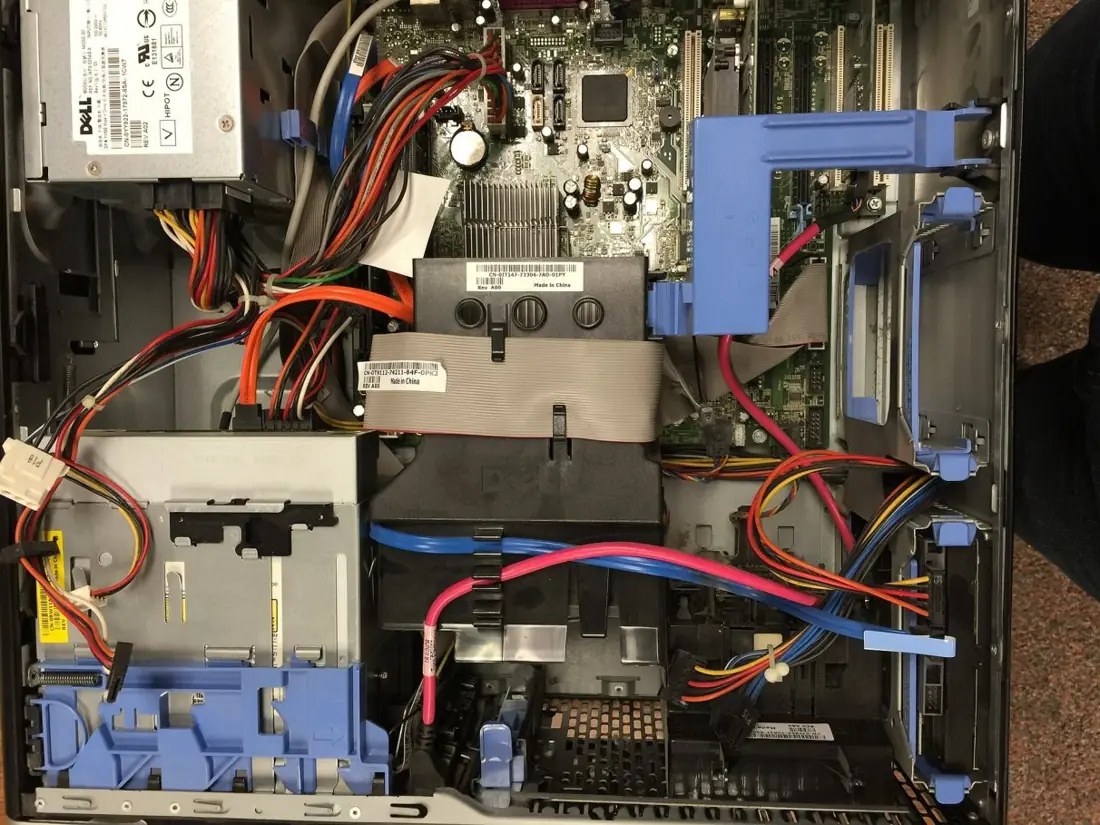
Hardware is the physical parts that we can touch.
| Group | Function | Examples |
|---|---|---|
| Input devices | Send data and instructions into the computer | Keyboard, mouse, scanner, microphone, webcam, touch screen, barcode reader |
| Processing unit (CPU) | The "brain" that carries out the instructions | Microprocessor chip |
| Output devices | Show the results | Monitor, printer, speaker, projector |
| Memory (primary) | Holds data and programs being used right now | RAM, ROM, cache |
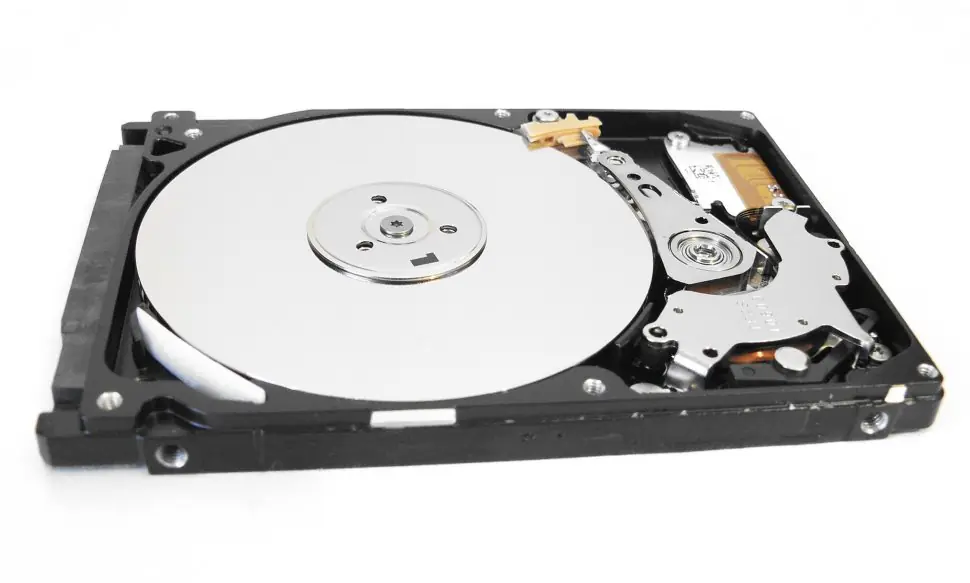
| Storage (secondary) | Keeps data permanently | Hard disk, SSD, pen drive, memory card, DVD |
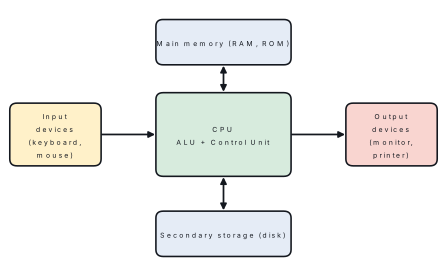
The CPU (Central Processing Unit) has three parts: the Arithmetic and Logic Unit (ALU) which does calculations and comparisons, the Control Unit (CU) which directs all the work, and registers, small fast stores.
Primary memory and storage units
| Memory | Meaning |
|---|---|
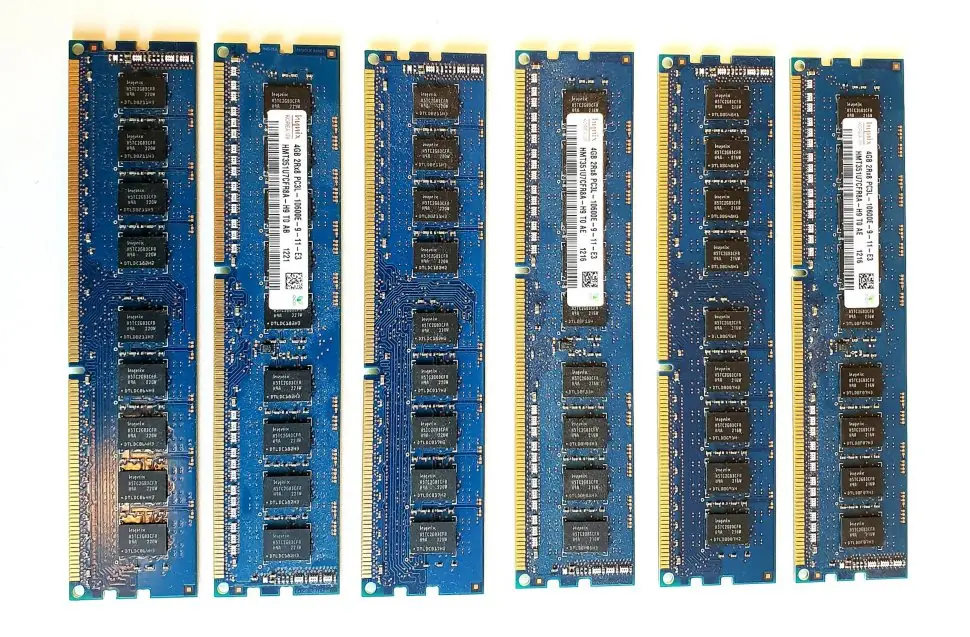
| RAM (Random Access Memory) | Temporary working memory; contents are lost when the power goes off (volatile). Read and write |
| ROM (Read Only Memory) | Permanent memory holding start-up instructions (BIOS); not lost when the power goes off |
| Cache | Very fast small memory between the CPU and RAM |
Computers store everything as 0s and 1s (the binary system). A bit is a single binary digit (0 or 1). A byte is a group of 8 bits and stores one character.
| Unit | Size |
|---|---|
| 1 byte (B) | 8 bits |
| 1 kilobyte (KB) | 1024 B |
| 1 megabyte (MB) | 1024 KB |
| 1 gigabyte (GB) | 1024 MB |
| 1 terabyte (TB) | 1024 GB |
Problem. A phone memory card of 2 GB is used to store photos each of size 4 MB. How many photos can it hold?
Solution. 2\ \text{GB} = 2 \times 1024 = 2048 MB.
Number of photos = \dfrac{2048}{4} = 512.
Binary numbers
The decimal system uses ten digits (0–9) with base 10. The binary system uses two digits (0, 1) with base 2. Each place in a binary number is a power of 2: \dots, 16, 8, 4, 2, 1.
Problem. (a) Convert 1101_2 to decimal. (b) Convert 25_{10} to binary.
Solution. (a) 1101_2 = 1\times8 + 1\times4 + 0\times2 + 1\times1 = 8 + 4 + 0 + 1 = 13.
(b) Divide 25 repeatedly by 2 and note the remainders:
| Division | Quotient | Remainder |
|---|---|---|
| 25 ÷ 2 | 12 | 1 |
| 12 ÷ 2 | 6 | 0 |
| 6 ÷ 2 | 3 | 0 |
| 3 ÷ 2 | 1 | 1 |
| 1 ÷ 2 | 0 | 1 |
Reading the remainders from bottom to top: 25_{10} = 11001_2. Check: 16 + 8 + 1 = 25 ✓.
Software
Software is the set of programs and instructions that tell the hardware what to do. We cannot touch it.
| Type | Meaning | Examples |
|---|---|---|
| System software | Runs and controls the computer | Operating systems (Windows, Linux, macOS, Android), device drivers, language translators |
| Utility software | Helps maintain the computer | Antivirus, disk cleaner, backup tools, file compression |
| Application software | Does a task for the user | Word processor (MS Word), spreadsheet (Excel), presentation (PowerPoint), browser, games, Photoshop |
An operating system (OS) manages the hardware, memory and files, runs other programs, and provides a user interface (the screen you see, with icons and windows). A virus is a harmful program that copies itself and damages data or slows the computer.
Types of computers
| Basis | Types |
|---|---|
| Size and power | Supercomputer, mainframe, minicomputer, microcomputer (desktop, laptop, tablet, smartphone) |
| Data handled | Analog, digital, hybrid |
| Purpose | General purpose, special purpose (such as in a washing machine or ATM) |
Microcomputers are used by individuals. Supercomputers do enormously fast calculations such as weather forecasting and scientific research.
13.2 Internet and networks
Computer network
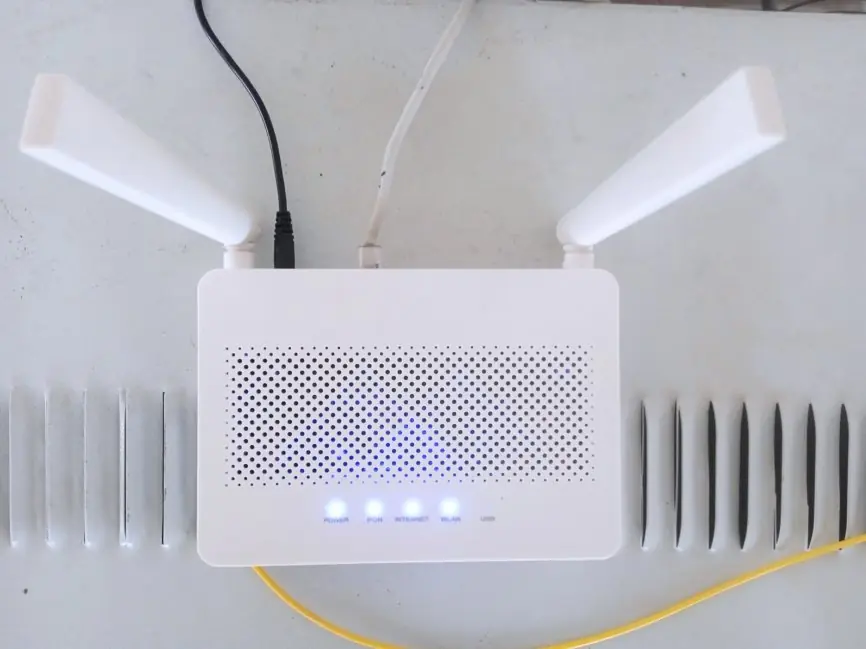
A computer network is a group of two or more computers and other devices connected together so that they can share data, files, printers and an internet connection.
Benefits: sharing of resources (printers, files), fast communication, saving cost, central backup and security. Drawbacks: spread of viruses, risk of hacking, expensive setup, failure of the main server may stop everyone.
| Type | Area covered | Example |
|---|---|---|
| LAN (Local Area Network) | A room, a building, a school | School computer lab, cyber café |
| MAN (Metropolitan Area Network) | A city | A cable TV network of a city, a bank's branches in a city |
| WAN (Wide Area Network) | A country or the world | The internet; a bank's ATM network |
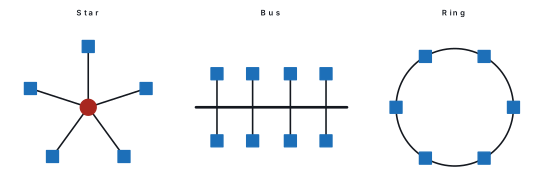
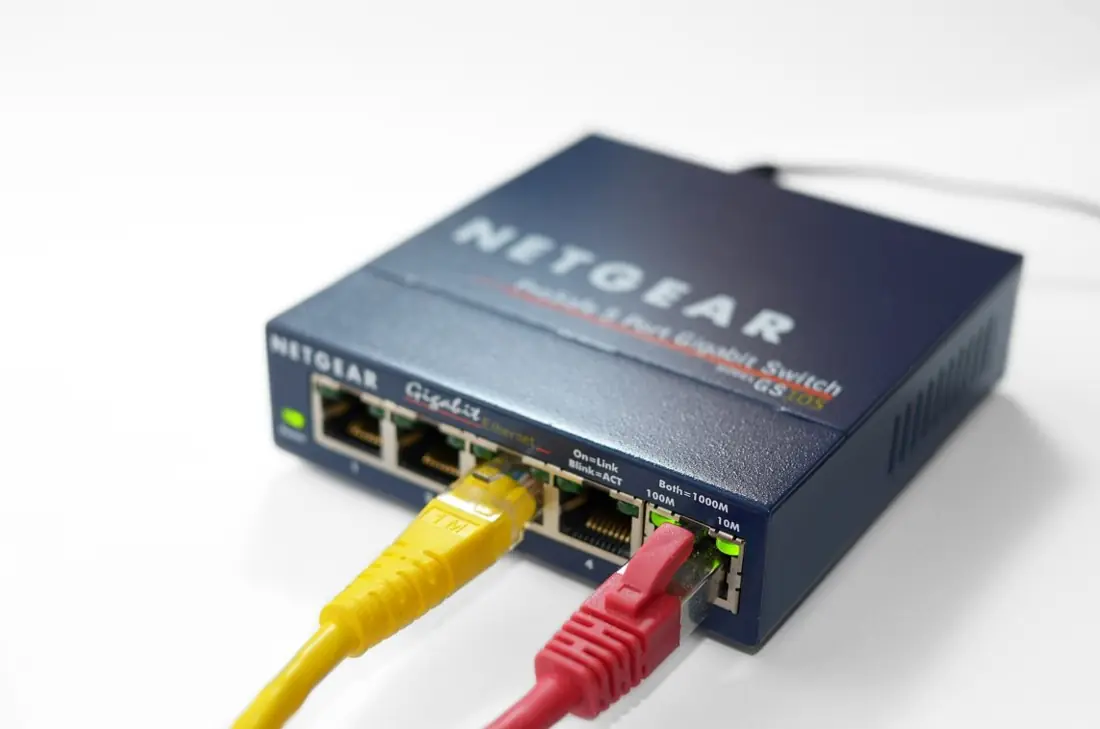
The way in which computers are arranged in a network is its topology: bus (all on one cable), star (all connected to a central hub or switch) and ring (in a closed loop). The star topology is the most common in schools and offices: if one cable fails, the others keep working, but if the central switch fails, the whole network stops.
The internet
The internet is a worldwide network of networks of computers, linked by cables, telephone lines, fibre optics and satellites, that follow common rules (protocols) to exchange data.
The internet began in 1969 as ARPANET, a project of the United States Department of Defense. Nepal's first internet service came in the 1990s, and today most people use the mobile internet and fibre broadband.
Key terms:
| Term | Meaning |
|---|---|
| ISP (Internet Service Provider) | A company that gives you an internet connection (e.g., Worldlink, Vianet, Subisu in Nepal; Ncell and Nepal Telecom for mobile data) |
| Protocol | A set of rules for communication, such as TCP/IP for the internet and HTTP for web pages |
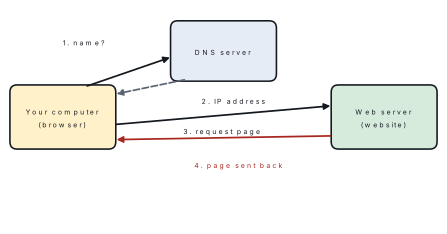
| IP address | A unique number identifying each device on the internet, e.g., 192.168.1.1 |
| WWW (World Wide Web) | A collection of web pages linked together and viewed with a browser; the web is a service on the internet, not the internet itself |
| Web browser | Program used to view web pages (Chrome, Firefox, Edge, Safari) |
| URL | The address of a web page, e.g., https://www.example.com/index.html |
| Search engine | A website that finds information for a keyword (Google, Bing) |
| Website / web page | A set of linked pages / a single page |
| Bandwidth | The amount of data that can be sent per second (bits per second, bps) |
Problem. A file of size 100 MB is downloaded on a connection of speed 8 Mbps (megabits per second). How long does it take?
Solution. Convert the file to bits: 100\ \text{MB} = 100 \times 8 = 800 megabits (1 byte = 8 bits).
Time = \dfrac{800\ \text{Mb}}{8\ \text{Mb/s}} = 100 s = 1 min 40 s.
Network speed is quoted in bits per second (Mbps, with a small b), while file sizes are in bytes (MB, with a big B). Divide the speed by 8 to get megabytes per second: 8 Mbps = 1 MB per second.
Services on the internet
- E-mail (electronic mail): sending messages and files at once to any part of the world. An address looks like
name@gmail.com: the user name, the symbol @, and the domain of the mail provider. A message can carry attachments, and can be sent to many people through Cc (copy) and Bcc (hidden copy). - Social media: Facebook, TikTok, Instagram, YouTube, Viber, WhatsApp to share, chat and video-call.
- Online search and learning: e-books, video lessons, online courses and libraries.
- Cloud storage and computing: saving files on remote servers (Google Drive, OneDrive) that can be reached from any device.
- VoIP and video conferencing: Zoom, Google Meet and Messenger give cheap calls and virtual classes.
- Online banking, e-governance and shopping: discussed below.
Safe use of the internet
| Threat | What it is | Protection |
|---|---|---|
| Virus, worm, trojan, ransomware | Harmful programs | Install and update antivirus; do not open unknown files |
| Hacking | Unauthorised entry into a system or account | Strong passwords, two-step verification |
| Phishing | Fake e-mail or message that tricks you into giving a password or bank details | Never click suspicious links; check the sender |
| Spam | Unwanted bulk mail | Spam filters |
| Cyber bullying | Harassing a person online | Do not respond; report and block |
| Identity theft, fraud | Using another person's details for gain | Share less personal information |
A firewall blocks unauthorised access to a network. A good password is long, mixes letters, numbers and symbols, and is not shared or reused.
13.3 E-commerce
E-commerce (electronic commerce) is the buying and selling of goods and services, and the transfer of money, through the internet and electronic networks.
Types of e-commerce
| Type | Between | Example |
|---|---|---|
| B2C (business to consumer) | A business and a customer | Daraz, Sastodeal, an online clothes shop |
| B2B (business to business) | Two businesses | A manufacturer buying raw material, or a wholesaler selling to a shopkeeper online |
| C2C (consumer to consumer) | Two individuals | Hamrobazar, Facebook marketplace |
| G2C (government to citizen) | Government and citizens | Online tax payment, e-passport application, online bill payment |
Electronic payment
Payment in e-commerce is done by debit or credit card, internet banking, mobile banking, digital wallets (eSewa, Khalti, IME Pay) and QR payments (Fonepay, NepalPay). The Nepal Rastra Bank regulates payment services. In many cases, cash on delivery is also used.
Advantages and disadvantages
| Advantages | Disadvantages |
|---|---|
| Open 24 hours; can buy from anywhere | Cannot touch or try the goods before buying |
| Saves time, travel and cost | Risk of fraud, fake goods, wrong delivery |
| Wide choice; easy comparison of prices | Needs internet, a device and some skill |
| Reaches customers across the country and the world | Fear for the safety of card and personal information |
| Home delivery; easy returns for many items | Delay in delivery, especially in remote areas; loss of jobs of some small shops |
Tips for safe online shopping: use well-known websites with https:// and a padlock sign; do not share your PIN or OTP; check the seller's rating and return policy; use cash on delivery when you are unsure; keep the order receipt.
13.4 ICT in daily life
| Field | Use of ICT |
|---|---|
| Education | E-learning, smart classrooms, digital libraries and e-books, online exams and results, video lessons, education apps |
| Health | Telemedicine (consulting doctors by video), electronic health records, digital X-ray, CT scan and MRI, online appointments, health-tracking watches |
| Banking and finance | ATM, mobile banking, internet banking, QR payment, online remittance and share trading |
| Government (e-governance) | Online forms and services (e.g., passport, driving licence and tax), online tendering, e-voting systems, national ID, public information websites |
| Agriculture | Weather forecasts and market prices by phone, farming advice by SMS or video, drones, and sensors for irrigation |
| Communication | E-mail, mobile phone, video call, social media; FM radio and television use digital technology |
| Business and industry | Computerised accounting, inventory and billing, automation and robots in factories, online marketing |
| Transport and tourism | Online ticket booking (buses and flights), GPS navigation, ride-sharing apps; trekking permits and hotel booking online |
| Entertainment | Online games, streaming of music and film, digital photography |
| Disaster management | Early warnings by mobile SMS, satellite maps of floods and landslides, drones for search and rescue |
| Science and research | Supercomputers, simulations, sensors, space satellites |
Emerging technologies
- Artificial Intelligence (AI): computers that learn from data to do tasks such as speech recognition, translation and recommending videos.
- Internet of Things (IoT): everyday objects (lights, fridges, vehicles, water meters) connected to the internet so that they can be controlled or monitored remotely.
- Robotics: machines that do work in factories, surgery and dangerous places.
- Cloud computing: using remote servers to store and process data.
- Blockchain and 3D printing are also growing.
Impact of ICT
Positive impacts: faster work and communication, access to information for all, new jobs (software developer, web designer, data analyst, online freelancer), services at a distance for people in remote hills and mountains. Negative impacts: addiction to games and social media, loss of privacy, spread of false news, health problems (eye strain, back pain, loss of sleep), cyber crime, loss of some traditional jobs, and e-waste (old computers and phones that poison soil and water if thrown away carelessly). Old devices should be recycled or passed to authorised collectors.
13.5 Ethics
Cyber ethics (computer ethics) are the moral rules and good manners that guide a person on how to use computers, the internet and digital information responsibly and respectfully.
Rules of good conduct (netiquette)
- Be polite and respectful online; do not use rude, hateful or abusive language.
- Do not spread rumours, rude pictures or fake news; verify before sharing.
- Do not use another person's work or picture without permission.
- Do not hack, enter another person's account, or read his or her messages.
- Do not share a person's private information or photos without consent.
- Do not use the school or office network for illegal purposes.
- Respect copyright; use licensed software.
- Think before you post: your digital footprint (the trail of what you post and do online) stays for a long time.
Copyright and plagiarism
Copyright is the legal right of the owner (author, artist, programmer) to control the copying and use of his or her work. Copying software, music, films or books without permission is piracy. Plagiarism is copying another person's work or ideas and presenting them as your own. Free and open-source software (like Linux and LibreOffice) is given with a licence allowing the public to use and share it.
Cyber crime and cyber law
Cyber crime is any crime done with a computer or on the internet: hacking, phishing, online fraud, spreading viruses, posting indecent material, stealing identity and harassing people.
Cyber law is the set of rules made by a government to punish such crimes and to protect users. In Nepal, the Electronic Transactions Act, 2063 B.S. (2008) recognises electronic records and digital signatures, and punishes crimes such as unauthorised access to a computer, damaging a computer system, publishing illegal material, and fraud. Later laws, such as the Individual Privacy Act, 2075 B.S., protect personal information. A person who is the victim of a cyber crime may complain to the Cyber Bureau of the Nepal Police.
Privacy and security
Keep your personal data safe: use strong passwords and change them regularly, do not give your password or OTP to anyone, log out on shared computers, update software, and back up important files. These are habits of a good digital citizen.
Downloading a film or software from an unofficial website is not harmless even when it is free. It is piracy, may carry viruses, and takes income from the creators.
Chapter summary
- A computer takes input, processes data using the CPU (ALU + CU) and memory, and gives output. Hardware is physical; software is programs (system, utility, application).
- RAM is volatile; ROM is permanent. 1 byte = 8 bits; 1 KB = 1024 B; 1 MB = 1024 KB; 1 GB = 1024 MB. Computers use the binary system.
- A network connects computers: LAN, MAN, WAN; topologies include star, bus and ring.
- The internet is a network of networks; the WWW is a service on it. Important terms: ISP, IP address, URL, browser, search engine, e-mail, bandwidth.
- Safe use: antivirus, firewall, strong passwords; beware of phishing, hacking and viruses.
- E-commerce is buying and selling online (B2C, B2B, C2C, G2C), with digital payment; it saves time and widens choice but carries risks of fraud.
- ICT is used in education, health, banking, governance, agriculture, transport and many other fields; emerging technologies are AI and IoT.
- Cyber ethics requires respect for others, privacy and copyright. Cyber crime is punished by cyber law; in Nepal, the Electronic Transactions Act 2063 B.S.
Practice questions
Group A — Objective (1 mark each)
- Which of the following is an output device? [1]akeyboardbscannercmonitordmouse
- The memory that loses its contents when the power is switched off is [1]aROMbRAMchard diskdpen drive
- A network that covers a school building is a [1]aLANbMANcWANdinternet
- 1 byte is equal to [1]a4 bitsb8 bitsc16 bitsd1024 bits
- A fake e-mail used to steal bank details is called [1]aspambphishingca firewalldcookies
Answers to Group A
1. (c) — a monitor displays results; the others are input devices.
2. (b) — RAM is volatile.
3. (a) — a local area network covers a small area such as a building.
4. (b) — 1 byte = 8 bits.
5. (b) — phishing tricks users into giving private information.
Group B — Short answer (2 marks each)
- Differentiate between hardware and software. [2]
- What is the difference between the internet and the WWW? [2]
- Define e-commerce. Give two examples of e-commerce websites in Nepal. [2]
- What is cyber crime? Give two examples. [2]
- Write two uses of ICT in the field of health. [2]
Answers to Group B
1. Hardware is the physical, touchable parts of a computer (monitor, keyboard); software is the set of programs that instruct the hardware (Windows, MS Word).
2. The internet is the worldwide network of connected computers; the WWW is the collection of linked web pages that we view through a browser, one of the services on the internet.
3. E-commerce is buying and selling of goods and services over the internet. Examples: Daraz, Sastodeal (also Hamrobazar).
4. A crime done using a computer or the internet. Examples: hacking, phishing, online fraud.
5. Telemedicine (consulting doctors by video) and digital medical imaging or electronic patient records.
Group C — Long answer (4 marks each)
- Draw a block diagram of a computer and explain the function of each part. [4]
- A video file of 600 MB is downloaded at 16 Mbps. How long does it take? [4]
- Convert 10110_2 into decimal and 19_{10} into binary. [4]
- List four advantages and two disadvantages of e-commerce. [4]
- Why is cyber ethics necessary? Explain any four rules of good conduct on the internet. [4]
Answers to Group C
1. Use the block diagram figure: input devices send data to the CPU; the CPU (ALU and control unit) processes with the help of main memory; results go to output devices; secondary storage stores data permanently.
2. 600\ \text{MB} = 600 \times 8 = 4800 megabits. Time = 4800/16 = 300 s = 5 minutes.
3. 10110_2 = 16 + 0 + 4 + 2 + 0 = 22. For 19: 19÷2 = 9 r1; 9÷2 = 4 r1; 4÷2 = 2 r0; 2÷2 = 1 r0; 1÷2 = 0 r1; reading upward 19_{10} = 10011_2.
4. Advantages: 24-hour service, saves time and travel, wide choice, home delivery. Disadvantages: risk of fraud, cannot touch the goods before buying, depends on the internet.
5. Cyber ethics protects users and keeps the internet safe and respectful. Rules: be polite; do not spread false news; respect copyright and do not plagiarise; do not enter other people's accounts; protect privacy.
Practise more: Science and Technology question bank