Unit 2 · Science and Technology · 25 min read
Information and Communication Technology
What the syllabus asks for 6
- tools of information and communication technology
- search engine, website and ISP
- social networking sites: uses and risks
- cybercrime, computer code of conduct, cyber law and internet security
- robotics and virtual reality
- artificial intelligence and cloud computing
Information and communication technology (ICT) has made daily life easier and faster. Computers, the internet, digital cameras, CCTV cameras, radio and television, ATMs, photocopiers, scanners, printers, routers and Wi-Fi are all ICT tools. Newer technologies such as artificial intelligence, virtual reality, robotics and cloud computing are spreading every year. With these benefits come dangers, so we must also know the computer code of conduct, cyber law and the rules of internet security. This unit follows the lessons of the CDC textbook.
Know the use and main parts of an ATM, photocopier, scanner, printer, router, Wi-Fi and set-top box; define search engine, website, URL and ISP; give the benefits and dangers of social media; define cybercrime and name its forms; state the computer code of conduct and the main points of Nepal's cyber law; list the measures of internet security; and explain robotics, virtual reality, artificial intelligence and cloud computing with their uses. Learn the full forms (ATM, WWW, URL, Wi-Fi, ISP, AI, VR, STB).
2.1 Tools of information and communication technology
Information and communication technology (ICT) means the tools and methods used to create, display, store, send and exchange information. Radio, television, newspapers, computers, mobile phones and projectors are ICT tools.
ICT is now used in almost every field: education, business, banking, management, health and entertainment.
2.1.1 Automated Teller Machine (ATM)
An ATM (Automated Teller Machine) is an electromechanical machine that gives banking services without a bank staff member. With a debit or credit card a customer can withdraw or deposit cash, check the balance, get a short statement, pay bills, transfer money and change the PIN.
| Part | Type | Work |
|---|---|---|
| Card reader | input | reads the data on the magnetic strip (or chip) of the card and sends it to the bank's server |
| Keypad | input | used to type the PIN (Personal Identification Number) and choose options; has keys 0–9 and keys like cancel, clear, enter |
| Display screen | output | shows instructions, balance and the status of the transaction |
| Speaker | output | gives spoken instructions, useful for visually impaired users |
| Receipt printer | output | prints the amount, remaining balance, date and time |
| Cash dispenser | output | counts and gives out the cash requested |
Precautions: keep the card and PIN secret and never give them to anyone; cover the keypad while typing the PIN; change the PIN from time to time.
2.1.2 Photocopy machine
A photocopier makes copies of documents. Most photocopiers use xerography, a dry process that uses light, heat, pressure, toner and electrostatic charge on a light-sensitive drum. (Photocopying is often called "xeroxing" for this reason.)
Steps to use it: (1) switch it on and check that the paper tray has paper; (2) lift the cover and place the document face down on the glass, in line with the guide marks, and close the cover; (3) choose the paper size and type; (4) set the number of copies and darkness; (5) press Start; (6) collect the copies from the output tray and check their quality.
2.1.3 Scanner and printer
A scanner is an input device that changes a picture or text printed on paper (hard copy) into digital form (soft copy) and stores it in a computer. Most scanners are flatbed scanners. Software using Optical Character Recognition (OCR) can turn the scanned text into editable text. Today a smartphone app can also scan.
A printer is an output device that takes a digital file from a computer or phone and produces a hard copy on paper. Printers may print black and white or colour. Common types are dot-matrix, ink-jet and laser printers. Printer speed is measured in characters per second (CPS), lines per minute (LPM) or pages per minute (PPM).
Steps to print: check that the printer is connected, on, and has paper and ink or toner → open the file → choose the printer → choose the settings (copies, orientation, paper size) → preview → click Print → collect the printout → switch off the printer.
| Scanner | Printer |
|---|---|
| input device | output device |
| changes hard copy into soft copy | changes soft copy into hard copy |
| sends data into the computer | takes data out of the computer |
| example: flatbed scanner | examples: ink-jet, laser printer |
2.1.4 Router, Wi-Fi and set-top box
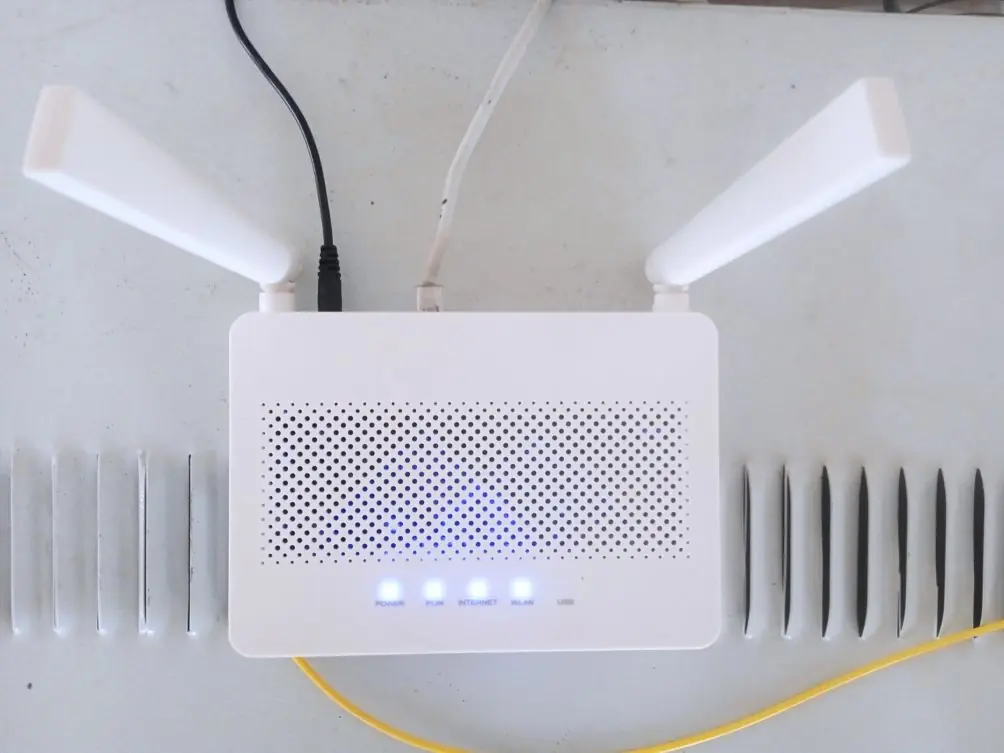
A router is a networking device that connects different wired or wireless networks and sends data from one network to another using IP (Internet Protocol) addresses. Routers are wired or wireless; DSL and optical-fibre routers are common in Nepal. ISPs use routers to send e-mail, web pages, voice and video to the right destination.
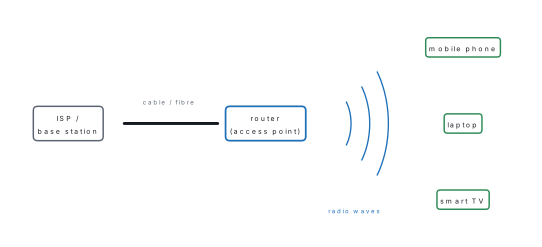
Wi-Fi (Wireless Fidelity) is a wireless networking system in which devices communicate by radio waves. It works as a wireless local area network (LAN). It was developed for computers but is now used in phones, televisions and cameras. Wi-Fi has three parts:
- Base station / Ethernet connection — the main network line (cable or fibre) that brings the internet to the house.
- Access point or router — the bridge between the wired and wireless network; it spreads the signal as radio waves.
- Devices — phones, laptops and TVs that receive the signal.
A set-top box (STB) is a hardware device that receives a digital signal, decodes it and displays television channels on a TV or monitor. The signal comes by cable, optical fibre, telephone line or satellite dish. Many ISPs in Nepal now give set-top boxes that also carry internet TV.
2.2 Search engine, website and ISP
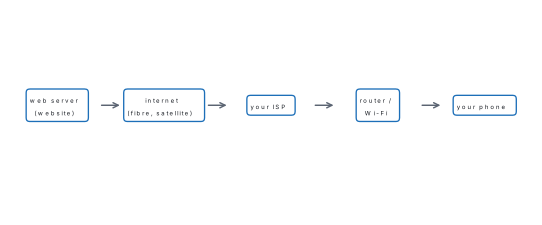
A search engine is a software system that searches the information on the internet and shows a list of web pages related to the words (keywords) we type. Examples: Google, Bing, Yahoo, Ask.
We may not know the address of the website that has the information we need.
With a search engine we type only a keyword, and it finds the pages. This saves
time. Google is so widely used that searching is often called "googling".
Example: to reach the Curriculum Development Centre, type "Curriculum
Development Centre" in the search box and choose www.moecdc.gov.np.
A website is a collection of related web pages, kept on a web server, that stores and shows information about a person or organisation. Every website has its own unique address called a URL (Uniform Resource Locator), also called a web address. A web browser (Chrome, Edge, Firefox, Safari) is needed to open it. WWW stands for World Wide Web.
Parts of a website
| Part | Meaning |
|---|---|
| Web hosting | a service that stores the website's files on a server so people can reach them |
| Web address (URL) | the unique address of the site, e.g. www.moecdc.gov.np |
| Homepage | the first page that opens; it has links to the other pages |
| Digital content | the text, pictures, audio and video on the pages |
| Navigation structure | the menu and links that help users move between pages |
Reading a web address. In https://www.moecdc.gov.np: https is the rule
for sending the page (the "s" means it is secure); www is the World Wide Web;
moecdc is the organisation's name; gov shows a government body; np shows
Nepal.
| Search engine | Website |
|---|---|
| a program that finds pages on many websites | a collection of pages that holds information |
| we type a keyword in it | we type its URL or reach it through a search engine |
| examples: Google, Bing | examples: www.moecdc.gov.np, www.neb.gov.np |
An ISP is a company that provides internet access to homes, offices and businesses for a fee. It is also called an internet access provider.
The customer pays according to the package or the amount of data used. Telenet (1974) is regarded as the world's first ISP. In Nepal, Mercantile Communications first started internet service in 1994. Today Nepal Telecom, WorldLink, Vianet and others are ISPs.
Features of an ISP: high-speed internet; e-mail addresses for customers; protection against phishing and malware; web hosting and domain services.
2.3 Social networking sites
Social networking sites (social media) are online communication channels for community-based interaction, sharing content and working together. Examples: Facebook, Messenger, YouTube, X (Twitter), Instagram, TikTok and blogs.
"Technology is a useful servant but a dangerous master" (Christian Lous Lange). Social media gives many benefits when used properly and causes harm when misused.
Blog. A blog (short for weblog) is an online journal or information website where an author shares ideas and articles. The person who runs it is a blogger. To create a blog: choose a platform (WordPress, Blogger) → choose a domain name → choose a hosting provider → choose a theme (design) → start writing → promote the blog.
| Benefits of social media | Disadvantages and dangers |
|---|---|
| Strong medium of expression and debate, also used in election campaigns | Health problems: overuse leads to depression and insomnia; blue light from screens reduces melatonin, the hormone that makes us sleepy |
| Brand development: businesses advertise and become known | Fake accounts: accounts made in another person's name, spam and malware |
| Customer interaction: feedback helps a business improve | Leak of confidential information of a company or person |
| learning (e.g. NCED Virtual classes on YouTube), news, keeping in touch | Targeted phishing to steal money or secrets; cyberbullying |
Ask: Would I say this to the person's face? Would I be happy if my parents and teacher saw it? Does it show my address, phone number, school or daily routine? If any answer is "no", do not post it — things put online are very hard to remove.
2.4 Cybercrime, computer code of conduct, cyber law and internet security
2.4.1 Cybercrime
Cybercrime (computer crime) is any crime done through electronic means (computer, mobile, internet) that harms a person's or group's reputation, money or mind. Examples are theft of intellectual property, identity theft and violation of privacy.
Banks, financial institutions, government websites and famous people are often targeted.
| Form | Meaning |
|---|---|
| Identity theft | misusing someone's personal information to get into their bank account or services |
| Cyber terrorism | cybercrime against a person, group or government to cause serious harm or to extort money |
| Cyberbullying | using social media or other electronic means to threaten, frighten, harass or humiliate someone |
| Hacking | entering or shutting down a computer system, network or website by unethical means |
| Defamation | posting statements online that damage the reputation of a person or organisation |
Spreading obscene content, hatred, rumours, and child abuse material are also cybercrimes.
2.4.2 Computer code of conduct
The computer code of conduct (computer ethics) is a set of guidelines about the right and professional behaviour expected from people who use computers and technology.
Its main points: (a) respect intellectual property — do not copy or share copyrighted material without permission; (b) security — protect data and systems from viruses and unauthorised access; (c) professionalism — no offensive or harassing behaviour; (d) accuracy — publish only true information; (e) obey laws and regulations; (f) report violations to the proper authority. Also: never steal data or software, never use another person's password, never spread viruses.
2.4.3 Cyber law
Cyber law (internet law) is the legal system that controls the use of the internet, computers and related technology and punishes computer crime and harassment. It also gives legal value to digital signatures and electronic documents used in e-banking and e-commerce.
In Nepal the Electronic Transaction and Digital Signature Ordinance (popularly the "cyber law") came on 30 Bhadra 2061 BS (15 September 2004). It was followed by the Electronic Transactions Act, 2063 and the Electronic Transactions Rules, 2064. The textbook lists these penalties under the Act:
| Offence | Punishment (up to) |
|---|---|
| hacking or destroying a computer system knowingly without authority | 3 years' jail or Rs 2 lakh fine, or both |
| entering a computer system without authority | 3 years or Rs 2 lakh, or both |
| knowingly damaging data | 3 years or Rs 2 lakh, or both |
| publishing illegal material electronically | 5 years or Rs 1 lakh, or both |
| computer fraud | 2 years or Rs 1 lakh, or both |
Other laws: the Act Relating to Children, 2075 forbids taking or publishing indecent pictures of children; the Copyright Act, 2059 protects original work including computer programs; the Privacy Act, 2075 stops organisations from passing on a person's data without consent (up to 3 years or Rs 30,000, or both).
| Computer code of conduct | Cyber law |
|---|---|
| moral guidelines for good behaviour | legal rules made by the state |
| breaking it is unethical | breaking it is a crime |
| no fixed legal punishment | punishment by jail or fine |
| e.g. do not use others' files | e.g. Electronic Transactions Act, 2063 |
2.4.4 Internet security
Internet security is the branch of computer security that protects the activities, data and transactions done over the internet (browser, website and network security).
Risks (threats): - Malware — harmful software such as viruses, worms, Trojan horses and spyware that steal information, damage files or take control of a computer. - Phishing — tricking people by false e-mails, SMS or pop-ups that look as if they come from a trusted source, to get passwords or card numbers. - Identity theft — stealing personal details to cheat in the victim's name. - Hacking — gaining unauthorised access to a system or network. - Botnet — a network of infected computers used for large attacks.
Measures: (i) use strong passwords; (ii) turn on two-factor authentication (e.g. a code sent to your phone); (iii) keep software updated; (iv) use good antivirus software; (v) use a firewall; (vi) back up important data; (vii) learn safe behaviour — do not open suspicious links. A digital signature and digital certificate (certification) prove who sent a file or owns a website, so they are also internet-security tools.
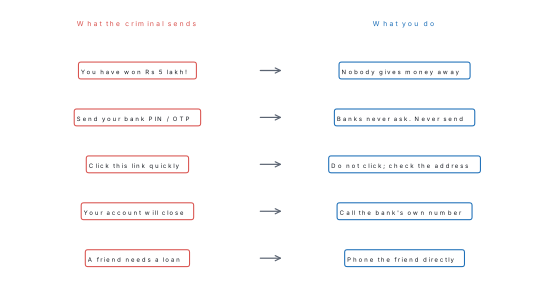
Situation. Sunita receives an SMS: "Congratulations! You have won Rs 5,00,000. Send your bank account number and the OTP you will receive to claim it."
Analysis. (1) She entered no lucky draw. (2) To give money, only the receiver's account number is needed; asking for an OTP means someone wants to take money out. (3) The message creates excitement and hurry — a typical phishing trick.
Action. Do not reply or click, take a screenshot, block the number, and report it with her parents to the police Cyber Bureau. This is phishing (a cybercrime).
Problem. Which is the strongest password, and why? (a) sita2065 (b) password123
(c) Gh8#rain!Tree4.
Answer. (c). It is long (14 characters) and mixes capital and small letters, numbers and symbols, and it is not a name or a date. (a) contains a name and a birth year, which are easy to guess; (b) is one of the most common passwords and is cracked at once. A strong password should also be different for each account and should be used with two-factor authentication.
2.5 Robotics and virtual reality
Robotics is the branch of computer science and engineering that deals with the design, construction, operation and use of robots — machines that can help humans and copy human actions. It joins mechanical, electrical and computer engineering and mathematics.
A robot has two main parts: hardware (the physical body that can be touched) and software (the computer program that tells it what to do). Robots can do dangerous jobs that humans cannot: working in space, disposing of bombs, working in the deep sea or near radiation.
| Field | Work done by robots |
|---|---|
| Manufacturing | welding, painting, assembling machine parts |
| Health care | helping in surgery, delivering medicines, physiotherapy |
| Agriculture | planting, harvesting, crop monitoring |
| Logistics | packing, sorting and moving goods |
| Exploration | collecting samples in space and the deep sea |
| Education | teaching robotics and programming |
| Entertainment | theme parks, films |
| Security | patrolling, finding and defusing explosives, fire control, rescue |
| Robot | Human |
|---|---|
| a machine made by humans | a living being |
| works by a program; has no feelings | thinks, feels and decides |
| does repetitive and dangerous work without tiring | gets tired and can be hurt |
| needs electricity and repair | needs food, rest and care |
Virtual reality (VR) is a computer-made, three-dimensional imitation of an environment that a person can see and interact with as if it were real, using special equipment such as a headset worn over the eyes, headphones and motion sensors.
Uses of VR: military training and treatment of post-traumatic stress disorder (Virtual Reality Exposure Therapy, VRET); education (virtual field trips to museums or the solar system); sports training and live broadcasts; mental health (treating anxiety and phobia); medical and dental surgery practice; fashion; architecture (seeing a building before it is built).
2.6 Artificial intelligence and cloud computing
Artificial intelligence (AI) is the making of computer programs or machines that can do tasks which normally need human intelligence, such as understanding language, recognising objects, making decisions and solving problems.
The main objective of AI is to make machines that can think, learn and solve problems like humans, so that work becomes faster, easier and more accurate.
| Type of AI | Meaning |
|---|---|
| Narrow (weak) AI | does one task only, e.g. speech recognition, face recognition |
| General (strong) AI | would be as intelligent as a human in any task |
| Artificial superintelligence | a theoretical AI that would be smarter than humans in every way |
Examples: self-driving cars, chatbots, humanoid robots. Sophia, a humanoid robot, came to Nepal in 2018 and spoke at a UNDP conference on "Technology for Public Services". Applications: astronomy, health care (faster diagnosis), games (chess), finance, data security, social media trends, travel booking, robotics, agriculture (crop monitoring) and education (virtual tutors).
| Virtual reality | Artificial intelligence |
|---|---|
| creates an artificial 3-D world to experience | makes a machine think and decide like a human |
| needs a headset and sensors | needs programs and data |
| e.g. a virtual tour of a museum | e.g. a chatbot, a self-driving car |
Cloud computing is the use of remote servers on the internet to store, manage and process data and programs, instead of keeping them only on a local computer or hard disk. The data can be used from anywhere with internet.
Companies giving this service are cloud service providers; in Nepal, Datahub, Silver Lining and Cloud Himalaya work in this field. Cloud services may be public (open to anyone, for a fee) or private (for a fixed group). Services include online storage (e.g. Google Drive), e-mail, and running software and websites on remote servers.
Advantages: (1) cost-effective — no need to buy and maintain expensive equipment, pay only for what is used; (2) accessible from anywhere in the world (global scale); (3) reliable — providers keep backups; (4) secure — providers have strong security. A drawback is that it needs an internet connection.
Question. A school spreadsheet prints the names of students who got less than 40 marks. Is this AI?
Answer. No. A person wrote the rule "less than 40" and the computer only followed it. If instead an app studies past attendance and homework data and itself works out which students are likely to fail, that is AI (machine learning), because the machine found the pattern from data.
Chapter summary
- ICT tools create, store, display, send and exchange information: ATM, photocopier, scanner (input, hard → soft copy), printer (output, soft → hard copy), router, Wi-Fi, set-top box.
- ATM input parts: card reader, keypad; output parts: screen, speaker, receipt printer, cash dispenser. Keep the PIN secret.
- A search engine finds web pages by keyword; a website is a collection of web pages with a unique URL; an ISP sells internet access.
- Social media is a strong medium but overuse harms health and invites fake accounts, data leaks and phishing.
- Cybercrime: identity theft, cyber terrorism, cyberbullying, hacking, defamation. Cyber law in Nepal: Electronic Transactions Act, 2063.
- Internet security: strong passwords, two-factor authentication, updates, antivirus, firewall, backup, digital signatures.
- Robotics designs robots; VR creates a 3-D artificial world; AI makes machines think; cloud computing stores and runs data on internet servers.
- Full forms: ATM = Automated Teller Machine, WWW = World Wide Web, URL = Uniform Resource Locator, Wi-Fi = Wireless Fidelity, ISP = Internet Service Provider, VR = Virtual Reality, AI = Artificial Intelligence, STB = Set-Top Box.
Practice questions
Group A — Multiple choice (1 mark each) (Textbook exercise 1.)
- What is the main function of a set-top box (STB)? [1]areceiving the digital signalbdisplaying TV channelscdecodingdall of the above
- What is the fixed address of a website called? [1]aWWWbURLcweb browserdweb page
- Which cybercrime means threatening, defaming or humiliating someone through social media? [1]aidentity theftbhackingctrade secretsdcyberbullying
- Which technology makes machines able to understand and act with human-like intelligence? [1]aroboticsbGoogle Pluscvirtual realitydartificial intelligence
- In which category of internet security does a digital signature fall? [1]acertificationbbrowser selectionce-mail securitydantivirus software
- Which of the following is an advantage of cloud computing? [1]acloud migrationbglobal scalecIT governancedunexpected costs
Answers to Group A
1. (d) — an STB receives, decodes and displays the signal.
2. (b) — URL, the Uniform Resource Locator.
3. (d) — cyberbullying.
4. (d) — artificial intelligence.
5. (a) — a digital signature works through digital certificates (certification).
6. (b) — data and programs can be reached from anywhere in the world.
Group B — Short answer (2 marks each) (Textbook exercises 2 and 3.)
- Differentiate between(a) printer and scanner(b) search engine and website. [2]
- Differentiate between(a) virtual reality and artificial intelligence(b) computer code of conduct and cyber law(c) robot and human. [3]
- What kind of technology is an ATM? Write its important functions. [2]
- List the main parts of a photocopy machine. [2]
- What is a printer? Mention its function. [2]
- What is a search engine? Explain the need for search engines with an example. [2]
- Write the main features of an ISP. [2]
- Mention the opportunities and benefits of social media. [2]
- What is cybercrime? Write its forms. [2]
- What is computer ethics? [2]
- Answer in one word or phrase:(a) device that converts hard copy into soft copy(b) collective online channel for community interaction and content sharing(c) shutting down or misusing a website by unethical means(d) legal framework to combat cybercrime(e) software program that copies itself from one computer to another. [5]
- Write the full forms: ATM, WWW, URL, Wi-Fi, ISP, AI, VR. [2]
Answers to Group B
1. See the tables in 2.1.3 and 2.2. (a) A scanner is an input device that changes a hard copy into a soft copy; a printer is an output device that changes a soft copy into a hard copy. (b) A search engine is a program that finds pages on many websites by keyword (Google); a website is a collection of web pages with its own URL that holds information (www.moecdc.gov.np).
2. (a) VR creates an artificial 3-D world that a person experiences through a headset; AI makes a machine think, learn and decide like a human. (b) The code of conduct is a set of moral guidelines for using computers, without legal punishment; cyber law is the law of the state, and breaking it is punished by jail or fine. (c) A robot is a machine run by a program, without feelings, that does repetitive or dangerous work without tiring; a human is a living being who thinks and feels, and gets tired.
3. An ATM is an electromechanical (computer-based) banking technology. Functions: withdraw and deposit cash, check balance, give a mini statement, pay bills, transfer funds, change PIN.
4. Glass plate (platen) and cover, light source and lens, light-sensitive drum with electrostatic charge, toner, fuser (heat and pressure), paper tray, control panel with Start button, output tray.
5. A printer is an output device that produces a hard copy of a digital file. It prints text and pictures in black and white or colour; types are dot-matrix, ink-jet and laser.
6. A search engine is a software system that finds information on the internet by keywords. It is needed because we often do not know the website address; e.g. typing "Curriculum Development Centre" in Google gives the link www.moecdc.gov.np, saving time.
7. High-speed internet; e-mail addresses; protection from phishing and malware; web hosting; charges according to the data package.
8. A strong medium of expression and discussion; quick news and notices; brand development and advertising for businesses; customer feedback; learning (e.g. NCED Virtual on YouTube); keeping in touch with family abroad.
9. Cybercrime is any crime done through computers, mobiles or the internet that harms a person's reputation, money or mind. Forms: identity theft, cyber terrorism, cyberbullying, hacking, defamation.
10. Computer ethics (code of conduct) is a set of guidelines for right and professional behaviour while using computers: respect intellectual property, keep data secure, behave politely, publish only true information, obey the law and report violations.
11. (a) scanner (b) social media / social networking site (c) hacking (d) cyber law (e) computer virus (a worm also spreads itself).
12. Automated Teller Machine; World Wide Web; Uniform Resource Locator; Wireless Fidelity; Internet Service Provider; Artificial Intelligence; Virtual Reality.
Group C — Long answer (4 marks each)
- Mention the dangers to internet security and the ways to avoid them. [4]
- What is artificial intelligence? What is its main objective? Write any four fields where AI is used. [4]
- What is robotics? Mention some important tasks done by robots. [4]
- What is virtual reality? Write the sectors in which it is used. [4]
- What is cloud computing? Write two services and two advantages of cloud computing. [4]
Answers to Group C
1. Dangers: malware (viruses, worms, Trojan horses, spyware); phishing by false messages; identity theft; hacking; botnets. Ways to avoid: strong and different passwords; two-factor authentication; update software; use antivirus and a firewall; back up data; do not open unknown links or attachments; never share PIN or OTP.
2. AI is the making of programs or machines that can do tasks needing human intelligence — understanding language, recognising objects, deciding and solving problems. Its main objective is to make machines that think and learn like humans so that work becomes faster and more accurate. Fields: health care (diagnosis), agriculture (crop monitoring), finance (chatbots, trading), education (virtual tutors), travel, games, robotics.
3. Robotics is the branch of computer science and engineering dealing with the design, construction, operation and use of robots. Tasks: welding, painting and assembling in factories; helping in surgery; planting and harvesting; packing and sorting goods; exploring space and the deep sea; defusing bombs and rescue work.
4. VR is a computer-made 3-D imitation of an environment that a user experiences through a headset and sensors as if it were real. Sectors: military training and PTSD therapy, education (virtual field trips), sports training and broadcasting, mental health (anxiety, phobia), medical surgery training, fashion, architecture.
5. Cloud computing is using remote servers on the internet to store, manage and process data and programs instead of a local computer. Services: online file storage (e.g. Google Drive), e-mail, web hosting, running software online. Advantages: low cost (pay only for use); access from anywhere; reliable backup; strong security.
Practise more: Science and Technology question bank