Unit 10 · Web, Communication and Society · 26 min read
Web Page Design
What the syllabus asks for 6
- World Wide Web: web page, website, web browser, URL and HTML
- Structure of an HTML document: html, head, title and body
- Formatting tags: headings, paragraphs, line breaks, bold, italic, underline and font
- Lists, images and hyperlinks
- Tables in HTML
- Creating and viewing a small website
Every website you open — the NEB results page, a news portal, the Nagarik App's web version, Wikipedia — is built from plain text files written in HTML. A browser reads those files and turns them into headings, paragraphs, pictures, tables and links. In this lesson you learn how the World Wide Web works and then write web pages yourself: the structure of an HTML document, tags for formatting text, lists, images, links and tables, and finally a small website of linked pages that you can open in any browser. All the code in this lesson was tested in a real browser (Chromium), and what it shows is described exactly.
Expect the full forms WWW, HTML, URL, HTTP(S); definitions of web page,
website, home page, web browser, tag, attribute; the parts of a URL; the
four structure tags; the difference between container and empty tags;
and writing HTML code for a given output — headings, a formatted paragraph,
an ordered or unordered list, an image, a hyperlink, or a table (often with
rowspan or colspan). You will also be asked what a given code shows in
the browser. Practise writing code by hand, with every tag closed.
10.1 World Wide Web: web page, website, web browser, URL and HTML
The World Wide Web (WWW, or "the web") was invented by Tim Berners-Lee, a British scientist at CERN, the European physics laboratory near Geneva. He proposed it in March 1989, wrote the first web server, the first browser and HTML by the end of 1990, and announced the web to the public in August 1991. In 1993 CERN made the web software free for everyone, and the web grew explosively.
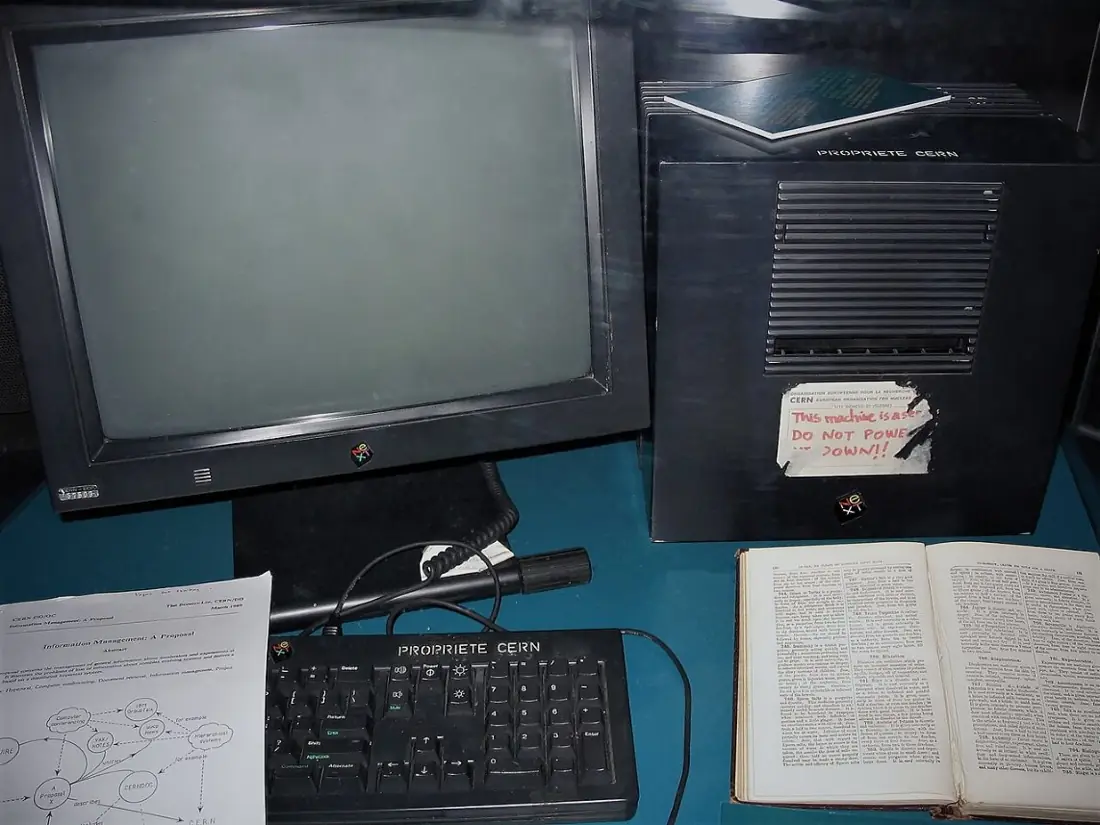
The World Wide Web is a huge collection of web pages, stored on computers called web servers all over the world and joined to one another by hyperlinks, which people open over the Internet with a web browser.
The Internet and the web are not the same. The Internet is the worldwide network of networks — cables, satellites, routers and computers joined together. The web is one service that runs on the Internet, like email, video calls and online games.
| Term | Meaning | Example |
|---|---|---|
| Web page | a single document on the web, written in HTML, that can contain text, pictures, links, sound and video | the results page of a school |
| Website | a group of related web pages under one domain name, linked to each other | www.neb.gov.np (National Examinations Board) |
| Home page | the first, main page of a website, usually saved as index.html |
the page that opens at www.ntc.net.np |
| Web browser | application software that requests web pages from servers and displays them | Google Chrome, Mozilla Firefox, Microsoft Edge, Safari, Opera |
| Web server | a computer that stores websites and sends pages to browsers when they ask | the computers of a hosting company |
| Hyperlink | text or a picture that opens another page when clicked | blue, underlined words |
| URL | Uniform Resource Locator: the unique address of a page on the web | https://www.moecdc.gov.np |
| HTTP / HTTPS | HyperText Transfer Protocol (Secure): the rules browsers and servers use to send pages; HTTPS encrypts them | a padlock in the address bar means HTTPS |

The parts of a URL
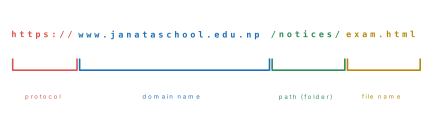
A domain name is read from the right. In www.janataschool.edu.np, np is
the country code of Nepal, edu shows the type of organisation
(education), janataschool is the organisation's own name and www is the
name of its web server. Other types used in Nepal are gov.np (government),
com.np (companies) and org.np (organisations); worldwide there are
.com, .org, .net and many more. A .np domain is registered free
of charge for Nepali citizens and organisations at register.com.np.
HTML
HTML (HyperText Markup Language) is the language used to create web pages. It marks up text with tags that tell the browser what each part is — a heading, a paragraph, a list, a picture, a link. HyperText means text with links to other text. HTML was created by Tim Berners-Lee; the current version is HTML5.
HTML is a markup language, not a programming language: it describes a document but cannot calculate or make decisions.
Tags. A tag is a keyword written inside angle brackets: <p>. Most tags
are container (paired) tags: an opening tag <b> and a closing tag
</b> with a slash, with the content between them. A few are empty
(unpaired) tags that have no content and no closing tag: <br>, <hr>,
<img>. An element is the opening tag, the content and the closing tag
together.
Attributes. An attribute gives extra information about an element. It is
written inside the opening tag as name="value", for example
<img src="school.jpg" width="300"> or <p align="center">. HTML tags are
not case-sensitive (<B> works like <b>), but lower case is the modern
practice.
| Container (paired) tag | Empty (unpaired) tag |
|---|---|
| has an opening and a closing tag | has only one tag |
encloses content: <b>bold</b> |
has no content: <br> |
e.g. <html>, <p>, <h1>, <a>, <table> |
e.g. <br>, <hr>, <img> |
Tools. An HTML file is plain text, so any text editor will do: Notepad on Windows, or code editors such as Notepad++, Visual Studio Code and Sublime Text, which colour the tags. The file is saved with the extension .html (or .htm) and opened in a browser.
10.2 Structure of an HTML document: html, head, title and body
Every web page has the same skeleton:
<!DOCTYPE html>
<html>
<head>
  <title>My First Page</title>
</head>
<body>
  Namaste! This is my first web page.
</body>
</html>
| Part | Meaning |
|---|---|
<!DOCTYPE html> |
a declaration (not a tag) telling the browser that this is an HTML5 document; always the first line |
<html> … </html> |
the root element: everything else goes inside it |
<head> … </head> |
information about the page — its title, character set and so on; nothing in the head appears in the window |
<title> … </title> |
the page's title, shown on the browser tab, in bookmarks and in search results |
<body> … </body> |
everything that appears in the browser window: text, pictures, lists, tables, links |
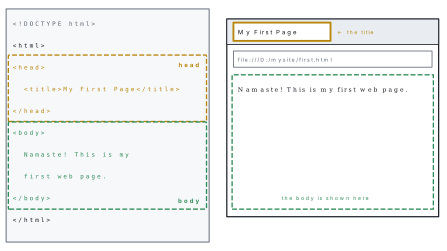
Nesting. Elements fit inside one another like boxes, and they must be
closed in the reverse order of opening: <b><i>Nepal</i></b> is correct,
<b><i>Nepal</b></i> is not. Indenting the code (as above) makes the nesting
easy to see.
The body tag can take attributes for the whole page, for example
<body bgcolor="lightyellow" text="navy"> for the background and text colours.
Like <font> and align below, these old attributes still work in browsers but
are replaced in HTML5 by CSS (styles), which you will meet in Grade 9.
Problem. Write, save and open a web page whose tab reads My First Page and whose window shows Namaste! This is my first web page.
Solution.
1. Open Notepad and type the seven lines of code shown above.
2. File → Save As. Choose a folder, e.g. D:\mysite. In Save as type
choose All files (*.*), type the name first.html, keep Encoding:
UTF-8, and click Save.
3. Double-click first.html in File Explorer; it opens in the default browser.
The tab shows My First Page and the window shows Namaste! This is my
first web page.
4. To change the page, edit it in Notepad, save (Ctrl + S) and press F5
in the browser to reload. Ctrl + U in the browser shows the page's source
code.
If Save as type is left as Text Documents (*.txt), Notepad saves
first.html.txt, which opens as plain text in Notepad again. Always choose
All files and type the .html extension yourself — and switch on File name
extensions in File Explorer so you can see what you saved.
The browser ignores extra spaces and line breaks in the code: three spaces show
as one, and pressing Enter in Notepad does not start a new line on the page.
Lines and paragraphs are made with tags. Notes for yourself can be written as
comments, <!-- like this -->, which the browser does not show.
10.3 Formatting tags: headings, paragraphs, line breaks, bold, italic, underline and font
| Tag | Purpose | Example |
|---|---|---|
<h1> … <h6> |
headings, <h1> the largest and most important, <h6> the smallest; shown bold with space above and below |
<h1>Nepal</h1> |
<p> |
a paragraph, with a blank line above and below | <p>Text…</p> |
<br> |
a line break: the next text starts on a new line (empty tag) | Kathmandu<br>Nepal |
<hr> |
a horizontal rule (line) across the page (empty tag) | <hr> |
<b> |
bold text (<strong> also bolds, marking important text) |
<b>China</b> |
<i> |
italic text (<em> also italicises, for emphasis) |
<i>India</i> |
<u> |
underlined text | <u>Everest</u> |
<sup> / <sub> |
superscript / subscript | x<sup>2</sup>, H<sub>2</sub>O |
<font> |
font face, size (1–7, default 3) and colour of text | <font face="Arial" size="5" color="green"> |
The align attribute of headings and paragraphs takes left (default),
center, right or justify: <h1 align="center">. Colours are written as
names (red, green, navy) or as hexadecimal codes such as #FF0000 (red)
and #008000 (green).
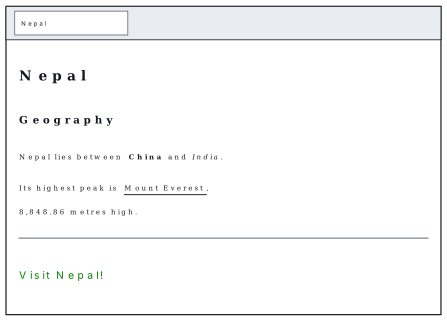
Problem. Write the HTML for a page titled Nepal that shows a main heading Nepal, a sub-heading Geography, a paragraph in which China is bold and India is italic, a paragraph in which Mount Everest is underlined and the height starts on a new line, a horizontal line, and the words Visit Nepal! in green Arial at size 5.
Solution.
<!DOCTYPE html>
<html>
<head>
  <title>Nepal</title>
</head>
<body>
  <h1>Nepal</h1>
  <h2>Geography</h2>
  <p>Nepal lies between <b>China</b> and <i>India</i>.</p>
  <p>Its highest peak is <u>Mount Everest</u>,<br>8,848.86 metres high.</p>
  <hr>
  <p><font face="Arial" size="5" color="green">Visit Nepal!</font></p>
</body>
</html>
The browser shows the two headings in bold, <h1> larger than <h2>; the
paragraphs with China in bold and India in italics; Mount Everest
underlined, with 8,848.86 metres high. starting on the next line because of
<br>; a grey line across the page from <hr>; and Visit Nepal! in larger
green Arial letters.
The <font> tag and the align, bgcolor and text attributes come from
older HTML. Browsers still obey them, and they are in your syllabus, but HTML5
replaces them with CSS: the same green text is written
<p style="color: green; font-family: Arial; font-size: 24px;">Visit Nepal!</p>.
Learn the old tags for the exam and know that CSS is the modern way.
10.4 Lists, images and hyperlinks
Lists
Unordered list <ul> — items marked with bullets. Each item is an <li>
(list item). The type attribute chooses the bullet: disc (filled circle, the
default), circle (hollow) or square.
Ordered list <ol> — items numbered automatically. type chooses the
numbering: 1 (1, 2, 3 — default), A (A, B, C), a (a, b, c), I (I, II,
III) or i (i, ii, iii); start chooses the first number.
Lists can be nested: a <ul> or <ol> placed inside an <li> makes
sub-points. A description list <dl> holds terms <dt> and their
descriptions <dd>.
Problem. What does the browser show for this body?
<h3>Fruits of Nepal</h3>
<ul type="square">
  <li>Mango</li>
  <li>Litchi</li>
  <li>Orange</li>
</ul>
<h3>Making tea</h3>
<ol>
  <li>Boil water.</li>
  <li>Add tea leaves.</li>
  <li>Add milk and sugar.</li>
</ol>
<ol type="I" start="3">
  <li>Kathmandu</li>
  <li>Pokhara</li>
  <li>Chitwan</li>
</ol>
Solution. The heading Fruits of Nepal, then Mango, Litchi and Orange each
with a small square bullet; the heading Making tea, then the steps numbered
1. 2. 3.; then Kathmandu, Pokhara and Chitwan numbered III. IV. V. —
Roman numerals (type="I") starting from 3 (start="3").
Images
The empty tag <img> places a picture on the page:
<img src="images/school.jpg" alt="Our school building" width="320">
| Attribute | Meaning |
|---|---|
src |
source: the file name or path of the picture (required) |
alt |
alternative text: shown if the picture cannot load, and read aloud for blind users |
width, height |
size in pixels (give only one to keep the shape) |
border |
a border around the picture, in pixels (old HTML) |
align |
left or right: the picture floats and text flows beside it (old HTML) |
Pictures for the web are usually JPG (photos), PNG (drawings, logos,
transparency) or GIF (simple animations). The path is relative to the
page: images/school.jpg means "the file school.jpg in the folder images,
next to this page".
Hyperlinks
The anchor tag <a> makes a hyperlink; its href (hypertext reference)
attribute gives the destination, and the text between the tags is what the
visitor clicks. Links appear blue and underlined, and purple once visited.
| Kind of link | Code |
|---|---|
| to another website (external) | <a href="https://www.welcomenepal.com">Nepal Tourism Board</a> |
| to another page of the same site | <a href="about.html">About us</a> |
| to open an email message | <a href="mailto:info@janataschool.edu.np">Email us</a> |
| to open in a new tab | <a href="https://www.neb.gov.np" target="_blank">NEB</a> |
| a picture as a link | <a href="gallery.html"><img src="images/trip.jpg" alt="Photos"></a> |
| to a place on the same page | <a href="#notices">Notices</a> jumps to <h2 id="notices"> |
Problem. A page in the same folder as an images folder has this body. The
file missing.jpg does not exist. What does the browser show?
<h2>Phewa Lake</h2>
<img src="images/pokhara.jpg" alt="Phewa Lake, Pokhara" width="300">
<img src="images/missing.jpg" alt="Photo of Phewa Lake (file missing)" width="200">
<p>Read more at the <a href="https://www.welcomenepal.com">Nepal Tourism Board</a> website.</p>
<p><a href="about.html">About us</a> | <a href="mailto:info@janataschool.edu.np">Email us</a></p>
Solution. The heading, then the first picture 300 pixels wide. For the
second picture the browser finds no file, so it shows a small broken-picture
icon with the alt text Photo of Phewa Lake (file missing) — the reason alt
matters. Then a paragraph in which Nepal Tourism Board is a blue underlined
link to that website, and a line with two links: About us opens
about.html, and Email us opens the email program with the address filled in.
10.5 Tables in HTML
A table is built row by row:
| Tag | Meaning |
|---|---|
<table> … </table> |
the whole table |
<caption> |
a title, shown centred above the table |
<tr> |
a table row |
<th> |
a table heading cell — bold and centred |
<td> |
a table data cell — normal and left-aligned |
| Attribute | Used in | Effect |
|---|---|---|
border="1" |
<table> |
draws lines around cells (without it the table has no lines) |
cellpadding="6" |
<table> |
space inside each cell, between text and border |
cellspacing="2" |
<table> |
space between neighbouring cells |
width, bgcolor, align |
<table>, <td> |
width, background colour, position |
colspan="2" |
<th>, <td> |
the cell spans two columns |
rowspan="2" |
<th>, <td> |
the cell spans two rows |
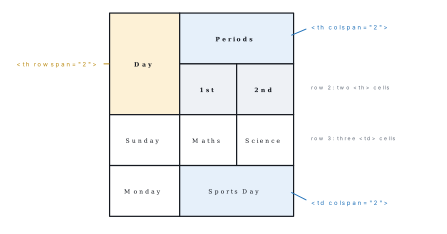
Problem. (a) Write the code for a bordered table captioned Class 8 Results with headings Name, Maths and Science and two rows: Asha 85 92 and Rohan 72 64. (b) What does the following code show, and how many cells does it have?
<table border="1" cellpadding="6">
  <tr>
    <th rowspan="2">Day</th>
    <th colspan="2">Periods</th>
  </tr>
  <tr>
    <th>1st</th>
    <th>2nd</th>
  </tr>
  <tr>
    <td>Sunday</td>
    <td>Maths</td>
    <td>Science</td>
  </tr>
  <tr>
    <td>Monday</td>
    <td colspan="2">Sports Day</td>
  </tr>
</table>
Solution. (a)
<table border="1">
  <caption>Class 8 Results</caption>
  <tr>
    <th>Name</th>
    <th>Maths</th>
    <th>Science</th>
  </tr>
  <tr>
    <td>Asha</td>
    <td>85</td>
    <td>92</td>
  </tr>
  <tr>
    <td>Rohan</td>
    <td>72</td>
    <td>64</td>
  </tr>
</table>
The caption appears centred above; the three headings are bold and centred.
(b) A 4-row, 3-column routine: Day fills two rows on the left, Periods fills
two columns above 1st and 2nd, the Sunday row has three cells, and Sports
Day stretches across both period columns on Monday. Counting the <th> and
<td> tags: 2 + 2 + 3 + 2 = 9 cells, filling the 4 × 3 = 12 places because
three cells each cover two places (12 − 3 = 9).
In a table, every row must cover the same number of columns once the spans are
counted. If the first row has colspan="2" plus one cell (3 columns), every
other row must also total 3. A missing <td> or an extra one makes the columns
slip out of line.
10.6 Creating and viewing a small website
A website is a set of web pages in one folder, linked to each other by a menu of links. Plan it on paper first: the pages, what each holds, and the links between them (a site map).
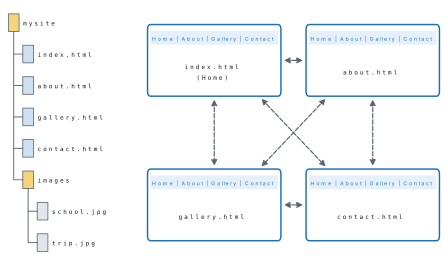
Steps
- Make a folder
mysite, and inside it a folderimagesholding the pictures (e.g.school.jpg). - Write the home page and save it in
mysiteasindex.html:
<!DOCTYPE html>
<html>
<head>
  <title>Shree Janata School - Home</title>
</head>
<body bgcolor="#f2f7ff">
  <p>
    <a href="index.html">Home</a> |
    <a href="about.html">About</a> |
    <a href="gallery.html">Gallery</a> |
    <a href="contact.html">Contact</a>
  </p>
  <hr>
  <h1 align="center">Shree Janata Secondary School</h1>
  <p align="center"><i>Lakeside, Pokhara</i></p>
  <img src="images/school.jpg" alt="Our school building" width="320">
  <h2>Notices</h2>
  <ul>
    <li>Science Exhibition on 15 Falgun</li>
    <li>Admission open for Grade 6</li>
  </ul>
</body>
</html>
- Save a copy as
about.html, keep the head and the menu, change the title to Shree Janata School - About and replace the rest of the body with that page's content. Do the same forgallery.htmlandcontact.html, so every page has the same menu. - View: double-click
index.html. Tested in Chromium, it shows a pale blue page with the menu of four blue links, a line, the centred heading and the italic address, the picture and the bulleted notices; clicking About opensabout.htmland the tab changes to Shree Janata School - About. - Test every link and picture, in more than one browser if you can, and fix any page that does not work.
- Publish (optional): to put the site on the Internet, copy the folder to a
web server through a hosting service, and connect a domain name to it.
Free hosting such as GitHub Pages exists, and a
.npdomain is free for Nepali citizens and organisations.
Problem. A student's page shows a broken picture; clicking About us gives
"File not found"; the second paragraph comes out bold as well; and the word
Pokhara does not appear at all. The files in the folder are index.html,
about.html and images/logo.png. Find the four mistakes:
<img src="image/logo.png" alt="School logo">
<a href="About.htm">About us</a>
<p>Welcome to <b>our school.</p>
<p>We teach Grades 1 to 10.</p>
<p align="center>Pokhara</p>
Solution. (1) The folder is images, not image: write
src="images/logo.png". (2) The file is about.html, not About.htm: the
extension is wrong, and on web servers capital letters matter too, so write
href="about.html". (3) <b> is never closed, so the browser keeps the bold
going into the next paragraph: write <b>our school.</b>. (4) The quotation mark
after center is missing, so the browser reads everything up to the next
quotation mark as the attribute's value and Pokhara disappears: write
align="center".
Make a folder named after your district. Write three pages — index.html
(home), places.html and contact.html — with the same menu of links on each.
The home page needs a heading, a paragraph with bold and italic words, and a
picture; places.html needs an ordered list of five places and a table of their
distances from your school; contact.html needs an email link. Test every link
in two browsers, then show your teacher the code with Ctrl + U.
Always start with the skeleton: <!DOCTYPE html>, <html>, <head> with
<title>, <body>. Close every container tag in reverse order, put attribute
values in double quotes, and indent nested tags. For a table, draw the grid
first and count the cells of every row, including the spans.
Chapter summary
- The WWW (Tim Berners-Lee, CERN, 1989–1991) is a collection of linked web
pages on web servers, opened over the Internet with a browser. A web
page is one HTML document; a website is related pages under one domain;
the home page is
index.html. - URL (Uniform Resource Locator) = protocol (
https://) + domain name (www.name.edu.np) + path + file name. HTTP(S) is the transfer protocol. - HTML (HyperText Markup Language, now HTML5) uses tags in angle
brackets: container tags
<p>…</p>, empty tags<br>,<hr>,<img>; attributes go in the opening tag:name="value". - Structure:
<!DOCTYPE html>,<html>,<head>with<title>(shown on the tab),<body>(shown in the window). Close tags in reverse order. - Formatting:
<h1>–<h6>,<p>,<br>,<hr>,<b>,<i>,<u>,<sup>,<sub>,<font face size color>(old; CSS today),align. - Lists:
<ul type="disc|circle|square">,<ol type="1|A|a|I|i" start="n">,<li>. Image:<img src alt width height>. Link:<a href="…">,mailto:,target="_blank". - Tables:
<table border>,<caption>,<tr>,<th>(bold, centred),<td>;colspan,rowspan. A website is a folder of linked pages with the same menu, saved as .html and tested in a browser.
Practice questions
Group A — Objective (1 mark each)
- The World Wide Web was invented by [1]aCharles BabbagebTim Berners-LeecBill GatesdLinus Torvalds
- HTML stands for [1]aHyperText Markup LanguagebHigh Transfer Machine LanguagecHyperText Making LanguagedHome Tool Markup Language
- Which of these is a web browser? [1]aNotepadbMicrosoft EdgecExceldWindows
- In
https://www.neb.gov.np/results.html, the domain name is [1]ahttpsbwww.neb.gov.npcresults.htmldnp - Which is an empty (unpaired) tag? [1]a
<p>b<b>c<br>d<title> - The text between
<title>and</title>appears [1]aas the largest headingbon the browser tabcat the bottom of the pagednowhere - Which heading tag shows the largest text? [1]a
<h6>b<h3>c<h1>d<head> <ol type="A" start="2">with three items numbers them [1]aA, B, CbB, C, Dc2, 3, 4dII, III, IV- The attribute that gives the file of a picture in
<img>is [1]ahrefbaltcsrcdlink - The tag that makes a hyperlink is [1]a
<a>b<link>c<h>d<l> - In a table, a cell that stretches across two columns uses [1]a
rowspan="2"bcolspan="2"ccellpadding="2"dborder="2" - A web page should be saved with the extension [1]a.txtb.docxc.htmld.exe
Answers to Group A
1. (b) — Tim Berners-Lee at CERN, 1989–1991.
2. (a) — HyperText Markup Language.
3. (b) — Edge is a browser; Notepad is a text editor.
4. (b) — https is the protocol and results.html the file name.
5. (c) — <br> has no closing tag.
6. (b) — the title is shown on the tab.
7. (c) — <h1> is the largest.
8. (b) — capital letters starting from the 2nd, B.
9. (c) — src (source); alt is the alternative text.
10. (a) — the anchor tag with href.
11. (b) — colspan spans columns.
12. (c) — .html (or .htm).
Group B — Short answer (2 marks each)
- Differentiate between a web page and a website. [2]
- What is a URL? Name its parts in
https://www.moecdc.gov.np/index.html. [2] - Differentiate between the Internet and the World Wide Web. [2]
- Differentiate between container and empty tags with two examples of each. [2]
- What is an attribute? Give an example. [2]
- Write the basic structure of an HTML document. [2]
- Write HTML code to show Computer Science as the largest, centred heading and Grade 8 below it in red. [2]
- Write the code for an unordered list of three districts with square bullets. [2]
- Write the code to insert the picture
rhino.jpg, 250 pixels wide, with suitable alternative text. [2] - Write code that makes the words Visit NEB a link to
https://www.neb.gov.np, opening in a new tab. [2]
Answers to Group B
1. A web page is a single HTML document that can be viewed in a browser. A
website is a collection of related web pages under one domain name, linked
together, such as www.neb.gov.np.
2. A URL (Uniform Resource Locator) is the unique address of a resource on
the web. Parts: protocol https://, domain name www.moecdc.gov.np, file name
index.html.
3. The Internet is the worldwide network of networks — the cables, routers and computers. The World Wide Web is a service that runs on the Internet: the collection of linked web pages opened with a browser. (Email is another Internet service.)
4. A container tag has an opening and a closing tag around content, e.g.
<p>…</p>, <b>…</b>. An empty tag has no content and no closing tag, e.g.
<br>, <hr>, <img>.
5. An attribute gives extra information about an element and is written in
the opening tag as name="value", e.g. <img src="logo.png"> or
<p align="center">.
6.
<!DOCTYPE html>
<html>
<head>
  <title>Page title</title>
</head>
<body>
  Page content
</body>
</html>
7.
<h1 align="center">Computer Science</h1>
<p><font color="red">Grade 8</font></p>
8.
<ul type="square">
  <li>Kaski</li>
  <li>Chitwan</li>
  <li>Jhapa</li>
</ul>
9. <img src="rhino.jpg" alt="One-horned rhinoceros" width="250">
10. <a href="https://www.neb.gov.np" target="_blank">Visit NEB</a>
Group C — Long answer (4 marks each)
- Write the HTML for a page titled My District that shows a centred main heading, a paragraph with one bold and one italic word, a line, and a numbered list of three places to visit. [4]
- Write the HTML for this table, with a border and the caption Marks: a header row Name, English, Nepali; and rows Sita 78 85 and Hari 66 72. [4]
- Write the HTML for a table whose first row is a heading Fee Details spanning three columns, followed by the heading row Grade, Monthly fee, Exam fee and the rows 7, 1500, 300 and 8, 1700, 350. How many cells does it have? [3+1]
- Explain the steps to create a two-page website (home and about) linked to each other, and to view it in a browser. [4]
- Explain the terms web browser, URL, HTML and hyperlink with one example each. [4]
Answers to Group C
1.
<!DOCTYPE html>
<html>
<head>
  <title>My District</title>
</head>
<body>
  <h1 align="center">Kaski District</h1>
  <p>Kaski is famous for <b>Phewa Lake</b> and the <i>Annapurna</i> range.</p>
  <hr>
  <ol>
    <li>Sarangkot</li>
    <li>World Peace Pagoda</li>
    <li>Davis Falls</li>
  </ol>
</body>
</html>
2.
<table border="1">
  <caption>Marks</caption>
  <tr>
    <th>Name</th>
    <th>English</th>
    <th>Nepali</th>
  </tr>
  <tr>
    <td>Sita</td>
    <td>78</td>
    <td>85</td>
  </tr>
  <tr>
    <td>Hari</td>
    <td>66</td>
    <td>72</td>
  </tr>
</table>
3.
<table border="1">
  <tr>
    <th colspan="3">Fee Details</th>
  </tr>
  <tr>
    <th>Grade</th>
    <th>Monthly fee</th>
    <th>Exam fee</th>
  </tr>
  <tr>
    <td>7</td>
    <td>1500</td>
    <td>300</td>
  </tr>
  <tr>
    <td>8</td>
    <td>1700</td>
    <td>350</td>
  </tr>
</table>
Cells: 1 + 3 + 3 + 3 = 10 (the first cell covers three places of the 4 × 3 = 12, so 12 − 2 = 10).
4. Make a folder mysite. In Notepad write the home page with the HTML
skeleton, a title, a heading and a link <a href="about.html">About</a>; save it
in the folder as index.html (Save as type: All files, Encoding UTF-8). Write the
about page with its own title and content and a link <a href="index.html">Home</a>;
save it as about.html in the same folder. Double-click index.html to open it in
the browser; click About to check that the about page opens, and Home to come
back. Correct any mistakes in Notepad, save, and press F5 to reload.
5. Web browser: application software that requests and displays web
pages — Google Chrome, Firefox. URL: the unique address of a web page —
https://www.neb.gov.np. HTML: the markup language of web pages, using tags —
<h1>Nepal</h1>. Hyperlink: text or a picture that opens another page when
clicked — <a href="about.html">About us</a>.
Practise more: Computer Science question bank