Unit 15 · Number System, Graphics and Multimedia · 37 min read
Number System
What the syllabus asks for 5
- Number systems: decimal, binary, octal and hexadecimal
- Converting decimal numbers to binary, octal and hexadecimal
- Converting binary, octal and hexadecimal numbers to decimal
- Converting between binary, octal and hexadecimal
- Bits, bytes and the units of memory
You count with ten digits because people first counted on ten fingers. A computer has no fingers: inside it, every tiny switch is either off or on, so it counts with only two digits, 0 and 1. This lesson teaches the four number systems used in computing — decimal, binary, octal and hexadecimal — how to change a number from one system to another, and how a computer's memory is measured in bits and bytes. You met base 2 and base 5 in Mathematics; the same ideas work here. Almost every mark in this lesson is earned by following a procedure step by step, so practise until the steps are automatic.
In a 50-mark school paper this lesson usually gives one or two objective questions (the base of a system, its symbols, a quick conversion, a memory unit), two short questions (one or two conversions, or a memory-unit calculation) and often a long question made of four conversions [1+1+1+1]. Marks are given for the working, not only the answer: the division table with its remainders, the expansion with place values, or the groups of bits. Every answer must carry its base, as in (101101)_2. Grade 9 starts its number-system unit with exactly these conversions.
15.1 Number systems: decimal, binary, octal and hexadecimal
A number system is a way of writing numbers with a fixed set of symbols (digits) and rules. The base (or radix) of a number system is the number of different digits it uses. The largest digit of a system is always one less than its base.
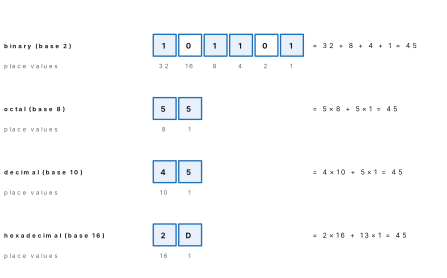
All four systems in this lesson are positional: the value of a digit depends on its position (place) in the number. The place at the right end is worth 1; every place to the left is worth base times the place on its right.
Decimal (base 10). Ten digits, 0 to 9. The places are worth 1, 10, 100, 1000 and so on, the powers of 10:
Binary (base 2). Only two digits, 0 and 1. The places are worth 1, 2, 4, 8, 16, 32, 64, 128 … — each place is double the one on its right. A binary digit is called a bit. Example: (110111)_2.
Octal (base 8). Eight digits, 0 to 7. The places are worth 1, 8, 64, 512, 4096 … Example: (375)_8. The digits 8 and 9 do not exist in octal.
Hexadecimal (base 16). Sixteen symbols: the digits 0 to 9 and the letters A to F, where A = 10, B = 11, C = 12, D = 13, E = 14 and F = 15. The places are worth 1, 16, 256, 4096 … Example: (\mathrm{8F5})_{16}. "Hex" is the short name.
To show which system a number belongs to, write its base as a small number after it: (101)_2 is binary and means five, while (101)_{10} is the ordinary one hundred and one. A number written with no base is taken to be decimal.
| System | Base | Digits used | Largest digit | Place values (right to left) | Example |
|---|---|---|---|---|---|
| Binary | 2 | 0, 1 | 1 | 1, 2, 4, 8, 16, 32 … | (10110)_2 |
| Octal | 8 | 0 to 7 | 7 | 1, 8, 64, 512 … | (207)_8 |
| Decimal | 10 | 0 to 9 | 9 | 1, 10, 100, 1000 … | (719)_{10} |
| Hexadecimal | 16 | 0 to 9, A to F | F (= 15) | 1, 16, 256, 4096 … | (\mathrm{AC4})_{16} |
Why computers use binary
A computer is built from millions of tiny electronic switches called transistors, and each one is either off or on. Two states are easy to make, easy to tell apart and hard to confuse even when a signal is weak: a low voltage stands for 0 and a high voltage for 1. The same two-state idea stores data everywhere in computing — a spot magnetised one way or the other on a hard disk, a pit or no pit on a DVD, a charge or no charge in a pen drive, light off or on in an optical fibre. Ten clearly different voltages would be far harder to build and to read reliably. So all data inside a computer — numbers, letters, pictures, sound — is stored as patterns of bits.
Why octal and hexadecimal are used
Long strings of 0s and 1s are hard for people to read and easy to copy wrongly. Because 8 = 2^3 and 16 = 2^4, one octal digit stands for exactly three bits and one hexadecimal digit for exactly four bits, so they are short, exact ways of writing binary. You will meet hexadecimal often:
- colour codes in web pages (Lesson 10):
#FF0000is pure red — FF of red, 00 of green, 00 of blue; - MAC addresses of network cards (Lesson 14), such as
3C-52-82-9A-7F-10; - memory addresses and error codes shown by programs.
Octal is used less today; you may see it in the file permissions of Linux, such
as 755.
| Decimal | Binary | Octal | Hexadecimal |
|---|---|---|---|
| 0 | 0 | 0 | 0 |
| 1 | 1 | 1 | 1 |
| 2 | 10 | 2 | 2 |
| 3 | 11 | 3 | 3 |
| 4 | 100 | 4 | 4 |
| 5 | 101 | 5 | 5 |
| 6 | 110 | 6 | 6 |
| 7 | 111 | 7 | 7 |
| 8 | 1000 | 10 | 8 |
| 9 | 1001 | 11 | 9 |
| 10 | 1010 | 12 | A |
| 11 | 1011 | 13 | B |
| 12 | 1100 | 14 | C |
| 13 | 1101 | 15 | D |
| 14 | 1110 | 16 | E |
| 15 | 1111 | 17 | F |
| 16 | 10000 | 20 | 10 |
Look down the table: in each system, when the largest digit is used up, the count goes back to 0 and a 1 is carried to the next place — after 1 in binary, after 7 in octal, after 9 in decimal and after F in hexadecimal.
Binary place values double from the right: 1, 2, 4, 8, 16, 32, 64, 128, 256, 512, 1024. Hexadecimal letters: A = 10, B = 11, C = 12, D = 13, E = 14, F = 15. With these two lines and the table above, every conversion in this lesson becomes simple arithmetic.
(101)_2 is not "one hundred and one"; read it digit by digit, "one zero one, base two", and remember it means five. And a digit can never equal or exceed its base: "(28)_8" and "(102)_2" are not numbers at all, because octal has no digit 8 and binary has no digit 2.
15.2 Converting decimal numbers to binary, octal and hexadecimal
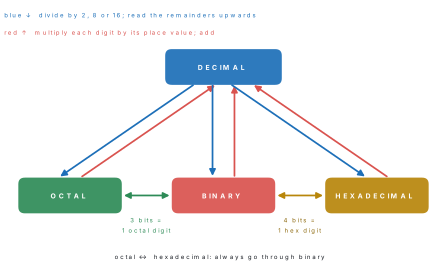
To change a decimal number into another base, use repeated division by the new base:
- Divide the decimal number by the base (2, 8 or 16). Write the quotient below it and the remainder at the side.
- Divide that quotient by the base again, and write the new quotient and remainder.
- Repeat until the quotient becomes 0.
- Write the remainders from the bottom to the top. This is the answer.
Each division by the base splits off the last digit of the number in that base, just as dividing 4725 by 10 leaves the remainder 5, its last digit. So the first remainder is the rightmost digit and the last remainder is the leftmost digit — which is why the remainders are read upwards.
Problem. Convert (45)_{10} into binary.
Solution. Divide by 2 again and again, writing each remainder.
| Divide by 2 | Quotient | Remainder |
|---|---|---|
| 45 ÷ 2 | 22 | 1 |
| 22 ÷ 2 | 11 | 0 |
| 11 ÷ 2 | 5 | 1 |
| 5 ÷ 2 | 2 | 1 |
| 2 ÷ 2 | 1 | 0 |
| 1 ÷ 2 | 0 | 1 |
The quotient is now 0, so stop. Reading the remainders from the bottom up: (45)_{10} = (101101)_2.
Check. 32 + 8 + 4 + 1 = 45 ✓
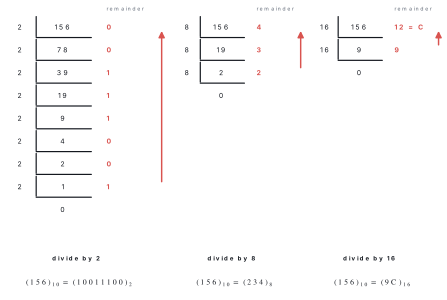
Problem. Convert (156)_{10} into binary, octal and hexadecimal.
Solution. The three ladders are drawn in the figure above.
Binary. 156 ÷ 2 = 78 r 0; 78 ÷ 2 = 39 r 0; 39 ÷ 2 = 19 r 1; 19 ÷ 2 = 9 r 1; 9 ÷ 2 = 4 r 1; 4 ÷ 2 = 2 r 0; 2 ÷ 2 = 1 r 0; 1 ÷ 2 = 0 r 1. Reading upwards, (156)_{10} = (10011100)_2.
Octal. 156 ÷ 8 = 19 r 4; 19 ÷ 8 = 2 r 3; 2 ÷ 8 = 0 r 2. Reading upwards, (156)_{10} = (234)_8.
Hexadecimal. 156 ÷ 16 = 9 r 12; 9 ÷ 16 = 0 r 9. The remainder 12 is written C, so (156)_{10} = (\mathrm{9C})_{16}.
Check. 128 + 16 + 8 + 4 = 156 ✓; 2\times64 + 3\times8 + 4 = 156 ✓; 9\times16 + 12 = 156 ✓
Problem. Convert (500)_{10} into octal.
Solution.
| Divide by 8 | Quotient | Remainder |
|---|---|---|
| 500 ÷ 8 | 62 | 4 |
| 62 ÷ 8 | 7 | 6 |
| 7 ÷ 8 | 0 | 7 |
Reading upwards: (500)_{10} = (764)_8.
Check. 7\times64 + 6\times8 + 4 = 448 + 48 + 4 = 500 ✓
Problem. Convert (2024)_{10} into hexadecimal.
Solution.
| Divide by 16 | Quotient | Remainder | Hex digit |
|---|---|---|---|
| 2024 ÷ 16 | 126 | 8 | 8 |
| 126 ÷ 16 | 7 | 14 | E |
| 7 ÷ 16 | 0 | 7 | 7 |
Reading upwards: (2024)_{10} = (\mathrm{7E8})_{16}.
Check. 7\times256 + 14\times16 + 8 = 1792 + 224 + 8 = 2024 ✓
(1) Reading the remainders downwards. For 156 the remainders from top to bottom are 0, 0, 1, 1, 1, 0, 0, 1; read downwards they give 00111001, which is 57, not the correct 10011100. Always read from the bottom up. (The remainders of 45 happen to read the same both ways, so 45 is no test.) (2) Forgetting the last remainder: when the quotient becomes 0, the number you divided (often 1) is itself the last remainder. (3) Writing a remainder of 10 to 15 as two digits in hexadecimal: 14 must be written E, not "14", or the answer becomes a different number.
Convert your answer back to decimal by the method of section 15.3. It takes thirty seconds and catches nearly every error. For binary there is also a quick test: an odd number always ends in 1 and an even number in 0.
A second method for binary: subtracting place values
For binary there is a quick method that also checks the division method. Write the place values 1, 2, 4, 8, 16, 32, 64, 128 … Take the largest place value that fits into the number, write 1 under it and subtract; repeat with what is left; write 0 under every place value that is not used.
Problem. Every part of an IPv4 address such as 192.168.1.10 (Lesson 14) is stored in one byte. Convert (a) 200, (b) 192 and (c) 168 into 8-bit binary by subtracting place values.
Solution. The place values of a byte are 128, 64, 32, 16, 8, 4, 2, 1.
(a) 200 − 128 = 72; 72 − 64 = 8; 8 − 8 = 0. The places 128, 64 and 8 are used:
| Place value | 128 | 64 | 32 | 16 | 8 | 4 | 2 | 1 |
|---|---|---|---|---|---|---|---|---|
| Bit | 1 | 1 | 0 | 0 | 1 | 0 | 0 | 0 |
So (200)_{10} = (11001000)_2.
(b) 192 − 128 = 64; 64 − 64 = 0. Places 128 and 64: (192)_{10} = (11000000)_2.
(c) 168 − 128 = 40; 40 − 32 = 8; 8 − 8 = 0. Places 128, 32 and 8: (168)_{10} = (10101000)_2.
Check. Dividing 168 by 2 repeatedly gives the remainders 0, 0, 0, 1, 0, 1, 0, 1, which read upwards are 10101000 ✓
15.3 Converting binary, octal and hexadecimal numbers to decimal
To change a number from any base into decimal, use positional expansion:
- Write the place value under each digit, starting with 1 at the right and multiplying by the base for each place to the left. (The place values are the powers of the base: \text{base}^0, \text{base}^1, \text{base}^2 …)
- Multiply each digit by its place value. In hexadecimal, change the letters A to F into 10 to 15 first.
- Add the products. The sum is the number in decimal.
These are the place values you will need most often:
| Power | 0 | 1 | 2 | 3 | 4 | 5 | 6 | 7 | 8 | 9 | 10 |
|---|---|---|---|---|---|---|---|---|---|---|---|
| Base 2 | 1 | 2 | 4 | 8 | 16 | 32 | 64 | 128 | 256 | 512 | 1024 |
| Base 8 | 1 | 8 | 64 | 512 | 4096 | ||||||
| Base 16 | 1 | 16 | 256 | 4096 | 65536 |
Problem. Convert (110101)_2 into decimal.
Solution. The rightmost digit has power 0; there are six digits, so the leftmost has power 5.
Check. 53 is odd and the binary number ends in 1 ✓
Problem. Convert (10011011)_2 into decimal.
Solution. Write the place values above the bits and add the place values that have a 1 under them.
| Place value | 128 | 64 | 32 | 16 | 8 | 4 | 2 | 1 |
|---|---|---|---|---|---|---|---|---|
| Bit | 1 | 0 | 0 | 1 | 1 | 0 | 1 | 1 |
128 + 16 + 8 + 2 + 1 = 155, so (10011011)_2 = (155)_{10}.
Problem. Convert (1572)_8 into decimal.
Solution.
Problem. Convert (\mathrm{3AF})_{16} into decimal.
Solution. Replace the letters first: A = 10 and F = 15.
Problem. Convert (\mathrm{BEAD})_{16} into decimal.
Solution. B = 11, E = 14, A = 10, D = 13, and the place values are 4096, 256, 16 and 1.
| Digit | B = 11 | E = 14 | A = 10 | D = 13 |
|---|---|---|---|---|
| Place value | 4096 | 256 | 16 | 1 |
| Product | 45056 | 3584 | 160 | 13 |
45056 + 3584 + 160 + 13 = 48813, so (\mathrm{BEAD})_{16} = (48813)_{10}.
Problem. In a web page (Lesson 10) the colour orange is written #FFA500.
The six hex digits are three pairs, giving the amounts of red, green and blue
light, each from 0 to 255. Find the three amounts in decimal.
Solution. Red = (\mathrm{FF})_{16} = 15\times16 + 15 = 255. Green = (\mathrm{A5})_{16} = 10\times16 + 5 = 165. Blue = (00)_{16} = 0.
So #FFA500 means red 255, green 165, blue 0: full red with some green, which
the eye sees as orange.
The rightmost digit is multiplied by \text{base}^0 = 1, not by the base. A student who starts with 2^1 for (110101)_2 gets 106, exactly double the right answer. Count the digits first: a number with n digits has its leftmost digit multiplied by \text{base}^{\,n-1}.
15.4 Converting between binary, octal and hexadecimal
Since 8 = 2^3, every octal digit is exactly 3 bits; since 16 = 2^4, every hexadecimal digit is exactly 4 bits. So these conversions need no division at all — only grouping, using the two tables below.
| Octal digit | 0 | 1 | 2 | 3 | 4 | 5 | 6 | 7 |
|---|---|---|---|---|---|---|---|---|
| 3 bits | 000 | 001 | 010 | 011 | 100 | 101 | 110 | 111 |
| Hex digit | 0 | 1 | 2 | 3 | 4 | 5 | 6 | 7 |
|---|---|---|---|---|---|---|---|---|
| 4 bits | 0000 | 0001 | 0010 | 0011 | 0100 | 0101 | 0110 | 0111 |
| Hex digit | 8 | 9 | A | B | C | D | E | F |
| 4 bits | 1000 | 1001 | 1010 | 1011 | 1100 | 1101 | 1110 | 1111 |
Why does grouping work? Look at the place values of binary in threes from the right: 1, 2, 4 | 8, 16, 32 | 64, 128, 256. Each group of three is worth 1, 8 or 64 times the same pattern 1, 2, 4 — and 1, 8 and 64 are exactly the place values of octal. So each group of three bits, read as a number from 0 to 7, is one octal digit in the right place. In the same way, groups of four bits are worth 1, 16, 256 … times a number from 0 to 15: the hexadecimal digits.
Binary to octal. Starting from the right, cut the bits into groups of three. If the last group on the left is short, add 0s on its left. Write the octal digit for each group.
Binary to hexadecimal. The same, with groups of four.
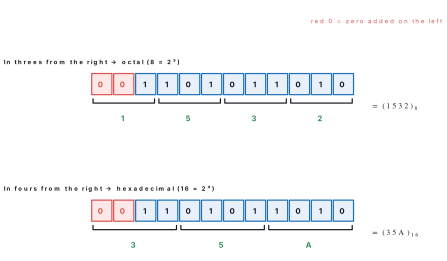
Problem. Convert (1101011010)_2 into octal and into hexadecimal.
Solution. Octal: groups of three from the right are 1 | 101 | 011 | 010. Fill the last group: 001 | 101 | 011 | 010 → 1, 5, 3, 2. So (1101011010)_2 = (1532)_8.
Hexadecimal: groups of four from the right are 11 | 0101 | 1010. Fill the last group: 0011 | 0101 | 1010 → 3, 5, A. So (1101011010)_2 = (\mathrm{35A})_{16}.
Check. The binary number is 512 + 256 + 64 + 16 + 8 + 2 = 858; (1532)_8 = 512 + 320 + 24 + 2 = 858 ✓ and (\mathrm{35A})_{16} = 768 + 80 + 10 = 858 ✓
Octal to binary. Replace each octal digit by its three bits, keeping any 0s inside a group. Hexadecimal to binary. Replace each hex digit by its four bits. Zeros at the far left of the final answer may be dropped.
Problem. Convert (5274)_8 into binary.
Solution.
| Octal digit | 5 | 2 | 7 | 4 |
|---|---|---|---|---|
| 3 bits | 101 | 010 | 111 | 100 |
Joining the groups: (5274)_8 = (101010111100)_2. Note that 2 is written 010, not 10: dropping that 0 would shift every bit after it.
Problem. Convert (a) (\mathrm{9C4})_{16} and (b) (\mathrm{2F})_{16} into binary.
Solution. (a) 9 = 1001, C = 1100, 4 = 0100, so (\mathrm{9C4})_{16} = (100111000100)_2.
(b) 2 = 0010, F = 1111, giving 00101111. The two 0s at the far left can be dropped: (\mathrm{2F})_{16} = (101111)_2.
Check (b). (\mathrm{2F})_{16} = 2\times16 + 15 = 47 and (101111)_2 = 32 + 8 + 4 + 2 + 1 = 47 ✓
Problem. A network card has the MAC address 3C-52-82-9A-7F-10 (Lesson 14).
(a) How many bits long is the address? (b) Write the pairs 3C and 9A in binary
and in decimal.
Solution. (a) There are 12 hexadecimal digits and each is 4 bits, so the address has 12 × 4 = 48 bits (6 bytes, one byte per pair).
(b) 3C: 3 = 0011 and C = 1100, so (\mathrm{3C})_{16} = (00111100)_2, which is 32 + 16 + 8 + 4 = 60. 9A: 9 = 1001 and A = 1010, so (\mathrm{9A})_{16} = (10011010)_2, which is 128 + 16 + 8 + 2 = 154 (check: 9 × 16 + 10 = 154 ✓).
Octal to hexadecimal, and back. There is no direct rule, because 8 and 16 are not powers of each other. Go through binary: write each octal digit as 3 bits, then regroup the bits in fours from the right (or the reverse).
Problem. Convert (745)_8 into hexadecimal.
Solution. Step 1 — octal to binary: 7 = 111, 4 = 100, 5 = 101, so (745)_8 = (111100101)_2.
Step 2 — regroup in fours from the right: 1 | 1110 | 0101 → 0001 | 1110 | 0101 → 1, E, 5.
So (745)_8 = (\mathrm{1E5})_{16}.
Check. (745)_8 = 7\times64 + 4\times8 + 5 = 485 and (\mathrm{1E5})_{16} = 256 + 14\times16 + 5 = 485 ✓
Problem. Convert (\mathrm{B6})_{16} into octal.
Solution. Step 1 — hex to binary: B = 1011, 6 = 0110, so (\mathrm{B6})_{16} = (10110110)_2.
Step 2 — regroup in threes from the right: 10 | 110 | 110 → 010 | 110 | 110 → 2, 6, 6.
So (\mathrm{B6})_{16} = (266)_8.
Check. (\mathrm{B6})_{16} = 11\times16 + 6 = 182 and (266)_8 = 2\times64 + 6\times8 + 6 = 182 ✓
Grouping (1101011010)_2 in threes from the left gives 110 | 101 | 101 | 0, which leads to the wrong answer 6550. The groups must start at the right end, where the place worth 1 is; the extra 0s go only at the left.
Activity 15.1 — check your answers with the computer
Open the Calculator on a Windows computer and choose Programmer from its menu. Type a decimal number such as 156: the calculator shows it at once in HEX, DEC, OCT and BIN. Click HEX, OCT or BIN to type a number in that base instead. Do five conversions from this lesson by hand first, then check each one on the calculator. (Phones have similar "programmer calculator" apps.)
The grade 9–10 course uses Python, which has these conversions built in.
bin(), oct() and hex() change a decimal number, adding the prefixes 0b,
0o and 0x; int(text, base) changes a number written in another base back
to decimal.
print(bin(45))
print(oct(500))
print(hex(2024))
print(int("110101", 2))
print(int("1572", 8))
print(int("3AF", 16))
print(format(156, "b"), format(156, "o"), format(156, "X"))
0b101101
0o764
0x7e8
53
890
943
10011100 234 9C
15.5 Bits, bytes and the units of memory
A bit (binary digit) is a single 0 or 1 — the smallest unit of data in a computer. A group of 4 bits is a nibble. A group of 8 bits is a byte, the basic unit in which memory and storage are measured.
One byte stores one character in the ASCII code used by English text: the letter A is the number 65, stored as the byte 01000001. So the word NEPAL needs 5 bytes, which is 40 bits. Nepali letters are not in ASCII; they are stored in Unicode, and in UTF-8, the form used on the web, a Devanagari character such as क takes 3 bytes. The word नेपाल is stored as five characters (न, े, प, ा, ल), so it takes 15 bytes. With n bits a computer can make 2^n different patterns: one byte (8 bits) has 2^8 = 256 patterns, the numbers 0 to 255. The largest byte, (11111111)_2, is 255, which is (377)_8 and (\mathrm{FF})_{16} — the FF of a colour code. The number of bits a processor handles at one time is called its word length: a "64-bit processor" works on 64 bits at once.
Bigger units are made by multiplying by 1024, not 1000, because computers count in powers of 2, and 2^{10} = 1024 is the power of 2 nearest to a thousand.
| Unit | Symbol | Equal to | In bytes |
|---|---|---|---|
| Bit | b | a single 0 or 1 | — |
| Nibble | — | 4 bits | half a byte |
| Byte | B | 8 bits | 1 |
| Kilobyte | KB | 1024 bytes | 2^{10} = 1,024 |
| Megabyte | MB | 1024 KB | 2^{20} = 1,048,576 |
| Gigabyte | GB | 1024 MB | 2^{30} = 1,073,741,824 |
| Terabyte | TB | 1024 GB | 2^{40} |
| Petabyte | PB | 1024 TB | 2^{50} |
| Exabyte | EB | 1024 PB | 2^{60} |
| Zettabyte | ZB | 1024 EB | 2^{70} |
| Yottabyte | YB | 1024 ZB | 2^{80} |
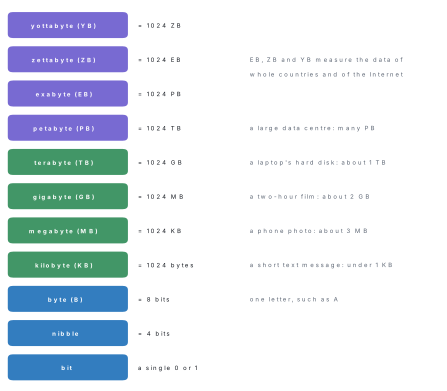
The grade 9 textbook's table of memory units goes from the petabyte straight to the yottabyte and says that 1 YB = 1024 PB. Two units come in between: the exabyte (EB) and the zettabyte (ZB). The correct order is bit, nibble, byte, KB, MB, GB, TB, PB, EB, ZB, YB, and 1 YB = 1024 ZB.
Makers of hard disks and pen drives, and network speeds (Lesson 14), use the decimal meaning: 1 KB = 1000 bytes, 1 GB = 1,000,000,000 bytes and 1 TB = 1,000,000,000,000 bytes. A computer divides by 1024 at each step, so a "1 TB" disk appears as 10^{12} \div 1024^3 \approx 931 GB. Nothing is missing; the two numbers use different units. Scientists now write KiB, MiB and GiB for the 1024 units, and you may see these in some programs. In this course, as in the CDC textbooks, 1 KB = 1024 bytes for memory.
Problem. Convert (a) 5 bytes into bits; (b) 3 KB into bytes; (c) 2 MB into bytes; (d) 4096 MB into GB; (e) 3 GB into KB.
Solution. Going to a smaller unit, multiply; going to a larger unit, divide.
(a) 5 bytes = 5 × 8 = 40 bits.
(b) 3 KB = 3 × 1024 = 3,072 bytes.
(c) 2 MB = 2 × 1024 KB = 2,048 KB = 2,048 × 1024 = 2,097,152 bytes.
(d) 4096 MB = 4096 ÷ 1024 = 4 GB.
(e) 3 GB = 3 × 1024 MB = 3,072 MB = 3,072 × 1024 = 3,145,728 KB.
Problem. Sushma's phone takes photos of 4 MB each. How many photos can a 64 GB memory card hold? (Ignore the space taken by the card's own system files.)
Solution. 64 GB = 64 × 1024 MB = 65,536 MB.
Number of photos = 65,536 ÷ 4 = 16,384 photos.
Problem. An essay has 2,000 words. On average a word, with the space after it, takes 6 characters. Find its size in bytes and in KB, taking 1 byte per character.
Solution. Characters = 2,000 × 6 = 12,000, so the size is 12,000 bytes. In KB: 12,000 ÷ 1024 ≈ 11.7 KB. A whole essay is smaller than one photo, which is why text messages and emails are so quick to send.
Problem. (a) What is the largest number that can be written with 10 bits? (b) How many bits are needed to write 1000 in binary? (c) And 5000?
Solution. n bits make 2^n patterns, the numbers from 0 to 2^n - 1.
(a) 2^{10} - 1 = 1024 - 1 = 1023, which is ten 1s: (1111111111)_2.
(b) 2^9 = 512 is less than 1000, but 2^{10} = 1024 is more, so 1000 needs 10 bits. Indeed (1000)_{10} = (1111101000)_2, which has 10 digits.
(c) 2^{12} = 4096 is less than 5000 and 2^{13} = 8192 is more, so 5000 needs 13 bits: (5000)_{10} = (1001110001000)_2.
Cut five cards. On their fronts draw 16, 8, 4, 2 and 1 dots, and lay them in a row with 16 on the left. A card turned face up means 1 and face down means 0. (1) Show 9: only the 8 and the 1 are up, so 9 = 01001. (2) Show 21, 30 and 31. (3) What is the largest number five cards can show, and how many different numbers (counting 0) can they make? (Answer: 31, and 32 numbers, because 2^5 = 32.) (4) Add a sixth card: how many dots must it have?
Chapter summary
- A number system writes numbers with a fixed set of digits; its base (radix) is the number of digits, and the largest digit is base − 1. Binary (2: 0, 1), octal (8: 0–7), decimal (10: 0–9), hexadecimal (16: 0–9, A–F with A = 10 … F = 15). Always write the base: (101)_2.
- All four are positional: place values are powers of the base, starting with \text{base}^0 = 1 at the right.
- Computers use binary because their switches have two states (off/on); octal (3 bits per digit) and hexadecimal (4 bits per digit) are short ways of writing binary — hex is used for colour codes and MAC addresses.
- Decimal → any base: divide by the base until the quotient is 0; read the remainders from the bottom up; write 10–15 as A–F.
- Any base → decimal: multiply each digit by its place value and add.
- Binary → octal / hex: group bits in threes / fours from the right, padding 0s on the left. Octal / hex → binary: write 3 / 4 bits for each digit. Octal ↔ hex: go through binary.
- Memory: bit; nibble = 4 bits; byte = 8 bits; KB, MB, GB, TB, PB, EB, ZB, YB, each 1024 times the one before. Disk makers and network speeds use 1000.
Practice questions
Group A — Objective (1 mark each)
- The base of the hexadecimal number system is [1]a2b8c10d16
- Which digit is not used in the octal system? [1]a0b5c7d8
- (1011)_2 in decimal is [1]a11b13c9d1011
- (25)_{10} in binary is [1]a11001b10011c11010d10101
- In hexadecimal, the symbol D stands for [1]a11b12c13d14
- How many bits make one byte? [1]a4b8c16d1024
- 1 KB is equal to [1]a1000 bitsb1024 bitsc1024 bytesd1000 MB
- (17)_8 in decimal is [1]a15b17c23d7
- The binary equivalent of (\mathrm{A})_{16} is [1]a1010b1100c1001d1110
- To convert a binary number into octal, its bits are grouped in [1]atwosbthreescfoursdeights
- Which of these units is the largest? [1]aTBbPBcGBdEB
- (64)_8 in binary is [1]a110100b1101111c1110001d11000101
- (\mathrm{FF})_{16} in decimal is [1]a225b255c256d1515
- A nibble is [1]a2 bitsb4 bitsc8 bitsd16 bits
Answers to Group A
1. (d) — hexadecimal uses 16 symbols, 0–9 and A–F.
2. (d) — octal digits run from 0 to 7.
3. (a) — 8 + 0 + 2 + 1 = 11.
4. (a) — 25 = 16 + 8 + 1, so the bits for 16, 8 and 1 are 1: 11001.
5. (c) — A = 10, B = 11, C = 12, D = 13.
6. (b) — a byte is 8 bits.
7. (c) — 1 KB = 1024 bytes (2^{10}).
8. (a) — 1 × 8 + 7 = 15.
9. (a) — A = 10 = 8 + 2 = 1010.
10. (b) — 8 = 2^3, so each octal digit is 3 bits.
11. (d) — the order is GB, TB, PB, EB.
12. (a) — 6 = 110 and 4 = 100, giving 110100.
13. (b) — 15 × 16 + 15 = 255.
14. (b) — a nibble is half a byte, 4 bits.
Group B — Short answer (2 marks each)
- What is a number system? Define base (radix) with one example. [2]
- Why do computers use the binary number system? [2]
- Convert (89)_{10} into binary. [2]
- Convert (11100110)_2 into decimal. [2]
- Convert (726)_8 into decimal. [2]
- Convert (1000)_{10} into hexadecimal. [2]
- Convert (\mathrm{2C9})_{16} into decimal. [2]
- Convert (1011101)_2 into octal and hexadecimal. [2]
- Convert 3 MB into KB and into bytes. [2]
- Convert (352)_8 into hexadecimal. [2]
- How many bits are there in 2 KB? Show the working. [2]
- Find the decimal value of (\mathrm{FFF})_{16}, the largest three-digit hexadecimal number. [2]
Answers to Group B
1. A number system is a way of writing numbers with a fixed set of digits and rules. Its base (radix) is the number of different digits it uses: binary has base 2 (digits 0 and 1), and decimal has base 10 (digits 0 to 9).
2. A computer is made of electronic switches that have only two states, off and on, which are easy to make and to tell apart; they are written as 0 and 1. Storage also uses two states (magnetised one way or the other, charge or no charge), so all data is stored and processed as binary digits.
3. 89 ÷ 2 = 44 r 1; 44 ÷ 2 = 22 r 0; 22 ÷ 2 = 11 r 0; 11 ÷ 2 = 5 r 1; 5 ÷ 2 = 2 r 1; 2 ÷ 2 = 1 r 0; 1 ÷ 2 = 0 r 1. Reading upwards, (89)_{10} = (1011001)_2. Check: 64 + 16 + 8 + 1 = 89.
4. Place values 128, 64, 32, 16, 8, 4, 2, 1 over the bits 1 1 1 0 0 1 1 0: 128 + 64 + 32 + 4 + 2 = 230, so (11100110)_2 = (230)_{10}.
5. (726)_8 = 7\times8^2 + 2\times8^1 + 6\times8^0 = 448 + 16 + 6 = (470)_{10}.
6. 1000 ÷ 16 = 62 r 8; 62 ÷ 16 = 3 r 14 (E); 3 ÷ 16 = 0 r 3. Reading upwards, (1000)_{10} = (\mathrm{3E8})_{16}. Check: 3 × 256 + 14 × 16 + 8 = 1000.
7. C = 12, so (\mathrm{2C9})_{16} = 2\times256 + 12\times16 + 9 = 512 + 192 + 9 = (713)_{10}.
8. Octal: 1 | 011 | 101 → 001 | 011 | 101 → (135)_8. Hexadecimal: 101 | 1101 → 0101 | 1101 → 5, D → (\mathrm{5D})_{16}. Check: the binary number is 64 + 16 + 8 + 4 + 1 = 93, and 64 + 24 + 5 = 93, 80 + 13 = 93.
9. 3 MB = 3 × 1024 = 3,072 KB; 3,072 × 1024 = 3,145,728 bytes.
10. Through binary: 3 = 011, 5 = 101, 2 = 010, so (352)_8 = (11101010)_2. In fours from the right: 1110 | 1010 → E, A. So (352)_8 = (\mathrm{EA})_{16}. Check: 3 × 64 + 5 × 8 + 2 = 234 and 14 × 16 + 10 = 234.
11. 2 KB = 2 × 1024 = 2,048 bytes, and each byte is 8 bits, so 2,048 × 8 = 16,384 bits.
12. F = 15, so (\mathrm{FFF})_{16} = 15\times256 + 15\times16 + 15 = 3840 + 240 + 15 = (4095)_{10}. (This is 16^3 - 1, one less than (1000)_{16}.)
Group C — Long answer (4 marks each)
- Convert as indicated:(a) (175)_{10} into binary(b) (1101101)_2 into decimal(c) (634)_8 into decimal(d) (\mathrm{4D})_{16} into binary. [1+1+1+1]
- Convert (420)_{10} into binary, octal and hexadecimal, and check one of your answers by converting it back. [4]
- Why is each octal digit worth exactly 3 bits and each hexadecimal digit exactly 4 bits? Convert (\mathrm{A7F})_{16} into octal through binary. [1+3]
- (a) Write the units of memory from the bit to the yottabyte in order, with the relation between each pair.(b) A 32 GB memory card stores songs of 4 MB each. How many songs can it hold?(c) Why does a "1 TB" hard disk show only about 931 GB on a computer? [2+1+1]
- Compare the binary, octal, decimal and hexadecimal systems in a table (base, digits, largest digit, one use). Write (100)_{10} in each of the other three systems. [2+2]
Answers to Group C
1. (a) 175 ÷ 2 = 87 r 1; 87 ÷ 2 = 43 r 1; 43 ÷ 2 = 21 r 1; 21 ÷ 2 = 10 r 1; 10 ÷ 2 = 5 r 0; 5 ÷ 2 = 2 r 1; 2 ÷ 2 = 1 r 0; 1 ÷ 2 = 0 r 1. Reading upwards, (175)_{10} = (10101111)_2 (check: 128 + 32 + 8 + 4 + 2 + 1 = 175). (b) (1101101)_2 = 64 + 32 + 0 + 8 + 4 + 0 + 1 = (109)_{10}. (c) (634)_8 = 6\times64 + 3\times8 + 4 = 384 + 24 + 4 = (412)_{10}. (d) 4 = 0100 and D = 1101, giving 01001101; dropping the leading 0, (\mathrm{4D})_{16} = (1001101)_2.
2. Binary: 420 ÷ 2 = 210 r 0; 210 ÷ 2 = 105 r 0; 105 ÷ 2 = 52 r 1; 52 ÷ 2 = 26 r 0; 26 ÷ 2 = 13 r 0; 13 ÷ 2 = 6 r 1; 6 ÷ 2 = 3 r 0; 3 ÷ 2 = 1 r 1; 1 ÷ 2 = 0 r 1. Reading upwards, (420)_{10} = (110100100)_2. Octal: 420 ÷ 8 = 52 r 4; 52 ÷ 8 = 6 r 4; 6 ÷ 8 = 0 r 6, so (420)_{10} = (644)_8. Hexadecimal: 420 ÷ 16 = 26 r 4; 26 ÷ 16 = 1 r 10 (A); 1 ÷ 16 = 0 r 1, so (420)_{10} = (\mathrm{1A4})_{16}. Check: (644)_8 = 6\times64 + 4\times8 + 4 = 384 + 32 + 4 = 420 ✓ (also (\mathrm{1A4})_{16} = 256 + 160 + 4 = 420 and 256 + 128 + 32 + 4 = 420).
3. 8 = 2^3, so three bits make exactly the eight patterns 000 to 111, one for each octal digit; 16 = 2^4, so four bits make exactly the sixteen patterns 0000 to 1111, one for each hex digit (1 mark). Step 1 — hex to binary: A = 1010, 7 = 0111, F = 1111, so (\mathrm{A7F})_{16} = (101001111111)_2. Step 2 — regroup in threes from the right: 101 | 001 | 111 | 111 → 5, 1, 7, 7. So (\mathrm{A7F})_{16} = (5177)_8. Check: 10\times256 + 7\times16 + 15 = 2687 and 5\times512 + 1\times64 + 7\times8 + 7 = 2687 ✓
4. (a) 1 nibble = 4 bits; 1 byte = 8 bits; 1 KB = 1024 bytes; 1 MB = 1024 KB; 1 GB = 1024 MB; 1 TB = 1024 GB; 1 PB = 1024 TB; 1 EB = 1024 PB; 1 ZB = 1024 EB; 1 YB = 1024 ZB. (b) 32 GB = 32 × 1024 = 32,768 MB; 32,768 ÷ 4 = 8,192 songs. (c) Disk makers count 1 TB as 1,000,000,000,000 bytes (powers of 1000), but the computer divides by 1024 three times to show GB: 10^{12} \div 1024^3 \approx 931 GB. The disk is not smaller; the two figures use different units.
5.
| System | Base | Digits | Largest digit | One use |
|---|---|---|---|---|
| Binary | 2 | 0, 1 | 1 | all data inside a computer |
| Octal | 8 | 0–7 | 7 | short form of binary; Linux file permissions |
| Decimal | 10 | 0–9 | 9 | everyday counting by people |
| Hexadecimal | 16 | 0–9, A–F | F (15) | colour codes, MAC addresses |
(100)_{10}: 100 ÷ 2 gives the remainders 0, 0, 1, 0, 0, 1, 1 (quotients 50, 25, 12, 6, 3, 1, 0), so (100)_{10} = (1100100)_2; 100 ÷ 8 = 12 r 4, 12 ÷ 8 = 1 r 4, 1 ÷ 8 = 0 r 1, so (100)_{10} = (144)_8; 100 ÷ 16 = 6 r 4, 6 ÷ 16 = 0 r 6, so (100)_{10} = (64)_{16}. Check: 64 + 32 + 4 = 100; 64 + 32 + 4 = 100; 6 × 16 + 4 = 100.
Practise more: Computer Science question bank