Unit 17 · Number System, Graphics and Multimedia · 25 min read
Multimedia
What the syllabus asks for 4
- Multimedia: meaning and elements (text, graphics, audio, video and animation)
- Multimedia hardware and software
- Uses of multimedia in education, entertainment, business and health
- Advantages and disadvantages of multimedia
An E-Paath lesson that talks, shows pictures, plays an animation and then asks you a question; a YouTube video; a mobile game; a slide show with music at the school's annual function — all of these mix words, pictures, sound and movement. This mixing is multimedia. This lesson explains what multimedia is and its five elements, the hardware and software needed to make and play it, how it is used in education, entertainment, business and health, and its advantages and disadvantages. Grade 10 returns to each element in detail, so learn the terms well now.
In the 50-mark school paper this lesson usually gives one or two objective questions (an element of multimedia, a multimedia device or program, a file format), one or two short questions (define multimedia; name its elements; two uses; difference between video and animation, or between linear and interactive multimedia) and sometimes a long question (explain the five elements with examples; uses of multimedia in different fields; or its advantages and disadvantages). Answers that give a Nepali example for each point score best.
17.1 Multimedia: meaning and elements
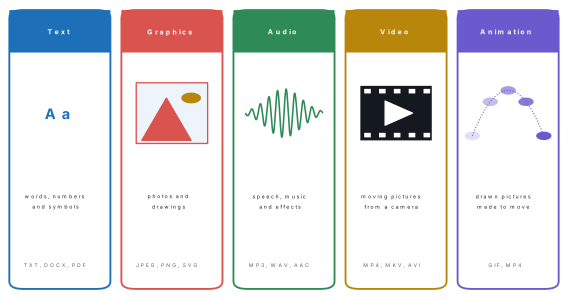
Multimedia is the combined use of two or more forms of media — text, graphics, audio, video and animation — to present information, usually with the help of a computer. Multi means many and media means the forms through which information is communicated.
A printed textbook uses only text and still pictures. A news programme on NTV adds speech, music and moving pictures. An E-Paath lesson adds one thing more: you can click, drag and answer, and the lesson responds. When a computer brings the media together, and especially when the user can control them, the result is computer multimedia.
The five elements
1. Text. Letters, numbers and symbols: titles, labels, instructions, subtitles and the words of a lesson. Text is the simplest element and needs the least storage — one English character needs one byte in plain text. The look of text is set by its font (for example Arial, Times New Roman or a Devanagari font such as Kalimati), its size, style and colour. Formats: TXT, DOCX, PDF.
2. Graphics. Still pictures: photographs, drawings, diagrams, charts, maps, icons and logos. As Lesson 16 showed, they are stored as raster (pixels) or vector (shapes). One labelled diagram often explains more than a whole paragraph. Formats: JPEG, PNG, GIF, BMP, SVG.
3. Audio. Any sound: speech, narration, music and sound effects such as a click or a bell. A microphone turns sound into an electrical signal and the computer stores it as numbers, thousands of measurements (samples) every second. Formats: MP3 and AAC (compressed, small), WAV (uncompressed, large), OGG.
4. Video. Moving pictures recorded from the real world with a camera, usually with sound. A video is a series of still pictures called frames shown quickly one after another — 25 or 30 frames per second on most phones and televisions, 24 in cinema films. Formats: MP4 (the most common), MKV, AVI, MOV.
5. Animation. Pictures that are drawn or made by a computer and shown one after another so that they seem to move: cartoons, a moving diagram of the heart, a bouncing logo. When about 12 to 30 pictures are shown each second, the eye joins them into smooth movement. Animation may be 2D (flat cartoons) or 3D (characters and objects modelled in three dimensions, as in animated films and games). Formats: GIF for short loops, MP4 for longer ones.
Both show moving pictures, so students often mix them up. A video is recorded from real life with a camera: a cricket match, a speech, a dance. An animation is drawn or generated picture by picture: a cartoon, an animated water cycle, a moving logo. A video of a puppet show is still a video; a cartoon of the same story is an animation.
Linear and interactive multimedia
| Linear multimedia | Interactive (non-linear) multimedia |
|---|---|
| plays from beginning to end in a fixed order | the user chooses what to see next and in what order |
| the viewer only watches or listens | the user clicks, drags, types or answers, and it responds |
| e.g. a film in a cinema hall, a TV advertisement, a slide show that runs by itself | e.g. an E-Paath lesson, a video game, a website, a touch-screen information kiosk |
When the parts of interactive multimedia are joined by links — click a word to hear it, click a picture to open a video — it is also called hypermedia.
Problem. Name the elements of multimedia used in each, and say whether it is linear or interactive: (a) an E-Paath lesson on the water cycle in which a voice explains, an animated raindrop moves through the cycle and the student then drags labels onto a diagram; (b) a 30-second Daraz advertisement on YouTube with a product video, music and the sale price written on the screen; (c) a mobile football game.
Solution. (a) Text (labels and instructions), graphics (the diagram), audio (the voice), animation (the raindrop); it is interactive, because the student drags labels and the lesson checks them. (b) Video, audio (music) and text (the price); it is linear — it plays the same way every time. (c) Graphics, animation (the players and the ball), audio (sounds and music) and text (score and menus); it is interactive, because the player controls the game.
17.2 Multimedia hardware and software
A multimedia system is a computer, phone or tablet together with the hardware to capture, store and play sound, pictures and video, and the software to create, edit and play multimedia.
Hardware
Multimedia hardware is grouped by its job: putting media in (input), processing and storing it, and giving it out (output).
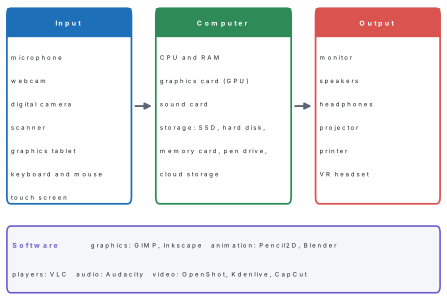
| Device | Type | What it does in multimedia |
|---|---|---|
| Microphone | input | turns speech and music into electrical signals for recording, video calls and voice search |
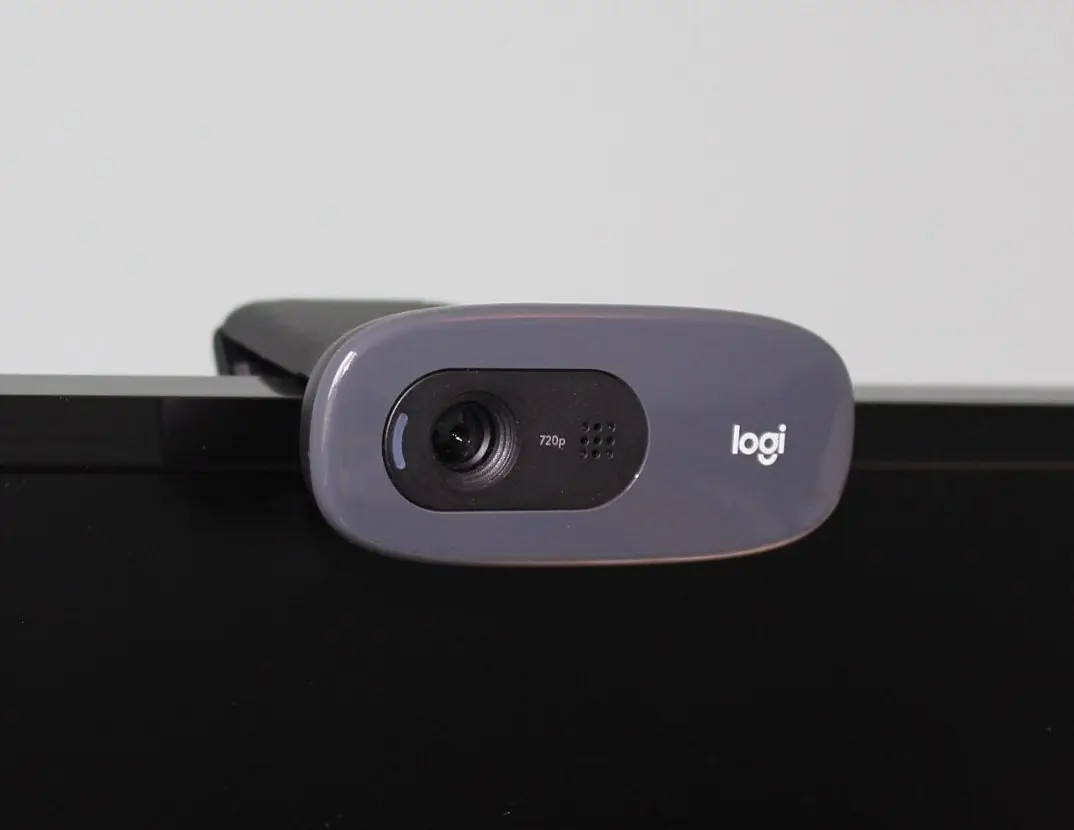
| Webcam | input | a small camera for video calls, online classes and recording yourself |
| Digital camera, phone camera | input | takes photographs and records video |
| Scanner | input | turns printed photos and documents into digital pictures |
| Graphics tablet with stylus | input | lets an artist draw on the computer by hand, like pen on paper |
| Monitor | output | shows text, pictures, video and animation; a Full-HD monitor has 1920 × 1080 pixels |
| Speakers, headphones, earphones | output | play sound; headphones keep it private |
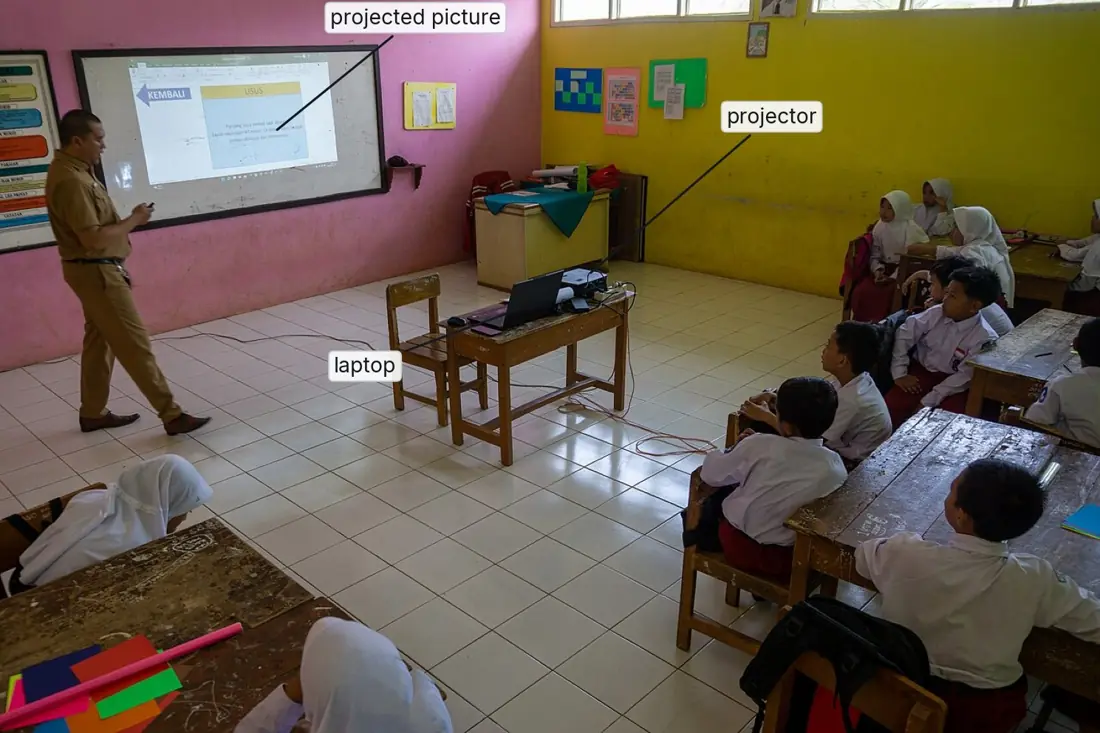
| Projector | output | shows the computer screen as a large picture on a wall or screen for a whole class |
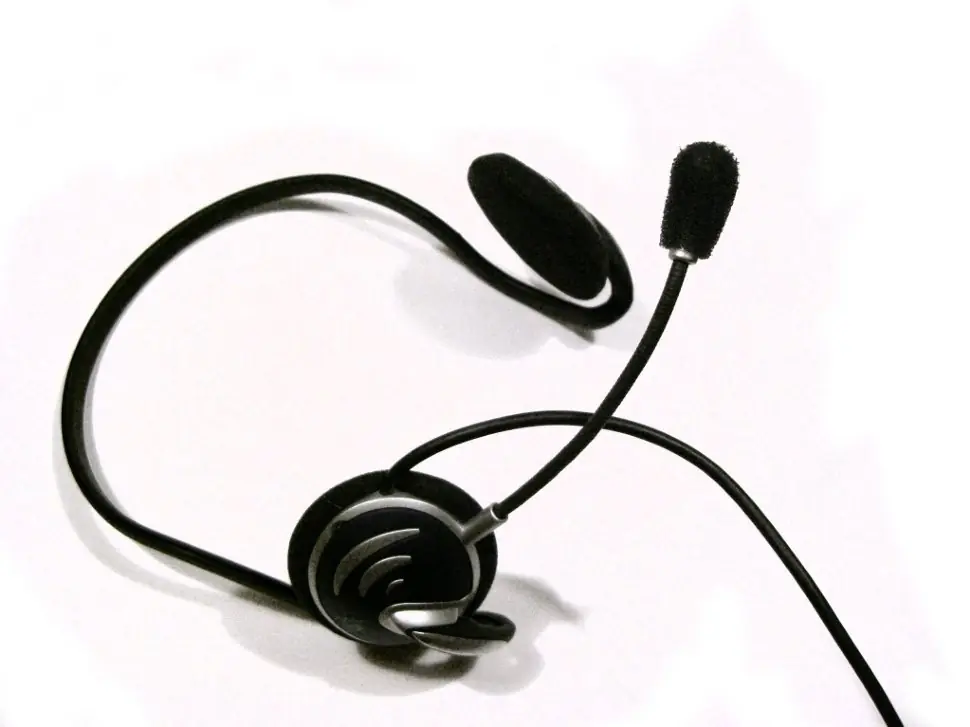
| Headset | input and output | headphones and a microphone together, for online classes and calls |
Inside the computer, four parts matter most:
- CPU and RAM — the processor does the work and the memory holds what is being edited; editing video needs a fast CPU and plenty of RAM (8 GB or more).
- Graphics card (video card, GPU) — draws pictures, 3D scenes and video frames on the screen quickly. Simple computers have it built into the CPU; computers for games and video editing have a separate one.
- Sound card — changes sound from the microphone into numbers (analogue to digital) and changes the numbers back into sound for the speakers (digital to analogue). Most motherboards have one built in.
- Storage — multimedia files are large, so they are kept on hard disks, SSDs (faster), memory cards in cameras and phones, pen drives, and cloud storage such as Google Drive or YouTube.
A projector, speaker and monitor are output devices: they give media out to people. A microphone, webcam and scanner are input devices: they bring media into the computer. A headset and a touch screen are both. Graphics cards and sound cards are neither — they are parts inside the computer that process pictures and sound.
Software
| Type of software | Examples | Used for |
|---|---|---|
| Media players | VLC media player (free), Windows Media Player | playing audio and video files of almost every format |
| Graphics software | Paint, GIMP, Inkscape, Canva | making and editing pictures (Lesson 16) |
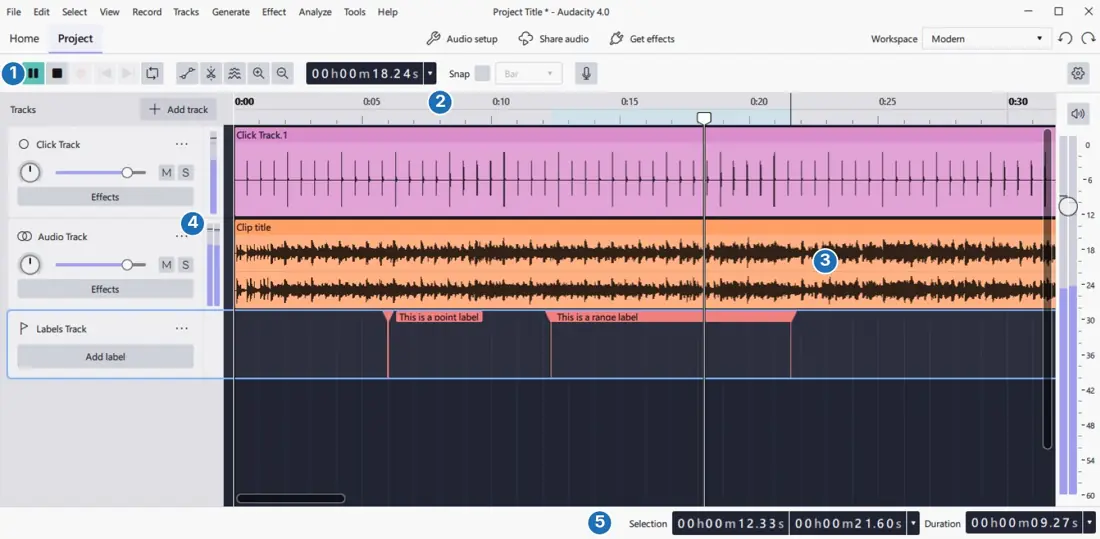
| Audio editors | Audacity (free and open source) | recording, cutting and joining sound, removing noise, saving as MP3 or WAV |
| Video editors | OpenShot and Kdenlive (free), CapCut (free app), Adobe Premiere Pro (paid) | joining clips, cutting, adding titles, music and effects, exporting MP4 |
| Animation software | Pencil2D (free, 2D), Blender (free, 3D), Adobe Animate (paid) | drawing frames, moving characters, 3D models |
| Presentation and authoring | PowerPoint, LibreOffice Impress, Google Slides, Canva, Scratch | slides with sound and video; interactive stories and games |
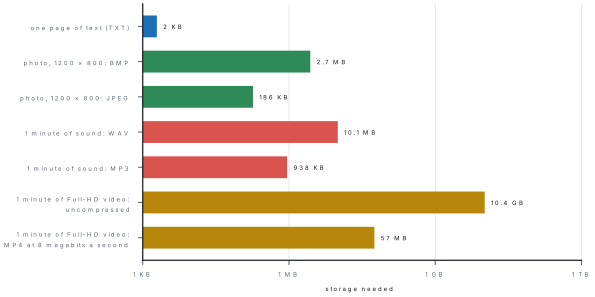
Every sound, picture and video becomes numbers, and multimedia files can be very large. The size of uncompressed sound is
Problem. CD-quality sound takes 44,100 samples every second, 16 bits per sample, in 2 channels (stereo). (a) How much storage does one minute need as an uncompressed WAV file? (b) An MP3 file of the same minute uses 128 kilobits per second (1 kilobit = 1000 bits). Find its size and how many times smaller it is. (Take 1 KB = 1024 bytes, 1 MB = 1024 KB.)
Solution. (a) Bits = 44,100 × 16 × 2 × 60 = 84,672,000 bits. Bytes = 84,672,000 ÷ 8 = 10,584,000 bytes; ÷ 1024 = 10,335.9 KB; ÷ 1024 ≈ 10.1 MB.
(b) Bits = 128 × 1000 × 60 = 7,680,000 bits; ÷ 8 = 960,000 bytes; ÷ 1024 = 937.5 KB (about 0.92 MB). It is 10,584,000 ÷ 960,000 ≈ 11 times smaller, which is why songs are shared as MP3.
Problem. A 10-second video clip is 1280 × 720 pixels, 24-bit colour, at 25 frames per second. (a) Find its uncompressed size. (b) Saved as MP4 it uses 5 megabits per second (1 megabit = 1,000,000 bits). Find the MP4 size.
Solution. (a) One frame = 1280 × 720 × 3 bytes = 2,764,800 bytes. Frames = 25 × 10 = 250. Size = 2,764,800 × 250 = 691,200,000 bytes; ÷ 1024 ÷ 1024 ≈ 659 MB — for just ten seconds.
(b) Bits = 5,000,000 × 10 = 50,000,000; ÷ 8 = 6,250,000 bytes ≈ 6.0 MB. The MP4 file is about 110 times smaller. Video compression stores a complete picture only now and then and, in between, mostly the changes from one frame to the next, so the file is small enough to send on Viber or watch on YouTube.
Problem. Name the hardware and software needed for each task: (a) recording an interview with the head teacher for the school radio programme; (b) joining an online class taught from Kathmandu; (c) showing a slide show to 60 parents in the school hall; (d) turning old printed family photos into digital pictures; (e) making a one-minute video about the school.
Solution. (a) A microphone (or headset) and headphones; Audacity to record, cut and save as MP3. (b) A webcam, a microphone and speakers or a headset; a video-call program such as Zoom or Google Meet. (c) A laptop and a projector with speakers; presentation software such as PowerPoint or Impress. (d) A scanner; graphics software such as GIMP to crop and correct them. (e) A phone camera and microphone; a video editor such as OpenShot or CapCut to join clips, add titles and music and export MP4.
17.3 Uses of multimedia in education, entertainment, business and health
Education
Multimedia makes lessons easier to see, hear and practise. OLE Nepal's E-Paath offers more than 500 free interactive lessons for grades 1 to 8 in Nepali, English, Mathematics and Science, built from pictures, sound, animations and games. Teachers show slides, videos and simulations through projectors and smart boards. Students learn from YouTube tutorials, e-books and audio books, and join online classes with video and screen sharing. Science simulations let a student "do" a dangerous or costly experiment on the screen. During the school closures of 2020, lessons were broadcast on radio and television for students at home.
Entertainment
Films, music videos, cartoons, video games, TikTok and YouTube channels, online streaming of cricket and football, and virtual reality (VR) games are all multimedia. Nepali films and music videos are now edited, given sound and effects, and released online with computer software.
Business
Businesses use multimedia to advertise (TV and YouTube adverts, Facebook posts, product photos and videos on Daraz), to present plans and sales figures in meetings, to train staff with videos, to hold video conferences with offices in other cities, and to promote tourism with videos and virtual tours of places such as Lumbini, Pokhara and the Everest region. Bank ATMs and information kiosks guide customers with screens, pictures and sound.
Health
Doctors use medical images — X-ray, ultrasound, CT and MRI pictures — shown and studied on computer screens, some of them as 3D models. Through telemedicine, a health worker at a remote health post can show a patient on a video call, and send photos and reports, to a specialist doctor in a city hospital. Nurses and doctors are trained with videos and 3D animations of the body, and health-awareness messages about vaccination, hand-washing and nutrition reach people as videos, radio jingles and posters.
| Field | Uses | Example in Nepal |
|---|---|---|
| Education | interactive lessons, simulations, online classes, e-books | E-Paath, online classes, projector lessons |
| Entertainment | films, music, games, streaming, VR | Nepali films and music videos on YouTube |
| Business | adverts, presentations, product videos, video conferencing, tourism promotion | Daraz product videos, tourism videos of Pokhara |
| Health | medical images, telemedicine, training, awareness campaigns | a health post consulting a city hospital by video call |
Multimedia is also used in news (online news with video), agriculture (farmers watching videos on new methods), public awareness (voter-education and road-safety videos) and communication (video calls on Viber and WhatsApp).
Work in groups of four to make a one-minute video called "Our School" (or "My Village"). 1. Graphics and video: take six to eight photos and two short clips with a phone. 2. Audio: write a short narration and record it in Audacity; save it as MP3. Use only music you are allowed to use (Lesson 12 explains copyright). 3. Text: plan a title, captions and a closing line with your names. 4. Animation: add moving titles or transitions, or draw a short animated logo in Pencil2D. 5. Put everything together in OpenShot, CapCut or PowerPoint and export it as MP4. 6. Show it to the class on the projector. Each group names the five elements it used and the hardware and software it needed.
17.4 Advantages and disadvantages of multimedia
| Advantages of multimedia | Disadvantages of multimedia |
|---|---|
| makes information interesting and holds attention | making good multimedia takes time, skill and planning |
| explains difficult ideas with pictures, sound and movement | cameras, computers and software can be expensive |
| helps learners who learn best by seeing, hearing or doing | files are large and need much storage and fast Internet |
| interactive multimedia gives practice and immediate feedback | needs electricity and devices, which not everyone has |
| one video or lesson can reach a huge number of people | too many effects can distract from the message |
| useful for people who cannot read well, through sound and pictures | long screen time can harm eyes and health, and attention |
| makes advertising, training and communication more effective | copied or edited media can spread copyright problems and false information |
Give two advantages and two disadvantages, each as a full sentence with an example: "Multimedia explains difficult ideas: an animation of the water cycle shows how water moves better than a paragraph does." A list of single words ("interesting, costly") seldom earns full marks.
Chapter summary
- Multimedia is the combined use of two or more media — text, graphics, audio, video and animation — usually with a computer.
- Video is recorded from real life with a camera; animation is drawn or computer-made pictures shown quickly (about 12–30 a second) so they seem to move.
- Linear multimedia plays in a fixed order (a film); interactive multimedia responds to the user (E-Paath, games, websites).
- Hardware: input — microphone, webcam, camera, scanner, graphics tablet; output — monitor, speakers, headphones, projector; inside — CPU, RAM, graphics card, sound card; storage — SSD, hard disk, memory card, cloud.
- Software: VLC (player), Audacity (audio), OpenShot, Kdenlive and CapCut (video), Pencil2D and Blender (animation), GIMP and Inkscape (graphics), PowerPoint (presentation).
- Uncompressed sound = samples per second × bits × channels × seconds ÷ 8 bytes; one minute of CD sound ≈ 10.1 MB, as MP3 ≈ 0.92 MB; MP4 makes video about a hundred times smaller.
- Uses: education, entertainment, business, health (medical images, telemedicine); advantages and disadvantages as in the table.
Practice questions
Group A — Objective (1 mark each)
- Which of these is not one of the five elements of multimedia? [1]atextbaudiocanimationdprinter
- Moving pictures recorded from real life with a camera are called [1]aanimationbvideocgraphicsdtext
- Which device is an output device? [1]amicrophonebwebcamcprojectordscanner
- VLC media player is used to [1]adraw vector logosbplay audio and video filesctype documentsdremove viruses
- A free program for recording and editing sound is [1]aAudacitybInkscapecExceldPaint
- Which file format is used for sound? [1]aMP3bJPEGcDOCXdSVG
- An E-Paath lesson in which the student drags and answers is an example of [1]alinear multimediabinteractive multimediaca text fileda hardware device
- The part of a computer that changes sound between analogue and digital form is the [1]agraphics cardbsound cardcnetwork carddhard disk
- The most common file format for video is [1]aMP4bMP3cGIFdTXT
- Showing a doctor a patient at a remote health post over a video call is called [1]atelemedicinebanimationce-commercedscanning
- A device that turns printed photos into digital pictures is a [1]aprojectorbscannercspeakerdmonitor
- Which of these is free video-editing software? [1]aOpenShotbVLC media playercAudacitydNotepad
Answers to Group A
1. (d) — a printer is hardware; the five elements are text, graphics, audio, video and animation.
2. (b) — video is recorded with a camera; animation is drawn.
3. (c) — a projector gives the picture out to the viewers.
4. (b) — VLC plays almost every audio and video format.
5. (a) — Audacity is a free, open-source audio editor.
6. (a) — MP3 is a compressed sound format.
7. (b) — the lesson responds to what the student does.
8. (b) — the sound card converts sound to numbers and back.
9. (a) — MP4 is the usual compressed video format.
10. (a) — telemedicine is health care at a distance using video, pictures and data.
11. (b) — a scanner captures a printed page or photo as a digital picture.
12. (a) — OpenShot edits video; VLC only plays it.
Group B — Short answer (2 marks each)
- What is multimedia? Name its five elements. [2]
- Write two differences between video and animation. [2]
- Differentiate between linear and interactive multimedia with one example each. [2]
- Name any two input devices and two output devices used in multimedia. [2]
- What is the use of(a) a graphics card and(b) a sound card? [2]
- Write any two uses of multimedia in education. [2]
- Write any two uses of multimedia in health. [2]
- Name one program for each job: playing a video, editing sound, editing video, making a 3D animation. [2]
- Write two advantages and two disadvantages of multimedia. [2]
- A 2-minute voice recording uses 22,050 samples per second, 16 bits per sample and 1 channel (mono). Find its uncompressed size in KB (1 KB = 1024 bytes). [2]
Answers to Group B
1. Multimedia is the combined use of two or more forms of media to present information, usually with a computer. Its five elements are text, graphics, audio, video and animation.
2. A video is recorded from real life with a camera, while an animation is made of drawn or computer-generated pictures. Video shows real people and places (a cricket match); animation can show anything that can be drawn, including imaginary things (a cartoon, a moving diagram of the heart).
3. Linear multimedia plays from start to end in a fixed order and the viewer only watches, e.g. a TV advertisement. Interactive multimedia lets the user choose and responds to clicks and answers, e.g. an E-Paath lesson or a video game.
4. Input: microphone, webcam, digital camera, scanner, graphics tablet (any two). Output: monitor, speakers, headphones, projector (any two).
5. (a) A graphics card (GPU) draws pictures, 3D scenes and video frames on the screen quickly. (b) A sound card changes sound from the microphone into digital form and changes digital sound back into sound for the speakers.
6. Interactive lessons such as E-Paath make learning interesting and give practice with feedback; teachers show videos, animations and simulations with a projector; students join online classes and watch tutorials (any two).
7. Doctors study X-ray, ultrasound, CT and MRI images on screens; telemedicine lets a remote health post consult a specialist by video call; doctors and nurses are trained with videos and 3D animations; awareness videos teach people about vaccination and hygiene (any two).
8. Playing a video: VLC media player. Editing sound: Audacity. Editing video: OpenShot (or Kdenlive or CapCut). 3D animation: Blender.
9. Advantages: makes information interesting and holds attention; explains difficult ideas with pictures, sound and movement. Disadvantages: needs costly equipment and skill to make; files are large and need storage and fast Internet.
10. Bytes = 22,050 × 16 × 1 × 120 ÷ 8 = 5,292,000 bytes; ÷ 1024 = 5,167.97 KB (about 5.05 MB).
Group C — Long answer (4 marks each)
- Define multimedia. Explain its five elements with one example of each. [1+3]
- What is a multimedia system? Describe the input, output and storage devices and the software it needs. [4]
- Explain the uses of multimedia in education, entertainment, business and health, with one example of each. [4]
- Write any four advantages and any four disadvantages of multimedia. [4]
- A 3-minute song is recorded in CD quality (44,100 samples per second, 16 bits, 2 channels).(a) Find its size as a WAV file in MB.(b) Find its size as an MP3 at 128 kilobits per second (1 kilobit = 1000 bits).(c) How many times smaller is the MP3?(d) How many such MP3 songs fit on a 16 GB memory card? (1 KB = 1024 bytes, 1 MB = 1024 KB, 1 GB = 1024 MB) [1+1+1+1]
Answers to Group C
1. Multimedia is the combined use of two or more forms of media — text, graphics, audio, video and animation — to present information, usually with a computer (1 mark). Text: letters, numbers and symbols, e.g. the title and instructions of a lesson. Graphics: still pictures such as photos, diagrams and maps, e.g. a labelled diagram of a flower. Audio: sound — speech, music and effects, e.g. a teacher's recorded explanation. Video: moving pictures recorded with a camera, e.g. a recorded science experiment. Animation: drawn or computer-made pictures shown quickly so they seem to move, e.g. an animated water cycle.
2. A multimedia system is a computer (or phone or tablet) with the hardware to capture, store and play sound, pictures and video, and the software to make, edit and play multimedia. Input devices: microphone (sound), webcam and digital camera (pictures and video), scanner (printed pictures), graphics tablet (drawing). Output devices: monitor, speakers and headphones, projector and printer. Inside: a fast CPU, enough RAM, a graphics card and a sound card. Storage: hard disk or SSD, memory cards, pen drives and cloud storage, because media files are large. Software: players (VLC), audio editors (Audacity), video editors (OpenShot, CapCut), graphics programs (GIMP, Inkscape) and animation programs (Pencil2D, Blender).
3. Education: interactive lessons such as E-Paath, videos and simulations shown on projectors, and online classes make learning interesting. Entertainment: films, music videos, cartoons and video games, watched on TV, YouTube and phones. Business: adverts, product photos and videos on Daraz, presentations, training videos and video conferences. Health: X-ray, CT and MRI images on screens, telemedicine between remote health posts and city hospitals, and training of doctors with 3D animations.
4. Advantages: (1) makes information interesting and holds attention; (2) explains difficult ideas with pictures, sound and movement; (3) suits learners who learn by seeing, hearing or doing, and gives practice with feedback; (4) one product can reach a very large audience. Disadvantages: (1) making it needs time, skill and costly equipment; (2) files are large and need much storage and fast Internet; (3) it needs electricity and devices, which not everyone has; (4) too many effects distract, and long screen time harms health.
5. (a) 44,100 × 16 × 2 × 180 = 254,016,000 bits; ÷ 8 = 31,752,000 bytes; ÷ 1024 ÷ 1024 ≈ 30.3 MB. (b) 128 × 1000 × 180 = 23,040,000 bits; ÷ 8 = 2,880,000 bytes; ÷ 1024 = 2,812.5 KB ≈ 2.75 MB. (c) 31,752,000 ÷ 2,880,000 ≈ 11 times smaller. (d) 16 GB = 16 × 1024 × 1024 = 16,777,216 KB; 16,777,216 ÷ 2,812.5 ≈ 5,965.2, so about 5,965 songs.
Practise more: Computer Science question bank