Unit 14 · Web, Communication and Society · 41 min read
Computer Network
What the syllabus asks for 6
- Computer network: meaning, advantages and disadvantages
- Network components: server, client, NIC, cables, hub, switch, router and modem
- Transmission media: wired and wireless
- Types of network: LAN, MAN and WAN
- Network topology: bus, ring and star
- The internet as a network of networks
In your school's computer lab, twenty computers print on one printer, open files kept on the teacher's computer and reach the Internet through one fibre line. This is possible only because the computers are joined into a network. This lesson explains what a network is and why we build one, the devices and cables (or radio waves) that join computers, how networks are named by the area they cover, the three basic shapes in which computers can be connected, and how the Internet joins millions of networks into one. Grades 9 and 10 build directly on these words, so learn them exactly.
In a 50-mark school paper this lesson usually gives one or two objective questions (a full form such as LAN, NIC or ISP; which device or cable does what), one or two short questions (define a network and give two advantages; two differences between a hub and a switch, LAN and WAN, or wired and wireless media) and often one long question: the bus, ring and star topologies with diagrams, four network devices, the three types of network, or "plan the network for a computer lab". The marker gives a mark for each correct point and each labelled diagram, so write points and draw neatly.
14.1 Computer network: meaning, advantages and disadvantages
A computer network is a group of two or more computers and other devices connected through wired or wireless media to exchange data and information and to share hardware, software and other resources.
Each device on a network — a computer, a printer, a phone or a server — is called a node. Every network, from two laptops sharing files to the whole Internet, has the same four parts:
| Part | What it is | Example in a school lab |
|---|---|---|
| Nodes | the devices that send and receive data | 20 computers, a printer, a server |
| Transmission medium | the path the data travels along | UTP cables, Wi-Fi radio waves |
| Connecting devices | devices that join the nodes and direct the data | a switch and a router |
| Protocols | the rules every device follows so that all understand one another | TCP/IP, the rules of the Internet |
A protocol is a set of rules for communication between devices on a network: how data is broken up, addressed, sent, checked and received. Two computers can exchange data only if they follow the same protocol, just as two people can talk only if they share a language.
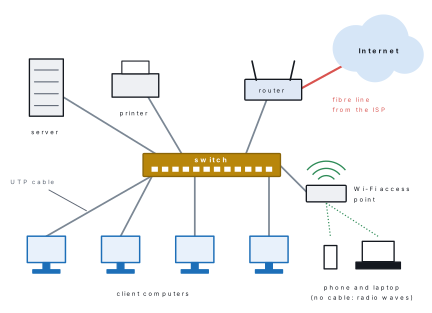
A network gives its users these services: file sharing, printer sharing, Internet sharing, communication (messages, email, video calls) and central storage and backup of data.
Advantages of a computer network
- Sharing hardware. One printer, scanner or projector can serve every computer of the lab or office, so fewer devices have to be bought.
- Sharing data and software. Files kept on a server can be opened from any computer; a teacher can send the same exercise to all forty students at once.
- Sharing one Internet connection. A single fibre line from an Internet Service Provider (ISP) serves the whole school.
- Fast communication. Messages, email, notices and video calls reach other users in seconds, whether they sit in the next room or in another country.
- Central control and backup. One administrator can create user accounts, install updates and back up everyone's work from one place.
Disadvantages of a computer network
- Cost and skill. Switches, routers, cables and servers cost money, and a trained person is needed to set up and look after the network.
- Viruses spread fast. Malware that reaches one computer can travel to every computer on the network (see Lesson 13).
- Security risk. A badly protected network lets hackers steal or damage data.
- Dependence. If the server, the central switch or the Internet line fails, many people cannot work at the same time.
- Less privacy. Shared folders can be read by others if permissions are careless, and the administrator can see much of what users do.
| Task in a school of 20 lab computers | Without a network | With a network |
|---|---|---|
| Printing | a printer for each computer, or carrying a pen drive to one printer | one printer shared by all |
| Giving an exercise to the class | copy it to 20 computers one by one | put it once in a shared folder |
| Internet | a separate connection for each computer | one fibre connection shared by all |
| Backing up students' work | 20 separate backups | one backup of the server |
| Spread of a virus | slow, by pen drives | fast, across the network |
Problem. A school lab has 20 computers. A laser printer costs Rs 18,000, a 24-port switch costs Rs 9,000 and each network cable costs Rs 300. Compare the cost of giving every computer its own printer with the cost of one shared printer on a network (one cable for each computer and one for the printer).
Solution. Without a network: 20 printers × Rs 18,000 = Rs 3,60,000.
With a network: one printer Rs 18,000 + one switch Rs 9,000 + 21 cables × Rs 300 = 18,000 + 9,000 + 6,300 = Rs 33,300.
Saving = 3,60,000 − 33,300 = Rs 3,26,700. The same switch and cables also let the 20 computers share files and one Internet line, which is why every school lab is networked.
14.2 Network components: server, client, NIC, cables, hub, switch, router and modem
A network is built from hardware (computers, cables and connecting devices), software (a network operating system such as Windows Server or Linux, and programs such as browsers and email) and the transmission medium. This section describes the hardware.
Server and client
A server is a powerful computer that provides services — files, printing, web pages, email or a database — to the other computers of a network. A client is a computer, phone or tablet that requests and uses those services.
When you watch a video on your phone, the phone is the client and the video company's computers are the servers. In a school lab the teacher's computer may act as a file server for the students' computers.
| Server | What it provides | Example |
|---|---|---|
| File server | stores files that users share | the lab's shared "Class 8" folder |
| Print server | manages the printing jobs of many users | the office printer queue |
| Web server | stores websites and sends web pages to browsers | the server holding your school's website |
| Mail server | sends, receives and stores email | Gmail's servers |
| Database server | stores large organised data and answers queries | a bank's customer accounts |
A network in which dedicated servers serve many clients is a client–server network; one in which every computer is equal and shares its own files is a peer-to-peer network. You will compare the two in grade 10.
NIC (Network Interface Card)
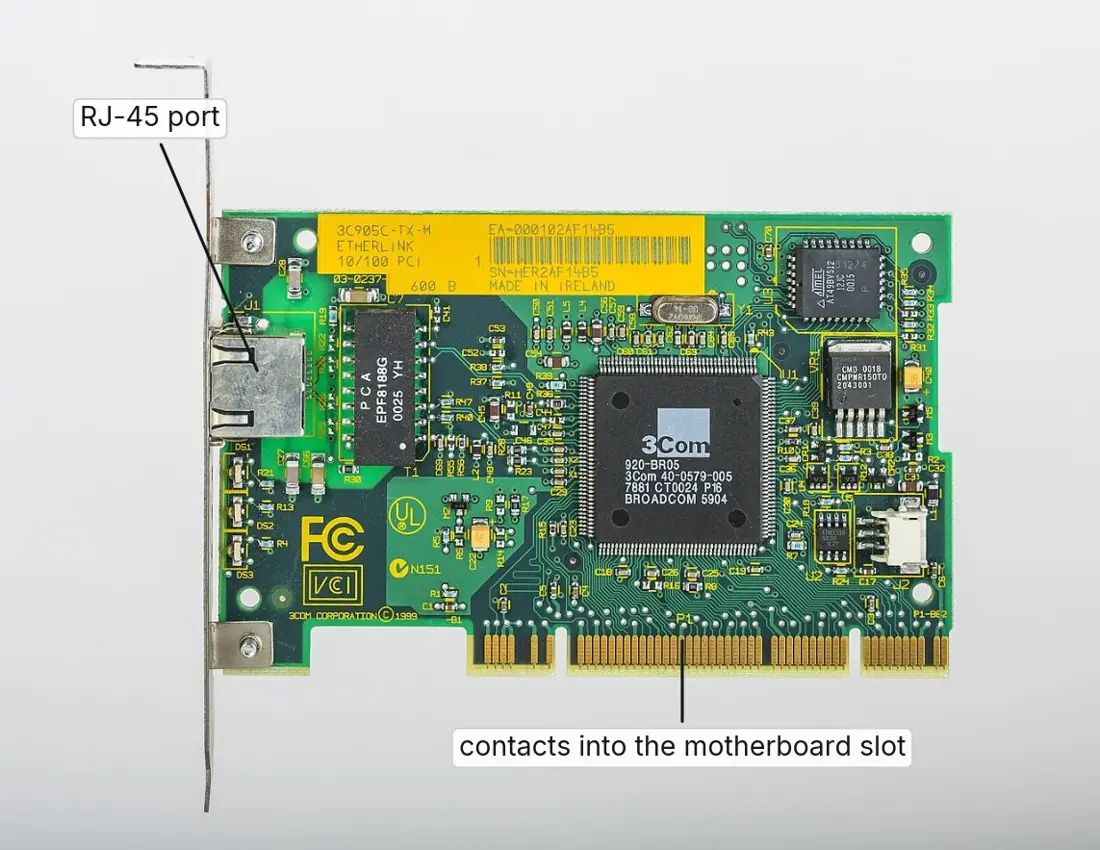
A NIC (Network Interface Card), also called a network adapter, is the
circuit that connects a computer to the network medium: an RJ-45 port for a
cable, or a small radio for Wi-Fi. Every NIC carries a permanent number, its
MAC (Media Access Control) address, which identifies that card on the local
network. A MAC address has 48 bits, written as 12 hexadecimal digits in six
pairs, for example 3C-52-82-9A-7F-10.
Modern laptops and phones have the NIC built into the motherboard; a desktop computer may use a separate card like the one below.
Cables
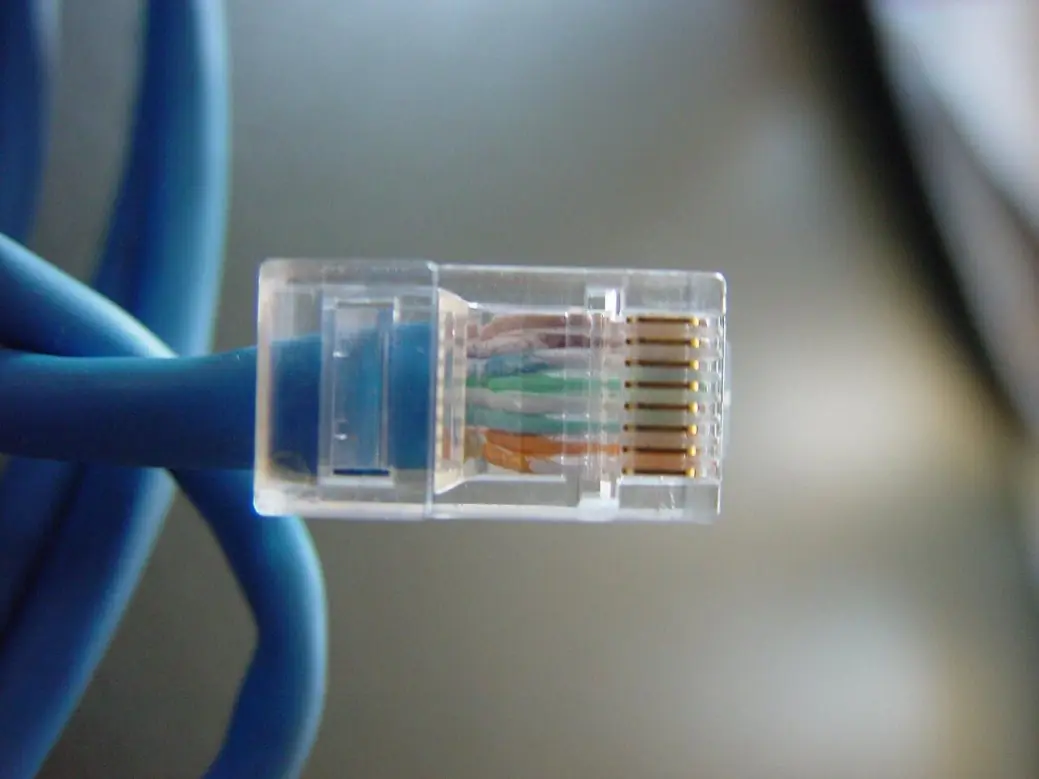
Cables carry the data between the nodes and the connecting devices. In a lab, each computer is joined to the switch by a UTP patch cable with an RJ-45 plug at each end; section 14.3 compares the three kinds of cable.
Hub
A hub is a box with several ports (sockets) into which the computers of a star network are plugged. It is a "dumb" device: whatever arrives at one port it copies to every other port, and every computer has to check whether the data is meant for it. All the computers share the hub's speed and their signals can collide. Hubs are cheap but are now replaced by switches.
Switch
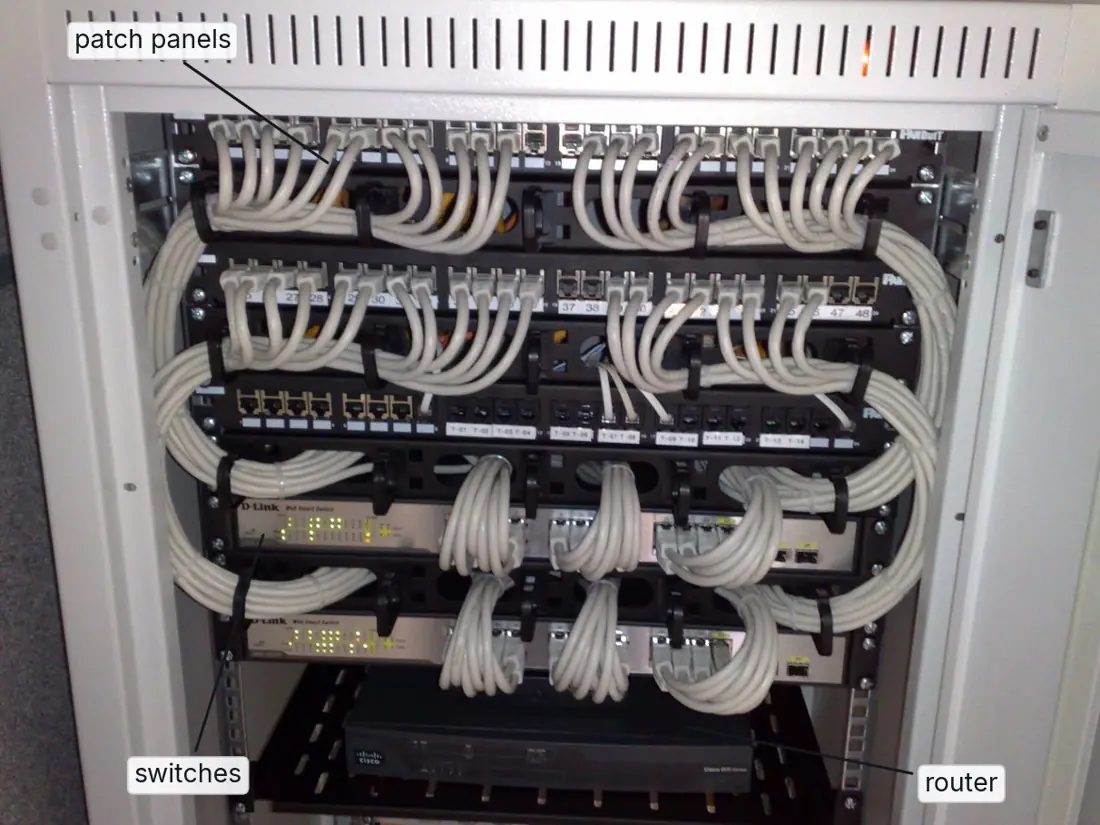
A switch also has many ports and sits at the centre of a star, but it is intelligent. It reads the MAC address in each piece of data, learns which computer is on which port, and sends the data only to the port of the destination computer. So a switched network is faster and more private than one built on a hub. Switches with 8, 16, 24 or 48 ports join the computers of every modern lab and office.
Router
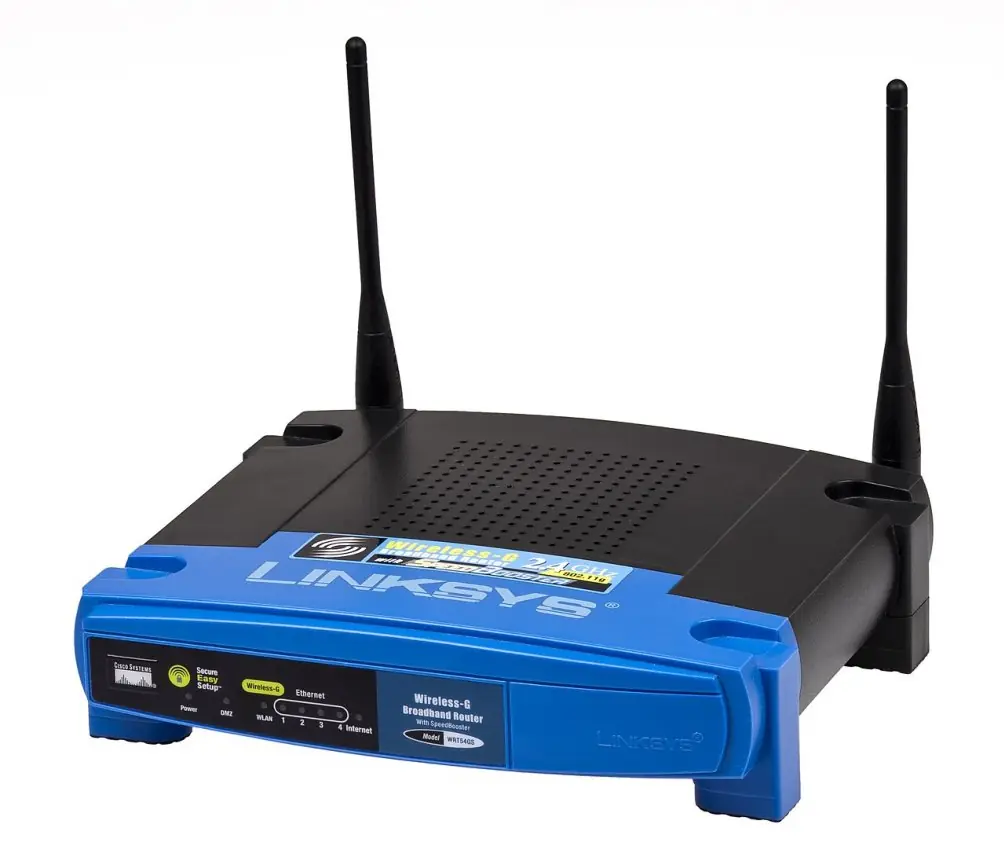
A router joins different networks together — for example your school's LAN and the ISP's network — and passes data between them. It reads the IP address (the Internet address) of each packet of data and chooses the best path for it, like a traffic police officer at a crossroads. The "Wi-Fi router" in a home is really several devices in one box: a router, a small switch, a Wi-Fi access point and often a modem.
Modem
A modem (modulator–demodulator) changes the computer's digital signals into the kind of signal the telephone or cable line can carry (modulation) and changes the incoming signal back into digital form (demodulation). Older Internet connections used a DSL modem on a telephone line; a 4G dongle or a pocket MiFi is a modem for the mobile network. On a fibre connection, the same job is done by an ONT (Optical Network Terminal), which changes light signals into electrical ones; the box an ISP such as Nepal Telecom or WorldLink fixes in your home is usually an ONT and a Wi-Fi router in one.
Other devices you will meet
| Device | Job |
|---|---|
| Wi-Fi access point | lets phones and laptops join a wired LAN by radio waves |
| Repeater | receives a weak signal, makes it strong again and sends it on, so a cable or Wi-Fi signal reaches farther |
| Bridge | joins two parts of a LAN and passes on only the data meant for the other part |
| ONT | converts the light of a fibre line into electrical signals (and back) |
| Point | Hub | Switch | Router |
|---|---|---|---|
| Joins | computers of one LAN | computers of one LAN | different networks, e.g. a LAN and the Internet |
| How it sends data | copies it to every port | sends it only to the destination's port | chooses the best path to the destination network |
| Address it reads | none | MAC address | IP address |
| Speed | shared by all ports; slows when busy | full speed on every port | depends on its links |
| Today | out of date | in every LAN | at the edge of every network |
Students often write that a modem "connects the computers of a lab". It does not: the switch (or hub) joins the computers of the lab, the router joins the lab to the Internet, and the modem or ONT only converts signals for the ISP's line. Likewise, a hub and a switch look alike, but the hub copies data to every port while the switch sends it only where it is meant to go.
On a Windows computer in the lab, open Command Prompt and type
ipconfig /all. Under the network adapter, copy the Physical Address (the
MAC address, six pairs of hexadecimal digits) and the IPv4 Address (four
numbers separated by dots, such as 192.168.1.23). On an Android phone, look in
Settings → About phone → Status (or Wi-Fi details). Compare with two friends:
whose numbers are the same, and whose are different? Then find the switch and
the router of your lab, count their ports and draw how your computer is
connected to them.
14.3 Transmission media: wired and wireless
Transmission media (communication media) are the paths along which data travels from one device to another. Wired (guided) media carry signals along a cable; wireless (unguided) media carry them through air or space as electromagnetic waves.
Wired (guided) media
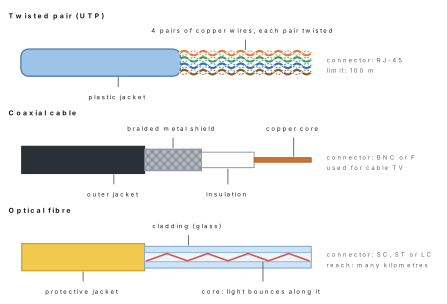
Twisted pair cable. Pairs of thin, insulated copper wires twisted round each other. The twisting cancels much of the electrical noise from nearby wires. A network cable has four pairs (eight wires) inside a plastic jacket. The common kind is UTP (Unshielded Twisted Pair); STP has a metal shield for noisy places such as factories. A CAT6 cable carries up to 1 Gbps (1,000 megabits per second) over a run of up to 100 m, with an RJ-45 connector at each end. Telephone lines use thinner twisted pairs with the smaller RJ-11 plug.
Coaxial cable. A single copper core, surrounded by plastic insulation, a braided metal shield and an outer jacket. The shield keeps out interference, so coaxial cable carries signals well over a few hundred metres. It is the round cable of cable television; very old LANs used it with BNC connectors.
Optical fibre cable. Thin strands of very pure glass (or plastic) that carry data as pulses of light. Light is kept inside the glass core because it reflects off the cladding around it. Fibre is the fastest medium, carries data for many kilometres without a repeater, and is not affected by electrical noise or lightning. ISPs use it for their backbones, for the cables under the oceans, and now for FTTH (Fibre To The Home) connections across Nepal.
| Point | Twisted pair (UTP) | Coaxial cable | Optical fibre |
|---|---|---|---|
| Carries | electrical signals in copper | electrical signals in copper | pulses of light in glass |
| Structure | 4 twisted pairs in a jacket | core, insulation, braided shield, jacket | glass core, cladding, jacket |
| Speed | up to about 1–10 Gbps | moderate | highest |
| Distance per run | up to 100 m | a few hundred metres | many kilometres |
| Noise and lightning | affected | less affected (shielded) | not affected |
| Cost and handling | cheapest, easiest to fit | moderate | costly; needs skilled joining |
| Connector | RJ-45 | BNC or F | SC, ST, LC |
| Typical use | LAN cables in labs and offices | cable TV | ISP backbones, FTTH, undersea cables |
Wireless (unguided) media
Radio waves. Spread out in all directions and pass through walls, so the receiver need not "see" the sender. FM radio, mobile phone networks (4G, 5G) and Wi-Fi all use radio waves; Wi-Fi works in the 2.4 GHz and 5 GHz bands and reaches a few tens of metres indoors.
Bluetooth. Low-power radio for very short distances, about 10 m: phone to earbuds, a wireless mouse, a smartwatch.
Microwave. High-frequency radio sent in a narrow beam between dish antennas that must be in a line of sight, so towers are built on hilltops a few tens of kilometres apart. Telephone companies have long used microwave links across Nepal's hills where laying cable is difficult.
Satellite. A communication satellite about 36,000 km above the equator receives a signal from a ground station (uplink) and sends it back to a wide area of the Earth (downlink). It reaches remote places — a VSAT dish can bring the Internet to a school in Humla — and carries TV channels, but the signal takes about a quarter of a second to go up and come down.
Infrared. Invisible light used by a TV remote. It needs a clear line of sight, works over only a few metres and cannot pass through walls.
| Point | Wired media | Wireless media |
|---|---|---|
| Path | a cable | air or space, as waves |
| Movement of devices | devices stay where the cable reaches | devices can move freely |
| Setting up | cables must be laid and fixed | quick; no cables to lay |
| Speed and reliability | usually faster and steadier | can be slowed by walls, distance and weather |
| Security | hard to tap without touching the cable | signals spread out, so need a strong password |
| Examples | twisted pair, coaxial, optical fibre | Wi-Fi, Bluetooth, microwave, satellite, infrared |
Network speed is measured in bits per second: a small b means bit, a capital B means byte, and 1 byte = 8 bits. A "40 Mbps" plan from an ISP is 40 megabits per second, but the download window shows megabytes per second. Divide by 8: a perfect 40 Mbps line delivers at most 5 MB per second.
Problem. A family has a 30 Mbps fibre plan. (a) What is the shortest time to download a 450 MB video? (b) A speed test shows that the line really gives 24 Mbps. How long does the download take now? (Take 1 MB = 1,000,000 bytes, as network speeds do; Lesson 15 explains why memory sizes use 1,024 instead.)
Solution. First change the file size into megabits: 450 MB × 8 = 3,600 Mb.
(a) Time = data ÷ speed = 3,600 Mb ÷ 30 Mbps = 120 s = 2 minutes. (Check: 30 Mbps ÷ 8 = 3.75 MB per second, and 450 ÷ 3.75 = 120 s.)
(b) Time = 3,600 ÷ 24 = 150 s = 2 minutes 30 seconds.
14.4 Types of network: LAN, MAN and WAN
Networks are named by the area they cover.
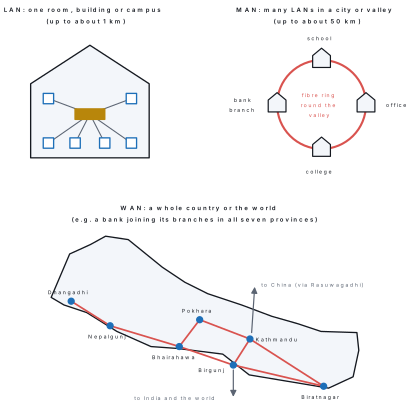
A LAN (Local Area Network) joins computers within a small area — a room, a building or a campus, up to about 1 km. A MAN (Metropolitan Area Network) covers a city or a valley and usually joins many LANs. A WAN (Wide Area Network) covers a large area — a whole country, a continent or the world — and joins many LANs and MANs.
LAN. Owned by one school, office or family. It is the fastest kind of network (100 Mbps to 10 Gbps), makes very few errors and is cheap to run. Your school's computer lab is a LAN; a LAN whose devices join by Wi-Fi is a WLAN (wireless LAN).
MAN. Owned by one large organisation or by a service provider. A cable-TV network across Kathmandu Valley, an ISP's fibre ring round Pokhara, or a bank joining its branches inside one city are MANs. It is slower than a LAN but faster than a WAN, and it links its LANs to the wider Internet.
WAN. Uses links owned by many organisations — telecom companies, ISPs and satellite operators — mainly optical fibre on land and under the sea, with microwave and satellite where cables cannot go. A bank joining its branches in all seven provinces, Nepal Telecom's national network, and above all the Internet are WANs. Per user, a WAN is slower and has more delay than a LAN.
A fourth, smaller kind is the PAN (Personal Area Network): the devices of one person within about 10 m, such as a phone with Bluetooth earbuds and a smartwatch.
| Point | LAN | MAN | WAN |
|---|---|---|---|
| Full form | Local Area Network | Metropolitan Area Network | Wide Area Network |
| Area covered | room, building or campus (up to about 1 km) | city or valley (up to about 50 km) | country, continent or the world |
| Owner | one school, office or family | one big organisation or a provider | many organisations together |
| Speed | highest | high | lower per user |
| Errors and delay | fewest | moderate | most |
| Media | UTP cables, Wi-Fi | optical fibre, microwave | optical fibre, satellite, microwave |
| Cost to set up | low | high | very high |
| Example | school computer lab | cable-TV network in Kathmandu Valley | the Internet; a bank's national network |
Because both have a "W", students write that a Wi-Fi network is a WAN. WLAN means wireless LAN: it is still a LAN, covering one home or building. What makes a network a LAN, MAN or WAN is the area it covers, not whether it uses cables or radio waves.
Problem. Name the type of network in each case and give the reason. (a) A student's phone sends music to her Bluetooth speaker. (b) The 30 computers of a school's two labs share files and one printer. (c) A college joins its four campuses in Kathmandu, Lalitpur and Bhaktapur by fibre. (d) A bank joins its 150 branches across Nepal so that a customer of the Dhangadhi branch can withdraw money in Ilam.
Solution. (a) PAN — two personal devices within a few metres. (b) LAN — one school, one building or campus. (c) MAN — several LANs within one valley. (d) WAN — branches spread over the whole country, joined through the links of telecom companies and ISPs.
14.5 Network topology: bus, ring and star
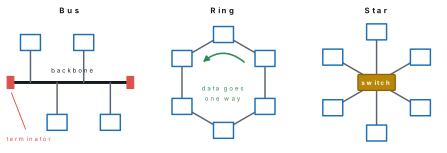
Network topology is the pattern (layout) in which the computers and devices of a network are connected. The physical topology is how the cables are laid; the logical topology is the path the data actually follows.
Bus topology
All the nodes are attached to one main cable, called the bus or backbone. A terminator at each end absorbs the signal so that it does not bounce back along the cable. Data sent by one computer travels along the whole bus; every computer checks the address, and only the addressee keeps the data. Only one computer can send at a time, or the signals collide.
- Advantages: needs the least cable; cheap and simple for a few computers; a computer can be added by tapping into the bus.
- Disadvantages: one break in the backbone stops the whole network; faults are hard to find; the network slows down as more computers send.
Ring topology
Each computer is joined to the next one, and the last to the first, so the cable forms a closed loop. Data travels round the ring in one direction, from computer to computer; each computer checks the address, strengthens the signal like a repeater and passes it on. In a token ring only the computer holding a special message, the token, may send, so data never collides.
- Advantages: no collisions; every computer gets an equal turn; the signal is renewed at each computer.
- Disadvantages: one broken cable or failed computer can stop the whole ring; adding or removing a computer means opening the ring; data passes through every computer on its way, which adds delay.
Star topology
Every computer has its own cable to a central device — a switch today, a hub in older networks. All data passes through the centre, which sends it on to the destination. Almost every LAN today, including your school lab, is a star.
- Advantages: a faulty cable or computer affects only that computer; computers are easy to add or remove; faults are easy to trace; fast with a switch.
- Disadvantages: needs more cable than a bus; if the central switch fails, the whole network stops; the switch adds to the cost.
| Point | Bus | Ring | Star |
|---|---|---|---|
| Layout | all nodes on one backbone cable | each node joined to the next in a closed loop | each node has its own cable to a central switch or hub |
| Cable needed | least | moderate | most |
| Data flow | along the bus in both directions | one direction, node to node | through the central device |
| Effect of one cable fault | a backbone break stops all | can stop the whole ring | only that node is cut off |
| Weak point | the backbone | every link | the central device |
| Adding a computer | easy | disturbs the ring | easy |
| Finding faults | hard | hard | easy |
| Use today | rare | rare (some city fibre rings) | almost every LAN |
Problem. Ten computers are to be joined. For each of bus, ring and star, how many cables and what extra parts are needed? What happens if one cable is cut? Which would you choose for a computer lab?
Solution. Bus: one backbone cable along the room, a short drop cable or tap for each of the 10 computers, and 2 terminators. If the backbone is cut, all 10 computers stop. Ring: each computer is joined to the next and the last to the first, so 10 cables. One cut cable can stop the whole ring. Star: 10 cables, one from each computer, and a switch with at least 10 ports (in practice a 16-port switch). A cut cable affects only its own computer. Choose the star: it costs a little more cable, but one fault never stops the whole lab, and faults are easy to find.
Grade 10 adds three more topologies: mesh (every node linked to many others, so data has several paths — ten computers in a full mesh need \frac{10\times9}{2}=45 cables), tree (stars arranged in levels under a main switch) and hybrid (a mixture of topologies, which most large networks are).
A topology answer without a diagram loses marks. Draw small, neat boxes for the computers, label the terminators on a bus, put an arrow showing the one direction of a ring, and label the switch or hub at the centre of a star. Then write one feature, one advantage and one disadvantage of each.
14.6 The internet as a network of networks
The Internet is the worldwide network of networks: millions of LANs, MANs and WANs owned by homes, schools, companies, ISPs and governments, joined by routers and all following the same rules, the TCP/IP protocols. No single person, company or country owns it.
Your phone at home is on a small Wi-Fi LAN. That LAN is joined to the network of an ISP (Internet Service Provider) such as Nepal Telecom, WorldLink, Vianet or Ncell. The ISPs of Nepal exchange local traffic with one another at the Nepal Internet Exchange (npIX), set up in Kathmandu in 2002, so that data travelling between two Nepali networks does not have to go abroad and come back. The ISPs reach the rest of the world through optical-fibre links across the border — through India at points such as Birgunj, Bhairahawa and Biratnagar, and since January 2018 also through China at Rasuwagadhi–Kerung — and from there through the networks of other countries and the cables laid under the oceans.
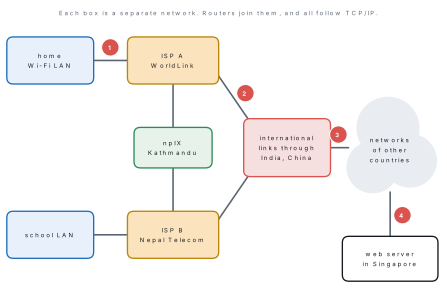
How data crosses the Internet: packets and TCP/IP
A photo or a web page is not sent in one piece. It is broken into small packets. Each packet carries part of the data together with the address of the sender and of the receiver, rather like a parcel with both addresses written on it. Routers pass each packet on, network to network, choosing a good path; packets of one message may even travel by different paths. At the far end they are put back together in the right order.
Two protocols do this work, so they are always named together as TCP/IP:
| Protocol | Full form | Job |
|---|---|---|
| TCP | Transmission Control Protocol | breaks the message into packets, numbers them, checks that all arrive and puts them back in order |
| IP | Internet Protocol | gives every device an IP address and carries each packet towards that address |
An IP address is the number that identifies a device on the Internet, such as 192.168.1.23 or 202.51.64.10: four numbers from 0 to 255 separated by dots. A MAC address identifies the card on the local network; an IP address identifies the device's place on the Internet, as a house number and a street address do.
How the Internet grew
| Year | Event |
|---|---|
| 1969 | ARPANET, a network of the United States Department of Defense, links its first computers; by December it joins four universities and research centres |
| 1983 | on 1 January ARPANET switches to the TCP/IP protocols — often called the birthday of the Internet |
| 1989 | Tim Berners-Lee proposes the World Wide Web at CERN in Switzerland |
| 1994 | the first commercial email service starts in Nepal (Mercantile Office Systems) |
| 1995 | the first Internet service in Nepal; the .np domain is set up |
| 2002 | Nepal Internet Exchange (npIX) is set up in Kathmandu |
| 2018 | a second international route opens through China, besides the links through India |
Problem. Rajan in Pokhara sends a photo on a chat app to his cousin in Biratnagar. Both use phones on home Wi-Fi, but with different ISPs. Describe the journey of the photo through the networks.
Solution. (1) The app breaks the photo into packets, each with the sender's and receiver's addresses (TCP/IP). (2) The packets travel by Wi-Fi to the home router and through the ONT and fibre to Rajan's ISP. (3) The chat company's servers receive the packets and send them on towards the cousin's ISP; between Nepali ISPs the traffic can be exchanged at npIX, while traffic for a server abroad crosses the international links. (4) The cousin's ISP sends the packets to her home router, which passes them by Wi-Fi to her phone. (5) TCP puts the packets back in order and checks that none is missing, and the photo appears. Every step is a different network: that is why the Internet is called a network of networks.
In the lab, open Command Prompt and type tracert www.google.com (on Linux or
a Mac, traceroute www.google.com). Each numbered line is one router on the
way from your computer to Google's server. Count the routers. The first line
is your own router; note which lines belong to your ISP (their names often
contain the ISP's name). Try tracert to a Nepali website and compare: is the
path shorter?
Chapter summary
- A computer network is two or more computers and devices connected by wired or wireless media to share data, hardware, software and an Internet connection; every device on it is a node, and all follow protocols.
- Advantages: sharing hardware, data and one Internet line; fast communication; central control and backup. Disadvantages: cost and skill, fast spread of viruses, security risk, dependence on the server or switch.
- Components: server (provides services), client (uses them), NIC (with a 48-bit MAC address), cables, hub (copies to all ports), switch (sends only to the destination port, by MAC address), router (joins networks, by IP address), modem (digital ↔ analog; ONT on fibre), Wi-Fi access point.
- Wired media: twisted pair (UTP, RJ-45, 100 m), coaxial (cable TV), optical fibre (light, fastest, many km). Wireless media: radio and Wi-Fi, Bluetooth (about 10 m), microwave (line of sight), satellite, infrared.
- LAN (building, up to about 1 km, fastest), MAN (city or valley), WAN (country or world; the Internet); PAN (one person, about 10 m). WLAN is a wireless LAN, not a WAN.
- Topologies: bus (one backbone, terminators, one break stops all), ring (closed loop, one direction, token), star (own cable to a central switch; most common; the centre is the weak point).
- The Internet is a network of networks joined by routers and TCP/IP; data travels in packets with IP addresses; ISPs meet at npIX; ARPANET began in 1969 and Nepal got the Internet in 1995.
- Speed is in bits per second: divide Mbps by 8 to get MB per second.
Practice questions
Group A — Objective (1 mark each)
- The network of a school's computer lab is a [1]aPANbLANcMANdWAN
- Which device sends data only to the port of the destination computer? [1]ahubbswitchcmodemdrepeater
- The full form of NIC is [1]aNetwork Interface CardbNetwork Internet ConnectioncNew Internet CarddNetwork Information Centre
- The connector used with a UTP network cable is [1]aRJ-11bRJ-45cBNCdUSB
- Which medium carries data as pulses of light? [1]atwisted pairbcoaxial cablecoptical fibredmicrowave
- Terminators are needed at both ends of the main cable in a [1]abus topologybring topologycstar topologydwireless LAN
- In a star topology the whole network stops when [1]aone computer is switched offbone cable is cutcthe central switch failsdthe printer is out of paper
- A modem changes [1]adigital signals into line signals and backbMAC addresses into IP addressesca LAN into a WANdlight into sound
- A phone connected to Bluetooth earbuds forms a [1]aPANbLANcMANdWAN
- The device that joins a school LAN to the Internet and chooses the path for data is a [1]ahubbswitchcrouterdNIC
- The set of rules followed by every network of the Internet is [1]aHTMLbTCP/IPcURLdWi-Fi
- Which wireless medium needs a clear line of sight and works only over a few metres, like a TV remote? [1]aradio wavesbmicrowavecinfrareddsatellite
- The network that grew into the Internet was [1]aARPANETbEthernetcnpIXdWLAN
- A 240 MB file is downloaded at 16 Mbps. The shortest download time is [1]a15 sb30 sc120 sd1,920 s
Answers to Group A
1. (b) — a lab lies in one building, so it is a Local Area Network.
2. (b) — a switch reads the MAC address; a hub copies to every port.
3. (a) — NIC is the Network Interface Card that joins a computer to the network.
4. (b) — RJ-45 has eight pins for the eight wires; RJ-11 is for telephones.
5. (c) — optical fibre carries light in a glass core.
6. (a) — the terminators stop the signal bouncing back along the bus.
7. (c) — every computer depends on the central device.
8. (a) — modulation and demodulation of signals for the line.
9. (a) — the devices of one person within about 10 m form a PAN.
10. (c) — a router joins different networks and chooses the best path.
11. (b) — TCP/IP are the common protocols of the Internet.
12. (c) — infrared needs line of sight and has a very short range.
13. (a) — ARPANET (1969) switched to TCP/IP in 1983 and grew into the Internet.
14. (c) — 240 × 8 = 1,920 Mb, and 1,920 ÷ 16 = 120 s.
Group B — Short answer (2 marks each)
- Define a computer network. Write two advantages of a network in a school. [2]
- Write two differences between a hub and a switch. [2]
- What is a NIC? What is a MAC address? [2]
- What are a server and a client? Give one example of each. [2]
- Write two differences between wired and wireless media, with one example of each. [2]
- Write two differences between a LAN and a WAN. [2]
- What is a modem? Why does a fibre connection need an ONT instead? [2]
- Give two reasons why the star topology is used in most computer labs. [2]
- A 600 MB video is downloaded on a 40 Mbps connection. Find the shortest download time. [2]
- Why is the Internet called a "network of networks"? [2]
Answers to Group B
1. A computer network is a group of two or more computers and devices connected by wired or wireless media to exchange data and share hardware, software and other resources. In a school: one printer and one Internet line can be shared by all the lab computers, and a teacher can give an exercise to the whole class through a shared folder (any two advantages).
2. A hub copies the data it receives to every port, while a switch sends it only to the port of the destination computer. On a hub all ports share one speed and data can collide; on a switch each port gets the full speed. (A switch also reads MAC addresses; a hub reads no address.)
3. A NIC (Network Interface Card) is the circuit or card that connects a
computer to the network medium, through an RJ-45 port or a Wi-Fi radio. A MAC
address is the permanent 48-bit number given to each NIC, written as six pairs
of hexadecimal digits such as 3C-52-82-9A-7F-10, which identifies it on the
local network.
4. A server is a powerful computer that provides services such as files, web pages or email to other computers, e.g. the web server that holds a school's website. A client is a computer or phone that requests and uses those services, e.g. a student's phone opening that website.
5. Wired media carry signals along a cable and keep devices in one place; wireless media carry signals through the air and let devices move. Wired media are usually faster, steadier and safer from eavesdropping; wireless media are quicker to set up but affected by walls and distance. Example of wired: UTP cable; of wireless: Wi-Fi (any two differences with the examples).
6. A LAN covers a small area such as a building or campus (up to about 1 km), while a WAN covers a country or the world. A LAN is owned by one organisation and is very fast with few errors; a WAN uses links of many organisations and is slower with more delay. (Examples: a school lab; the Internet.)
7. A modem (modulator–demodulator) converts the computer's digital signals into signals that a telephone or cable line can carry, and converts them back on arrival. A fibre line carries light, not electrical signals, so an ONT (Optical Network Terminal) is needed to convert light into electrical signals and back.
8. A faulty cable or computer cuts off only that one computer, so the rest of the lab keeps working; and computers are easy to add, remove and check, because each has its own cable to the switch. (Also: a switch gives every computer full speed.)
9. 600 MB × 8 = 4,800 Mb. Time = 4,800 Mb ÷ 40 Mbps = 120 s = 2 minutes.
10. The Internet is not one network but millions of separate networks — home and school LANs, the networks of ISPs and companies, national and international WANs — owned by different people and joined by routers. Because all of them follow the same TCP/IP rules, data can pass from any one of them to any other.
Group C — Long answer (4 marks each)
- What is network topology? Explain bus, ring and star topologies with neat diagrams. [1+3]
- Explain any four network devices with their functions. [4]
- What are transmission media? Explain twisted pair, coaxial and optical fibre cables. [1+3]
- Explain LAN, MAN and WAN with one example of each. Write one difference between LAN and MAN. [3+1]
- Your school has 24 computers, one printer and one server in its lab, and the teachers want Wi-Fi and the Internet. Describe the network you would set up: topology, devices, cables and Internet connection. Draw a labelled sketch. [4]
Answers to Group C
1. Network topology is the pattern in which the computers and devices of a network are connected (1 mark). Bus: all computers are attached to one backbone cable with a terminator at each end; it needs the least cable, but one break in the backbone stops the network (draw a line with four computers and two terminators). Ring: each computer is joined to the next and the last to the first; data travels one way round, passed on by each computer; one broken link can stop the whole ring (draw six computers in a loop with an arrow). Star: each computer has its own cable to a central switch or hub; a faulty cable affects only one computer and faults are easy to find, but if the switch fails the whole network stops (draw a switch with six computers around it).
2. Any four: NIC — connects a computer to the network medium; carries a MAC address. Hub — joins the computers of a star LAN and copies all data to every port. Switch — joins the computers of a LAN and sends data only to the destination's port using its MAC address. Router — joins different networks, such as a LAN and the Internet, reads IP addresses and chooses the best path. Modem — converts digital signals into signals for a telephone or cable line and back; on fibre an ONT does this. Wi-Fi access point — lets wireless devices join a wired LAN.
3. Transmission media are the paths along which data travels between devices: wired (guided) or wireless (unguided) (1 mark). Twisted pair: four pairs of insulated copper wires twisted to reduce noise, inside a plastic jacket; cheap, up to 1 Gbps over 100 m, RJ-45 connector; used for LAN cables. Coaxial: a copper core with insulation, a braided metal shield and a jacket; the shield keeps out interference; used for cable TV. Optical fibre: thin glass strands carrying pulses of light in a core surrounded by cladding; the fastest medium, reaches many kilometres and is not affected by electrical noise or lightning, but costly; used for ISP backbones and FTTH.
4. LAN: a network within a room, building or campus, up to about 1 km, owned by one organisation, very fast — e.g. a school computer lab. MAN: a network covering a city or valley that joins many LANs — e.g. a cable-TV network in Kathmandu Valley, or a bank's branches in one city. WAN: a network across a country or the world, using links of many organisations — e.g. the Internet, or a bank's network joining branches in all seven provinces. One difference: a LAN covers one building or campus and is owned by one organisation, while a MAN covers a whole city and joins the LANs of many places (or: a LAN is faster than a MAN).
5. Topology: a star, because one faulty cable then affects only one computer and faults are easy to find. Devices: a 48-port switch at the centre (24 computers + printer + server + access point + router = 28 ports, with room to grow); a router joining the lab to the ISP; the ISP's ONT for the fibre line; a Wi-Fi access point (or a Wi-Fi router) for the teachers, protected by a strong password; a NIC in every computer. Cables: UTP (CAT6) patch cables with RJ-45 plugs from each computer, the printer, the server and the access point to the switch, each under 100 m. Internet: a fibre (FTTH) connection from an ISP such as Nepal Telecom or WorldLink, through the ONT to the router. The sketch shows the switch in the middle, the 24 computers, printer and server around it, the access point with wireless waves, and the router leading to the Internet, as in the first figure of this lesson.
Practise more: Computer Science question bank