Unit 3 · Computer Fundamentals · 23 min read
Generations of Computer
What the syllabus asks for 6
- Meaning of a computer generation
- First generation: vacuum tubes
- Second generation: transistors
- Third generation: integrated circuits
- Fourth generation: microprocessors
- Fifth generation: artificial intelligence and parallel processing
ENIAC filled a room, weighed 27 tonnes and did 5,000 additions a second. The phone in your pocket weighs less than 200 grams and does thousands of millions of operations a second. That change did not happen all at once. It came in generations, each starting when a new electronic part replaced the old one: vacuum tubes, then transistors, then integrated circuits, then the microprocessor. This lesson studies each generation — its main component, features and example computers — and the fifth generation, which is trying to make computers learn and reason.
Every exam on this lesson asks you to match a generation with its main component (1st vacuum tube, 2nd transistor, 3rd IC, 4th microprocessor, 5th artificial intelligence). Learn the comparison table in section 3.6: period, component, memory, language, speed, size and examples. Long questions ask for "features of the ___ generation" or "differences between two generations"; short ones ask you to define a generation, IC, microprocessor or AI, or to expand IC, LSI, VLSI and ULSI.
3.1 Meaning of a computer generation
In a family, a generation is the step from grandparents to parents to children: about twenty-five or thirty years, during which much changes. Computers also come in generations, but a computer generation is decided by technology, not by age.
A generation of computer is a stage in the development of computers in which a major new technology — above all a new main electronic component for processing — was used. Each new generation produced computers that were smaller, faster, cheaper, more reliable and more powerful, and used less electricity and gave off less heat, than those of the generation before.
There are five generations. The first four are named after the component used to build the processor; the fifth is named after what the computers try to do.
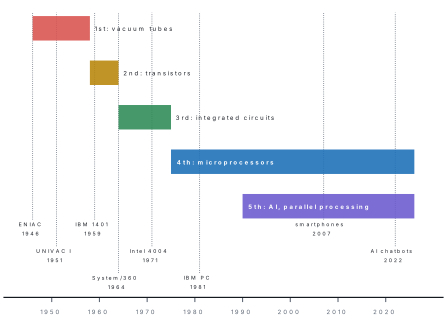
As we move from one generation to the next:
- the processing component becomes smaller and computers shrink from rooms to desks to pockets;
- speed rises from thousandths of a second (milliseconds) per operation to billionths (nanoseconds) and less;
- memory and storage grow from a few thousand numbers to many gigabytes;
- power use, heat and cost fall, and reliability rises;
- computers become easier to use, from switches and punched cards to keyboards, mice, touch screens and voice.
Books give slightly different years for each generation (some start the fourth in 1971, when the first microprocessor was made). A computer belongs to a generation because of its main component, not because of its date. If a question describes a machine "built with transistors", it is second generation whatever the year.
3.2 First generation: vacuum tubes (about 1946–1958)
A vacuum tube (also called a valve) is a sealed glass tube with the air removed, containing a heated wire (cathode) that gives off electrons, a metal plate (anode) that collects them and, in most tubes, a grid between them that controls the flow. It can switch an electric current on and off and can amplify (strengthen) a signal.
The vacuum tube was invented by John Ambrose Fleming (the diode, 1904) and improved by Lee de Forest (the triode, with a grid, 1906). A first-generation computer used thousands of tubes as its switches: ENIAC had 17,468.
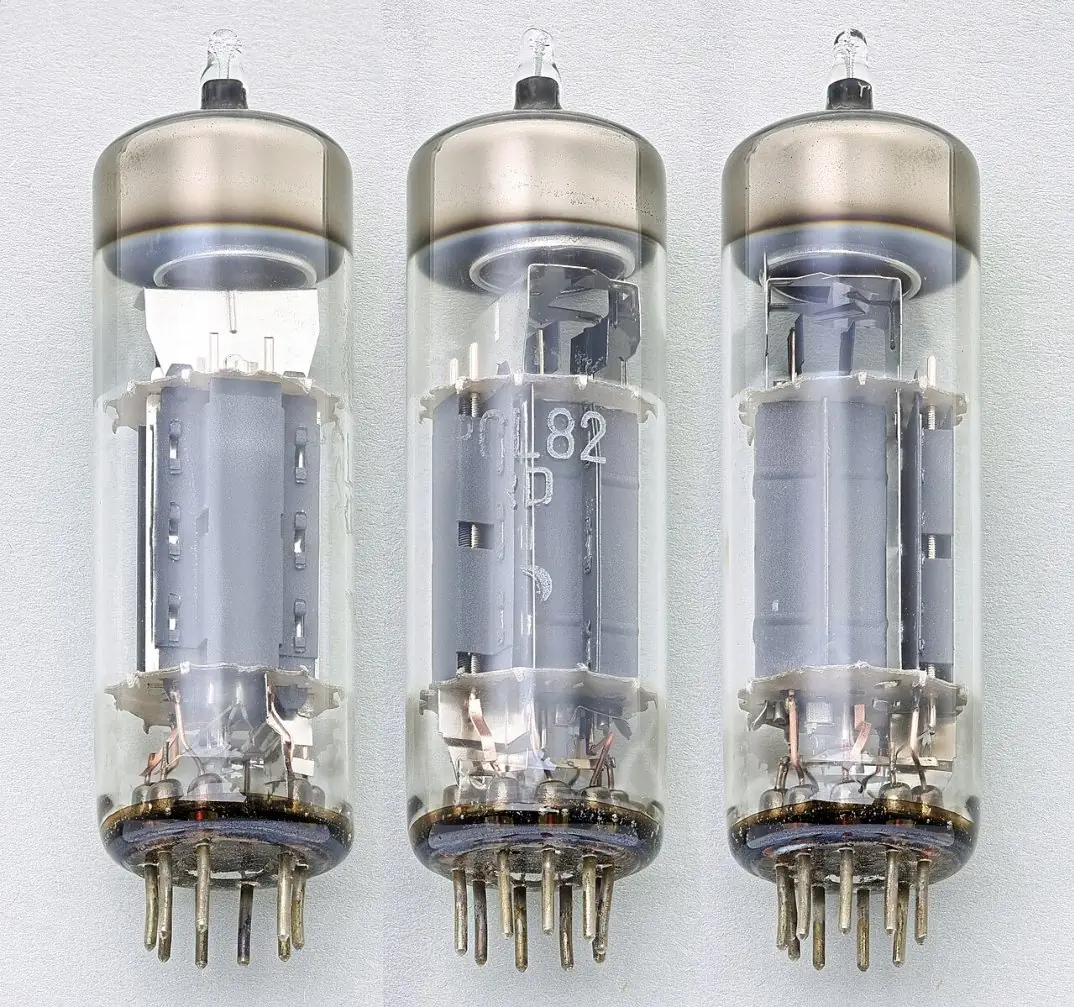
Features of first-generation computers
- Vacuum tubes were the main component for processing.
- Magnetic drums were used for main memory; data and programs went in on punched cards and paper tape, and results came out on printed paper.
- They were programmed in machine language — long strings of 0s and 1s that are very hard to write and check.
- They were huge (a whole room), very heavy and very expensive.
- They used a lot of electricity and gave off so much heat that tubes often burned out; the computers broke down frequently and were unreliable.
- They were slow by today's standards: one operation took about a millisecond (thousandth of a second).
- They could do only one job at a time.
Examples: ENIAC, EDVAC, EDSAC, UNIVAC I, IBM 650, IBM 701.
3.3 Second generation: transistors (about 1958–1964)
A transistor is a small electronic component made of a semiconductor such as silicon or germanium. It can switch a current on and off and amplify signals, like a vacuum tube, but it is far smaller, uses much less power, gives off little heat and lasts much longer.
The transistor was invented in 1947 at Bell Laboratories in the USA by John Bardeen, Walter Brattain and William Shockley, who won the Nobel Prize for it in 1956. From the late 1950s, computers were built from thousands of transistors soldered onto small circuit cards.
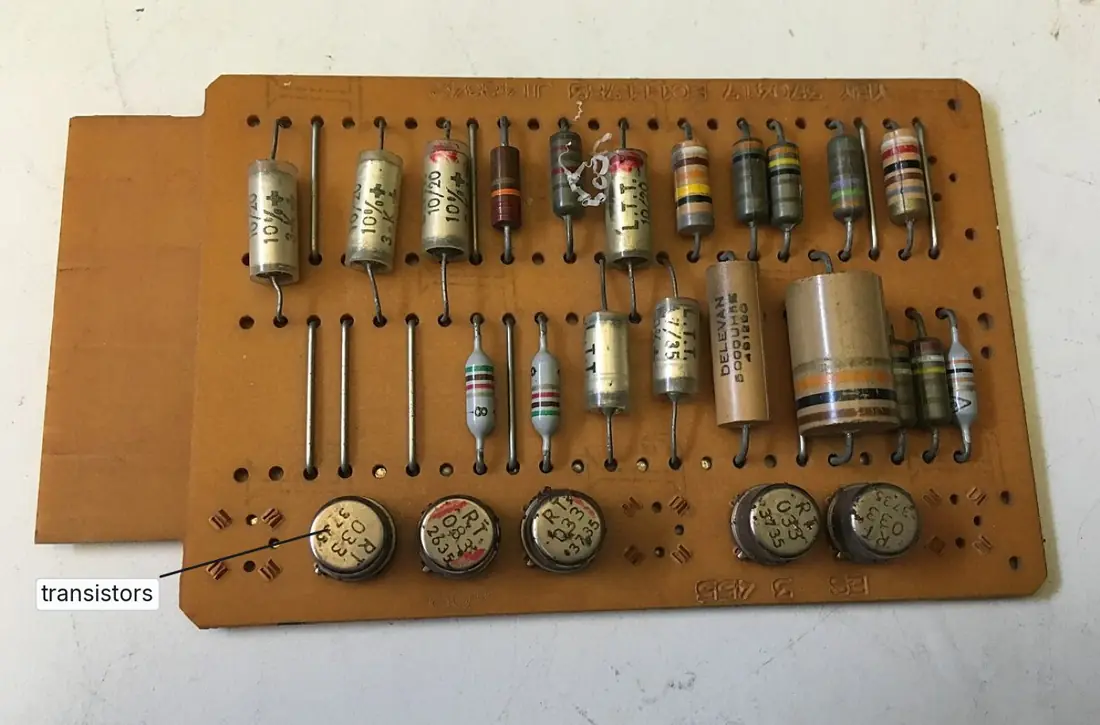
Features of second-generation computers
- Transistors replaced vacuum tubes as the main component.
- Magnetic core memory (tiny rings of magnetic material threaded on wires) was used for main memory; magnetic tape and magnetic disks for storage.
- Programs were written in assembly language, and the first high-level languages appeared: FORTRAN (1957) for science and COBOL (1959) for business.
- They were smaller, cheaper, faster and more reliable than first-generation computers, and used less power and gave off less heat — but they still needed air-conditioned rooms.
- One operation took about a microsecond (millionth of a second).
- Punched cards were still used for input, and printers for output.
Examples: IBM 1401 (1959) — Nepal's first computer — IBM 7090, CDC 1604, PDP-1, Honeywell 400.
Problem. A first-generation computer took about one millisecond per operation and a second-generation one about one microsecond. (a) How many operations could each do in one second? (b) How many times faster is a computer that takes one nanosecond per operation than the first-generation machine?
Solution. (a) 1 ms = 1/1000 s, so the first generation did about 1,000 operations per second. 1 μs = 1/1,000,000 s, so the second did about 1,000,000 operations per second — a thousand times more. (b) 1 ms ÷ 1 ns = 10^{-3} \div 10^{-9} = 10^6, so it is about one million times faster.
3.4 Third generation: integrated circuits (about 1964–1975)
An integrated circuit (IC), or chip, is a complete electronic circuit — many transistors, resistors and capacitors and the connections between them — made together on one small piece (chip) of silicon, usually smaller than a fingernail, and sealed in a plastic or ceramic package with metal pins.
The IC was invented by Jack Kilby of Texas Instruments in 1958 (he won the Nobel Prize in Physics in 2000) and, independently, by Robert Noyce of Fairchild Semiconductor in 1959, whose silicon design is the one used today. Early ICs held a few to a few hundred components; these are called SSI and MSI.
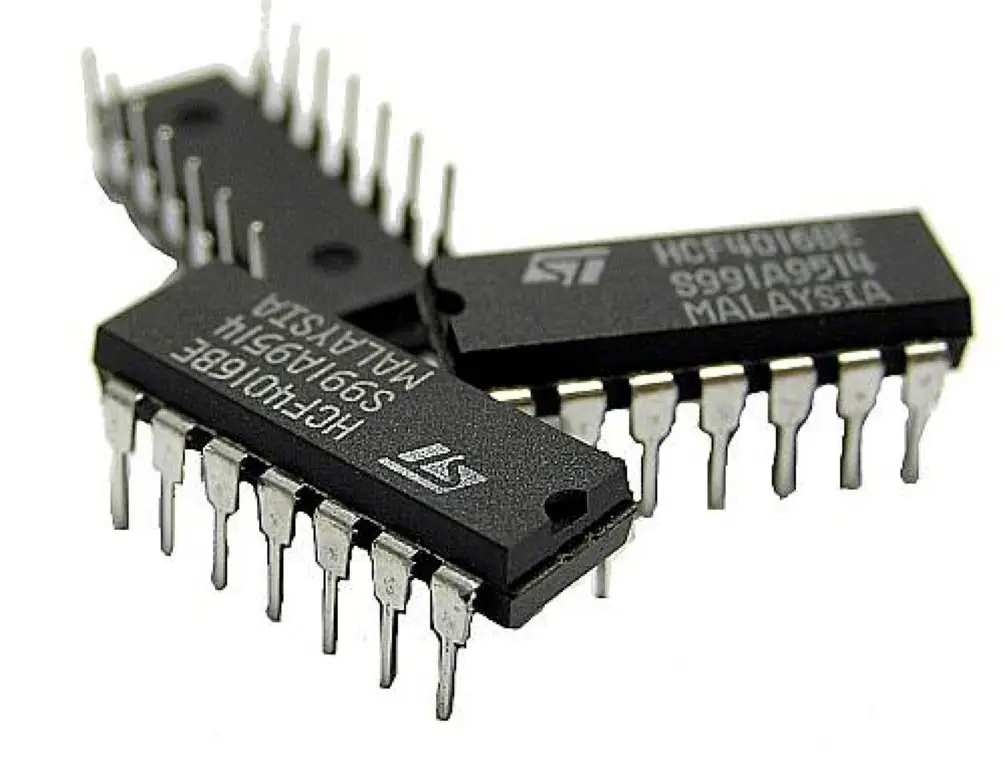
Features of third-generation computers
- Integrated circuits replaced individual transistors, so one chip did the work of many transistors.
- Main memory was magnetic core and, later, semiconductor memory; magnetic disks were used widely for storage.
- Keyboards and monitors began to replace punched cards and printouts for working with the computer.
- Operating systems let one computer run several programs at once (multiprogramming) and let many users at terminals share it (time-sharing).
- High-level languages such as BASIC (1964), Pascal (1970) and C (1972) were widely used.
- They were smaller, cheaper, faster (about a nanosecond per basic operation), more reliable and gave off less heat. Smaller, cheaper minicomputers appeared beside the big mainframes.
Examples: IBM System/360 (1964), PDP-11 (1970), Honeywell 6000 series.
| Short form | Full form | Approximate size |
|---|---|---|
| IC | Integrated Circuit | — |
| SSI | Small Scale Integration | up to about 100 components on a chip |
| MSI | Medium Scale Integration | hundreds |
| LSI | Large Scale Integration | thousands to tens of thousands |
| VLSI | Very Large Scale Integration | hundreds of thousands to millions |
| ULSI | Ultra Large Scale Integration | more than a million (today, billions) |
3.5 Fourth generation: microprocessors (about 1975 to the present)
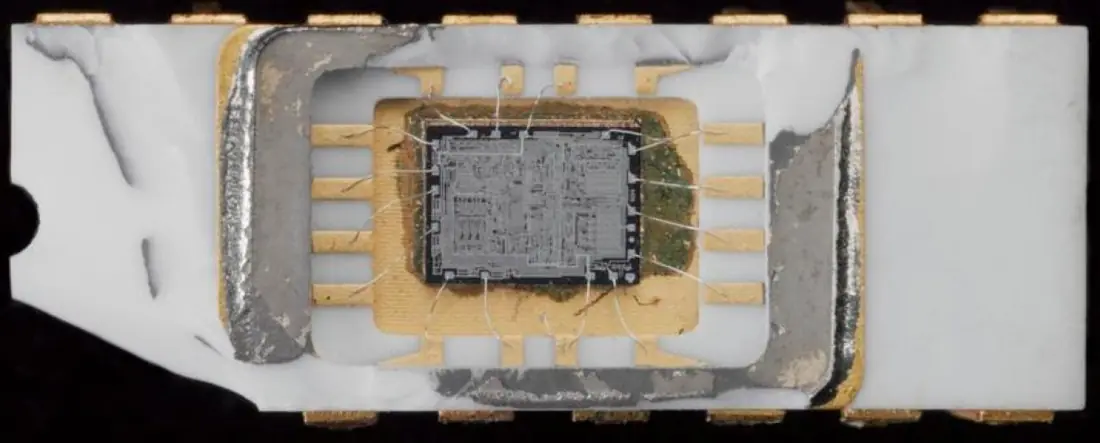
A microprocessor is a single chip that contains a computer's entire central processing unit — the control unit, the arithmetic logic unit and the registers. It is made with LSI, VLSI or ULSI technology.
The first microprocessor, the Intel 4004, came out in 1971. It was designed for a Japanese calculator company by Ted Hoff, Federico Faggin, Stanley Mazor and Masatoshi Shima, held 2,300 transistors and worked on 4 bits at a time. Because a whole CPU now fitted on one chip, a computer could fit on a desk — and later in a hand.
Features of fourth-generation computers
- The microprocessor (LSI, then VLSI and ULSI) is the main component.
- Main memory is semiconductor RAM; storage moved from floppy disks to hard disks, CDs and DVDs, flash drives, memory cards and SSDs.
- Personal computers appeared: the Altair 8800 (1975), Apple II (1977), IBM PC (1981) and Apple Macintosh (1984), followed by laptops, tablets and smartphones.
- The graphical user interface (GUI) with windows, icons and a mouse, and later the touch screen, made computers easy for everyone to use.
- Computers were joined into networks and the Internet.
- Languages such as C, C++, Java and Python, and ready-made application software (word processors, spreadsheets, games), are used.
- Computers are very small, very fast (operations in nanoseconds and fractions of a nanosecond), cheap, reliable and use little power.
Examples: IBM PC, Apple Macintosh, today's desktops, laptops, tablets and smartphones. The computer you use at school is a fourth-generation computer.
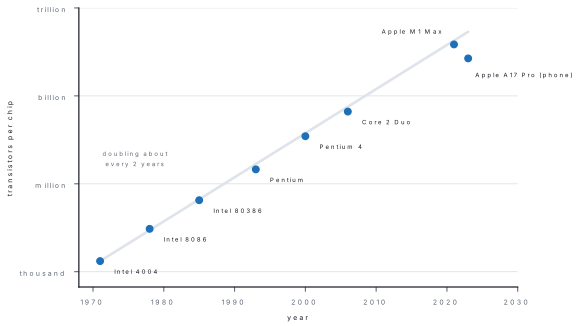
Problem. In 1965 Gordon Moore, a founder of Intel, predicted that the number of transistors on a chip would keep doubling; from 1975 he put it at every two years. The Intel 4004 of 1971 had 2,300 transistors. If the count doubled every two years, how many would a chip of 2021 have? Compare with the Apple M1 Max of 2021, which has about 57 billion.
Solution. From 1971 to 2021 is 50 years, which is 50 ÷ 2 = 25 doublings. Transistors = 2,300 × 2^{25} = 2,300 × 33,554,432 = 77,175,193,600, about 77 billion. The real chip has about 57 billion — less than the prediction, but of the same size. Moore's law has held remarkably well for fifty years.
3.6 Fifth generation: artificial intelligence and parallel processing
The fifth generation is not named after a new component. It is named after a goal: computers that can learn, reason and understand in ways that once needed human intelligence. The name comes from Japan's Fifth Generation Computer Systems project (1982–1992), which tried to build such machines using parallel processing and the logic language Prolog.
Artificial intelligence (AI) is the ability of a computer program to do tasks that normally need human intelligence: understanding speech and language, recognising faces and objects, learning from examples, solving problems and making decisions.
Parallel processing is a way of working in which a large task is divided into parts that are processed at the same time by several processors (or several cores of one processor), so the whole task finishes much faster.
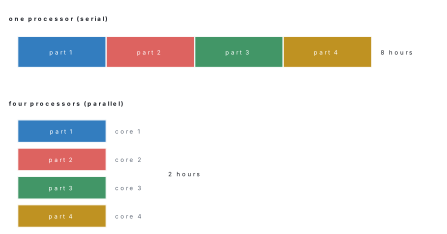
Parallel processing is everywhere today. A phone's processor may have eight cores; a graphics processor has thousands; and the fastest supercomputer in June 2026, China's LineShine, used about 13.8 million cores together.
Features of fifth-generation computers
- They use artificial intelligence: they can learn from data, recognise speech, faces and handwriting, translate languages and answer questions.
- They work in natural language: you can talk or type to them in ordinary words, in Nepali or English, instead of exact commands.
- They use parallel processing and ULSI chips with billions of transistors.
- Research continues on quantum computers, which use the laws of atomic physics to solve some problems far faster, and on chips made from biological materials (bio-chips) and nanotechnology.
- Languages such as Python, Prolog and LISP are used to build AI programs.
Examples you may already use: voice assistants (Siri, Google Assistant), AI chatbots that write and explain text (from 2022), face unlock on phones, Google Translate, recommendations on YouTube, robots in factories and self-driving cars being tested on roads.
An AI program does not understand the world as you do. It finds patterns in the data it was trained on, so it can give a confident answer that is wrong, and it can copy unfair ideas hidden in its data. Check important facts in a reliable source, and never present an AI's work as your own.
Problem. A weather-forecast calculation takes 64 hours on one processor. The job can be split into equal parts. Ideally, how long does it take on (a) 8 processors and (b) 16 processors? (c) Why is the real time a little longer?
Solution. Ideal time = time on one processor ÷ number of processors. (a) 64 ÷ 8 = 8 hours. (b) 64 ÷ 16 = 4 hours. (c) The processors must share out the work, wait for one another and combine their results, and a few steps cannot be split at all, so the real time is somewhat longer than the ideal.
Comparison of the five generations
| Feature | 1st | 2nd | 3rd | 4th | 5th |
|---|---|---|---|---|---|
| Period (approx.) | 1946–1958 | 1958–1964 | 1964–1975 | 1975–present | present and future |
| Main component | vacuum tube | transistor | integrated circuit (SSI, MSI) | microprocessor (LSI, VLSI, ULSI) | ULSI chips, AI, parallel processing |
| Main memory | magnetic drum | magnetic core | magnetic core, then semiconductor | semiconductor RAM | semiconductor RAM |
| Input and output | punched cards, paper tape | punched cards, magnetic tape, printers | keyboard, monitor | keyboard, mouse, touch screen | voice, touch, camera, natural language |
| Language | machine language | assembly; FORTRAN, COBOL | high-level: BASIC, Pascal, C | high-level, 4GL: C++, Java, Python, SQL | AI languages, Python, natural language |
| Speed of one operation | milliseconds | microseconds | nanoseconds | nanoseconds and less | very fast, parallel |
| Size, heat, reliability | room-sized, very hot, unreliable | smaller, less heat | smaller still, reliable | desk to pocket, very reliable | all sizes |
| Examples | ENIAC, EDVAC, UNIVAC I | IBM 1401, IBM 7090, CDC 1604 | IBM System/360, PDP-11 | IBM PC, Macintosh, laptops, phones | AI assistants, robots |
1st tube, 2nd transistor, 3rd chip (IC), 4th processor on a chip, 5th thinking machine (AI). Speeds: milli → micro → nano → faster still.
Problem. Name the generation of each computer: (a) it used 5,200 vacuum tubes and magnetic tape; (b) it was built from transistors on circuit cards and rented by Nepal in 2028 BS; (c) its whole CPU is one chip, and it runs Windows 11; (d) it was built from ICs and let many users share it through terminals; (e) it understands spoken questions and learns from examples.
Solution. (a) First (vacuum tubes — UNIVAC I). (b) Second (transistors — the IBM 1401). (c) Fourth (microprocessor). (d) Third (integrated circuits, time-sharing). (e) Fifth (artificial intelligence).
The class divides into five groups, one for each generation. Each group makes a chart with: the period, the main component (draw it or paste a picture), the memory, the language, four features and two example computers. Present your chart in two minutes; then put the five charts in order on the wall. As a class, discuss: will the fifth generation be a blessing or a danger for people? Give reasons on both sides.
For a 4-mark question on one generation, write the period, the main component, and at least four features (memory, language, speed, size/heat or cost, input and output), then two examples. Start every answer with the component — it is the one point the marker looks for first.
Chapter summary
- A generation is a stage of computer development marked by a major new technology, especially a new processing component; each generation is smaller, faster, cheaper, more reliable and more powerful.
- 1st (1946–1958): vacuum tubes, magnetic drums, machine language, milliseconds; huge, hot, unreliable. ENIAC, UNIVAC I.
- 2nd (1958–1964): transistors (Bell Labs, 1947), magnetic core memory, assembly language, FORTRAN and COBOL, microseconds. IBM 1401 (Nepal), IBM 7090.
- 3rd (1964–1975): integrated circuits (Kilby, 1958; Noyce, 1959), keyboards and monitors, time-sharing, BASIC and C, nanoseconds. IBM System/360.
- 4th (1975–present): microprocessors (Intel 4004, 1971; LSI, VLSI, ULSI), PCs, GUI, networks and the Internet. IBM PC, laptops, smartphones.
- 5th: artificial intelligence and parallel processing; natural language, learning machines, quantum research.
- Moore's law: transistors on a chip double about every two years.
Practice questions
Group A — Objective (1 mark each)
- First-generation computers used [1]atransistorsbvacuum tubescintegrated circuitsdmicroprocessors
- The transistor was invented in 1947 at [1]aIBMbBell LaboratoriescInteldTexas Instruments
- Which generation used magnetic core memory and assembly language? [1]afirstbsecondcfourthdfifth
- The integrated circuit was invented by [1]aJack KilbybCharles BabbagecHerman HollerithdTed Hoff
- The first microprocessor was the [1]aPentiumbIntel 4004cIBM 1401dApple A17 Pro
- The computers we use at school belong to the [1]asecond generationbthird generationcfourth generationdfirst generation
- VLSI stands for [1]aVery Large Scale IntegrationbVery Long System InstructioncVisual Large Scale InterfacedVery Low Speed Integration
- Artificial intelligence is the main feature of the [1]asecond generationbthird generationcfourth generationdfifth generation
- Nepal's first computer, the IBM 1401, was a [1]afirst-generation computerbsecond-generation computercthird-generation computerdfourth-generation computer
- Dividing a task among many processors that work at the same time is called [1]aparallel processingbtime-sharingcbatch processingdmultiprogramming
- Keyboards and monitors began to replace punched cards in the [1]afirst generationbsecond generationcthird generationdfifth generation
- The language used by first-generation computers was [1]aPythonbmachine languagecBASICdCOBOL
Answers to Group A
1. (b) — vacuum tubes, e.g. ENIAC's 17,468.
2. (b) — Bardeen, Brattain and Shockley at Bell Labs.
3. (b) — core memory and assembly language came with transistors.
4. (a) — Jack Kilby, Texas Instruments, 1958.
5. (b) — Intel 4004, 1971, 2,300 transistors.
6. (c) — they are built around microprocessors.
7. (a) — Very Large Scale Integration.
8. (d) — the fifth generation aims at AI.
9. (b) — it was built with transistors.
10. (a) — parallel processing.
11. (c) — the third generation brought keyboards and monitors.
12. (b) — only 0s and 1s.
Group B — Short answer (2 marks each)
- What is meant by a generation of computer? [2]
- Write any four features of first-generation computers. [2]
- What is a transistor? Why was it better than a vacuum tube? [2]
- What is an integrated circuit? Who invented it? [2]
- What is a microprocessor? Name the first microprocessor. [2]
- Write the full forms of IC, LSI, VLSI and ULSI. [2]
- What is artificial intelligence? Give two examples of its use. [2]
- What is parallel processing? Give one example. [2]
- A job takes 48 hours on one processor. Ideally, how long will it take on 6 processors? Why is the real time longer? [2]
Answers to Group B
1. A generation of computer is a stage in the development of computers marked by a major new technology, especially a new main processing component. Each new generation was smaller, faster, cheaper, more reliable and more powerful than the one before.
2. Any four: vacuum tubes as the main component; magnetic drum memory; machine language; punched cards and paper tape for input; huge size; much heat and electricity; unreliable; slow (milliseconds); very expensive.
3. A transistor is a small semiconductor component that switches and amplifies electric current. It was better because it was much smaller, used less power, gave off little heat, was faster and lasted longer, so computers became smaller, cheaper and more reliable.
4. An integrated circuit (chip) is a complete circuit of many transistors, resistors and capacitors made on one small piece of silicon. It was invented by Jack Kilby (1958), and independently by Robert Noyce (1959).
5. A microprocessor is a single chip that contains the whole CPU (control unit, ALU and registers). The first was the Intel 4004 (1971).
6. IC — Integrated Circuit; LSI — Large Scale Integration; VLSI — Very Large Scale Integration; ULSI — Ultra Large Scale Integration.
7. AI is the ability of a computer program to do tasks that need human intelligence, such as understanding language, recognising faces, learning and deciding. Examples: voice assistants, face unlock, Google Translate, AI chatbots, self-driving cars (any two).
8. Parallel processing divides a big task into parts that several processors work on at the same time, so it finishes faster. Example: a supercomputer running a weather forecast on thousands of processors, or the eight cores of a phone processor.
9. Ideal time = 48 ÷ 6 = 8 hours. It is longer in practice because the processors must share out the work, wait for each other and combine results, and some steps cannot be split.
Group C — Long answer (4 marks each)
- Describe the features of second-generation computers with examples. [4]
- Differentiate between third- and fourth-generation computers in any four points. [4]
- What is the fifth generation of computers? Describe its features. [1+3]
- Make a table showing the main component, language, speed and one example of each of the first four generations. [4]
- The Intel 4004 (1971) had 2,300 transistors. Assuming the number doubles every two years, find the expected number in 1991. What is this rule called? [3+1]
Answers to Group C
1. Period about 1958–1964. Main component: transistors (invented at Bell Labs in 1947) instead of vacuum tubes. Magnetic core memory; magnetic tape and disks for storage. Assembly language and the first high-level languages, FORTRAN and COBOL. Smaller, faster (microseconds), cheaper and more reliable than the first generation; less heat and power, but still air-conditioning. Punched cards for input, printers for output. Examples: IBM 1401 (Nepal's first computer, 2028 BS), IBM 7090, CDC 1604.
2.
| Third generation | Fourth generation |
|---|---|
| integrated circuits (SSI, MSI) | microprocessor (LSI, VLSI, ULSI) |
| about 1964–1975 | about 1975 to the present |
| mainframes and minicomputers, still large | personal computers, laptops, smartphones |
| keyboard and monitor; time-sharing terminals | GUI, mouse, touch screen; networks and the Internet |
| BASIC, Pascal, C | C++, Java, Python, 4GL |
| example: IBM System/360 | example: IBM PC, Apple Macintosh |
3. The fifth generation is the present and future stage in which computers use artificial intelligence to learn, reason and understand natural language (1 mark). Features: AI that learns from data and recognises speech, faces and writing; natural-language input in ordinary words; parallel processing on many processors; ULSI chips with billions of transistors; research on quantum computers and bio-chips; AI languages such as Python and Prolog. Examples: voice assistants, AI chatbots, self-driving cars.
4.
| Generation | Main component | Language | Speed of one operation | Example |
|---|---|---|---|---|
| 1st | vacuum tube | machine language | milliseconds | ENIAC |
| 2nd | transistor | assembly; FORTRAN, COBOL | microseconds | IBM 1401 |
| 3rd | integrated circuit | high-level: BASIC, C | nanoseconds | IBM System/360 |
| 4th | microprocessor | high-level, 4GL | nanoseconds and less | IBM PC |
5. From 1971 to 1991 is 20 years = 20 ÷ 2 = 10 doublings. Expected number = 2,300 × 2^{10} = 2,300 × 1,024 = 2,355,200 (about 2.4 million). The rule is Moore's law. (The real Intel 486 of 1989 had about 1.2 million transistors, so the rule is a good rough guide.)
Practise more: Computer Science question bank