Unit 11 · Web, Communication and Society · 34 min read
Information and Communication Technology
What the syllabus asks for 5
- ICT: meaning, components and uses
- Communication technologies: telephone, mobile, radio, television, satellite and the internet
- Internet services: WWW, e-mail, search engines, chat, video conferencing and cloud storage
- ICT in Nepal: e-governance, online banking and digital payments, e-learning
- Advantages and disadvantages of ICT; the digital divide
A farmer in Jumla checks the price of apples on a phone, a student in Biratnagar joins an online class, and a mother in Dubai sends money home to Syangja through a mobile wallet. All three are using information and communication technology (ICT): computers, phones and networks working together to move information from one place to another in seconds. This lesson explains what ICT is made of, the technologies that carry our messages, the services of the Internet, how Nepal uses ICT in government, banking and education, and why some people are still left out.
Expect definitions (ICT, satellite, e-mail, cloud storage, e-governance, digital divide), two-point differences (radio and television, the Internet and the WWW, Cc and Bcc), lists with examples (components of ICT, Internet services, digital payment systems of Nepal) and a long question on the uses, advantages and disadvantages of ICT or on the digital divide. In Group C the marker gives one mark for each correct, explained point, so write four separate points, each with a Nepali example.
11.1 ICT: meaning, components and uses
ICT is the use of computers, telecommunication equipment, networks and software to collect, store, process, send and receive information. It joins two older ideas: information technology (IT), which is about computers handling data, and communication technology, which is about moving messages over a distance by telephone, radio, satellite or the Internet.
Recall from Lesson 1 that data are raw facts (marks 78, 64, 91) and information is processed data that has meaning (the class average is 77.7). ICT turns data into information and then delivers that information to the people who need it, wherever they are.
Components of ICT
An ICT system has six parts. Remove any one of them and the system stops working.
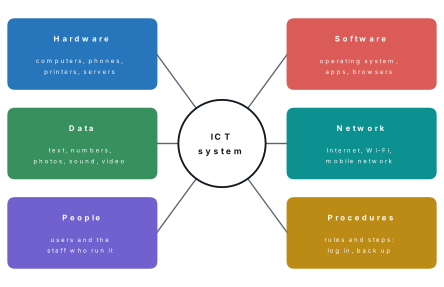
| Component | Meaning | Example: checking the SEE result on a phone |
|---|---|---|
| Hardware | the physical devices | your smartphone, the NEB web server, mobile towers |
| Software | the programs that run on the hardware | Android, the web browser, the result website |
| Data | the facts that are stored and processed | your symbol number and the grades stored for it |
| Network | the communication links that carry data | 4G mobile data or home Wi-Fi, and the Internet |
| People | those who use and run the system | you, and the staff who enter and check the results |
| Procedures | the rules and steps to follow | open the site, type the symbol number and date of birth, press Submit |
Uses of ICT
ICT is now part of almost every kind of work.
| Field | How ICT is used | Example in Nepal |
|---|---|---|
| Education | online classes, digital textbooks, e-libraries, results | Sikai Chautari lessons, SEE results online |
| Health | patient records, telemedicine (a doctor treats a patient over a video call), test reports by SMS | a hospital in Kathmandu advising a health post in Humla |
| Banking and trade | mobile banking, digital wallets, online shopping | eSewa, Khalti, connectIPS, Daraz |
| Government | online services, records, complaints | Nagarik App, online passport form, Hello Sarkar |
| Agriculture | weather forecasts, crop advice, market prices | price and weather alerts on a farmer's phone |
| Communication | calls, SMS, chat, e-mail, social media | Viber and WhatsApp calls to relatives abroad |
| Transport and tourism | online tickets, maps, hotel booking | bus and flight tickets booked from a phone |
| Disaster management | early warnings, rescue coordination | flood-warning SMS to people living near rivers |
| Entertainment | music, films, games, news | YouTube, online FM radio, live cricket |
Problem. Sita pays Rs 150 for momo at a shop in Pokhara by scanning the shop's QR code with the Khalti app on her phone. Name each component of ICT in this transaction.
Solution. Hardware: Sita's smartphone, the printed QR code and the payment company's servers. Software: Android and the Khalti app. Data: the amount (Rs 150), the shop's account number stored in the QR code, and Sita's balance. Network: the mobile data or Wi-Fi link and the Internet. People: Sita and the shopkeeper. Procedures: scan the code, type the amount, confirm with the MPIN, check the confirmation message.
11.2 Communication technologies: telephone, mobile, radio, television, satellite and the Internet
Communication technology is the equipment and method used to send a message from a sender to a receiver over a distance. Every one of them needs a sender, a medium (wire, radio waves, light in a fibre) and a receiver. Some carry messages only one way (broadcast: radio, television); others carry them both ways (two-way: telephone, mobile, Internet).
Telephone
The telephone was invented by Alexander Graham Bell in 1876. Its microphone turns the voice into an electrical signal, which travels along copper wire (today often optical fibre) to a telephone exchange; the exchange connects it to the line of the person being called, whose earpiece turns the signal back into sound. A telephone fixed to a wire at home or in an office is a landline. In Nepal, landlines are provided mainly by Nepal Telecom.
Mobile phone
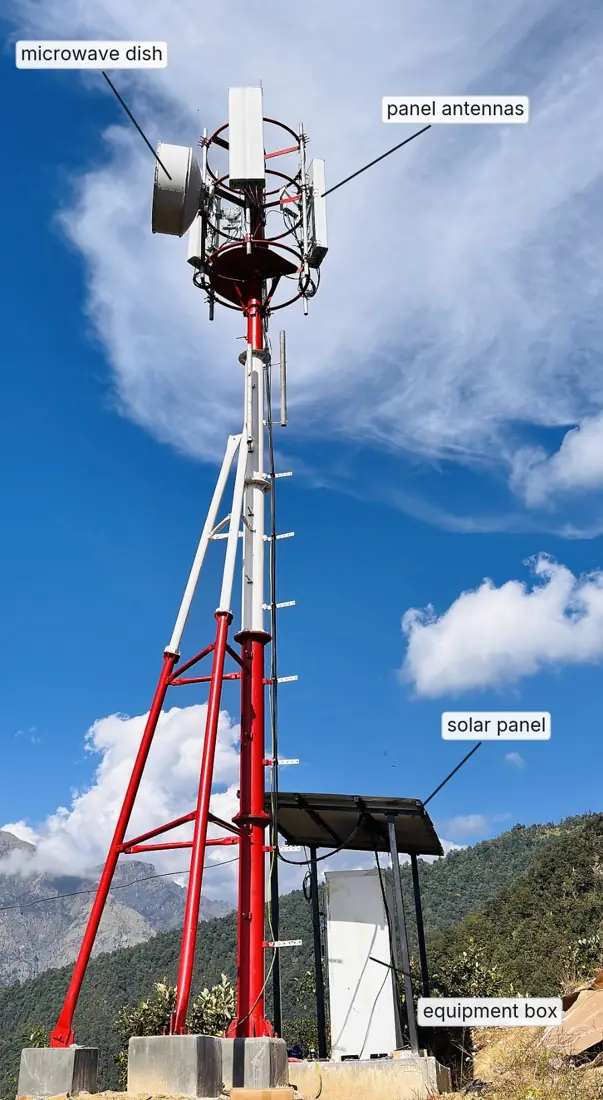
A mobile phone uses radio waves instead of a wire. The land is divided into small areas called cells, and each cell has a mobile tower (base station) at its centre. Your phone talks only to the nearest tower. The tower passes the call through cables, optical fibre or a microwave link to the mobile exchange, which sends it to the tower nearest the person you are calling. When you travel, the call is handed from one tower to the next without breaking. That is why it is called a cellular network.
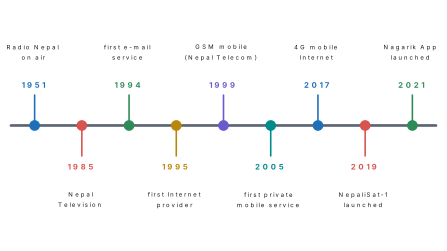
Mobile phones have come in generations: 2G carried voice and SMS, 3G added mobile Internet, 4G made the Internet fast enough for video, and 5G is faster still with almost no delay. In Nepal, Nepal Telecom started GSM mobile service in 1999, the first private operator (Mero Mobile, now Ncell) began in 2005, and Nepal Telecom launched 4G on 1 January 2017.
Radio
Radio sends sound through the air as radio waves from a transmitter to any number of receivers. It is one-way: listeners can hear but cannot reply through the same set. A radio is cheap, needs little electricity and reaches villages that have no Internet, which makes it very important for news, weather and disaster warnings. AM (amplitude modulation) stations reach far; FM (frequency modulation) stations give clearer sound over a shorter distance, and Nepal now has hundreds of local and community FM stations. Radio Nepal was established on 20 Chaitra 2007 BS (2 April 1951).
Television
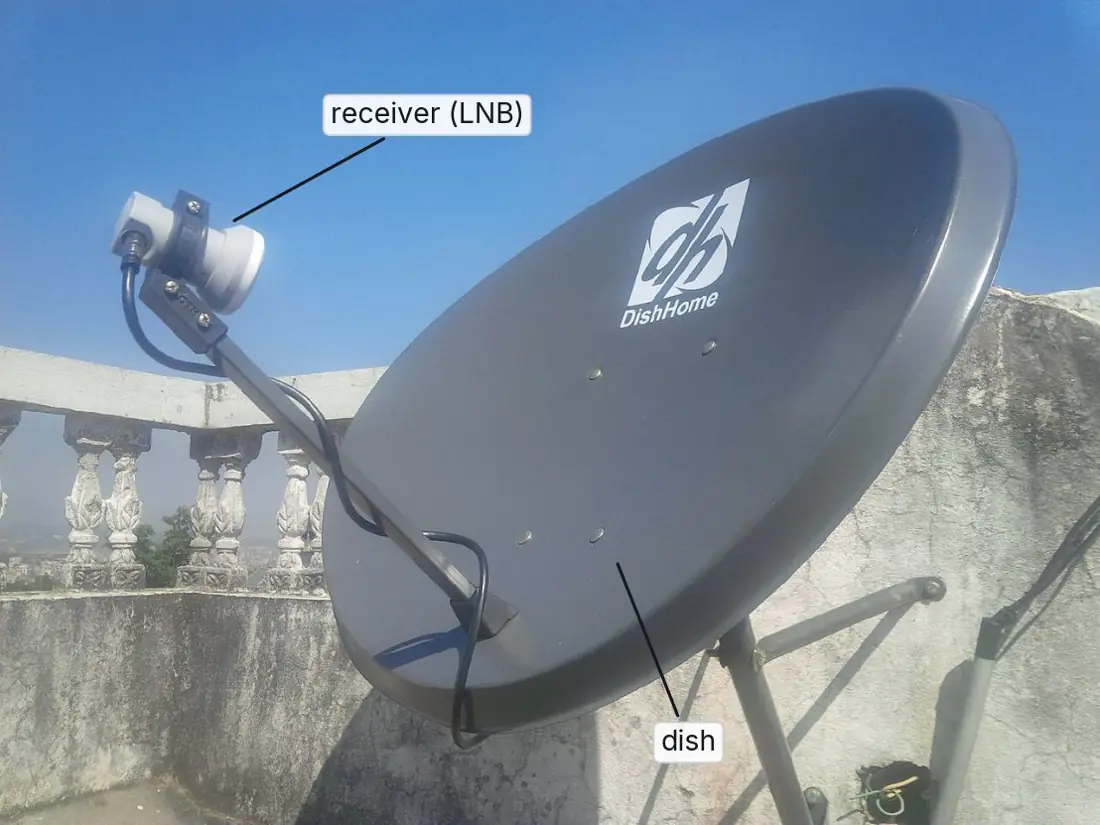
Television (TV) sends both moving pictures and sound. It reaches homes in four ways: through an antenna on the roof (terrestrial TV), through a cable from a local operator, from a satellite to a small dish on the house (DTH, direct to home, such as DishHome), or over the Internet (IPTV and streaming apps). Nepal Television (NTV) made its first test broadcast on 17 Magh 2041 BS (30 January 1985).
| Point | Radio | Television |
|---|---|---|
| What it carries | sound only | moving pictures and sound |
| Cost of a set | very low | higher |
| Power needed | very little; works on batteries | more; needs a screen |
| Reach in remote areas | very wide | narrower |
| Example in Nepal | Radio Nepal, community FM | NTV, DishHome channels |
Satellite
A communication satellite is a machine placed in orbit around the Earth that receives signals from a ground station, strengthens them and sends them back to a very large area of the Earth. The signal going up is the uplink; the signal coming down is the downlink.
Many communication satellites are in geostationary orbit, about 35,786 km above the equator. Up there a satellite goes round the Earth once a day, exactly as fast as the Earth turns, so it seems to stay still in the sky, and a dish on a roof can point at it without moving. Satellites carry TV channels (DTH), satellite phones, Internet to remote places through small dishes called VSATs, weather pictures, and the location signals used by GPS maps. Nepal's first satellite, NepaliSat-1, a 1.3 kg research satellite with a camera, was launched on 18 April 2019 (Nepal time) under the BIRDS-3 project.
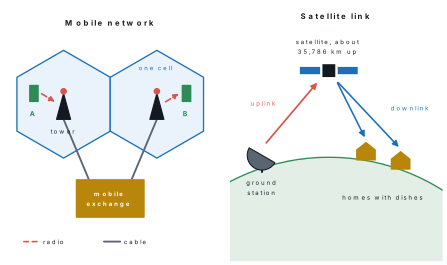
Many students write that a mobile call "goes to a satellite". An ordinary mobile phone talks only to the nearest tower, and the towers are joined by cables, optical fibre and microwave links. Only a satellite phone (used by trekking teams and rescue workers where there are no towers) connects directly to a satellite.
The Internet
The Internet is the worldwide network of computer networks that all follow the same rules for sending data (TCP/IP). It carries every other kind of message too: e-mail, voice and video calls, radio and TV programmes, and bank payments. You will study how it is built in Lesson 14. In Nepal, the first commercial e-mail service began in 1994 and the first Internet service provider (ISP) in 1995; today the Internet reaches homes through optical fibre, Wi-Fi and 4G mobile data.
| Technology | What it carries | Medium | Direction | Example in Nepal |
|---|---|---|---|---|
| Telephone (landline) | voice | copper wire or fibre | two-way | Nepal Telecom landline |
| Mobile phone | voice, SMS, data | radio waves to towers | two-way | Nepal Telecom, Ncell |
| Radio | sound | radio waves | one-way | Radio Nepal, community FM |
| Television | pictures and sound | antenna, cable, satellite or Internet | one-way | NTV, DishHome |
| Satellite | TV, phone, Internet, GPS | radio waves through space | both | DTH television, VSAT Internet |
| Internet | all kinds of data | fibre, cables, Wi-Fi, mobile | two-way | fibre and 4G Internet |
Problem. Which communication technology suits each situation, and why? (a) Warning people along the Koshi river that a flood is coming, when the electricity has failed. (b) A rescue team on a high pass in Mugu where there are no mobile towers. (c) A family in Ilam that wants to watch more than a hundred channels. (d) A student who wants to send her project file to her teacher tonight.
Solution. (a) Radio (and SMS where towers still work): battery radios keep working without mains power and one transmitter reaches everyone at once. (b) A satellite phone: it connects directly to a satellite, so it needs no tower. (c) Satellite TV (DTH) such as DishHome: one small dish receives all the channels the satellite carries. (d) The Internet, by e-mail or a chat app: it is two-way, fast and can carry files.
11.3 Internet services: WWW, e-mail, search engines, chat, video conferencing and cloud storage
An Internet service is a particular use of the Internet. The six below are used every day.
World Wide Web (WWW)
The World Wide Web is the huge collection of web pages stored on web servers all over the world and joined by hyperlinks. It was created by Tim Berners-Lee at CERN, near Geneva, in 1989. You open web pages with a web browser (Chrome, Firefox, Edge, Safari) by typing their address (URL) or clicking links. You met web pages, websites and URLs in Lesson 10.
| The Internet | The World Wide Web |
|---|---|
| a worldwide network of networks: the cables, devices and rules | a collection of linked web pages that runs on the Internet |
| carries every service: web, e-mail, calls, chat, file transfer | is only one of those services |
| began in 1969 as ARPANET | began in 1989 at CERN |
| like the roads of a country | like the vehicles of one company that use those roads |
Sending an e-mail, making a Viber call or playing an online game uses the Internet but not the Web. The Web is only the pages you open in a browser. Writing "Internet means WWW" loses the mark in a difference question.
E-mail (electronic mail) is a way of sending written messages, with files attached if needed, from one computer or phone to another through the Internet. Every user has an e-mail address of the form username@domain, for example ramesh.thapa@gmail.com: the part before @ is the user's name and the part after it is the mail server. Gmail, Outlook and Yahoo Mail are common e-mail services. Mail is sent from server to server using the SMTP protocol.
| Part of an e-mail | Use |
|---|---|
| To | the main receiver(s) |
| Cc (carbon copy) | people who receive a copy; every receiver can see their addresses |
| Bcc (blind carbon copy) | people who receive a copy secretly; the other receivers cannot see these addresses |
| Subject | a short title telling what the mail is about |
| Body | the message itself |
| Attachment | a file sent with the mail: a photo, a PDF, a document |
E-mail is fast, almost free, can reach many people at once, keeps a written record, and can carry files; but it needs the Internet, can bring spam (unwanted mail) and fake mails that try to steal passwords (you will meet phishing in Lesson 12).
Problem. A class teacher is sending the exam routine to the parents of 40 students. The head teacher should also get a copy. Where should she put the addresses?
Solution. The parents' 40 addresses go in Bcc, so that no parent sees the others' addresses (they are private information). The head teacher can go in Cc, since there is nothing secret about sending her a copy. The teacher's own address can go in To.
Search engines
A search engine is a website that finds web pages about the words you type, called keywords. Google, Bing and DuckDuckGo are examples. A search engine works in three steps: its programs (called crawlers) visit billions of pages; it stores the words of each page in a huge index, like the index at the back of a book; and when you search, it ranks the matching pages and shows the most useful first. You can search more exactly by putting a phrase in "quotation marks", by adding site: (for example SEE result site:gov.np) or filetype:pdf.
Chat
Chat (instant messaging) is the exchange of short text messages, voice notes, photos and stickers in real time: the other person sees them at once and can reply at once. Apps such as Viber, WhatsApp, Messenger and Telegram also allow group chats and free voice and video calls over the Internet.
Video conferencing
Video conferencing is a live meeting over the Internet in which people at different places see and hear each other at the same time through cameras, microphones and speakers or headphones.
Zoom, Google Meet, Microsoft Teams and the free, open-source Jitsi Meet are common tools. Schools held classes this way during the COVID-19 lockdown, doctors use it for telemedicine, and offices use it for meetings that would otherwise need long journeys. Good manners in an online meeting are the same as in a classroom: join on time, keep the microphone muted while others speak, and raise your hand (there is a button for it) before speaking.
Cloud storage
Cloud storage is a service that keeps your files on the computers (servers) of a company on the Internet instead of only on your own device, so you can open, edit and share them from any device after logging in.
Google Drive gives 15 GB free (shared with Gmail and Google Photos), OneDrive 5 GB and Dropbox 2 GB. Your files are safe even if your phone is lost, and a group can work on one file together; but you need the Internet to reach them, and you must trust the company with your data and protect the account with a strong password.
| Service | What it does | Examples |
|---|---|---|
| WWW | lets you read linked web pages | websites of NEB, schools, news |
| sends written messages and files | Gmail, Outlook | |
| Search engine | finds web pages by keywords | Google, Bing, DuckDuckGo |
| Chat | sends instant messages, voice notes and calls | Viber, WhatsApp, Messenger |
| Video conferencing | live meeting with sound and video | Zoom, Google Meet, Teams, Jitsi Meet |
| Cloud storage | keeps files online, reachable from anywhere | Google Drive, OneDrive, Dropbox |
Problem. A teacher in Dhangadhi uploads a 450 MB lesson video to Google Drive on a 30 Mbps connection. (a) Find the shortest possible time. (b) A speed test shows the real speed is only 24 Mbps. How long does it actually take?
Solution. Speeds are in megabits per second, so first change megabytes to megabits: 1 byte = 8 bits, so 450 MB × 8 = 3,600 Mb.
(a) Time = data ÷ speed = 3,600 ÷ 30 = 120 seconds = 2 minutes.
(b) Time = 3,600 ÷ 24 = 150 seconds = 2 minutes 30 seconds.
11.4 ICT in Nepal: e-governance, online banking and digital payments, e-learning
In 2019 the government adopted the Digital Nepal Framework, a plan with eight sectors (digital foundation, agriculture, health, education, energy, tourism, finance and urban infrastructure) and 80 projects to bring services online. Three areas affect students most.
e-Governance
e-Governance is the use of ICT by the government to give services and information to citizens, businesses and its own offices quickly, cheaply and openly.
| Type | Between | Example in Nepal |
|---|---|---|
| G2C — government to citizen | government and people | Nagarik App, online passport form, SEE and NEB results online, Hello Sarkar complaints |
| G2B — government to business | government and companies | online company registration, filing tax online with the Inland Revenue Department, e-bidding |
| G2G — government to government | between offices | ministries and municipalities sharing records |
The Nagarik App, launched in full on 2 May 2021 (2078 BS), puts a citizen's records in one place on the phone: citizenship, PAN, voter details, driving licence, police clearance report and more, and it lets people pay some taxes and send complaints. Each online service saves a journey and a queue, and a citizen can track an application instead of asking for it again and again.
Online banking and digital payments
Online banking lets customers use their bank account without visiting the bank: internet banking on a website, mobile banking in the bank's app, SMS banking, and ATMs for cash. A digital wallet is an app that holds money and pays bills and shops from a phone: eSewa (Nepal's first, from 2009), Khalti (2017) and IME Pay are examples. QR payment lets a customer pay by scanning a shop's printed code, and Fonepay is a network that links many banks and wallets for such payments. connectIPS, run by Nepal Clearing House, sends money directly from one bank account to another. All these companies work under licences from Nepal Rastra Bank.

An OTP (one-time password) is a code sent to your phone to prove that you are making a payment, and the MPIN is the PIN of your account. Cheats phone people pretending to be "from eSewa" or "from the bank" and ask for these codes. The real company never asks for them. Anyone who has them can empty the account.
e-Learning
e-Learning is learning with the help of ICT: online classes, recorded video lessons, digital textbooks, quizzes and online libraries. In Nepal, the government's Sikai Chautari portal has lessons and textbooks for grades 1 to 10, OLE Nepal offers the interactive E-Paath lessons and the E-Pustakalaya digital library, and many schools give homework through Google Classroom. A student can replay a lesson as often as needed, but needs a device, electricity, the Internet and self-discipline.
Problem. Classify each service: (a) a shop owner in Butwal files VAT online; (b) a student downloads her SEE marksheet; (c) a citizen gets a police clearance report through the Nagarik App; (d) a municipality sends its records to a ministry by computer; (e) a family pays its electricity bill with Khalti.
Solution. (a) G2B e-governance. (b) G2C e-governance. (c) G2C e-governance. (d) G2G e-governance. (e) A digital payment (online banking and digital wallets), not e-governance, although the bill belongs to the Nepal Electricity Authority.
11.5 Advantages and disadvantages of ICT; the digital divide
| Advantages of ICT | Disadvantages of ICT |
|---|---|
| fast, cheap communication across the world | needs money for devices, data and repairs |
| information on any subject at any time | false news and rumours spread quickly |
| services from home: banking, bills, government papers | cyber crime: hacking, fraud, cyber bullying (Lesson 12) |
| new jobs and online businesses | some old jobs disappear |
| better education and health care in remote areas | addiction to games and social media; less exercise |
| saves paper, travel and time | loss of privacy; personal data can be misused |
| help in disasters: warnings and rescue coordination | electronic waste and electricity use harm the environment |
The digital divide
The digital divide is the gap between people who have access to ICT — devices, the Internet and the skill to use them — and people who do not. The gap can be between cities and villages, rich and poor, young and old, men and women, or one country and another.
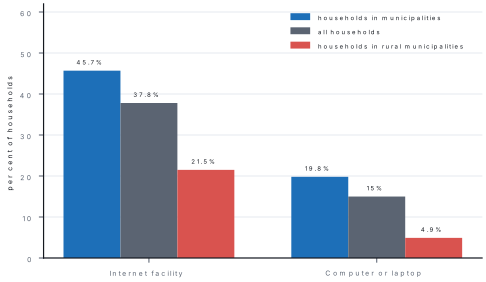
The 2021 census of Nepal shows the gap clearly. Of the 6,666,937 households counted, 37.8% had an Internet facility and only 15% had a computer or laptop, although about 73% had a smartphone.
Causes of the digital divide in Nepal: devices and data packs cost money; hills and mountains make it hard and expensive to lay cables and build towers; some villages still have weak electricity; many older people never learnt to use a computer; much online content is in English rather than Nepali or local languages; and people with disabilities may need special devices.
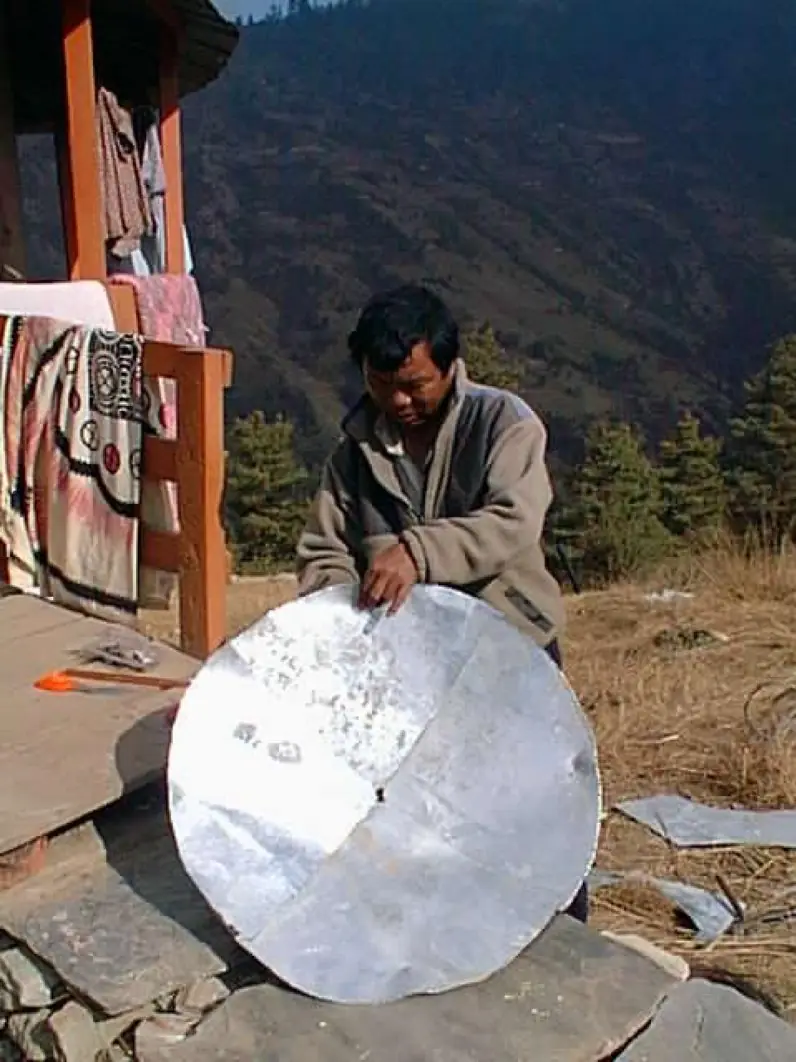
Ways to reduce it: cheaper data and devices; more towers and fibre in rural areas; community ICT centres and free Wi-Fi in schools, libraries and ward offices; computer classes for adults; more content in Nepali and local languages; and accessible devices and websites. Local people can make a difference too. From 2001, Mahabir Pun linked the mountain villages around Nangi in Myagdi to the Internet with home-made dish antennas and Wi-Fi relay stations; his Nepal Wireless Networking Project won him the Ramon Magsaysay Award in 2007.
Problem. Of the 6,666,937 households in the 2021 census, 37.72% had an Internet facility. (a) How many households had it, and how many did not? (b) 19.8% of households in municipalities but only 4.9% in rural municipalities had a computer or laptop. About how many times more likely was an urban household to have one?
Solution. (a) 37.72% of 6,666,937 = 0.3772 × 6,666,937 ≈ 2,514,769; the census itself counted 2,514,510 households with Internet (the percentage is rounded). Households without it = 6,666,937 − 2,514,510 = 4,152,427, more than six out of every ten.
(b) 19.8 ÷ 4.9 ≈ 4.0, so an urban household was about four times as likely to have a computer.
Write the advantages and disadvantages under two headings, as numbered points, each with a short Nepali example: "1. Services from home — e.g. a police report through the Nagarik App." Four clear points with examples earn more than a long paragraph that repeats one idea.
(1) List every ICT device in your home (phones, TV, radio, computer, router) and write what each is used for. (2) Ask your family which online services they use: bank app, wallet, Nagarik App, online classes, video calls with relatives abroad. Put each under e-governance, digital payment, e-learning or communication. (3) Find one elderly neighbour or relative who does not use the Internet and ask why. Is the reason cost, skill, language or something else? Share your findings with the class and draw a class bar chart of the results.
Chapter summary
- ICT is the use of computers, telecommunication equipment, networks and software to collect, store, process, send and receive information.
- Its six components are hardware, software, data, network, people and procedures.
- Communication technologies: telephone (voice over wire), mobile (radio waves to the tower of each cell), radio (one-way sound), television (one-way pictures and sound), satellite (uplink and downlink; geostationary at about 35,786 km) and the Internet (a network of networks that carries everything).
- Nepal's milestones: Radio Nepal 1951, NTV 1985, e-mail 1994, first ISP 1995, GSM mobile 1999, 4G 2017, NepaliSat-1 2019, Nagarik App 2021.
- Internet services: WWW (linked web pages; not the same as the Internet), e-mail (To, Cc, Bcc, attachment), search engines, chat, video conferencing and cloud storage.
- ICT in Nepal: e-governance (G2C, G2B, G2G; Nagarik App), online banking and digital payments (eSewa, Khalti, Fonepay QR, connectIPS; never share an OTP or MPIN) and e-learning (Sikai Chautari, E-Paath).
- The digital divide is the gap between those who have devices, the Internet and the skill to use them and those who do not; in 2021, 45.7% of urban but 21.5% of rural households had Internet.
Practice questions
Group A — Objective (1 mark each)
- ICT stands for [1]aInformation and Computer TechnologybInformation and Communication TechnologycInternet and Communication ToolsdInternational Communication Technology
- Which of these is NOT a component of an ICT system? [1]adatabprocedurecnetworkdfurniture
- A radio broadcast is an example of [1]aone-way communicationbtwo-way communicationcvideo conferencingdcloud storage
- The area served by one mobile tower is called a [1]anodebcellcdomaindrouter
- The signal sent from a ground station up to a satellite is the [1]adownlinkbuplinkchotspotdbackbone
- Radio Nepal was established in [1]a2007 BSb2041 BSc2051 BSd2063 BS
- Which Internet service keeps your files on a company's servers so that you can open them from any device? [1]achatbsearch engineccloud storagedWWW
- Google, Bing and DuckDuckGo are [1]aweb browsersbsearch enginesce-mail servicesdoperating systems
- In an e-mail, the addresses that other receivers cannot see are written in [1]aTobCccBccdSubject
- The Nagarik App is an example of [1]ae-commercebe-governancece-learningdsocial media
- Which of these is a digital wallet of Nepal? [1]aKhaltibZoomcGmaildViber
- The gap between people who can use ICT and those who cannot is the [1]adigital footprintbdigital dividecdigital signatureddigital payment
- In the 2021 census, about what percentage of Nepali households had an Internet facility? [1]a15%b37.8%c72.9%d95%
Answers to Group A
1. (b) — information and communication technology.
2. (d) — the six components are hardware, software, data, network, people and procedures.
3. (a) — listeners receive but cannot reply through the radio.
4. (b) — each tower serves one cell; hence "cellular" network.
5. (b) — up is the uplink; the signal coming down is the downlink.
6. (a) — 20 Chaitra 2007 BS (2 April 1951).
7. (c) — e.g. Google Drive, OneDrive, Dropbox.
8. (b) — they find web pages by keywords; browsers only open pages.
9. (c) — Bcc means blind carbon copy.
10. (b) — it is a government-to-citizen (G2C) service.
11. (a) — Zoom is video conferencing, Gmail is e-mail, Viber is chat.
12. (b) — the digital divide.
13. (b) — 37.8% (2,514,510 of 6,666,937 households).
Group B — Short answer (2 marks each)
- Define ICT. Name any four components of an ICT system. [2]
- Write any two differences between radio and television. [2]
- What is a communication satellite? Write any two uses of satellites. [2]
- Differentiate between the Internet and the WWW. [2]
- What is video conferencing? Name two programs used for it. [2]
- What is cloud storage? Write one advantage and one disadvantage of it. [2]
- What is e-governance? Give two examples of e-governance in Nepal. [2]
- Name any two digital payment systems of Nepal and write one safety rule for using them. [2]
- What is the digital divide? Write any two ways to reduce it. [2]
- A 600 MB video is uploaded on a 40 Mbps connection. Find the shortest time the upload can take. [2]
Answers to Group B
1. ICT is the use of computers, telecommunication equipment, networks and software to collect, store, process, send and receive information. Components (any four): hardware, software, data, network, people, procedures.
2. Radio carries sound only, while television carries moving pictures and sound. A radio set is cheap and runs on batteries, so it reaches remote villages; a TV set costs more and needs more power. (Any two.)
3. A communication satellite is a machine in orbit that receives signals from a ground station (uplink), strengthens them and sends them back to a wide area of the Earth (downlink). Uses (any two): satellite TV (DTH), satellite phones, Internet in remote places (VSAT), GPS navigation, weather forecasting.
4. The Internet is the worldwide network of computer networks — the cables, devices and rules — and carries every service. The WWW is a collection of linked web pages that is only one service running on the Internet; e-mail and video calls use the Internet without using the Web.
5. Video conferencing is a live meeting over the Internet in which people at different places see and hear each other at the same time using cameras and microphones. Programs (any two): Zoom, Google Meet, Microsoft Teams, Jitsi Meet.
6. Cloud storage is a service that keeps your files on a company's servers on the Internet so that you can open and share them from any device. Advantage: the files are safe even if your phone or computer is lost (or: they can be opened anywhere and shared). Disadvantage: you need the Internet to reach them (or: your data is held by another company, so privacy depends on its security).
7. e-Governance is the use of ICT by the government to give services and information to citizens, businesses and its own offices. Examples (any two): the Nagarik App, the online passport form, SEE and NEB results online, online tax filing with the Inland Revenue Department, the Hello Sarkar complaint service.
8. Any two of eSewa, Khalti, IME Pay, Fonepay QR, connectIPS, mobile banking. Safety rule: never tell anyone your OTP or MPIN (or: use only the official app, keep the phone locked, check the amount and the receiver before confirming).
9. The digital divide is the gap between people who have devices, the Internet and the skill to use ICT and people who do not. Ways (any two): cheaper data and devices; more towers and fibre in rural areas; community ICT centres and free Wi-Fi in schools and libraries; computer classes for adults; content in Nepali and local languages.
10. 600 MB × 8 = 4,800 Mb. Time = 4,800 ÷ 40 = 120 seconds = 2 minutes.
Group C — Long answer (4 marks each)
- What is ICT? Explain any three uses of ICT in Nepal with an example of each. [1+3]
- Describe any four communication technologies, giving an example of each from Nepal. [4]
- Explain any four services of the Internet. [4]
- Write any four advantages and any four disadvantages of ICT. [2+2]
- What is the digital divide? Explain its causes in Nepal and suggest two ways to bridge it. [1+2+1]
Answers to Group C
1. ICT is the use of computers, telecommunication equipment, networks and software to collect, store, process, send and receive information (1 mark). Uses (any three, 1 mark each): Education — online classes, digital textbooks and results; e.g. Sikai Chautari lessons and SEE results published online. Banking — mobile banking and digital wallets let people pay and send money from a phone; e.g. paying a shop with Khalti or eSewa by QR code. Government (e-governance) — services without queues; e.g. the Nagarik App for citizenship, PAN and police reports. Health — telemedicine lets a doctor in a city advise a health post by video call. Agriculture — farmers get weather forecasts and market prices on their phones. Communication — free calls and chat with relatives abroad through Viber and WhatsApp.
2. (Any four, 1 mark each.) Telephone (landline): turns the voice into an electrical signal that travels by wire through an exchange to the other telephone; two-way; e.g. a Nepal Telecom landline. Mobile phone: uses radio waves to the tower of its cell, and the towers are joined through the mobile exchange; carries calls, SMS and data; e.g. Nepal Telecom and Ncell. Radio: sends sound by radio waves from a transmitter to many receivers; one-way, cheap, reaches remote villages; e.g. Radio Nepal (2007 BS) and community FM stations. Television: sends moving pictures and sound by antenna, cable, satellite or the Internet; e.g. NTV and DishHome. Satellite: receives signals from a ground station (uplink) and sends them back to a wide area (downlink); e.g. DTH television and VSAT Internet in remote areas; NepaliSat-1 (2019) was Nepal's first satellite. Internet: the worldwide network of networks that carries all kinds of data; e.g. fibre and 4G Internet.
3. (Any four, 1 mark each.) WWW: a collection of web pages joined by hyperlinks, opened in a browser; e.g. the NEB website. E-mail: sends written messages and attached files to an address such as name@gmail.com; To, Cc and Bcc fields; e.g. Gmail. Search engine: finds web pages by keywords, using an index of the Web; e.g. Google. Chat: real-time text, voice notes and calls; e.g. Viber, WhatsApp. Video conferencing: live meetings with sound and video among people in different places; e.g. Zoom, Google Meet. Cloud storage: keeps files on Internet servers so they can be opened and shared from anywhere; e.g. Google Drive (15 GB free).
4. Advantages (any four, half a mark each): fast and cheap communication worldwide; information on any subject at any time; services from home (banking, bills, government papers); new jobs and online businesses; better education and health care in remote areas; saving of paper, travel and time; help in disasters. Disadvantages (any four, half a mark each): cost of devices and data; spread of false news; cyber crime such as hacking and fraud; loss of some jobs; addiction and health problems; loss of privacy; electronic waste.
5. The digital divide is the gap between people who have access to ICT — devices, the Internet and the skill to use them — and people who do not (1 mark). Causes in Nepal (2 marks): the cost of devices and data; difficult hills and mountains where towers and cables are costly to build; weak electricity in some villages; lack of computer skills, especially among older people; most content is in English. The 2021 census showed Internet in 45.7% of urban but only 21.5% of rural households. Ways to bridge it (1 mark, any two): cheaper data and devices; more towers and fibre in rural areas; community ICT centres and free Wi-Fi in schools and ward offices; computer classes for adults; content in Nepali and local languages — as Mahabir Pun's Nepal Wireless Networking Project did for the villages of Myagdi.
Practise more: Computer Science question bank