Unit 4 · Computer Fundamentals · 24 min read
Types of Computer
What the syllabus asks for 5
- Classification by working principle: analog, digital and hybrid computers
- Classification by size: supercomputer, mainframe, minicomputer and microcomputer
- Microcomputers: desktop, laptop, tablet, smartphone and workstation
- Classification by purpose: general-purpose and special-purpose computers
- Choosing a computer for a task
The computer in your school lab, the ECG machine in a hospital, the chip that runs a washing machine and the giant machines that forecast the weather are all computers, but they are very different. Some measure, some count, some do both. Some fill a hall and some fit in a pocket. Some do any job you give them and some do one job all their lives. This lesson sorts computers in three ways — by how they work, by their size and power, and by their purpose — and then uses those ideas to choose the right computer for a task.
Learn the classification chart in Figure 1 and be able to draw it. Expect: "differentiate between analog and digital computers" or "between mainframe and microcomputer"; "what is a hybrid computer? give two examples"; features and uses of a supercomputer; types of microcomputer; and "general-purpose versus special-purpose". The newer kind of question gives a situation (a bank, a designer, a hospital) and asks which computer suits it and why. Always give an example with each type.
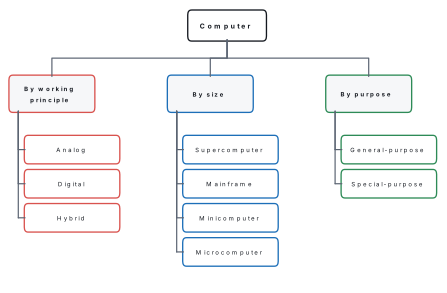
4.1 Classification by working principle: analog, digital and hybrid computers
The working principle is the kind of data a computer works on. Some quantities in nature change smoothly: temperature, speed, pressure, the level of water in a tank. Others come in separate steps that can be counted: the number of students in a class, the digits of a phone number.
Analog (continuous) data can take any value within a range and changes smoothly, like the temperature during a day. Digital (discrete) data take only separate, countable values; inside a computer they are written with the two binary digits 0 and 1.
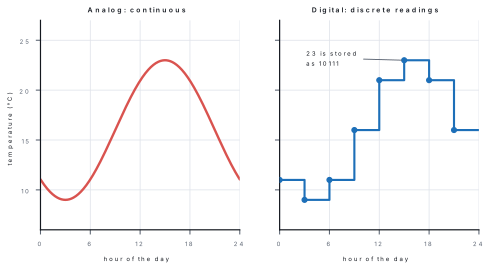
Analog computer
An analog computer works on continuous (analog) data by measuring a physical quantity such as temperature, pressure, speed, length or voltage. It shows its result as a position on a scale or dial, not as separate digits.
Features of analog computers:
- they measure; they do not count;
- they give results quickly, but only approximately (to the accuracy with which a scale can be read);
- they have little or no memory;
- each is built for one kind of job.
Examples: the slide rule (Lesson 2), a car's analog speedometer, a mercury thermometer, a barometer, a voltmeter with a needle, and early machines such as the tide-predicting machines and Vannevar Bush's differential analyser of 1931.
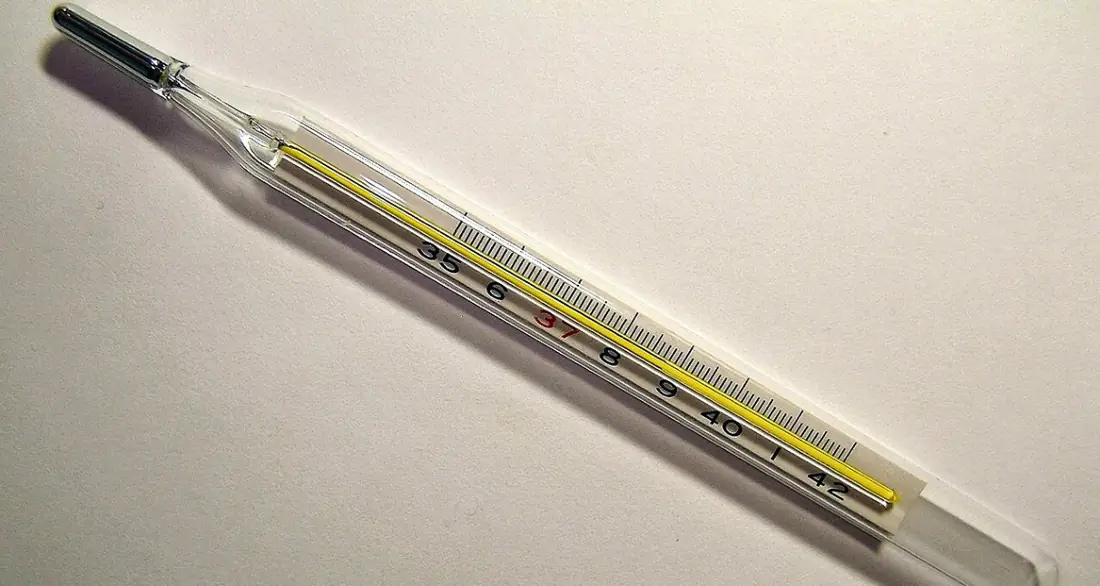
Digital computer
A digital computer works on discrete (digital) data. It represents all data — numbers, letters, pictures, sounds — with the binary digits 0 and 1, and processes them by counting and calculating.
Features of digital computers:
- they count, so their results are exact (100% accurate for correct input);
- they have large memory and storage;
- they can be programmed for many different jobs;
- they are the most common computers by far: when people say "computer" they mean a digital computer.
Examples: desktop and laptop computers, smartphones, tablets, calculators, digital watches, ATMs and digital thermometers.
| Analog computer | Digital computer |
|---|---|
| works on continuous data | works on discrete data (0 and 1) |
| measures | counts |
| result is approximate | result is exact |
| little or no memory | large memory and storage |
| usually built for one task | can be programmed for many tasks |
| result read from a dial or scale | result shown as digits, text or pictures |
| e.g. speedometer with a needle, mercury thermometer | e.g. laptop, smartphone, calculator |
Hybrid computer
A hybrid computer combines the features of analog and digital computers. Its analog part measures continuous quantities; these readings are converted into digital form, and its digital part calculates, stores and displays the results.
The conversion is done by a circuit called an analog-to-digital converter (ADC). Hybrid computers are used where something must be measured and then calculated on accurately:
- hospitals: an ECG machine measures the heart's electrical signals and prints or displays them; an ICU monitor measures heart rate, blood pressure and oxygen level and sounds an alarm when a value is unsafe; ultrasound and CT scan machines turn measured signals into pictures;
- petrol pumps: the dispenser measures the flow of fuel (analog) and displays the litres and the price in rupees (digital);
- aircraft and spacecraft: measuring height, speed and air pressure and calculating the course;
- industry and weather stations: measuring temperature and pressure in a cement factory or at a weather station and controlling or recording them.
Problem. Classify each device by its working principle: (a) a mercury thermometer; (b) a calculator; (c) an ECG machine; (d) the dispenser at a petrol pump that shows litres and rupees; (e) a smartphone; (f) a car's speedometer with a needle.
Solution. (a) Analog — it measures temperature as a smooth rise of mercury. (b) Digital — it counts with digits. (c) Hybrid — it measures the heart's signal and processes and displays it digitally. (d) Hybrid — it measures the flow and calculates the price digitally. (e) Digital. (f) Analog — the needle moves smoothly with speed.
4.2 Classification by size: supercomputer, mainframe, minicomputer and microcomputer
Digital computers are also grouped by their size, speed, storage, cost and number of users. From biggest to smallest they are supercomputers, mainframes, minicomputers and microcomputers.
Supercomputer
A supercomputer is the fastest, most powerful and most expensive type of computer, built from thousands of processors working together (parallel processing) to solve very large scientific and engineering problems.
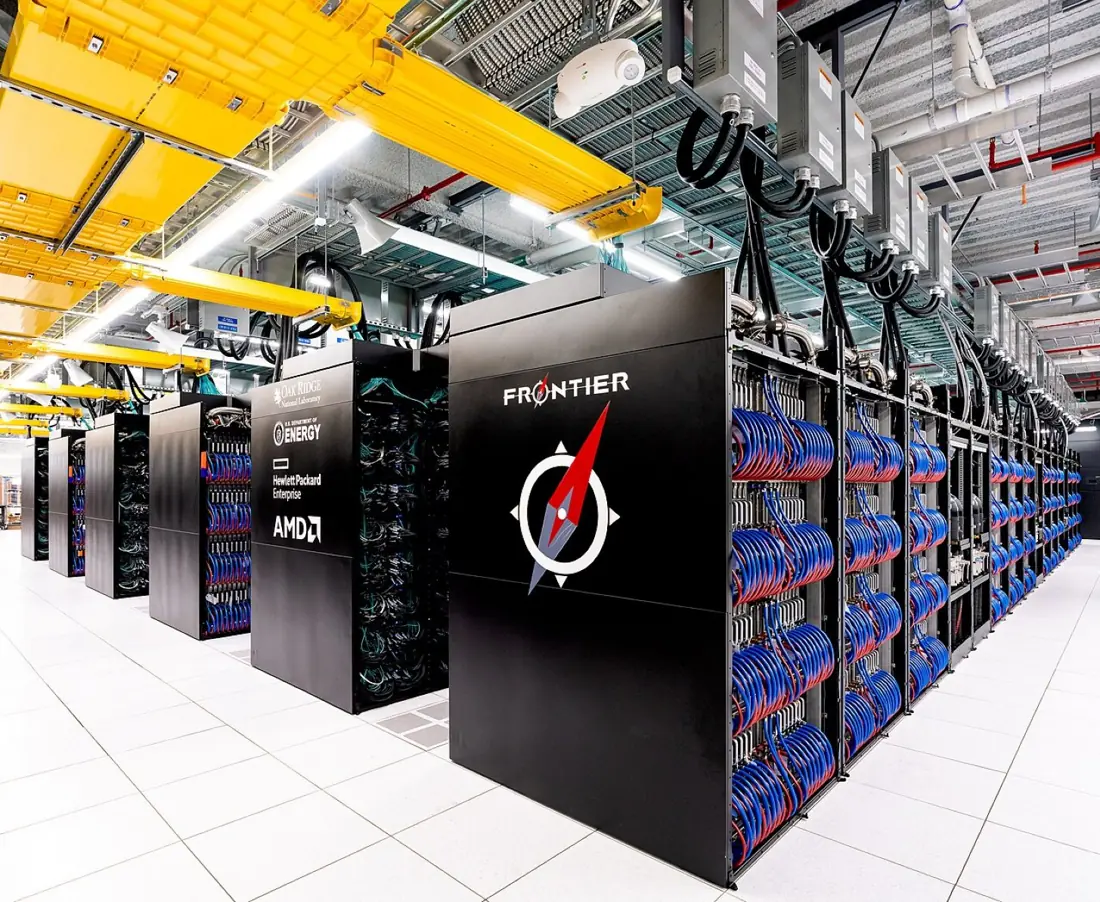
A supercomputer's speed is measured in FLOPS — floating-point operations (calculations with decimal numbers) per second. The fastest machines now pass one exaflop, 10^{18} calculations per second. In the TOP500 list of June 2026 the fastest was LineShine in Shenzhen, China, at about 2.2 exaflops, using about 13.8 million processor cores and 42 megawatts of electricity — as much power as tens of thousands of homes.
Features: extremely fast (parallel processing); huge memory and storage; needs a large hall, special cooling and its own power supply; costs hundreds of millions of dollars; used by research centres and governments, not by ordinary offices.
Uses: weather forecasting and climate study, space research, nuclear research, designing medicines and vaccines, simulating earthquakes and floods, oil and gas exploration, and training large AI programs.
Problem. LineShine does about 2.198 × 10¹⁸ calculations per second. (a) A laptop does, say, 10^{12} (one trillion) calculations per second. How long would it take to do LineShine's work of one second? (b) Nepal has 2,91,64,578 people. If every person did one sum per second, without stopping, how long would they take?
Solution. (a) Time = 2.198 × 10¹⁸ ÷ 10¹² = 2.198 × 10⁶ s = 2,198,000 ÷ 86,400 ≈ 25.4 days. (b) Calculations per person = 2.198 × 10¹⁸ ÷ 29,164,578 ≈ 7.54 × 10¹⁰, so each person needs 7.54 × 10¹⁰ seconds. In years: 7.54 × 10¹⁰ ÷ (365.25 × 86,400) ≈ 2,390 years.
Mainframe computer
A mainframe is a large, powerful and very reliable computer that can serve hundreds or thousands of users at the same time and process millions of transactions, used by big organisations to store and process their central data.
Features: very large memory and storage; many users connected through terminals and networks at once; extremely reliable — it runs for years without stopping; strong security; expensive, and needs trained staff and an air-conditioned room.
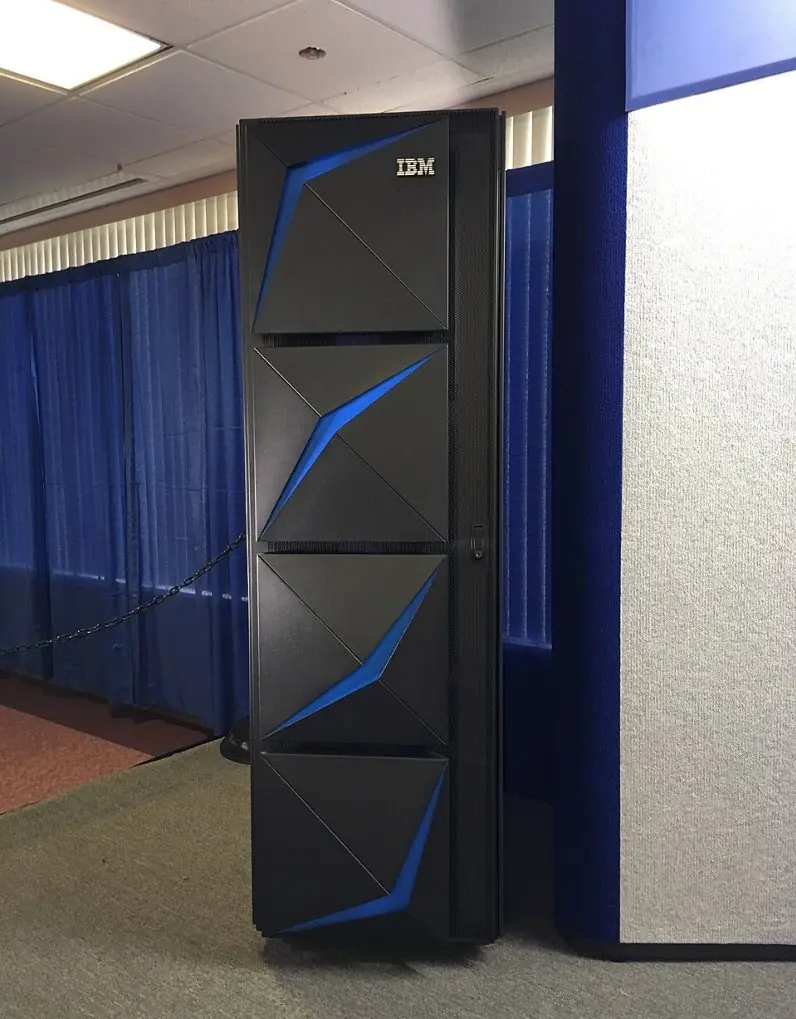
Uses: banks (keeping every account and card payment), insurance companies, airlines (ticket reservation), railways, large government offices (census, taxes, citizen records) and big universities. The IBM 1401 and the ICL 2950/10 used in Nepal's censuses were mainframes. Today's best-known mainframes are IBM's Z series; the IBM z17, launched in 2025, has processors with eight cores running at 5.5 GHz and built-in AI circuits for checking payments for fraud as they happen.
Minicomputer
A minicomputer is a medium-sized multi-user computer, smaller, cheaper and less powerful than a mainframe but more powerful than a microcomputer, which can serve tens to a few hundred users at the same time.
Minicomputers appeared in the 1960s: the PDP-8 (1965) and PDP-11 (1970) of Digital Equipment Corporation and, later, IBM's AS/400 (1988) were famous. They were used by colleges, hospitals, factories and medium-sized businesses for accounts, stock control and controlling machines. Today their job is done mostly by servers — powerful computers that provide data and services to other computers on a network (Lesson 14) — so the term minicomputer is rarely used for new machines.
Microcomputer
A microcomputer is a small, low-cost computer whose CPU is a single microprocessor. It is designed mainly for one user at a time, so it is also called a personal computer (PC).
The first popular microcomputers were the Altair 8800 (1975), the Apple II (1977) and the IBM PC (1981). Microcomputers are the commonest computers in the world: they are cheap, easy to use and run millions of programs. Section 4.3 describes their types.
| Feature | Supercomputer | Mainframe | Minicomputer | Microcomputer |
|---|---|---|---|---|
| Size | fills a large hall | large cabinets in a room | a cabinet or a few racks | fits on a desk, a lap or in a hand |
| Speed | fastest (exaflops) | very fast | medium | fast enough for one person |
| Users at once | used for a few huge jobs at a time | hundreds to thousands | tens to a few hundred | usually one |
| Cost | hundreds of millions of dollars | millions | lakhs to crores of rupees | thousands to a few lakh rupees |
| Main use | science: weather, space, research | banks, airlines, governments | colleges, factories, medium businesses | homes, schools, offices |
| Example | LineShine, El Capitan, Frontier | IBM z17, IBM z15 | PDP-11, IBM AS/400 | desktop, laptop, smartphone |
4.3 Microcomputers: desktop, laptop, tablet, smartphone and workstation
1. Desktop computer. A computer meant to stay on a desk. It has a separate system unit (casing) with a monitor, keyboard and mouse; an all-in-one desktop hides the system unit behind the screen. Desktops give the most power for the money, are easy to repair and upgrade, and are used in school labs, offices and banks. They need mains power (and a UPS during power cuts).
2. Laptop (notebook). A portable computer with the screen, keyboard, touchpad, speakers, webcam and a rechargeable battery built into one folding case, usually 13 to 16 inches wide and weighing about 1 to 2.5 kg. It can be used where there is no socket and carried to class or to the field. Very light, slim laptops are sometimes sold as ultrabooks; small cheap ones were once called netbooks.
3. Tablet. A flat, light computer worked by a touch screen, usually 7 to 13 inches, without a built-in keyboard (one can be attached). It is used for reading, watching, drawing, online classes and simple office work. Examples: Apple iPad, Samsung Galaxy Tab.
4. Smartphone. A mobile phone that is also a complete computer: it runs apps on an operating system such as Android or iOS, and has a camera, GPS and sensors. For most people in Nepal the smartphone is their first, and often only, computer: they use it for calls, banking with eSewa or Khalti, classes and the Nagarik App.
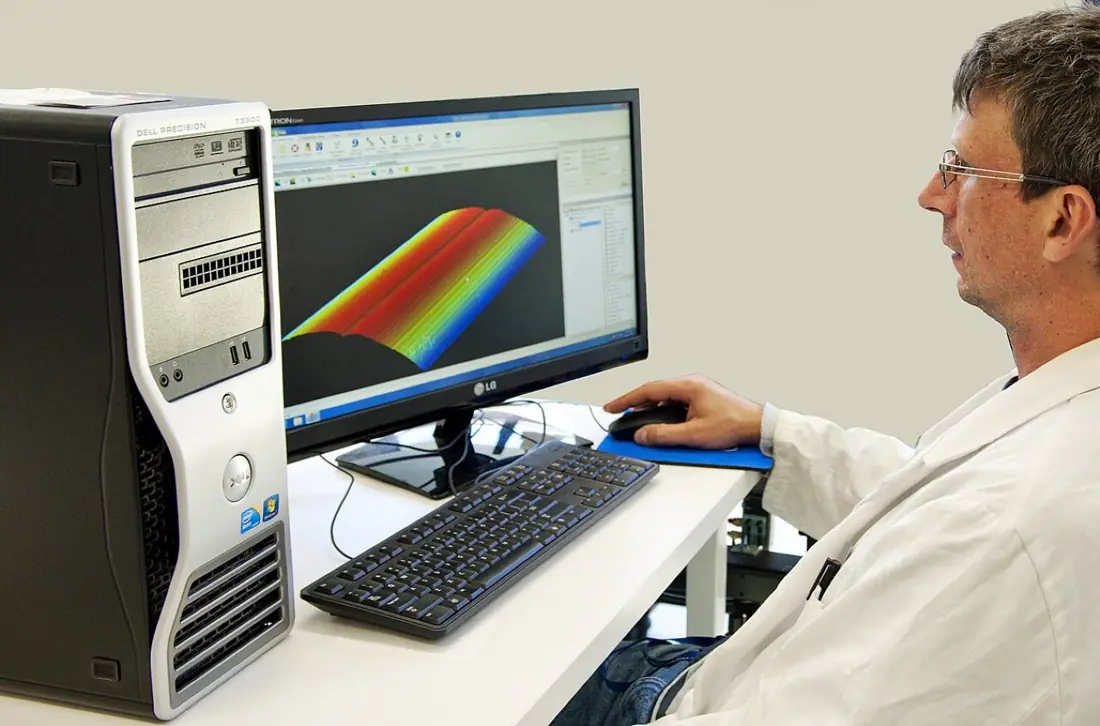
5. Workstation. A powerful single-user microcomputer for technical and creative work — engineering design (CAD), architecture, 3D animation, film and video editing, and scientific calculations. It has a fast processor with many cores, a large RAM (often 64 GB or more), a professional graphics card and large, fast storage. Examples: HP Z series, Dell Precision, Lenovo ThinkStation.
| Type | Portable? | Input | Typical use |
|---|---|---|---|
| Desktop | no | keyboard and mouse | school lab, office, cyber café |
| Laptop | yes, with battery | keyboard and touchpad | study, office work anywhere |
| Tablet | yes, very light | touch screen | reading, video, drawing, classes |
| Smartphone | yes, in a pocket | touch screen and voice | calls, apps, payments, photos |
| Workstation | no | keyboard, mouse, pen tablet | 3D design, video editing, engineering |
In this lesson a workstation is a high-performance microcomputer for technical work. In everyday English the word also means "the desk where a person works", and some books use it for a terminal of a network. In an exam on types of computer, write the technical meaning.
4.4 Classification by purpose: general-purpose and special-purpose computers
A general-purpose computer can do many different kinds of work, one after another, simply by running different programs. A special-purpose computer is built to do one particular job; its program is usually stored permanently in a chip and is not changed by the user.
Your laptop is general-purpose: today it types an essay, tomorrow it edits a video and plays a game. The computer inside a washing machine is special-purpose: it does nothing but run wash cycles, all its life.
A special-purpose computer built into another machine to control it is called an embedded system. Embedded computers are everywhere: in washing machines and microwave ovens, digital watches and calculators, ATMs, traffic lights, cars (engine control and airbags), lifts, TV set-top boxes, printers, fitness bands, CCTV cameras and the POS card machines in shops.
| General-purpose computer | Special-purpose computer |
|---|---|
| does many kinds of tasks | does one particular task |
| new programs can be installed and changed | program is fixed in a chip and rarely changed |
| needs an operating system and application software | runs one built-in program |
| usually costs more and is bigger | usually small and cheap for its job |
| e.g. desktop, laptop, smartphone | e.g. washing machine controller, ATM, digital watch, traffic-light controller |
Problem. State whether each is a general-purpose or a special-purpose computer, with a reason: (a) a school lab desktop; (b) the controller of a microwave oven; (c) a smartphone; (d) an ATM; (e) the computer in a car that fires the airbags.
Solution. (a) General-purpose — it runs word processors, browsers, programming tools and more. (b) Special-purpose — it only times and heats. (c) General-purpose — any app can be installed. (d) Special-purpose — it only handles cash withdrawals, balance checks and deposits. (e) Special-purpose (embedded) — its only job is to detect a crash and fire the airbags in a fraction of a second.
4.5 Choosing a computer for a task
No single computer is best for every task. Before buying or using one, ask these questions:
- What work will it do, and which software does that work need? The software decides the operating system and the power required.
- How powerful must it be? Look at the processor, the RAM and the graphics card. Heavy video, 3D and engineering work need much more than typing and browsing.
- How much storage? Photos and videos need large storage; an SSD makes a computer start and open files quickly.
- Must it be portable? Laptops, tablets and phones run on batteries and can be carried; they are also useful during power cuts.
- How many people will use it at the same time? One person: a microcomputer. Thousands: a mainframe or servers.
- What is the budget? Count the price, the electricity, repairs and software licences.
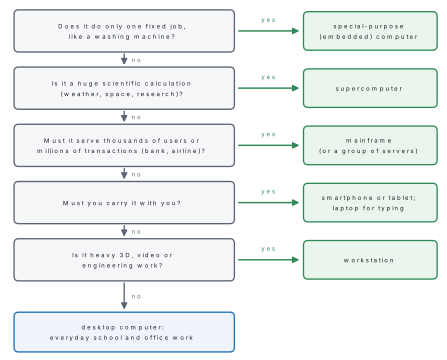
Problem. Suggest the most suitable type of computer for each user and give one reason: (a) a Grade 8 student who studies at home and at a relative's house; (b) an architect who makes 3D models of buildings; (c) the head office of a bank with branches all over Nepal; (d) scientists modelling the monsoon over South Asia; (e) a reporter who sends photos and news from remote districts; (f) a school computer lab of 30 students.
Solution. (a) Laptop (or a tablet with a keyboard): portable, runs on battery, and enough for documents, browsing and programming practice. (b) Workstation: 3D modelling needs a powerful processor, a lot of RAM and a professional graphics card. (c) Mainframe (or a cluster of servers): thousands of transactions from ATMs, branches and apps every minute, with very high reliability and security. (d) Supercomputer: monsoon models need billions of calculations at once (parallel processing). (e) Smartphone (with a laptop if long reports are typed): it fits in a pocket, takes photos and sends them over the mobile network. (f) Desktop computers: cheapest for the power, sturdy, easy to repair, and they stay in the lab.
Work in groups. Survey ten computing devices at home and at school — phones, laptops, the school's printer, a digital watch, a TV remote, a calculator. For each, fill in a table: name, maker, analog/digital/hybrid, general/special-purpose, size type (if digital) and one use. Then answer: (a) Which kind of computer did you find most often? (b) Why is a supercomputer not used in every office? (c) Why have microcomputers become so popular?
Answering "differentiate between" questions
Write differences as pairs on the same point, in a two-column table: "analog measures — digital counts", "analog approximate — digital exact". A list of features of one type without the matching features of the other earns little. Four clear pairs earn full marks in a 4-mark answer.
Chapter summary
- By working principle: analog computers measure continuous data (thermometer, speedometer, slide rule); digital computers count discrete data in 0s and 1s (PC, phone, calculator); hybrid computers do both (ECG, ICU monitor, petrol-pump dispenser).
- By size: supercomputer (fastest; exaflops; weather, research — e.g. LineShine, Frontier), mainframe (thousands of users; banks, airlines — IBM z17), minicomputer (medium, multi-user — PDP-11; now servers), microcomputer (one user; microprocessor; PC).
- Microcomputers: desktop, laptop (notebook), tablet, smartphone and workstation (powerful, for design and video).
- By purpose: general-purpose computers run many programs; special-purpose computers do one job; one built into a machine is an embedded system.
- Choosing a computer depends on the task and software, power, storage, portability, number of users and budget.
Practice questions
Group A — Objective (1 mark each)
- A computer that works on continuous data by measuring is [1]aa digital computerban analog computerca microcomputerda mainframe
- A digital computer represents data with [1]a0 and 1b0 to 9ca needle on a dialdmercury
- An ECG machine is an example of [1]aan analog computerba digital computerca hybrid computerda supercomputer
- The fastest and most expensive type of computer is the [1]amainframebminicomputercsupercomputerdworkstation
- A bank uses a large, reliable computer that serves thousands of users at once. It is a [1]amicrocomputerbmainframectabletdanalog computer
- The speed of a supercomputer is measured in [1]aFLOPSbkilogramscpixelsdbytes
- A microcomputer has a [1]avacuum tube as its CPUbmicroprocessor as its CPUcseparate ALU cabinetdmercury memory
- A powerful single-user computer for 3D design and video editing is a [1]aworkstationbmainframecminicomputerdcalculator
- The computer that controls a washing machine is [1]ageneral-purposebspecial-purposeca mainframeda supercomputer
- Which of these is a general-purpose computer? [1]aan ATMba digital watchca laptopda traffic-light controller
- The PDP-11 is an example of a [1]asupercomputerbminicomputercsmartphonedhybrid computer
- Which device is analog? [1]acalculatorbmercury thermometercsmartphoneddigital watch
Answers to Group A
1. (b) — analog computers measure continuous quantities.
2. (a) — binary digits 0 and 1.
3. (c) — it measures the heart's signal and processes it digitally.
4. (c) — supercomputers lead in speed and cost.
5. (b) — a mainframe serves thousands of users.
6. (a) — floating-point operations per second.
7. (b) — a single-chip microprocessor.
8. (a) — a workstation.
9. (b) — it does one job, so it is special-purpose (embedded).
10. (c) — a laptop can run any program.
11. (b) — a famous minicomputer of 1970.
12. (b) — the mercury rises smoothly; it measures.
Group B — Short answer (2 marks each)
- Differentiate between analog and digital computers in two points. [2]
- What is a hybrid computer? Give two examples. [2]
- Write any four uses of a supercomputer. [2]
- What is a mainframe computer? Where is it used? [2]
- What is a microcomputer? Why is it so popular? [2]
- Differentiate between a laptop and a desktop computer. [2]
- What is a workstation? Who uses it? [2]
- What is an embedded system? Give two examples. [2]
- A supercomputer does 2 \times 10^{18} calculations per second and a laptop 10^{12}. How many seconds would the laptop take to do the supercomputer's work of one second? [2]
Answers to Group B
1. An analog computer works on continuous data and measures; a digital computer works on discrete data (0 and 1) and counts. Analog results are approximate; digital results are exact. (Also: analog has little memory, digital has large memory.)
2. A hybrid computer combines analog and digital features: it measures continuous quantities and then processes and displays them digitally. Examples: ECG machine, ICU patient monitor, petrol-pump dispenser.
3. Any four: weather forecasting, climate study, space research, nuclear research, designing medicines, earthquake and flood simulation, oil exploration, training large AI programs.
4. A mainframe is a large, powerful, very reliable computer that serves hundreds or thousands of users at the same time. It is used by banks, insurance companies, airlines, railways and large government offices.
5. A microcomputer is a small, low-cost computer with a single microprocessor as its CPU, used by one person at a time (a PC). It is popular because it is cheap, small, easy to use and runs millions of programs for study, work and entertainment.
6. A desktop stays on a desk, has a separate system unit and needs mains power; a laptop is portable, has everything in one folding case and runs on a battery. A desktop gives more power for the money and is easier to upgrade; a laptop can be used anywhere.
7. A workstation is a powerful single-user microcomputer with a fast multi-core processor, large RAM and a professional graphics card. It is used by engineers, architects, animators, video editors and scientists.
8. An embedded system is a special-purpose computer built into another machine to control it. Examples: the controller of a washing machine or microwave oven, an ATM, a car's airbag computer, a traffic-light controller.
9. Time = 2 \times 10^{18} \div 10^{12} = 2 \times 10^{6} s = 2,000,000 seconds (about 23 days).
Group C — Long answer (4 marks each)
- Classify computers on the basis of size and explain each type briefly. [4]
- What is a hybrid computer? Explain with three examples how it combines analog and digital features. [1+3]
- Differentiate between general-purpose and special-purpose computers in four points. [4]
- Describe any four types of microcomputer. [4]
- A hospital wants(a) a computer for its doctors to read patient records on ward rounds,(b) a machine to monitor patients in the ICU,(c) a computer for the billing counter, and(d) a powerful system to analyse thousands of brain scans for research. Suggest a suitable computer for each, with a reason. [4]
Answers to Group C
1. Supercomputer: the fastest, biggest and costliest; thousands of processors in parallel; used for weather forecasting and scientific research, e.g. LineShine, Frontier. Mainframe: large, reliable, serves hundreds or thousands of users at once; used by banks, airlines and governments, e.g. IBM z17. Minicomputer: medium-sized, multi-user (tens to a few hundred users), cheaper than a mainframe; used by colleges and factories, e.g. PDP-11; today replaced by servers. Microcomputer: small, cheap, one user, CPU on a single microprocessor; e.g. desktop, laptop, smartphone.
2. A hybrid computer combines an analog part that measures continuous quantities with a digital part that calculates, stores and displays (1 mark). ECG machine: measures the heart's electrical signal (analog) and displays and prints it as a trace with values (digital). ICU monitor: measures heart rate, blood pressure and oxygen (analog) and shows exact numbers and sounds alarms (digital). Petrol-pump dispenser: measures the flow of fuel (analog) and calculates and shows litres and rupees (digital).
3.
| General-purpose | Special-purpose |
|---|---|
| does many kinds of work | does one particular job |
| programs can be installed and changed by the user | program fixed in a chip |
| needs an operating system and application software | runs one built-in program |
| usually bigger and costlier | small and cheap for its job |
| e.g. laptop, desktop, smartphone | e.g. washing machine controller, ATM, digital watch |
4. Any four. Desktop: stays on a desk; separate system unit, monitor, keyboard and mouse; powerful for its price; school labs and offices. Laptop: portable, all parts in one folding case with a battery; study and office work anywhere. Tablet: flat, light, touch screen; reading, videos, classes. Smartphone: a phone that runs apps on Android or iOS; calls, payments, photos, GPS. Workstation: powerful single-user computer with a strong processor, large RAM and graphics card; 3D design, video editing, engineering.
5. (a) A tablet (or laptop): light and portable, so doctors carry it from bed to bed. (b) A hybrid computer (ICU monitor): it measures heart rate, pressure and oxygen continuously and shows exact values and alarms. (c) A desktop computer with a receipt printer: it stays at the counter and is cheap and reliable. (d) A workstation or a supercomputer/server cluster, depending on size: analysing thousands of scans needs very high processing power and parallel processing.
Practise more: Computer Science question bank