Unit 13 · Web, Communication and Society · 30 min read
Computer Virus
What the syllabus asks for 5
- Computer virus: meaning, history and how it spreads
- Types of malware: virus, worm, Trojan horse, spyware, adware and ransomware
- Symptoms of an infected computer
- Antivirus software: how it works and examples
- Protecting a computer: safe browsing, updates, backups and strong passwords
A computer virus is not a germ. It is a program — a set of instructions written by a person — that hides inside other files, copies itself to more files and more computers, and does things the owner never asked for: it slows the machine, deletes or locks files, shows unwanted adverts or steals passwords. This lesson explains what viruses and other harmful programs are, where they came from and how they travel, how to tell that a computer is infected, how antivirus software finds them, and the everyday habits that keep a computer safe.
Expect definitions (computer virus, malware, worm, Trojan horse, spyware, adware, ransomware, antivirus), two-point differences (virus and worm, spyware and adware, antivirus and firewall), lists (ways a virus spreads, symptoms of infection, examples of antivirus programs, ways of protection) and a long question on the types of malware or on how to protect a computer. Scenario questions describe a computer's symptoms and ask you to name the malware and say what to do.
13.1 Computer virus: meaning, history and how it spreads
A computer virus is a harmful program that attaches itself to another file or program, copies itself into other files and disks when the infected file is run, and damages data or disturbs the working of the computer without the user's knowledge. Any program made to harm a computer or its user is called malware (from malicious software); a virus is one kind of malware.
The name comes from biology. Like a living virus, a computer virus needs a host (a file to live in), multiplies inside it, spreads from one computer to another, and harms its host. In 1983 Fred Cohen, a student in the United States, showed a program that could infect other programs; his teacher Leonard Adleman suggested the name "computer virus", which Cohen used in his 1984 paper.
People write malware to show off, to steal passwords and money, to spy, to damage a rival, or to demand a ransom. Making and spreading a virus that destroys or damages data is a crime in Nepal under section 46 of the Electronic Transactions Act, 2063 (Lesson 12).
A short history
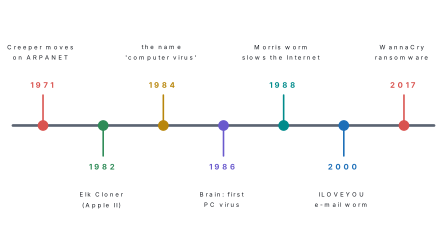
| Year | Event |
|---|---|
| 1971 | Creeper, written by Bob Thomas at BBN in the USA, moved from computer to computer on ARPANET showing "I'M THE CREEPER : CATCH ME IF YOU CAN". It did no harm. Ray Tomlinson then wrote Reaper to find and delete it — the first antivirus-like program. |
| 1982 | Elk Cloner, written by Rich Skrenta, a 15-year-old school student, spread on Apple II floppy disks and showed a short poem every fiftieth time the computer was started. |
| 1983–84 | Fred Cohen demonstrated a self-copying program and named it a computer virus. |
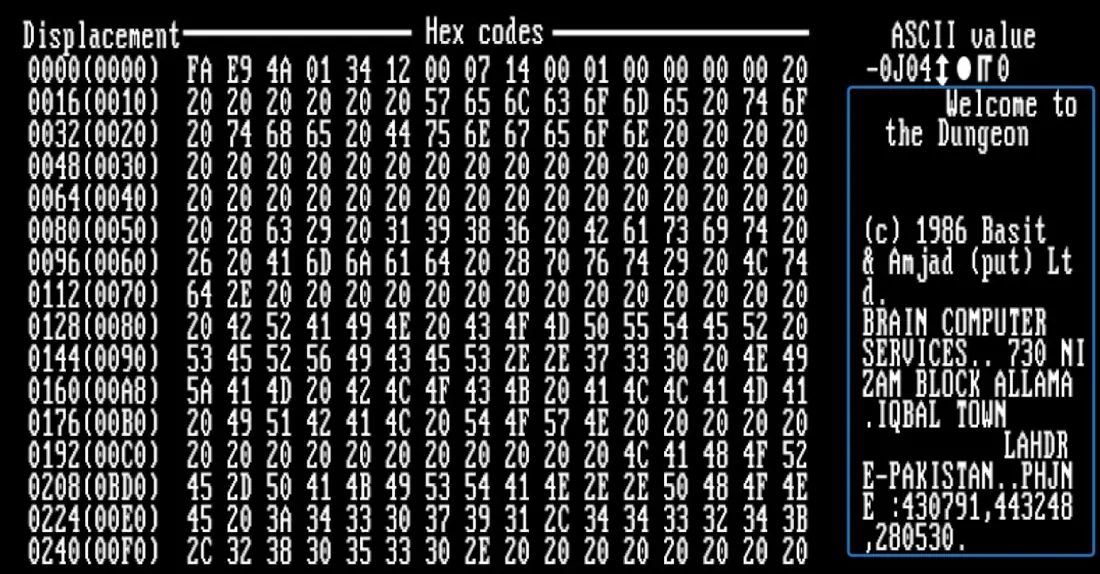
| 1986 | Brain, made by the brothers Basit and Amjad Farooq Alvi in Lahore, Pakistan, infected the boot sector of floppy disks. It was the first virus for IBM PC computers. |
| 1988 | The Morris worm, released on 2 November 1988, copied itself across the young Internet and slowed thousands of computers. |
| 2000 | ILOVEYOU arrived in May 2000 as an e-mail with the attachment LOVE-LETTER-FOR-YOU.TXT.vbs; opening it overwrote picture and music files and mailed itself to everyone in the address book. |
| 2017 | WannaCry ransomware struck on 12 May 2017. It locked the files of more than 200,000 computers in over 150 countries and demanded 300 US dollars in Bitcoin from each victim. |
How a virus spreads
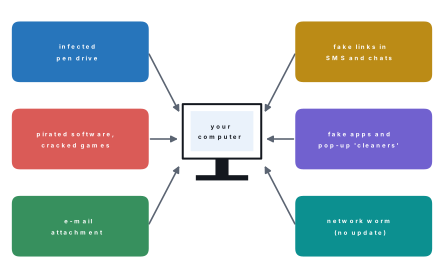
A virus cannot do anything until its host file is opened or run. It then copies itself into other files, into the boot sector of disks, or onto any pen drive plugged into the computer, and each copy waits for the next person to run it. The common routes into a computer are:
- infected pen drives and external disks passed from computer to computer, a very common route in school labs and print shops;
- pirated software, cracked games and "free" copies of paid programs from untrusted websites;
- e-mail attachments from strangers, or from friends whose computers are infected;
- links in SMS, chat and social media that lead to infected downloads;
- fake apps installed from outside the official app stores, and fake pop-ups saying "Your PC is infected — download this cleaner";
- networks: worms travel by themselves to computers that are missing security updates, and viruses spread through shared folders.
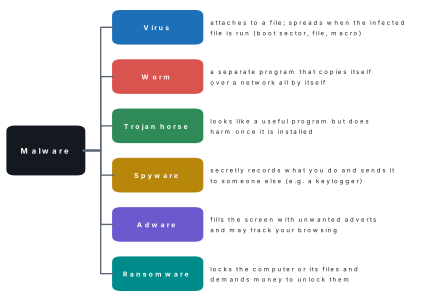
Students often call every harmful program a virus. Malware is the general name. A virus is the kind that hides inside other files; a worm, a Trojan horse, spyware, adware and ransomware are different kinds, as the next section shows. Write "malware" when you mean all of them.
13.2 Types of malware: virus, worm, Trojan horse, spyware, adware and ransomware
Virus
A virus attaches itself to a host — a program, a document or the boot sector of a disk — and runs whenever the host is used. It spreads only when a person runs or opens the infected host, and it may delete or corrupt files, fill the disk, or slow the computer. Viruses are grouped by where they hide:
| Kind of virus | Where it hides | What happens |
|---|---|---|
| Boot sector virus | the boot sector, the part of a disk the computer reads first when it starts | it loads into memory before the operating system and infects every disk used; e.g. Brain |
| File (program) virus | program files such as those ending in .exe |
it runs each time the program is opened and infects other programs |
| Macro virus | the macros (small programs) inside Word or Excel documents | it spreads when the document is opened and shared; e.g. Melissa (1999) |
| Multipartite virus | both the boot sector and program files | it is hard to remove because it hides in two places |
Worm
A worm is a separate program that copies itself from computer to computer over a network without needing a host file and without anyone running it. It uses weaknesses in software that has not been updated. Even when it does nothing else, a worm uses up network bandwidth and slows everything down. The Morris worm (1988) was one; WannaCry spread as a worm.
| Virus | Worm |
|---|---|
| needs a host file or program | is a complete program by itself |
| spreads when a person runs the infected file | spreads by itself over networks |
| spreads mainly through files and disks | spreads mainly through networks and e-mail |
| damages files on the computer it infects | mainly uses up network speed and computer resources (and may carry other harm) |
| example: Brain | example: Morris worm |
Trojan horse
A Trojan horse is a harmful program disguised as something useful or attractive: a free game, a "crack" for paid software, a "phone speed booster". It does not copy itself; it waits for the user to install it. Once inside, it may steal passwords, open a hidden backdoor that lets a criminal control the computer, or download other malware. The name comes from the old Greek story in which soldiers hid inside a wooden horse that was given to the city of Troy as a gift, and opened the gates at night.
Spyware
Spyware secretly watches what you do and sends the information to someone else: the websites you visit, your messages, your location, or even your camera. A keylogger is spyware that records every key you press, so it captures passwords and PINs as you type them.
Adware
Adware fills the screen with unwanted advertisements — pop-ups, new tabs, banners — changes the browser's home page or search engine, and often tracks your browsing to choose the adverts. It usually comes bundled with "free" programs downloaded from untrusted sites.
| Spyware | Adware |
|---|---|
| hides and works secretly | makes itself very visible with adverts |
| steals information: passwords, messages, browsing | earns money by showing adverts |
| the user often notices nothing | the user notices pop-ups and a changed home page |
| example: a keylogger | example: a toolbar that keeps opening shopping sites |
Ransomware
Ransomware locks the computer or encrypts the files so that they cannot be opened, then shows a message demanding a ransom, usually in a cryptocurrency such as Bitcoin, to unlock them. Paying does not guarantee that the files come back, and it encourages the criminals. The real defence is a backup kept away from the computer and up-to-date software: WannaCry attacked Windows computers that had not installed a security update released in March 2017, two months earlier.
| Type | Needs a host? | Copies itself? | How it gets in | Main harm | Example |
|---|---|---|---|---|---|
| Virus | yes | yes | running an infected file or disk | damages or deletes files | Brain |
| Worm | no | yes | networks, by itself | slows networks; carries other harm | Morris worm |
| Trojan horse | no | no | the user installs a fake "useful" program | backdoor, theft of data | fake game cracks |
| Spyware | no | no | bundled downloads, Trojans | steals private information | keyloggers |
| Adware | no | no | bundled free software | unwanted adverts, tracking | pop-up toolbars |
| Ransomware | no | some do | attachments, worms, Trojans | locks files for money | WannaCry |
Problem. Which type of malware is described? (a) A "free version" of a paid video editor works, but it secretly sends the user's saved passwords to a stranger. (b) A program spreads to every unprotected computer on a college network overnight, although nobody opened anything. (c) After a free download, a browser keeps opening betting and shopping adverts. (d) A screen says "Your files are encrypted. Pay to get them back." (e) A program hidden inside an Excel file infects other spreadsheets when it is opened.
Solution. (a) A Trojan horse carrying spyware: it was disguised as a useful program. (b) A worm: it spread by itself through the network. (c) Adware. (d) Ransomware. (e) A macro virus.
13.3 Symptoms of an infected computer
A computer that is infected usually shows one or more of these signs.
| Area | Symptoms |
|---|---|
| Speed | the computer becomes very slow; programs take long to open; it freezes or restarts by itself |
| Files | files are missing, renamed, damaged or locked; file sizes change; strange new files and icons appear |
| Pen drives | folders on a pen drive turn into shortcuts and the real files seem to disappear |
| Screen | pop-up adverts, strange messages or a ransom note; the browser's home page or search engine changes by itself |
| Security | the antivirus is switched off and cannot be turned on; Task Manager or Settings will not open |
| Network | the Internet is slow, data packs finish quickly, or the disk and network lights flash when you are doing nothing |
| Accounts | friends receive messages, e-mails or links that you never sent |
| Phones | the battery drains fast, the phone gets hot, and unknown apps appear |
A computer can also be slow because its disk is nearly full, too many programs start with it, it is old, or it is overheating. Do not "format the computer" or blame a virus at the first sign. Run a full antivirus scan first; if it finds nothing, look at the disk space and the list of programs that start with Windows.
Problem. What is the likely cause of each problem, and what should be done? (a) In the school lab, the folders on Dipa's pen drive have become shortcuts. (b) Every file on the office computer has a new extension and will not open, and a note on the desktop asks for money. (c) Since Sagar installed a free "video downloader", his browser shows adverts on every page. (d) Classmates get "Look at this video of you!" links from Anjali's account.
Solution. (a) A virus or worm on the pen drive that hides the real folders and creates shortcuts that run it. Do not click the shortcuts; scan the pen drive with an updated antivirus on a protected computer, then show hidden files and copy them to safety. (b) Ransomware. Disconnect the computer from the network at once so that it cannot spread, do not pay, report it, and restore the files from a backup after the computer has been cleaned. (c) Adware that came with the free program. Uninstall the program, remove unknown browser extensions, reset the browser and scan. (d) Her account has been hacked (or her device infected). She should change the password from a safe device, switch on two-step verification, log out of all other devices, and warn friends not to open the link.
13.4 Antivirus software: how it works and examples
Antivirus software is a utility program that detects, blocks and removes viruses and other malware from a computer, a phone or a storage device.
How antivirus software works
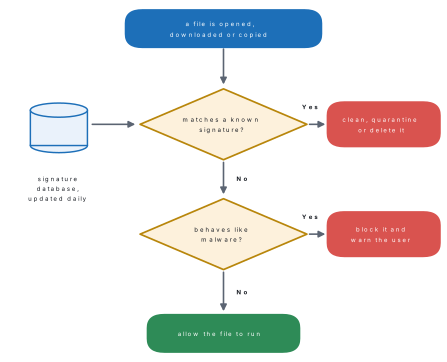
- Signature checking. Every known virus contains a recognisable pattern of code, its signature. The antivirus keeps a database of signatures (also called virus definitions) and compares files with it. New malware appears every day, so the database must be updated regularly, usually automatically over the Internet.
- Heuristic (behaviour) checking. To catch new malware that is not yet in the database, the antivirus also watches for suspicious behaviour, such as a program trying to change hundreds of files, to hide itself or to switch off the antivirus.
- Real-time protection. The antivirus runs all the time in the background and checks each file the moment it is opened, downloaded, copied or arrives on a pen drive.
- Scanning. The user can also run a quick scan (the places malware usually hides), a full scan (every file on every disk) or a custom scan (one folder or pen drive), and schedule scans automatically.
- Action. When it finds malware, the antivirus can clean (repair) the file, quarantine it — move it into a locked area where it cannot run or spread, so that it can be checked or restored later — or delete it.
Examples of antivirus software
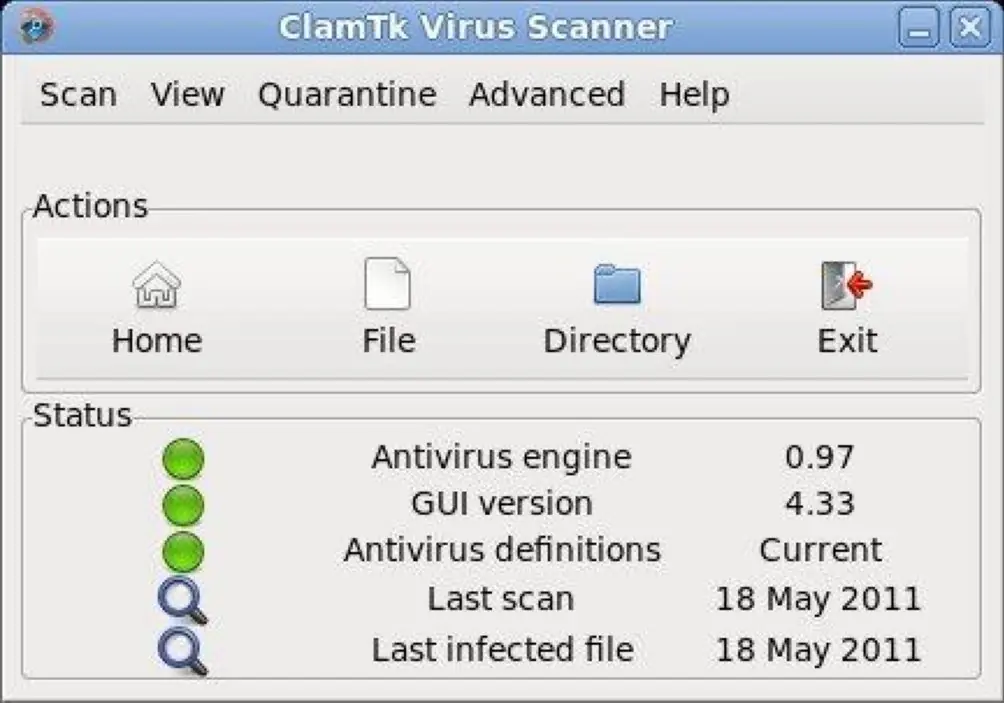
Microsoft Defender comes built into Windows 10 and 11 (in the Windows Security app). Other well-known programs are Avast, AVG, Avira, Kaspersky, Norton 360, McAfee, Bitdefender, ESET NOD32 and Quick Heal; ClamAV is free and open-source, and ClamTk is a simple window for it on Linux. Phones have antivirus apps too, but on a phone the most important protection is to install apps only from the official store.
Running two real-time antivirus programs together makes them fight over every file, which slows the computer and can make it crash. Use one good antivirus, keep it updated, and use a second program only for an occasional manual scan.
An antivirus is not the same as a firewall, which you will study again in Grade 9. A firewall is a guard on the network connection; an antivirus is a guard on the files.
| Antivirus | Firewall |
|---|---|
| checks files and programs for malware | checks the data coming in and going out through the network |
| detects, quarantines and removes malware already on the computer | blocks unauthorised connections before they reach the computer |
| works with a database of virus signatures | works with rules about which programs and addresses may connect |
| example: Microsoft Defender Antivirus, Kaspersky | example: Windows Defender Firewall, the firewall in a router |
Problem. Bina and Hari both copy the same game from a friend's pen drive. Hari's antivirus, updated this morning, quarantines it as a virus. Bina's antivirus has not been updated for four months and lets it run. Explain why, and say what Bina should do now.
Solution. Antivirus software finds known malware by comparing files with its signature database. The virus is new, so its signature was added to the database only recently: Hari's updated copy has it and Bina's old copy does not, and the behaviour check did not catch it either. Bina should update her antivirus at once, run a full scan, quarantine or delete what it finds, change her passwords from a safe device, and switch on automatic updates.
13.5 Protecting a computer: safe browsing, updates, backups and strong passwords
No single tool gives complete protection; safety comes from good habits used together.
Install antivirus and keep the firewall on. Use one trusted antivirus with real-time protection and automatic updates, and keep the firewall of the operating system switched on.
Update the operating system and apps. Updates (patches) close the security holes that worms and hackers use. Switch on automatic updates for Windows, Android, the browser and every app. Old systems that no longer receive updates, such as Windows 7, should be replaced or upgraded.
Browse and download safely. Download software only from the official website or app store; never use cracked software. Do not click pop-ups that say your computer is infected. Check that a site's address is spelt correctly and starts with https before typing a password. Do not open e-mail attachments or links you were not expecting, even from friends, until you have checked with them.
Scan pen drives. Scan every pen drive before opening it, do not open unknown pen drives, and switch off AutoPlay so that nothing runs automatically when a drive is plugged in.
Keep backups. A backup is an extra copy of your files kept somewhere else, so that you can get them back after a virus, ransomware, theft or a disk failure. Follow the 3-2-1 rule:
| 3 | 2 | 1 |
|---|---|---|
| keep three copies of important files | on two different kinds of storage, e.g. the computer and an external disk | with one copy away from the computer, e.g. in cloud storage or at another place |
Unplug the backup disk after copying: ransomware can lock files on any disk that is connected.
Use strong passwords and MFA. A strong password is long (at least 12 characters), mixes capital and small letters, numbers and symbols, contains no name or birthday, and is different for every account. A passphrase of unrelated words such as Cloud-Tiger-Rice-73! is easy to remember and hard to guess. Switch on multi-factor authentication, so that a stolen password alone is not enough to log in. Never share passwords, and lock the screen when you leave the computer.
Use a standard account. Do everyday work in a standard (non-administrator) user account, so that malware cannot easily install itself or change system settings.
Problem. The 20 computers in a school lab often catch viruses from students' pen drives, and last year the teacher lost the year's marks when a disk failed. Write a five-point plan for the lab.
Solution. (1) Install one antivirus on every computer, with automatic updates and real-time scanning of pen drives; switch off AutoPlay. (2) Turn on automatic Windows updates and keep the firewall on. (3) Give students standard accounts so that they cannot install programs; only the teacher's account is an administrator. (4) Keep the marks under the 3-2-1 rule: on the office computer, on an external disk kept unplugged in a cupboard, and in the school's cloud storage. (5) Teach the rules: no pirated software, no unknown pen drives, no clicking on pop-ups, and strong, separate passwords for every account.
How to answer the protection question
Name the habit and say what it protects against: "Install updates — they close the security holes that worms such as WannaCry use." A list of habits without reasons earns only half the marks.
With your teacher: (1) Open the antivirus on a lab computer and note the date of its last update and last scan; run a quick scan of a pen drive. (2) Open the Quarantine list and see whether any files have been locked away. (3) Check whether Windows updates and the firewall are switched on. (4) Make a poster of the 3-2-1 backup rule for the lab wall, and find out where your school keeps its backups. (5) Write three warning signs of an infected pen drive on the board for the next class.
Chapter summary
- A computer virus is a harmful program that attaches itself to files, copies itself when the file is run, and damages data without the user's knowledge; malware is the general name for all harmful programs.
- History: Creeper (1971), Elk Cloner (1982), the name "computer virus" by Fred Cohen (1983–84), Brain from Lahore (1986, first PC virus), Morris worm (1988), ILOVEYOU (2000), WannaCry (2017).
- Viruses spread through pen drives, pirated software, e-mail attachments, fake links and apps, and networks.
- Types: virus (needs a host; boot sector, file, macro, multipartite), worm (spreads by itself over networks), Trojan horse (disguised as useful), spyware (secretly watches; keyloggers), adware (unwanted adverts), ransomware (locks files for money).
- Symptoms: slowness, crashes, missing or locked files, shortcut folders on pen drives, pop-ups, a disabled antivirus, messages sent without you.
- Antivirus detects, blocks and removes malware by signature checking, behaviour checking and real-time scanning, then cleans, quarantines or deletes; it must be updated. Examples: Microsoft Defender, Avast, Kaspersky, Norton, ClamAV. A firewall guards the network, an antivirus the files.
- Protection: antivirus and firewall, automatic updates, safe browsing and downloads, scanning pen drives, the 3-2-1 backup rule, strong unique passwords with MFA, and standard user accounts.
Practice questions
Group A — Objective (1 mark each)
- A computer virus is a [1]aliving germbharmful programchardware faultdkind of cable
- The name "computer virus" was first used by [1]aFred CohenbCharles BabbagecBill GatesdTim Berners-Lee
- Brain, the first virus for IBM PCs, appeared in [1]a1971b1986c2000d2017
- Malware that copies itself over a network without a host file is a [1]aTrojan horsebwormcmacro virusdadware
- A harmful program disguised as a useful game or tool is a [1]awormbTrojan horsecfirewalldcookie
- Malware that locks your files and demands money is [1]aspywarebadwarecransomwaredfreeware
- A program that secretly records every key you press is a kind of [1]aadwarebspywarecantivirusdcompiler
- Which of these is NOT antivirus software? [1]aKasperskybAvastcMicrosoft DefenderdMicrosoft Excel
- Moving an infected file into a locked area where it cannot run is called [1]aformattingbquarantineccompressingduploading
- A boot sector virus infects [1]athe monitorbthe part of a disk read first when the computer startsconly e-mailsdthe printer
- Pop-up adverts and a browser home page that changes by itself are signs of [1]aadwareba full diskca loose cableda firewall
- The 3-2-1 backup rule means keeping [1]a3 copies on 2 kinds of storage with 1 copy elsewhereb3 passwords for 2 accountsc3 antivirus programsdonly 1 copy
- WannaCry spread mainly to Windows computers that [1]ahad no keyboardbhad not installed a security updatecwere switched offdhad a strong password
Answers to Group A
1. (b) — a virus is a program written by a person.
2. (a) — Fred Cohen, on the suggestion of Leonard Adleman, 1983–84.
3. (b) — 1986, by the Alvi brothers of Lahore.
4. (b) — a worm needs no host and spreads by itself.
5. (b) — named after the wooden horse of Troy.
6. (c) — ransomware demands a ransom.
7. (b) — a keylogger is spyware.
8. (d) — Excel is a spreadsheet program.
9. (b) — quarantine isolates the file safely.
10. (b) — the boot sector is read when the computer starts.
11. (a) — adware shows unwanted adverts and changes browser settings.
12. (a) — three copies, two media, one copy away from the computer.
13. (b) — Microsoft had released the patch two months earlier.
Group B — Short answer (2 marks each)
- What is a computer virus? Write any two ways by which it spreads. [2]
- Differentiate between a virus and a worm. [2]
- What is a Trojan horse? Why is it given this name? [2]
- What is ransomware? Write one way to protect your files from it. [2]
- Differentiate between spyware and adware. [2]
- Write any four symptoms of a computer infected by a virus. [2]
- What is antivirus software? Name any two antivirus programs. [2]
- What is a virus signature? Why must antivirus software be updated regularly? [2]
- Differentiate between antivirus software and a firewall. [2]
- What is a backup? Explain the 3-2-1 backup rule. [2]
Answers to Group B
1. A computer virus is a harmful program that attaches itself to other files, copies itself when the infected file is run, and damages data without the user's knowledge. It spreads (any two) through infected pen drives, pirated software, e-mail attachments, fake links and downloads, and shared network folders.
2. A virus needs a host file and spreads only when a person runs the infected file; a worm is a complete program that copies itself over a network by itself. A virus mainly damages files; a worm mainly uses up network speed and computer resources.
3. A Trojan horse is a harmful program disguised as a useful or attractive one, such as a free game or a software crack; it does harm (steals data, opens a backdoor) once installed and does not copy itself. It is named after the Greek story of soldiers hidden in a wooden horse given to Troy as a gift.
4. Ransomware is malware that locks a computer or encrypts its files and demands money to unlock them. Protection (any one): keep a backup on a disk that is unplugged after use or in cloud storage; install security updates; do not open unknown attachments.
5. Spyware hides and secretly collects information such as passwords and browsing and sends it to someone; adware shows unwanted adverts and is very visible. Example: a keylogger is spyware; a toolbar that keeps opening shopping sites is adware.
6. Any four: the computer becomes slow or freezes; files go missing, change or will not open; folders on pen drives turn into shortcuts; pop-ups or strange messages appear; the antivirus is switched off by itself; friends receive messages you did not send; the Internet or data use is unusually high.
7. Antivirus software is a utility program that detects, blocks and removes viruses and other malware. Examples (any two): Microsoft Defender, Avast, AVG, Avira, Kaspersky, Norton 360, McAfee, Bitdefender, ESET NOD32, Quick Heal, ClamAV.
8. A virus signature is the recognisable pattern of code that identifies a known virus; antivirus programs keep a database of them. It must be updated because new malware appears every day, and an antivirus can recognise by signature only the malware whose signature is already in its database.
9. Antivirus software checks files and programs for malware and removes or quarantines it; a firewall checks the data entering and leaving through the network and blocks unauthorised connections. Antivirus uses a signature database; a firewall uses rules about which programs and addresses may connect.
10. A backup is an extra copy of files kept somewhere else so that they can be recovered after loss or damage. The 3-2-1 rule: keep 3 copies of important files, on 2 different kinds of storage, with 1 copy away from the computer (for example in cloud storage).
Group C — Long answer (4 marks each)
- What is malware? Explain any four types of malware with an example of each. [1+3]
- Write a short history of computer viruses, describing any four important events. [4]
- What is antivirus software? Explain how it detects and deals with malware. [1+3]
- Explain any four ways of protecting a computer from viruses and other malware. [4]
- A cyber café's computers have become slow, show adverts on every page, and the folders on customers' pen drives turn into shortcuts. Name the likely malware and write a plan to clean the computers and keep them safe. [1+3]
Answers to Group C
1. Malware (malicious software) is any program made to harm a computer or its user (1 mark). Any four (3 marks): Virus — attaches itself to a file and spreads when the file is run; e.g. Brain (boot sector virus). Worm — a separate program that copies itself over networks by itself; e.g. the Morris worm. Trojan horse — disguised as a useful program, it does harm once installed; e.g. a fake game crack that steals passwords. Spyware — secretly records what the user does and sends it to someone; e.g. a keylogger. Adware — shows unwanted adverts and tracks browsing; e.g. a pop-up toolbar. Ransomware — locks the files and demands money; e.g. WannaCry (2017).
2. Any four, 1 mark each: 1971 Creeper — Bob Thomas's program moved between ARPANET computers showing "I'M THE CREEPER : CATCH ME IF YOU CAN"; Reaper was written to delete it. 1982 Elk Cloner — a 15-year-old's program spread on Apple II floppy disks and showed a poem. 1983–84 — Fred Cohen demonstrated a self-copying program and gave it the name computer virus. 1986 Brain — made by the Alvi brothers in Lahore, Pakistan; infected the boot sector of floppy disks; the first PC virus. 1988 Morris worm — spread over the Internet and slowed thousands of computers. 2000 ILOVEYOU — an e-mail worm that overwrote picture and music files. 2017 WannaCry — ransomware that locked over 200,000 computers in more than 150 countries.
3. Antivirus software is a utility program that detects, blocks and removes malware (1 mark). How it works (3 marks): signature checking — it compares files with a database of known virus signatures, which must be updated regularly; behaviour (heuristic) checking — it watches for suspicious actions such as a program changing hundreds of files, to catch new malware; real-time protection — it checks every file as it is opened, downloaded or copied, including pen drives, and the user can run quick, full or custom scans; action — infected files are cleaned, quarantined (locked away where they cannot run) or deleted.
4. Any four, 1 mark each, with the reason: antivirus and firewall — real-time scanning removes malware and the firewall blocks unauthorised connections; updates — patches close the security holes that worms use, as WannaCry showed; safe browsing and downloading — official sites and stores only, no cracked software, no pop-ups or unknown attachments; scanning pen drives and switching off AutoPlay — stops the commonest school route; backups by the 3-2-1 rule — files can be recovered after ransomware or disk failure; strong unique passwords with MFA — a stolen password alone cannot open the account; standard user accounts — malware cannot easily install itself.
5. The slowness and adverts point to adware (and possibly spyware) on the computers, and the shortcut folders to a pen-drive virus or worm (1 mark). Plan (3 marks): disconnect each infected computer from the network; update the antivirus and run a full scan, quarantining or deleting what it finds; uninstall unknown programs and browser extensions and reset the browsers; scan customers' pen drives and show hidden files so they can recover the real folders; install all Windows updates and keep the firewall on; switch off AutoPlay and give customers a standard account that cannot install programs; and keep a clean backup of the café's own files under the 3-2-1 rule.
Practise more: Computer Science question bank