Question bank · 38 min read
Computer Science: Unit-wise Objective Question Bank
Computer Science in grade 8 is examined by your own school, in a written paper of 50 marks and two hours, beside the practical work in the lab. Group A of that paper is ten one-mark objective items. They are the quickest marks in the paper and the easiest to lose: a full form remembered wrongly, a hub confused with a switch, a binary number read from the wrong end, a QBASIC MOD worked out as a division. This chapter drills those items lesson by lesson for all twenty lessons of the Computer Science 8 book, in the same order as the book.
Each section opens with a facts line — the few facts that the items of that lesson actually use. Then come eight to ten items, and then a key that gives each answer with a one-line reason. Work an item in under a minute, check it in ten seconds, and move on. The reasons matter more than the letters: a reason you can repeat is a mark you will not lose next time.
| Group | Items | Marks each | Total | What it tests |
|---|---|---|---|---|
| A | 10 | 1 | 10 | one fact, a full form, a short calculation or the output of one line of code |
| B | 10 | 2 | 20 | a definition with an example, two differences, a short program or a few steps |
| C | 5 | 4 | 20 | a full explanation, a diagram, a longer program or HTML page, or a scenario |
| Total | 25 | 50 | 2 hours |
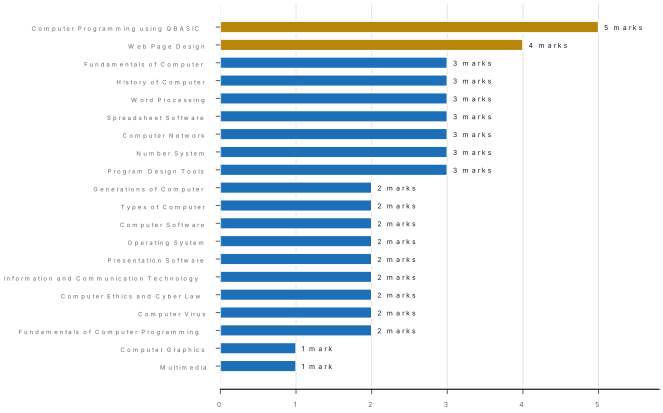
There is no national specification grid for this school paper. The weights in the chart below are the ones this bank uses for its model papers (chapter 25). The six lessons on computer fundamentals carry 14 marks, the three on application software 8, the five on the web, communication and society 13, number system, graphics and multimedia 5, and the three on programming 10.
Every item below is an original practice item written to the pattern above and to the lessons of the Computer Science 8 book. None is claimed to come from any school's paper. Every calculation, conversion and QBASIC result was worked out independently before it was written down.
23.1 Fundamentals of Computer
Facts. A computer accepts data, processes it under a program, stores it and gives information (Latin computare, to calculate). Data are raw facts; information is processed data. Hardware can be touched; software is a set of programs. IPOS: input → CPU (control unit directs, ALU calculates and compares) → output, with storage (RAM temporary; hard disk, SSD, pen drive permanent). Characteristics: speed (ms, μs, ns), accuracy (GIGO), diligence, versatility, storage, automation. 1 KB = 1024 bytes; 1 GB = 1024 MB.
- Processed, meaningful data is called [1]adatabinformationcan instructionda program
- Which part of the CPU compares two marks to find the larger? [1]acontrol unitbarithmetic logic unitcRAMdhard disk
- A teacher typed 29 instead of 92, so a student's percentage came out wrong. This illustrates [1]adiligencebGIGOcversatilitydautomation
- Which device is both an input and an output device? [1]ascannerbprinterctouch screendspeaker
- A computer prints 5,000 admit cards with the same quality from the first to the last. This shows its [1]adiligencebstoragecversatilitydautomation
- Which memory loses its contents when the power goes off? [1]aROMbhard diskcRAMdpen drive
- How many 4 MB photos can a 32 GB memory card hold, taking 1 GB = 1024 MB? [1]a8,000b8,192c4,096d1,024
- The Nagarik App is an example of computers used in [1]aagriculturebgovernment servicescentertainmentdweather forecasting
Answers to 23.1
1. (b) — data become information only after processing.
2. (b) — comparing is a logical operation, done by the ALU.
3. (b) — Garbage In, Garbage Out: wrong input gives wrong output.
4. (c) — it senses touch (input) and shows pictures (output).
5. (a) — working on without tiring or losing quality is diligence.
6. (c) — RAM is temporary; the others keep data without power.
7. (b) — 32 × 1024 = 32,768 MB, and 32,768 ÷ 4 = 8,192.
8. (b) — citizens keep records and use government services in it.
23.2 History of Computer
Facts. Abacus: counting boards c. 2700 BC; on a suanpan a heaven bead = 5 and an earth bead = 1. Napier's bones (1617): multiplication. Slide rule (Oughtred, c. 1622): analog. Pascaline (Pascal, 1642): add and subtract, automatic carry. Stepped reckoner (Leibniz, 1673): all four operations. Jacquard loom (1804): punched cards. Babbage: Difference Engine (1822), Analytical Engine (1834) with mill (processor) and store (memory) — father of the computer; Ada Lovelace: first programmer (1843). Hollerith's tabulator: 1890 US census → IBM (1924). Mark I (1944): electromechanical. ABC (1942): first electronic digital. ENIAC (1946): first general-purpose electronic, 17,468 tubes. EDVAC: stored program. UNIVAC I (1951): first commercial computer in the USA. Nepal: IBM 1401 rented in 2028 BS for the census; ICL 2950/10 in 2038 BS.
- On a Chinese abacus, the ones rod shows one heaven bead and three earth beads at the beam. The digit is [1]a4b8c6d15
- Numbered rods that made multiplication easy were invented by [1]aBlaise PascalbJohn NapiercLeibnizdJacquard
- The machine with a stepped drum that could add, subtract, multiply and divide was the [1]aPascalinebstepped reckonercabacusdslide rule
- In the Analytical Engine, the "mill" did the work of today's [1]amemorybCPUcprinterdkeyboard
- Punched cards were first used to control a [1]atabulating machinebloom for weavingcPascalinedslide rule
- Which of these was electromechanical? [1]aENIACbHarvard Mark IcUNIVAC IdABC
- The first commercial computer made in the USA was [1]aENIACbEDVACcUNIVAC IdMark I
- Nepal's first computer, rented for the census of 2028 BS, was the [1]aICL 2950/10bIBM 1401cApple IIdUNIVAC I
Answers to 23.2
1. (b) — 5 + 1 + 1 + 1 = 8.
2. (b) — Napier's bones, 1617.
3. (b) — Leibniz's stepped reckoner, 1673; the Pascaline only added and subtracted.
4. (b) — the mill did the arithmetic; the store was the memory.
5. (b) — Jacquard's loom of 1804; Hollerith borrowed the idea later.
6. (b) — relays and a rotating shaft; the others were electronic.
7. (c) — the first was accepted by the US Census Bureau in 1951.
8. (b) — a second-generation computer rented at Rs 1,25,000 a month.
23.3 Generations of Computer
Facts. A generation is a stage marked by a new main component. 1st (1946–1958): vacuum tubes, machine language, milliseconds — ENIAC, UNIVAC I. 2nd (1958–1964): transistors (Bell Labs, 1947), assembly, FORTRAN, COBOL, microseconds — IBM 1401. 3rd (1964–1975): integrated circuits (Kilby, 1958), keyboards and monitors, time-sharing, nanoseconds. 4th (1975–): microprocessors (Intel 4004, 1971, 2,300 transistors), PCs, GUI, Internet. 5th: artificial intelligence and parallel processing. VLSI = Very Large Scale Integration. Moore's law: transistors double about every two years.
- The main component of second-generation computers was the [1]avacuum tubebtransistorcintegrated circuitdmicroprocessor
- ENIAC belongs to the [1]afirst generationbsecond generationcthird generationdfourth generation
- Many transistors, resistors and capacitors made on one small piece of silicon form [1]aa vacuum tubeban integrated circuitca relayda punched card
- The Intel 4004 of 1971 was the first [1]atransistorbintegrated circuitcmicroprocessordsupercomputer
- Operations measured in microseconds are typical of the [1]afirst generationbsecond generationcthird generationdfifth generation
- Understanding natural language and learning from data are aims of the [1]asecond generationbthird generationcfourth generationdfifth generation
- VLSI stands for [1]aVery Large Scale IntegrationbVery Long Silicon InstructioncVisual Large Scale InterfacedVery Low Speed Integration
- A chip has 1 million transistors. If the number doubles every two years, after four years it is expected to have [1]a2 millionb4 millionc8 milliond16 million
Answers to 23.3
1. (b) — transistors replaced vacuum tubes.
2. (a) — it used about 17,468 vacuum tubes.
3. (b) — an integrated circuit, or chip.
4. (c) — a whole CPU on one chip.
5. (b) — 1st milliseconds, 2nd microseconds, 3rd nanoseconds.
6. (d) — the fifth generation is about AI.
7. (a) — Very Large Scale Integration.
8. (b) — four years is two doublings: 1 → 2 → 4 million.
23.4 Types of Computer
Facts. Analog computers measure continuous data (speedometer with a needle, mercury thermometer, slide rule); digital computers count discrete data in 0s and 1s; hybrid computers do both (ECG, ICU monitor, petrol-pump dispenser). By size: supercomputer (fastest, measured in FLOPS; weather, research), mainframe (thousands of users; banks, airlines), minicomputer (tens to hundreds of users; PDP-11), microcomputer (one user, microprocessor). Microcomputers: desktop, laptop, tablet, smartphone, workstation (3D design, video). General-purpose computers run many programs; special-purpose (embedded) ones do one job.
- A car's speedometer with a moving needle works as [1]aa digital computerban analog computerca hybrid computerda mainframe
- A petrol-pump dispenser measures the flow of fuel and shows litres and rupees as numbers. It is [1]aanalogbdigitalchybridda supercomputer
- The speed of a supercomputer is measured in [1]abpsbFLOPScdpidrpm
- A bank's central computer that serves thousands of users at once is a [1]amicrocomputerbminicomputercmainframedanalog computer
- An architect needs one powerful computer for 3D models. The best choice is a [1]aworkstationbtabletcmainframedembedded computer
- The computer inside a washing machine is [1]ageneral-purposebspecial-purposeca supercomputerda mainframe
- Forecasting the monsoon over South Asia needs a [1]asmartphonebsupercomputercminicomputerdanalog computer
- A smartphone is a kind of [1]amainframebmicrocomputercanalog computerdminicomputer
Answers to 23.4
1. (b) — the needle moves smoothly; it measures.
2. (c) — analog measuring, digital calculating.
3. (b) — floating-point operations per second.
4. (c) — mainframes serve thousands of users reliably.
5. (a) — a fast single-user machine with a strong graphics card.
6. (b) — it does one job all its life (an embedded system).
7. (b) — huge parallel calculations need a supercomputer.
8. (b) — one user, one microprocessor.
23.5 Computer Software
Facts. System software runs the computer: operating system, device drivers (one per device), utility programs (antivirus, backup, compression, disk cleanup) and language processors (assembler; compiler — whole program at once; interpreter — line by line, stops at the first error). Application software does the user's work: packaged (made for many users — Word, Chrome, VLC) or tailor-made (for one organisation). Licences: proprietary (buy; code secret), freeware (free; code secret), shareware (free trial, then pay), open source (code open to change and share). Remove programs with Uninstall.
- A program that lets the operating system control a scanner is a [1]autilitybdevice driverccompilerdgame
- 7-Zip, which compresses files, is [1]aapplication softwarebutility softwarecan operating systemda device driver
- A translator that runs a program one line at a time and stops at the first error is [1]aa compilerban interpretercan assemblerda driver
- Software written for one hospital's own billing and records is [1]apackagedbtailor-madecfreewaredshareware
- Software that may be used free for 30 days and must then be bought is [1]afreewarebsharewarecopen sourcedfirmware
- Software whose source code anyone may read, change and share is [1]aproprietarybfreewarecopen sourcedshareware
- Which of these is proprietary software? [1]aLibreOfficebLinuxcMicrosoft WindowsdFirefox
- The safe way to remove a program from Windows 11 is to [1]adelete its desktop iconbuse Settings → Apps → Installed apps → Uninstallcdelete its folderdempty the Recycle Bin
Answers to 23.5
1. (b) — each device needs its own driver.
2. (b) — it maintains files, so it is a utility.
3. (b) — an interpreter works line by line.
4. (b) — made for one organisation's own needs.
5. (b) — try before you buy.
6. (c) — open source.
7. (c) — Windows must be licensed; the others are open source.
8. (b) — deleting icons or folders leaves the program or breaks it.
23.6 Operating System
Facts. The OS manages hardware and software and gives the user interface: process (multitasking), memory, file and device management, security, user interface. Single-user vs multi-user; CUI (typed commands — MS-DOS, Linux terminal) vs GUI (windows, icons, menus); desktop (Windows, macOS, Linux) vs mobile (Android, iOS). Linux: Linus Torvalds, 1991, open source; Android: Google, built on Linux. Dialog box: option button chooses one, check boxes several. Path: D:\School\Grade 8\file.docx. Copy: Ctrl + C, Ctrl + V; move: Ctrl + X, Ctrl + V; rename: F2. Shift + Delete and pen-drive deletions skip the Recycle Bin. Settings: Win + I; Nepal's time zone UTC+05:45.
- Running a song while typing in Word is handled by the OS's [1]afile managementbprocess managementcsecurityddevice management
- MS-DOS has [1]aa GUIba CUIca touch interfaceda voice interface
- Linux was created by [1]aBill GatesbLinus TorvaldscSteve JobsdTim Berners-Lee
- In a dialog box, the control that allows only one choice from a group is the [1]acheck boxboption buttonctext boxdspin box
- For the file
D:\School\Grade 8\notes.txt, the folder that directly contains it is [1]aD:bSchoolcGrade 8dnotes - Pressing Ctrl + X and then Ctrl + V on a file [1]acopies itbmoves itcrenames itddeletes it
- A file deleted from a pen drive [1]agoes to the Recycle Binbis deleted permanentlycmoves to Documentsdis hidden
- The shortcut that opens Windows Settings is [1]aWin + EbWin + IcWin + DdAlt + F4
Answers to 23.6
1. (b) — sharing the CPU among programs is process management.
2. (b) — commands are typed.
3. (b) — in 1991, as open source.
4. (b) — option (radio) buttons; check boxes allow several.
5. (c) — the last folder before the file name.
6. (b) — cut and paste moves.
7. (b) — removable drives have no Recycle Bin.
8. (b) — Win + E opens File Explorer, Win + D the desktop.
23.7 Word Processing
Facts. Word processors: Microsoft Word (.docx), LibreOffice Writer (.odt), Google Docs. Save Ctrl + S; Save As F12 (a new copy); Print Ctrl + P (pages 1-3, 6); Undo Ctrl + Z, Redo Ctrl + Y; Cut, Copy, Paste Ctrl + X, C, V; Find Ctrl + F, Replace Ctrl + H; spelling F7; Bold, Italic, Underline Ctrl + B, I, U; Left, Centre, Right, Justify Ctrl + L, E, R, J. Header at the top, footer at the bottom; Insert → Page Number. Table cells = rows × columns; merging k cells into one removes k − 1. Wrap Text: In Line, Square, Tight, Top and Bottom, Behind, In Front. WordArt (Writer: Fontwork). Mail merge (Mailings tab) = main document + data source → one copy per row.
- Which of these is not a word processor? [1]aMicrosoft WordbLibreOffice WritercGoogle DocsdMicrosoft Excel
- Ctrl + J applies [1]ajustified alignmentbboldca new pagedunderline
- To keep the original file and save a changed copy under a new name, use [1]aSavebSave AscPrintdClose
- Printing with Pages:
3-5, 8prints how many pages of each copy? [1]a3b4c5d8 - Text that repeats at the bottom of every page is the [1]aheaderbfootercmargindcaption
- A table has 4 columns and 5 rows. After the 4 cells of the top row are merged, it has [1]a17 cellsb20 cellsc16 cellsd19 cells
- The Start Mail Merge command is on the [1]aInsert tabbMailings tabcReferences tabdReview tab
- Text flows around the rectangular box of a picture with the wrapping option [1]aIn Line with TextbSquarecBehind TextdTop and Bottom
Answers to 23.7
1. (d) — Excel is a spreadsheet.
2. (a) — L, E, R, J are left, centre, right, justify.
3. (b) — Save As makes a new copy; Save overwrites.
4. (b) — pages 3, 4, 5 and 8.
5. (b) — the footer; the header is at the top.
6. (a) — 4 × 5 = 20, and merging 4 cells into 1 leaves 20 − 3 = 17.
7. (b) — Mailings → Start Mail Merge.
8. (b) — Square wraps around the box; Tight follows the outline.
23.8 Spreadsheet Software
Facts. A workbook holds worksheets; a cell address is column + row (C5); a range B2:E6 has columns × rows cells. Formulas begin with =; brackets first, then ^, then * and /, then + and -. Relative references (B2) change when copied; absolute ones ($B$1) do not. SUM, AVERAGE, MAX, MIN, COUNT (numbers only), IF(condition, if_true, if_false). ##### means the column is too narrow. Sort reorders rows; filter hides rows that do not match. Charts: column and bar compare items, line shows change over time, pie shows parts of a whole (angle = share × 360°).
- How many cells are in the range A2:C6? [1]a10b12c15d18
- The result of
=20-8/4is [1]a3b18c12d2 - A1:A4 hold 10, 15, 20 and 35. The result of
=AVERAGE(A1:A4)is [1]a20b80c35d4 - B1:B5 hold 12, Absent, 9, 15 and 8. The result of
=COUNT(B1:B5)is [1]a5b4c44d1 - C2 holds 40. The formula
=IF(C2>=40,"Pass","Fail")shows [1]aPassbFailcTRUEd40 - The formula
=B2*$E$1in C2 is copied to C3. In C3 it becomes [1]a=B3*$E$1b=B3*$E$2c=B2*$E$1d=C3*$F$1 - To show only the rows in which Science is 60 or more, use [1]aSortbFiltercMerge & CenterdAutoFill
- The best chart for Pokhara's temperature in each month of a year is a [1]apie chartbline chartctabledWordArt
- A cell shows
#####. The reason is that [1]athe formula is wrongbthe column is too narrowca number is divided by zeroda function is misspelled - In a pie chart of a family's spending of Rs 24,000, the slice for Rs 6,000 has an angle of [1]a60°b90°c25°d120°
Answers to 23.8
1. (c) — 3 columns (A, B, C) × 5 rows (2 to 6) = 15.
2. (b) — 8 ÷ 4 = 2 first, then 20 − 2 = 18.
3. (a) — (10 + 15 + 20 + 35) ÷ 4 = 80 ÷ 4 = 20.
4. (b) — COUNT ignores the text "Absent".
5. (a) — 40 >= 40 is TRUE.
6. (a) — B2 moves down a row; $E$1 stays fixed.
7. (b) — a filter hides rows that do not match.
8. (b) — a line chart shows change over time.
9. (b) — widen the column to see the number.
10. (b) — 6,000 ÷ 24,000 = ¼, and ¼ × 360° = 90°.
An absolute reference has a dollar sign before both parts, $E$1; E$1 fixes only the row. A range uses a colon, A2:C6; a comma joins separate ranges, A1:A5,C1:C5. Read every $ and every : in an option before choosing it.
23.9 Presentation Software
Facts. PowerPoint (.pptx), LibreOffice Impress (.odp), Google Slides. New slide Ctrl + M; layouts arrange placeholders; a theme designs all slides. A transition works between slides; an animation works on objects — entrance (green), emphasis (yellow), exit (red), motion paths; starts On Click, With Previous or After Previous. Views: Normal, Outline, Slide Sorter, Notes Page, Reading View, Slide Show. The slide master changes every slide. F5 from the beginning, Shift + F5 from the current slide, Esc ends, B blacks the screen. 6 × 6 rule.
- LibreOffice Impress saves presentations as [1]a.pptxb.odpc.odsd.odt
- Ctrl + M in PowerPoint [1]aadds a new slidebopens the slide mastercmutes the sounddmoves a slide
- The effect when one slide changes to the next is [1]aan animationba transitionca layoutda theme
- In PowerPoint, entrance animations are marked in [1]agreenbyellowcreddblue
- An animation that starts at the same time as the effect before it is set to [1]aOn ClickbWith PreviouscAfter PreviousdDelay
- The view that shows small thumbnails of all slides for reordering them is [1]aNormalbSlide SortercNotes PagedReading View
- Pressing Shift + F5 [1]astarts the show from the first slidebstarts the show from the current slidecends the showdblacks out the screen
- An 8-slide self-running show moves on every 15 seconds. One run lasts [1]a1 minuteb2 minutesc23 secondsd2 minutes 30 seconds
Answers to 23.9
1. (b) — .odp, the OpenDocument presentation format.
2. (a) — Ctrl + M is New Slide in PowerPoint and Impress.
3. (b) — transitions work between slides.
4. (a) — green entrance, yellow emphasis, red exit.
5. (b) — With Previous runs together; After Previous waits.
6. (b) — Slide Sorter.
7. (b) — F5 starts from the first slide.
8. (b) — 8 × 15 = 120 seconds = 2 minutes.
23.10 Web Page Design
Facts. The WWW was invented by Tim Berners-Lee at CERN (1989–1991). A web page is one HTML document; a website is related pages under one domain; the home page is index.html. URL = protocol (https://) + domain name + path + file name. HTML: container tags (<p>…</p>) and empty tags (<br>, <hr>, <img>); attributes go in the opening tag. Structure: <html>, <head> with <title> (shown on the tab), <body> (shown in the window). <h1> is the largest heading, <h6> the smallest. <font> size 1–7, default 3. <ul type="square">, <ol type="a" start="3">, <li>. <img src alt width>. <a href>, mailto:, target="_blank". Tables: <tr>, <th>, <td>, colspan, rowspan.
- The World Wide Web was invented by [1]aTim Berners-LeebCharles BabbagecBill GatesdLinus Torvalds
- In
https://www.ntc.net.np/plans.html, the protocol is [1]ahttpsbwwwcnet.npdplans.html - Which of these is an empty (unpaired) tag? [1]a
<hr>b<h1>c<title>d<body> - The text inside
<title>appears [1]aon the browser tabbas the top headingcat the foot of the pagednowhere - The smallest heading tag is [1]a
<h1>b<h6>c<head>d<hr> - A list
<ol type="a" start="3">with two items numbers them [1]aa, bbc, dc3, 4diii, iv - The attribute of
<img>whose text is shown when the picture cannot load is [1]asrcbaltchrefdwidth - Clicking
<a href="mailto:info@school.edu.np">Write to us</a>[1]aopens a web pagebopens a new email messagecdownloads a filedshows a picture - A table cell that stretches down over two rows uses [1]a
colspan="2"browspan="2"ccellspacing="2"dborder="2" - The default size of text in the
<font>tag is [1]a1b3c5d7
Answers to 23.10
1. (a) — at CERN, 1989–1991.
2. (a) — https is the protocol; www.ntc.net.np is the domain name.
3. (a) — <hr> has no closing tag.
4. (a) — the title belongs to the head and shows on the tab.
5. (b) — <h1> is the largest, <h6> the smallest.
6. (b) — small letters starting from the third, c.
7. (b) — alt is the alternative text.
8. (b) — mailto: opens the email program.
9. (b) — rowspan spans rows; colspan spans columns.
10. (b) — sizes run from 1 to 7 and 3 is the default.
23.11 Information and Communication Technology
Facts. ICT is the use of computers, telecommunication equipment, networks and software to collect, store, process, send and receive information; its components are hardware, software, data, network, people and procedures. A geostationary satellite orbits at about 35,786 km. Nepal: Radio Nepal 1951, NTV 1985, e-mail 1994, first ISP 1995, GSM mobile 1999, 4G 2017, NepaliSat-1 2019, Nagarik App 2021. E-mail: To, Cc, Bcc (hidden copies), attachment. E-governance: G2C, G2B, G2G. Never share an OTP or MPIN. The digital divide is the gap between those with devices, Internet and skills and those without.
- ICT stands for [1]aInformation and Communication TechnologybInternet and Computer ToolscInformation and Computer TypingdInternational Communication Television
- The rules and steps for using an ICT system correctly and safely form its [1]aproceduresbhardwarecnetworkddata
- A geostationary satellite orbits the Earth at a height of about [1]a350 kmb3,579 kmc35,786 kmd357,860 km
- Nepal's first satellite, NepaliSat-1, was launched in [1]a2009b2017c2019d2021
- To send a copy of an e-mail without the other receivers seeing that address, put it in [1]aTobCccBccdSubject
- A citizen renewing a document through a government website is an example of [1]aG2GbG2BcG2CdB2B
- A caller says he is from your bank and asks for the OTP sent to your phone. You should [1]atell him quicklybnever share itcshare half of itde-mail it
- The gap between people who have devices, the Internet and the skill to use them and those who do not is the [1]adigital dividebbandwidthce-governancednetiquette
Answers to 23.11
1. (a) — Information and Communication Technology.
2. (a) — procedures are the rules and steps people follow.
3. (c) — about 35,786 km above the equator.
4. (c) — launched in 2019.
5. (c) — blind carbon copy.
6. (c) — government to citizen.
7. (b) — banks never ask for an OTP; it is a fraud.
8. (a) — the digital divide.
23.12 Computer Ethics and Cyber Law
Facts. Computer ethics are moral rules for using computers; the Ten Commandments were written by the Computer Ethics Institute (1992). Cyber crimes: hacking, phishing (fake messages that steal details), cyber bullying, identity theft, software piracy, online fraud. Intellectual property: copyright (in Nepal the author's life plus 50 years — Copyright Act, 2059), patents, trademarks; plagiarism is using another's work without credit. Nepal's cyber law: the Electronic Transactions Act, 2063; unauthorised access can bring up to Rs 2 lakh, 3 years or both. Report to the Cyber Bureau of Nepal Police. Your digital footprint is the trail you leave online.
- The Ten Commandments of Computer Ethics were written by [1]athe Computer Ethics Institutebthe National Examinations BoardcMicrosoftdthe United Nations
- A fake e-mail that looks like it comes from a bank and asks for your password is [1]ahackingbphishingcplagiarismdcyber bullying
- Copying an essay from a website and handing it in as your own work is [1]apiracybplagiarismchackingdspam
- Nepal's cyber law is the [1]aCopyright Act, 2059bElectronic Transactions Act, 2063cInformation Technology Policy, 2057dTelecommunications Act, 2053
- In Nepal, the copyright of a book lasts for [1]a10 yearsbthe author's life plus 50 yearsc25 yearsdever
- Under the Electronic Transactions Act, entering another person's computer account without permission can be punished with up to [1]aRs 2 lakh, 3 years in prison, or bothba Rs 500 fine onlyca warning onlyd20 years in prison
- In Nepal, cyber crimes are reported to the [1]aCyber Bureau of Nepal PolicebNational Examinations BoardcNepal TelecomdCurriculum Development Centre
- The record of everything you post, search and share online is your [1]adigital footprintbbandwidthcIP addressdavatar
Answers to 23.12
1. (a) — in 1992.
2. (b) — phishing "fishes" for passwords with fake messages.
3. (b) — plagiarism; piracy is copying software or media.
4. (b) — the Electronic Transactions Act, 2063.
5. (b) — life plus 50 years under the Copyright Act, 2059.
6. (a) — unauthorised access is an offence under the Act.
7. (a) — the Cyber Bureau handles cyber crime.
8. (a) — your digital footprint.
23.13 Computer Virus
Facts. A virus attaches itself to files and copies itself when they run; malware is the general name. Creeper (1971), Brain (1986, from Lahore, the first PC virus), Morris worm (1988), ILOVEYOU (2000), WannaCry (2017). Types: virus (needs a host), worm (spreads by itself over networks), Trojan horse (disguised as useful software), spyware (watches secretly; keyloggers), adware (unwanted adverts), ransomware (locks files for money). Antivirus detects, cleans, quarantines or deletes malware and must be updated — Microsoft Defender, Avast, Kaspersky. 3-2-1 backup: three copies, on two kinds of media, one kept off-site.
- Malware that spreads by itself across a network without needing a host file is a [1]avirusbwormcadwaredTrojan horse
- A free "game" that secretly opens the computer to an attacker is a [1]aTrojan horsebwormcfirewallddriver
- Malware that locks your files and demands money to unlock them is [1]aspywarebransomwarecadwareda boot sector virus
- Brain, the first virus for PCs (1986), came from [1]aLahorebKathmanducDelhidLondon
- A keylogger, which records everything you type, is a kind of [1]aspywarebantiviruscfirewalldadware
- Which of these is antivirus software? [1]aMicrosoft DefenderbWinRARcMicrosoft ExceldVLC
- Moving a suspicious file to a locked, safe area so it cannot run is called [1]aquarantinebdefragmentingccompressingdformatting
- The 3-2-1 backup rule is three copies, on two kinds of media, with [1]aone copy off-sitebone copy hiddencone copy printeddone copy compressed
Answers to 23.13
1. (b) — a worm copies itself over networks by itself.
2. (a) — it hides inside something that looks useful.
3. (b) — ransomware, e.g. WannaCry (2017).
4. (a) — written in Lahore, Pakistan.
5. (a) — it spies on the user.
6. (a) — the antivirus built into Windows.
7. (a) — quarantine isolates the file.
8. (a) — one copy away from home (or in the cloud) survives fire or theft.
23.14 Computer Network
Facts. A network joins two or more computers to share data, hardware and an Internet connection. Hub: copies data to all ports; switch: sends only to the destination port (by MAC address, 48 bits); router: joins different networks (by IP address); modem: digital ↔ analog. UTP cable uses RJ-45 plugs (100 m); optical fibre carries light. LAN (a building), MAN (a city), WAN (a country or the world), PAN (about 10 m). Topologies: bus (one backbone), ring (a loop), star (central switch; if it fails, all stop). The Internet uses TCP/IP and packets. Speed in bits: Mbps ÷ 8 = MB per second.
- The device that sends data only to the port of the computer it is meant for is a [1]ahubbswitchcmodemdrepeater
- The device that joins a school's LAN to the Internet using IP addresses is a [1]arouterbhubcNICdprinter
- A MAC address is [1]a32 bits longb48 bits longc64 bits longd128 bits long
- The plug on a UTP network cable is [1]aRJ-45bBNCcUSB-CdHDMI
- A network inside one school building is a [1]aPANbLANcMANdWAN
- In a star topology, if the central switch fails [1]aonly one computer stopsbthe whole network stopscnothing changesdthe speed doubles
- A 100 Mbps connection can download at most [1]a100 MB per secondb12.5 MB per secondc800 MB per secondd8 MB per second
- The basic set of rules that every computer on the Internet follows is [1]aTCP/IPbHTMLcICTdGUI
Answers to 23.14
1. (b) — a switch reads MAC addresses; a hub copies to all ports.
2. (a) — routers join different networks.
3. (b) — 48 bits, written as 12 hexadecimal digits.
4. (a) — RJ-45; BNC is for coaxial cable.
5. (b) — a local area network.
6. (b) — every computer depends on the centre.
7. (b) — 100 ÷ 8 = 12.5 megabytes per second.
8. (a) — Transmission Control Protocol / Internet Protocol.
23.15 Number System
Facts. Base (radix) = number of digits; largest digit = base − 1. Binary (base 2: 0, 1), octal (8: 0–7), decimal (10), hexadecimal (16: 0–9, A–F with A = 10 … F = 15). Decimal → base: divide repeatedly, read the remainders from the bottom up. Base → decimal: multiply each digit by its place value (\text{base}^0, \text{base}^1, …) and add. Binary → octal / hex: groups of 3 / 4 bits from the right. Memory: 4 bits = nibble, 8 bits = byte, 1 KB = 1024 bytes, 1 MB = 1024 KB, 1 GB = 1024 MB.
- The base of the hexadecimal number system is [1]a2b8c10d16
- (45)_{10} in binary is [1]a(101101)_2b(110101)_2c(101011)_2d(100101)_2
- (110101)_2 in decimal is [1]a53b45c35d52
- (157)_8 in decimal is [1]a111b157c117d109
- (2F)_{16} in decimal is [1]a32b47c215d45
- (11010110)_2 in octal is [1]a(326)_8b(652)_8c(316)_8d(236)_8
- (11010110)_2 in hexadecimal is [1]a(D6)_{16}b(6D)_{16}c(C6)_{16}d(D5)_{16}
- (A3)_{16} in binary is [1]a(10100011)_2b(10110011)_2c(1010011)_2d(11000011)_2
- The largest digit used in the octal system is [1]a7b8c9dF
- 4 GB is equal to [1]a4,000 MBb4,096 MBc1,024 MBd4,096 KB
Answers to 23.15
1. (d) — sixteen digits, 0–9 and A–F.
2. (a) — 45 = 32 + 8 + 4 + 1, so 101101.
3. (a) — 32 + 16 + 4 + 1 = 53.
4. (a) — 1 × 64 + 5 × 8 + 7 = 64 + 40 + 7 = 111.
5. (b) — 2 × 16 + 15 = 47.
6. (a) — 011 010 110 gives 3, 2, 6.
7. (a) — 1101 0110 gives D (13) and 6.
8. (a) — A = 1010 and 3 = 0011.
9. (a) — base 8 uses 0 to 7.
10. (b) — 4 × 1024 = 4,096 MB.
In decimal-to-binary conversion the last remainder is the leftmost digit. Reading 45's remainders 1, 0, 1, 1, 0, 1 from the top gives 101101 by chance only because that number reads the same both ways; for 6 the remainders are 0, 1, 1 and the answer is 110, not 011. Always read from the bottom up, and check by converting back.
23.16 Computer Graphics
Facts. Raster (bitmap) pictures are grids of pixels and blur or pixelate when enlarged; vector pictures store shapes as numbers and stay sharp at any size. Colour depth n bits gives 2^n colours (8-bit = 256; 24-bit = 16,777,216); each pixel mixes red, green and blue (0–255 each). Uncompressed size = width × height × bits ÷ 8 bytes. Paint and GIMP edit raster pictures; Inkscape draws vectors (SVG); Canva uses online templates. BMP uncompressed; JPEG lossy, small, for photos; PNG lossless with transparency; GIF 256 colours, simple animation; SVG vector.
- A picture made of a grid of tiny coloured squares is [1]aa raster graphicba vector graphiccan animationda font
- A school logo that must stay sharp on a badge and on a banner should be made as [1]aa raster graphicba vector graphicca BMP fileda JPEG file
- With a colour depth of 8 bits, a pixel can show [1]a8 coloursb64 coloursc256 coloursd16,777,216 colours
- The uncompressed size of an 800 × 600 picture with 24-bit colour is [1]a480,000 bytesb1,440,000 bytesc11,520,000 bytesd14,400 bytes
- The free vector-drawing program that saves SVG files is [1]aPaintbGIMPcInkscapedExcel
- For a photograph on a website, where small file size matters most, the usual format is [1]aBMPbJPEGcSVGdTXT
- The format that keeps every detail and allows a transparent background is [1]aPNGbJPEGcBMPdMP3
- A small moving sticker with few colours is usually a [1]aGIF filebBMP filecDOCX filedXLSX file
Answers to 23.16
1. (a) — pixels make a raster (bitmap) picture.
2. (b) — vectors scale without losing sharpness.
3. (c) — 2^8 = 256.
4. (b) — 800 × 600 × 24 ÷ 8 = 1,440,000 bytes.
5. (c) — Inkscape; GIMP and Paint are raster editors.
6. (b) — JPEG compresses photos strongly (with some loss).
7. (a) — PNG is lossless and supports transparency.
8. (a) — GIF supports simple animation in up to 256 colours.
23.17 Multimedia
Facts. Multimedia combines two or more media: text, graphics, audio, video and animation. Video is recorded from real life; animation is drawn or computer-made pictures shown quickly (about 12–30 a second). Linear multimedia plays in a fixed order (a film); interactive multimedia responds to the user (E-Paath, games). Hardware: microphone, webcam, scanner, speakers, projector, sound and graphics cards. Software: VLC, Audacity (audio), OpenShot and Kdenlive (video), Blender (animation). Uncompressed sound = samples per second × bits × channels × seconds ÷ 8 bytes. Uses in education, entertainment, business and health.
- Which of these is not an element of multimedia? [1]atextbaudiocanimationdelectricity
- Pictures drawn one by one and shown quickly so that they seem to move form [1]aan animationba video recordingctextdaudio
- A film watched from beginning to end without any choices is [1]alinear multimediabinteractive multimediaca raster graphicda vector graphic
- An E-Paath lesson in which you click to answer and choose what to see next is [1]alinearbinteractivecanalogdprinted
- The free program for recording and editing sound is [1]aAudacitybInkscapecExceldPaint
- One minute of uncompressed CD-quality stereo sound (44,100 samples a second, 16 bits, 2 channels) takes about [1]a1 MBb10 MBc100 MBd1 GB
- To play sound, a computer needs [1]aa sound card and speakersba scannerca webcamda keyboard
- Telemedicine and medical images are uses of multimedia in [1]ahealthbfarming onlycbanking onlydsports only
Answers to 23.17
1. (d) — the five elements are text, graphics, audio, video and animation.
2. (a) — animation; video is recorded from real life.
3. (a) — linear: a fixed order.
4. (b) — interactive: it responds to the user.
5. (a) — Audacity is a free audio editor.
6. (b) — 44,100 × 16 × 2 × 60 ÷ 8 = 10,584,000 bytes, about 10 MB.
7. (a) — the sound card makes the signal; speakers play it.
8. (a) — health care.
23.18 Program Design Tools
Facts. A program is a set of instructions; the program development life cycle is problem analysis (input, process, output) → design → coding → testing and debugging → documentation → implementation and maintenance. An algorithm is a finite set of clear steps from Start to Stop, with input, output, definiteness, finiteness and effectiveness. Flowchart symbols: oval (start/stop), parallelogram (input/output), rectangle (process), diamond (decision), arrows (flow), circle (connector). Every algorithm uses sequence, selection and repetition. Pseudocode is structured English (INPUT, PRINT, IF … ENDIF, WHILE … ENDWHILE). A trace table is a dry run.
- The flowchart symbol for a decision is the [1]adiamondbrectanglecovaldparallelogram
- The flowchart symbol for input and output is the [1]aparallelogrambdiamondccircledoval
- Start and Stop are drawn in [1]aan ovalba rectangleca diamonddan arrow
- The property that an algorithm must end after a fixed number of steps is [1]adefinitenessbfinitenessceffectivenessdinput
- The first step of program development is [1]acodingbproblem analysisctestingddocumentation
- "Repeat these steps until the counter reaches 10" is an example of [1]asequencebselectioncrepetitionddocumentation
- Structured English with keywords such as IF … ENDIF is called [1]apseudocodebmachine codeca flowchartdHTML
- An algorithm sets N = 1, then repeats "PRINT N × 2; N = N + 1" while N ≤ 4. It prints [1]a2, 4, 6, 8b1, 2, 3, 4c2, 4, 6, 8, 10d1, 3, 5, 7
Answers to 23.18
1. (a) — a diamond has two labelled exits, yes and no.
2. (a) — parallelogram.
3. (a) — the oval terminal symbol.
4. (b) — finiteness.
5. (b) — first understand the input, process and output.
6. (c) — a loop repeats steps.
7. (a) — pseudocode.
8. (a) — N takes 1, 2, 3, 4, printing 2, 4, 6, 8; at N = 5 the loop stops.
23.19 Fundamentals of Computer Programming
Facts. Machine language is binary and runs directly; assembly language uses mnemonics (MOV, ADD) and needs an assembler; high-level languages (QBASIC, Python, C, Java) are English-like. A compiler translates the whole program; an interpreter one line at a time. Errors: syntax (breaking the language's rules), run-time (an impossible operation while running, e.g. division by zero), logical (wrong method, wrong answer, no message). Debugging finds and corrects errors. QBASIC (Microsoft, 1991), Python (Guido van Rossum, 1991), C (Dennis Ritchie, 1972), Java (James Gosling, 1995). QBASIC types: % integer, & long, ! single (default), # double, $ string.
- The language written only in 0s and 1s is [1]amachine languagebassembly languagecPythondQBASIC
- MOV and ADD are mnemonics of [1]aassembly languagebHTMLcPythondmachine language
- Dividing a number by zero while a program is running causes [1]aa syntax errorba run-time errorca logical errordno error
- A program adds two numbers when it should multiply them; it runs and gives wrong answers with no message. This is [1]aa syntax errorba run-time errorca logical errorda compile error
- The C language was developed by [1]aDennis RitchiebGuido van RossumcJames GoslingdTim Berners-Lee
- Python was created by [1]aGuido van RossumbDennis RitchiecJames GoslingdLinus Torvalds
- In QBASIC, the variable
N$holds [1]aa stringban integerca double-precision numberda long integer - Finding and correcting the errors in a program is called [1]adebuggingbcompilingccodingddocumenting
Answers to 23.19
1. (a) — the only language the CPU runs directly.
2. (a) — mnemonics are short codes of assembly language.
3. (b) — it fails only while running.
4. (c) — the logic is wrong, so the answer is wrong.
5. (a) — Dennis Ritchie, 1972.
6. (a) — Guido van Rossum, 1991.
7. (a) — the $ sign marks a string variable.
8. (a) — debugging.
23.20 Computer Programming using QBASIC
Facts. CLS clears the screen, REM writes a remark, LET assigns, INPUT reads, PRINT displays (; joins, , jumps to the next zone), END ends; Shift + F5 runs, F8 steps, F9 sets a breakpoint. Operators: ^, * /, \ (integer division), MOD (remainder), + -; relational results: true = −1, false = 0. Functions: SQR, ABS, INT (next lower whole number), FIX (drops the decimal part), LEN, LEFT$, RIGHT$, MID$, UCASE$, LCASE$. FOR … NEXT with STEP; WHILE … WEND and DO WHILE … LOOP test first; DO … LOOP UNTIL tests last and runs at least once.
- The statement that clears the screen is [1]aCLSbCLEARcREMdEND
- The value of
17 MOD 5is [1]a2b3c3.4d12 - The value of
17 \ 5is [1]a3b2c3.4d85 LEN("NEPAL")returns [1]a4b5c6dNEPALMID$("COMPUTER", 4, 3)returns [1]aPUTbMPUcUTEdCOM- How many times does the body of
FOR I = 1 TO 10 STEP 3run? [1]a3b4c10d30 - The loop that tests its condition at the end, and so always runs at least once, is [1]aDO … LOOP UNTILbWHILE … WENDcDO WHILE … LOOPdnone of them
INT(-4.7)returns [1]a−4b−5c4d−4.7- The key that runs a QBASIC program is [1]aF5 alonebShift + F5cCtrl + SdF8
PRINT 5 > 3displays [1]aTRUEb1c−1dYES
Answers to 23.20
1. (a) — CLS clears the output screen.
2. (a) — 17 = 3 × 5 + 2; MOD gives the remainder.
3. (a) — integer division drops the remainder.
4. (b) — N, E, P, A, L: five characters.
5. (a) — three characters starting at the 4th: P, U, T.
6. (b) — I takes 1, 4, 7, 10.
7. (a) — UNTIL at the bottom is checked after the body has run.
8. (b) — INT goes down to the next lower whole number; FIX(−4.7) would give −4.
9. (b) — Shift + F5; F8 steps one line at a time.
10. (c) — QBASIC shows true as −1.
For whole numbers, a \ b gives the quotient and a MOD b the remainder: 17 \ 5 = 3 and 17 MOD 5 = 2, because 17 = 3 × 5 + 2. Check every such answer with that line. And remember INT rounds down — INT(-4.7) is −5, not −4.
One hundred and sixty-eight items, twenty facts lines. Copy the twenty facts lines onto two sheets — inventors and dates, the generations, the shortcut keys, the spreadsheet functions, the HTML tags, the network devices, the conversions and the QBASIC operators. In the last week before the paper those two sheets replace this chapter.
Chapter summary
- Fundamentals, history and generations: data → process → information; CU directs, ALU calculates; GIGO; Pascal 1642, Leibniz 1673, Babbage (mill and store), Lovelace, Hollerith 1890, ENIAC 1946, UNIVAC I 1951; IBM 1401 in Nepal (2028 BS); tube → transistor → IC → microprocessor → AI.
- Types, software and OS: analog measures, digital counts, hybrid does both; super > mainframe > mini > micro; system vs application software; compiler (whole) vs interpreter (line by line); proprietary, freeware, shareware, open source; CUI vs GUI; copy, move, Recycle Bin.
- Office software: Ctrl + S, F12, Ctrl + Z, Ctrl + H, Ctrl + J; header top, footer bottom; mail merge on Mailings; ranges are columns × rows; formulas start with
=;$E$1stays fixed; COUNT counts numbers; transitions between slides, animations on objects; F5 and Shift + F5. - Web and society: URL = protocol + domain + path + file;
<title>on the tab;<h1>largest; empty tags<br>,<hr>,<img>;alt,href,mailto:,colspan,rowspan; ICT, G2C, Bcc, OTP; phishing, plagiarism, ETA 2063; worm, Trojan, ransomware, quarantine. - Networks, numbers and media: switch by MAC, router by IP; RJ-45; LAN/MAN/WAN; star; Mbps ÷ 8 = MB/s; read remainders upwards; groups of 3 (octal) and 4 (hex); 1 GB = 1024 MB; raster vs vector; 2^n colours; PNG, JPEG, GIF, SVG; linear vs interactive multimedia.
- Programming: oval, parallelogram, rectangle, diamond; sequence, selection, repetition; syntax, run-time and logical errors;
\quotient,MODremainder,INTrounds down; FOR … STEP counts; DO … LOOP UNTIL runs at least once; true is −1.