Question bank · 30 min read
Computer Science: Model Question Sets and Predicted Questions
This chapter does three jobs. It sets out the pattern of the 50-mark Computer Science paper used throughout this bank and shows where each area's marks come from; it gives two complete model papers, each of 50 marks and two hours, built to that pattern, with a full answer to every question; and it closes with a ranked list of practice priorities, each with the reason it holds its place. Sit each model paper in one go, with a clock, before you look at the answers. Every QBASIC program in the answers was run in FreeBASIC and QB64, and its output is printed exactly.
Computer Science in grade 8 is set and marked by your own school, so no outsider knows your paper. The ranks in section 25.4 rest only on the pattern of the paper, on the syllabus of the CDC course and on how much each topic can be asked in a written test: a high rank means practise this first, never "this will come"; a low rank means "likely to carry fewer marks", never "safe to skip". Every question in this chapter is an original practice item; none is copied from any school's paper.
| Group | Questions | Marks each | Total | What it asks for |
|---|---|---|---|---|
| A | 10 | 1 | 10 | multiple choice: a fact, a full form, a key, a symbol, an output |
| B | 10 | 2 | 20 | two points, a difference, a short conversion, a small program or output |
| C | 5 | 4 | 20 | an explanation with a diagram, a full conversion, an algorithm and flowchart, a complete program |
| Total | 25 | 50 | 2 hours |
Practical work in the computer lab is assessed separately by the school. Groups B and C carry 40 of the 50 written marks, so the paper is won by complete answers, not by quick recall.
25.1 What the paper looks like
Where the marks of each area come from
The twenty lessons fall into the five areas of the CDC course. Both model papers follow the same blueprint: every area has two Group A items and two Group B questions; four areas have a long question, and programming has two, because writing a program or an algorithm with its flowchart is the work that takes a full page.
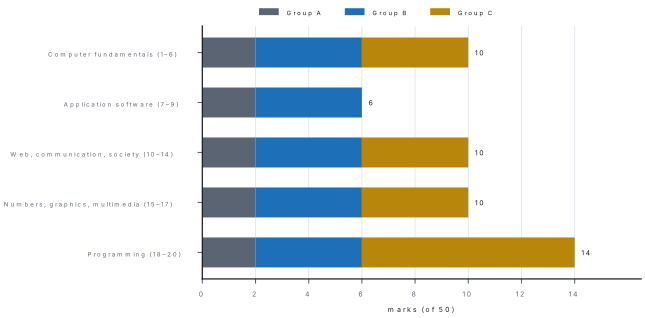
| Area (lessons) | Group A | Group B | Group C | Marks |
|---|---|---|---|---|
| Computer fundamentals (1–6) | 2 | 2 questions | 1 question | 10 |
| Application software (7–9) | 2 | 2 questions | 6 | |
| Web, communication and society (10–14) | 2 | 2 questions | 1 question | 10 |
| Number system, graphics and multimedia (15–17) | 2 | 2 questions | 1 question | 10 |
| Programming (18–20) | 2 | 2 questions | 2 questions | 14 |
| Total | 10 | 10 (20 marks) | 5 (20 marks) | 50 |
Your school may share the marks differently, but the point of a blueprint holds for any grid: every area appears. Three lessons left unread cost at least three Group A marks and possibly a long question as well.
Reading the paper: 5 minutes. Group A: 10 minutes (one minute an item). Group B: 40 minutes (4 minutes a question). Group C: 55 minutes (about 11 minutes a question; a program or a flowchart takes longer than a definition). Checking: 10 minutes — trace each program once with a simple input and check every conversion by converting back. Start Group C by the 55-minute mark even if two Group B questions are left; return to them at the end.
25.2 Model Set 1
Computer Science — Class 8. Time: 2 hours. Full marks: 50. Attempt all questions. Give answers in your own words as far as practicable.
Question paper
Group A — Choose the correct answer. [10 × 1 = 10]
- The full form of GIGO isaGood Input, Good OutputbGarbage In, Garbage OutcGeneral Input, General OutputdGive In, Give Out
- Integrated circuits were first used in theafirst generationbsecond generationcthird generationdfourth generation
- The shortcut key for Find and Replace in MS Word isaCtrl + FbCtrl + HcCtrl + RdCtrl + P
- Which formula gives the total of the cells B2 to B10?a
=TOTAL(B2:B10)b=SUM(B2:B10)c=ADD(B2,B10)dSUM B2-B10 - The HTML tag that breaks a line isa
<lb>b<br>c<break>d<p> - Malware that locks a user's files and demands money isaadwarebspywarecransomwareda worm
- The binary equivalent of (13)_{10} isa1011b1101c1110d1001
- Which image format stays sharp however much it is enlarged?aJPEGbBMPcPNGdSVG
- The flowchart symbol used for a decision isaan ovalba parallelogramca diamondda rectangle
- What is printed by
PRINT 19 MOD 4?a4b4.75c3d0
Group B — Answer the following questions briefly. [10 × 2 = 20]
- Differentiate between analog and digital computers, with one example of each.
- What is an operating system? Write any two of its functions.
- Differentiate between relative and absolute cell references, with examples.
- Write two differences between a slide transition and an animation.
- What is e-governance? Give two examples from Nepal.
- What is phishing? Write two ways to stay safe from it.
- Convert (110110)_2 into decimal and into octal.
- Write two advantages and two disadvantages of multimedia.
- Write two differences between a compiler and an interpreter.
- Write the output of the following program.
CLS
FOR I = 5 TO 1 STEP -1
    PRINT I * I;
NEXT I
END
Group C — Answer the following questions in detail. [5 × 4 = 20]
- Explain the first four generations of computers, giving the main component, one feature and one example of each. [4]
- What is a computer network? Explain bus, ring and star topologies with diagrams. [1+3]
- (a) Convert (350)_{10} into binary and hexadecimal.(b) Convert (5B)_{16} into octal through binary. [2+2]
- Write an algorithm and draw a flowchart to find the greatest of three numbers. [2+2]
- Write a QBASIC program to display the first ten terms of the series 1, 1, 2, 3, 5, 8, … [4]
Solutions
Group A — answers with reasons
1. (b) — wrong input gives wrong output.
2. (c) — first vacuum tubes, then transistors, then ICs.
3. (b) — Ctrl + F only finds; Ctrl + H finds and replaces.
4. (b) — SUM adds a range written with a colon.
5. (b) — <br> is an empty tag for a line break.
6. (c) — ransom-ware: files are held to ransom.
7. (b) — 8 + 4 + 0 + 1 = 13.
8. (d) — SVG is a vector format; the others are raster.
9. (c) — the diamond holds a yes/no question.
10. (c) — 19 = 4 × 4 + 3, so the remainder is 3.
Group B — answers
11. An analog computer works on continuous quantities such as temperature, speed or pressure and shows its result as a reading on a scale, for example a speedometer. A digital computer works on discrete data counted as 0s and 1s and gives exact numbers, for example a personal computer or a calculator.
12. An operating system is the main system software that manages all the hardware and software of a computer and gives the user an interface, such as Windows or Android. Any two functions: process management, memory management, file management, device management, security, providing the user interface.
13. A relative reference such as B2 changes when a formula is copied: copied one row down, =B2*2 becomes =B3*2. An absolute reference such as $E$1 has dollar signs and stays the same wherever the formula is copied, so =B2*$E$1 copied down becomes =B3*$E$1.
14. A transition is the effect when the show moves from one slide to the next; an animation is an effect on one object — a title, picture or chart — on a slide. A transition is applied from the Transitions tab to a whole slide; an animation is applied from the Animations tab and can make an object enter, be emphasised or leave.
15. E-governance is the use of ICT by the government to provide its services and information to people quickly and openly. Examples: the Nagarik App, which gives citizens their PAN, driving licence and other records on the phone; paying taxes and registering companies online; online application for passports and public service examinations (any two).
16. Phishing is tricking people into giving their passwords, PINs or OTPs through a fake message, e-mail or website that looks as if it came from a bank, wallet or office. Ways to stay safe: never share an OTP, PIN or password with anyone; check the sender and the link, and type the bank's address yourself instead of clicking; turn on multi-factor authentication; report the message (any two).
17. 1\times32 + 1\times16 + 0\times8 + 1\times4 + 1\times2 + 0\times1 = 54, so (110110)_2 = (54)_{10}. In threes from the right: 110 110 → 6, 6, so (110110)_2 = (66)_8. Check: 6\times8 + 6 = 54 ✓.
18. Advantages: it makes learning interesting and holds attention; it explains hard ideas with pictures, sound and motion (also: suits different learners; reaches a large audience). Disadvantages: making it needs time, skill and costly equipment; its files are large and need storage and fast Internet (also: too many effects distract).
19. A compiler translates the whole program at once, while an interpreter translates and runs one line at a time. A compiler makes an object program (.exe) that runs again without it; an interpreter makes no object program and is needed every time the program runs. (Also: a compiler lists all errors at the end; an interpreter stops at the first error.)
20. The loop runs for I = 5, 4, 3, 2, 1 and prints each square on one line:
25 16 9 4 1
Group C — answers
21.
| Generation | Main component | One feature | Example |
|---|---|---|---|
| First (about 1946–1958) | vacuum tubes | huge, hot and unreliable; machine language | ENIAC, UNIVAC I |
| Second (about 1958–1964) | transistors | smaller, cooler, faster; assembly language and FORTRAN | IBM 1401 |
| Third (about 1964–1975) | integrated circuits | keyboards and monitors; high-level languages; time-sharing | IBM System/360 |
| Fourth (about 1975 to now) | microprocessors (VLSI) | personal computers, GUIs, networks and the Internet | IBM PC, laptops, smartphones |
One mark for each generation with its component, feature and example.
22. A computer network is two or more computers and devices connected by wired or wireless media to share data, hardware, software and an Internet connection (1 mark). Bus: all computers are joined to one main cable, the backbone, with a terminator at each end; it uses the least cable, but a break in the backbone stops the whole network. Diagram: a long horizontal line with short lines down to four or five computers and a block at each end. Ring: each computer is joined to the next and the last to the first in a closed loop, and data travels round in one direction; there are no collisions, but one broken link can stop the ring. Diagram: five or six computers in a circle, each joined to its neighbours. Star: every computer has its own cable to a central switch; one faulty cable affects only one computer and faults are easy to find, but if the switch fails the whole network stops. Diagram: a switch in the middle with computers around it, each on its own line (3 marks).
23. (a) Divide 350 by 2 and read the remainders from the bottom up:
| Division | Quotient | Remainder |
|---|---|---|
| 350 ÷ 2 | 175 | 0 |
| 175 ÷ 2 | 87 | 1 |
| 87 ÷ 2 | 43 | 1 |
| 43 ÷ 2 | 21 | 1 |
| 21 ÷ 2 | 10 | 1 |
| 10 ÷ 2 | 5 | 0 |
| 5 ÷ 2 | 2 | 1 |
| 2 ÷ 2 | 1 | 0 |
| 1 ÷ 2 | 0 | 1 |
(350)_{10} = (101011110)_2. Hexadecimal: 350 ÷ 16 = 21 r 14 (E); 21 ÷ 16 = 1 r 5; 1 ÷ 16 = 0 r 1; so (350)_{10} = (15E)_{16}. Check: 1\times256 + 5\times16 + 14 = 256 + 80 + 14 = 350 ✓.
(b) Four bits for each hexadecimal digit: 5 = 0101, B = 1011, giving 01011011. Regroup in threes from the right: 001 011 011 → 1, 3, 3, so (5B)_{16} = (133)_8. Check: (5B)_{16} = 5\times16 + 11 = 91 and (133)_8 = 64 + 24 + 3 = 91 ✓.
24. Algorithm. Step 1: Start. Step 2: Read A, B and C. Step 3: Is A > B and A > C? If yes, display A and go to step 6. Step 4: Is B > C? If yes, display B and go to step 6. Step 5: Display C. Step 6: Stop. Flowchart. Start (oval) → Read A, B, C (parallelogram) → diamond "Is A > B and A > C?" → Yes: parallelogram "Display A"; No: diamond "Is B > C?" → Yes: parallelogram "Display B"; No: parallelogram "Display C" → the three paths join → Stop (oval). Both exits of each diamond are labelled Yes and No. Test. A = 45, B = 72, C = 68: the first test fails (45 > 72 is false), the second passes (72 > 68), so the output is 72.
25. Each new term is the sum of the two terms before it.
CLS
REM The first ten terms of 1, 1, 2, 3, 5, ...
A = 1
B = 1
PRINT A; B;
FOR I = 3 TO 10
    C = A + B
    PRINT C;
    A = B
    B = C
NEXT I
END
1 1 2 3 5 8 13 21 34 55
Marks: CLS and END; the two first terms; the loop that runs eight more times; the update of A and B in the right order.
In question 23, students read the remainders from the top down and write 011110101 — the binary number backwards. In question 25, students write A = B after B = C, so A and B become equal and the series breaks. Order matters in both: remainders are read from the bottom up, and in the update the old B must be saved in A before B changes.
25.3 Model Set 2
Computer Science — Class 8. Time: 2 hours. Full marks: 50. Attempt all questions. Give answers in your own words as far as practicable.
Question paper
Group A — Choose the correct answer. [10 × 1 = 10]
- Who is called the father of the computer?aBlaise PascalbCharles BabbagecHerman HollerithdJohn Napier
- Software whose source code anyone may study, change and share is calledaproprietary softwarebsharewarecopen-source softwaredtailor-made software
- Which key starts a PowerPoint slide show from the first slide?aF1bF5cF7dF12
- Combining one letter with a list of names to print a personalised copy for each person is calledamail mergebWordArtcfind and replacedpage layout
- To send an e-mail to many people without showing their addresses to each other, put the addresses inaTobCccBccdSubject
- Which device joins a school LAN to the Internet and forwards packets by IP address?ahubbswitchcrouterdNIC
- The decimal value of (17)_8 isa15b17c13d71
- Which of these is an output device for multimedia?amicrophonebwebcamcprojectordscanner
- A program runs without any message but prints a wrong answer. It hasaa syntax errorba logical errorca run-time errorda hardware fault
- Which QBASIC loop always runs its body at least once?aFOR … NEXTbWHILE … WENDcDO WHILE … LOOPdDO … LOOP UNTIL
Group B — Answer the following questions briefly. [10 × 2 = 20]
- Differentiate between hardware and software, with two examples of each.
- Write a short note on Charles Babbage's Analytical Engine.
- What are a header and a footer in a document? Write the steps to insert page numbers in MS Word.
- Marks are in the cells C2 to C20. Write formulas to find(a) their average and(b) "Pass" in D2 if C2 is 40 or more, otherwise "Fail".
- Write HTML to show the words "NEB website" as a link to
https://www.neb.gov.npand a picturelogo.png200 pixels wide. - Write any four symptoms of a computer infected by a virus.
- How many bytes does an uncompressed 1024 × 768 image with 24-bit colour need? Give the answer in MB too.
- Convert (A9)_{16} into binary and into decimal.
- Write an algorithm to find the simple interest when the principal, time and rate are given.
- Write the output of the following program.
CLS
PRINT UCASE$("pokhara"); LEN("POKHARA"); MID$("POKHARA", 3, 3)
END
Group C — Answer the following questions in detail. [5 × 4 = 20]
- What is an operating system? Explain CUI and GUI, and single-user and multi-user operating systems, with examples. [1+3]
- What is cyber crime? Explain any three cyber crimes, and write the punishment that Nepal's Electronic Transactions Act, 2063 gives for two of them. [1+3]
- (a) Convert (1101101)_2 into octal and hexadecimal.(b) Convert (476)_8 into decimal and binary. [2+2]
- The program below should print a table of Celsius and Fahrenheit temperatures from 0 °C to 100 °C in steps of 20. Find the three errors, name the type of each, and write the corrected program with its output. [4]
CLS
REM Celsius to Fahrenheit table
PRINT "Celsius", "Fahrenheit"
FOR C = 0 TO 100 STEP 20
    F = C * 9 / 5 + 23
    PRNT C, F
NEXT F
END
- Write a QBASIC program that reads ten numbers one by one and displays the largest and the smallest of them. [4]
Solutions
Group A — answers with reasons
1. (b) — his Analytical Engine had input, mill, store and output, like a modern computer.
2. (c) — "open source": the code is open to all.
3. (b) — F5 starts from the beginning; Shift + F5 from the current slide.
4. (a) — mail merge joins a main document with a data source.
5. (c) — Bcc means blind carbon copy.
6. (c) — a router joins different networks and uses IP addresses.
7. (a) — 1\times8 + 7 = 15.
8. (c) — a projector shows pictures; the others take input.
9. (b) — the method is wrong, but the grammar is correct.
10. (d) — its test comes after the body.
Group B — answers
11. Hardware is the physical, touchable part of a computer, such as the keyboard, monitor, CPU and printer. Software is the set of programs that tells the hardware what to do, such as Windows and MS Word. Hardware cannot work without software, and software needs hardware to run on.
12. Charles Babbage designed the Analytical Engine in 1834 as a general-purpose calculating machine to be controlled by punched cards. It had an input unit (cards), a mill that did the calculations, a store (memory) and an output unit — the same parts as a modern computer — although it was never completed. Ada Lovelace wrote a program for it in 1843.
13. A header is text printed at the top of every page and a footer is text printed at the bottom of every page, such as the school's name, a title or the date. To insert page numbers: Insert tab → Page Number → choose the position (top or bottom of the page) and a style; the numbers appear on every page automatically.
14. (a) =AVERAGE(C2:C20) (b) =IF(C2>=40,"Pass","Fail"), then copy it down with AutoFill for the other students.
15.
<a href="https://www.neb.gov.np">NEB website</a>
<img src="logo.png" alt="Logo" width="200">
16. Any four: the computer becomes very slow or hangs; programs crash or the computer restarts by itself; files go missing, change or will not open; folders on a pen drive become shortcuts; unwanted pop-ups appear; the antivirus is turned off by itself; messages are sent from your account without you.
17. Pixels = 1024 × 768 = 786,432; 24 bits = 3 bytes, so size = 786,432 × 3 = 2,359,296 bytes; ÷ 1024 ÷ 1024 = 2.25 MB.
18. Four bits for each digit: A = 1010, 9 = 1001, so (A9)_{16} = (10101001)_2. Decimal: 10\times16 + 9 = 169, so (A9)_{16} = (169)_{10}. Check: 128 + 32 + 8 + 1 = 169 ✓.
19. Step 1: Start. Step 2: Read P, T and R. Step 3: SI = P × T × R ÷ 100. Step 4: Display SI. Step 5: Stop.
20. UCASE$ gives POKHARA, LEN gives 7 (printed with a space on each side) and MID$ gives three letters from the third: KHA. On one line:
POKHARA 7 KHA
Group C — answers
21. An operating system is the main system software that manages all the hardware and software of a computer and gives an interface between the user and the computer (1 mark). CUI (character user interface): the user types commands at a prompt — MS-DOS, the Linux terminal; commands must be remembered. GUI (graphical user interface): the user works with windows, icons, menus and a pointer or touch — Windows, macOS, Android; easy for beginners. Single-user OS: one person uses the computer at a time — Windows 11 Home on a home PC. Multi-user OS: many users work on the same computer at the same time, usually over a network — Linux and UNIX servers (3 marks).
22. Cyber crime is any illegal act done with a computer, a phone or the Internet (1 mark). Any three: hacking — getting into a computer, account or network without permission; phishing — fake messages or websites that trick people into giving passwords, PINs or OTPs; cyber bullying — insulting, threatening or shaming someone online again and again; identity theft — using someone's personal details to pretend to be them; software piracy — copying or using software without a licence. Punishments under the ETA 2063 (any two): unauthorised access (hacking), section 45 — a fine up to Rs 2 lakh, imprisonment up to 3 years, or both; pirating, destroying or altering computer source code, section 44 — up to 3 years, up to Rs 2 lakh, or both; damaging a computer and its information, section 46 — up to Rs 2 lakh, up to 3 years, or both; publishing illegal material in electronic form, section 47 — up to Rs 1 lakh, up to 5 years, or both; computer fraud, section 52 — up to Rs 1 lakh, up to 2 years, or both (3 marks).
23. (a) In threes from the right, padding the left with zeros: 001 101 101 → 1, 5, 5, so (1101101)_2 = (155)_8. In fours from the right: 0110 1101 → 6, D, so (1101101)_2 = (6D)_{16}. Check: (155)_8 = 64 + 40 + 5 = 109 and (6D)_{16} = 96 + 13 = 109 ✓.
(b) 4\times8^2 + 7\times8^1 + 6\times8^0 = 256 + 56 + 6 = 318, so (476)_8 = (318)_{10}. Binary, three bits for each octal digit: 4 = 100, 7 = 111, 6 = 110, so (476)_8 = (100111110)_2. Check: 256 + 32 + 16 + 8 + 4 + 2 = 318 ✓.
24. (1) F = C * 9 / 5 + 23 — a logical error: the formula adds 32, not 23. (2) PRNT C, F — a syntax error: the keyword is PRINT. (3) NEXT F — it must name the loop's counter, C; FreeBASIC rejected this line with "FOR/NEXT variable name mismatch" and QB64 with "Incorrect variable after NEXT". Corrected program:
CLS
REM Celsius to Fahrenheit table
PRINT "Celsius", "Fahrenheit"
FOR C = 0 TO 100 STEP 20
    F = C * 9 / 5 + 32
    PRINT C, F
NEXT C
END
Celsius       Fahrenheit
 0             32
 20            68
 40            104
 60            140
 80            176
 100           212
The commas put the Fahrenheit values in the second print zone, at column 15. Check: 100 × 9 ÷ 5 + 32 = 180 + 32 = 212 ✓.
25. The first number read becomes both the largest and the smallest so far; each later number is compared with both.
CLS
REM Largest and smallest of ten numbers
FOR I = 1 TO 10
    PRINT "Number"; I;
    INPUT N
    IF I = 1 THEN
        L = N
        S = N
    END IF
    IF N > L THEN L = N
    IF N < S THEN S = N
NEXT I
PRINT "Largest ="; L
PRINT "Smallest ="; S
END
Number 1 ? 23
Number 2 ? 7
Number 3 ? 56
Number 4 ? 12
Number 5 ? 89
Number 6 ? 4
Number 7 ? 61
Number 8 ? 33
Number 9 ? 18
Number 10 ? 45
Largest = 89
Smallest = 4
Marks: the loop of ten; reading each number; the starting values from the first number; the two comparisons; the labelled output.
The answer that loses the mark in question 25
Many students set L = 0 and S = 0 before the loop. The largest still comes out right for positive numbers, but the smallest stays 0, because no number typed is below 0. Start both from the first number read, as above, or start S at a very large value such as 999999.
25.4 Ranked practice priorities
The order below is a judgement from the pattern of the paper, the syllabus and how easily each topic is turned into written questions. Tier A is worth rehearsing until it is automatic; Tier B is the second pass; Tier C is a quick pass in the last week.
Tier A — rehearse until automatic
| Rank | Topic and likely form | Marks | Why it ranks here |
|---|---|---|---|
| 1 | Number conversions: decimal to binary, octal and hexadecimal by division; to decimal by expansion; binary ↔ octal ↔ hexadecimal by grouping | 1, 2 or 4 | A fixed method marked step by step; it fits every group, and both model sets give it a long question. |
| 2 | A complete QBASIC program with input, a decision or a loop, and labelled output | 4 | Programming has two long questions; a program is marked by its parts, so a partly right program still scores. |
| 3 | An algorithm and a matching flowchart for a short problem (area, interest, odd or even, greatest, sums, tables, factorial) | 2 or 4 | The other programming long question; the symbols and the matching of steps are easy to mark. |
| 4 | The output of a QBASIC program or of library functions (MOD, LEN, LEFT$, MID$, INT, loops with STEP) |
1 or 2 | Quick to set and to mark; tracing a loop in a table makes it safe. |
| 5 | Network topologies with diagrams; LAN, MAN and WAN; network devices | 1, 2 or 4 | The natural long question of the web and communication area; three diagrams earn three marks. |
| 6 | Compiler and interpreter, low- and high-level languages, the three types of error, finding errors in a program | 1, 2 or 4 | Two-point differences are the favourite short question, and "find the errors" turns into a long one. |
Tier B — second pass
| Rank | Topic and likely form | Marks | Why it ranks here |
|---|---|---|---|
| 7 | Malware types (virus, worm, Trojan, spyware, adware, ransomware), symptoms, antivirus and protection | 1 or 2 | Many short definitions and lists; a common Group B question. |
| 8 | Cyber crimes and the Electronic Transactions Act, 2063 with its sections and punishments | 1, 2 or 4 | The section numbers and penalties are exact facts, easy to ask in any group. |
| 9 | Spreadsheet formulas: SUM, AVERAGE, MAX, MIN, COUNT, IF; relative and absolute references | 1 or 2 | The most "written" part of application software; every formula is right or wrong. |
| 10 | HTML: the page structure, headings, lists, images, links and tables | 1, 2 or 4 | A small page or table is a quick program-like question. |
| 11 | Generations of computers: component, feature and example of each | 1 or 4 | Fits neatly into a table answer; first-to-fourth generations make a ready long question. |
| 12 | Types of computer: analog, digital, hybrid; super, mainframe, mini, micro; general and special purpose | 1 or 2 | Classifications with examples, often as a difference. |
| 13 | System and application software; packaged and tailor-made; software licences | 1 or 2 | Clear differences, each with examples. |
| 14 | Raster and vector graphics; BMP, JPEG, PNG, GIF and SVG; image size from pixels and colour depth | 1 or 2 | A difference, a full form or a one-line calculation. |
Tier C — a quick pass before the paper
| Rank | Topic and likely form | Marks | Why it ranks here |
|---|---|---|---|
| 15 | Operating system: functions, CUI and GUI, types, files, paths and the Recycle Bin | 1, 2 or 4 | Well known from daily use; usually short questions. |
| 16 | ICT: components, Internet services, e-mail fields, e-governance, digital payments, the digital divide | 1 or 2 | Many facts, each worth a short answer. |
| 17 | History: Babbage, Lovelace, ENIAC and UNIVAC, computers in Nepal | 1 or 2 | Names and years make good objective items; a short note on Babbage is common. |
| 18 | Multimedia: the five elements, hardware and software, uses, advantages and disadvantages | 1 or 2 | Lists and examples; one calculation of sound size at most. |
| 19 | Word processor and presentation features: shortcut keys, mail merge, header and footer, transition and animation, slide views | 1 or 2 | Mostly practical work; the written paper asks keys and short steps. |
| 20 | Fundamentals: data and information, IPOS, characteristics, limitations and uses | 1 or 2 | The first lesson of the book; definitions and lists, rarely a long question. |
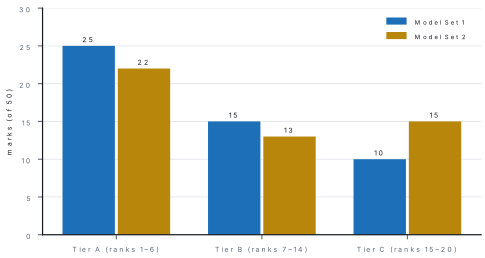
| Tier | Set 1 questions | Set 2 questions |
|---|---|---|
| A | 7, 9, 10, 17, 19, 20, 22, 23, 24, 25 | 6, 7, 9, 10, 18, 19, 20, 23, 24, 25 |
| B | 2, 4, 5, 6, 8, 11, 13, 16, 21 | 2, 14, 15, 16, 17, 22 |
| C | 1, 3, 12, 14, 15, 18 | 1, 3, 4, 5, 8, 11, 12, 13, 21 |
Day 1–2: number conversions, ten of each kind, each checked by converting back. Day 3–4: write and trace six QBASIC programs — one each with IF, SELECT CASE, FOR, WHILE and DO … LOOP, and one with string functions. Day 5: three algorithms with flowcharts, drawn with all the symbols. Day 6: the differences of Tier A and B, as two-column tables. Day 7: one model set, timed, then the error list of everything you got wrong.
25.5 Two answers written the way the marker pays
Question. Write two differences between a compiler and an interpreter.
Model answer. (1) A compiler translates the whole program at once, while an interpreter translates and runs it one line at a time. (2) A compiler makes an object program (an .exe file) that runs again without it, while an interpreter makes no object program and is needed every time the program runs.
One mark for each difference. Each sentence compares the same feature of both translators. Writing "a compiler is fast" alone earns nothing, because it says nothing about the interpreter.
Question. Write a QBASIC program to read a number and display whether it is odd or even.
Model answer.
CLS
REM Odd or even
INPUT "Enter a whole number"; N
IF N MOD 2 = 0 THEN
    PRINT N; "is an even number."
ELSE
    PRINT N; "is an odd number."
END IF
END
Enter a whole number? 46
 46 is an even number.
Four marks: (1) CLS, REM and END; (2) INPUT with a clear prompt; (3) the condition N MOD 2 = 0 in a correct IF … ELSE … END IF; (4) both outputs with labels. The sample run shows the marker that the program works; it was produced by running the program.
Chapter summary
- The paper is 10 + 20 + 20 = 50 marks in two hours: ten 1-mark multiple-choice items, ten 2-mark short questions and five 4-mark long questions; practical work is assessed separately.
- In the blueprint every area has two Group A items and two Group B questions; programming carries 14 marks with two long questions, and fundamentals, web and communication, and numbers, graphics and multimedia carry 10 each.
- A workable clock: 5 minutes reading, 10 for Group A, 40 for Group B, 55 for Group C, 10 for checking.
- The six topics worth rehearsing first: number conversions, complete QBASIC programs, algorithms with flowcharts, program output, network topologies, and translators and errors.
- Write points, not paragraphs; compare the same feature in every difference; show every division in a conversion and check it by converting back; trace every program once and write its output.
- Both model papers are rehearsals built to the pattern, not forecasts: no one outside your school knows its paper.